
If you need fast external storage for creative work, backups, or moving large files, an external hard drive with Thunderbolt can make a noticeable difference.
In this roundup, we focus on the best options for performance, portability, durability, and value so you can choose the right drive with confidence.
Best 10 External Hard Drive with Thunderbolt Picks for 2026
Top-Speed Portable SSD
OWC Envoy Ultra 2TB Thunderbolt 5 Portable NVMe SSD

- Over 6000MB/s speeds
- Thunderbolt 3/4 and USB4 compatible
- Rugged, shock-resistant, weatherproof
Best For: Users prioritizing maximum portable SSD performance
Desktop Storage Workhorse
LaCie d2 Professional 10TB External Hard Drive

- 10TB capacity for large archives
- Up to 240MB/s transfer speeds
- USB-C and Thunderbolt 3 support
Best For: Desktop creators needing reliable high-capacity storage
Tiny Fast Portable SSD
SABRENT Rocket Nano XTRM 2TB External SSD
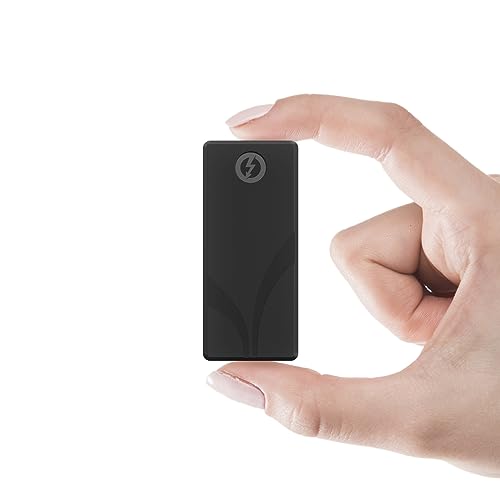
- Up to 2700MB/s over Thunderbolt 3
- Compact aluminum body with sleeve
- Includes Thunderbolt and USB cables
Best For: Traveling professionals who want a tiny high-speed SSD
Rugged Travel Backup
LaCie Rugged USB-C 4TB Portable Drive

- Drop, shock, dust, and rain resistant
- 4TB portable storage for backups and media
- USB-C works with Mac and PC
Best For: Travel, field work, and durable everyday backups
Secure Mac Backup
WD My Passport Ultra for Mac 5TB
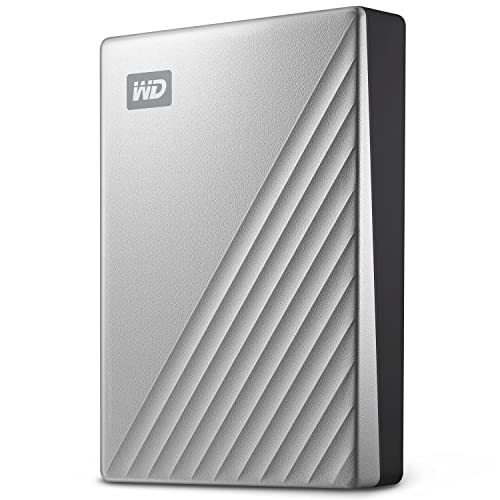
- Formatted for Mac out of the box
- 256-bit AES hardware encryption and password protection
- 5TB capacity with backup software
Best For: Mac users who want secure portable backups
Rugged Pro Backup
SanDisk Professional G-Drive ArmorATD 5TB

- Rugged aluminum enclosure with easy-grip bumper
- USB-C 5Gbps for backup and storage
- 5TB capacity with up to 130MB/s read
Best For: Durable portable backup for creators and professionals
Budget Portable Backup

- 4TB USB 3.0 portable drive
- Works with Windows or Mac
- Plug-and-play with no software
Best For: Simple everyday backup and portable storage
High-Capacity Everyday Pick

- 5TB portable storage capacity
- USB 3.2 Gen 1 / USB 3.0
- Plug-and-play for PC and Mac
Best For: Large-capacity portable storage with simple setup
Large Media Storage
- 5TB portable USB 3.0 drive
- Good for media and backups
- Console and PC/Mac compatible
Best For: Big media libraries and easy portable expansion
Rugged Portable Pick – LaCie Rugged Thunderbolt USB 3.0 1TB External Hard Drive
If you want an external hard drive with thunderbolt that can handle travel and quick transfers, the LaCie Rugged Thunderbolt USB 3.0 is built for that mix of durability and convenience. It combines Thunderbolt and USB connectivity, supports transfer speeds up to 130MB/s, and adds a rugged enclosure that’s meant to keep up with on-the-go creative work.
Best For: Creators who need a portable, durable drive for everyday editing and backup.
Pros:
- Integrated Thunderbolt cable for easy, fast connections
- Drop, dust, and water resistant design for travel
- Up to 130MB/s transfer speeds for content capture and editing
- Includes a one-month Adobe Creative Cloud All Apps membership
Cons:
- 1TB capacity may be limiting for larger media libraries
- Mechanical HDD won’t match SSD-level speed
- Designed more for portability than desk-bound mass storage
Overall, this is a practical choice if you want a tough, portable Thunderbolt drive for creative work and regular backup tasks. It focuses on durability and simple setup rather than maximum desktop storage capacity.
Top-Speed Portable SSD – OWC Envoy Ultra 2TB Thunderbolt 5 Portable NVMe SSD
The OWC Envoy Ultra is a high-speed external hard drive with thunderbolt for users who want SSD performance in a portable form factor. With Thunderbolt 5 and speeds over 6000MB/s, it is designed for demanding workflows, while remaining backward compatible with Thunderbolt 3, Thunderbolt 4, and USB4 machines.
Best For: Power users who need top-tier portable SSD speed across modern Thunderbolt systems.
Pros:
- Over 6000MB/s performance for very fast transfers
- Backward compatible with Thunderbolt 3, Thunderbolt 4, and USB4
- Bus-powered with a built-in Thunderbolt cable
- Rugged, shock-resistant, and weatherproof construction
Cons:
- Premium speed-focused option rather than a budget pick
- Portable capacity tops out at 2TB in this model
- Best value depends on having a compatible high-speed Thunderbolt setup
This drive makes the most sense when raw speed matters more than price or maximum capacity. If you work with large files and want a portable SSD that can keep up with modern Thunderbolt devices, it is an excellent fit.
Desktop Storage Workhorse – LaCie d2 Professional 10TB External Hard Drive
For a desktop external hard drive with thunderbolt that emphasizes capacity and reliability, the LaCie d2 Professional stands out. It offers 10TB of storage, up to 240MB/s speeds, and support for USB-C and Thunderbolt 3 computers, making it a strong fit for creators with large project libraries.
Best For: Desktop users who need large-capacity storage for editing and archiving.
Pros:
- Huge 10TB capacity for projects and archives
- Up to 240MB/s transfer speed for everyday creative workflows
- Compatible with USB-C and Thunderbolt 3 systems
- 7200 RPM enterprise-class BarraCuda Pro drive inside
Cons:
- Desktop form factor is not built for pocket portability
- Mechanical drive is slower than an SSD-based option
- Requires a desk or workstation setup
This is a sensible pick if your priority is dependable bulk storage rather than ultra-portable speed. It suits editors, photographers, and anyone who needs a roomy external drive for long-term files and active projects.
Tiny Fast Portable SSD – SABRENT Rocket Nano XTRM 2TB External SSD
If you need an external hard drive with thunderbolt in a very compact body, the Sabrent Rocket Nano XTRM is built for fast portable use. It delivers up to 2700MB/s over Thunderbolt 3, falls back to 900MB/s over USB 3.2 Gen 2, and includes both Thunderbolt and USB cables so it is ready for different setups.
Best For: Professionals who want a tiny, fast SSD for travel and high-speed file transfers.
Pros:
- Up to 2700MB/s over Thunderbolt 3
- Compact 2TB aluminum design for easy carry
- Includes both Thunderbolt and USB-C to USB-A cables
- Silicone sleeve adds extra drop and scratch protection
Cons:
- Smaller physical size may be easier to misplace
- Top speed depends on Thunderbolt 3 support
- Storage expansion beyond 2TB is not offered in this model
It is a strong choice for users who want fast, flexible portable storage without extra accessories. The mix of speed, compact size, and broad compatibility makes it especially practical for frequent movers.
Rugged Travel Backup – LaCie Rugged USB-C 4TB Portable Drive
If you want an external hard drive with thunderbolt-adjacent modern connectivity for travel-heavy storage, the LaCie Rugged USB-C 4TB is built for the job. It focuses on portability and protection, with a compact body that can handle drops, shocks, dust, and rain while still giving you a simple USB-C connection for Macs and PCs.
Best For: Field work, commuting, and anyone who needs a durable 4TB portable drive for backups and media.
Pros:
- Rugged enclosure is designed to resist drops, shocks, dust, and rain.
- 4TB capacity gives plenty of room for backups, photos, and video files.
- USB-C connection keeps it compatible with modern laptops and desktops.
- Works with both Mac and PC for flexible everyday use.
Cons:
- Mechanical drive speeds are modest compared with SSD options.
- Uses USB 3.0/USB-C rather than true Thunderbolt support.
Overall, this is a practical pick if durability matters more than top-end speed. It suits users who want a reliable portable backup drive that can take a beating on the road.
Secure Mac Backup – WD My Passport Ultra for Mac 5TB
The WD My Passport Ultra for Mac is a strong choice if you want an external hard drive with thunderbolt-style convenience from a USB-C portable drive built for Apple users. It comes formatted for Mac, adds password protection with 256-bit AES hardware encryption, and includes backup software with defense against ransomware.
Best For: Mac users who want a secure, high-capacity portable backup drive for personal or business files.
Pros:
- Formatted for Mac right out of the box.
- 5TB capacity provides generous space for large backups and files.
- Password protection with 256-bit AES hardware encryption adds security.
- Includes backup software with defense against ransomware.
Cons:
- Designed specifically for Mac use, so it is less universal than cross-platform drives.
- Mechanical drive performance is not as fast as solid-state storage.
For Mac owners who value security and capacity, this drive is easy to recommend. It emphasizes practical backup features and a refined portable design over raw speed.
Rugged Pro Backup – SanDisk Professional G-Drive ArmorATD 5TB
The SanDisk Professional G-Drive ArmorATD 5TB is a rugged external hard drive with thunderbolt mentioned in its connectivity details, making it a useful option for users who want portable storage with modern connection support. It is built for backup and storage, with a durable aluminum enclosure and an easy-grip bumper that make it feel ready for pro-grade use.
Best For: Users who want a durable portable HDD for backup and storage with USB-C convenience.
Pros:
- Rugged build includes a premium anodized aluminum enclosure.
- Easy-grip bumper adds extra durability and handling confidence.
- USB-C 5Gbps connection is geared toward quick file backup and storage.
- 5TB capacity offers ample room for large projects and archives.
Cons:
- Windows users need to reformat before use.
- Performance is rated around 130MB/s read, which is typical for a mechanical drive.
This drive makes sense when toughness and capacity matter more than maximum speed. It is a solid portable HDD for creators and professionals who want dependable backup storage.
Budget Portable Backup – Seagate 4TB Portable
If you want an external hard drive with thunderbolt in your roundup, this Seagate Portable 4TB is better viewed as a simple USB 3.0 backup option rather than a Thunderbolt drive. It’s built for easy drag-and-drop storage on Windows or Mac, with plug-and-play setup and an included 18-inch USB 3.0 cable.
Best For: Everyday backup and portable storage for PC or Mac users who want a straightforward, no-software drive.
Pros:
- 4TB capacity for files, backups, and general media storage
- Automatic recognition on Windows or Mac with no software required
- Includes an 18-inch USB 3.0 cable for quick setup
- Portable 2.5-inch form factor makes it easy to carry
Cons:
- Uses USB 3.0, not Thunderbolt
- Mechanical drive design is less premium than SSD storage
- Read speed is listed at 120 MB/s, so it’s not built for speed-first workflows
For shoppers comparing external hard drive with thunderbolt alternatives, this model makes more sense if you care about simple compatibility and value over faster interface options. It’s a practical backup drive, but not the right pick if Thunderbolt performance is the main goal.
High-Capacity Everyday Pick – WD Elements 5TB Portable
This WD Elements Portable 5TB is a no-frills external hard drive with thunderbolt-style portability in mind, but it actually uses USB 3.2 Gen 1 / USB 3.0 instead of Thunderbolt. That makes it a practical choice for users who want large-capacity storage, plug-and-play convenience, and broad PC/Mac compatibility.
Best For: Users who want a large portable drive for simple file storage and backup without extra setup.
Pros:
- 5TB capacity gives you more room than many entry-level portable drives
- Plug-and-play operation for quick use out of the box
- Compatible with Windows, PC, and Mac systems
- Includes a SuperSpeed USB-A cable rated at 5Gbps
Cons:
- Does not include Thunderbolt connectivity
- Mechanical hard drive design is focused on storage, not top-tier speed
- Read speed is listed at 50 MB/s in the supplied details
If your priority is capacity and easy setup, this WD portable drive is a solid fit. It won’t satisfy buyers specifically searching for Thunderbolt performance, but it does deliver simple, widely compatible storage.
Large Media Storage – Seagate 5TB Expansion
This Seagate 5TB portable drive is another good option if you’re researching an external hard drive with thunderbolt, but it’s actually a USB 3.0 model. It’s aimed at multimedia storage, with plug-and-play convenience, automatic recognition, and an included USB 3.0 Type-A cable for easy connection to PC or Mac systems.
Best For: Media libraries and console or computer users who need a roomy portable drive with easy setup.
Pros:
- 5TB of storage for large multimedia collections and backups
- Works with Windows or Mac and requires no software to get started
- Includes an 18-inch USB 3.0 cable for straightforward setup
- Supports several game consoles, including PS4 and multiple Xbox models
Cons:
- Uses USB 3.0 instead of Thunderbolt
- Mechanical drive construction won’t match SSD-level responsiveness
- Supplied details list the form factor and dimensions inconsistently, so shoppers may want to double-check fit
This is a practical high-capacity portable drive for buyers who need storage first and speed second. If Thunderbolt is a must-have, you’ll need a different class of drive, but for basic expansion this model covers the essentials well.
How We Picked the Best External Hard Drive with Thunderbolt
We compared capacity, interface speed, portability, durability, software support, and overall value. For an External Hard Drive with Thunderbolt, the best choice depends on whether you care more about raw transfer speed, rugged field use, or dependable desktop storage.
Quick Comparison
Thunderbolt models are the fastest picks here and are best for video editing, large photo libraries, and frequent file transfers. USB-C and USB 3.2 options still offer strong everyday performance, better compatibility, and lower prices. Rugged portable drives suit travel and on-location work, while desktop drives are better for high-capacity storage and long-term backups.
Key Buying Factors for an External Hard Drive with Thunderbolt
Speed
Check whether the drive uses Thunderbolt 3, Thunderbolt 4, or Thunderbolt 5. Higher versions generally offer more headroom, but real-world performance also depends on the internal drive type, especially whether it is an SSD or HDD.
Capacity
Choose capacity based on your workload. 1TB to 2TB works for lighter creative and general use, 4TB to 5TB is a strong sweet spot for most prosumers, and 10TB or more is better for desktop archives and backup-heavy setups.
Portability and Ruggedness
If you travel, shoot on location, or work outside the office, look for shock resistance, dust protection, and compact designs. If the drive stays on a desk, larger desktop enclosures usually deliver more capacity and better sustained performance.
Compatibility
Make sure the drive works with your Mac or PC and supports the ports on your laptop or desktop. Some Thunderbolt drives include USB backward compatibility, which is helpful if you switch between devices.
Backup and Security Features
Useful extras include backup software, password protection, hardware encryption, and data recovery services. These features can add real value, especially if the drive stores important client or personal files.
Who Should Buy Which External Hard Drive with Thunderbolt?
Choose a Thunderbolt SSD if you want the fastest transfers for editing, offloading media, or working from external storage. Choose a rugged portable HDD if you need lower cost per terabyte and better travel durability. Choose a desktop HDD if your priority is maximum capacity for backups, archives, and stationary use. For most buyers, the best External Hard Drive with Thunderbolt is the one that balances speed, size, and compatibility with the way you actually work.