
USB-C has become the easiest way to connect portable storage across modern laptops, desktops, tablets, and even some consoles. If you want simple plug-and-play backup or a larger drive for media and projects, the right pick depends on speed, durability, and compatibility.
Below, we focus on the best USB-C external hard drives for different needs, from rugged travel-ready models to larger-capacity backups for Mac and Windows users.
Best 10 USB C External Hard Drives Picks for 2026
Mac-Ready Portable Pick
WD My Passport Ultra for Mac 5TB
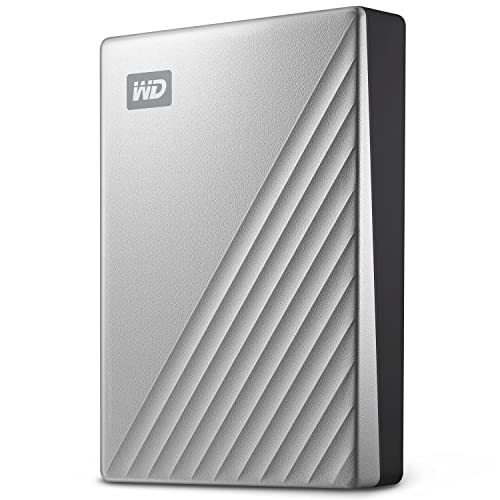
- USB-C and USB 3.1 compatibility
- 5TB portable storage for backups
- Password protection with AES encryption
Best For: Mac users needing secure portable backup storage
Rugged Travel Choice

- Drop, shock, dust, and rain resistant
- USB-C connectivity for modern devices
- Works with both Mac and PC
Best For: Travelers and field users who need durable portable storage
Windows-Friendly Backup Pick
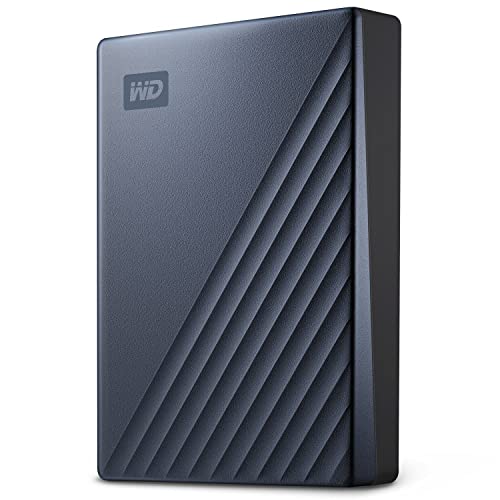
- 5TB portable drive for PC backups
- USB-C and USB 3.1 compatible
- 256-bit AES encryption and password protection
Best For: Windows users wanting secure high-capacity portable storage
Budget Multi-Use Option

- USB-C and USB 3.0 connectivity
- Patented silicone sleeve for protection
- Works with PCs, Macs, and consoles
Best For: Budget buyers needing a compact multi-device drive
USB-C Everyday Backup Pick
WD 2TB My Passport Portable Drive

- USB-C and USB-A compatibility
- Password protection with AES encryption
- Includes backup software and 3-year warranty
Best For: portable backup across many device types
Rugged USB-C Backup Pick
SanDisk Professional 5TB G-Drive ArmorATD

- USB-C with USB 3.2 Gen 1
- Rugged aluminum enclosure and bumper
- 5TB capacity for large backups
Best For: durable portable storage and field backup
Compact Security-Focused Pick

- Slim portable design
- Backup software with ransomware defense
- Password protection and hardware encryption
Best For: compact everyday storage with file protection
Versatile 500GB Combo Drive
Compact USB-C Storage for Gaming and Travel

- USB 3.0 and USB-C support
- Shock-absorbing silicone sleeve
- Works with PCs and multiple consoles
Best For: Portable cross-device storage and PS4/Xbox One game offloading
Reliable Everyday Storage
WD Elements 2TB Portable Drive

- 2TB capacity in a small enclosure
- USB 3.2 Gen 1 plug-and-play setup
- Lightweight option for everyday files
Best For: Simple portable storage for Windows and Mac users
High-Capacity Portable Pick

- Huge 5TB portable storage
- Plug-and-play with no software
- Works with Windows, Mac, PS4, and Xbox
Best For: Large media libraries, backups, and console storage expansion
Mac-Ready Portable Pick – WD My Passport Ultra for Mac 5TB
If you want a usb c external hard drives option that fits neatly into a Mac workflow, this WD My Passport Ultra for Mac is built around USB-C and USB 3.1 compatibility, plus 5TB of portable storage. It adds password protection with 256-bit AES hardware encryption and includes backup software with defense against ransomware, making it a practical choice for everyday backups and file carrying.
Best For: Mac users who want a portable 5TB drive with security features and a refined metal design.
Pros:
- USB-C and USB 3.1 compatible for modern Mac connectivity
- 5TB capacity gives plenty of room for backups and large files
- 256-bit AES hardware encryption plus password protection
- Refined metal cover and compact 2.5-inch portable form factor
Cons:
- Formatted for Mac, so Windows users may need to reformat for their setup
- Includes a USB 3.0 cable in the box, which may matter if you prefer native USB-C accessories
Overall, this is a strong fit if your priority is Mac-friendly storage with security and a premium portable build. It balances capacity, convenience, and protection without overcomplicating the setup.
Rugged Travel Choice – LaCie Rugged USB-C 4TB
Among usb c external hard drives, the LaCie Rugged USB-C stands out if durability matters as much as capacity. It offers 4TB of storage, USB-C connectivity, and a compact portable build, while its drop, shock, dust, and rain resistance makes it a good fit for travel, field work, or unpredictable daily carry.
Best For: Buyers who need a tough portable drive for Mac and PC use in more demanding environments.
Pros:
- Drop, shock, dust, and rain resistant for added protection
- 4TB capacity handles backups, photos, videos, and large files
- USB-C interface supports modern laptops and desktops
- Works with both Mac and PC
Cons:
- Mechanical hard disk design is less rugged than solid-state storage in feel
- At 4TB, it offers less space than some larger portable alternatives
If you want a drive you can toss in a bag without worrying too much about the environment, this LaCie is easy to justify. It trades a bit of capacity for serious protection and broad compatibility.
Windows-Friendly Backup Pick – WD My Passport Ultra 5TB Blue
If you’re comparing usb c external hard drives for a Windows setup, this WD My Passport Ultra offers a straightforward portable storage option with 5TB capacity, USB-C and USB 3.1 compatibility, and a refined metal enclosure. It also includes password protection with 256-bit AES hardware encryption and backup software with ransomware defense for everyday file safety.
Best For: PC users who want a high-capacity portable drive with security features and a slim metal design.
Pros:
- 5TB capacity for backups, media, and large file storage
- USB-C and USB 3.1 compatibility for modern connectivity
- 256-bit AES hardware encryption with password protection
- Compact portable design with a metal enclosure
Cons:
- Formatted for Windows, so Mac users may need to adjust the drive format
- Uses a mechanical hard disk rather than a faster solid-state option
This is a practical pick if you want a lot of storage in a simple, portable package and you primarily work on Windows. The security features and backup software add useful value without making the drive complicated.
Budget Multi-Use Option – YOTUO 1TB USB-C External HDD
For shoppers looking at usb c external hard drives on a tighter budget, this YOTUO 1TB drive focuses on flexibility. It supports USB 3.0 and USB-C, works across computers and consoles, and includes a patented silicone sleeve for added shock protection. The compact 2.5-inch design and plug-and-play approach make it easy to carry and use right away.
Best For: Users who want an affordable portable drive for everyday storage, backups, and light console use.
Pros:
- USB 3.0 and USB-C support for broad connectivity
- Patented silicone sleeve helps cushion against drops
- Works with Windows, Mac, Linux, PS4, PS5, Xbox One, and Xbox Series X/S
- Lightweight, compact, and plug-and-play
Cons:
- 1TB capacity is modest compared with larger portable drives
- PS5 and Xbox Series X/S games cannot be run or stored directly from the drive
This YOTUO drive makes sense if you need simple cross-device storage without spending much. It is not the biggest option here, but its mix of compatibility and protective design is useful for everyday carry.
USB-C Everyday Backup Pick – WD 2TB My Passport Portable Drive
If you want one of the more versatile usb c external hard drives for everyday storage, this WD My Passport is built to move easily between USB-C and USB-A devices. It’s a practical pick for photos, videos, documents, games, and routine backups, with added security features for files you want to keep private.
Best For: Users who want a portable backup drive that works across USB-C and USB-A devices.
Pros:
- Compatible with Windows PC, Mac, Chromebook, gaming consoles, mobile phones, and tablets
- Supports up to 5TB of storage across the line, with this model offering 2TB
- Includes password protection and 256-bit AES hardware encryption
- Comes with device management software and a 3-year limited warranty
Cons:
- Not positioned as a rugged drive for harsh conditions
- Transfer speed details are not specified in the provided notes
Overall, this is a well-rounded option if you want broad device compatibility and built-in security in a compact portable drive. It’s less about specialty performance and more about dependable day-to-day storage.
Rugged USB-C Backup Pick – SanDisk Professional 5TB G-Drive ArmorATD
Among usb c external hard drives, this SanDisk Professional G-Drive ArmorATD stands out if durability matters as much as capacity. It’s a USB-C backup drive built for quick file storage, with a rugged enclosure and easy-grip bumper that make it better suited to travel and field use than a basic desktop-style portable drive.
Best For: Users who need a durable USB-C portable drive for backup and on-the-go storage.
Pros:
- USB-C drive with USB 3.2 Gen 1 connectivity for quick file backup and storage
- 5TB capacity provides lots of room for large media libraries and backups
- Premium anodized aluminum enclosure adds strength
- Easy-grip bumper is designed for rugged, pro-grade durability
Cons:
- Works with Windows only after reformatting
- Performance can vary based on host device and usage conditions
This is a strong pick when you want a portable USB-C drive that feels built for tougher handling. It trades universal plug-and-play convenience for a more rugged design and larger capacity.
Compact Security-Focused Pick – WD 2TB My Passport Black
If you’re comparing usb c external hard drives for simple portable storage, this WD My Passport is a compact option with a focus on protection and everyday backup. It uses USB 3.1/USB 3.0 compatibility, includes device management software, and adds password protection plus hardware encryption for files you want to keep secure.
Best For: Users who want a slim portable drive with backup and security features.
Pros:
- Slim, durable design for portable use
- Includes backup software with defense against ransomware
- Password protection and hardware encryption help secure files
- Backed by a 3-year limited warranty
Cons:
- Uses USB 3.1/USB 3.0 compatibility rather than being USB-C focused
- 2TB capacity may be limiting for users with very large media libraries
This model makes sense if your priority is compact storage with a security-first feature set. It’s a straightforward everyday drive, but buyers specifically seeking native USB-C emphasis may want to compare it with newer options.
Versatile 500GB Combo Drive – Compact USB-C Storage for Gaming and Travel
If you’re comparing usb c external hard drives for a mix of gaming, backups, and everyday file moves, this YOTUO portable HDD is built to do a little of everything. It offers 500GB of storage, USB 3.0 and USB-C connectivity, and plug-and-play compatibility across Windows, Mac, Linux, and several game consoles.
Best For: Users who want a lightweight external drive for cross-device storage, PS4/Xbox One game offloading, and basic backup tasks.
Pros:
- USB 3.0 and USB-C support for flexible connections.
- Patented silicone sleeve adds shock protection for portable use.
- Works with Windows, Mac, Linux, PS4, PS5, Xbox One, and Xbox Series X/S.
- Compact 0.16 kg design makes it easy to carry.
Cons:
- 500GB capacity is modest if you need a large media or game library.
- PS5 and Xbox Series X/S games cannot be run or stored directly from the drive.
This is a practical pick if you value compatibility and portability over sheer capacity. It makes sense for users who want one small drive for backups, transfers, and legacy console storage without extra setup.
Reliable Everyday Storage – WD Elements 2TB Portable Drive
For shoppers looking at usb c external hard drives mainly for simple expansion and everyday backup, the WD Elements Portable focuses on the basics. This 2TB drive uses USB 3.2 Gen 1/USB 3.0 performance and a small, lightweight enclosure, making it easy to toss in a bag or keep beside a laptop.
Best For: Everyday file storage for Windows and Mac users who want an uncomplicated portable hard drive.
Pros:
- 2TB capacity gives plenty of room for photos, videos, music, and documents.
- Small, lightweight design is easy to carry.
- Plug-and-play setup keeps installation simple.
- USB 3.2 Gen 1 (5Gbps) interface supports fast everyday transfers.
Cons:
- No USB-C port is listed in the supplied specs.
- General-purpose design does not add protective extras like a rugged sleeve.
This WD option is a straightforward storage upgrade rather than a feature-heavy drive. If you want dependable capacity in a compact body and don’t need special extras, it’s an easy fit.
High-Capacity Portable Pick – Seagate 5TB Backup Drive
If you need usb c external hard drives for large backups and media libraries, this Seagate Portable drive stands out for capacity. It provides 5TB of storage, USB 3.0 plug-and-play operation, and broad compatibility with Windows, Mac, PS4, and Xbox consoles, making it a strong all-around option for bulk storage.
Best For: Users who need a large portable HDD for media, backups, and console storage expansion.
Pros:
- 5TB capacity is ideal for large game, photo, or video libraries.
- Plug-and-play setup works without software.
- Compatible with Windows, Mac, PS4, and Xbox platforms.
- Includes an 18-inch USB 3.0 cable for immediate use.
Cons:
- Uses USB 3.0 Type A connectivity rather than USB-C.
- Heavier and larger than smaller portable drives.
This is the strongest capacity pick in the group, so it’s best when storage size matters more than convenience features. If you want a simple drive for big backups or lots of media, it delivers that clearly.
How We Picked the Best USB C External Hard Drives
We prioritized drives that balance real-world portability, usable capacity, broad device support, and straightforward setup. For USB C External Hard Drives, the most useful options are the ones that connect easily, back up reliably, and fit the way you actually work.
We also considered warranty and backup features, ruggedness for travel, and whether a drive offers USB-C directly or includes dual compatibility for USB-C and USB-A systems.
Quick Comparison
In broad terms, higher-capacity models are best for large photo, video, and game libraries, while 1TB to 2TB drives make more sense for everyday document backup and lighter mobile storage. Rugged drives are worth paying for if the drive will live in a backpack, camera bag, or commute kit.
Capacity Vs. Portability
5TB models give you the most room, but smaller drives are easier to carry and often cost less. If you only need a simple backup drive, you may not need maximum capacity.
Rugged Vs. Standard
Rugged models are built for better drop and dust resistance, which matters for travel and field use. Standard drives are usually lighter and more affordable for home or office use.
Key Buying Factors for USB-C External Hard Drives
First, check compatibility. Some drives work best with Mac and Windows out of the box, while others may need formatting for Time Machine, Windows backup, or gaming consoles. If you switch between devices often, look for models with USB-C and USB-A support or included adapters.
Second, think about how you will use the drive. For backups, software and password protection can be useful. For media libraries and transfers, capacity matters more than bundled tools. For travel, a rugged shell is often the smarter buy than a faster but more delicate design.
Third, pay attention to connection generation. USB-C is the connector type, but speed can still vary depending on the drive and host port. A faster port does not guarantee a faster hard drive, so set expectations based on the drive’s class rather than the cable alone.
Who Should Buy Which USB C External Hard Drives?
If you need a dependable everyday backup drive, choose a standard 2TB to 5TB model with simple plug-and-play support. If you want the safest option for travel or fieldwork, pick a rugged enclosure with better shock and weather resistance. If your priority is budget storage, smaller-capacity drives can still be plenty for documents, photos, and casual file transfers.
For mixed-device households, USB C External Hard Drives with broad compatibility are the most flexible choice. For Mac-focused users, look for drives optimized for macOS workflows and backup software. For PC and console users, make sure the drive’s formatting and capacity fit the platform before buying.