
In today’s fast-paced work environment, the right keyboard can greatly impact your productivity and comfort. You need a full-size office keyboard that not only meets your typing needs but also enhances your workspace ergonomically. With options ranging from wireless convenience to mechanical precision, there are many choices available. But which ones truly stand out in 2026? Let’s explore some of the top contenders that could transform your daily tasks.
Logitech Signature K650 Wireless Keyboard with Wrist Rest

If you’re looking for a comfortable and versatile typing experience, the Logitech Signature K650 Wireless Keyboard with Wrist Rest is an ideal choice for office workers and remote professionals alike. Its full-size layout, complete with deep-cushioned keys and a convenient numpad, guarantees you can type efficiently all day. The integrated soft-touch palm rest offers added comfort during long sessions. Plus, you can connect effortlessly via Bluetooth or the Logi Bolt USB receiver across multiple platforms. With an impressive battery life of up to 36 months and spill-resistant design, this keyboard truly combines functionality with durability for your workspace.
Best For: Office workers and remote professionals seeking a comfortable and versatile typing experience.
Pros:
- Integrated soft-touch palm rest and deep-cushioned keys for all-day comfort.
- Wireless connectivity options via Bluetooth or Logi Bolt USB receiver for easy pairing across multiple platforms.
- Long battery life of up to 36 months and spill-resistant design for enhanced durability.
Cons:
- Full-size layout may not be suitable for users with limited desk space.
- Personalization features require Logi Options+ Software, which may not be compatible with all operating systems.
- The keyboard’s weight may make it less portable for users who need to move it frequently.
Logitech K270 Wireless Keyboard for Windows

The Logitech K270 Wireless Keyboard is an ideal choice for professionals seeking a reliable and comfortable typing experience. Its full-size layout features deep-profile keys, including a number pad, ensuring you have everything you need at your fingertips. The spill-proof design adds durability, while the use of 38% recycled plastic highlights its eco-friendliness. With an impressive battery life of up to 24 months, you won’t be changing batteries often. Enjoy a strong 2.4 GHz wireless connection with a 33-foot range, and easily access multimedia functions with dedicated keys, making your workflow smoother and more efficient.
Best For: Professionals looking for a durable and efficient wireless keyboard that enhances productivity in both home and office environments.
Pros:
- Durable spill-proof design protects against accidental spills.
- Long battery life of up to 24 months reduces maintenance and interruptions.
- Reliable wireless connectivity with a range of up to 33 feet for flexible use.
Cons:
- Limited compatibility as it only supports Windows operating systems.
- Lacks backlighting, which may be a drawback for low-light environments.
- The full-size layout may be too large for users with limited desk space.
Aula H108 Wireless Mechanical Keyboard

For multitaskers who need a reliable and versatile keyboard, the Aula H108 Wireless Mechanical Keyboard stands out with its seamless multi-device connectivity. You can effortlessly switch between five paired devices—laptop, desktop, tablet, smartphone, or game console—using FN combination keys. Enjoy a silent typing experience thanks to its advanced gasket structure and sound-absorbing foam. With customizable RGB backlighting and a full-size layout, it combines functionality and style. Plus, the hot-swappable keys and long-lasting 8000mAh battery mean you can customize your setup and work for weeks without recharging. It’s perfect for both gaming and professional tasks.
Best For: Multitaskers and gamers seeking a versatile, quiet, and customizable keyboard that can easily switch between multiple devices.
Pros:
- Supports 2.4G, BT5.0, and wired USB-C connectivity for seamless device switching.
- Features silent switches and sound-absorbing foam for a quiet typing experience.
- Customizable RGB backlighting enhances aesthetics and can sync with music.
Cons:
- The full-size design may be bulkier for users with limited desk space.
- Hot-swappable feature may require additional investment in preferred switches.
- Battery life, while long-lasting, may vary depending on backlight usage and settings.
Logitech G413 SE Full-Size Mechanical Gaming Keyboard

Designed with gamers in mind, the Logitech G413 SE Full-Size Mechanical Gaming Keyboard stands out for its tactile mechanical switches that deliver uncompromising performance. You’ll appreciate the PBT keycaps, which resist heat and wear, ensuring longevity. With 6-key rollover anti-ghosting, every keystroke is registered accurately, essential for intense gaming sessions. The sleek black-brushed aluminum top case not only looks premium but feels robust, minimizing flex during use. Plus, the white LED backlighting adds a stylish touch. If you prefer a compact layout, consider the tenkeyless option. This keyboard elevates any gaming setup while maintaining high-quality durability and performance.
Best For: Gamers seeking a reliable and high-performance mechanical keyboard for competitive play.
Pros:
- Tactile mechanical switches provide a satisfying typing experience and enhanced performance.
- Durable PBT keycaps resist heat and wear, ensuring long-lasting use.
- Sleek design with robust aluminum construction and customizable white LED backlighting.
Cons:
- No dedicated macro keys, which may limit customization for advanced users.
- The full-size layout may take up more desk space compared to tenkeyless options.
- Limited RGB lighting options, as it only features white backlighting.
Wireless Keyboard and Mouse Combo (Ergonomic)

An ergonomic wireless keyboard and mouse combo is perfect for those who spend long hours at their desks and want to maintain comfort while boosting productivity. Featuring 2.4G full-size wave keys, this combo includes a wrist rest and adjustable height for ideal support. The contoured mouse fits comfortably in your right hand, enhancing navigation with forward and back functions. With a reliable 2.4 GHz USB receiver, you’ll enjoy a strong signal up to 33 feet without delays. Plus, the automatic power-saving feature helps conserve battery life, making it a smart choice for any workspace.
Best For: Individuals who spend extended periods working at a desk and seek ergonomic comfort to enhance productivity.
Pros:
- Ergonomic design with wrist rest and adjustable height reduces wrist strain and provides comfort during long-term use.
- Reliable wireless connectivity with a 2.4 GHz USB receiver offers a strong signal up to 33 feet without delays.
- Automatic power-saving feature helps conserve battery life by activating sleep mode during periods of inactivity.
Cons:
- Requires 1 AA battery for both the keyboard and mouse, which are not included.
- Limited compatibility may not work seamlessly with some non-standard operating systems.
- The mouse design is specifically contoured for right-hand use, which may not be comfortable for left-handed users.
X9 Wired Ergonomic Full Size Keyboard

If you’re looking for a keyboard that prioritizes comfort during long work hours, the X9 Wired Ergonomic Full Size Keyboard stands out with its integrated wrist rest. This full-size USB keyboard features 114 keys, including a number pad, making it perfect for any office setup. The adjustable kickstand allows you to find your ideal typing angle, enhancing your overall experience. With dedicated multimedia keys, controlling your music and videos is a breeze. Just plug it in with the 5ft USB-A cable, and you’re ready to go on your PC or Chromebook. Plus, enjoy peace of mind with a 2-year warranty.
Best For: Individuals seeking a comfortable and efficient typing experience during long work hours, suitable for both office and home environments.
Pros:
- Integrated wrist rest provides support and comfort during extended typing sessions.
- Dedicated multimedia keys enhance user experience with easy access to music and video controls.
- Plug and play functionality ensures quick setup without the need for additional software.
Cons:
- Wired connectivity may limit mobility compared to wireless options.
- The full-size design may not be suitable for users with limited desk space.
- Some users may prefer mechanical keys for a more tactile feedback experience.
Sablute MA41 Wireless Keyboard and Mouse Combo for Windows/Mac

The Sablute MA41 Wireless Keyboard and Mouse Combo stands out for those who prioritize ergonomic comfort during long workdays. Its contoured wave shape aligns with your natural hand posture, greatly reducing wrist strain. You’ll appreciate the ultra-quiet typing at just 30dB, perfect for late-night work or shared spaces. The ergonomic mouse, featuring adjustable DPI levels and one-touch shortcuts, enhances your efficiency. Plus, with plug-and-play functionality and compatibility across multiple systems, setup is a breeze. The sleek, spill-resistant design guarantees durability, making it a smart choice for any workspace. Enjoy ergonomic support and efficiency with the Sablute MA41.
Best For: Those seeking ergonomic comfort and quiet operation during extended typing sessions in various work environments.
Pros:
- Ergonomic design reduces wrist strain and finger fatigue, enhancing comfort during long workdays.
- Ultra-quiet typing at 30dB makes it ideal for shared spaces and late-night work without disturbing others.
- Wide compatibility with multiple operating systems and easy plug-and-play setup for hassle-free use.
Cons:
- Some one-touch shortcuts may not be compatible with Mac, limiting functionality for Mac users.
- Requires additional batteries for both keyboard and mouse, which are not included in the package.
- While spill-resistant, it may not be fully waterproof, requiring caution around liquids.
TECKNET Wired Keyboard, Silent USB Keyboard for Office

Looking for a keyboard that combines comfort and quiet operation? The TECKNET Wired Keyboard is your solution. Its low-profile membrane keys offer silent typing, perfect for offices or libraries. With a full-size ergonomic layout and adjustable tilt feet, you’ll enjoy comfort during long sessions. Plus, it’s spill-resistant, ensuring durability for everyday use. Customize your workspace with 7-color RGB lighting and multimedia shortcuts for quick access to essential functions. Easy plug-and-play setup means no hassle with drivers, and with a lifetime warranty, you can trust in its longevity. Elevate your typing experience with this efficient, stylish keyboard.
Best For: Those seeking a quiet, comfortable, and durable keyboard for office or library use.
Pros:
- Quiet Operation: Low-profile membrane keys significantly reduce typing noise, ideal for shared workspaces.
- Ergonomic Design: Full-size layout with adjustable tilt feet enhances comfort during extended typing sessions.
- Customizable RGB Lighting: 7-color options and multiple brightness levels allow personalization for a vibrant workspace.
Cons:
- Limited Mac Functionality: Some multimedia features may not work fully on Mac OS.
- Wired Connection Only: May not suit users who prefer wireless convenience.
- Basic Key Features: Lacks advanced features found in higher-end gaming keyboards.
AULA F108 PRO Wireless Mechanical Keyboard
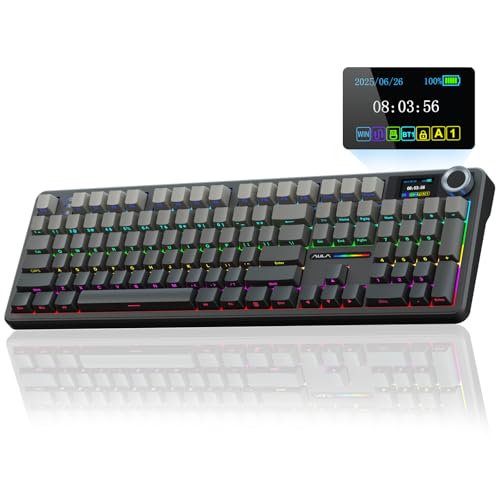
For those who crave versatility and functionality in their workspace, the AULA F108 PRO Wireless Mechanical Keyboard stands out as a top choice in the “Best Office Keyboards of 2026.” Featuring a built-in intelligent TFT color display and a multi-function knob, it allows you to switch between custom GIFs, volume controls, and connection modes seamlessly. With tri-mode connectivity, you can quickly connect up to five devices, whether it’s a PC, Mac, or tablet. Its hot-swappable design lets you customize key switches easily, while the advanced sound dampening guarantees a quiet typing experience, making it perfect for any office environment.
Best For: The AULA F108 PRO Wireless Mechanical Keyboard is best for professionals and gamers seeking a versatile and customizable typing experience in a sleek and modern design.
Pros:
- Tri-mode connectivity allows seamless switching between multiple devices.
- Hot-swappable switches enable easy customization for a personalized typing experience.
- Advanced sound dampening ensures a quiet and comfortable typing environment.
Cons:
- Linux compatibility may be limited due to potential driver issues affecting certain functionalities.
- Driver customization is only available in wired mode, restricting some features in wireless use.
- RGB effects and settings require software support, which is only compatible with Windows systems.
Arteck Backlit USB Wired Full Size Keyboard

Featuring seven unique LED backlight colors with adjustable brightness levels, the Arteck Backlit USB Wired Full Size Keyboard is perfect for those who work late into the night or prefer a personalized typing experience. Its ergonomic design and Scissors X structure guarantee comfortable typing, while low-profile keys provide quiet operation. Setting it up is easy with the 1.2M USB cable, and its compact dimensions make it suitable for any workspace. Weighing just 17.4oz, it’s lightweight and portable. With a customer rating of 4.4 stars and a 24-month warranty, it’s a reliable choice for both PC and laptop users.
Best For: Those who need a versatile and customizable keyboard for late-night typing sessions or a personalized workspace experience.
Pros:
- Ergonomic design with Scissors X structure for comfortable and efficient typing.
- Seven unique LED backlight colors with adjustable brightness levels enhance visibility in low light.
- Compact and lightweight design makes it easy to transport and fit into any workspace.
Cons:
- Wired connection may limit mobility compared to wireless options.
- Some users may prefer a different key feel than the low-profile keys provided.
- Limited to USB connection, which may not be compatible with all devices without adapters.
Factors to Consider When Choosing a Full Size Office Keyboard
When choosing a full-size office keyboard, you need to think about several key factors. Consider ergonomic design features for comfort, key switch types for typing feel, and connectivity options that suit your setup. Don’t forget to check battery life expectations and the possibilities for customization to make your keyboard truly yours.
Ergonomic Design Features
Choosing a full-size office keyboard with ergonomic design features can make a significant difference in your comfort and productivity. Look for wave-shaped keyboards and integrated wrist rests, as these help align your hands and reduce strain during long typing sessions. Adjustable height settings allow you to find your best typing angle, enhancing comfort and lowering the risk of repetitive strain injuries. Keyboards with low-pressure soft keys absorb impact, decreasing finger fatigue for prolonged use. Contoured shapes support natural hand posture, minimizing wrist strain and promoting healthier typing positions. Additionally, spill-resistant designs guarantee durability, making them ideal for busy office environments where accidents can happen. Investing in these features will boost your overall typing experience.
Key Switch Types
After considering ergonomic design features, the next important factor to look at is the type of key switches. You can choose between membrane and mechanical switches. Membrane keyboards are quieter and more affordable but often lack the tactile feedback and durability of mechanical options. If you value responsiveness and longevity, mechanical switches are the way to go, as they can last for over 50 million keystrokes. Popular Cherry MX switches offer various characteristics—like red for linear typing, blue for tactile feedback, and brown for a balance of both. The type of key switch you choose will greatly impact your typing comfort, speed, and overall experience, making it essential for your office setup.
Connectivity Options
As you explore options for a full-size office keyboard, connectivity plays a crucial role in your decision-making process. Consider whether the keyboard offers wireless options like Bluetooth or a USB receiver, which can greatly enhance mobility and reduce cable clutter. Look for models with multi-device connectivity, allowing you to switch effortlessly between your laptop, tablet, or smartphone. Confirm the keyboard maintains a stable transmission range, ideally up to 33 feet (10 meters), to avoid delays. Additionally, check for easy plug-and-play functionality that requires minimal setup, making it hassle-free across various operating systems. Finally, evaluate compatibility with different systems, such as Windows, macOS, and Linux, to guarantee your keyboard works smoothly with all your devices.
Battery Life Expectations
When selecting a full-size office keyboard, battery life is a key consideration that can influence your overall satisfaction. Some wireless models can last up to 36 months on a single set of batteries, while others, like the Logitech K270, offer around 24 months, minimizing the hassle of replacements. Your typing habits also play a role; heavy usage may reduce battery longevity compared to lighter typing. Look for keyboards with power-saving features, such as automatic sleep modes, which help extend battery life during inactivity. Additionally, consider the type of connectivity; Bluetooth keyboards can vary in battery consumption based on the version and how you use them. Balancing these factors will help you choose a keyboard that suits your needs.
Customization and Personalization
Customization and personalization are essential factors to evaluate in a full-size office keyboard, especially if you want to enhance your productivity and comfort. Look for keyboards with programmable keys and macros; these allow you to set shortcuts for frequently used functions, making tasks quicker. Some models come with software that lets you personalize backlighting, key assignments, and even create profiles tailored to different applications. If you prefer mechanical keyboards, consider hot-swappable keys that let you change switches easily. Additionally, advanced features can provide flexibility, like altering function key behaviors and multimedia controls. Finally, choose a keyboard that supports multiple device connections, so you can switch between systems seamlessly while keeping your personalized settings intact.
Durability and Build Quality
A durable office keyboard can greatly enhance your typing experience and productivity. When choosing one, consider keyboards with PBT keycaps, which resist wear and fading, guaranteeing they last under heavy use. Opt for spill-resistant designs to safeguard internal components from accidental liquid exposure, extending the keyboard’s lifespan. Mechanical switches typically outperform membrane types, boasting durability ratings of up to 80 million keystrokes, perfect for busy environments. Look for a sturdy frame with minimal flex, which helps maintain performance during intense typing sessions. Additionally, adjustable tilt feet can improve ergonomics and reduce strain-related damage, further contributing to longevity. Prioritizing these features will guarantee you invest in a keyboard that withstands the demands of your workspace.
Compatibility With Systems
Choosing a full-size office keyboard that fits your system is essential for a smooth workflow. Make sure the keyboard is compatible with various operating systems like Windows, macOS, Chrome OS, Linux, iPadOS, iOS, and Android. This versatility caters to your diverse needs. Look for plug-and-play functionality, which allows for easy setup without extra software. Check the keyboard’s compatibility with specific OS versions, as some may only support newer ones, like Windows 7 or later. If you switch between devices, consider a keyboard with multi-device connectivity. Ergonomic options often support both Windows and Mac, with specific key functions adjusted for each layout. Finding the right compatibility will enhance your productivity and comfort.