
When it comes to boosting your productivity at work, the right mechanical keyboard can make a significant difference. You want a keyboard that not only feels good to type on but also complements your workspace’s style. From customizable backlighting to ergonomic designs, there are plenty of options out there. Let’s explore some of the best mechanical keyboards that seamlessly blend functionality with aesthetics, ensuring you find the perfect fit for your needs.
Logitech G413 SE Full-Size Mechanical Gaming Keyboard

When you’re looking for a reliable mechanical keyboard that balances work and gaming seamlessly, the Logitech G413 SE stands out with its tactile mechanical switches. This full-size keyboard boasts a sleek black-brushed aluminum top case and durable PBT keycaps, ensuring it withstands daily use. With 6-key rollover anti-ghosting technology, you can type confidently without missed keystrokes. The twelve FN keys offer convenient media controls, enhancing your productivity. Plus, the adjustable white LED lighting adds a touch of style to your setup. Whether you’re gaming or working, the G413 SE is built to elevate your experience.
Best For: Gamers and professionals seeking a durable, high-performance mechanical keyboard that enhances both gaming and productivity.
Pros:
- Tactile mechanical switches provide a responsive typing experience.
- Robust build quality with PBT keycaps ensures long-lasting durability.
- Convenient media controls and adjustable white LED lighting enhance usability and aesthetics.
Cons:
- No customizable RGB lighting options may limit personalization for some users.
- Full-size layout may not be ideal for those with limited desk space.
- Lacks additional features like programmable keys commonly found in higher-end models.
Logitech K845 Mechanical Illuminated Keyboard

The Logitech K845 Mechanical Illuminated Keyboard stands out as an excellent choice for anyone seeking a premium typing experience, thanks to its versatile switch options—Red, Blue, and Brown—catering to different preferences in tactile feedback and sound. With a full-size layout that includes 104 keys and a compact design, it fits seamlessly on your desk. The modern aluminum top case guarantees durability, while adjustable tilt angles promote ergonomic typing. Plus, the customizable white backlighting with five patterns enhances productivity in low-light conditions. Whether you’re gaming or working, this keyboard delivers reliable performance and comfort for all your typing needs.
Best For: Users seeking a premium keyboard experience, including gamers and professionals needing reliable performance.
Pros:
- Versatile switch options (Red, Blue, Brown) cater to different preferences for tactile feedback and sound.
- Customizable white backlighting with five patterns enhances productivity in low-light conditions.
- Durable aluminum top case and adjustable tilt angles promote ergonomic typing and longevity.
Cons:
- USB corded connection may limit portability compared to wireless options.
- Full-size layout might not be suitable for users with limited desk space.
- Mechanical switches can be louder than membrane keyboards, which may not be ideal for quiet environments.
Logitech MX Mechanical Wireless Keyboard

For professionals seeking a seamless typing experience, the Logitech MX Mechanical Wireless Keyboard stands out with its tactile quiet switches that offer a satisfying feel without disturbing those around you. This full-size keyboard features low-profile switches, ensuring comfort during long work hours. With smart illumination, the backlit keys light up when you approach and adapt to your workspace’s lighting. You can connect up to three devices via Bluetooth, making multitasking effortless. Plus, the USB-C charging provides a quick boost, offering up to 15 days of use on a full charge. It’s a stylish tool that enhances your productivity.
Best For: Professionals and multitaskers looking for a comfortable and efficient typing experience with customizable features.
Pros:
- Tactile Quiet switches provide a satisfying feel while minimizing noise, making it ideal for shared workspaces.
- Smart illumination enhances usability in different lighting conditions by automatically adjusting the backlighting.
- Multi-device connectivity allows seamless switching between three devices, improving productivity.
Cons:
- The full-size layout may not be suitable for those with limited desk space.
- Weight might make it less portable for users who travel frequently.
- Price point may be higher compared to standard keyboards, which could deter budget-conscious buyers.
SteelSeries Apex 5 Hybrid Mechanical Gaming Keyboard

If you’re seeking a mechanical keyboard that seamlessly blends work and play, the SteelSeries Apex 5 Hybrid Mechanical Gaming Keyboard is a standout choice. Its hybrid blue mechanical switches provide a tactile click while maintaining smoothness, ensuring a satisfying typing experience. The durable aircraft-grade aluminum frame promises longevity, making it perfect for daily use. With an OLED smart display, you can customize notifications and game info to stay connected. Plus, the dynamic per-key RGB illumination adds flair to your workspace. Don’t forget the premium magnetic wrist rest, providing exceptional comfort during those long hours at the keyboard.
Best For: Gamers and professionals looking for a versatile mechanical keyboard that excels in both gaming and productivity environments.
Pros:
- Durable construction with an aircraft-grade aluminum alloy frame ensures long-lasting performance.
- Customizable OLED smart display allows for personalized notifications and game information at a glance.
- Dynamic per-key RGB illumination enhances the aesthetic appeal and allows for personalized lighting effects.
Cons:
- Hybrid switches may not satisfy purists who prefer traditional mechanical switches.
- The keyboard’s size may take up significant desk space, which could be a concern for compact setups.
- Some users may find the price point higher compared to other mechanical keyboards without similar features.
ASUS ROG Strix Scope II X Wired USB Mechanical Gaming Keyboard
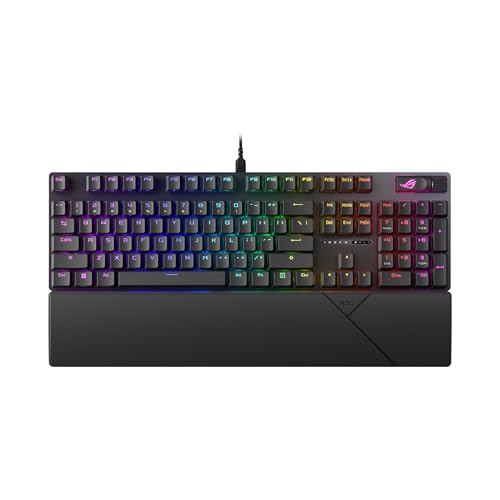
Experience seamless typing and gaming with the ASUS ROG Strix Scope II X, designed for those who demand both performance and comfort. This full-size keyboard features hot-swappable ROG NX Snow V2 linear switches for smooth keystrokes and optional clicky switches for tactile feedback. Its durable aluminum top plate and wear-resistant PBT doubleshot keycaps guarantee longevity, while integrated sound-dampening foam enhances acoustics. You’ll enjoy ergonomic comfort with three angle adjustments and a detachable wrist rest. With pre-programmed hotkeys, a multi-function wheel, and fully macro-programmable keys, this keyboard optimizes your gaming, streaming, and daily work experience effortlessly.
Best For: Gamers and professionals seeking a high-performance, durable mechanical keyboard with customizable features and ergonomic comfort.
Pros:
- Hot-swappable ROG NX Snow V2 switches allow for personalized typing experience and easy customization.
- Durable aluminum top plate and wear-resistant PBT doubleshot keycaps ensure long-lasting use.
- Integrated sound-dampening foam and customizable RGB illumination enhance both aesthetics and acoustics.
Cons:
- Wired connectivity may limit mobility compared to wireless alternatives.
- The full-size design might take up more desk space than compact keyboards.
- Optional clicky switches may not appeal to users preferring silent operation.
CORSAIR K70 CORE RGB Mechanical Gaming Keyboard

The CORSAIR K70 CORE RGB Mechanical Gaming Keyboard stands out for its pre-lubricated MLX Red linear switches, making it an excellent choice for professionals who value smooth keystrokes during long work sessions. With its durable aluminum top plate and ABS double-shot keycaps, this keyboard offers stability and resistance to wear. You’ll appreciate the customizable RGB lighting through iCUE software, allowing you to personalize your setup. The magnetic detachable palm rest enhances comfort, while the multi-function media control dial simplifies your workflow, making it easier to manage tasks efficiently. Enjoy a reliable, stylish keyboard that boosts your productivity in any workspace.
Best For: Professionals and gamers who seek a responsive, customizable, and high-quality typing experience.
Pros:
- Mechanical switches provide smooth keystrokes, enhancing typing speed and accuracy.
- Customizable RGB lighting allows for personalized aesthetics and improved gaming immersion.
- Durable build with aluminum top plate and double-shot keycaps ensures long-lasting performance.
Cons:
- Weighty design may not be ideal for users looking for a portable keyboard.
- Limited compatibility with some non-Windows operating systems.
- Price point may be higher compared to basic keyboards without gaming features.
Logitech G213 Prodigy Gaming Keyboard

For those who value both functionality and comfort in their typing experience, the Logitech G213 Prodigy Gaming Keyboard stands out with its Mech-Dome keys, offering a tactile feel that enhances productivity. With customizable RGB lighting across five zones, you can personalize your workspace while enjoying a spill-resistant design that’s easy to clean. The integrated palm rest and adjustable feet guarantee comfort during long hours of use. Plus, the anti-ghosting gaming matrix allows for seamless key presses. Weighing just 2.2 pounds, it’s a sturdy yet portable choice, making it a perfect ally for work and play alike.
Best For: Gamers and professionals seeking a reliable, customizable keyboard that combines comfort with high performance.
Pros:
- Customizable RGB lighting across five zones allows for personalized aesthetics.
- Durable, spill-resistant design ensures easy cleanup and longevity.
- Integrated palm rest and adjustable feet enhance comfort during extended use.
Cons:
- Wired connection may limit mobility compared to wireless options.
- Heavier than some competitors, making it less portable.
- Limited compatibility with operating systems outside of Windows.
Logitech Alto Keys K98M Wireless Mechanical Keyboard

With its mechanical typewriter feel and UniCushion technology, the Logitech Alto Keys K98M Wireless Mechanical Keyboard is perfect for those who crave comfort and precision during long hours of typing. You’ll appreciate the hot-swappable Marble Switches and concave keys, providing a smooth, responsive experience whether you’re working or gaming. Its full-size layout, complete with a numpad and customizable Action Keys via the Logi Options+ app, enhances productivity. With Bluetooth and Logi Bolt connectivity, it seamlessly pairs with multiple devices. Plus, enjoy up to 12 months of battery life and USB-C recharging capability for uninterrupted use.
Best For: The Logitech Alto Keys K98M Wireless Mechanical Keyboard is best for professionals and gamers seeking a comfortable and customizable typing experience.
Pros:
- Hot-swappable Marble Switches allow for personalized key feel and easy customization.
- Long battery life of up to 12 months ensures reliability for extended use.
- Multi-device connectivity via Bluetooth and Logi Bolt enhances versatility across different setups.
Cons:
- The keyboard’s full-size design may not be suitable for compact workspaces.
- Some users may prefer a different switch type based on personal typing preferences.
- The transparent top case may not appeal to everyone’s aesthetic taste.
Logitech G PRO Mechanical Gaming Keyboard

Designed for esports athletes, the Logitech G PRO Mechanical Gaming Keyboard stands out as an excellent choice for those seeking high-performance gear in a compact form. Its ultra-portable tenkeyless design maximizes your workspace, making it easy to transport to tournaments. The durable GX Blue Click switches provide tactile feedback, ensuring precise keypresses. With 16.8 million LIGHTSYNC RGB backlit keys, you can customize your setup without needing additional software. Plus, the detachable Micro USB cable offers flexibility, while the 3-step angle adjustment enhances comfort. This keyboard’s combination of speed and design makes it ideal for both work and play.
Best For: The Logitech G PRO Mechanical Gaming Keyboard is best for esports athletes and competitive gamers seeking a high-performance, portable keyboard.
Pros:
- Ultra-portable tenkeyless design allows for maximum workspace and easy transport.
- Durable GX Blue Click switches provide tactile feedback for precise keypresses.
- Customizable 16.8 million LIGHTSYNC RGB backlighting enhances aesthetics and personalization without extra software.
Cons:
- Limited macro programming for tournament compliance may restrict advanced gaming strategies.
- Lack of a numeric keypad may be inconvenient for users who require it for productivity tasks.
- Audible click sound from the switches may not be preferred in quiet environments.
Corsair K55 CORE RGB Gaming Keyboard

The Corsair K55 CORE RGB Gaming Keyboard stands out for its quiet, responsive membrane switches, making it an excellent choice for those who type frequently, whether for work or play. With customizable ten-zone RGB backlighting and programmable features via CORSAIR iCUE, you can personalize your workspace. The four dedicated media buttons enhance your productivity by allowing quick volume and playback control. Plus, its spill resistance can handle up to 300ml, ensuring durability. Weighing just 1.66 pounds and featuring a 1,000Hz polling rate, it offers a seamless typing experience. Rated 4.5 stars by users, it’s a reliable choice for any setup.
Best For: Those seeking a quiet and responsive keyboard for both gaming and typing tasks.
Pros:
- Quiet membrane switches provide a comfortable typing experience for long sessions.
- Customizable RGB backlighting allows for personalization and enhances aesthetic appeal.
- Spill resistant design protects against accidental liquid spills, adding to the keyboard’s durability.
Cons:
- Membrane switches may not offer the same tactile feedback as mechanical switches preferred by some gamers.
- Limited key rollover (12-key) may not be ideal for advanced gaming requiring simultaneous key presses.
- Corded design may restrict movement compared to wireless options.
Factors to Consider When Choosing a Mechanical Keyboard for Work
When choosing a mechanical keyboard for work, it’s essential to take into account several key factors. You’ll want to think about the type of key switches, ergonomic features, and customization options that fit your needs. Additionally, keep in mind connectivity, compatibility, and overall build quality to guarantee a durable choice.
Key Switch Type
Choosing the right key switch type is essential for enhancing your typing experience while working. Mechanical keyboards come with tactile, linear, and clicky switches, each catering to different preferences. If you like feedback without much noise, tactile switches are perfect for you, providing a noticeable bump at the actuation point. For those who prioritize speed and quietness, linear switches deliver a smooth keystroke without any tactile feedback. On the other hand, if you enjoy a classic typing feel, clicky switches offer both an audible click and tactile feedback, reminiscent of typewriters. Your choice impacts your typing speed, accuracy, and overall comfort, making it vital to select a key switch type that aligns with your working style.
Ergonomic Design Features
While it’s easy to overlook ergonomics in the quest for a high-performance mechanical keyboard, prioritizing design features can greatly enhance your comfort and productivity. Look for adjustable tilt angles to customize the keyboard height, ensuring ideal wrist positioning during long typing sessions. Integrated palm rests are another essential feature, providing support that reduces wrist strain. A compact layout minimizes the distance between your mouse and keyboard, cutting down on shoulder and arm strain. Pay attention to key switch types too; low-profile or tactile switches can greatly impact typing comfort. Finally, consider the overall build quality—heavy, sturdy materials add stability, keeping your keyboard secure during intense work or gaming marathons.
Customization Options Available
Ergonomics play a significant role in comfort, but customization options can elevate your typing experience even further. Many mechanical keyboards come with programmable keys, allowing you to tailor functions and create macros that boost your productivity. You can also enjoy backlighting customization, choosing colors and effects that not only enhance your workspace aesthetic but improve visibility in low light. Some models offer software that lets you remap keys and adjust settings, ensuring a personalized experience for specific tasks. Additionally, custom keycap sets can change the feel and appearance of your keyboard, enhancing comfort and style. With dedicated profiles, you can switch settings or layouts based on the application, making your workflow smoother and more efficient.
Connectivity and Compatibility
When selecting a mechanical keyboard for work, compatibility with your operating system is essential, as not all keyboards support every OS equally. Make sure the keyboard works seamlessly with Windows, macOS, or Linux, especially if you need specific features. Next, check the connectivity options like USB wired, Bluetooth, or wireless, as this influences flexibility across devices. If you work with multiple devices, look for keyboards that allow multi-device pairing for easy switching. Additionally, verify if dedicated software is needed for customization, and ascertain cross-platform functionality enhances usability. Finally, consider features like USB-C charging or low-energy Bluetooth for longer battery life and faster charging. These factors can greatly improve your productivity and overall experience.
Build Quality and Durability
A mechanical keyboard’s build quality and durability play an essential role in its performance and lifespan, especially in a work environment. Look for keyboards made from durable materials, like aluminum alloy and PBT keycaps, which resist wear and tear. A robust construction with minimal flex and sound-dampening foam enhances your typing experience and extends the keyboard’s life. Pay attention to switch ratings; higher-rated switches can handle up to 20 million keypresses, indicating better durability for your daily tasks. Opting for spill-resistant designs can protect against accidental liquid damage, making maintenance easier. Finally, heavier keyboards tend to stay in place during intense typing sessions, reducing wear on connections and components, ensuring your investment lasts.
Backlighting and Aesthetics
While backlighting may seem like a secondary feature, it markedly enhances your typing experience, especially in low-light conditions. You’ll find that customizable backlighting options not only boost visibility but also let you personalize your workspace to match your style. Keyboards with dynamic RGB illumination can adjust brightness based on ambient lighting, reducing eye strain during long sessions. A well-designed backlight highlights active keys, aiding productivity, particularly in complex software applications. Additionally, quality backlighting contributes to the overall durability and usability of your keyboard, often including spill resistance that protects internal components while maintaining aesthetic appeal. So, when choosing a mechanical keyboard for work, consider how backlighting can elevate both functionality and style in your setup.
Size and Layout
Choosing the right size and layout for your mechanical keyboard can greatly influence your typing comfort and efficiency. Full-size keyboards offer a dedicated number pad and extra function keys, perfect for tasks requiring extensive number input. If you’re tight on desk space or need more mouse movement, consider a tenkeyless (TKL) layout, which omits the number pad. For portability, compact keyboards like 75% or 65% layouts condense keys even further, potentially sacrificing function rows or arrow keys. Ergonomics matter too; look for adjustable angles and wrist rests to support good posture during long typing sessions. Finally, verify the key spacing and placement suit your natural typing position to minimize strain and boost your speed and accuracy.
Noise Level Considerations
When selecting a mechanical keyboard for work, noise level can greatly impact your environment and productivity. Mechanical keyboards vary in sound based on the switch type; tactile and clicky switches tend to be noisier, while linear switches offer a quieter experience. If you’re in a shared office, consider low-profile or “silent” switches to reduce distractions for your coworkers. The decibel level can affect both your comfort and productivity, with quieter keyboards often preferred in professional settings. Think about your typing habits, too—if you type quickly on louder switches, you may disturb others more. It’s a good idea to test keyboards in-person or read reviews to find the right balance between sound and performance before making your purchase.