
Looking for a gaming mouse with onboard memory that keeps your settings ready on every PC? The right model can save buttons, DPI stages, and macros directly on the mouse, so your setup travels with you.
Below, we’ve narrowed the field to ten standout picks for different grip styles, game genres, and budgets, with a focus on practical performance and easy customization.
Best 10 Gaming Mouse with Onboard Memory Picks for 2026
Precision Control Pick
Logitech G502 Hero Wired Gaming Mouse

- Up to 25,600 DPI HERO sensor
- 11 programmable buttons
- Adjustable weights and LIGHTSYNC RGB
Best For: Players who want a customizable wired mouse with precise tracking and tunable balance
Wireless Value Pick
Redragon M810 PRO Wireless RGB Gaming Mouse

- 2.4GHz wireless with rechargeable battery
- 5 on-board DPI levels
- 8 programmable buttons with RGB lighting
Best For: Gamers who want wireless convenience and customizable DPI presets without overcomplicating setup
Premium Wireless Pick
Logitech G502 Lightspeed Wireless Gaming Mouse

- LIGHTSPEED wireless performance
- Hero 25K sensor up to 25,600 DPI
- 11 customizable buttons with PowerPlay support
Best For: Competitive players who want top-tier wireless tracking and deep button customization
MMO Button Pick
Redragon M908 Wired MMO RGB Gaming Mouse

- 18 programmable buttons
- 5 memory profiles
- Weight tuning kit with 12-button MMO layout
Best For: MMO players who want lots of programmable controls and profile-based customization
Ergonomic Wireless Pick
Razer Basilisk V3 X HyperSpeed

- 9 customizable controls for macros
- HyperSpeed and Bluetooth wireless
- Up to 535 hours on Bluetooth
Best For: Right-handed gamers wanting comfort, long battery life, and flexible wireless use
Budget Wired Macro Mouse

- 11 programmable buttons and rapid fire
- 5 DPI levels with software tuning
- Comfort grip claw-style design
Best For: Budget gamers who want lots of remappable controls in a wired mouse
Lightweight Wireless Classic

- LIGHTSPEED wireless with 1 ms response
- HERO sensor up to 12,000 DPI
- Lightweight 3.4 oz design
Best For: Players and laptop users who want a light, portable wireless mouse
Ergonomic Precision Pick
Razer Basilisk V3 Customizable RGB Wired Ergonomic Gaming Mouse

- 11 programmable buttons for macros and shortcuts
- 26K DPI sensor with precise optical tracking
- HyperScroll wheel and 11-zone RGB lighting
Best For: Right-handed gamers who want an ergonomic, highly customizable wired mouse
MMO Control Specialist
Corsair Scimitar RGB Elite Wired MMO MOBA PC Gaming Mouse
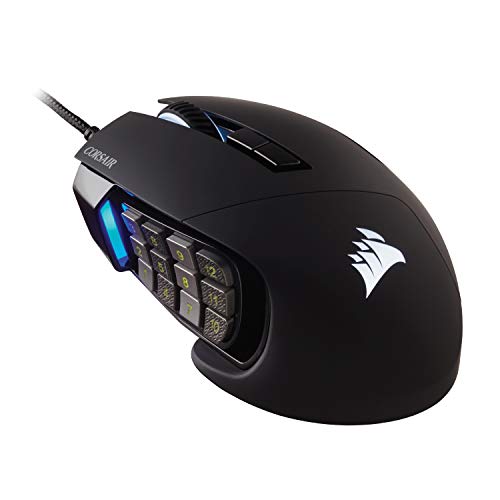
- 17 programmable buttons for macros and frequent actions
- Repositionable 12-button side panel for custom grip fit
- 18,000 DPI sensor with durable Omron switches
Best For: MMO and MOBA players who want dense controls and adjustable side buttons
Precision Control Pick – Logitech G502 Hero Wired Gaming Mouse
If you want a gaming mouse with onboard memory-style customization through software and a highly tunable feel, the Logitech G502 Hero is built for serious desktop play. It pairs a 25,600 DPI HERO sensor with 11 programmable buttons, so you can dial in sensitivity, macros, and button layouts for different games.
Best For: Players who want a highly customizable wired mouse with a precise sensor, lots of buttons, and adjustable weight tuning.
Pros:
- HERO sensor supports up to 25,600 DPI with zero smoothing, filtering, or acceleration
- 11 programmable buttons give you plenty of room for macros and shortcuts
- Adjustable weight system lets you tune the balance with up to five 3.6 g weights
- LIGHTSYNC RGB adds customizable lighting for a more personalized setup
Cons:
- Wired design may not suit players who prefer a cable-free setup
- Customization features rely on Logitech Gaming Software
Overall, this is a strong pick for players who value precision, button flexibility, and a mouse that can be tailored to their grip and feel.
Wireless Value Pick – Redragon M810 PRO Wireless RGB Gaming Mouse
The Redragon M810 PRO is a practical gaming mouse with onboard memory-style convenience thanks to its 5 on-board DPI levels and fully programmable controls. Its wireless 2.4GHz connection, 8 remappable buttons, and 45-hour battery life make it a flexible option for gaming or everyday use.
Best For: Gamers who want a wireless mouse with customizable DPI steps, remappable buttons, and long battery life.
Pros:
- 2.4GHz wireless connection keeps the desk setup cable-free
- 5 on-board DPI levels let you switch between sensitivity presets quickly
- 8 programmable buttons support macros and keybinding customization
- Rechargeable battery lasts up to 45 hours in eco-mode
Cons:
- Maximum sensitivity is lower than some higher-end gaming mice
- Best customization features depend on Redragon Pro driver software
This is a solid choice if you want wireless freedom and a mouse that still gives you useful sensitivity presets and button mapping options.
Premium Wireless Pick – Logitech G502 Lightspeed Wireless Gaming Mouse
If you are shopping for a gaming mouse with onboard memory-style control in a premium wireless package, the Logitech G502 Lightspeed stands out for performance and flexibility. It combines LIGHTSPEED wireless, an upgradable Hero 25K sensor, and 11 customizable buttons for players who want fast response and deep personalization.
Best For: Competitive players who want a high-performance wireless mouse with strong tracking, customizable buttons, and optional wireless charging support.
Pros:
- LIGHTSPEED wireless is designed for competitive-level responsiveness
- Hero 25K sensor offers 1:1 tracking and up to 25,600 DPI after update
- 11 customizable buttons work well for macros and shortcuts
- PowerPlay support can keep the mouse charged when used with the separate charging system
Cons:
- PowerPlay wireless charging system is sold separately
- Battery life may still matter if you do not use PowerPlay
For gamers who want a wireless mouse that feels built for performance first and customization second, this is one of the strongest options in the group.
MMO Button Pick – Redragon M908 Wired MMO RGB Gaming Mouse
The Redragon M908 is a strong gaming mouse with onboard memory-style profile management for players who need lots of controls at hand. With 18 programmable buttons, 5 memory profiles, and a 12-button MMO side layout, it is built for games and workflows that benefit from dense customization.
Best For: MMO and strategy players who want maximum button count, profile switching, and a wired mouse with a tunable feel.
Pros:
- 18 programmable buttons give you very broad control mapping
- 5 memory profiles help separate settings for different games or tasks
- Up to 12 MMO side buttons are ideal for complex command sets
- Weight tuning kit lets you adjust the mouse feel to your preference
Cons:
- Large button count may be more than casual users need
- Wired design may not appeal to players who prefer wireless mice
This is the most feature-heavy option here for users who want a true control hub rather than a simple pointer.
Ergonomic Wireless Pick – Razer Basilisk V3 X HyperSpeed
If you want a gaming mouse with onboard memory-style customization through software profiles and a strong wireless feature set, the Razer Basilisk V3 X HyperSpeed is built for flexible play. Its right-handed ergonomic shape, nine customizable controls, and HyperSpeed or Bluetooth connectivity make it a practical pick for players who want comfort and quick access to commands.
Best For: Right-handed gamers who want a comfortable wireless mouse with lots of programmable controls and long battery life.
Pros:
- 9 customizable controls for macros and command-heavy games
- HyperSpeed wireless and Bluetooth support for flexible setup
- Up to 285 hours on HyperSpeed and 535 hours on Bluetooth
- 18K optical sensor and Gen-2 mechanical switches for reliable gameplay
Cons:
- Right-handed shape only
- No onboard memory is explicitly listed in the supplied details
This mouse stands out if you value wireless convenience, a comfortable grip, and lots of control options. It is a strong everyday gaming choice, especially if you want to move between devices without giving up responsiveness.
Budget Wired Macro Mouse – Redragon M612 Predator
The Redragon M612 is a straightforward gaming mouse with onboard memory-style flexibility through its software-based remapping and 11 programmable buttons. If you want a wired gaming mouse with onboard memory-like customization potential, this model focuses on value, rapid-fire support, and a comfortable claw-grip shape for long sessions.
Best For: Budget-minded players who want many programmable buttons, wired reliability, and a comfortable grip.
Pros:
- 11 programmable buttons for keybind-heavy games and work
- 5 DPI levels, with software adjustment from 500 to 8000 DPI
- Rapid fire key plus 2 side macro buttons
- Ergonomic claw-grip design with comfort-focused coating
Cons:
- Wired only, so no wireless option
- Right-handed design only
For the price, the M612 packs a lot of control into a simple wired build. It makes sense if you want a mouse that can be mapped for games or work without paying for premium wireless features.
Lightweight Wireless Classic – Logitech G305 Lightspeed
The Logitech G305 Lightspeed is a compact wireless gaming mouse aimed at players who want speed, simplicity, and strong battery life. For anyone shopping for a gaming mouse with onboard memory, it is worth noting that the supplied details highlight wireless performance, HERO sensor precision, and G HUB battery-saving options rather than onboard profile storage.
Best For: Gamers and laptop users who want a lightweight wireless mouse with strong sensor performance and long battery life.
Pros:
- LIGHTSPEED wireless with 1 ms report rate
- HERO sensor with up to 12,000 DPI and 400 IPS precision
- Up to 250 hours of gameplay on one AA battery
- Lightweight 3.4 oz design with built-in nano receiver storage
Cons:
- Fewer buttons than multi-control gaming mice
- No onboard memory is specified in the supplied details
The G305 is best if you want dependable wireless performance in a simple, travel-friendly shape. It is not the most feature-packed option here, but it offers a strong mix of accuracy, portability, and battery life.
Ergonomic Precision Pick – Razer Basilisk V3 Customizable RGB Wired Ergonomic Gaming Mouse
If you want a gaming mouse with onboard memory features to support a highly tuned setup, the Razer Basilisk V3 is built around customization and fast access. It pairs an ergonomic right-handed shape with 11 programmable buttons, a HyperScroll tilt wheel, and a 26K DPI optical sensor for players who want a responsive wired mouse for everyday gaming and macro-heavy play.
Best For: Right-handed players who want an ergonomic wired gaming mouse with lots of remappable controls and precise tracking.
Pros:
- 11 programmable buttons for macros, push-to-talk, ping, and other shortcuts
- HyperScroll tilt wheel offers free-spin or tactile scrolling modes
- 26K DPI optical sensor for crisp, pixel-precise tracking
- 11-zone Razer Chroma RGB lighting with game-reactive effects
Cons:
- Wired-only design may not suit buyers who want wireless freedom
- Right-handed shape is not ideal for left-handed users
- Onboard memory is not explicitly listed in the supplied product notes
The Basilisk V3 stands out if you value comfort, customization, and a feature-rich control layout. It is a strong pick for players who want a mouse that can handle both fast-paced gameplay and detailed button mapping.
Macro-Rich Wireless Choice – Redragon Wireless Gaming Mouse M901P-KS
If you need a gaming mouse with onboard memory-style profile storage and a lot of remapping room, the Redragon M901P-KS is aimed at MMO and MOBA players. It offers 16 programmable buttons, five memory profiles, adjustable DPI up to 16,000, and wireless plus wired charging support for flexible desktop use.
Best For: MMO and MOBA players who want a wireless mouse with heavy macro customization and saved profiles.
Pros:
- 16 programmable buttons with macro editing
- 5 memory profiles to save settings
- Wireless design with rechargeable battery and wired charging support
- Up to 16,000 DPI plus adjustable polling rate
Cons:
- Bulkier MMO layout may feel crowded for users who prefer a simpler mouse
- Right-handed shape only
- Profile saving is limited to five memory slots
This model makes sense if you want a feature-packed control mouse for games that reward lots of binds. The side-button array and saved profiles make it especially practical for players who switch between different setups often.
MMO Control Specialist – Corsair Scimitar RGB Elite Wired MMO MOBA PC Gaming Mouse
The Corsair Scimitar RGB Elite is a gaming mouse with onboard memory-style customization in mind for MMO and MOBA players who rely on complex input layouts. It combines 17 programmable buttons, a repositionable 12-button side panel, and an 18,000 DPI optical sensor, making it easy to build a mouse setup around frequent actions and macros.
Best For: MMO and MOBA players who want a wired mouse with maximum button density and flexible side-button placement.
Pros:
- 17 fully programmable buttons for complex macros and frequent actions
- Patented Key Slider system lets you reposition the 12 side buttons
- 18,000 DPI optical sensor with fine 1 DPI adjustment steps
- Durable build with Omron switches and braided cable
Cons:
- Wired-only design
- MMO-focused layout may be excessive for general-purpose use
- No explicit onboard memory specification is listed in the supplied notes
If your games depend on lots of mapped commands, the Scimitar RGB Elite delivers one of the most adaptable control layouts here. It is especially appealing when you want side-button placement that can be adjusted to match your grip.
How We Picked the Best Gaming Mouse with Onboard Memory
We focused on mice that store key settings locally, including DPI steps, button assignments, lighting preferences, and macro profiles. Priority went to models with reliable sensors, comfortable shapes, and enough programmable inputs for real-world gaming use.
We also balanced wired and wireless options, since some players want zero-latency simplicity while others prefer a clutter-free desk and long battery life. Value, software usability, and build quality mattered as much as raw specs.
Quick Comparison: Which Type Fits Your Setup?
If you want a simple all-rounder, a standard ergonomic mouse with a few programmable buttons is usually the easiest choice. MMO and MOBA players should look for higher button counts and side-panel layouts. FPS players may prefer lighter, simpler designs with fast sensor response and fewer distractions.
Wireless models are best if you want freedom of movement or a cleaner desk, but wired versions can still be the better pick if you want maximum consistency and never want to think about charging. A good Gaming Mouse with Onboard Memory should make the transition between machines seamless either way.
Key Buying Factors for a Gaming Mouse with Onboard Memory
Profile Storage and Remapping
Make sure the mouse can store the settings you care about most. Some models keep only one profile onboard, while others support multiple profiles or advanced macros. If you switch between games or work and play, deeper profile support is worth paying for.
Button Layout and Comfort
Choose a shape that matches your grip and the number of inputs you actually use. More buttons are helpful for MMOs and productivity, but too many controls can feel crowded if you mainly play shooters.
Sensor Performance and DPI Control
Higher DPI numbers are not everything, but responsive tracking and sensible DPI stage switching are important. Look for consistent sensor behavior and the ability to save preferred sensitivity steps onboard.
Connectivity and Battery Life
For wireless mice, check connection type, latency claims, and battery endurance. For wired mice, focus on cable flexibility and overall feel. Either way, onboard memory should let you unplug or move systems without losing your setup.
Who Should Buy Which Gaming Mouse with Onboard Memory?
Competitive FPS players will usually be happiest with lighter, simpler mice that store a few essential settings. MMO and macro-heavy players should prioritize larger mice with more programmable buttons and stronger software support. If you play on multiple PCs or share a system, onboard memory is especially useful because your preferred setup stays attached to the mouse itself.
If you want the most flexible option, pick a model with solid software and multiple profiles. If you want the least hassle, choose a straightforward mouse that saves your core settings and works the same way every time you plug it in.