
If you want faster inputs, cleaner macro control, and fewer keyboard stretches, a gaming mouse with side buttons can make a real difference. These mice are especially useful for MMO and MOBA players, but they also help with productivity and multitasking.
In this roundup, we focused on models that balance button layout, comfort, sensor performance, and value so you can find the right fit for your hand size, playstyle, and budget.
Best 10 Gaming Mouse with Side Buttons Picks for 2026
MMO Macro Pick
Redragon M908 Wired MMO RGB Gaming Mouse

- 12 MMO side buttons for fast command access
- 18 programmable buttons with 5 memory profiles
- Up to 12400 DPI and adjustable weight tuning
Best For: Players who want maximum side-button mapping on a wired MMO mouse
Wireless MMO Choice
Razer Naga V2 HyperSpeed Wireless MMO Gaming Mouse

- 19 programmable buttons for MMO control
- Up to 400 hours on Bluetooth battery life
- HyperSpeed Wireless and Bluetooth support
Best For: Gamers who want a wireless MMO mouse with long battery life
High-Button MMO Option
UtechSmart Venus Pro Wired MMO Gaming Mouse

- 12 side buttons and 19 programmable buttons
- Up to 16400 DPI with on-mouse adjustment
- Includes 8 weights for custom balance
Best For: MMO players who want lots of thumb buttons and weight tuning
Versatile Side-Button Pick
Logitech G502 Hero Wired Gaming Mouse

- 11 programmable buttons for customizable control
- Up to 25600 DPI HERO sensor
- Adjustable weights and LIGHTSYNC RGB
Best For: Gamers who want a versatile wired mouse with side buttons
Modular MMO Pick
Razer Naga Trinity Gaming Mouse

- 3 swappable side plates: 2, 7, or 12 buttons
- Up to 19 programmable buttons for macros
- 16,000 DPI sensor with adjustable sensitivity
Best For: Players who want maximum side-button flexibility
Adjustable Keypad Pick

- 12 side buttons can be repositioned with Key Slider
- 17 programmable buttons for MMO/MOBA macros
- 18,000 DPI sensor with fine 1-DPI steps
Best For: MMO and MOBA players who want an adjustable side-button grid
Budget Macro Mouse

- 15 programmable buttons for remaps and hotkeys
- Default 2 + 8 side-button MMO layout
- Five DPI levels with software support
Best For: Budget buyers who want plenty of side buttons and macros
Tri-Mode MMO Flex
SOLAKAKA SM809 Pro 9-Side-Button Mouse
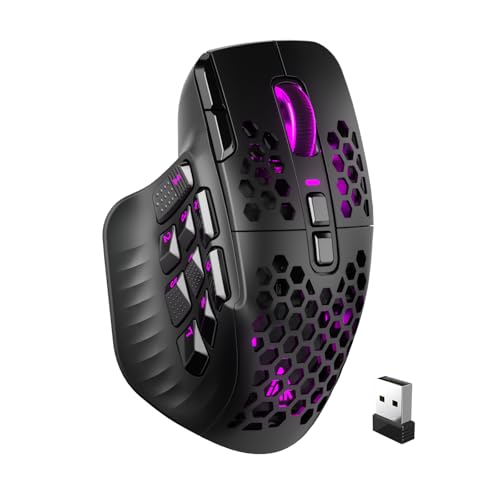
- 9 side buttons and 16 programmable controls
- 2.4GHz, Bluetooth 5.0, and USB-C wired modes
- Up to 24000 DPI with onboard memory profiles
Best For: MMO players who want maximum button customization and multi-device connectivity
Heavyweight MMO Control
Redragon M921 Wired RGB MMO Mouse

- 12 side buttons plus a dedicated fire button
- 18 programmable buttons with software remapping
- Includes 8 weights for balance tuning
Best For: Gamers who want a feature-packed wired MMO mouse with adjustable feel
Custom-Weight Button Grid
Redragon M901K 12-Side-Button MMO Mouse

- 12 side buttons and 19 programmable controls
- Adjustable DPI from 100 to 12400
- 8 removable weights for personalized balance
Best For: MMO and MOBA players who want lots of buttons plus weight tuning
MMO Macro Pick – Redragon M908 Wired MMO RGB Gaming Mouse
If you want a gaming mouse with side buttons built for MMO-style commands, the Redragon M908 gives you a lot to work with. It offers 18 programmable buttons, including 12 MMO side buttons, plus adjustable DPI up to 12400 and an included weight tuning set for dialing in the feel.
Best For: MMO and macro-heavy players who want lots of side-button mapping on a wired mouse.
Pros:
- 12 MMO programmable side buttons and 18 total programmable buttons
- Up to 12400 DPI with software-adjustable sensitivity
- Weight tuning set helps customize balance
- RGB lighting can be disabled if you want a simpler look
Cons:
- Wired design may not suit players who prefer wireless
- Large button count may feel busy if you only need a few shortcuts
The M908 is a strong pick if your priority is fast access to many commands rather than a minimalist layout. Its side-button layout, adjustable DPI, and profile support make it especially useful for games that reward dense key mapping.
Wireless MMO Choice – Razer Naga V2 HyperSpeed Wireless MMO Gaming Mouse
This gaming mouse with side buttons is built for players who want a flexible wireless setup without giving up a deep button layout. The Razer Naga V2 HyperSpeed includes 19 programmable buttons, low-latency wireless, Bluetooth support, and very long battery life for extended sessions.
Best For: MMO players who want a wireless mouse with lots of programmable controls and long battery life.
Pros:
- 19 programmable buttons for extensive mapping options
- HyperSpeed Wireless plus Bluetooth connectivity
- Up to 400 hours on Bluetooth and 250 hours on HyperSpeed Wireless
- Focus Pro 30K optical sensor for precise tracking
Cons:
- Wireless mice may need more setup than simple wired models
- Battery-powered design means eventual recharging or replacement
If you want a side-button mouse that can stay in service for long stretches between battery changes, this model is easy to justify. It combines a large command layout with two wireless modes and a sensor designed for precise control.
High-Button MMO Option – UtechSmart Venus Pro Wired MMO Gaming Mouse
For shoppers looking for a gaming mouse with side buttons and plenty of customization, the UtechSmart Venus Pro leans hard into MMO features. It includes 12 side buttons, 19 total buttons, adjustable DPI up to 16400, and onboard profile and RGB options for organizing different play styles.
Best For: MMO players who want a wired mouse with many thumb-access buttons and adjustable weight.
Pros:
- 12 side buttons with 19 total programmable buttons
- Up to 16400 DPI with on-mouse sensitivity adjustment
- Includes 8 pre-installed weights for balance changes
- Ergonomic right-handed shape with textured grip
Cons:
- Wired connection may not appeal to wireless buyers
- Large MMO layout is more specialized than a standard gaming mouse
The Venus Pro is a practical choice when thumb-button access matters more than a clean, simple shell. Its adjustable weight, profile support, and high button count make it well suited to games and workflows that depend on quick macro use.
Versatile Side-Button Pick – Logitech G502 Hero Wired Gaming Mouse
If you want a gaming mouse with side buttons but prefer a more balanced all-around design, the Logitech G502 Hero is a strong mainstream option. It includes 11 programmable buttons, a HERO sensor up to 25600 DPI, customizable RGB lighting, and adjustable weights for personal tuning.
Best For: Players who want a versatile wired gaming mouse with side buttons and strong overall precision.
Pros:
- 11 programmable buttons for flexible shortcuts
- HERO sensor supports up to 25600 DPI
- Adjustable weights help fine-tune feel and balance
- LIGHTSYNC RGB adds customizable lighting
Cons:
- Only 11 buttons, so it is less MMO-heavy than some rivals
- Wired design may not fit every desk setup
The G502 Hero is a good middle ground if you want side buttons without committing to an oversized MMO mouse. It offers a familiar shape, precise tracking, and enough programmable controls for most gaming and everyday tasks.
Modular MMO Pick – Razer Naga Trinity Gaming Mouse
If you want a gaming mouse with side buttons that can adapt to different genres, the Razer Naga Trinity is built around that idea. Its interchangeable side plates let you switch between 2, 7, and 12-button layouts, while the 19 programmable buttons and 16,000 DPI optical sensor give you plenty of control for macros, mapping, and fast sensitivity changes.
Best For: MMO players and anyone who wants the most flexible side-button layout in one mouse.
Pros:
- Three interchangeable side plates with 2, 7, and 12-button configurations
- Up to 19 programmable buttons for remaps and macro functions
- 16,000 DPI optical sensor with on-the-fly adjustment buttons
- Chroma RGB lighting with preset profiles
Cons:
- Right-handed design only
- Wired USB connection may not suit everyone
- Complexity may be more than needed for simple gaming setups
The Naga Trinity stands out if side-button count and layout flexibility matter more than keeping things simple. It offers one of the most configurable designs here, making it a strong fit for players who want a mouse that can change with their game.
Adjustable Keypad Pick – Corsair Scimitar RGB Elite
The Corsair Scimitar RGB Elite is a gaming mouse with side buttons aimed at MMO and MOBA players who rely on frequent key presses and macros. Its standout feature is the patented Key Slider system, which lets you reposition the 12 side buttons to better fit your grip, while the 17 programmable buttons and 18,000 DPI sensor add precision and customization.
Best For: MMO and MOBA players who want a highly configurable side-button grid.
Pros:
- 12 repositionable side buttons with Key Slider control
- 17 fully programmable buttons for complex macros
- 18,000 DPI optical sensor with 1 DPI adjustment steps
- Durable build with 50 million click-rated Omron switches
Cons:
- Right-handed shape only
- Wired design
- Large button layout may feel crowded if you want a simpler mouse
For players who depend on side-button access, the Scimitar RGB Elite is especially practical because the keypad position can be adjusted instead of forcing your hand to adapt. That makes it a strong choice if you want an MMO mouse that can be tuned to your grip and playstyle.
Budget Macro Mouse – Redragon M811 Wired RGB Mouse
The Redragon M811 is a practical gaming mouse with side buttons for players who want extra inputs without spending on a premium MMO model. It includes 15 programmable buttons, a default 2 + 8 MMO side-button layout, and adjustable DPI settings up to 10 levels through software, so it covers both gaming and everyday keybinding needs.
Best For: Budget-minded MMO players who want lots of programmable buttons.
Pros:
- 15 programmable buttons with customizable keybinds
- Default 2 + 8 side-button setup for MMO-style control
- Five DPI levels, with software adjustment support up to 12400
- RGB lighting and multi-platform support
Cons:
- Reported max sensitivity in details is 6200 DPI, so specs vary by source
- Wired-only design
- Side-button layout is less flexible than fully modular MMO mice
The M811 is a solid value option if your priority is having many remappable buttons for quick actions and macros. It may not be as refined as higher-end MMO mice, but it gives you a lot of side-button functionality for the price-focused category.
Tri-Mode MMO Flex – SOLAKAKA SM809 Pro 9-Side-Button Mouse
If you want a gaming mouse with side buttons that can also move between multiple devices, the SOLAKAKA SM809 Pro is built for that kind of flexibility. It combines 9 side buttons, 16 programmable controls, and tri-mode connectivity, so it can work as an MMO mouse on a desktop or pull double duty on a laptop, tablet, or gaming console setup.
Best For: Players who want a highly programmable MMO mouse with wireless and wired connection options.
Pros:
- 9 side buttons plus 16 total programmable buttons for macros and remapping
- Tri-mode connection with 2.4GHz wireless, BT 5.0, and USB-C wired
- Up to 24000 DPI sensor for precise aiming and fast sensitivity changes
- Web-based configuration and onboard memory for plug-and-play profiles
Cons:
- AAA battery power may not suit users who prefer a built-in rechargeable pack
- Modular side plates add flexibility, but also more parts to manage
This is a strong pick if button count and connection flexibility matter more than simplicity. The SM809 Pro is especially practical for MMO players who want many remappable inputs without relying on software always running in the background.
Heavyweight MMO Control – Redragon M921 Wired RGB MMO Mouse
The Redragon M921 is a gaming mouse with side buttons aimed at players who want lots of mapped inputs in a wired design. With 12 side buttons, 18 programmable buttons, and a dedicated fire button, it’s made for MMO and strategy-heavy play where quick access to commands matters more than keeping the mouse minimal.
Best For: Gamers who want a wired MMO mouse with a large side-button layout and customizable weight.
Pros:
- 12 side buttons plus a dedicated fire button for fast command access
- 18 programmable buttons with Redragon software customization
- Adjustable weight tuning with 8 included 2.4g weights
- PAW3327 sensor with up to 12400 DPI and 1000 Hz polling
Cons:
- Wired USB design may not suit users who want wireless freedom
- Strongly MMO-focused layout can feel busy for simpler gaming or general use
If you like a dense button layout and want to tune feel as well as performance, the M921 gives you a lot to work with. It’s a practical choice for players who value customization, though its size and control-heavy design are most appealing in MMO-style use cases.
Custom-Weight Button Grid – Redragon M901K 12-Side-Button MMO Mouse
For shoppers comparing a gaming mouse with side buttons, the Redragon M901K stands out with 12 side buttons, 19 programmable buttons, and a design built around MMO-style control. It also adds weight tuning and adjustable DPI, making it a useful option if you want a mouse that can be shaped to your preferred feel and mapped for many different tasks.
Best For: MMO and MOBA players who want a customizable wired mouse with many side buttons and weight tuning.
Pros:
- 12 side buttons and 19 programmable buttons for macro-heavy play
- Adjustable DPI from 100 to 12400 with 125Hz to 1000Hz polling
- 8 removable 2.4g weights for balance and feel customization
- RGB lighting with 4 modes and 5 memory profiles
Cons:
- Wired USB connection may not fit users wanting a wireless setup
- Heavier feature set may be more than needed for everyday browsing or light gaming
The M901K is a solid pick if your priority is control density and tuning options. It gives you plenty of side-button inputs, adjustable performance settings, and physical weight customization, which makes it especially appealing for players who want a mouse they can adapt to different games.
How We Picked the Best Gaming Mouse with Side Buttons
We prioritized mice that offer genuinely useful side-button layouts rather than just extra buttons for marketing. That means checking placement, ease of reach, programmability, sensor quality, grip comfort, and whether the mouse feels practical in long sessions. We also considered wired and wireless options so different players can choose what matters most: low-latency simplicity, battery life, or desk flexibility.
Quick Comparison
If you want a simple rule of thumb: pick a multi-button MMO mouse if you rely on macros and hotkeys, choose a more traditional gaming shape if you want versatility across genres, and look at wireless only if you value movement freedom and battery endurance. A Gaming Mouse with Side Buttons should feel like an extension of your hand, not a distraction.
Key Buying Factors for a Gaming Mouse with Side Buttons
Button Count and Layout
More buttons are not always better. Twelve side buttons can be ideal for MMOs, but some players prefer 2 to 7 buttons because they are easier to learn and less likely to misclick. Look for clear separation, textured surfaces, and a layout you can identify by feel.
Programmability and Software
Make sure the mouse supports remapping, macros, and profile saving if you plan to switch between games or workflows. Reliable software matters as much as button count, especially for complex MMO rotations or productivity shortcuts.
Shape, Weight, and Grip
Comfort is critical. Larger MMO mice often suit palm grip users and medium-to-large hands, while lighter or more conventional shapes can be better for mixed gaming and everyday use. Consider whether the side-button grid interferes with your thumb position.
Sensor and Connectivity
DPI numbers are only part of the story. Focus on tracking consistency, lift-off behavior, and connection type. Wired models usually offer straightforward performance, while wireless models can be excellent if you want less cable drag and strong battery life.
Who Should Buy Which Gaming Mouse with Side Buttons?
Buy a high-button MMO mouse if you play games that reward dense macro use and quick access to many abilities. Choose a simpler side-button mouse if you play multiple genres and want a more balanced shape. If you mainly want convenience, a wireless option can be worth it, especially for a clean desk and flexible movement. For most buyers, the best Gaming Mouse with Side Buttons is the one that matches your hand size, software needs, and how often you actually use those extra inputs.