
In today’s fast-paced work environment, having the right tools can make all the difference in your productivity. High-performance docking stations are essential for maximizing efficiency, especially with their ability to support multiple displays and numerous connectivity options. As you explore the best models available in 2026, you’ll discover features that could transform your workspace. So, what should you keep in mind when choosing the perfect docking station for your needs?
Anker Prime Docking Station (DL7400), 14-Port Triple Display
If you’re a professional who juggles multiple displays and devices, the Anker Prime Docking Station (DL7400) is designed for you. This 14-port docking station supports triple 4K displays at 60Hz and even offers an 8K output. You’ll appreciate the robust connectivity options, including multiple USB-C and HDMI ports, plus a 2.5Gbps Ethernet port for reliable internet. With up to 140W charging capability, it powers your devices efficiently. The built-in fan and ActiveShield 3.0 guarantee your setup stays cool. Overall, it’s an excellent choice for enhancing productivity and streamlining your workspace.
Best For: Professionals who require multiple displays and devices to enhance productivity and streamline their workspace.
Pros:
- Supports triple 4K displays at 60Hz and one 8K output for superior visual quality.
- Offers robust connectivity options with 14 ports, including multiple USB-C and HDMI ports.
- Efficient 140W charging capability with built-in cooling system for device stability.
Cons:
- Requires the latest DisplayLink driver, which may require additional setup.
- The weight of 1.84 pounds could make it less portable for on-the-go users.
- Limited customer reviews may not provide a comprehensive view of long-term durability.
Acer Premium 13-in-1 Docking Station for Laptops

The Acer Premium 13-in-1 Docking Station is an ideal choice for professionals who rely on multiple displays for enhanced productivity. With support for triple 4K monitors, this sleek aluminum dock connects seamlessly through its 2x HDMI and 1 DisplayPort. You’ll enjoy stable performance thanks to its 110W power adapter, delivering 85W to your laptop. Plus, the variety of ports—including USB-C, USB-A, and Gigabit Ethernet—ensures all your devices connect effortlessly. Cable management keeps your workspace tidy, while integrated security features safeguard your setup. Rated 4.5 stars, this docking station is perfect for anyone seeking efficiency and reliability.
Best For: Professionals who require multiple displays for enhanced productivity and efficient workspace management.
Pros:
- Supports triple 4K monitor setups for increased screen real estate.
- Sleek aluminum design aids in heat dissipation and adds a modern touch to any workspace.
- Integrated security features help protect your equipment from theft.
Cons:
- Limited compatibility with macOS, which only supports mirroring.
- Heavier than some other docking stations, which may affect portability.
- The cable lock for the security slot is not included, necessitating an additional purchase for full security.
Anker 13-in-1 USB-C Laptop Docking Station

Looking for a docking station that enhances your productivity? The Anker 13-in-1 USB-C Laptop Docking Station has you covered. With support for triple displays via dual HDMI and DisplayPort, you can multitask like a pro. You’ll enjoy fast charging with an 85W USB-C port for your laptop and an 18W port for your mobile device. Its extensive connectivity includes three USB-A ports, an Ethernet port, SD/microSD slots, and more. Compatible with Windows 10/11 and ChromeOS, this docking station is designed for efficiency. Plus, it comes with a 135W power adapter and an 18-month warranty for peace of mind.
Best For: Professionals and students seeking a versatile docking station to enhance productivity with multiple display and connectivity options.
Pros:
- Supports triple display output, allowing for efficient multitasking across monitors.
- Fast charging capabilities with an 85W USB-C port for laptops and an 18W port for mobile devices.
- Extensive connectivity options, including multiple USB-A ports, HDMI, DisplayPort, Ethernet, and SD/microSD slots.
Cons:
- Limited compatibility, as it does not support Linux systems.
- macOS and iPadOS users may experience identical content on external monitors due to Single-Stream Transport mode.
- May require additional setup or configuration for optimal performance with certain devices.
Anker Prime TB5 Docking Station (14-in-1 Thunderbolt 5 Dock)

Power users seeking a versatile and high-speed docking solution will find the Anker Prime TB5 Docking Station (14-in-1 Thunderbolt 5 Dock) an excellent choice. With a maximum transfer speed of 120Gbps, you can move a hefty 150GB file in just 25 seconds. This dock features multiple connectivity options, including Thunderbolt 5 ports, USB-A, and card readers, ensuring compatibility with all your devices. It also supports dual 8K displays at 60Hz for an immersive experience. Plus, with 140W charging capability, you can power your devices efficiently. Enjoy the included accessories and a 24-month warranty for peace of mind.
Best For: Power users and professionals who require a high-speed, versatile docking solution for multiple devices and displays.
Pros:
- High transfer speeds: Move large files quickly with a maximum transfer speed of 120Gbps.
- Dual display support: Enjoy an immersive experience with dual 8K@60Hz displays.
- Robust charging capability: Power multiple devices simultaneously with 140W charging support.
Cons:
- Price point: May be more expensive compared to basic docking stations.
- Size: The docking station may take up more space on a desk compared to smaller alternatives.
- Compatibility: Full feature set may require Thunderbolt 5 compatible devices for optimal performance.
Dell WD19DCS Performance Docking Station with 210W Power Supply

Designed for professionals who demand high-performance connectivity, the Dell WD19DCS Performance Docking Station stands out with its impressive 210W power supply. You’ll appreciate its extensive connectivity options, featuring three USB 3.1 Gen 1 Type-A ports and two USB 3.1 Gen 2 Type-C ports. The docking station includes an HDMI input, dual DisplayPort inputs, and an RJ45 Gigabit Ethernet port, ensuring you can connect multiple devices seamlessly. Weighing just 1.29 pounds, it’s portable yet powerful, making it perfect for your workspace. With an impressive 4.4-star customer rating, the WD19DCS is a reliable choice for enhancing your productivity.
Best For: Professionals seeking high-performance connectivity and multiple device support in their workspaces.
Pros:
- High power supply of 210W allows for charging laptops and powering multiple devices.
- Extensive connectivity options with multiple USB ports, HDMI, and DisplayPort inputs for seamless device integration.
- Lightweight design at 1.29 pounds, making it easy to transport for on-the-go professionals.
Cons:
- Limited customer base, as indicated by its ranking at #28,523 in Electronics.
- Potential compatibility issues with some older devices due to newer USB standards.
- Price feedback may indicate that some users find it on the higher side compared to competing docking stations.
Plugable USB-C Triple Monitor Docking Station (UD-ULTCDL)

The Plugable USB-C Triple Monitor Docking Station (UD-ULTCDL) is an ideal choice for professionals who need to maximize their productivity across multiple screens. With 13 ports, you can easily connect up to three monitors, supporting 4K @ 30Hz on the main display and 1920×1200 @ 60Hz on secondary ones. It delivers fast 100W charging to your laptop and 20W to your devices. Compatible with Windows and macOS, it requires DisplayLink drivers for Macs. Plus, enjoy high-speed data transfers through four USB 3.0 ports, an SD card reader, Gigabit Ethernet, and separate audio ports for enhanced connectivity.
Best For: Professionals looking to enhance their workflow with multiple monitors and robust connectivity options.
Pros:
- Supports up to three monitors with high-resolution display capabilities for increased productivity.
- Fast 100W Power Delivery ensures your laptop stays charged while in use.
- Multiple connectivity options, including USB 3.0 ports, an SD card reader, and Gigabit Ethernet, provide versatile data transfer and networking solutions.
Cons:
- Requires installation of DisplayLink drivers for macOS, which may be an additional step for some users.
- HDCP is not supported, limiting certain media playback options.
- Potential compatibility issues with older operating systems or devices lacking USB-C/Thunderbolt ports.
WAVLINK Docking Station for Triple Monitors

If you’re a professional who relies on multiple displays for tasks like video editing or extensive data analysis, the WAVLINK Docking Station for Triple Monitors is an ideal solution. It supports triple 4K@60Hz displays, allowing you to connect seamlessly through its three HDMI ports and two DisplayPort options. With a robust 130W power adapter, you can charge your laptop while powering connected devices. The docking station is compatible with various operating systems and offers super-speed data transfer with multiple USB ports. Plus, its gigabit RJ45 ethernet guarantees a stable and reliable internet connection for your productivity needs.
Best For: Professionals in video editing and data analysis who require multiple high-resolution displays for enhanced productivity.
Pros:
- Supports triple 4K@60Hz displays for high-quality visuals.
- Equipped with a robust 130W power adapter for charging laptops and powering devices.
- Offers super-speed data transfer with multiple USB ports for efficient connectivity.
Cons:
- Only one HDMI and DP port can be selected at a time, limiting simultaneous use.
- Requires installation of DisplayLink driver for proper functionality.
- Not compatible with Unix, Linux, iOS, and iPad, which may limit usage for some users.
Dell Pro Dock WD25 – USB Type-C Docking Station
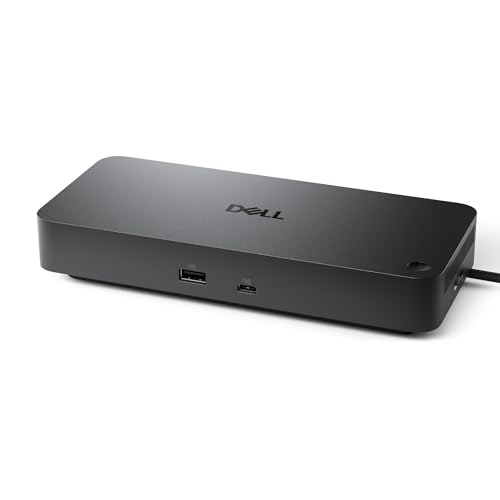
For professionals seeking a reliable solution to enhance their productivity, the Dell Pro Dock WD25 – USB Type-C Docking Station shines with its ability to deliver up to 100W of power to both Dell and non-Dell laptops. It supports up to four high-resolution displays, ensuring seamless multitasking. With the latest ports for faster USB and network speeds, it keeps your workflow efficient. Designed for manageability, it improves IT efficiency while minimizing disruptions. Plus, its commitment to sustainability is impressive, featuring at least 65% recycled materials and up to 72% reduction in standby power consumption. This dock is a powerhouse for any workspace.
Best For: Professionals looking for a versatile docking solution that enhances productivity and supports multiple high-resolution displays.
Pros:
- Supports up to 100W power delivery to both Dell and non-Dell laptops, ensuring efficient charging.
- Ability to connect up to four high-resolution displays, facilitating seamless multitasking and enhanced productivity.
- Sustainable design featuring at least 65% recycled materials and significant reductions in power consumption during standby.
Cons:
- May require specific drivers or software updates for optimal compatibility with certain non-Dell laptops.
- Limited to USB Type-C connectivity, which may not be compatible with older devices without adapters.
- Higher initial investment compared to basic docking stations that offer fewer features.
Anker Laptop Docking Station Dual Monitor (8-in-1 USB C Hub)

Searching for a powerful docking station that elevates your productivity? The Anker Laptop Docking Station Dual Monitor (8-in-1 USB C Hub) is your solution. With dual HDMI ports, you can stream or mirror content in stunning 4K, making multitasking a breeze. Its USB-C PD-IN charging port and 85W power delivery keep your devices charged without hassle. Plus, with two USB-A data ports, an Ethernet hub, and an SD card reader, you’ll enjoy massive expansion options. Compatible with Windows and ChromeOS, this hub integrates seamlessly into your workflow. Just remember, it requires a 100W PD wall charger, which isn’t included.
Best For: Professionals and students who need a versatile docking station for dual monitor setups and extensive connectivity options.
Pros:
- Massive expansion with multiple ports including dual HDMI, USB-A, Ethernet, and SD card reader for enhanced productivity.
- 4K dual display capabilities allow for high-resolution streaming and multitasking across two monitors.
- 85W Power Delivery ensures your devices stay charged while in use, reducing cable clutter.
Cons:
- Charger not included, requiring an additional purchase of a 100W PD wall charger.
- Limited compatibility as it does not support Linux systems.
- macOS limitations with identical content display on both external monitors may not suit all users’ needs.
WD19DCS Dell Docking Station Dual Monitor

The WD19DCS Dell Docking Station is an excellent choice for professionals who demand high-performance connectivity and versatility in their workspace. With dual 4K display support, it allows you to connect up to four monitors, enhancing your productivity. The 240W power adapter delivers up to 210W to your device, ensuring you stay charged throughout your workday. Its USB-C capabilities streamline data, audio, and video connections. Weighing 4.55 pounds and measuring 12.4 x 11.85 x 2.44 inches, it fits seamlessly into any setup. With a solid 4.1-star rating, it’s a reliable solution for your docking needs.
Best For: Professionals seeking a high-performance docking station with dual monitor support for enhanced productivity.
Pros:
- Versatile connectivity: Supports up to four displays, including dual 4K monitors, for improved multitasking.
- Powerful performance: The 240W power adapter delivers ample power to keep devices charged throughout the workday.
- USB-C convenience: Streamlines connections for data, audio, and video through a single cable.
Cons:
- Weight: At 4.55 pounds, it may be less portable for users who travel frequently.
- Compatibility requirements: Requires USB-C or Thunderbolt compatibility, which may limit its use with older devices.
- Price point: Higher-end docking stations may be more expensive compared to basic models.
Factors to Consider When Choosing a High Performance Docking Station
When you’re choosing a high-performance docking station, you’ll want to think about several key factors. Consider the variety and types of ports available, along with the display resolution support to guarantee it meets your needs. Don’t forget to check the power delivery capacity and heat management features, as well as compatibility with your devices.
Port Variety and Types
Choosing a high-performance docking station means considering a variety of ports to guarantee compatibility with your devices and peripherals. Look for options that include USB-C, USB-A, HDMI, DisplayPort, and Ethernet to cover all your needs. Multiple USB-C ports are vital, as they support both charging and data transfer, enhancing functionality. If you multitask, select a docking station with triple display capabilities; this will boost your productivity considerably. Pay attention to data transfer speeds—USB 3.0 and USB 3.1 ports deliver speeds of up to 5Gbps and 10Gbps, respectively, which is essential for efficient file transfers. Finally, consider models that feature SD and microSD card slots for easy access to additional storage and seamless file management.
Display Resolution Support
To maximize your productivity, understanding display resolution support is vital when selecting a high-performance docking station. Look for models that can handle up to triple 4K displays or even 8K output for stunning clarity. Confirm it supports multiple display configurations, like dual or triple monitors, to enhance your multitasking capabilities. Consider specifications that indicate high refresh rates, such as 60Hz for 4K displays, which provide smoother visuals. It’s also important to check for compatibility with DisplayPort Multi-Stream Transport (MST) technology, allowing seamless connections of multiple displays through a single output. If you’re using a macOS system, be mindful of potential limitations, as they often only support Single-Stream Transport (SST), resulting in mirrored displays instead of extended ones.
Power Delivery Capacity
Understanding display resolution support sets the stage for another key feature: power delivery capacity. This capacity is essential, as it dictates how much power your docking station can supply to connected devices. With docking stations offering up to 210W of power delivery, you can effectively charge high-performance laptops while transferring data. A higher wattage, like 140W, guarantees you can charge your laptop and other devices simultaneously without performance drops. Confirm the docking station’s power delivery aligns with your laptop’s requirements to avoid underpowering issues. Many models utilize Power Delivery (PD) protocols for fast charging and efficient power management. A robust power delivery solution can enhance your productivity by reducing clutter and the need for multiple chargers on your workspace.
Heat Management Features
While many factors contribute to a high-performance docking station, effective heat management features are crucial for maintaining ideal functionality. Look for docking stations with built-in fans and thermal regulation systems that keep temperatures in check during heavy use. Advanced cooling technologies, like Anker’s ActiveShield 3.0, monitor temperatures in real-time and adjust fan speeds to guarantee steady performance. Additionally, a well-designed station often uses aluminum or other heat-dissipating materials for enhanced passive cooling. Features like airflow channels and vents improve circulation, reducing the risk of thermal throttling. Prioritizing effective heat management not only extends your docking station’s lifespan but also ensures uninterrupted performance during demanding tasks like video editing or gaming.
Compatibility With Devices
When choosing a high-performance docking station, confirming compatibility with your devices is essential for seamless functionality. Start by confirming that the docking station supports your device’s operating system, like macOS 13.5 or later, or Windows 10/11. Next, check that its ports align with your laptop’s specifications, whether it’s USB-C, Thunderbolt, or DisplayPort Alt Mode. Display support varies, so if you’re a macOS user, be aware that some stations may only mirror displays, while Windows users can often extend them. Additionally, verify the docking station provides enough power to charge your laptop and peripherals. Finally, look into driver requirements, as some stations may need specific drivers for features like multiple displays to work effectively.
Data Transfer Speeds
Data transfer speeds play an essential role in your choice of a high-performance docking station. Look for options that offer speeds up to 10Gbps via USB-C connections, which enable rapid file transfers and efficient device communication. Many modern docks leverage DisplayLink technology, supporting high-resolution displays alongside fast data transfer rates, enhancing your workstation’s performance. Prioritize ports like USB 3.1 Gen 2 for peak speeds, as older standards like USB 2.0 can only manage up to 480Mbps. The inclusion of multiple high-speed USB ports is vital for power users, allowing simultaneous connections and data transfers. Finally, consider bandwidth requirements for video output; higher resolutions like 4K demand more data throughput than standard HD, impacting your overall productivity.
Build Quality and Design
Build quality and design are critical factors when selecting a high-performance docking station. A sleek aluminum body not only enhances the look but also aids in heat dissipation, which helps maintain performance stability. Consider the dimensions and weight, as lighter models improve portability for frequent travelers. Robust materials are essential for durability, ensuring your docking station withstands daily use without wear and tear. Additionally, effective cable management can declutter your workspace, promoting organization and productivity. Don’t overlook integrated security features, like a locking mechanism, which can protect against theft and unauthorized access to your devices. Prioritizing these aspects will lead you to a docking station that meets both your aesthetic and functional needs.