
In today’s tech-driven world, having a reliable USB hub with an Ethernet port is essential for seamless connectivity. Whether you’re working from home, gaming, or simply connecting multiple devices, the right hub can make all the difference. With the demand for these gadgets on the rise, it’s vital to know which options stand out in 2026. Let’s explore the top contenders that can enhance your setup and keep you connected.
UGREEN Revodok 6 in 1 USB C Hub with Ethernet and HDMI

If you’re a Mac user or someone who relies on high-speed internet for gaming or work, the UGREEN Revodok 6 in 1 USB C Hub is perfect for you. This hub transforms a single USB-C port into six, featuring a 4K HDMI output and a Gigabit Ethernet port for lightning-fast connections. You’ll enjoy stable online gaming and seamless video calls with speeds up to 1000Mbps. Plus, the hub supports 100W pass-through charging, ensuring your devices stay powered. With three USB-A 3.0 ports, you can easily connect peripherals like mice and keyboards, making this hub a versatile addition to your setup.
Best For: Mac users and individuals requiring high-speed internet for gaming and work.
Pros:
- Versatile connectivity: Transforms a single USB-C port into six, accommodating multiple devices.
- High-speed performance: Gigabit Ethernet port supports up to 1000Mbps for stable internet connections.
- 4K HDMI output: Provides high-definition visuals for movies, online meetings, and presentations.
Cons:
- Limited HDMI support: Does not support HDR or 3D content.
- Power allocation: 15W reserved for operations may limit charging for some high-power devices.
- Speed limitations: HDMI output is capped at 30Hz for 4K resolution, which may not suit all users.
Anker 6-in-1 USB C Hub with Ethernet and HDMI Adapter

The Anker 6-in-1 USB C Hub with Ethernet and HDMI Adapter is an ideal choice for professionals and creatives who need to expand their device connectivity without sacrificing speed or performance. Weighing just 2.89 ounces, this compact hub features a Power Delivery input port, an HDMI port supporting 4K@30Hz, an Ethernet port, a USB-C data port, and two USB data ports. You can connect a 65W wall charger for powerful pass-through charging, ensuring your laptop stays powered. With a 4.6-star rating from over 3,400 reviews and an 18-month warranty, it’s a reliable option for all your connectivity needs.
Best For: Professionals and creatives looking to expand their device connectivity with a compact and efficient multiport adapter.
Pros:
- Massive Expansion: Offers multiple ports including HDMI, Ethernet, and USB, accommodating various devices.
- Powerful Pass-Through Charging: Allows for high-speed charging of laptops with a 65W wall charger.
- High-Quality Media Display: Supports external displays up to 4K@30Hz for enhanced viewing experiences.
Cons:
- Limited HDMI Refresh Rate: Only supports 4K at 30Hz, which may not be sufficient for demanding applications.
- Weight and Size: While compact, some users may prefer an even lighter or smaller option.
- Price Sensitivity: Some customers may find it slightly expensive compared to similar products.
UGREEN USB to Ethernet Adapter with 5 Ports
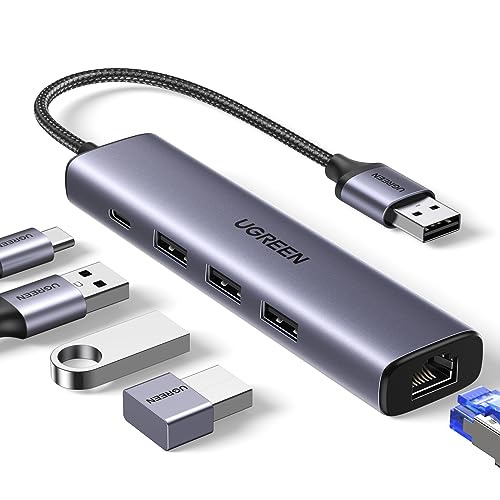
For professionals and students needing reliable connectivity, the UGREEN USB to Ethernet Adapter with 5 Ports stands out as an excellent choice. With one Gigabit RJ45 Ethernet port and three USB 3.0 ports, you’ll enjoy network speeds up to 1000Mbps and data transfer rates of 5Gbps—ten times faster than USB 2.0. It’s compatible with laptops, MacBooks, and Windows 11, ensuring seamless plug-and-play functionality. Plus, its compact size and lightweight design make it portable. While it supports high-power peripherals through its USB-C power port, it won’t charge your laptop. Rated 4.6 out of 5 stars, it’s a reliable addition.
Best For: Professionals and students who require reliable wired connectivity and high-speed data transfer for their devices.
Pros:
- Fast Network Speeds: Offers up to 1000Mbps for stable wired connections.
- Multiple Ports: Includes 1 Gigabit Ethernet port and 3 USB 3.0 ports for versatile connectivity.
- Portable Design: Compact and lightweight, making it easy to carry for on-the-go use.
Cons:
- Driver Installation Required: Needs drivers for Windows XP/7/8/Vista and Linux, which may complicate setup for some users.
- No Laptop Charging: The USB-C power port does not support charging host devices like laptops.
- Limited Compatibility: While it supports many systems, it may not work seamlessly with all older devices.
Anker USB C Hub with Ethernet (8-in-1 Multiport Adapter)

Looking for a versatile solution to expand your device’s connectivity? The Anker USB C Hub with Ethernet is your answer. This 8-in-1 multiport adapter features a 4K 60Hz HDMI port, 10Gbps USB-C and USB-A data ports, and a microSD/SD card reader, giving you massive expansion from a single USB-C port. You’ll enjoy flawless 4K video output and high-speed data transfers. Plus, with 85W power delivery, you can charge your devices while using the hub. Compatible with MacBook Pro, XPS, and iPad, it’s perfect for modern users. Just plug it in and experience seamless connectivity!
Best For: Users looking to expand connectivity options on their devices with a high-speed, versatile hub.
Pros:
- Massive Expansion: Offers multiple ports including HDMI, USB-C, USB-A, and card reader for extensive connectivity.
- High-Speed Data Transfer: Achieves data transfer speeds up to 10 Gbps for quick file sharing.
- Power Delivery: Supports up to 85W pass-through charging, allowing you to power your devices simultaneously.
Cons:
- Limited Compatibility: Not compatible with Linux systems, which may restrict usage for some users.
- Requires Specific Power Supply: Optimal performance requires a 100W Power Delivery charger, which may necessitate an additional purchase.
- HDMI Port Only for Video Output: The USB-C port is dedicated to data transfer, limiting options for simultaneous video and data connections.
FORIDA Aluminum USB to Ethernet Adapter with 7-Port USB Hub
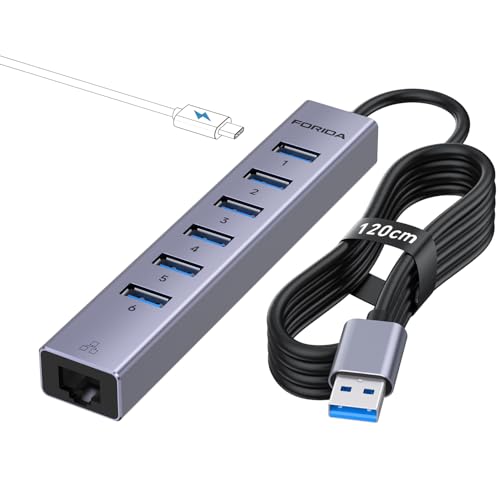
Enhancing your connectivity options, the FORIDA Aluminum USB to Ethernet Adapter with 7-Port USB Hub is ideal for professionals and gamers who require a reliable, high-speed internet connection. This versatile hub expands one USB A port into eight, featuring six USB 3.0 ports, a USB C charging port, and a Gigabit Ethernet port. With a 3.9ft cable, you won’t struggle with reach. Enjoy data transfer speeds up to 5 Gbps, ensuring quick file transfers. Plus, the smart charging capability provides up to 15W power. It’s compatible with various operating systems and includes an 18-month warranty for peace of mind.
Best For: Professionals and gamers seeking a reliable, high-speed internet connection with expanded USB capabilities.
Pros:
- Versatile Connectivity: Expands one USB A port into eight, providing multiple USB 3.0 ports and a Gigabit Ethernet port.
- High Data Transfer Speeds: Offers up to 5 Gbps data transfer speed, significantly faster than USB 2.0.
- Smart Charging Capability: Includes a 5V/3A power interface for efficient charging of devices while using multiple ports.
Cons:
- Limited to USB A Ports: Requires an available USB A port for connection, which may be a limitation for newer devices with only USB C ports.
- Cable Length: While 3.9ft is convenient, it may not be long enough for some setups.
- Potential Compatibility Issues: Although compatible with various operating systems, some older devices may experience connectivity challenges.
Acer USB to Ethernet Adapter with USB 3.0 Hub

The Acer USB to Ethernet Adapter with USB 3.0 Hub is an excellent choice for professionals and gamers who require seamless connectivity without compromising performance. With its dual USB-A/C port design and a Gigabit Ethernet port, you can enjoy wired Internet speeds up to 1000Mbps. Plus, the three USB 3.0 ports allow data transfers at 5Gbps, making it perfect for streaming and large file transfers. Its plug-and-play setup works across various operating systems, ensuring compatibility with your devices. Constructed from durable aluminum, this slim and portable hub is ideal for travel, providing reliable connectivity wherever you go.
Best For: Professionals and gamers who need seamless and high-speed connectivity for streaming, gaming, and large file transfers.
Pros:
- Dual USB-A/C port design offers versatility and compatibility with various devices.
- Gigabit Ethernet port enables wired Internet speeds up to 1000Mbps for stable connections.
- Three USB 3.0 ports support high-speed data transfers at 5Gbps, enhancing productivity.
Cons:
- Older systems may require driver installation, which could complicate setup for some users.
- Optimal performance requires CAT6 or higher Ethernet cables, potentially increasing costs for users.
- Limited to three USB ports, which may not be sufficient for users with multiple peripherals.
UGREEN Revodok Pro 9 in 1 USB C Hub

For professionals and gamers seeking seamless connectivity, the UGREEN Revodok Pro 9 in 1 USB C Hub stands out with its stable gigabit Ethernet port, delivering speeds of up to 1000Mbps. This hub transforms one USB-C port into nine, featuring a 4K@60Hz HDMI port for stunning visuals, alongside fast data transfer capabilities up to 10Gbps. You’ll appreciate the PD 100W fast charging, which powers your laptop while still allowing other devices to connect. Compatible with Mac M1, M2, M3, M4, and Steam Deck, this hub is your perfect companion for work or play, enhancing both productivity and entertainment.
Best For: Professionals and gamers seeking enhanced connectivity and performance from a single USB-C port.
Pros:
- Versatile Connectivity: Offers nine ports including HDMI, Ethernet, and multiple USB data ports, catering to various device needs.
- High-Speed Performance: Supports fast data transfer speeds up to 10Gbps and stable gigabit Ethernet connection for reliable online activities.
- 4K Visuals: The 4K@60Hz HDMI port provides stunning visuals for presentations, gaming, and media consumption.
Cons:
- Limited USB-C Port Functionality: The USB-C port only supports charging and does not allow for data transmission or video output.
- Potential Overheating: High power usage during charging and data transfer may lead to overheating in some scenarios.
- Compatibility Restrictions: Primarily designed for specific devices like Mac M1, M2, M3, M4, and Steam Deck, limiting use with other brands.
MCY USB C Hub Multiport Adapter for Laptops

Looking to elevate your productivity? The MCY USB C Hub Multiport Adapter is your ultimate 10-in-1 docking station. With support for dual monitor setups, you can enjoy single 8K or dual 4K@60Hz outputs, perfect for stunning visuals on your MacBook or Windows laptop. Fast charging is a breeze with its 100W PD pass-through port, while the 1000Mbps Ethernet guarantees stable internet. You’ll also appreciate the two USB-A and two USB-C ports for rapid data transfers, alongside an efficient SD/TF card reader. Compatible with most USB-C devices, this hub offers versatility for all your connectivity needs.
Best For: Professionals and creatives who require multiple display outputs and fast data transfer capabilities for enhanced productivity.
Pros:
- Versatile connectivity options with 10 ports, including dual monitor support for enhanced multitasking.
- Fast charging capabilities with a 100W PD pass-through port, allowing for quick power replenishment while using other devices.
- High data transfer speeds of up to 5Gbps, making it ideal for users needing quick access to large files.
Cons:
- Limited compatibility for Mac systems, as they only support dual 4K outputs and not the full 8K capability.
- SD/TF card reader cannot read cards simultaneously, which may be inconvenient for users needing to access multiple cards at once.
- Requires DP1.4 support for 8K output, which may limit usability with older devices.
ALL-LUCKY USB to Ethernet Adapter Hub (4 in 1)

Designed specifically for users of devices like the iMac, MacBook Pro, iPad Pro, and XPS, the ALL-LUCKY USB to Ethernet Adapter Hub (4 in 1) offers exceptional connectivity options. This hub features three USB 3.0 ports and one Gigabit Ethernet port, letting you connect multiple peripherals seamlessly. With plug-and-play functionality, you won’t need any drivers for most systems. Enjoy impressive network performance with speeds up to 1000Mbps, especially when using a CAT6 cable. Plus, its compact design guarantees portability, making it perfect for use in various settings like offices, schools, and libraries.
Best For: Users of iMac, MacBook Pro, iPad Pro, and XPS looking for seamless connectivity and high-speed network performance.
Pros:
- Expands connectivity with three USB 3.0 ports and one Gigabit Ethernet port.
- Supports high-speed data transfer rates up to 5Gbps and network speeds up to 1000Mbps.
- Compact and portable design ideal for use in various environments like offices and schools.
Cons:
- Does not support device charging, with a maximum output current of 900mA.
- Driver required for Windows 7 compatibility.
- Limited to USB 3.0 speeds, not fully utilizing older USB standards.
Hiearcool USB C Hub Ethernet 8-in-1 Adapter

The Hiearcool USB C Hub Ethernet 8-in-1 Adapter is the ultimate solution for professionals who need seamless connectivity and enhanced productivity. With its 4K HDMI output at 60Hz and 1Gbps Ethernet, you can enjoy fast internet and stunning visuals for video calls or presentations. It features three USB 3.0 ports, SD and TF card readers, and supports 100W pass-through charging, making it perfect for multitasking. Compatible with various USB-C laptops, this compact hub (5.16 x 1.77 x 0.55 inches) weighs just 3.04 ounces, ensuring you stay connected whether at home, the office, or on business trips.
Best For: Professionals and students who require versatile connectivity and enhanced productivity while using USB-C laptops.
Pros:
- Supports 4K HDMI output at 60Hz, providing high-quality visuals for presentations and streaming.
- 1Gbps Ethernet connectivity ensures fast and reliable internet access for video calls and online meetings.
- Compact and lightweight design makes it easy to carry for business travel or remote work.
Cons:
- Limited to USB-C laptops, which may exclude some older devices.
- Only three USB 3.0 ports may not be sufficient for users with multiple peripherals.
- Some users may find the price point higher compared to simpler USB hubs.
Factors to Consider When Choosing a USB Hub with Ethernet Port
When you’re choosing a USB hub with an Ethernet port, consider several key factors. Think about the port configuration options, data transfer speeds, and charging capabilities to guarantee it meets your needs. Additionally, check its compatibility with your devices and evaluate its size for portability.
Port Configuration Options
Choosing the right USB hub with an Ethernet port hinges on understanding your port configuration options. Start by considering the number and types of ports you need, like USB-A, USB-C, HDMI, and Ethernet, to guarantee compatibility with your devices. Look for a hub that features a Gigabit Ethernet port for a speedy connection, perfect for gaming and streaming. Evaluate the USB ports’ data transfer speeds; USB 3.0 ports offer up to 5Gbps, considerably faster than USB 2.0. Don’t forget to check for power delivery capabilities, which provide charging options for laptops, with power ranging from 65W to 100W. Finally, if you need visuals, verify the hub supports 4K HDMI output for ideal presentations and media playback.
Data Transfer Speeds
Data transfer speeds play a significant role in your experience with a USB hub that includes an Ethernet port. Typically, USB 3.0 ports offer speeds up to 5Gbps, while USB 3.1 and USB-C can reach 10Gbps. If you’re upgrading from USB 2.0, which operates at just 480Mbps, you’ll notice a massive improvement in file transfer times. Additionally, the Ethernet ports in these hubs can support network speeds of up to 1000Mbps, ensuring reliable internet connectivity. When choosing a USB hub, consider the number of available ports and their data transfer rates to effectively manage multiple devices. Compatibility with USB standards is also essential for maximizing speed and performance across all your connected peripherals.
Charging Capabilities
While evaluating a USB hub with an Ethernet port, it’s essential to take into account its charging capabilities to confirm it meets your power needs. Look for hubs with power delivery (PD) support, ideally up to 100W, which can efficiently power your laptop while using other peripherals. Pay attention to the wattage reserved for operation; for instance, a hub may allocate 85W for charging, reserving 15W for its functionality. Check that the charging features align with your device, as some hubs only support charging via USB-C without data or video output. Additionally, verify the number of USB ports balances charging and data transfer speeds, especially if they share the same USB-C port.
Compatibility With Devices
When selecting a USB hub with an Ethernet port, compatibility with your devices is essential for ensuring seamless operation. First, check that the hub works with your operating system—be it Windows, macOS, Chrome OS, or Linux—since some may need specific drivers for older systems. Next, look for compatibility with USB standards like USB-C and USB-A to connect effortlessly across devices. Make sure the hub supports necessary protocols like DP Alt Mode for video and Power Delivery for charging, maximizing its functionality. Also, consider your hardware specifications, especially if your devices have Thunderbolt ports. Finally, choose hubs that explicitly list compatibility with your specific device models for guaranteed performance and reliability.
Size and Portability
Choosing the right USB hub with an Ethernet port involves considering its size and portability, especially if you’re often on the move. A compact and lightweight design makes travel easier, allowing you to slip it into bags or laptop cases without adding bulk. Look for hubs with a slim profile, as they fit seamlessly into tight spaces. A built-in cable or short, flexible design can help reduce clutter, making it simpler to connect devices in crowded areas. Also, prioritize ease of handling; larger or bulkier hubs can be cumbersome in busy environments like offices or classrooms. By evaluating these factors, you’ll guarantee you get a hub that’s both functional and portable, perfectly suited for your lifestyle.
Build Quality Materials
The build quality of materials in USB hubs with Ethernet ports plays a crucial role in their performance and longevity. Look for hubs made from durable aluminum or high-grade plastic, as these materials guarantee lasting use and effective heat dissipation. A robust construction not only extends the hub’s lifespan but also offers stability, protecting it from regular wear and accidental drops. Consider the weight and portability, too; lighter materials make it easier to carry during travel. High-quality connectors and ports made from corrosion-resistant materials enhance performance and reliability, while proper insulation and shielding minimize interference, boosting data transfer speeds. Prioritizing these factors will lead you to a dependable USB hub for your connectivity needs.
Warranty and Support
While evaluating USB hubs with Ethernet ports, it’s essential to contemplate the warranty and support options offered by manufacturers. Warranty durations can vary, with some hubs providing as little as 12 months and others extending up to 18 months or more, giving you peace of mind. Understanding warranty terms is vital, as it highlights coverage for hardware malfunctions and any exclusions for specific damage types. Additionally, consider customer support availability; many manufacturers have dedicated teams ready to assist you with technical issues or inquiries. Look for online resources like FAQs, user manuals, and troubleshooting guides, which can enhance your experience. A solid warranty and support system boosts user satisfaction and confidence in your product choice.