
If you need sharper text, cleaner graphics, and reliable paper handling, the right scanner can make a major difference. This roundup of high resolution document scanners focuses on models that balance image quality, speed, and everyday usability.
Whether you want a compact home option, a wireless office workhorse, or a portable feeder for travel, the picks below are chosen to help you find the best fit quickly.
Best 10 High Resolution Document Scanners Picks for 2026
Fast Office Scanning

- 50-sheet ADF handles larger scan batches.
- Duplex scanning with double-feed detection.
- OCR and ScanSmart simplify file management.
Best For: Busy offices that want fast, dependable document scanning.
Compact High-Detail Pick

- 2400 x 2400 dpi optical resolution.
- Auto Scan Mode simplifies operation.
- Handles documents, photos, receipts, and cards.
Best For: Users who want a compact scanner with high-detail output.
Wireless Workflow Upgrade

- Wi‑Fi scanning works without a computer.
- 100-sheet ADF handles bigger jobs.
- Duplex scanning plus OCR improve workflow.
Best For: Users who want wireless, cloud-friendly document scanning.
One-Touch Productivity
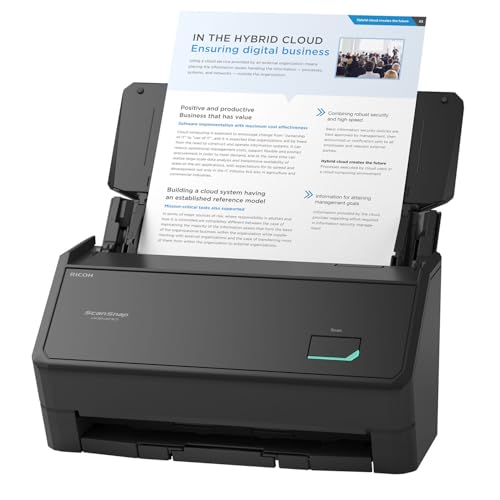
- One-touch scanning keeps it easy to use.
- 100-sheet feeder and up to 45 ppm.
- 600 dpi resolution and ScanSnap Home software.
Best For: People who want fast, automated scanning for mixed paper types.
Space-Saving Wireless Pick

- Compact design for small desks
- USB or Wi-Fi scanning
- Up to 30 ppm duplex with image cleanup
Best For: Compact, wireless scanning for mixed home-office use
Photo And Document Hybrid

- Batch-scans photos quickly
- Duplex capture for photo backs
- USB and wireless with OCR software
Best For: Photo archiving plus fast document scanning
High-Volume Searchable Filing

- 30 ppm duplex scanning
- Full-text search and barcode naming
- 50-sheet ADF
Best For: Busy users who need fast scanning and easy file organization
Fast Office Scanning – Epson WorkForce ES-400 II
For shoppers comparing high resolution document scanners, the Epson WorkForce ES-400 II is a practical desktop option built for fast everyday paperwork. Its 50-sheet ADF, duplex scanning, and OCR tools make it a good fit when you want efficient batch scanning, searchable PDFs, and easy file sharing without a lot of setup time.
Best For: Busy home offices and small workgroups that need fast, reliable document scanning with simple file management.
Pros:
- 50-sheet automatic document feeder helps you scan stacks more efficiently.
- Duplex scanning and double feed detection support smoother multi-page jobs.
- Epson ScanSmart includes preview, cloud upload, email, and automatic file naming.
- OCR can create searchable PDFs and convert scans to editable Word or Excel files.
Cons:
- Rated optical resolution is 300 dpi, so it is not the highest-resolution pick in this group.
- USB connection only, so it is less flexible than wireless models.
If your priority is speed, workflow efficiency, and dependable document handling, the ES-400 II is a strong office-focused scanner. It is less about ultra-fine detail and more about getting lots of pages into usable digital files quickly.
Compact High-Detail Pick – Canon CanoScan LiDE 300
If you want high resolution document scanners for occasional home or desk use, the Canon CanoScan LiDE 300 stands out for detail. Its 2400 x 2400 dpi optical resolution is well suited for digitizing documents and images, and Auto Scan Mode helps keep the process simple when you just want to load and go.
Best For: Home users who want a compact USB scanner with higher detail for documents and images.
Pros:
- 2400 x 2400 dpi optical resolution offers the highest detail in this lineup.
- Auto Scan Mode automatically detects what you are scanning.
- LED light source and USB connectivity keep the unit simple to use.
- Works with documents, photos, receipts, and business cards.
Cons:
- Single-sheet capacity means it is not built for batch scanning.
- Best suited to Windows 7 systems based on the supplied requirements.
The LiDE 300 is the most detail-focused choice here, but it is not designed for large document stacks. It makes more sense when resolution and simplicity matter more than speed.
Wireless Workflow Upgrade – Epson WorkForce ES-580W
Among high resolution document scanners, the Epson WorkForce ES-580W is a strong choice if you want flexibility as much as speed. With Wi‑Fi, a 4.3-inch touchscreen, and a 100-sheet ADF, it is designed to move scans straight to your device or cloud account while keeping batch jobs moving efficiently.
Best For: Offices and home users who want wireless scanning, a large feeder, and easy cloud sharing.
Pros:
- Wireless connectivity lets you send scans to smartphones, tablets, computers, or cloud storage.
- 100-sheet ADF supports larger scan batches with less reloading.
- Duplex scanning and Single-Step Technology capture both sides automatically.
- OCR, searchable PDFs, and editable Word or Excel conversion improve document handling.
Cons:
- Rated optical resolution is 300 dpi, which is solid but not class-leading for detail.
- Wireless features add complexity compared with a simple USB-only scanner.
The ES-580W is best when you want scanning to fit into a modern shared workflow. It is especially useful if you value cable-free convenience and direct cloud or device access.
One-Touch Productivity – ScanSnap iX2400
For buyers comparing high resolution document scanners, the ScanSnap iX2400 is built around speed and simplicity. One-touch scanning, a 100-sheet feeder, and 600 dpi resolution make it a good fit for turning mixed paper stacks into cleaned-up digital files without much manual effort.
Best For: Users who want quick one-button scanning for documents, receipts, cards, and photos.
Pros:
- One-touch operation keeps scanning simple and fast.
- 100-sheet feeder and up to 45 pages per minute support productive batch scanning.
- 600 dpi resolution is the highest rated resolution in this set.
- ScanSnap Home helps organize documents, receipts, business cards, photos, and more.
Cons:
- USB connection only, so it does not offer wireless flexibility.
- Heavier than the compact flatbed-style option in this roundup.
The iX2400 is a strong pick if you want a fast scanner that does a lot of cleanup and organization automatically. It is especially appealing when you need a single device to handle many everyday paper types.
Office-Ready Duplex Speed – Canon imageFORMULA R40II
If you want high resolution document scanners that prioritize speed and simple day-to-day office use, the Canon imageFORMULA R40II is built for exactly that. It scans both sides at once at up to 45 pages per minute, handles a wide mix of document types, and connects by USB-C for straightforward setup.
Best For: Small offices or home offices that need fast duplex scanning with easy setup and broad document handling.
Pros:
- Up to 45 pages per minute with duplex scanning and a 60-sheet automatic feeder.
- Handles receipts, business cards, reports, contracts, and long or thick documents.
- Simple USB-C connection and included Canon CaptureOnTouch software.
- 600 dpi resolution for detailed document capture.
Cons:
- Designed exclusively for the included Canon CaptureOnTouch software.
- TWAIN and ISIS drivers are not supported.
Overall, the R40II is a practical pick if your priority is fast, reliable document throughput rather than advanced driver flexibility. Its mix of speed, feeder capacity, and document versatility makes it a strong everyday office scanner.
Space-Saving Wireless Pick – ScanSnap iX1300
The ScanSnap iX1300 is a strong fit if you want high resolution document scanners in a compact footprint. It scans up to 30 pages per minute in duplex, connects by USB or Wi-Fi, and uses automatic image cleanup features like de-skew, color optimization, and blank page removal to make results easy to use.
Best For: Users who want a compact scanner for mixed documents, photos, cards, and cloud-ready workflows.
Pros:
- Space-saving design that stays out of the way on a desk.
- USB and Wi-Fi connectivity for Mac, PC, mobile devices, and cloud services.
- Up to 30 ppm duplex scanning with automatic de-skew and blank page removal.
- Handles documents, photos, thick items, and plastic cards.
Cons:
- 20-sheet standard capacity is smaller than some office-focused models.
- Best results rely on the ScanSnap Home software ecosystem.
For people who need a scanner that is easy to place, easy to connect, and easy to use, the iX1300 makes a lot of sense. It trades raw feeder capacity for convenience, portability, and polished scanning output.
Photo And Document Hybrid – Epson FastFoto FF-680W
The Epson FastFoto FF-680W stands out among high resolution document scanners because it is built for both documents and photo preservation. It can batch-scan photos quickly, includes duplex capture for front-and-back content, and offers multiple resolution options for sharing, archiving, or enlarging scans.
Best For: Anyone digitizing photo collections while also needing fast document scanning and OCR.
Pros:
- Scans photos very quickly, including batch scanning up to 36 at a time.
- Duplex scanning captures the image and handwritten notes on the back of a photo in one pass.
- Includes Epson ScanSmart software with OCR for readable document text.
- USB and wireless connectivity support flexible placement.
Cons:
- Standard sheet capacity is only 10 sheets.
- Designed with photo scanning in mind, so it may be more specialized than a general office scanner.
This model is a smart choice if your scanning workload includes old photos, mixed family archives, and documents. Its speed and image tools are especially useful when preservation matters as much as organization.
Desk-Ready Speed and Simplicity – Canon imageFORMULA R30
If you want high resolution document scanners that are easy to set up and quick to use, the Canon imageFORMULA R30 is a practical office pick. It scans both sides at up to 25 pages per minute, includes a 60-sheet feeder, and can handle mixed batches like invoices, contracts, business cards, and everyday paperwork.
Best For: Small offices and home users who want fast duplex scanning with no software installation.
Pros:
- Built-in scanning software requires no installation and updates automatically
- Duplex scanning at up to 25 pages per minute
- 60-sheet automatic feeder for larger document stacks
- Supports many document types, including mixed batches
Cons:
- USB connection only, so it is best placed near a computer
- Rated resolution is 600 dpi, which is solid but not specialized for photo work
The R30 is a strong fit if you want an everyday document scanner that keeps workflow simple. Its plug-and-scan approach makes it especially appealing when you need reliable output without dealing with extra setup steps.
High-Volume Searchable Filing – Plustek PS188
For buyers comparing high resolution document scanners for organized digital filing, the Plustek PS188 stands out for speed and search tools. It scans double-sided pages at up to 30 pages per minute, includes a 50-sheet ADF, and adds features like embedded full-text search and barcode-based file naming.
Best For: Users who want fast duplex scanning plus stronger file search and naming tools.
Pros:
- Scans both sides at up to 30 pages per minute
- 50-sheet automatic feeder for efficient batch scanning
- Full-text search helps make saved files easier to find
- Barcode recognition can save barcodes as filenames
Cons:
- Windows-only support may limit cross-platform use
- Designed for documents rather than broader media use
The PS188 is a good choice when speed matters, but organization matters too. Its search and naming features make it especially useful if you scan many files and need them easy to retrieve later.
Portable Office On the Go – Canon imageFORMULA R10
If portability is the priority in high resolution document scanners, the Canon imageFORMULA R10 is built for mobile use. It is USB powered, lightweight, and compact, while still offering duplex scanning, a 20-sheet feeder, and support for receipts, cards, reports, and legal documents.
Best For: Mobile workers, classrooms, and home offices that need a compact scanner with easy setup.
Pros:
- Portable, lightweight design for easy transport
- USB powered with no complicated setup
- Duplex scanning up to 12 pages per minute
- Works with Windows and Mac computers
Cons:
- 20-sheet feeder is smaller than larger desktop models
- 12 ppm speed is more modest than faster office scanners
The R10 fits best when you need a scanner you can move between locations without sacrificing core document features. It is less about bulk throughput and more about convenient, reliable scanning wherever you work.
How We Picked the Best High Resolution Document Scanners
We selected scanners based on practical buying factors that matter most in real use: scan quality, duplex performance, feed reliability, software ease, connection options, and overall value. We also prioritized models that can handle common office tasks without constant adjustment or re-scanning.
Quick Comparison
In this group, some scanners are better suited to daily office workloads, while others are more compact, portable, or photo-friendly. If you want the simplest setup, look for models with plug-and-scan or one-touch workflows. If you need more flexibility, wireless options and cloud support can save time.
Key Buying Factors for High Resolution Document Scanners
Image Quality and Detail
For High Resolution Document Scanners, resolution is only part of the story. Look for crisp OCR accuracy, strong contrast, and dependable color reproduction if you scan receipts, contracts, IDs, or mixed documents.
Duplex Scanning and Speed
Double-sided scanning is essential for productivity. Check pages per minute, but also consider how consistently the scanner maintains speed with mixed paper stacks and thicker documents.
Feeder Capacity and Paper Handling
An automatic document feeder can dramatically reduce manual work. If you scan multi-page files often, a larger feeder and better jam prevention are worth paying for.
Connectivity and Workflow
USB is fine for a single workstation, while wireless models make sense for shared spaces. Cloud destinations, one-button presets, and mobile-friendly workflows can also make a scanner much easier to live with.
Size and Use Case
Not every scanner needs to be an office tank. Compact desktop models suit small desks, while portable scanners are better for limited space or occasional travel use. Photo-document hybrids are useful if your needs extend beyond paperwork.
Who Should Buy Which High Resolution Document Scanners?
Choose a compact, budget-conscious model if you scan occasionally and want simple setup. Choose a wireless duplex scanner if you share devices across a home office or small team. Choose a faster feeder-based office scanner if you handle larger stacks and need dependable daily throughput. If portability matters most, go with a lightweight USB-powered option. For mixed photo and document archiving, a model built for both is the smartest choice.
In short, the best choice depends on whether you value resolution, speed, portability, or convenience most. Matching those priorities to the scanner’s strengths will get you better results and fewer headaches over time.