
In 2025, the industrial label printer market offers a robust selection designed to meet your diverse labeling needs. With features like high print resolutions and versatile connectivity, these printers are built for durability and efficiency. Whether you’re working in a warehouse or at a job site, choosing the right printer can greatly impact your operations. Let’s explore the top ten models that stand out with regard to performance and reliability.
LabelTac Industrial Label Printer 4
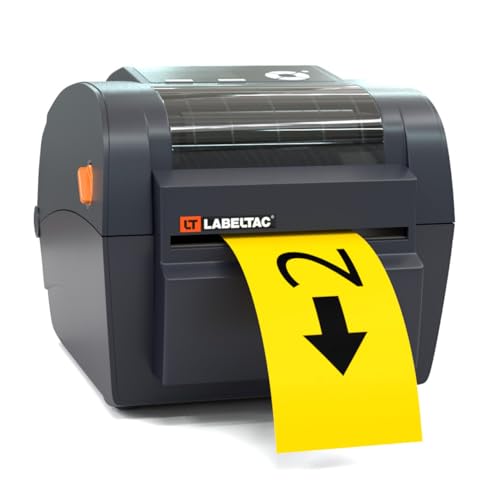
The LabelTac Industrial Label Printer 4 is perfect for businesses seeking a reliable and efficient labeling solution. With its compact design, it fits seamlessly into your workstation while offering impressive print capabilities. You can create labels between 1/2 to 4 inches wide with a maximum resolution of 300 dpi using thermal transfer ink. The included LabelSuite Design and Print Software provides access to a vast library of templates, simplifying your design process. Plus, with a lifetime warranty and stellar customer reviews, you can trust this printer to meet your labeling needs for years to come.
Best For: Businesses seeking a reliable and efficient labeling solution in a compact design.
Pros:
- Lifetime warranty ensures long-term reliability and customer satisfaction.
- Extensive content library of templates and design elements simplifies the label creation process.
- Compact size allows for easy integration into any workstation or office desk.
Cons:
- Limited print functions as it only supports simplex printing.
- Compatibility restricted to LabelTac 4 supplies, limiting options for users.
- No dual-sided printing capabilities may be a drawback for some labeling needs.
HP Direct Thermal Label Printer (300 DPI)

For businesses that require high-volume labeling solutions, the HP Direct Thermal Label Printer (300 DPI) stands out as an ideal choice. This industrial-grade printer offers direct thermal printing, eliminating the hassle of ink or toner. It supports label rolls up to five inches wide and operates at an impressive speed of 7 inches per second. With versatile connectivity options like USB and Ethernet, setting it up is a breeze, especially using the Network Auto Installer software. Compact and lightweight, it easily fits into various environments, making it a favorite among users, reflected in its impressive rating of 4.7 out of 5 stars.
Best For: Businesses that require high-volume, efficient labeling solutions without the need for ink or toner.
Pros:
- Compact and lightweight design, making it easy to fit in various work environments.
- High-speed printing at 7 inches per second, ideal for quick label production.
- Versatile connectivity options, including USB and Ethernet, with easy setup through Network Auto Installer software.
Cons:
- Limited to a maximum media size of 4 x 6 inches, which may not accommodate larger labels.
- Requires direct thermal labels, which may not be suitable for all labeling needs.
- Customer reviews are based on a relatively small sample size, which may not fully represent all user experiences.
Brady M210 Portable Label Printer

Designed with professionals in mind, the Brady M210 Portable Label Printer excels in creating labels quickly and efficiently, making it an ideal choice for those working in dynamic job site environments. With dimensions of 9.5 x 4.5 x 2.5 inches and a rugged yellow and black design, this printer withstands tough conditions. You’ll appreciate its auto-format labels and 11 pre-loaded design guides for speedy creation. Plus, the military-grade shock resistance guarantees durability. With the ability to create UPC, DataMatrix, and QR Codes, along with multi-line print capabilities, it meets all your labeling needs while tracking material usage seamlessly.
Best For: Professionals who need a durable and efficient label printer for dynamic job site environments.
Pros:
- Auto-format labels with 11 pre-loaded design guides for quick label creation.
- Military-grade shock resistance ensures durability in tough conditions.
- Multi-line print capability and support for UPC, DataMatrix, and QR Codes enhance versatility.
Cons:
- Limited to a maximum of 12 label files stored on the device.
- Drop-tested but may still be susceptible to damage from extreme impacts.
- May not support as many customization options as more advanced models.
Brother PT-E310BTVP P-Touch Edge Handheld Industrial Label Printer Kit
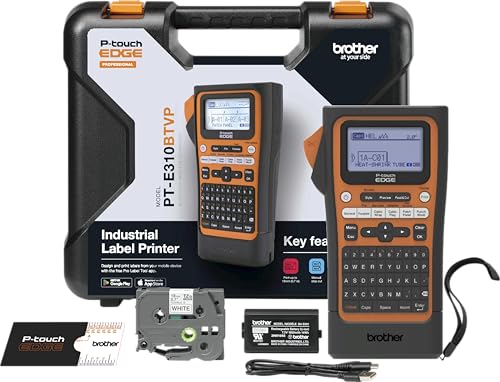
If you’re tackling mid-size projects in industrial settings, the Brother PT-E310BTVP P-Touch Edge Handheld Industrial Label Printer Kit stands out with its Bluetooth and USB-C connectivity. You’ll appreciate its ability to support labels from 3.5mm to 18mm, making it versatile for various tasks. The printer features quick application keys for labeling essentials like cable wraps and patch panels, while also allowing you to print tough laminated labels and heat shrink tubes. With the Pro Label Tool app, you can easily create and store label templates, ensuring your labeling process is efficient and streamlined.
Best For: Professionals tackling mid-size labeling projects in industrial settings who require versatility and connectivity.
Pros:
- Quick application keys facilitate efficient labeling for essential tasks like cable wraps and patch panels.
- Bluetooth and USB-C connectivity allow seamless integration with devices for easy label creation and printing.
- Supports various label sizes from 3.5mm to 18mm, making it suitable for a wide range of applications.
Cons:
- Maximum print resolution of 180 dpi may not meet the needs of those requiring higher-quality prints.
- Limited to TZe, HGe, Hse cartridges, which may restrict label media options.
- Weight of 1.76 pounds could be considered slightly heavier for handheld use compared to other models.
Brother PT-E510VP Handheld Industrial Label Printer

The Brother PT-E510VP Handheld Industrial Label Printer stands out as an ideal choice for professionals tackling large industrial projects. With features like dual auto cutter and USB-C connectivity, you can easily create durable laminated labels and heat shrink tubes. Quick application keys streamline your work for cable wraps, flags, and more. Plus, you can store databases and templates for efficient printing. The ambidextrous hand strap enhances usability, while the option to print strips of half-cut labels guarantees easy peel-and-apply functionality. Connect to your PC for advanced design with P-touch Editor, making labeling both effective and convenient.
Best For: Professionals working on large industrial projects that require durable labeling solutions.
Pros:
- Supports a wide range of label sizes from 3.5mm to 24mm, enhancing versatility.
- Quick application keys facilitate efficient labeling for various tasks such as cable wraps and flags.
- USB-C connectivity allows for easy charging and connection to a PC for advanced design options.
Cons:
- May be considered bulky for users seeking a more compact labeling solution.
- The learning curve for utilizing all features and software may be steep for some users.
- Limited to specific label types, which may not meet all labeling needs for every user.
Makeid D50 Industrial Label Printer

For professionals in need of a reliable labeling solution, the Makeid D50 Industrial Label Printer stands out with its robust features and versatility. This desktop label maker boasts a 2″ print head and is compatible with both mobile apps and PC editors. With a powerful 2600mAh Li-ion battery, you can enjoy up to 90 days of standby time. Its thermal transfer technology guarantees clarity for up to five years, while the automatic cutter and quick-change cartridge design enhance efficiency. Plus, the ultra-strong acrylic adhesive sticks firmly to rough surfaces, making it ideal for various labeling applications.
Best For: Professionals in industries such as telecommunications, electrical, and logistics who require durable and high-quality labeling solutions.
Pros:
- High print quality: Produces sharp labels with a 300 DPI resolution that last up to five years without fading.
- User-friendly features: Automatic cutter and quick-change cartridge design streamline the label-making process.
- Strong adhesive performance: Ultra-strong acrylic adhesive ensures labels adhere firmly to rough surfaces and withstand harsh conditions.
Cons:
- Limited print head size: The 2″ print head may not accommodate larger label sizes for certain applications.
- Dependency on battery: While the battery life is impressive, it may require recharging during heavy use.
- Mobile and PC compatibility: Some users may find the need for apps or software a barrier if they prefer traditional label-making methods.
Epson LW-PX900PCD Industrial Label Maker Kit

Designed for professionals in industrial settings, the Epson LW-PX900PCD Industrial Label Maker Kit stands out with its compatibility for all Epson PX tape types, making it a versatile tool for creating labels in diverse environments. This handheld device prints on various tape types, including heat shrink tubing and magnetic, with a maximum width of 1.5 inches. You’ll appreciate the large print preview screen that minimizes errors. The complete kit includes essential accessories like a rechargeable battery and USB cable, all housed in a rugged case. With a solid 4.7-star rating, it’s a reliable choice for all your labeling needs.
Best For: Professionals in industrial settings looking for a versatile and reliable label-making solution.
Pros:
- Versatile Compatibility: Works with all Epson PX tape types, including specialized options like heat shrink tubing and magnetic tape.
- User-Friendly Design: The large print preview screen helps reduce errors, ensuring accurate label creation.
- Complete Kit: Comes with essential accessories, including a rechargeable battery and rugged carrying case for portability.
Cons:
- Weight: At 7.45 pounds, it may not be as portable as lighter alternatives on the market.
- Price Point: The complete kit could be considered expensive for casual users or those with minimal labeling needs.
- Limited Maximum Media Size: The maximum label width of 1.5 inches may not meet the needs of users requiring larger labels.
Brady S3100 Sign and Label Printer (S3100-W)

Looking for a reliable labeling solution that streamlines your workflow? The Brady S3100 Sign and Label Printer (S3100-W) is your go-to desktop device for industrial applications. It effortlessly creates multi-line signs and labels, helping you clearly identify wires, panels, and circuit boards. With automatic label setup, you won’t waste time on calibration adjustments. Plus, it’s compatible with the Brady B30 Series Continuous Labeling Tape for versatile styles. Its walk-up and print functionality makes it user-friendly, ideal for enhancing safety and organization in your facility. Included components, like a quick start guide and cleaning tools, guarantee you’re ready to go!
Best For: The Brady S3100 Sign and Label Printer is best for industrial environments that require clear labeling for safety and organization.
Pros:
- Automatic label setup saves time by eliminating the need for calibration adjustments.
- User-friendly walk-up and print functionality makes it easy for anyone to operate.
- Compatible with various styles of Brady B30 Series Continuous Labeling Tape, providing versatility in labeling options.
Cons:
- Primarily designed for industrial use, which may not suit smaller office or home applications.
- Limited to specific labeling tape types, restricting options for labels outside the Brady B30 Series.
- Desktop design may require dedicated space, which could be an issue in smaller work environments.
LABELWORKS Epson LW-PX400 Industrial Label Maker Kit

The LABELWORKS Epson LW-PX400 Industrial Label Maker Kit is an ideal choice for professionals who need reliable labeling solutions in demanding environments. With support for custom labels up to 1 inch wide, you can easily mark wires and equipment with high-resolution prints. This kit includes essential accessories like an AC adapter, industrial tape cartridge, and a user guide, making it field-ready. Plus, Bluetooth connectivity allows you to operate it wirelessly with smart devices or Windows PCs. Best of all, it comes with a lifetime warranty, ensuring you’re covered if any issues arise.
Best For: Professionals in industrial settings who require durable and high-resolution labeling solutions for wires and equipment.
Pros:
- High-resolution printing for clear and durable labels, suitable for demanding environments.
- Bluetooth connectivity allows for wireless operation with smart devices and Windows PCs, enhancing flexibility.
- Comprehensive kit includes essential accessories, making it ready for immediate use in the field.
Cons:
- Limited label width of up to 1 inch may not meet the needs of all labeling tasks.
- Warranty coverage is available only in the United States and Canada, limiting support for international users.
- Potential learning curve with Label Editor software for those unfamiliar with design software.
Brother PT-E560BTVP P-Touch Edge Handheld Industrial Label Printer

For professionals tackling large industrial projects, the Brother PT-E560BTVP P-Touch Edge Handheld Industrial Label Printer stands out with its capability to support labels ranging from 3.5mm to 24mm. You’ll appreciate its Bluetooth connectivity and dual auto-cutter, making peel-and-apply tasks a breeze. This printer excels in creating laminated labels and heat shrink tubes, with quick access keys for various applications. You can design and print labels using the Pro Label Tool app or connect via USB-C to utilize P-touch Editor software. Plus, the ambidextrous hand strap adds convenience, ensuring efficiency in your labeling tasks.
Best For: Professionals involved in large industrial projects requiring efficient and versatile labeling solutions.
Pros:
- Bluetooth connectivity allows for wireless printing from mobile devices, enhancing convenience.
- Dual auto-cutter feature simplifies the peel-and-apply process, saving time on labeling tasks.
- Quick access keys for specific applications streamline workflow and improve productivity.
Cons:
- The printer may be bulkier compared to non-industrial label printers, making it less portable.
- Limited label width range (3.5mm to 24mm) may not meet the needs for all labeling applications.
- Requires a mobile app or PC connection for full design capabilities, which may add complexity for some users.
Factors to Consider When Choosing an Industrial Label Printer
When you’re choosing an industrial label printer, consider factors like printing technology options and label size compatibility. You’ll also want to look at connectivity features and design software support to guarantee it fits your workflow. Don’t forget about durability and portability to keep your operations running smoothly.
Printing Technology Options
Choosing the right printing technology for your industrial label printer is essential, as it directly affects the quality, efficiency, and cost of your labeling operations. Thermal transfer printing is a popular choice, offering high-quality, durable labels that withstand harsh environments. If you need speed and efficiency for high-volume applications, consider direct thermal printing, which eliminates ink or toner altogether. Pay attention to print resolution; options typically range from 180 to 300 dpi, impacting label clarity. Additionally, check the maximum label width your printer can handle, as some models support sizes up to 5 inches. Remember, your choice of technology will also influence consumable costs, with thermal transfer printers requiring ribbons while direct thermal printers use cost-effective heat-sensitive media.
Label Size Compatibility
Selecting the right label size is essential, as it directly impacts your labeling efficiency and effectiveness. Industrial label printers typically support various label widths, ranging from 1/2 inch to 5 inches. Check the maximum media size your printer can handle, as this may vary from 4 x 6 inches to larger formats. Some printers cater to specialized label types like heat shrink tubing, which can influence size compatibility. Additionally, verify any limitations on label thickness or material types to guarantee they match your needs. The ability to print on different label sizes enhances your efficiency in industrial tasks, allowing you the flexibility to adapt to various labeling applications seamlessly. Make sure your printer meets all these requirements before making a choice.
Connectivity Features
In today’s fast-paced industrial environment, having a printer that connects effortlessly to your existing systems is essential. Look for industrial label printers that offer multiple connectivity options like USB and Ethernet, which make integration into your workflows straightforward. If you prefer mobility, consider handheld models with Bluetooth, allowing you to create labels wirelessly from your mobile device. Some printers even come with proprietary software designed for easy setup and operation, enhancing your printing experience. Advanced features, such as Network Auto Installer software, simplify installation in networked environments. Additionally, guarantee compatibility with popular shipping platforms and software, enabling you to efficiently handle tasks like shipping labels, barcodes, and product labeling, streamlining your operations.
Design Software Support
Design software support is a crucial factor when evaluating an industrial label printer, as it can make or break your labeling efficiency. Look for printers that come with design software facilitating easy label creation and editing, which can greatly boost your productivity. Opt for those with extensive content libraries and ready-to-use templates; this feature can save you time and streamline your workflow. A user-friendly interface is essential, allowing you to navigate features quickly. Additionally, confirm compatibility with mobile or PC applications, giving you the flexibility to create labels wherever you are. Finally, check that the software supports various formats, like barcodes and QR codes, to meet your diverse labeling needs in industrial settings.
Durability and Portability
Durability and portability are essential factors when choosing an industrial label printer, especially if you work in tough environments. Look for printers with rugged designs that meet military-grade specifications for shock and vibration resistance, guaranteeing they hold up against harsh conditions. Lightweight construction and compact dimensions make it easy to transport your printer across different job sites. Many models also feature built-in rechargeable batteries, allowing for wireless operation without being tethered to a power source. Additionally, ambidextrous hand straps and utility rings enhance grip, reducing the risk of drops. Finally, verify the printer can withstand exposure to oil and low temperatures, making it suitable for various outdoor and industrial applications.
Warranty and Support Services
When selecting an industrial label printer, warranty and support services play a significant role in your decision-making process. A lifetime warranty shows the manufacturer’s confidence in their product’s durability, giving you peace of mind for long-term use. Limited warranties, on the other hand, can lead to unexpected costs if repairs are needed after they expire. Consider customer support services, as quick troubleshooting and repair options can enhance your experience, especially with complex printers. Additionally, the availability of replacement parts and consumables is essential to minimize downtime. Finally, look for positive customer feedback regarding warranty claims and support responsiveness, as this indicates a manufacturer’s reliability and commitment to your satisfaction in the industrial labeling sector.