
As remote work becomes increasingly common, the right video conference camera can make all the difference in your meetings. You want clarity, reliability, and features that enhance interaction. In 2025, several cameras stand out for their advanced capabilities. From ultra HD resolution to innovative designs, these options cater to various professional needs. Curious about which models made the list and what features set them apart? Let’s explore the top contenders.
Logitech C920x HD Pro PC Webcam

The Logitech C920x HD Pro PC Webcam is an excellent choice for remote workers and content creators alike, thanks to its Full HD 1080p video quality and stereo audio with dual microphones. You’ll appreciate the crisp, clear visuals and vibrant colors, making your video calls feel lifelike. This webcam’s HD light correction adapts to different lighting conditions, ensuring sharp images even in dim environments. Plus, its autofocus keeps your image consistently sharp. With compatibility across popular platforms like Zoom and Google Meet, it’s versatile for any setting. At just 5.7 ounces, it’s lightweight and easy to set up anywhere you need it.
Best For: The Logitech C920x HD Pro PC Webcam is best for remote workers, content creators, and anyone needing high-quality video conferencing.
Pros:
- Excellent Full HD 1080p video quality at 30fps for crisp and vibrant visuals.
- Automatic HD light correction and autofocus ensure sharp images in various lighting conditions.
- Compatible with major platforms like Microsoft Teams, Google Meet, and Zoom for versatile usage.
Cons:
- Limited to a maximum frame rate of 30fps, which may not satisfy users looking for higher performance.
- Requires a decent internet connection for optimal video quality during calls.
- The included software for advanced features is time-limited (3-month XSplit VCam license).
Logitech Brio 101 Full HD 1080p Webcam

If you’re looking for a webcam that delivers exceptional video quality for professional meetings, the Logitech Brio 101 Full HD 1080p Webcam is an excellent choice. With its Full HD resolution, you’ll experience crystal-clear images. The RightLight technology enhances brightness, minimizing shadows for a polished appearance. Setup is a breeze thanks to its plug-and-play design, making it compatible with Zoom, Microsoft Teams, and Google Meet. Plus, the built-in microphone guarantees your audio is crystal clear. For added privacy, it features an integrated shutter. Weighing just 4.6 ounces, it’s compact and easy to transport, making it perfect for on-the-go professionals.
Best For: Professionals seeking a high-quality webcam for video conferencing and streaming.
Pros:
- High-quality video: Full HD 1080p resolution ensures clear image quality during video calls.
- Easy setup: Plug-and-play design allows for quick and hassle-free installation on various platforms.
- Privacy features: Integrated privacy shutter provides peace of mind when the webcam is not in use.
Cons:
- Limited compatibility: While it works with major platforms, it may not support all software or applications.
- No advanced features: Lacks additional features like 4K resolution or advanced zoom capabilities.
- Weight: Although compact, some might find it slightly heavier compared to other ultra-lightweight webcams.
Logitech Brio 4K Webcam with Noise-Cancelling Mic

For professionals seeking exceptional video quality in virtual meetings, the Logitech Brio 4K Webcam with Noise-Cancelling Mic stands out. With ultra HD resolution up to 4K at 30 fps, you’ll experience superb frame rates and vivid colors. The webcam features autofocus and 5x digital zoom, while RightLight 3 optimizes lighting for any environment. You can choose from three adjustable field of view presets for the perfect framing. Dual omnidirectional microphones with noise-canceling technology guarantee clear audio, even from a distance. Plus, it’s compatible with various platforms and includes privacy features like Windows Hello and an attachable shutter for added security.
Best For: Professionals seeking high-quality video and audio for virtual meetings and presentations.
Pros:
- Ultra HD resolution provides exceptional clarity and detail during video calls.
- Noise-canceling microphones ensure clear audio by reducing background noise.
- Adjustable field of view options allow for customizable framing based on the meeting setting.
Cons:
- Higher price point compared to standard webcams may not suit all budgets.
- Requires compatible software for full functionality, which could limit usability on some platforms.
- Limited to 30 fps at 4K, which may not meet the needs of users looking for higher frame rates.
Logitech MeetUp Video Conferencing System

When it comes to small to medium-sized meeting rooms, the Logitech MeetUp Video Conferencing System stands out with its ultra HD 4K video quality and 120° wide field of view. You’ll love the 5x HD zoom that captures details clearly, while the beamforming microphones pick up voices from up to 4 meters away, ensuring everyone’s heard. With motorized pan and tilt capabilities, you can easily focus on key areas, like whiteboards. It’s compatible with various devices and platforms, making setup a breeze. Plus, multiple mounting options let you customize your space for the best experience.
Best For: Small to medium-sized meeting rooms that require high-quality video conferencing solutions.
Pros:
- Ultra HD 4K video quality ensures clear visuals and detail.
- 120° wide field of view and 5x HD zoom allow for comprehensive coverage of the meeting space.
- Flexible mounting options and compatibility with various devices and conferencing platforms make installation easy.
Cons:
- Expansion microphone is sold separately, which adds to the overall cost.
- The system may be overkill for very small rooms or casual meetings.
- Limited functionality in very large spaces without additional equipment.
TOUCAN 360-Degree Video Conference Camera
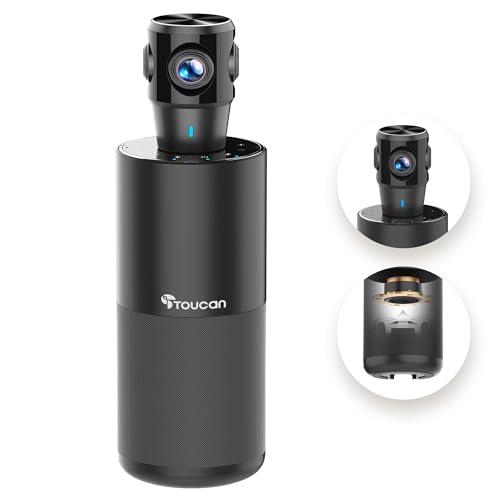
The TOUCAN 360-Degree Video Conference Camera stands out as the perfect choice for teams seeking dynamic and engaging remote meetings. With 1080p HD resolution and 360° omni-directional shooting, it captures every facial expression and gesture, enhancing interaction. You’ll appreciate its crystal-clear visuals and high-quality microphones that guarantee your voice is heard loud and clear. Plus, its plug-and-play design makes setup a breeze—just connect it to your device, and you’re ready to go. Compatible with popular platforms like Zoom and Microsoft Teams, the TOUCAN adapts to any conference room, making it ideal for both small and large spaces.
Best For: Teams looking for an engaging and effective solution for remote meetings with superior video and audio quality.
Pros:
- High-quality 1080p HD resolution ensures crystal-clear visuals during video conferences.
- 360° omni-directional shooting captures all participants, enhancing interaction and engagement.
- Plug-and-play functionality allows for easy setup without complicated installation processes.
Cons:
- Limited to conference settings, may not be suitable for personal use or casual video calls.
- Requires a stable internet connection for optimal performance during meetings.
- Potentially higher cost compared to standard webcams, which may not fit all budgets.
Owl Labs Meeting Owl 3 Conference Room Camera

Designed for seamless collaboration, the Owl Labs Meeting Owl 3 Conference Room Camera stands out with its 360° video and audio coverage, making it ideal for hybrid meetings. With 1080p HD video and audio capture up to 18 feet, it guarantees everyone’s voice is heard. Its award-winning Owl Intelligence System automatically focuses on the speaker, enhancing engagement for remote participants. Setup takes just six minutes with its plug-and-play USB design. Plus, you can easily expand coverage with multiple devices or integration options. Certified for platforms like Microsoft Teams and Zoom, it’s perfect for any meeting environment.
Best For: Organizations looking for an efficient and engaging solution for hybrid meetings that require 360° video and audio coverage.
Pros:
- Plug-and-play setup allows for quick installation and use within minutes.
- The Owl Intelligence System enhances participation by automatically focusing on speakers.
- Compatible with major video conferencing platforms like Microsoft Teams, Zoom, and Google Meet.
Cons:
- Limited audio coverage may not be sufficient for very large rooms without additional expansion options.
- The reliance on USB connectivity may limit placement options based on available ports.
- The device may require additional equipment for optimal performance in larger configurations.
TONGVEO All-in-One Conference Room Video Camera System

For small to medium meeting spaces, the TONGVEO All-in-One Conference Room Video Camera System stands out as an ideal choice, thanks to its AI Auto-Tracking HD1080P camera. With 60fps and 3X optical zoom, it guarantees sharp video quality. The system includes a Bluetooth conference speakerphone with echo-canceling microphones, capturing clear audio up to 16.4ft away. Easy to set up with plug-and-play functionality, it connects seamlessly to laptops and smart TVs. Compatible with major video conferencing apps, you’ll enjoy consistent performance in meetings. Plus, technical support is just a message away, assuring help is available whenever you need it.
Best For: Professionals seeking a high-quality, easy-to-use video conferencing solution for small to medium meeting spaces.
Pros:
- Full HD video and audio quality with AI Auto-Tracking for seamless presentations.
- Easy setup with plug-and-play functionality and compatibility with major video conferencing apps.
- Long battery life for the Bluetooth speakerphone, allowing 6-8 hours of continuous use.
Cons:
- Limited to small to medium meeting rooms, may not be suitable for larger gatherings.
- Requires a wired connection for the PTZ camera, which may limit placement options.
- Support response time of 24 hours may be slower for urgent issues.
3-in-1 4K Webcam with Microphones and Speaker

Looking for an all-in-one solution for your video conferencing needs? The TONGVEO 3-in-1 4K Webcam combines a stunning FHD 4K lens with built-in dual microphones and a powerful 3W speaker. Enjoy crystal-clear visuals at 3840×2160 resolution and immersive sound with noise-canceling mics that pick up voices from up to 16.4 feet away. Its smart AI auto-framing keeps you centered, while 5x digital zoom and adjustable field of view enhance your experience. Plus, it’s plug-and-play compatible with all major operating systems and video conferencing software. With a privacy cover included, your security’s covered too!
Best For: Professionals, educators, and gamers seeking a comprehensive video conferencing solution with high-quality audio and visual capabilities.
Pros:
- High Resolution: Offers stunning 4K video quality at 30fps for clear and detailed visuals.
- Built-in Audio: Features dual microphones and a 3W speaker, eliminating the need for additional audio equipment.
- Smart Technology: AI auto framing and voice tracking enhance the user experience by keeping participants centered and focusing on speakers.
Cons:
- Limited to USB Connection: Requires a USB connection, which may limit placement options depending on the available ports.
- Price Point: May be more expensive than basic webcams without integrated audio features.
- Dependence on AI: The effectiveness of smart tracking features may vary based on the environment and lighting conditions.
NexiGo Meeting 360 (Gen 2) Smart Video Conference Camera

The NexiGo Meeting 360 (Gen 2) Smart Video Conference Camera stands out for teams seeking an immersive meeting experience, thanks to its impressive 360-degree panoramic view. With 8K capture and 1080P output, you’ll enjoy stunning video quality. The dual omnidirectional microphones pick up voices from up to 18 feet away, while integrated dual 10W speakers guarantee crystal-clear audio. Privacy is a priority, featuring a secure USB connection and a pop-up lens cover. Plus, it’s easy to set up—just plug it in, select it as your audio and video device, and you’re ready to go.
Best For: Teams and organizations looking for an immersive and high-quality video conferencing experience with enhanced audio and privacy features.
Pros:
- High video quality: 8K capture with 1080P output ensures stunning visuals.
- Exceptional audio performance: Omnidirectional microphones and dual speakers provide clear sound.
- Easy to use: Plug and play functionality with compatibility across major platforms.
Cons:
- Limited portability: The camera is designed for stationary use, making it less ideal for mobile setups.
- Price point: May be considered expensive compared to basic conference cameras.
- Setup for larger rooms: May require additional setup or equipment for very large spaces to maximize its capabilities.
j5create 360 Degree All Around Meeting Webcam (JVCU360)

Meetings can often feel one-dimensional, but the j5create 360 Degree All Around Meeting Webcam (JVCU360) transforms the experience with its impressive 360° video conferencing capability. You’ll enjoy vibrant 1080P HD video and clear audio, thanks to the built-in omnidirectional microphone. With six display modes, you can guarantee everyone’s in view, making collaboration seamless. Its USB-C connection offers plug-and-play functionality, compatible with major apps like Zoom and Microsoft Teams. Lightweight and compact, it’s easy to set up anywhere. With a solid 4.4-star rating from users, it’s a reliable choice for your next online meeting.
Best For: The j5create 360 Degree All Around Meeting Webcam is best for professionals and educators seeking an enhanced video conferencing experience with comprehensive audio and visual coverage.
Pros:
- High-definition 1080P video quality ensures clear visuals during meetings.
- Omnidirectional microphone captures audio from all directions for improved sound clarity.
- Compatible with major video conferencing platforms, making it versatile for various online collaboration needs.
Cons:
- Limited to USB-C connectivity, which may require adapters for some users.
- Some users may find the compact size less stable during use without proper support.
- The weight of 0.01 ounces may make it feel less substantial compared to other webcams.
Factors to Consider When Choosing a Video Conference Camera
When choosing a video conference camera, you’ll want to take into account several key factors. Resolution and video quality are essential for clear visuals, while audio performance guarantees everyone hears you well. Don’t forget to check compatibility with your software and the camera’s ease of setup for a smooth experience.
Resolution and Video Quality
Choosing a video conference camera involves considering resolution and video quality, which are vital for effective communication. Higher resolution options like 1080p or 4K deliver clearer and more detailed images, enhancing your overall experience. Aim for a camera with at least 30 frames per second (fps) for smooth video playback; higher frame rates can offer even more fluid motion, especially during dynamic presentations. Features like autofocus and light correction can improve image quality in various lighting conditions, ensuring everyone’s seen clearly. Additionally, a wide-angle lens captures more participants in a single frame, perfect for group meetings. Finally, keep an eye on video compression technology; balancing quality with bandwidth capabilities is essential for maintaining visual fidelity.
Audio Performance and Clarity
While visuals are important in video conferencing, audio performance and clarity can make or break a meeting. You want to guarantee that your camera has high-quality audio features, like dual omnidirectional microphones that can capture clear sound from up to 18 feet away. Noise-canceling technology is also crucial, as it filters out background noise, allowing participants’ voices to come through without interference. Look for full-duplex microphone arrays, which let people speak and listen simultaneously, creating a more natural conversation flow. If you often meet in larger spaces, opt for cameras with a microphone sensitivity range of at least 16.4 feet. Integrated speaker systems can enhance your audio experience, so you won’t need extra external equipment.
Compatibility With Software
Great audio quality sets the stage for effective communication, but having a video conference camera that seamlessly integrates with your preferred software can elevate your meetings even further. Make sure the camera works well with popular platforms like Zoom, Microsoft Teams, and Google Meet to streamline your workflow. It’s also vital to check compatibility with both Windows and Mac operating systems, ensuring ease of use across devices. Look for plug-and-play functionality for quick setup without extra drivers. High-definition resolution is fundamental, as some platforms may require specific video quality standards. Additionally, features like auto-light correction and integrated microphones can enhance your overall meeting experience on supported software, making your choice even more impactful.
Ease of Setup
When it comes to setting up a video conference camera, ease of installation plays a crucial role in guaranteeing a smooth experience. Look for cameras with plug-and-play functionality, allowing you to get started quickly without extra drivers or complicated processes. Verify compatibility with major video conferencing platforms to simplify connections and avoid issues during use. Cameras that offer USB connections typically make it easier to link devices without extensive configuration. Check for clear user manuals or online support resources, especially if you’re new to this technology. Finally, opt for systems with remote controls or intuitive interfaces to streamline adjustments and settings, making your setup as hassle-free as possible.
Field of View
Choosing the right field of view (FOV) for your video conference camera is essential, as it directly affects how well participants and the environment are captured. With options ranging from narrow (around 65°) to wide (up to 120° or more), you’ll want to evaluate your specific needs. A wider FOV is great for larger groups, allowing everyone to fit into the shot without moving the camera too far away. Some cameras even let you adjust the FOV, so you can customize it based on your meeting setup. Keep in mind the room size and layout; a narrow FOV might limit visibility in spacious areas, while a wide FOV could distort images in smaller spaces.
Privacy Features
While selecting a video conference camera, it’s just as important to contemplate privacy features as it is to assess the field of view. Look for cameras with integrated privacy shutters or covers, allowing you to physically block the lens when it’s not in use. This gives you an extra layer of security. Consider models with secure USB connections to prevent unauthorized access during calls. Pop-up designs for lens shielding can enhance privacy without needing extra accessories. Certifications for security standards indicate that the camera meets privacy regulations. Finally, opt for devices featuring advanced data security protocols, like in-house algorithms and firmware, to protect against potential data breaches. Prioritizing these features will help keep your meetings secure.
Additional Smart Technologies
As you evaluate video conference cameras, considering additional smart technologies can greatly enhance your meeting experience. Look for AI-powered auto-tracking features that automatically focus on active speakers, boosting engagement. Cameras with auto white balance and exposure adjustment guarantee your visuals remain clear, regardless of lighting conditions. Advanced voice tracking capabilities allow the camera to follow the speaker within a specified range, helping remote participants feel more connected. Don’t overlook privacy features like physical lens covers and secure USB connections to protect your information during calls. Finally, choose cameras that offer multiple video output modes and adjustable fields of view to customize your visual experience based on your meeting space’s size and layout.
Design and Portability
When evaluating video conference cameras, design and portability play an essential role in ensuring flexibility and ease of use in various meeting environments. Smaller, lighter models are easier to transport and set up, making them ideal for on-the-go professionals. Look for plug-and-play designs that allow quick connections without complicated setups. Consider the camera’s field of view; wide-angle options capture more participants, accommodating various room sizes. Integrated privacy features, like slide covers, enhance usability while maintaining a sleek appearance. Finally, choose aesthetically pleasing designs that align with your conference setup, as they contribute to a professional atmosphere. Balancing these factors will help you select a camera that meets your specific needs and enhances your video conferencing experience.