
A KVM over IP switch can let you view and control a computer remotely as though you were sitting in front of it. That is useful for home offices, home labs, workstations, and small server setups where local access is inconvenient.
This roundup compares 10 options ranging from compact single-computer devices to multi-port and HDMI-over-network extenders. The right choice depends on video quality, BIOS-level control, networking, power management, and how many systems you need to manage.
Best 10 Kvm Over Ip Switches for Home Offices Picks for 2026
Best Remote BIOS Access
GL.iNet Comet GL-RM1 Remote KVM

- BIOS-level remote control without host software
- 4K video at 30Hz with low latency
- Remote rebooting, file transfer, and audio
Best For: Home offices and IT users needing remote recovery access
Best 4K60 Network Extender
OREI HDMI KVM Extender Over IP

- 4K 4:4:4 video at 60Hz
- Extends HDMI and USB up to 400 feet
- Supports one-to-many networking with a 1G switch
Best For: Wired home-office setups needing high-quality remote display control
Best PoE Remote KVM

- PoE and Type-C dual power options
- Remote BIOS reinstall for recovery
- 4K streaming at 30fps with expansion support
Best For: Ethernet-equipped offices seeking flexible remote computer management
Best Open-Source Remote KVM

- Local, cloud, and Wake on LAN access
- 1080p at 60fps with 30–60ms latency
- Open-source and expandable Linux platform
Best For: Tinkerers needing flexible remote access and system recovery
Best Wireless Flexibility

- Dual-band Wi-Fi 6 plus wired connectivity
- 4K@30Hz passthrough with two-way audio
- Tailscale and optional self-hosted access
Best For: Wireless-friendly home offices and home labs
Best Long-Range Ethernet Setup
AV Access 4K HDMI USB KVM Extender

- Up to 390 feet over Cat5e or better
- 4K video, audio, and USB extension
- Three USB ports on the receiver
Best For: Wired workstations separated from the host computer
Best Remote Power Control
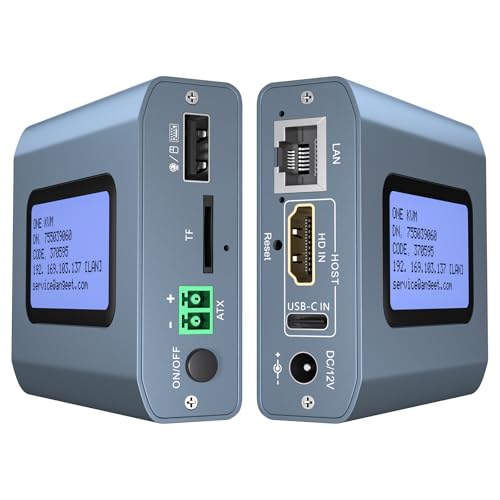
- 4K@60Hz remote video support
- ZeroTier for cross-network access
- Desktop power control and BIOS access
Best For: Unattended desktops, servers, and home labs
Best Open-Source Pick

- 1080p at 60 fps with 30–60 ms latency
- Open-source firmware with SSH customization
- Remote BIOS access and Wake-on-LAN support
Best For: Single-PC home offices and home labs
Best Multi-Host Setup

- Four HDMI inputs for switching among four hosts
- PoE-powered with 5V USB-C backup
- 4K 30Hz loop-out, touchscreen, and rack brackets
Best For: Multi-computer home labs and organized workstations
Best Two-Computer Value

- Controls and switches between two computers
- 4K at 60Hz with under 60 ms stated delay
- ZeroTier and desktop remote power control
Best For: Two-PC home offices needing remote switching
Best Remote BIOS Access – GL.iNet Comet GL-RM1 Remote KVM
For home offices needing dependable kvm over ip switches for home offices, the GL.iNet Comet GL-RM1 provides remote access to a computer or server through the internet. It supports BIOS-level control, remote rebooting, operating-system installation, file transfers, and 4K video at 30Hz without requiring software on the controlled computer.
Best For: Remote workers, IT users, and smart-home setups that need BIOS-level access to a computer or server.
Pros:
- Enables remote rebooting, BIOS access, and operating-system installation.
- Supports 3840×2160 video at 30Hz with low latency and remote audio output.
- Offers one-click app setup and does not require host-computer software.
- Includes file transfer and Tailscale-oriented remote access features.
Cons:
- Provides one USB port and one KVM connection.
- PD adapters cannot be used.
- 4K video is limited to 30Hz.
The GL-RM1 is a compact, capable choice when remote recovery and BIOS control matter more than multi-computer switching. Its hardware encoding and broad computer compatibility make it especially practical for managing a home workstation from elsewhere.
Best 4K60 Network Extender – OREI HDMI KVM Extender Over IP
The OREI EX-500-KVM is a strong option for home offices comparing kvm over ip switches for home offices and wanting wired HDMI extension rather than cloud-based remote access. It sends 4K 4:4:4 video at 60Hz, plus USB keyboard and mouse control, over shielded Cat6 cable.
Best For: Home offices that need low-latency 4K video and keyboard/mouse control at a second location.
Pros:
- Supports 4K 4:4:4 at 60Hz over distances up to 400 feet.
- Includes two USB 1.1 ports for keyboard and mouse connectivity.
- Supports point-to-point or one-to-many operation through a 1G network switch.
- Provides HDMI loop-out, IR control, automatic EDID/DDC management, and HDCP 2.2 support.
Cons:
- A 1G network switch is required for one-to-many operation and is sold separately.
- Optimal performance requires high-quality shielded Cat6 cable; flat cables should not be used.
- It is a wired extender kit rather than an internet-based remote-access device.
Choose the OREI when display quality and real-time responsiveness are the priorities. Its transmitter-receiver design suits a desk-to-room setup, while networked one-to-many support can expand the system when paired with the appropriate switch.
Best PoE Remote KVM – GL.iNet Comet GL-RM1PE
The GL.iNet Comet GL-RM1PE simplifies kvm over ip switches for home offices with Power over Ethernet and Type-C power options. It is designed for remote computer and server management, including 4K streaming at 30 frames per second and remote BIOS reinstallation.
Best For: Home offices with Ethernet cabling that want flexible power and remote BIOS management.
Pros:
- Supports both PoE and Type-C power supplies.
- Provides remote BIOS reinstall capability for computer or server recovery.
- Streams 4K video at 30 frames per second.
- Includes 32GB built-in eMMC storage and USB support for ATX and Fingerbot accessories.
Cons:
- 4K streaming is limited to 30 frames per second.
- The supplied notes do not specify multi-device switching or multiple KVM inputs.
- Its accessory-focused USB interface may require additional hardware for power-control functions.
The RM1PE is a practical fit for a networked home office where PoE simplifies installation and reduces cable clutter. Its built-in storage and expansion support also make it more flexible for users building a compact remote-management setup.
Best Open-Source Remote KVM – JetKVM IP KVM
The JetKVM is a flexible choice for shoppers evaluating kvm over ip switches for home offices and wanting browser-based remote control. It connects through HDMI and USB-C, offers local or optional cloud access, supports Wake on LAN, and uses H.264 encoding for 1080p at 60 frames per second.
Best For: Tinkerers and remote workers who want open-source software, flexible access methods, and recovery features.
Pros:
- Offers local browser access, optional cloud access, and Wake on LAN.
- Provides 1080p at 60fps with stated 30–60ms latency.
- Supports remote recovery tasks such as restarting, Safe Mode access, and operating-system reinstallation.
- Open-source Linux software and an expansion port support customization.
Cons:
- Video output is specified at 1080p rather than 4K.
- Cloud access is optional and depends on the JetKVM Cloud service.
- Advanced power and serial-control features may require additional expansion hardware.
JetKVM stands out for its customization potential and broad access options. It is well suited to a home office where responsive 1080p control, remote rescue, and experimentation matter more than maximum display resolution.
Best Wireless Flexibility – GL-RM10 Comet Pro Remote KVM
For home offices that need flexible remote access, the GL.iNet GL-RM10 Comet Pro is one of the more adaptable kvm over ip switches for home offices. It supports wired and dual-band Wi-Fi 6 connectivity, 4K video passthrough at 30 frames per second, and browser-based access across Windows, macOS, and Linux without requiring client software.
Best For: Home offices, home labs, and users who want wireless access plus BIOS-level recovery capabilities.
Pros:
- Dual-band Wi-Fi 6 and wired connectivity support flexible installations.
- 4K@30Hz video passthrough and two-way audio support remote meetings and troubleshooting.
- Built-in Tailscale and optional self-hosted cloud deployment provide additional remote-access options.
- Optional ATX Board or Fingerbot accessories can enable remote power control or hard resets.
Cons:
- Remote power and reset functions require separately sold extensions.
- 4K passthrough is limited to 30 frames per second.
- Its desktop form factor may be less suitable for rack-mounted setups.
The Comet Pro stands out when a home-office KVM needs more than basic screen and peripheral sharing. Its touchscreen, multiple access methods, and recovery features make it particularly useful for unattended computers and small home labs.
Best Long-Range Ethernet Setup – AV Access 4K HDMI USB KVM Extender
The AV Access 4K HDMI USB KVM Extender is designed for home offices where the computer and workstation need to be separated by distance. It sends HDMI, audio, USB, and keyboard/mouse control up to 390 feet over Cat5e or better cabling, while also supporting operation through an existing Gigabit network.
Best For: Home offices with a remote workstation, centralized computer equipment, or long cable runs.
Pros:
- Extends 4K@30Hz video, audio, and USB signals up to 390 feet.
- Works over existing Ethernet infrastructure to reduce dedicated cabling.
- Receiver includes three USB 2.0 ports for peripherals such as storage devices, gamepads, or printers.
- Plug-and-play compatibility with Windows, macOS, and Linux requires no drivers.
Cons:
- It is an extender system using transmitter and receiver units rather than a compact single-box KVM.
- 4K output is limited to 30Hz, although 1080p supports up to 120Hz.
- Multiple sets require DIP-switch pairing and compatible network planning.
This model makes sense when distance and reliable wired transmission matter more than internet-based access. Its USB expansion and support for up to 16 paired extender sets also give it room to grow beyond a basic home-office installation.
Best Remote Power Control – 4K IP KVM with ZeroTier
This 4K remote KVM is a strong fit for home offices that need internet-based control of a desktop or server. It provides web and app access without extra software on the controlled computer, supports 4K at 60Hz with stated latency below 60 milliseconds, and includes ZeroTier for peer-to-peer access across networks.
Best For: Remote workers and home-lab users who need BIOS access, OS installation, monitoring, and desktop power control.
Pros:
- Supports 3840×2160 at 60Hz with latency below 60 milliseconds.
- Enables remote BIOS access and OS installation without relying on operating-system software.
- Built-in ZeroTier can simplify cross-network access without port forwarding or separate VPN configuration.
- Included ATX wiring supports remote power on/off for compatible desktop computers.
Cons:
- Remote power control is for desktop computers and does not support laptops.
- ZeroTier requires an online upgrade, according to the supplied details.
- Remote access requires using its web interface and app workflow.
For home offices that need to recover or manage an unattended computer, this IP KVM offers useful server-style functionality in a compact package. Its 4K60 support and included power-control wiring make it especially practical for a remotely managed desktop.
Best Open-Source Pick – JetKVM IP KVM
For shoppers comparing kvm over ip switches for home offices, the JetKVM is a compact option for browser-based access to one HDMI-equipped computer. It supports 1080p at 60 fps, LAN access, optional WebRTC cloud access, and BIOS-level control without requiring drivers or client software.
Best For: Home offices and home labs managing a single powered-on PC or server remotely.
Pros:
- Simple setup with HDMI, USB-C, and Ethernet connections.
- 1080p at 60 fps streaming with stated 30–60 ms latency.
- Open-source Linux and Golang firmware with SSH customization.
- Supports Wake-on-LAN and remote BIOS, reboot, and safe-mode access.
Cons:
- The non-PoE model cannot control a fully powered-off target without separately sold ATX or DC modules.
- HDMI video is supported, but audio transfer is not.
- Designed for one host rather than switching between multiple computers.
The JetKVM stands out when openness, compact size, and straightforward single-host troubleshooting matter most. Confirm that your computer can supply the required USB-C power, or plan for an additional power-control module if full off-state management is important.
Best Multi-Host Setup – GL.iNet Comet X Quad-Port KVM
The GL.iNet Comet X is a strong fit for home-office buyers who need kvm over ip switches for home offices with several computers. Its four HDMI inputs, PoE support, touchscreen, browser control, and local HDMI loop-out make it suitable for a compact workstation or rack-based setup.
Best For: Power users and home labs switching among up to four computers.
Pros:
- Controls up to four hosts through dedicated HDMI and USB-C ports.
- PoE carries network and power over one Ethernet cable, with 5V USB-C backup.
- Provides browser-based HTTPS access without client software.
- Includes 4K at 30Hz HDMI loop-out, a touchscreen, and rack-mount brackets.
Cons:
- The loop-out supports 4K at 30Hz rather than 4K at 60Hz.
- Its rack-ready, multi-port design may be more hardware than a single-PC home office needs.
- Operating temperature details supplied are limited to 25°C–40°C.
Choose the Comet X if you want one remotely accessible unit for multiple systems and value local control as well. It is especially practical where PoE, rack mounting, and onboard storage for images or deployment files can simplify a home-lab workflow.
Best Two-Computer Value – ONE-KVM 4K Remote KVM
For a home office with two computers, the ONE-KVM offers remote KVM control through a web interface or app. It supports 4K at 60Hz, hardware H.264 encoding, remote switching, and optional desktop power control through an ATX motherboard connection.
Best For: Users who need remote access and switching between two desktop PCs.
Pros:
- Switches between two hosts with remote web or app control and local physical switching.
- Supports 3840×2160 at 60Hz with stated latency below 60 ms.
- Built-in ZeroTier can enable cross-network access without manual port forwarding.
- Supports remote power on/off for desktop PCs using the included Dupont connection.
Cons:
- Requires a 12V power adapter and is not PoE-powered.
- The supplied notes specify web access on LAN, while WAN access is through the app.
- Remote power control is limited to compatible desktop PCs connected to the motherboard header.
The ONE-KVM is a practical middle ground for a dual-PC home office, particularly if 4K60 video and remote power control are priorities. Its setup involves more cabling than a basic single-host unit, but the two-port switching and ZeroTier support add useful flexibility.
How We Picked the Best Kvm Over Ip Switches for Home Offices
We focused on features that matter in real home-office installations rather than treating every networked video device as interchangeable. The selection includes dedicated IP KVM appliances, HDMI-over-IP extenders, and multi-port systems suited to different levels of remote-management needs.
Key considerations included supported resolution and refresh rate, access during boot and BIOS setup, USB keyboard and mouse control, network connectivity, remote-access software, power options, and installation complexity. We also considered whether a device is better suited to one computer, multiple computers, a home lab, or a longer-distance structured-cabling setup.
Quick Comparison
| What to compare | Best fit |
|---|---|
| Compact single-port remote KVM | One desktop, workstation, or server |
| PoE-powered model | Installations where a nearby power adapter is inconvenient |
| Wi-Fi-enabled KVM | Flexible placement, when wired Ethernet is unavailable |
| Multi-port KVM | Home labs or offices managing several computers |
| HDMI-over-IP extender | Sending keyboard, mouse, and video across a wired network |
| Models with remote power features | Unattended systems that may need rebooting or wake control |
Key Buying Factors for Kvm Over Ip Switches for Home Offices
Video Resolution and Refresh Rate
Check the complete signal path, not just the headline resolution. A 4K device may support 30Hz or 60Hz, while USB bandwidth and compression can affect responsiveness. For office applications, 4K at 30Hz may be adequate; smoother 60Hz output is preferable for detailed workflows, video, and frequent cursor movement.
BIOS Access and USB Compatibility
True hardware-based KVM access should work before the operating system loads, allowing remote entry into BIOS or recovery tools. Confirm the included USB connections support your keyboard, mouse, storage, webcam, or other required peripherals.
Network and Remote-Access Design
Wired Ethernet generally offers the most dependable performance. Wi-Fi can simplify placement but introduces more variables. For access outside the home, review VPN, Tailscale, ZeroTier, authentication, encryption, and whether cloud accounts are required. Avoid exposing a management interface directly to the public internet without appropriate security controls.
Power and Installation
PoE can reduce cable clutter, while standard USB-C or adapter-powered models may be easier for a basic desk setup. Also verify cable length, HDMI version, HDCP support, Cat5e or better requirements, and whether the device passes through your monitor’s preferred signal.
Who Should Buy Which Kvm Over Ip Switches for Home Offices?
Choose a compact single-port model if you need dependable remote control of one home-office PC or server. A PoE version makes sense for a network closet or structured installation. Wi-Fi 6 models suit flexible placements, provided the wireless network is strong and stable.
For a home lab with several machines, select a multi-port unit such as a quad-port design or a switch built for two or more computers. Choose an HDMI-over-IP extender when your priority is transporting video and USB over existing Cat5e or better cabling, especially between rooms. Finally, look for remote power, wake, virtual media, or OS-installation features if you regularly maintain unattended systems rather than simply accessing a running desktop.