
The best KVM over IP switches for Mac make it possible to control a remote computer, server, or workstation from macOS without staying beside the hardware. The models in this roundup cover compact network KVMs, 4K video, BIOS access, remote power features, and multi-computer switching.
Before choosing, check macOS compatibility, network requirements, video limits, USB support, and whether you need true internet access or only local-network control. The right option depends as much on your workflow as on resolution.
Best 10 Kvm Over Ip Switches for Mac Picks for 2026
Best Wireless 4K Pick

- Dual-band Wi-Fi 6 and wired connectivity
- 4K30 passthrough with two-way audio
- macOS browser and app access
Best For: Wireless home labs and remote recovery
Best Open-Source Option

- 1080p60 streaming with 30–60ms latency
- Browser, cloud, and Wake on LAN access
- Open-source Linux platform
Best For: DIY remote administration and recovery
Best PoE Remote KVM

- PoE and USB-C dual power
- 4K30 remote streaming
- Tailscale and remote BIOS reinstall
Best For: Wired server and computer installations
Best Long-Distance Extender

- 4K extension up to 390 feet
- USB keyboard and mouse control
- Driver-free macOS compatibility
Best For: Distributed workstations and control rooms
Best Overall
GL.iNet Comet GL-RM1 Remote KVM

- 4K video at 30Hz with hardware encoding
- BIOS access and remote power-on control
- Works with Apple devices without host software
Best For: High-resolution Mac and server management
Best for Everyday Use

- 1080p at 60fps with 30–60ms latency
- Open-source firmware with SSH customization
- Supports Mac, Windows, Linux, and Raspberry Pi
Best For: Customizable home labs and remote troubleshooting
Best 4K Power-Control Pick
Remote KVM Over IP with ZeroTier
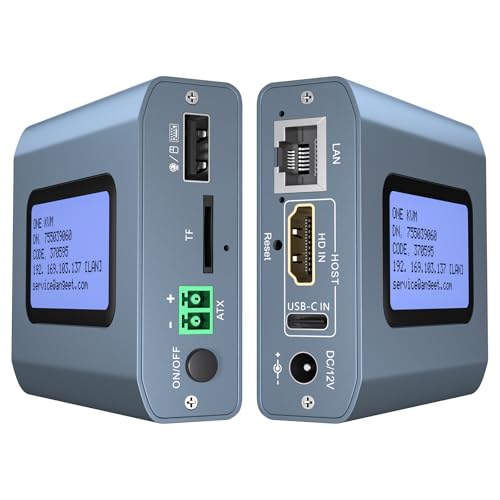
- 4K video at 60Hz with under 60ms latency
- ZeroTier supports cross-network remote access
- ATX control enables desktop power on/off
Best For: 4K Mac setups needing remote desktop power control
Best Remote-Control Option

- Remote access for two computers
- 4K video with synchronized audio
- LCD IP display and ZeroTier access
Best For: Remote desktop and IT management
Best Heavy-Duty Pick

- Open-source software platform
- Optional remote access
- Ultra-low-latency HDMI and USB device
Best For: Flexible remote server management
Best Dual-Monitor Desk Setup
USB-C HDMI KVM Dock for Two Computers

- Connects one laptop and one desktop
- Supports two monitors and USB 3.0 peripherals
- Provides laptop PD charging
Best For: Local Mac and PC workstation sharing
Best Wireless 4K Pick – Comet Pro Remote KVM
For Mac users comparing kvm over ip switches for mac, the GL.iNet GL-RM10 Comet Pro is a flexible remote KVM device with Wi-Fi 6, wired connectivity, and browser-based access that supports macOS without client software.
Best For: Home labs, offices, and users who want wireless remote access with 4K passthrough and recovery features.
Pros:
- Supports dual-band Wi-Fi 6 plus wired networking.
- Provides 4K at 30FPS video passthrough and two-way audio.
- Works with macOS through a web browser or GLKVM app.
- Built-in Tailscale and optional self-hosted cloud support add flexibility.
Cons:
- ATX Board and Fingerbot power-control accessories are sold separately.
- 4K streaming is limited to 30FPS.
The touchscreen and remote BIOS or OS recovery support make this a particularly capable choice when you need more than basic screen and input access. Its wireless design is convenient, while self-hosting options appeal to privacy-conscious users.
Best Open-Source Option – JetKVM IP KVM
The JetKVM is a compact Ethernet IP KVM for Mac users who want browser-based control, optional cloud access, and an open-source Linux foundation. It connects to the controlled computer through USB-C and HDMI.
Best For: DIY users and small offices seeking low-latency remote control with expansion and recovery capabilities.
Pros:
- Offers local browser access, cloud access, and Wake on LAN.
- Streams 1080p at 60FPS with claimed 30–60ms latency.
- Open-source software runs on Linux and supports SSH customization.
- Expansion options include ATX, DC power, and RS-232 accessories.
Cons:
- Video support is specified at 1080p rather than 4K.
- Remote cloud access is optional and depends on the JetKVM cloud service.
With adjustable video quality and several power options, the JetKVM is designed for responsive everyday administration as well as remote rescue after crashes or boot failures. Its open platform is a strong fit for technically inclined buyers.
Best PoE Remote KVM – Comet PoE Remote KVM
The GL.iNet Comet PoE GL-RM1PE is worth considering among kvm over ip switches for mac when you want a wired installation. It combines Ethernet and HDMI with PoE and USB-C power, while its KVM functions support remote system management.
Best For: Servers and computers in networked locations where PoE simplifies power and cabling.
Pros:
- Supports PoE and Type-C dual power supply.
- Provides 4K streaming at 30FPS.
- Includes Tailscale for secure remote connectivity.
- Supports remote BIOS reinstall and ATX or Fingerbot control through USB.
Cons:
- Its 4K streaming capability is limited to 30FPS.
- Some power-control functions require additional ATX or Fingerbot hardware.
PoE makes this model especially practical for server rooms and other installations where a separate power adapter is inconvenient. The built-in eMMC storage and recovery-oriented features further support unattended remote management.
Best Long-Distance Extender – AV Access 4K HDMI USB KVM
The AV Access 4K HDMI USB KVM Extender takes a different approach to kvm over ip switches for mac: it extends HDMI, USB, and audio over an existing Ethernet network rather than relying on a software remote-access service. It works with macOS without drivers.
Best For: Offices, control rooms, server racks, and workstations separated by up to 390 feet of Cat5e or better cabling.
Pros:
- Extends 4K video up to 120 meters or 390 feet over Ethernet cable.
- Supports remote keyboard, mouse, and USB peripherals.
- Works with Windows, macOS, and Linux without drivers.
- Up to 16 extender sets can operate on the same network using DIP switches.
Cons:
- This is a physical extender system, not a browser-based KVM for access from anywhere.
- It requires transmitter and receiver units plus network cabling.
- 4K operation is limited to 30Hz.
This model is best viewed as a professional-grade network extension solution rather than a cloud KVM. Its long reach, peripheral support, and multi-system pairing make it useful when the operator and computer need to remain in different rooms.
Best Overall – GL.iNet Comet GL-RM1 Remote KVM
The GL.iNet Comet GL-RM1 is a strong choice among kvm over ip switches for mac users who need dependable remote access to a Mac, PC, server, or other compatible device. It provides BIOS-level control, 4K video at 30Hz, remote audio, file transfer, and hardware-based video encoding without requiring software on the controlled computer.
Best For: Mac users, IT professionals, and home-lab operators who need high-resolution remote BIOS and desktop access.
Pros:
- Supports 3840×2160 at 30Hz with low-latency remote viewing.
- Enables BIOS access, remote rebooting, OS installation, and computer power-on control.
- Works with Apple devices and requires no additional software on the host computer.
- Includes remote audio and file-transfer capabilities.
Cons:
- Does not support PD adapters.
- Provides one USB port and one KVM connection.
Choose the GL-RM1 when resolution and broad remote-management features matter more than switching between multiple connected computers. Its compact design and 2-year guarantee add practical appeal for remote support and server maintenance.
Best for Everyday Use – JetKVM IP KVM
JetKVM is a flexible pick for shoppers comparing kvm over ip switches for mac, especially those who value open-source firmware and browser-based access. It delivers 1080p at 60fps, supports keyboard and mouse control, and offers LAN, WebRTC cloud, and Wake-on-LAN access options.
Best For: Mac-compatible home labs, troubleshooting setups, and users who want open-source customization.
Pros:
- Supports Windows, Mac, Linux, and Raspberry Pi environments.
- Provides 1080p at 60fps with claimed 30–60ms latency.
- Offers browser access, WebRTC cloud access, and Wake-on-LAN.
- Open-source Linux and Golang firmware supports SSH customization.
Cons:
- Does not transfer audio.
- The non-PoE version cannot control a fully powered-off target without separate ATX or DC modules.
- Maximum video output is 1920×1080.
JetKVM makes sense when smooth Full HD control and extensibility are priorities. It is particularly useful for remote BIOS troubleshooting, OS reinstalls, and lab administration, but buyers needing 4K or built-in full power control should consider another model.
Best 4K Power-Control Pick – Remote KVM Over IP with ZeroTier
This Remote KVM Over IP is a feature-rich option for kvm over ip switches for mac, combining 4K video, browser and app access, ZeroTier connectivity, and desktop power control. It supports macOS along with Windows, Linux, and Android, while its ATX connection can provide remote power on/off for compatible desktop computers.
Best For: Mac and mixed-device users who need 4K remote access plus network connectivity and desktop power control.
Pros:
- Supports 3840×2160 at 60Hz with latency below 60 milliseconds.
- Works with macOS, Windows, Linux, Android, PCs, servers, and compatible devices.
- Built-in ZeroTier enables peer-to-peer access without port forwarding or VPN setup.
- Supports remote desktop power on/off through the included ATX connection.
Cons:
- Remote power control is for desktop computers and does not support laptops.
- ZeroTier requires an online upgrade.
- Remote app access requires initial web-browser login and app download.
Consider this model if you want a broad feature set in one unit, particularly 4K60 video and remote desktop power control. Its laptop limitation and upgrade requirement for ZeroTier are important details to check before buying.
Best Remote-Control Option – ONE-KVM 4K IP KVM for Two PCs
If you need kvm over ip switches for mac and other devices, the ONE-KVM provides remote access to two computers through a web interface or app. It supports 4K video, remote switching, and desktop power control, making it suited to home-office and IT-management setups.
Best For: Remote access to two desktop PCs over LAN or the internet, including setups that need remote power control.
Pros:
- Controls two computers remotely through a browser or ONE KVM app.
- Supports 3840×2160 at 60Hz with synchronized audio and under-60ms delay.
- Built-in LCD displays the acquired IP address, simplifying setup.
- Includes ZeroTier for cross-network access without manual port forwarding.
Cons:
- Requires a 12V power adapter and is not PoE.
- Remote power control is intended for desktop PCs and requires motherboard wiring.
- Web access is available on LAN, while WAN access uses the app.
This is the most feature-rich choice here for genuinely remote computer management. Confirm that your computers and network fit the included cabling and access requirements before buying.
Best Heavy-Duty Pick – JetKVM Remote Server Manager
The JetKVM is an open-source remote server management device with HDMI and USB connectivity. For shoppers comparing kvm over ip switches for mac, its optional remote access and low-latency design make it worth considering when software flexibility is a priority.
Best For: Users who want an open-source remote-management device with optional remote access and microSD support.
Pros:
- Uses open-source software.
- Offers optional remote access.
- Designed for ultra-low-latency operation.
- Includes a microSD card and full-size HDMI connectivity.
Cons:
- Remote access is optional rather than presented as a universal built-in feature.
- It is non-PoE.
- The supplied notes provide fewer setup and compatibility details than the other options.
JetKVM is the specialized choice for buyers who value an open-source platform. Because the available specifications are brief, verify remote-access requirements and Mac workflow compatibility before ordering.
Best Dual-Monitor Desk Setup – USB-C HDMI KVM Dock for Two Computers
This USB-C HDMI KVM is a local sharing solution rather than an internet-access device, but it can suit Mac users comparing kvm over ip switches for mac alternatives. It connects one laptop and one desktop to two monitors and shared USB peripherals, with laptop charging through USB-C.
Best For: A two-computer desk using one laptop, one desktop, two monitors, and shared USB accessories.
Pros:
- Supports two monitors and up to two connected computers.
- Provides three USB 3.0 ports, USB-C, dual HDMI outputs, and laptop PD charging.
- Supports up to 100W PD input, with 73W to 85W delivered to the laptop.
- Switches using the device button or included wired controller without drivers.
Cons:
- On macOS, dual-monitor output supports mirrored mode only.
- The laptop USB-C port must support video transmission and USB control protocols.
- It does not offer IP or internet-based remote switching.
This is a practical productivity dock for a shared local workstation, especially when a Mac laptop is part of the setup. Its macOS mirroring limitation makes it less suitable if you need two independent extended displays.
How We Picked the Best Kvm Over Ip Switches for Mac
We selected these Kvm Over Ip Switches for Mac based on remote-control capability, macOS-friendly browser or client access, video quality, USB and keyboard/mouse support, network flexibility, and installation requirements. We also considered practical features such as BIOS-level control, Tailscale or ZeroTier support, Power over Ethernet, remote wake or power management, and compatibility with desktop computers, laptops, and servers.
Because “KVM over IP” covers several designs, this list includes dedicated IP KVM devices, HDMI-over-network extenders, and conventional KVM switches with network-oriented features. Confirm the product’s exact topology before buying: some models control one computer, while others switch between multiple systems.
Quick Comparison
| Best For | Features to Prioritize | Potential Trade-Off |
|---|---|---|
| Remote server administration | BIOS access, virtual media, remote power | More setup and higher cost |
| Home-office access | Simple web interface, Tailscale, 4K passthrough | May lack advanced server controls |
| Multiple computers | Multi-input switching, USB sharing, EDID support | Often limited to local-network use |
| Long-distance video | TCP/IP transmission over Cat5e or better | Network latency and compression can vary |
| USB-C laptop setups | USB-C power delivery, dual-monitor support | May not provide true IP-based access |
Key Buying Factors for Kvm Over Ip Switches for Mac
MacOS Access and Network Security
Look for a browser-based interface or a clearly supported macOS workflow. If you need access away from home, prefer products that work with a secure overlay network such as Tailscale or ZeroTier, or place the device behind a properly configured VPN. Avoid exposing a KVM’s administration page directly to the public internet unless the manufacturer explicitly documents a secure setup.
Resolution, Refresh Rate, and Latency
“4K” may mean 4K capture, 4K passthrough, or 4K output at a limited refresh rate. Check whether the specification is 30Hz or 60Hz and whether the Mac display, cable, and target computer support the same standard. For command-line work, latency and reliability matter more than maximum resolution; for creative or office use, smooth passthrough is more important.
Control Depth and USB Compatibility
Basic remote KVMs provide video, keyboard, and mouse control. Server-focused models may add BIOS access, virtual media for installing an operating system, webcam support, wake functions, or remote power control. Check USB connector types, HID compatibility, and whether storage devices are supported. Apple keyboards and special function keys may not map perfectly through every KVM.
Power, Cabling, and Installation
PoE can simplify installation, while USB-C power delivery is useful for laptop switching but does not necessarily indicate IP-based remote access. Confirm Ethernet speed, cable category, maximum distance, power adapter requirements, and whether the device needs a direct connection to the target computer.
Who Should Buy Which Kvm Over Ip Switches for Mac?
Choose a compact Tailscale-enabled remote KVM if you want convenient Mac access to a home workstation or small server. Select a model with BIOS control, virtual media, and remote power features for unattended servers or frequent operating-system maintenance. An HDMI-over-Cat extender is better when the priority is reliable local video over long cable runs rather than internet-based administration.
For users switching between a MacBook and another computer at the same desk, a USB-C or dual-monitor KVM may be simpler and faster than a dedicated IP device. Buyers managing several systems should verify the number of inputs, monitor outputs, USB ports, and switching method before focusing on resolution. Finally, confirm that the product’s security model and network software fit your comfort level: remote accessibility is useful only when it is configured safely.