
When it comes to running a successful business, efficiency is key. One way to enhance your organization is by investing in a reliable label printer. With various options available, you’ll find models that not only boost productivity but also streamline your shipping processes. From compact designs to high-speed machines, the right label printer can make a significant difference. Curious about which printers stand out in the market and why they deserve your attention?
Phomemo Bluetooth Thermal Label Printer (241BT)

The Phomemo Bluetooth Thermal Label Printer (241BT) is an excellent choice for small businesses looking to streamline their shipping process. With its wireless Bluetooth capability, you can easily print labels directly from your iPhone or Android device using the Labelife app. It’s compatible with major platforms like Shopify, Amazon, and USPS, allowing you to print a variety of labels, including text and barcodes. This printer operates at 150 mm/s, saving you time and eliminating ink costs through thermal direct technology. Plus, with robust customer support, you’ll have assistance whenever you need it for seamless operations.
Best For: Small businesses seeking an efficient and cost-effective solution for printing shipping labels.
Pros:
- Wireless Bluetooth printing enables convenient label creation directly from mobile devices.
- High printing speed of 150 mm/s allows for quick label production, enhancing efficiency.
- Multi-platform compatibility supports various e-commerce platforms and label types, making it versatile for different business needs.
Cons:
- Only supports black-and-white printing, limiting options for colorful labels.
- Requires specific app and driver installations for various devices, which may be inconvenient for some users.
- Thermal color label paper is needed for color labels, which adds an extra cost for those requiring color printing.
Bluetooth Thermal Shipping Label Printer (4×6 Wireless Label Maker)

Designed specifically for small businesses, the Bluetooth Thermal Shipping Label Printer excels in delivering fast and efficient printing for your shipping needs. With the ability to print labels up to 4×6 inches at a remarkable 72 labels per minute, you’ll streamline your shipping process. It’s compatible with various devices, including Windows, iOS, and Android, though Mac and Chromebook users will need a USB connection. You’ll appreciate the included 25 sheets of waterproof label paper, ensuring durability. Plus, if you encounter any issues, the dedicated Nulltonex support team is ready to assist you via live chat, phone, or email during business hours.
Best For: Small businesses looking for a reliable and efficient solution for printing shipping labels.
Pros:
- High-speed printing capability of 72 labels per minute, enhancing operational efficiency.
- Wide compatibility with various devices, including Windows, iOS, and Android.
- Includes waterproof label paper, ensuring durability for shipping labels.
Cons:
- Mac and Chromebook users require a USB connection for printing, limiting Bluetooth functionality.
- Potential learning curve for users unfamiliar with thermal printers.
- Limited support hours for phone assistance, which may not suit all users’ schedules.
Brother P-touch PT-D610BT Connected Label Maker
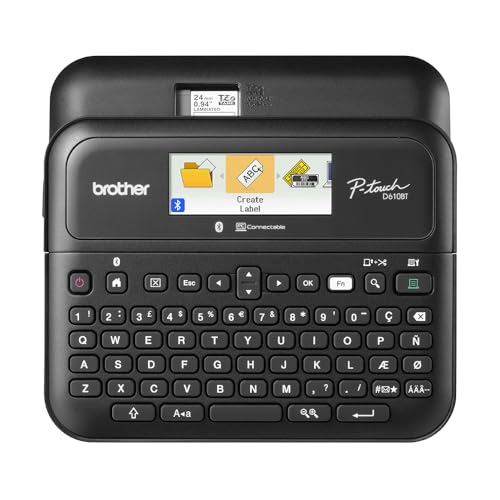
For businesses that require efficient labeling solutions, the Brother P-touch PT-D610BT Connected Label Maker stands out with its versatile connectivity options. You can easily create and print labels from your computer or mobile device via Bluetooth or USB, making it perfect for collaborative environments. With 17 fonts, 17 styles, and 900 symbols, you’ll design impressive labels up to 1 inch wide. Its large color LCD display allows you to preview your labels before printing, reducing waste. Plus, built-in memory for 90 labels and quick access to 175 templates streamline your workflow, enhancing your organization and productivity effortlessly.
Best For: Businesses and organizations that require efficient and customizable labeling solutions for inventory management and asset tracking.
Pros:
- Versatile connectivity options via Bluetooth and USB for easy label creation from multiple devices.
- Extensive design features with 17 fonts, 17 styles, and 900 symbols for creating professional labels.
- Built-in memory for storing frequently used labels and access to a library of business-specific templates to streamline workflow.
Cons:
- Limited to labels up to 1 inch wide, which may not meet all labeling needs.
- Dependence on software for advanced customization might require additional learning for some users.
- The initial setup and connectivity process may be complex for those unfamiliar with technology.
Rollo USB Shipping Label Printer – Commercial Grade Thermal Label Printer

Looking for a reliable solution to streamline your shipping process? The Rollo USB Shipping Label Printer is your answer. This commercial-grade thermal printer delivers high-speed printing at 150mm/s—one 4×6 label every second—ensuring efficiency in your operations. You can create custom labels from 1.57 to 4.1 inches wide, perfect for barcodes, product tags, and more. Plus, it works seamlessly with major shipping platforms like FedEx and UPS, making integration a breeze. By eliminating ink and toner costs, the Rollo printer offers a cost-effective way to enhance your shipping experience while maintaining clarity and professionalism in your labels.
Best For: Small to medium-sized businesses looking for an efficient and cost-effective solution to streamline their shipping and label-making processes.
Pros:
- High-speed printing at 150mm/s, producing one label per second for enhanced efficiency.
- No need for ink or toner, resulting in lower operational costs.
- Compatible with major shipping platforms and ecommerce marketplaces for seamless integration.
Cons:
- Limited to thermal printing, which may not be suitable for all types of labels or materials.
- Requires a USB connection, which may limit placement options in some setups.
- Initial setup might be complex for users unfamiliar with printer configurations.
Bluetooth Thermal Shipping Label Printer for Small Business

If you’re a small business owner needing efficient shipping solutions, the KNAON Bluetooth Thermal Shipping Label Printer stands out with its impressive multi-platform compatibility. This portable printer works seamlessly with iPhone, Android, Windows, and Mac, allowing you to print from platforms like eBay and Shopify. With Bluetooth connectivity via the FlashLabel Pro App, you can print wirelessly, while USB support guarantees easy connections across devices. Enjoy over 3,000 templates and fast printing speeds of up to 180 mm/s. Its compact design makes storage simple, and it even includes test printing papers for immediate use. Upgrade your shipping process today!
Best For: Small business owners seeking an efficient and versatile shipping label printing solution.
Pros:
- Multi-platform compatibility allows seamless printing from various devices and platforms like eBay and Shopify.
- Fast printing speed of up to 180 mm/s ensures quick turnaround times for shipping labels.
- Compact design makes it easy to store and transport, ideal for small business environments.
Cons:
- Limited compatibility for Mac users with older processors, requiring the FlashLabel Pro App for printing.
- Initial setup may require downloading additional drivers or extensions, which could be cumbersome for some users.
- Thermal paper size restrictions may not accommodate all label types needed for certain businesses.
Bluetooth Shipping Label Printer D450BT for Small Business

The Bluetooth Shipping Label Printer D450BT is an ideal solution for small business owners who need a reliable and efficient way to streamline their shipping processes. This compact printer fits easily in your workspace while holding up to 250 4×6 thermal labels. With its Bluetooth connectivity, you can print from any device—Android, iOS, Windows, and more—without the hassle of tangled wires. The smart thermal printing technology eliminates the need for ink, saving you time and money. Plus, it integrates seamlessly with platforms like USPS, eBay, and Shopify, making it perfect for scaling your online business efficiently.
Best For: Small business owners seeking an efficient and cost-effective solution for shipping label printing.
Pros:
- Compact design allows for easy placement in small workspaces while holding up to 250 labels.
- Wireless printing capabilities provide flexibility to print from various devices without the clutter of wires.
- Cost-effective thermal printing eliminates the need for ink, reducing overall printing costs.
Cons:
- Limited label size support, as it only accommodates 4×6 thermal labels.
- Dependence on thermal labels may require businesses to stock specific supplies regularly.
- Bluetooth connectivity issues may arise in environments with multiple devices or interference.
MUNBYN Bluetooth Thermal Label Printer RW403B

For small business owners seeking an efficient and reliable labeling solution, the MUNBYN Bluetooth Thermal Label Printer RW403B stands out as an ideal choice. This wireless 4×6 shipping label printer connects effortlessly with devices like Android, iPhone, Windows, and more, requiring no downloads for setup. With a remarkable lifespan of up to 970,000 labels and a near-zero jam rate, you’ll enjoy enhanced productivity and cost savings. Its advanced technology guarantees precise printing, while the whisper-quiet operation keeps your workspace serene. Plus, access to a multitude of design elements and templates makes creating professional labels a breeze.
Best For: Small business owners looking for an efficient and reliable wireless labeling solution that integrates seamlessly with multiple devices.
Pros:
- Easy setup with no downloads required for connectivity.
- Long-lasting performance with a lifespan of up to 970,000 labels and a near-zero jam rate.
- Whisper-quiet operation, making it suitable for quiet work environments.
Cons:
- Limited print width of up to 4.25″, which may not meet all labeling needs.
- Requires Bluetooth connectivity, which may not be suitable for all desktop setups.
- Initial cost may be higher compared to traditional label printers.
Brother QL-820NWBC Ultra Flexible Label Printer

Designed with versatility in mind, the Brother QL-820NWBC Ultra Flexible Label Printer is perfect for businesses that require quick and efficient labeling solutions. With its compact dimensions of 5.7″ x 5″ x 9.2″, this black-and-white printer fits easily into any workspace. You’ll appreciate its ultra-fast printing speed, producing up to 110 standard address labels per minute at a crisp 300 dpi. Flexible connectivity options, including WiFi, Bluetooth, and Ethernet, let you print directly from mobile devices. Plus, the user-friendly monochrome LCD screen allows for standalone use, making labeling a breeze without needing a computer.
Best For: The Brother QL-820NWBC Ultra Flexible Label Printer is best for businesses needing quick, reliable, and versatile labeling solutions.
Pros:
- Ultra-fast printing speed of up to 110 labels per minute.
- Flexible connectivity options including WiFi, Bluetooth, and Ethernet.
- User-friendly monochrome LCD screen for standalone operation.
Cons:
- Limited to black-and-white printing, which may not suit all labeling needs.
- Relatively compact size may limit the size of labels that can be printed.
- May require specific label rolls (like DK-2251) for certain color printing capabilities.
Nelko Bluetooth Thermal Shipping Label Printer for Small Business

Small businesses looking to streamline their shipping processes will find the Nelko Bluetooth Thermal Shipping Label Printer an excellent choice. This wireless printer is compatible with Android, iPhone, and Windows, making it versatile for various platforms like Amazon and eBay. With a rapid printing speed of 150 mm/s and a resolution of 203 DPI, you’ll get clear labels without needing ink or toner. It supports different label sizes and types, perfect for shipping, tagging, and pricing. Plus, the included setup resources and responsive support guarantee you’re never left in the lurch. Optimize your shipping efficiency with Nelko today!
Best For: Small businesses seeking an efficient and reliable solution for printing shipping labels and tags.
Pros:
- Fast Printing Speed: Achieves a rapid printing speed of 150 mm/s, allowing for high-volume label production.
- Wide Compatibility: Works seamlessly with major platforms like Amazon, eBay, Shopify, and more, catering to diverse business needs.
- No Ink Required: Utilizes thermal direct technology, eliminating the need for ink or toner, which reduces ongoing costs.
Cons:
- Limited Mac Support: Mac OS only supports USB connection, which may limit wireless functionality for Mac users.
- Dependence on Thermal Labels: Requires specific thermal labels to operate, which might not be as readily available as standard labels.
- Initial Setup Required: Users must install drivers and software from the included U-Disk, which could be challenging for some.
NIIMBOT B1 Label Maker Machine
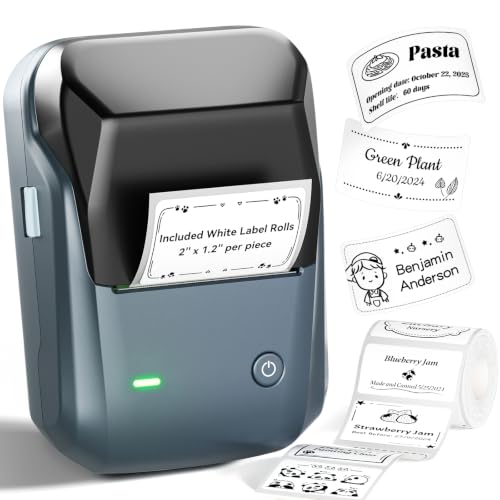
The NIIMBOT B1 Label Maker Machine stands out as an ideal choice for busy professionals seeking efficiency and organization in their workspace. This thermal label printer connects effortlessly to your iOS or Android devices via Bluetooth, and you can also link it to your PC using a USB cable. With its user-friendly NIIMBOT app, you’ll enjoy auto-detection of label sizes and a wealth of customization options, including over 30 fonts and 1500 symbols. Plus, its inkless thermal printing means no mess. The built-in rechargeable battery guarantees you stay productive, making it a perfect companion for any small business or home office.
Best For: Busy professionals and small businesses looking for an efficient and customizable labeling solution.
Pros:
- User-friendly app with auto-detection of label sizes and extensive customization options.
- Inkless thermal printing technology ensures no mess and low maintenance.
- Built-in rechargeable battery allows for portability and convenience with an auto-shutoff feature.
Cons:
- Not compatible with tablets, limiting device connectivity options.
- Requires a USB driver for PC connection, which may be an additional step for some users.
- Limited to Bluetooth connectivity, which could be a drawback for those preferring wired connections.
Factors to Consider When Choosing a Label Printer for Business
When choosing a label printer for your business, you’ll want to take into account several key factors. Think about the printing speed, connectivity options, and compatibility with label sizes that suit your needs. Additionally, evaluate the cost of operation and user-friendly features to guarantee you make the best choice.
Printing Speed Efficiency
Choosing a label printer that meets your business needs hinges considerably on its printing speed efficiency. It’s vital to select models that can print up to 180 mm/s, producing 72 labels per minute. A higher printing speed minimizes downtime, which is essential during busy shipping periods. Many thermal label printers use advanced technology for consistent high-speed output without needing ink or toner, making them cost-effective. Additionally, fast printers typically offer a resolution of 203 DPI, ensuring your labels remain clear and legible, even at high volumes. Evaluating these factors will help you meet the demands of high-volume shipping and labeling tasks, ultimately enhancing your operational efficiency.
Connectivity Options Available
High printing speed efficiency is just one aspect of selecting the right label printer for your business; connectivity options play a significant role too. Look for printers that offer both Bluetooth and USB connectivity, ensuring compatibility with smartphones, tablets, and computers. Wireless printing via Bluetooth adds flexibility, allowing you to print labels without being tethered to a computer. It’s also essential to check for driver-free integration capabilities, enabling seamless connections with major shipping platforms. Consider if the printer supports Wi-Fi or Ethernet, as these options allow multiple users in a shared workspace to access the printer. Finally, verify compatibility with various operating systems, including Windows, macOS, iOS, Android, and Chrome OS, to meet all your team’s needs.
Label Size Compatibility
Confirming your label printer is compatible with the specific sizes your business needs is essential for efficient operations. Some printers support widths ranging from 1 inch to 4.6 inches, so you’ll want to choose one that fits your requirements. Look for options that can handle common sizes, like 4×6 inches for shipping labels and smaller 3×2 inches for product tags. Flexibility is key; a printer that accommodates custom-sized labels enhances your labeling versatility. Additionally, consider models that support both roll and fanfold labels for operational efficiency. Finally, verify the printer can produce various formats, including text, barcodes, and QR codes, while maintaining high print quality across different label sizes. This guarantees your business stays organized and efficient.
Cost of Operation
When evaluating the cost of operating a label printer for your business, it is crucial to take into account the ongoing expenses tied to consumables like ink or toner. Traditional printers can drive up costs with regular ink or toner replacements, while thermal label printers eliminate these expenses by using heat-sensitive paper. Additionally, thermal printers often only require thermal labels, making them more economical over time. With high-speed options reaching up to 150 mm/s, you can produce large quantities quickly, reducing labor costs. The durability of some thermal models, capable of printing up to 970,000 labels before maintenance, further lowers operational expenses. Advanced features like auto-alignment technology can also minimize waste and enhance efficiency, contributing to overall cost savings.
User-Friendly Features
Choosing a label printer that fits your business needs involves considering user-friendly features that enhance efficiency and ease of use. Look for easy connectivity options like Bluetooth and USB to guarantee quick setup and seamless integration with your devices. A printer with intuitive apps or software simplifies the design process, offering pre-made templates and customizable options that save you time. Built-in memory for frequently used labels allows for rapid reprinting, which is essential in fast-paced environments. A clear LCD display helps you preview labels before printing, assuring accuracy and minimizing waste. Additionally, features like automatic label cutters and smart alignment mechanisms streamline your workflow, reducing manual intervention and boosting productivity.
Support and Warranty
Support and warranty are vital factors that can make a significant difference in your label printer experience. When choosing a printer, consider the availability of customer support options like live chat or phone assistance. Timely help can minimize downtime during critical operations. Look for models with extended warranty periods, as they reflect the manufacturer’s confidence in durability and reliability, giving you peace of mind. Confirm the printer includes thorough setup guides and technical resources to streamline installation and troubleshoot issues. It’s also important to check if the manufacturer provides regular software updates for compatibility with new operating systems. Finally, evaluate support hours to guarantee quick issue resolution during your business’s operational times.