
A good laptop stand with cable management does more than lift your screen. It helps tame cords, improve airflow, and create a cleaner, more comfortable workspace.
In this roundup, we focused on practical options for home offices, hybrid workers, and desk setups that need both better ergonomics and smarter organization.
Best 10 Laptop Stand with Cable Management Picks for 2026
Space-Saving Vertical Riser
3M Vertical Notebook Computer Riser

- Built-in cable management for tidier cords
- 3 inches of vertical height adjustment
- Non-skid base with holding ledge
Best For: simple desk setups that need a compact riser
Docking-Ready Stand
BENFEI USB-C Stand with 6-in-1 Dock

- Adjustable stand with aluminum build
- 6-in-1 dock adds HDMI, Ethernet, USB, and PD
- Helps keep the desktop cleaner with fewer adapters
Best For: workspaces that need both laptop elevation and hub connectivity
Clamp-On Cable Tray Organizer
LUKETURE Desk Side Storage with Cable Tray

- Built-in cable tray for hidden wires and power strips
- Clamp-on design installs without drilling
- Steel build holds up to 30 lbs
Best For: desk edges that can support side-mounted storage and cord hiding
Rotating Ergonomic Riser
BESIGN LSX7 Rotating Adjustable Laptop Stand

- 360° rotating base for flexible viewing
- Adjustable height and angle for comfort
- Open design improves airflow and desk space
Best For: users who want ergonomic adjustability and a rotating base
Ergonomic Desk Riser with Drawer
BONTEC Adjustable Monitor Stand Riser
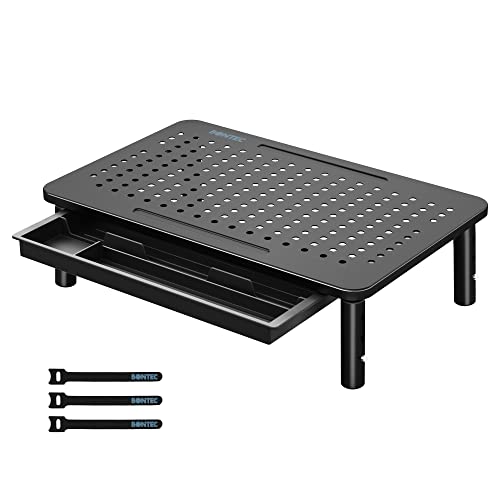
- 3 height options for better posture
- Built-in drawer and pen slot for storage
- Includes cable management for a tidier desk
Best For: Desk users who want ergonomic lift plus storage and cable organization
Portable Aluminum Laptop Riser
BESIGN LS03 Detachable Laptop Stand

- Raises laptops about 6 inches for better ergonomics
- Open aluminum design helps with cooling
- Detachable and folds flat for easy storage
Best For: Users who want a lightweight, portable laptop riser with simple setup
Height-Adjustable Workspace Organizer
Bostitch Konnect Monitor Riser

- Four height levels for a personalized setup
- Built-in cable management reduces cord clutter
- Drawer and phone holder add handy storage
Best For: Anyone wanting a versatile riser with cord control and desk organization
Docking-Ready Desk Upgrade

- 8-in-1 hub reduces desk clutter
- 4K HDMI and USB data ports
- 100W PD with portable foldable design
Best For: People who want a stand and hub in one compact setup
Ergonomic Everyday Choice
Adjustable Aluminum Laptop Riser

- Up to 7 inches of height adjustment
- Ventilated aluminum design
- Folds flat for portability
Best For: Users who need a simple ergonomic stand without built-in ports
Portable Cooling Pick
Adjustable Airflow Laptop Stand

- Adjustable height and angle
- Supports up to 15.4 pounds
- Foldable design for travel
Best For: Travelers and remote workers with smaller laptops
Space-Saving Vertical Riser – 3M Vertical Notebook Computer Riser
If you want a laptop stand with cable management that keeps your desk simple, this 3M vertical riser is built for a compact footprint and cleaner cord routing. It raises your notebook into a more comfortable viewing position while helping organize cables with its built-in management feature.
Best For: Users who want a basic, space-saving riser for a laptop or docking setup.
Pros:
- Built-in cable management helps keep cords organized.
- 3 inches of vertical height adjustment for a better viewing angle.
- Non-skid base and holding ledge add stability.
- Compatible with most docking stations.
Cons:
- Designed more as a riser than a fully adjustable ergonomic stand.
- No USB hub or charging ports included.
This is a practical pick if you want a simple, sturdy riser that frees up desk space and tidies cables without adding extra tech. It is best for a straightforward workstation setup where organization matters more than advanced features.
Docking-Ready Stand – BENFEI USB-C Stand with 6-in-1 Dock
This laptop stand with cable management adds more than height adjustment, making it a strong choice if you want to clean up your desk with fewer adapters and cables. It combines an adjustable aluminum stand with a 6-in-1 USB-C docking station for video, networking, charging, and data.
Best For: Laptop users who want a stand plus integrated docking connectivity in one unit.
Pros:
- Adjustable height and angle for more comfortable viewing.
- Built-in 6-in-1 dock includes HDMI 4K@60Hz, Ethernet, USB ports, and power delivery.
- Aluminum alloy construction with anti-skid silicone for stability.
- Pass-through charging support helps keep the laptop powered while connected.
Cons:
- Bulkier and more specialized than a basic stand.
- Docking features depend on device compatibility and port needs.
If your goal is to reduce desk clutter while adding ports, this model stands out because it merges ergonomic support and connectivity. It is a smart fit for people who plug in monitors, Ethernet, and accessories from the same workspace.
Clamp-On Cable Tray Organizer – LUKETURE Desk Side Storage with Cable Tray
If your priority is a laptop stand with cable management that hides power strips and loose cords, this desk-side storage tray takes a more utility-focused approach. It clamps to the side of a desk and adds a cable tray plus storage space for a laptop, tablet, and small accessories.
Best For: People who want side-mounted storage and a dedicated cable tray to clear desk space.
Pros:
- Dedicated cable tray helps keep hidden wires and power strips organized.
- High-quality steel construction supports up to 30 lbs.
- No-drill installation with silicone cushioning to help protect the desk.
- Heat dissipation holes support safer charging storage.
Cons:
- Only fits desks with flat edges and specific thickness limits.
- Not a traditional ergonomic laptop riser for screen-height adjustment.
This is the best match if cable control matters more than tilt or height changes. It works well as a side-mounted organizer for users who want to store a laptop and keep the desk surface clear.
Rotating Ergonomic Riser – BESIGN LSX7 Rotating Adjustable Laptop Stand
This laptop stand with cable management leans more toward ergonomic positioning and flexible viewing than integrated connectivity. Its open design keeps airflow moving, and the rotating base makes it easier to share the screen or adjust your angle during a work session.
Best For: Users who want an adjustable, rotating stand for comfort and airflow.
Pros:
- 360° rotating base allows flexible viewing angles.
- Adjustable height and angle help reduce neck strain.
- Open design improves ventilation and can store peripherals underneath.
- Metal construction supports up to 13 lbs with rubber contact points for grip.
Cons:
- No built-in cable tray or docking ports.
- Load capacity is lower than some heavier-duty stands.
This is a strong all-around ergonomic pick if you mainly need adjustability and screen-sharing flexibility. It does not add cable-routing hardware, but it can still help keep the workspace cleaner by opening up room beneath the laptop.
Ergonomic Desk Riser with Drawer – BONTEC Adjustable Monitor Stand Riser
If you want a laptop stand with cable management that also improves comfort and desk organization, this BONTEC riser is a practical pick. The adjustable height design, ventilated mesh top, and built-in drawer make it useful for everyday home office setups where you want your laptop raised and your workspace kept tidy.
Best For: Users who want an ergonomic riser with a drawer and simple cable organization for a cleaner desk.
Pros:
- Three height options help improve sitting posture and reduce neck and shoulder strain.
- Mesh platform promotes airflow to help keep laptops and monitors cooler.
- Built-in drawer and pen slot add handy storage for small desk items.
- Included hub-based cable management helps reduce wire clutter.
Cons:
- Designed as a riser rather than a dedicated folding laptop stand.
- Assembly is tool-free, but the fixed leg setup may not suit users wanting more adjustability.
Overall, this BONTEC model stands out when you need a sturdy, organized workspace upgrade with a focus on posture and storage. It is especially appealing if cable control and desktop tidiness matter as much as laptop height.
Portable Aluminum Laptop Riser – BESIGN LS03 Detachable Laptop Stand
The BESIGN LS03 is a straightforward laptop stand with cable management benefits mainly through its open, uncluttered design and clean desktop footprint. It raises your notebook to a better viewing height, improves airflow, and folds flat when you need to save space, making it a simple ergonomic choice for daily use.
Best For: People who want a lightweight, detachable aluminum laptop riser for improved posture and cooling.
Pros:
- Raises the laptop by about 6 inches to support a more comfortable viewing angle.
- Open aluminum build improves ventilation and helps prevent overheating.
- Detachable design makes it easy to assemble in three steps and store flat.
- Rubber contact points help keep the laptop stable and protect it from scratches.
Cons:
- Supports up to 8.8 lbs, so it is better suited to standard laptops than heavier setups.
- Does not include built-in drawers or extra storage features.
This is a clean, functional choice if you value portability and a more elevated laptop position over extra accessories. It keeps the desk open and organized while staying focused on the essentials.
Height-Adjustable Workspace Organizer – Bostitch Konnect Monitor Riser
If you are shopping for a laptop stand with cable management that also adds useful desk features, the Bostitch Konnect is worth a look. It offers four height levels, an integrated drawer, a phone holder, and a built-in cable management system, making it a strong fit for workspaces that need both convenience and order.
Best For: Office or home users who want a versatile riser with adjustable height, phone storage, and cord control.
Pros:
- Four height levels let you fine-tune the viewing position for a monitor or laptop.
- Built-in cable management helps keep cords neat and organized.
- Drawer and cell phone holder add practical everyday storage and accessibility.
- Rubber feet improve stability and help keep the stand securely in place.
Cons:
- Plastic construction may not feel as premium as metal alternatives.
- Weight capacity is 25 lbs, so it is best for lighter single-monitor or laptop setups.
As a desk organizer, this Bostitch model does a lot in one compact footprint. It is a sensible pick if you want adjustable ergonomics plus the added benefit of cable control and quick-access storage.
Docking-Ready Desk Upgrade – 8-in-1 USB-C Hub Stand
If you want a laptop stand with cable management that also cuts down on dongles, this stand-dock combo is built to simplify a busy desk. It raises your laptop, adds 8-in-1 connectivity, and keeps common connections like HDMI, USB, SD, and power routed through one portable hub.
Best For: Users who want one compact stand to handle display output, charging, and peripheral connections at a desk or on the go.
Pros:
- Built-in 8-in-1 docking station helps reduce cable clutter.
- Supports 4K HDMI at 30Hz for an external monitor setup.
- 100W power delivery with 85W reserved for laptop charging.
- Foldable, lightweight design includes a storage bag for travel.
Cons:
- HDMI requires a USB-C port with DisplayPort Alt Mode support.
- Not intended for high-power devices or more than one hard drive.
- External drive use needs the laptop to be in a charging state.
Overall, this is the most cable-management-friendly option in the group because it combines a stand and hub in one unit. It works best for people who want fewer adapters hanging off their laptop while still keeping a portable setup.
Ergonomic Everyday Choice – Adjustable Aluminum Laptop Riser
This laptop stand with cable management is really more about clean ergonomics than built-in routing hardware. It gives you an adjustable, ventilated riser that helps lift your screen, clear desk space, and make it easier to keep your workspace tidy.
Best For: Buyers who want a simple, sturdy laptop riser for posture, cooling, and portable daily use.
Pros:
- Up to 7 inches of height adjustment for a more comfortable viewing angle.
- Ventilated open design supports airflow and heat dissipation.
- Lightweight aluminum build folds flat for easy transport.
- Non-slip silicone pads and hooks help keep the laptop secure.
Cons:
- Supports laptops and tablets up to 15.6 inches only.
- No built-in ports or docking features for cable handling.
- Heavier or larger devices may affect balance and stability.
As a basic desk riser, this is a dependable option if you already have a separate hub or charger setup. It won’t manage cables by itself, but it can still help create a cleaner, more organized workstation.
Portable Cooling Pick – Adjustable Airflow Laptop Stand
If your priority is a lightweight laptop stand with cable management support through a cleaner setup, this foldable riser keeps things simple and organized. It focuses on adjustable positioning, strong support, and improved airflow rather than built-in dock features.
Best For: Travelers and remote workers who want an ergonomic, foldable stand for a smaller laptop.
Pros:
- Adjustable height and angle help improve comfort during long sessions.
- Sturdy metal construction supports up to 15.4 pounds.
- Ventilated design promotes strong heat dissipation.
- Foldable and portable for home, office, or travel use.
Cons:
- Only supports laptops up to 15.6 inches.
- No integrated ports or hub for cable routing.
- Listed details include a projector-mount reference, which may be confusing.
This stand is a practical pick if you want a stable, space-saving riser and you don’t need docking functionality. It is best viewed as an ergonomic support piece that helps keep a desk cleaner by lifting the laptop off the surface.
How We Picked the Best Laptop Stand with Cable Management
We looked for stands that improve viewing height, keep cables out of the way, and fit real-world desk setups. Priority went to stable builds, useful adjustment ranges, strong ventilation, and cable routing features that reduce clutter without making the stand harder to use.
We also considered extras like docking stations, drawer storage, rotation, and portability, since the best Laptop Stand with Cable Management should match how you actually work.
Quick Comparison
Some stands are built for simple height adjustment and airflow, while others combine risers with USB hubs, HDMI output, Ethernet, or storage trays. If you want the cleanest desk possible, a stand with integrated cable routing or a dock can reduce the number of separate accessories on your workspace.
If portability matters more than expansion, a lightweight foldable stand may be the better choice, especially if you move between rooms or offices.
Key Buying Factors for a Laptop Stand with Cable Management
Height and Viewing Angle
Look for a setup that brings the top of your screen closer to eye level and lets your elbows rest comfortably. Adjustable models are usually best if you share a desk or use multiple devices.
Cable Routing and Accessory Support
Check how cables are managed: trays, rear openings, side channels, or dock integration all help. If you use external monitors or charging accessories, choose a model that keeps power and data cables accessible rather than trapped.
Stability and Weight Capacity
A stand should feel solid when you type or connect peripherals. Heavier laptops, docking stations, and accessories need a sturdier base and a higher weight rating.
Cooling and Desk Space
Ventilated designs can help airflow around the laptop, while compact risers preserve room for a keyboard, mouse, or notebook. If your desk is small, prioritize footprint and storage efficiency.
Who Should Buy Which Laptop Stand with Cable Management?
Choose a simple adjustable riser if you mainly want better posture and a tidier desk. Pick a Laptop Stand with Cable Management and a built-in dock if you connect to monitors, Ethernet, and multiple USB devices every day. If you want a hybrid workstation, monitor risers with drawers or trays can be useful for keeping chargers and small accessories together.
For frequent movers or shared spaces, a foldable portable stand is the most flexible option. For permanent desk setups, a heavier model with integrated storage or cable routing usually offers the best long-term organization.