
Adding a laptop tray to a monitor arm is one of the simplest ways to clear desk space and improve screen positioning. It can turn a laptop into a more ergonomic secondary display or help create a cleaner, more flexible workstation.
This roundup focuses on the best laptop trays for monitor arms in 2026, with attention to VESA compatibility, weight support, tray size, and everyday stability.
Best 7 Laptop Trays for Monitor Arms Picks for 2026
Best for Dual-Use Workstations
HUANUO Monitor Arm with Laptop Tray

- Ventilated 14" x 12" laptop tray
- Monitor support up to 22 lbs
- Clamp or grommet installation options
Best For: People who want a monitor arm with an attached laptop tray for a tidy single-desk setup.
Best for Wide VESA Compatibility

- Fits 100x100mm VESA monitor mounts
- Supports laptops up to 17.3 inches and 28.6 lbs
- Open design helps with airflow and heat dissipation
Best For: People who need a sturdy, broadly compatible laptop tray for a VESA monitor arm.
Best VESA Tray Only Pick
suptek Adjustable Laptop VESA Tray

- Fits 13- to 18-inch laptops with 75x75 / 100x100 VESA mounts
- Adjustable clamps, cable tie, and rubber pads help secure the laptop
- Ventilated tray design supports better airflow on an arm or stand
Best For: People who already own a VESA monitor arm and just need a secure laptop tray.
Best for Heavy Laptops
ergounion Laptop Tray for Monitor Arm

- Supports laptops up to 17.3 inches and 28.6 lbs
- 100x100mm VESA fit works with many monitor arms
- Open U-shaped design improves cooling and port access
Best For: People with larger laptops who want a sturdy VESA-mounted tray for a monitor arm setup.
Best for Secure Fit
HumanCentric VESA Laptop Mount Tray
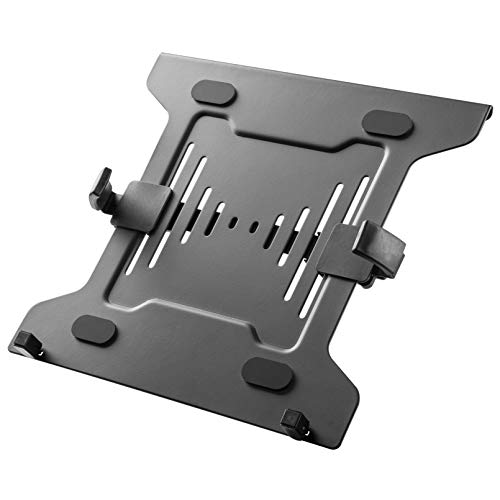
- Tight adjustable clamps for a stable hold
- Fits 75x75 and 100x100 mm VESA mounts
- Rubber pads and airflow holes protect the laptop
Best For: Remote workers, students, and creators who need a secure VESA laptop tray for a monitor arm setup.
Best Steel Build – Steel Laptop Tray for VESA Mounts
If you want one of the more durable laptop trays for monitor arms, this all-steel VESA tray is a straightforward way to add a notebook to an existing setup. It fits standard 100 x 100 mm mounts, includes the hardware you need, and adds a vented platform that helps keep airflow moving under the laptop.
Best For: Buyers who want a sturdy, no-frills VESA laptop tray for a secure dual-screen workstation.
Pros:
- Solid all-steel construction feels stable and secure
- Fits standard VESA 100 x 100 mm monitor arms and mounts
- Bottom lip helps keep the laptop from sliding forward
- Vent holes improve airflow for better cooling
Cons:
- Only works with VESA-compatible monitor arms
- At 12.6″ x 9″, it may be tight for larger notebooks
- No height or angle adjustment built into the tray itself
For shoppers comparing laptop trays for monitor arms, this model stands out more for strength and compatibility than for extra features. It is a practical pick if you already have a VESA arm and want a dependable metal tray that keeps your laptop elevated and cool.
Best for Dual-Use Workstations – HUANUO Monitor Arm with Laptop Tray
If you want one of the more practical laptop trays for monitor arms, this HUANUO setup gives you a monitor mount and laptop shelf in a single desk-friendly package. It’s a solid pick for compact workstations, hybrid office setups, or anyone who wants to raise both screens without adding extra clutter.
Best For: Users who want a single arm solution for a monitor and laptop on the same desk.
Pros:
- 14″ x 12″ ventilated laptop tray helps keep airflow moving around the notebook
- Supports 13-32″ VESA monitors up to 22 lbs with broad tilt, swivel, and rotation adjustment
- Built-in cable management helps keep cords tidy and off the desktop
- Clamp or grommet mounting gives you flexible installation options for wooden desks
Cons:
- Single-monitor design may not suit multi-screen setups
- Mounting hardware is limited to compatible wooden desks
- Adjustment screws need to be tightened carefully to hold position
This is a strong fit if you need laptop trays for monitor arms that do more than just hold a notebook. The combination of ergonomic positioning, cable control, and a ventilated tray makes it especially useful for everyday work, but it’s worth checking desk material and monitor specs before buying.
Best for VESA Compatibility – Laptop VESA Mount Tray Holder 12-17 Inch
If you want one of the more adaptable laptop trays for monitor arms, this VESA-compatible tray is a practical way to add a notebook to an existing stand while keeping your desk cleaner. It mounts to standard 75×75 mm and 100×100 mm VESA patterns, includes adjustable side clamps, and adds airflow plus anti-slip protection for everyday use.
Best For: Users who already have a VESA monitor arm or stand and want a universal laptop tray for 12-17 inch notebooks.
Pros:
- Fits both 75×75 mm and 100×100 mm VESA mounts for broad compatibility
- Adjustable clamps and safety barrier help keep the laptop secure
- Ventilated base and silicone pads support cooler, steadier placement
Cons:
- Monitor arm or stand must be purchased separately
- Weight limit is capped at 19.8 lbs, so it’s not for heavier setups
This is a solid pick if your goal is to turn an existing arm into a laptop display mount without much fuss. Among laptop trays for monitor arms, it stands out for straightforward VESA compatibility and practical laptop-retention features rather than premium extras.
Best for Wide VESA Compatibility – ergounion VESA Laptop Tray
If you need laptop trays for monitor arms that fit a standard 100x100mm VESA pattern, this ergounion tray is a practical, no-frills option. It supports laptops from 6 to 17.3 inches and up to 28.6 lbs, making it a solid pick for most office setups.
Best For: Users who want a sturdy VESA laptop tray for a monitor arm and need broad laptop compatibility.
Pros:
- Fits most 100x100mm VESA monitor mounts for easy integration
- Holds laptops up to 17.3 inches and 28.6 lbs
- Bottom lip, non-slip pads, and solid iron construction add stability
- Open center design helps improve airflow and heat dissipation
Cons:
- Only works with compatible VESA monitor arms
- Simple tray design offers limited adjustability on its own
Overall, this is a straightforward choice if you want one of the more universal laptop trays for monitor arms without extra gimmicks. It focuses on fit, stability, and cooling, which is exactly what many desk setups need.
Best VESA Tray Only Pick – suptek Adjustable Laptop VESA Tray
If you already own a monitor arm or stand with VESA mounting, this suptek tray is a practical way to add a laptop to the setup. It’s one of the more flexible laptop trays for monitor arms, with adjustable side clamps, a 10 lb weight limit, and ventilation holes to help keep a notebook secure and cooler on the mount.
Best For: Anyone who wants a tray-only laptop mount to pair with an existing VESA monitor arm or stand.
Pros:
- Fits 13- to 18-inch laptops and standard 75×75 / 100×100 VESA mounts
- Adjustable clamps and cable tie help hold the laptop firmly in place
- Ventilation holes support better airflow for warmer-running notebooks
- Tray-only design is ideal if you already have a compatible arm or stand
Cons:
- Monitor arm or stand is not included
- 10 lb weight cap may rule out heavier laptops
- Clamping-style fit may be less convenient for frequent laptop removal
This is a straightforward option for buyers comparing laptop trays for monitor arms because it focuses on compatibility, secure retention, and airflow rather than extras. If you already have the VESA hardware, it’s an efficient add-on for turning a monitor setup into a dual-screen workstation.
Best for Heavy Laptops – ergounion Laptop Tray for Monitor Arm
If you’re comparing laptop trays for monitor arms, this ergounion model is a strong fit for larger notebooks and sturdier desk setups. Its 100x100mm VESA compatibility, 28.6 lb capacity, and all-steel build make it a practical way to add a laptop to an ergonomic arm system without sacrificing stability or port access.
Best For: Users with 15- to 17.3-inch laptops who want a rigid, VESA-mounted tray for a cleaner, more adjustable workstation.
Pros:
- Supports laptops up to 17.3 inches and 28.6 lbs
- 100x100mm VESA fit works with many monitor arms
- Open U-shaped design helps with cooling and full port access
- Protective padding helps keep the laptop scratch-free
Cons:
- Requires a compatible VESA monitor arm
- Desk mode is fixed at a 30° angle, so it’s less adjustable off-arm
- Best results may require a desk mat for surface protection
Overall, this is a well-built option if you need laptop trays for monitor arms that can handle heavier machines and keep cables, ports, and airflow in mind. It’s especially appealing for buyers who want a durable, no-fuss tray rather than a lightweight universal cradle.
Best for Secure Fit – HumanCentric VESA Laptop Mount Tray
If you want one of the more secure laptop trays for monitor arms, this HumanCentric tray is built for a firm, stable hold on a VESA-compatible mount. It lifts your laptop to a more ergonomic viewing height, helps clear desk clutter, and adds useful airflow for everyday work or multi-monitor setups.
Best For: Remote workers, students, and creators who want a sturdy laptop tray that clamps down tightly on a monitor arm or stand.
Pros:
- Adjustable clamps fit laptops from 9.5" to 16.5" wide for a secure grip
- Works with standard 75×75 and 100×100 mm VESA mounts
- Rubber pads and ventilation holes help protect the laptop and improve cooling
Cons:
- Mount is sold separately, so it is not a standalone solution
- Best suited for 10" to 15.6" laptops, not larger notebooks
This is a practical pick if stability matters more than bells and whistles. Among laptop trays for monitor arms, it stands out for its tight clamp system, protective padding, and straightforward compatibility with common VESA setups.
How We Picked the Best Laptop Trays for Monitor Arms
We focused on trays that mount securely to common VESA patterns, support typical laptop sizes without excessive flex, and work well with popular single-arm and stand setups. We also looked for clear weight limits, practical tray dimensions, and adjustability that makes day-to-day use easier.
For Laptop Trays for Monitor Arms, the details matter: a tray that fits your VESA pattern but wobbles under load is not a good buy. We prioritized designs that balance compatibility, stability, and ease of installation.
Quick Comparison
Most options here fall into two camps: tray-only designs for users who already have a compatible arm, and bundled monitor-arm kits for buyers who want an all-in-one setup. Tray-only models are usually better value if you already own a monitor arm. Bundled kits are more convenient if you are building a new workstation from scratch.
Pay close attention to VESA size, because 75×75 mm and 100×100 mm are the most common standards. Also check the maximum laptop size and weight rating, especially if you use a larger 17-inch-class notebook or a heavy work laptop.
Key Buying Factors for Laptop Trays for Monitor Arms
VESA Compatibility
Make sure the tray matches your monitor arm’s mounting standard. Most buyers should look for 75×75 mm and 100×100 mm support, since those cover many deskside arms and stands.
Size and Weight Capacity
A wider tray can improve balance and comfort, but only if the arm can support the load. If your laptop is thicker, heavier, or used with a dock, charger, or external keyboard nearby, choose a tray with a higher rating and enough surface area.
Retention and Stability
Some trays rely on edge lips or straps to keep the laptop secure. Others use a more open shelf style. If you move your arm often, a model that fully secures the laptop is usually the safer choice.
Ergonomics and Workspace Use
Consider how you plan to use the setup. A tray works well for clamshell mode with an external keyboard and mouse, for secondary-screen use beside a main monitor, or for keeping a laptop elevated during video calls.
Who Should Buy Which Laptop Trays for Monitor Arms?
If you want the easiest upgrade to an existing arm, choose a tray-only model with the right VESA fit and a capacity that exceeds your laptop’s weight. If you are building a new workstation, a bundled arm-and-tray option can simplify setup and help ensure compatibility.
Frequent travelers and remote workers should prioritize quick installation and a secure hold. Power users with larger notebooks should focus on stronger weight limits and wider trays. For most buyers, the best choice is the model that fits your VESA mount cleanly, supports your laptop comfortably, and feels stable in daily use.