
Wall-mounted monitor arms can free up desk space, improve ergonomics, and help offices build cleaner, more flexible workstations. The right pick depends on screen size, weight, adjustment range, and how your space is laid out.
Below, we’ve curated the best options for different office needs, from compact single-screen setups to heavier ultrawide displays and dual-monitor workstations.
Best 10 Wall Mount Monitor Arms for Offices Picks for 2026
Best for Full-Motion Flexibility
MOUNTUP Single Wall Monitor Arm

- Supports monitors up to 32 inches and 19.8 lbs
- Full-motion adjustment with 360° rotation
- Space-saving wall install for cleaner desks
Best For: Office users who want a single monitor wall mount with strong adjustability and a tidy setup.
Best for Larger Single Monitors
VIVO Single Monitor Counterbalance Wall Mount
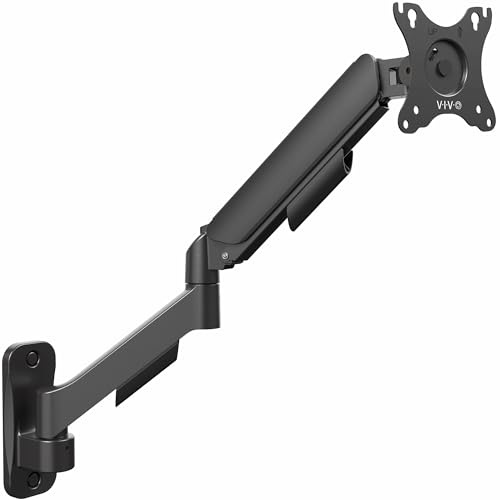
- Supports monitors up to 32 inches and 19.8 lbs
- Full-motion arm offers tilt, swivel, and 360° rotation
- Counterbalance design helps with smoother ergonomic adjustment
Best For: Offices with a single mid-size monitor that need wall-mounted adjustability and a cleaner desk layout.
Best for Dual 32-Inch Screens
HUANUO Dual Monitor Wall Mount

- Fits two 17-32 inch monitors
- Wide tilt, swivel, and rotation adjustments
- Wall mount frees up desk space
Best For: Office and home-office users who want a sturdy dual monitor wall mount for larger screens.
Best for Flexible Reach
WALI Full Motion Monitor Wall Mount

- 15-inch articulating arm for easy screen positioning
- Fits 13 to 32 inch displays with VESA up to 100x100mm
- Retracts close to the wall to save office space
Best For: Small offices and desk setups that need a compact, adjustable wall-mounted monitor arm.
Best for Comfort
ARES WING Wall Mount Monitor Arm

- Fits 17-49 inch ultrawide displays
- Holds up to 44 lbs with gas-spring adjustment
- Great space saver for clean office setups
Best For: Offices and workstations with large ultrawide monitors that need strong wall-mounted support.
Best for Wall-Mounted Desk Space
WALI 17–32" Single Monitor Arm

- Fits 17–32" monitors with 75x75/100x100 VESA
- Extends, tilts, swivels, and rotates for ergonomic viewing
- Great for freeing desk space in office setups
Best For: Office users who want a sturdy, space-saving wall-mounted arm for one monitor.
Best for Dual-Screen Flexibility
BONTEC Dual Wall Mount for 13-32" Monitors

- Supports two monitors up to 32 inches and 19.8 lbs each
- Gas spring arms make height and angle changes smooth
- Tilts, swivels, and rotates for ergonomic office viewing
Best For: Office users who want a flexible dual-monitor wall setup with a cleaner desk.
Best for Full Motion Adjustability
monTEK Single Monitor Wall Mount

- Fits 17 to 32 inch VESA monitors
- Full-motion arm with smooth repositioning
- Supports up to 19.8 lbs with cable management
Best For: Office users who want a flexible, space-saving wall-mounted monitor arm.
Best for Long Reach – MOUNT PRO Long Wall Monitor Arm
If you need wall mount monitor arms for offices that can reach farther from the wall without taking over the desk, this MOUNT PRO arm is a practical pick. Its extra-long design, full-motion adjustability, and clean cable management make it a strong fit for flexible workstations, corner setups, and shared spaces.
Best For: Office users who want a long-reach wall mount for better positioning, more desk space, and easy viewing from different angles.
Pros:
- Extends up to 25.67" and retracts to 3.17" for flexible placement
- Full-motion adjustments with 360° rotation, tilt, and swivel
- Supports 13" to 32" monitors and VESA 75×75 / 100×100
- Works on wood stud, concrete, and brick walls
Cons:
- Not compatible with drywall alone
- Does not support 1000R/1500R/1800R curved screens
This is a smart option if you want wall mount monitor arms for offices that prioritize reach and positioning over ultra-compact design. It offers plenty of movement for ergonomic viewing while helping keep the workspace open and organized.
Best for Ultrawide Monitors – ARES WING 60 lb Wall Mount Arm
If you need wall mount monitor arms for offices that can also handle oversized gaming displays, this ARES WING arm stands out for its 60 lb capacity and support for 24-57 inch screens. It is built for heavy ultrawide monitors, and the bearing-head design makes angle changes easier than many standard friction-based arms.
Best For: Offices, studios, and home workstations with large ultrawide or curved monitors that need strong, flexible wall mounting.
Pros:
- 60 lb load rating supports very large ultrawide and curved monitors
- Bearing head makes tilt adjustments smoother under heavy weight
- Full-motion range helps dial in ergonomic viewing angles
- Built-in cable management keeps office setups tidy
Cons:
- Requires VESA 75×75 or 100×100 mounting patterns
- Best installed on a stud, concrete, or brick wall
- More arm than many typical office monitors need
For buyers comparing wall mount monitor arms for offices, this is a strong pick when the monitor is unusually large or heavy and stability matters more than a compact profile. It is especially appealing if you want a clean, adjustable setup without sacrificing support.
Best for Full-Motion Flexibility – MOUNTUP Single Wall Monitor Arm
If you want wall mount monitor arms for offices that free up desk space while still giving you a wide range of adjustability, this MOUNTUP single monitor wall mount is a strong pick. It supports screens up to 32 inches, offers tilt, swivel, height adjustment, and 360° rotation, and works well when you need a cleaner, more ergonomic workstation.
Best For: Offices that want a space-saving wall-mounted monitor setup with flexible positioning for one screen.
Pros:
- Supports most 17-32 inch monitors up to 19.8 lbs
- Full-motion arm with tilt, swivel, height adjustment, and portrait/landscape rotation
- Sturdy aluminum build with smoother spring-assisted movement
- Includes hardware and a detachable VESA plate for easier installation
Cons:
- Not compatible with drywall alone
- Only works with 75x75mm and 100x100mm VESA patterns
- Single-monitor design only
For offices that can mount into studs, brick, or concrete, this is a practical way to improve ergonomics and reclaim desk space. Among wall mount monitor arms for offices, it stands out for its broad movement range and solid everyday build.
Best for Larger Single Monitors – VIVO Single Monitor Counterbalance Wall Mount
If you want wall mount monitor arms for offices that can support a larger screen without taking up desk space, this VIVO arm is a practical pick. It handles monitors up to 32 inches and 19.8 lbs, and the spring-assisted counterbalance makes height changes easier during the workday.
Best For: Office setups with a single mid-size monitor that need full-motion adjustment, cleaner cable routing, and sturdy wall-mounted support.
Pros:
- Supports monitors up to 32 inches and 19.8 lbs
- Full-motion arm offers tilt, swivel, and 360° rotation
- Counterbalance design helps with smoother ergonomic adjustment
- Includes hardware for wood stud and concrete/brick mounting
Cons:
- Not suitable for drywall-only installation
- Single-monitor design only
- Limited to 100×100 VESA compatibility
For offices that need a straightforward wall-mounted solution, this arm balances reach, adjustability, and support well. It is especially useful when wall mount monitor arms for offices need to free up workspace while still allowing flexible screen positioning.
Best for Dual 32-Inch Screens – HUANUO Dual Monitor Wall Mount
If you need wall mount monitor arms for offices that can handle two larger displays, this HUANUO wall-mount setup is built for flexibility and space-saving. It supports monitors up to 32 inches, offers wide-angle adjustments, and mounts directly to wood studs, concrete, or brick for a stable workstation.
Best For: Office users, home-office setups, and multitaskers who want a dual-monitor wall mount with strong adjustability and a cleaner desk.
Pros:
- Supports two 17-32 inch monitors up to 17.6 lbs per arm
- Flexible tilt, swivel, and 360° rotation for better ergonomics
- Wall mounting helps free up desk space and reduce cable clutter
- Works with VESA 75×75 and 100×100 patterns
Cons:
- Requires a suitable wall surface for installation
- Not ideal if you need frequent monitor repositioning
- Dual-arm design may be more than some single-monitor offices need
Overall, this is a strong pick for wall mount monitor arms for offices where desk space, ergonomic positioning, and support for larger dual displays matter most. It’s especially appealing if you want a sturdy, adjustable mount without giving up a clean workstation layout.
Best for Flexible Reach – WALI Full Motion Monitor Wall Mount
If you need wall mount monitor arms for offices that can free up desk space without locking you into one viewing angle, this WALI articulating mount is a practical pick. It supports most 13 to 32 inch displays, offers a long 15-inch extension, and gives you enough tilt, swivel, and rotation to dial in a comfortable setup.
Best For: Small offices, workstations, and shared desks that need a space-saving monitor arm with broad adjustment.
Pros:
- 15-inch extension helps position the screen closer or farther away as needed
- Full-motion adjustment with ±15° tilt, 180° swivel, and 360° rotation
- Works with common VESA patterns up to 100x100mm and screens up to 33 lbs
- Retracts to 2 inches from the wall to keep the workspace tidy
Cons:
- Not suitable for drywall-only installation
- Limited to smaller displays, so it is not ideal for larger office monitors
Overall, this mount is a strong fit if you want flexible positioning and a cleaner desk area without overpaying for extras. For wall mount monitor arms for offices, it stands out as a straightforward, space-saving solution for compact setups.
Best for Comfort – ARES WING Wall Mount Monitor Arm
If you need wall mount monitor arms for offices that can handle larger screens without sacrificing adjustability, the ARES WING is built for the job. It supports ultrawide displays up to 49 inches, offers strong motion control, and helps clear valuable desk space while keeping the setup ergonomic.
Best For: Offices, home offices, and workstation setups with ultrawide or heavy monitors that need a sturdy wall-mounted arm.
Pros:
- Supports ultrawide monitors up to 49 inches and 44 lbs
- Wide range of motion with tilt, swivel, rotation, and 23.9″ extension
- Pulls back to just 5″ from the wall to save space
- Built-in cable management helps keep desks looking clean
Cons:
- Requires a VESA-compatible monitor or adapter
- Installation should be done on a stud, concrete, or brick wall
For buyers comparing wall mount monitor arms for offices, this model stands out for its heavy-duty support and ultrawide-friendly design. It is especially appealing if you want a flexible arm that can handle a larger screen while still maintaining a clean, professional workspace.
Best for Wall-Mounted Desk Space – WALI 17–32" Single Monitor Arm
If you need wall mount monitor arms for offices that free up desk space and keep a single screen easy to position, this WALI wall mount is a practical pick. It supports most 17 to 32 inch monitors, offers a wide range of motion, and works with both brick and wood walls.
Best For: Offices that want a sturdy, space-saving single-monitor wall mount with flexible ergonomic adjustment.
Pros:
- Supports monitors up to 32″ and 22 lbs for broad office compatibility
- Strong adjustability with tilt, swivel, extension, and portrait/landscape rotation
- Helps clear desk clutter and improve viewing comfort in compact work areas
- Includes mounting hardware and US-based support
Cons:
- Single-monitor design only
- Requires wall mounting, so it is less flexible than a desk clamp arm
- Best fit is limited to VESA 75×75 mm and 100×100 mm displays
This is a solid option if your office setup needs a durable wall mount with good motion and a cleaner footprint. For buyers comparing wall mount monitor arms for offices, it stands out most for simple space savings and ergonomic flexibility rather than premium features.
Best for Dual-Screen Flexibility – BONTEC Dual Wall Mount for 13-32" Monitors
If you want wall mount monitor arms for offices that free up desk space without sacrificing adjustability, this BONTEC dual arm is a strong practical pick. It supports most 13-32 inch displays, offers broad tilt, swivel, and rotation movement, and uses gas springs to make day-to-day positioning easier.
Best For: Office setups that need two fully adjustable monitors, a cleaner desk, and better ergonomic positioning.
Pros:
- Dual-arm design with smooth height adjustment for two screens
- Wide range of motion: tilt, swivel, and 360° rotation
- Compatible with common VESA 75×75 and 100×100 monitors
- Built-in cable management helps keep office setups tidy
Cons:
- Requires wall installation, so it is less flexible than a desk clamp
- Best results depend on matching the arm tension to your monitor weight
Overall, this is a well-rounded option for buyers comparing wall mount monitor arms for offices because it combines strong adjustability, space savings, and a clean ergonomic layout. It makes the most sense when you need dual-screen support on a fixed wall mount rather than a temporary workstation setup.
Best for Full Motion Adjustability – monTEK Single Monitor Wall Mount
If you want one of the more flexible wall mount monitor arms for offices, this monTEK model stands out for its smooth full-motion adjustment and wall-saving profile. It supports a wide range of monitor sizes, works with common VESA patterns, and keeps the screen stable enough for everyday desk work, video calls, and multi-use setups.
Best For: Office users who want an articulated wall-mounted monitor arm with strong range of motion and a clean, space-saving install.
Pros:
- Fits 17 to 32 inch monitors with 75×75 and 100×100 VESA compatibility
- Full-motion arm offers tilt, swivel, rotation, and up to 21.7 inches of extension
- Steel and aluminum build supports up to 19.8 lbs with reduced wobble
- Integrated cable management helps keep office setups tidy
Cons:
- Not suitable for drywall-only mounting
- Requires VESA holes or an adapter for incompatible monitors
- Single-monitor design won’t work for dual-screen desk setups
For buyers comparing wall mount monitor arms for offices, this is a practical pick if you care more about adjustability and desk clearance than a minimal fixed mount. It is especially useful in workspaces where screen position changes often and a clean wall-mounted layout matters.
How We Picked These Wall Mount Monitor Arms for Offices
We focused on office-friendly Wall Mount Monitor Arms for Offices that balance sturdiness, movement, and compatibility. That means checking VESA support, screen-size range, weight capacity, articulation, and whether each arm is practical for daily use in a workplace setting.
We also considered installation simplicity, how well each mount supports ergonomic positioning, and whether it suits common office setups such as single monitors, dual screens, and ultrawide displays.
Quick Comparison: Which Type Fits Your Office?
For standard office monitors, a single full-motion arm is usually the most versatile choice. If you use two displays, a dual-arm wall mount can improve productivity while keeping the desk clear. For large ultrawide or heavier screens, a heavy-duty gas spring model is the safer option.
If your office uses mixed display sizes, prioritize mounts with broad compatibility and stronger weight limits rather than choosing by screen size alone.
Key Buying Factors for Wall Mount Monitor Arms for Offices
Screen Size and Weight Capacity
Always match the mount to both the diagonal screen size and the monitor’s actual weight. A mount can advertise a compatible size range but still fail if the panel is too heavy.
VESA Pattern Support
Most office monitors use VESA 75×75 or 100×100. Confirm the mount supports your display’s pattern before buying, especially for ultrawide or curved screens.
Range of Motion
Look for tilt, swivel, rotation, and extension if you need flexible viewing angles. More movement helps reduce glare and supports better posture, especially in shared workspaces.
Wall Type and Installation Space
Check whether the mount is suitable for your wall material and whether the arm’s extension will fit your workstation depth. In tight offices, a long-reach arm may be useful, but only if the wall location allows it.
Ergonomics and Workflow
The best Wall Mount Monitor Arms for Offices should help place the screen at eye level and keep the keyboard area open. That can reduce clutter and make dual-tasking easier throughout the day.
Who Should Buy Which Wall Mount Monitor Arms for Offices?
Choose a single monitor arm if you want a simple, space-saving upgrade for a standard desk setup. Pick a dual-monitor wall mount if your work depends on side-by-side apps, spreadsheets, or content creation. Go with a heavy-duty mount for large ultrawide, gaming-style, or premium displays that need stronger support.
If you manage a shared office or want a more polished look, prioritize adjustability and build quality over the lowest price. A well-matched mount can improve comfort, free desk space, and make your workstation easier to maintain.