
In 2026, choosing the right large ultrawide monitor can greatly enhance your office setup. With options that blend impressive visuals and productivity features, you’ll want to evaluate factors like screen size, ergonomic design, and connectivity. Some models stand out for their vibrant displays and multitasking capabilities. Let’s explore the top contenders that could transform your workspace and elevate your work efficiency.
LG 34SR60QC-W 34-inch QHD Curved Smart Monitor

The LG 34SR60QC-W 34-inch QHD Curved Smart Monitor is perfect for professionals who crave an expansive workspace. With a stunning 3440×1440 resolution and a 21:9 aspect ratio, it immerses you in your tasks, whether they’re work or entertainment. The 1800R curve enhances your viewing experience, while the 99% sRGB color gamut guarantees vibrant visuals. Thanks to built-in webOS23, you can easily stream from services like Netflix and Disney+. Connectivity is a breeze with two HDMI ports and three USB ports. Plus, its sleek, virtually frameless design looks great in any office setup, making multitasking effortless and enjoyable.
Best For: Professionals and gamers seeking an expansive, immersive workspace with vibrant visuals and seamless streaming capabilities.
Pros:
- High resolution (3440×1440) and 21:9 aspect ratio provide an immersive viewing experience for both work and entertainment.
- Built-in webOS23 allows easy access to popular streaming services and over 300 free LG Channels.
- Sleek, virtually frameless design enhances any office setup and supports multitasking effectively.
Cons:
- Limited refresh rate of 100Hz may not meet the demands of high-end competitive gaming.
- Curved design may not be suitable for all users, particularly those who prefer flat screens.
- Potential compatibility issues with certain older devices or software applications.
LG 34WR55QK-B 34-inch UltraWide Curved Computer Monitor

For professionals who juggle multiple tasks, the LG 34WR55QK-B 34-inch UltraWide Curved Computer Monitor stands out with its impressive 21:9 UltraWide WQHD resolution. With HDR10 and up to 99% sRGB color gamut, you’ll enjoy vibrant visuals that enhance your workflow. Its OnScreen Control and Picture-by-Picture features let you customize your workspace and view content from two sources simultaneously. Plus, the USB Type-C connectivity offers up to 65W power delivery, keeping your devices charged. The ergonomic design, adjustable height, and 3-side virtually borderless appearance elevate both comfort and aesthetics, making it a perfect fit for your office setup.
Best For: Professionals who need to multitask efficiently with vibrant visuals and ergonomic comfort.
Pros:
- Exceptional 21:9 UltraWide WQHD resolution provides expansive screen real estate for multitasking.
- OnScreen Control and Picture-by-Picture features allow seamless viewing of different content sources.
- Ergonomic design with adjustable height enhances comfort during extended use.
Cons:
- Limited built-in speakers may require external audio solutions for better sound quality.
- Curved screen may take time to get used to for some users transitioning from flat monitors.
- Price point may be higher compared to standard monitors with similar specifications.
Sceptre 34-Inch Curved Ultrawide WQHD Monitor (C345B-QUT168)

Designed with multitaskers in mind, the Sceptre 34-Inch Curved Ultrawide WQHD Monitor (C345B-QUT168) offers an expansive 3440 x 1440 resolution that enhances productivity by providing 30% more screen space than traditional monitors. With a swift 1ms response time and refresh rates up to 180Hz, you’ll enjoy smooth visuals without ghosting, perfect for both gaming and work. The 21:9 aspect ratio immerses you in your content, while the 99% sRGB color gamut guarantees vibrant colors. Plus, built-in speakers and a sleek curved design add to the modern aesthetic, making it a fantastic addition to any office setup.
Best For: The Sceptre 34-Inch Curved Ultrawide WQHD Monitor is best for gamers and multitaskers seeking an immersive viewing experience with enhanced productivity.
Pros:
- Exceptional 3440 x 1440 resolution provides sharp and detailed visuals.
- High refresh rates up to 180Hz ensure smooth gameplay and fluid motion.
- Curved design enhances immersion and adds a modern touch to any workspace.
Cons:
- Limited connectivity options with only two DisplayPort inputs.
- Built-in speakers may not deliver high-quality audio for serious media consumption.
- The large size may require ample desk space, which could be a limitation in smaller setups.
LG 34U530A-W 34-inch UltraWide Computer Monitor

With its 34-inch UltraWide display and 21:9 aspect ratio, the LG 34U530A-W monitor transforms your office setup into a multitasking powerhouse. Featuring a crisp UltraWide WFHD resolution of 2560 x 1080, this IPS panel offers stunning visuals and up to 99% sRGB color coverage. The borderless design maximizes your screen space, while the adjustable stand guarantees ideal viewing angles. With USB Type-C, DisplayPort, and HDMI connectivity, you’ll keep your desk tidy. Plus, the built-in stereo speakers and VESA DisplayHDR 400 elevate your audio-visual experience, making it perfect for video calls, streaming, and productivity tasks.
Best For: Professionals and gamers seeking an immersive multitasking experience with vibrant visuals and enhanced productivity.
Pros:
- Stunning UltraWide WFHD resolution (2560 x 1080) for enhanced clarity and detail.
- Adjustable stand allows for customizable viewing angles to reduce neck strain.
- Multiple connectivity options including USB Type-C, DisplayPort, and HDMI to minimize cable clutter.
Cons:
- Limited HDR performance as it only supports VESA DisplayHDR 400.
- Weight of 19.4 pounds may require a sturdy desk for optimal stability.
- Speakers may not satisfy audiophiles, as built-in options can be less powerful compared to dedicated external speakers.
Samsung Viewfinity S65UA 34-Inch Ultrawide QHD Curved Monitor (LS34A654UBNXGO)
The Samsung Viewfinity S65UA 34-Inch Ultrawide QHD Curved Monitor is perfect for professionals who thrive on multitasking. Its 21:9 aspect ratio and ultra WQHD resolution provide ample screen real estate for all your apps and documents. With 1 billion colors and HDR10, your visuals are stunningly vibrant. The 1000R curvature reduces eye strain, while TUV certification guarantees smart eye care. You’ll appreciate the fast 100Hz refresh rate for smooth navigation and the virtually borderless design that keeps distractions at bay. Plus, with USB Type-C connectivity, you can keep your workspace clutter-free and efficient.
Best For: Professionals and gamers who require a large, high-quality display for multitasking and immersive gameplay.
Pros:
- Stunning ultra WQHD resolution with vibrant colors and HDR10 for enhanced visuals.
- Ergonomic 1000R curvature and TUV-certified eye care features reduce eye strain during long usage.
- Fast 100Hz refresh rate and AMD FreeSync technology ensure smooth performance for both productivity and gaming.
Cons:
- The large size may not fit well in smaller workspaces.
- Limited adjustment options for height and tilt could affect ergonomic positioning.
- USB Type-C port may not be compatible with all devices without adapters.
INNOCN 49″ Curved Ultrawide Gaming Monitor (49C1R)

For gamers and multitaskers seeking an immersive experience, the INNOCN 49″ Curved Ultrawide Gaming Monitor (49C1R) stands out with its expansive 49-inch display and stunning 5120 x 1440 resolution. The 1800R curvature enhances comfort, reducing eye strain during long hours. With a 120Hz refresh rate and Adaptive-Sync technology, you’ll enjoy smooth visuals whether gaming or multitasking. Its versatile connectivity options, including USB-C and HDMI 2.1, make it compatible with various devices. Plus, you can easily adjust the height, tilt, and swivel for the best viewing angles. This monitor truly maximizes productivity and guarantees an engaging experience.
Best For: Gamers and multitaskers who seek an immersive and expansive visual experience.
Pros:
- Exceptional 49-inch curved display with a high 5120 x 1440 resolution for immersive gaming and multitasking.
- Versatile connectivity options including USB-C, HDMI 2.1, and multiple USB ports for easy device integration.
- Adjustable height, tilt, and swivel features ensure optimal viewing angles and comfort during extended use.
Cons:
- The monitor is quite heavy at 35.1 pounds, which may make it challenging to mount or reposition.
- Limited HDR capability with HDR400, which may not meet the expectations of some users looking for higher HDR performance.
- The size may be overwhelming for smaller workspaces, limiting placement options.
Samsung 34″ ViewFinity S50GC Ultra-WQHD Monitor (LS34C502GANXZA)

Ideal for professionals seeking enhanced productivity, the Samsung 34″ ViewFinity S50GC Ultra-WQHD Monitor delivers an impressive 21:9 aspect ratio that maximizes your screen real estate. With a brightness of 300 cd/㎡ and a static contrast ratio of 3000:1, you’ll enjoy vibrant visuals. The monitor supports HDR10, displaying over 1 billion colors. Eye Care Technology, including an ambient light sensor and Eye Saver Mode, reduces strain during long hours. Plus, with a 100Hz refresh rate and AMD Radeon FreeSync, gaming and video playback are seamless. Connectivity options like HDMI and DisplayPort facilitate multitasking, enhancing your workflow.
Best For: Professionals and gamers seeking a versatile monitor that enhances productivity and provides an immersive viewing experience.
Pros:
- Wide 21:9 aspect ratio maximizes screen space for multitasking and immersive gaming.
- Eye Care Technology significantly reduces eye strain during prolonged use.
- High refresh rate of 100Hz and AMD Radeon FreeSync provide smooth visuals for gaming and video playback.
Cons:
- Limited connectivity options with only two HDMI and one DisplayPort input.
- The monitor may require calibration to achieve optimal color accuracy for professional design work.
- Larger size may not be suitable for smaller workspaces or desks.
Samsung 34″ ViewFinity S50GC Ultrawide QHD Monitor

Looking to enhance your office setup? The Samsung 34″ ViewFinity S50GC Ultrawide QHD Monitor is a game-changer. With a 21:9 aspect ratio and Ultra-WQHD resolution, you’ll enjoy seamless multitasking and vibrant visuals with HDR10, showcasing over 1 billion colors. Its 100Hz refresh rate and AMD Radeon FreeSync technology minimize lag and tearing for smoother experiences. Plus, the eye care features, including an ambient light sensor and Eye Saver Mode, keep your eyes comfortable during long hours. With Picture-by-Picture and Picture-in-Picture capabilities, you can effortlessly manage multiple tasks, making this monitor an ideal addition to any workspace.
Best For: Professionals and creatives who require expansive screen real estate for multitasking and vibrant visual performance.
Pros:
- Ultra-WQHD resolution offers stunning visuals and enhances productivity with a 21:9 aspect ratio.
- Eye care technologies such as Eye Saver Mode and Flicker Free help reduce eye strain during extended use.
- Multitasking features like Picture-by-Picture and Picture-in-Picture allow for efficient management of multiple sources simultaneously.
Cons:
- The large size may not fit comfortably on smaller desks or workspaces.
- Limited adjustability options for height and tilt may affect ergonomics for some users.
- Higher price point compared to standard monitors may not be justifiable for casual users.
LG 34″ Curved UltraWide Smart Monitor
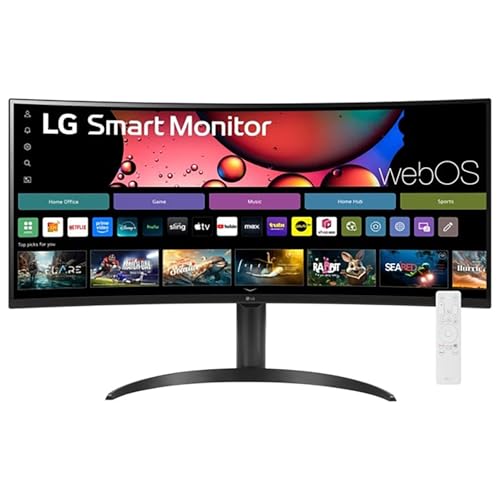
The LG 34″ Curved UltraWide Smart Monitor is a game-changer for professionals who crave an expansive workspace without clutter. With its 34″ WQHD display and 21:9 aspect ratio, you’ll enjoy a stunningly wide view that enhances productivity. The 1800R curve immerses you in your work, while HDR10 guarantees vibrant visuals. Plus, built-in webOS lets you multitask effortlessly and stream your favorite shows. You can access cloud services like Microsoft 365 directly, reducing the need for a PC. Its sleek, frameless design and adjustable stand provide both style and comfort, making it a perfect fit for any office setup.
Best For: Professionals and creatives seeking an expansive workspace with immersive visuals for enhanced productivity.
Pros:
- Stunning 34″ WQHD display with a 21:9 aspect ratio for a wider view and improved multitasking.
- Built-in webOS allows seamless access to streaming services and cloud applications without the need for a PC.
- Sleek, virtually frameless design with ergonomic adjustments for a comfortable and stylish setup.
Cons:
- Curved design may not be ideal for everyone, especially those who prefer flat screens.
- Limited native resolution options compared to more conventional monitors.
- Potentially higher price point compared to standard monitors without smart features.
Gawfolk 34 inch Ultrawide Gaming Monitor (2560×1080P)

For professionals seeking to boost productivity, the Gawfolk 34 inch Ultrawide Gaming Monitor offers an impressive 21:9 aspect ratio, providing 30% more screen space than standard monitors. With a resolution of 2560×1080P, this IPS panel delivers stunning color accuracy, covering 128% of sRGB. The smooth 120Hz refresh rate enhances fluid motion, making it perfect for both gaming and multitasking. Enjoy wide viewing angles thanks to IPS technology, while the bezel-less design minimizes distractions. Connectivity options like HDMI 2.1 and DisplayPort 1.4 guarantee compatibility with various devices. Plus, its adjustable tilt allows for ideal viewing angles in any setup.
Best For: Professionals and gamers looking for an immersive ultrawide display that enhances productivity and gaming performance.
Pros:
- Stunning Color Accuracy: Covers 128% of sRGB for vibrant visuals and precise color reproduction.
- Fluid Motion: Smooth 120Hz refresh rate reduces screen tearing, ideal for fast-paced gaming and multitasking.
- Wide Viewing Angles: IPS technology provides excellent visibility from various angles, making it suitable for collaborative work.
Cons:
- Limited Resolution: The 2560x1080P resolution may not meet the needs of users requiring higher pixel density for detailed graphic work.
- Adjustable Tilt Only: Lacks height adjustment, which may not accommodate all ergonomic preferences.
- Bezel-less Design Risks Damage: The thin bezel may be more susceptible to damage compared to traditional framed monitors.
Factors to Consider When Choosing a Large Ultrawide Monitor for Office
When choosing a large ultrawide monitor for your office, you’ll want to take into account several key factors. Screen size and resolution play a vital role in your overall experience, while the aspect ratio can impact how you multitask. Don’t forget about refresh rates, connectivity options, and ergonomic design features that enhance comfort and usability.
Screen Size and Resolution
Choosing the right screen size and resolution for your ultrawide monitor can greatly impact your productivity. A larger screen, like 34 inches, gives you more screen real estate, enhancing multitasking capabilities. With a typical 21:9 aspect ratio, ultrawide monitors provide a wider field of view, improving comfort and efficiency during your work hours. Opting for higher resolutions, such as Ultra WQHD (3440 x 1440), guarantees sharper images and greater detail, vital for precision tasks like graphic design or data analysis. Additionally, consider the curvature; a 1800R curve aligns better with your eye’s natural shape, reducing strain. Finally, aim for a refresh rate of 100Hz or higher for smoother visuals, especially during fast-paced tasks.
Aspect Ratio Importance
While you may focus on screen size and resolution, the aspect ratio of your ultrawide monitor plays an essential role in enhancing your office setup. A 21:9 aspect ratio provides a wider field of view than traditional 16:9 monitors, allowing you to view multiple applications side by side without needing extra screens. This extra screen space can boost your multitasking capabilities by up to 34%, making work more efficient. Additionally, the wider aspect ratio improves the immersive experience during presentations or video calls, helping you effectively share content with multiple viewers. Some models even support Picture-by-Picture (PbP) technology, enabling simultaneous display from two different sources, which is particularly beneficial for creative professionals needing accurate content representation.
Refresh Rate Considerations
The aspect ratio isn’t the only factor that can elevate your office setup; refresh rate also plays a significant role in your overall experience. While a refresh rate of 60Hz is generally sufficient for typical office tasks, consider opting for at least 75Hz to reduce eye strain during long hours. If you work with fast-moving content or enjoy gaming during breaks, a higher refresh rate of 100Hz or more can provide smoother visuals and enhance responsiveness. Monitors exceeding 120Hz are perfect for gaming and media consumption, cutting down on lag. Just remember to match the refresh rate with your graphics hardware to avoid any performance issues, ensuring you get the most out of your ultrawide monitor.
Connectivity Options Available
When selecting a large ultrawide monitor for your office, connectivity options should be a top priority to guarantee seamless integration with your devices. Look for multiple HDMI and DisplayPort inputs to assure compatibility with various devices and easy switching. USB Type-C connectivity is a game-changer, offering power delivery and data transfer while reducing cable clutter, especially for laptop users. Built-in USB hubs are another benefit, providing extra ports for peripherals like keyboards and external storage. It’s also wise to verify the monitor supports wireless options like Apple AirPlay for smooth integration with smart devices. Finally, consider models featuring Picture-by-Picture (PbP) or Picture-in-Picture (PIP) capabilities, allowing you to view multiple sources simultaneously at native resolution.
Ergonomic Design Features
Choosing a large ultrawide monitor with ergonomic design features guarantees you’ll stay comfortable during long work sessions. Look for adjustable height, tilt, and swivel options to achieve the best viewing angles and minimize neck strain. A borderless design reduces distractions, helping you maintain focus on your tasks. If you opt for a curved display, like one with a 1800R curvature, it aligns with the natural curve of your eyes, which can reduce fatigue. Additionally, monitors incorporating eye care technologies, such as flicker-free and blue light reduction modes, promote healthier viewing habits. Finally, consider adjustable stands that save desk space while enhancing your workspace’s ergonomics, keeping your environment clean and conducive to productivity.
Color Accuracy and Gamut
Color accuracy and gamut play an essential role in your decision-making process for selecting a large ultrawide monitor. If you’re involved in graphic design or photo editing, you’ll want a monitor that reproduces colors accurately. Look for displays with a high color gamut—aim for at least 99% sRGB to guarantee vibrant and precise colors. Monitors featuring HDR (High Dynamic Range) can further enhance color depth and contrast, making images pop. Opt for IPS (In-Plane Switching) technology, as it provides better color consistency and wider viewing angles than TN panels. Additionally, consider monitors with VESA DisplayHDR certification for superior brightness and color performance in various lighting conditions, assuring your workspace is visually appealing and effective.
Multitasking Capabilities
As you explore large ultrawide monitors, consider how their multitasking capabilities can alter your workflow. With a 21:9 aspect ratio, these monitors offer ample screen real estate, allowing you to easily arrange multiple windows side by side without needing a dual monitor setup. Features like Picture-by-Picture (PbP) let you view content from two input sources simultaneously, boosting productivity for tasks that involve cross-referencing. The OnScreen Control makes it simple to customize your workspace, ensuring your applications and documents are organized efficiently. Many models also support screen splitting, dividing the display into multiple sections for quick access to various applications. Plus, high refresh rates and low response times enhance smooth changes between tasks, making multitasking more efficient.
Smart Features Integration
When selecting a large ultrawide monitor for your office, smart features can greatly enhance your productivity and overall experience. Monitors with built-in operating systems let you access streaming services directly, eliminating the need for extra devices. You’ll find multiple free channels and apps that provide entertainment alongside your work tasks, making your setup more versatile. Integration with cloud services, like Microsoft 365 and Google applications, allows seamless multitasking and collaboration without a connected PC. Additionally, devices that support wireless casting, such as Apple AirPlay 2, simplify sharing content from your mobile devices. Voice control capabilities offer hands-free navigation, further streamlining your workflow. These features create a more efficient and enjoyable workspace tailored to your needs.