
If you’re looking to enhance your workspace efficiency, choosing the right docking station for your business laptop is essential. With various options available, you can easily find a model that meets your needs for connectivity, power delivery, and multitasking. The right choice can greatly streamline your workflow and improve productivity. So, which docking stations stand out in today’s market? Let’s explore the top contenders that can transform your setup.
Anker Laptop Docking Station Dual Monitor (8-in-1 USB C Hub)

The Anker Laptop Docking Station Dual Monitor (8-in-1 USB C Hub) is perfect for busy professionals who need seamless multi-monitor setups. With dual HDMI ports, you can stream or mirror content in stunning 4K at 60Hz on one display or 30Hz on two. The hub also features a 1 Gbps Ethernet port and multiple USB ports, maximizing your connectivity options. Plus, the 85W Power Delivery guarantees your devices stay charged while you work. Just remember, it requires a 100W PD wall charger. Compatible with various operating systems, it’s your go-to solution for enhancing workspace efficiency.
Best For: Busy professionals seeking a versatile docking station for seamless multi-monitor setups and enhanced connectivity options.
Pros:
- Supports dual HDMI displays with stunning 4K resolution for an immersive viewing experience.
- Offers multiple connectivity options including USB-A ports, Ethernet, and SD card reader for maximum flexibility.
- Provides 85W Power Delivery, ensuring your devices remain charged while in use.
Cons:
- Requires a separate 100W PD wall charger, which is not included in the package.
- Not compatible with Linux operating systems, limiting its use for some users.
- macOS displays identical content on both external monitors, which may not suit all users’ needs.
Anker Prime Docking Station (14-Port, 160W Max Output)

Designed for professionals who need robust connectivity, the Anker Prime Docking Station offers an impressive 14 ports, making it an ideal choice for business laptops. With 160W max output, you can charge up to four devices simultaneously while enjoying fast data transfer speeds of up to 10Gbps. It features three USB-C ports, one USB-A port, and dual HDMI ports for seamless dual display setups. Compatible with Windows and ChromeOS, this docking station enhances your workspace by supporting high-resolution displays and efficient power management. Plus, you’ll find a USB-C cable included for easy setup right out of the box.
Best For: Professionals and businesses needing robust connectivity and efficient power management for multiple devices.
Pros:
- 14-port design allows for extensive connectivity options, catering to various devices.
- 160W max output enables simultaneous charging of up to four devices, enhancing productivity.
- Dual HDMI support facilitates seamless dual display setups for improved multitasking.
Cons:
- Not compatible with Linux operating systems, limiting usability for some users.
- External monitors display identical content on macOS, which may not suit all users’ needs.
- Does not support 5120*1440 monitors, potentially restricting display options for high-resolution users.
Acer 13-in-1 Docking Station with Triple Monitor Support

With seamless triple monitor support, the Acer Premium 13-in-1 Docking Station is an ideal choice for professionals who demand efficient multitasking capabilities. You’ll appreciate its dual HDMI and DisplayPort connections, allowing for stunning triple 4K displays. Weighing just 2.33 pounds, it’s portable yet powerful, featuring a sleek aluminum design that guarantees heat dissipation. The 110W power adapter delivers 85W to your laptop, maintaining stable performance even during intensive tasks. Plus, the integrated security slot helps keep your setup secure. With 4.5 out of 5 stars from users, this docking station enhances your workspace while reducing cable clutter.
Best For: Professionals who require efficient multitasking capabilities with seamless triple monitor support.
Pros:
- Seamless triple monitor support with dual HDMI and DisplayPort connections for stunning 4K displays.
- Sleek aluminum design ensures efficient heat dissipation and enhances workspace aesthetics.
- Stable performance with 110W power adapter delivering 85W to the laptop, maintaining reliability during intensive tasks.
Cons:
- Limited macOS support as it only mirrors displays (SST) instead of extending them.
- Portability may be hindered for users who prefer ultra-lightweight options, weighing 2.33 pounds.
- Integrated security slot requires an additional cable lock for enhanced security, which is not included.
Plugable USB 3.0 and USB-C Universal Laptop Docking Station

For professionals seeking a reliable and versatile docking solution, the Plugable USB 3.0 and USB-C Universal Laptop Docking Station stands out. It features dual HDMI ports, allowing you to connect two monitors and enjoy resolutions up to 1920×1200. With wired Gigabit Ethernet, a 3.5mm audio jack, and multiple USB ports, it enhances your productivity at home or the office. Compatible with Windows, macOS, and ChromeOS, it requires a driver for Mac users. Plus, you’ll have peace of mind with a two-year warranty and lifetime support from a North American team, ensuring your docking experience is seamless.
Best For: Professionals and students looking for a versatile docking station that supports dual monitors and enhances productivity at home or in the office.
Pros:
- Dual HDMI ports for connecting two monitors, supporting resolutions up to 1920×1200.
- Multiple USB ports and wired Gigabit Ethernet for enhanced connectivity and productivity.
- Two-year warranty and lifetime support from a North American team ensure reliability and assistance.
Cons:
- Driver installation is required for macOS users, which may complicate setup.
- Not recommended for gaming or playback of encrypted content due to lack of HDCP support.
- Linux compatibility is not available, limiting use for Linux users.
Anker 13-in-1 USB-C Laptop Docking Station

The Anker 13-in-1 USB-C Laptop Docking Station stands out as an ideal choice for professionals who need extensive connectivity options for multitasking. With support for triple displays through dual HDMI ports and a DisplayPort, you can enhance your productivity effortlessly. It features an 85W USB-C laptop charging port, alongside additional ports like three USB-A, an Ethernet port, and SD/microSD card slots. You’ll appreciate the high-speed charging capabilities, allowing simultaneous charging of your laptop and mobile device. Compatible with various operating systems and devices, this docking station equips you for success in any business environment.
Best For: Professionals seeking extensive connectivity options and support for multiple displays to enhance productivity.
Pros:
- Supports triple display with dual HDMI ports and a DisplayPort for enhanced multitasking.
- High-speed charging capabilities allow simultaneous charging of both a laptop and a mobile device.
- Wide compatibility with various operating systems and devices, including USB-C, USB4, and Thunderbolt connections.
Cons:
- Limited macOS and iPadOS support, only allowing single-stream transport (SST) mode for external monitors.
- Not compatible with Linux, which limits usage for some users.
- May require additional setup for optimal performance with certain devices.
Dell Pro Dock WD25 – USB Type-C Docking Station
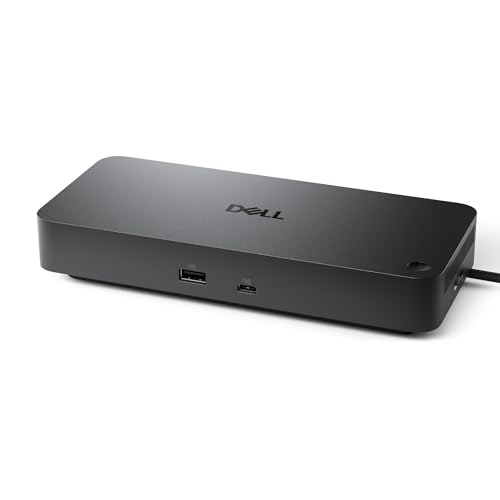
Designed to enhance productivity in dynamic work environments, the Dell Pro Dock WD25 is the ideal choice for professionals who rely on seamless connectivity. With its USB Type-C and DP Alt Mode connector, you can easily connect up to four high-resolution displays. It delivers up to 100W of power, making it compatible with both Dell and non-Dell PCs. This dock is part of a highly manageable docking family, ensuring IT efficiency while minimizing disruptions. Plus, its sustainable design features up to 72% reduction in power consumption and incorporates at least 65% post-consumer recycled materials, making it an eco-friendly option.
Best For: Professionals seeking a reliable and efficient docking station to enhance connectivity and productivity in dynamic work environments.
Pros:
- Supports up to four high-resolution displays for enhanced multitasking.
- Delivers up to 100W of power, compatible with both Dell and non-Dell PCs.
- Eco-friendly design with significant power reduction and use of recycled materials.
Cons:
- May be overkill for users who only need basic connectivity options.
- Relatively higher price point compared to simpler docking solutions.
- Limited to USB Type-C devices, which may not suit all laptops or peripherals.
USB C Laptop Docking Station Dual Monitor Hub (14 in 1)

If you’re a professional who frequently works with multiple displays, the USB C Laptop Docking Station Dual Monitor Hub (14 in 1) is an essential tool for enhancing productivity. This versatile hub transforms a single USB-C/Thunderbolt port into 14 connections, including dual HDMI and DisplayPort outputs supporting up to 4K resolution. With fast data transfer speeds of up to 10Gbps through multiple USB ports, you can efficiently connect peripherals. Plus, enjoy stable wired connections with its Ethernet port and power delivery capabilities up to 100W. Compatible with various laptops, it simplifies your workspace while boosting your efficiency.
Best For: Professionals who require multiple display outputs and fast data transfers for enhanced productivity.
Pros:
- Supports dual and triple monitor setups, accommodating various display needs with high resolutions.
- Fast data transfer speeds of up to 10Gbps through multiple USB ports for efficient peripheral connectivity.
- Provides up to 100W power delivery, ensuring laptops stay charged while connected.
Cons:
- Limited to mirrored displays for MacBook laptops, which may restrict functionality for some users.
- Does not support converter usage, potentially limiting compatibility with certain devices.
- Cable and adapter for power delivery not included, which may require additional purchases.
Selore USB C Docking Station Dual Monitor (14 in 1)

For professionals who need seamless multitasking, the Selore USB C Docking Station stands out with its dual monitor support and 14 versatile ports. You can connect two 4K HDMI displays or a VGA monitor, allowing you to work on multiple tasks efficiently. With three 10Gbps USB ports, four USB A ports, and SD/Micro SD card readers, data transfer is swift and easy. Plus, the 1000M Ethernet port guarantees reliable internet connectivity. The 100W Power Delivery port supports fast charging, keeping your devices powered up. It’s compatible with various laptops, making it a great addition to your workspace.
Best For: Professionals and multitaskers who require dual monitor support and multiple connectivity options for enhanced productivity.
Pros:
- Versatile connectivity: Offers 14 ports, including dual 4K HDMI outputs and a VGA port, for flexible display options.
- High-speed data transfer: Features three 10Gbps USB ports and fast SD/Micro SD card readers for quick file transfers.
- Reliable internet access: Includes a 1000M Ethernet port for stable and fast internet connectivity.
Cons:
- Limited Mac support: Mac devices with M1 and M2 chips can only mirror screens, not extend displays.
- Power output restrictions: Charging limited to 87W, which may not be sufficient for some high-power devices.
- Compatibility requirements: Requires Thunderbolt 3 or USB C ports with specific capabilities for full functionality.
HP USB-C Dock G5 11-in-1 Adapter

The HP USB-C Dock G5 11-in-1 Adapter stands out as an essential tool for professionals seeking seamless connectivity and organization in their workspace. This compact device supports USB-C and Thunderbolt-enabled laptops, including HP and MacBook® models. With a single-cable solution, you can connect multiple accessories and up to three displays, reducing desk clutter. It also features advanced management capabilities like Wake-on LAN and MAC Address Pass-Through, enhancing network security. Rated 4.2 out of 5 stars, this docking station delivers reliable performance, making it a top choice for boosting your workspace efficiency.
Best For: Professionals using USB-C and Thunderbolt-enabled laptops who need a seamless solution for connecting multiple devices and displays.
Pros:
- Compact design minimizes desk clutter and provides a single-cable solution for multiple connections.
- Advanced management features like Wake-on LAN and MAC Address Pass-Through enhance network security and remote management.
- Compatible with a wide range of devices, including HP laptops and MacBook® computers.
Cons:
- Limited support for non-HP devices regarding some advanced management features.
- Performance may vary depending on the specifications of the connected devices.
- Weight (1.65 pounds) may be slightly heavy for portable use compared to other docking solutions.
Plugable Universal Laptop Docking Station (UD-3900)

Designed for professionals who need seamless connectivity, the Plugable Universal Laptop Docking Station (UD-3900) offers dual HDMI ports that enable you to expand your workspace effortlessly. With a hybrid USB 3.0 and USB-C cable, you can connect easily. Enjoy stunning video resolutions up to 2560×1440 and rely on wired Gigabit Ethernet for fast internet. Plus, it comes with six USB ports, perfect for all your devices. While it supports various operating systems, remember that it requires a driver for macOS. With a solid 4.5-star rating and a two-year warranty, it’s a dependable choice for boosting your productivity.
Best For: Professionals looking for seamless connectivity and dual monitor support to enhance productivity.
Pros:
- Easy connectivity with a hybrid USB 3.0 and USB-C cable.
- Supports high video resolutions up to 2560×1440 for clear displays.
- Six USB ports provide ample connectivity for multiple devices.
Cons:
- Requires manual driver installation for macOS users.
- Not suitable for gaming or HDCP protected content.
- Does not charge the host laptop while in use.
Factors to Consider When Choosing a Docking Station for Business Laptop
When choosing a docking station for your business laptop, you’ll want to take into account several key factors. Think about the connectivity options, display support, and power delivery specifications that best suit your needs. Additionally, make certain the dock is compatible with your devices and offers the variety of ports you require for peak functionality.
Connectivity Options Available
Choosing the right docking station for your business laptop hinges on the variety of connectivity options it offers. Look for docks that feature multiple ports like HDMI, DisplayPort, USB-A, and USB-C. These ports allow you to connect various peripherals and set up multiple displays. Fast data transfer speeds, such as 10Gbps USB ports, can considerably boost your productivity when handling large files. Verify compatibility with your laptop’s charging requirements to maintain safe and effective power delivery. Additionally, consider docking stations with Ethernet ports for stable wired connections and SD/microSD card readers for easy access to external storage devices. These features will enhance your workspace organization and multitasking capabilities.
Display Support Capabilities
To maximize your productivity, consider the display support capabilities of a docking station before making a purchase. Check how many external displays it supports; some models allow for dual or even triple monitor setups, which can greatly enhance your workflow. Verify you know the maximum resolution and refresh rates; many docking stations handle dual 4K displays at 30Hz or 60Hz for sharp visuals. If you’re a Mac user, remember that macOS often limits multiple monitors to mirrored displays, while Windows typically allows for extended setups. Also, verify compatibility with the DisplayPort version on your laptop, as newer versions support higher resolutions. Finally, look for various video output options like HDMI and DisplayPort for maximum compatibility.
Power Delivery Specifications
While considering display support capabilities is important, you can’t overlook the power delivery specifications of a docking station. The maximum wattage a docking station can provide greatly impacts your laptop and peripheral charging. Opt for a docking station with higher power delivery, like 100W, to efficiently charge multiple devices at once, ensuring everything stays powered throughout your workday. Compatibility with USB-C Power Delivery (PD) is also essential, as it allows for fast charging and data transfer through a single cable, reducing clutter. Be sure to check the output wattage needed for your laptop; insufficient power can lead to slow charging or battery drain during demanding tasks. Finally, review specifications for power output limitations when multiple ports are in use.
Port Variety and Functionality
When evaluating a docking station for your business laptop, the variety of ports available plays an important role in its functionality. Look for multiple USB-A and USB-C ports, HDMI, DisplayPort, Ethernet, and card readers to connect all your vital peripherals. Make sure the docking station supports your required display capabilities, like dual or triple monitor outputs, while checking resolution and refresh rates to meet your needs. Power delivery features are significant, allowing you to charge your laptop while connecting devices, with outputs typically between 60W and 100W. Finally, prioritize high-speed USB ports, like USB 3.1 or 10Gbps, for quick file transfers and efficient connectivity, guaranteeing a seamless experience across your devices.
Compatibility With Devices
Choosing a docking station that’s compatible with your devices is essential for ensuring a seamless workflow. First, make sure it supports USB-C, USB4, or Thunderbolt connections, as these are standard for modern laptops. Verify compatibility with your operating system; some docks may not support Linux or need specific drivers for macOS. If you plan to use multiple monitors, check that the docking station connects with various display types and resolutions. Don’t forget about power delivery features, especially if you want to charge your laptop while using it. Finally, confirm that it accommodates the ports you need for your peripherals, like HDMI, Ethernet, and different USB types, to enhance your productivity.
Design and Portability Features
Design and portability are essential factors to take into account when selecting a docking station for your business laptop. Look for a compact and lightweight model to minimize desk clutter and make it easy to transport between home and office. An aluminum body or other materials that dissipate heat effectively can help maintain performance stability during use. Consider the size; it should fit comfortably alongside your other equipment without taking up excessive space. Integrated cable management features can reduce tangling and enhance organization, creating a more efficient work environment. Finally, make sure the docking station has a sturdy design with security slots to prevent theft and maintain stability in various work settings. These features can greatly enhance your workspace efficiency.
Price and Warranty Considerations
Price and warranty considerations play an essential role in selecting the right docking station for your business laptop. Start by comparing prices across various models, as they can vary greatly based on the number of ports and features. Don’t overlook the warranty—options typically range from one to three years, with longer warranties suggesting greater manufacturer confidence in durability. Also, check if customer support is included, as it adds value by ensuring assistance is available for any issues. Remember to factor in any additional costs for power adapters or cables that might not come with the docking station. Finally, research customer reviews to assess durability and performance, ensuring the price aligns with the product’s overall value.