
The best MIDI interfaces for studio work make it easier to connect keyboards, synthesizers, controllers, and recording gear without adding unnecessary complexity. The right choice depends on your I/O needs, computer connection, monitoring setup, and whether you also need microphone preamps.
We selected 10 options ranging from compact MIDI-to-USB cables and affordable interfaces to flexible multi-input units for larger production setups. Use the guide below to narrow the list by workflow, connectivity, and long-term value.
Best 10 Midi Interfaces for Studio Picks for 2026
Versatile USB-C Hub

- 4-in/4-out USB-C with MIDI I/O
- Two mic preamps and 192 kHz support
- LCD metering, loopback, and low latency
Best For: Flexible home-studio recording and MIDI setups
Complete Starter Bundle

- MIDI In/Out for external hardware
- Two mic preamps with phantom power
- Includes mic, headphones, software, and cables
Best For: First-time home recording and MIDI setups
Modern Studio Center
Focusrite Scarlett 4i4 4th Gen

- 4-in/4-out with MIDI In/Out
- Two mic preamps and two Hi-Z inputs
- Auto Gain, Clip Safe, and Air mode
Best For: Growing studios with synths, instruments, and line gear
Simple MIDI Link

- One MIDI input and one MIDI output
- Plug-and-play USB-C connection
- LEDs indicate power and MIDI activity
Best For: Connecting one keyboard or synth to a computer
Best Overall
Focusrite Scarlett 2i2 4th Gen

- Two mic preamps and Hi-Z instrument inputs
- Auto Gain, Clip Safe, and Air modes
- Includes a broad recording software bundle
Best For: Solo musicians and compact home studios
Best for Hybrid Studios

- 16-in/8-out USB-C connectivity
- Eight mic preamps and 14 line inputs
- MIDI I/O, loopback, and standalone modes
Best For: Hardware-rich hybrid studios and multi-mic setups
Best for Comfort
Focusrite Scarlett 2i2 Studio Bundle

- Two-channel Scarlett 4th Gen interface
- Includes condenser mic, cable, and headphones
- Recording software and plugins included
Best For: First-time home recording setups
Best Value MIDI Interface
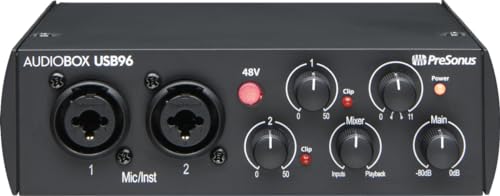
- MIDI I/O with two mic preamps and instrument inputs
- 24-bit/96 kHz recording and USB bus power
- Includes Studio One Artist, Ableton Live Lite, and plug-ins
Best For: Home and portable studios needing MIDI plus versatile audio inputs
Best Compact MIDI Setup Alternative
Focusrite Scarlett Solo 3rd Gen

- Air-enabled mic preamp and Hi-Z instrument input
- Supports recording up to 24-bit/192 kHz
- Compact design with balanced outputs and bundled software
Best For: Solo recording setups that do not require listed hardware MIDI I/O
Best for Streaming and Podcasting
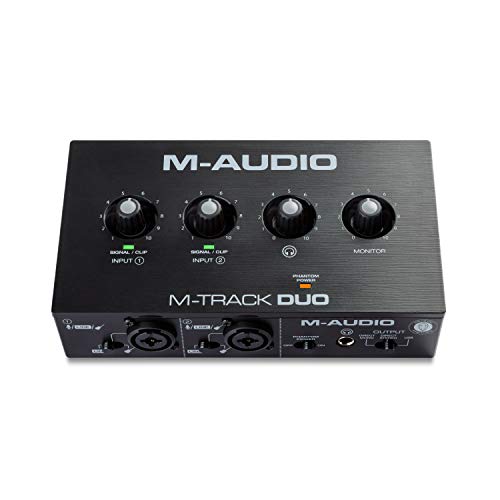
- Dual combo inputs with phantom power
- USB/Direct zero-latency monitoring switch
- Includes MPC Beats for music production
Best For: Entry-level recording, podcasting, and live streaming
Versatile USB-C Hub – MOTU M4 4×4 Interface
For musicians comparing MIDI interfaces for studio work, the MOTU M4 combines MIDI I/O with 4-in/4-out USB-C connectivity, two microphone preamps, and low-latency monitoring. Its LCD screen and loopback support also make it practical for recording, mixing, and podcasting.
Best For: Home studios needing flexible I/O, MIDI connectivity, and USB-C computer integration.
Pros:
- 4-in/4-out USB-C interface with MIDI I/O
- Two microphone preamps and 192 kHz maximum sample rate
- LCD metering, loopback, and low-latency monitoring
- Compatible with computers and iOS devices
Cons:
- Only two microphone preamps are included
- Requires compatible USB-C or iOS connectivity arrangements
The M4 is a strong choice when MIDI is only one part of a broader recording setup. Its additional inputs, outputs, monitoring features, and included software support make it more versatile than a basic MIDI-only interface.
Complete Starter Bundle – AudioBox USB 96 Studio Bundle
If you want MIDI interfaces for studio use without assembling every component separately, this AudioBox bundle includes the interface, headphones, condenser microphone, cables, and recording software. MIDI In/Out supports synths, drum machines, and controllers, while the two mic preamps handle simultaneous guitar and vocal recording.
Best For: Beginners who want an all-in-one recording and MIDI starter package.
Pros:
- MIDI In/Out for synths, drum machines, and controllers
- Two class-A mic preamps with +48V phantom power
- Includes microphone, headphones, stand, cables, and software
- Zero-latency monitoring and USB bus power
Cons:
- Limited to two audio channels
- Maximum sample rate is 96 kHz
- USB connectivity may offer less expansion than newer multi-I/O interfaces
The AudioBox USB 96 bundle is aimed at convenience rather than extensive expansion. It is a practical entry point for recording vocals, guitar, and MIDI hardware with the main accessories already included.
Modern Studio Center – Focusrite Scarlett 4i4 4th Gen
The Focusrite Scarlett 4i4 4th Gen is a capable option for MIDI interfaces for studio systems built around synths, drum machines, microphones, and instruments. It provides MIDI I/O alongside four line inputs, four line outputs, two mic preamps, and two Hi-Z inputs.
Best For: Producers needing a modern, expandable studio hub with MIDI and multiple line connections.
Pros:
- 4-in/4-out design with MIDI In/Out
- Two mic preamps, two Hi-Z inputs, and four line inputs
- Auto Gain and Clip Safe help manage recording levels
- Air mode and 120 dB dynamic range support detailed recordings
Cons:
- More features than needed for simple MIDI-only setups
- Requires the included USB-C power arrangement and computer connection
With broad analog connectivity and MIDI support, the Scarlett 4i4 is well suited to a growing setup. Its automatic level tools and included software bundle add convenience for producers recording several types of sources.
Simple MIDI Link – LEKATO USB-C MIDI Cable
For a straightforward connection between a keyboard or synthesizer and a computer, the LEKATO cable is a compact alternative to full audio interfaces. It provides one MIDI input and one output, USB-C connectivity, plug-and-play operation, and LED indicators for monitoring power and signal activity.
Best For: Standard MIDI setups connecting one hardware device to a Windows computer, Mac, or iPad.
Pros:
- One MIDI input and one MIDI output
- USB-C plug-and-play connection with no special drivers required
- LED indicators show power and signal activity
- Supports keyboards, digital pianos, synthesizers, and drum pads
Cons:
- Does not provide microphone, instrument, or audio outputs
- Limited to a single MIDI in/out connection
- Older or proprietary devices may require compatibility troubleshooting
This cable is best viewed as a dedicated MIDI connection rather than a complete recording interface. It suits basic hardware-to-computer workflows, but users needing audio recording or multiple MIDI ports should choose a full interface.
Best Overall – Focusrite Scarlett 2i2 4th Gen
The Focusrite Scarlett 2i2 4th Gen is a straightforward choice for musicians seeking midi interfaces for studio recording. Its two mic preamps, Hi-Z instrument inputs, and USB-C connectivity suit vocal, guitar, and compact production setups.
Best For: Solo musicians, singers, and home studios recording up to two sources at once.
Pros:
- Two mic preamps and two Hi-Z instrument inputs support vocals, guitars, and other instruments.
- 120dB dynamic range, 24-bit/192kHz conversion, and Air modes support detailed recordings.
- Auto Gain and Clip Safe help simplify level setting and reduce clipping risks.
- Includes Ableton Live Lite, Pro Tools Intro+, Cubase LE, and Hitmaker Expansion.
Cons:
- Two inputs may be limiting for drum kits, ensembles, or larger hardware setups.
- It does not include a microphone or headphones.
The 2i2 balances useful recording safeguards with a compact two-channel design. It is a strong fit when you want a capable interface without paying for more I/O than your studio requires.
Best for Hybrid Studios – Fender Quantum LT 16
The Fender Quantum LT 16 is built for expansive production environments that need more than a basic two-channel interface. Among midi interfaces for studio use, it stands out with 16-in/8-out USB-C connectivity, extensive line inputs, MIDI I/O, and standalone operating modes.
Best For: Hybrid studios integrating synthesizers, mixers, outboard gear, multiple microphones, and live or streaming workflows.
Pros:
- Eight MAX-HD mic preamps provide up to +75dB of gain for multi-mic recording.
- Fourteen line inputs support external hardware, mixers, and larger setups.
- DC-coupled outputs and built-in five-pin MIDI I/O support modular and MIDI equipment.
- Loopback, standalone Mixer Mode, Mic Pre Mode, and Fender software expand its flexibility.
Cons:
- Its 19-inch form factor and 4.8-pound weight are less convenient for small or mobile setups.
- The larger I/O count may be unnecessary for simple vocal-and-guitar recording.
- It has a two-year manufacturer warranty, shorter than the Focusrite options listed here.
The Quantum LT 16 makes the most sense when your studio depends on substantial routing and expansion. Its broad I/O and standalone features offer room to grow, provided you have the space and equipment to use them.
Best for Comfort – Focusrite Scarlett 2i2 Studio Bundle
The Focusrite Scarlett 2i2 Studio 4th Gen packages a two-channel interface with the core accessories needed to begin recording. For shoppers comparing midi interfaces for studio setups, it offers the same compact recording platform as the 2i2 while adding a condenser microphone, XLR cable, and headphones.
Best For: Beginners and home recordists who need an interface, microphone, and headphones in one purchase.
Pros:
- Includes the Scarlett 2i2 4th Gen with two mic preamps and two Hi-Z inputs.
- CM25 MkIII condenser microphone, 3m XLR cable, and SH-450 headphones are included.
- 120dB dynamic range, Air modes, Auto Gain, and Clip Safe support approachable recording.
- Includes Ableton Live Lite, Pro Tools Intro+, Cubase LE, and Hitmaker Expansion.
Cons:
- Two input channels are not designed for large ensembles or extensive hardware.
- The bundled microphone and headphones may be less useful if you already own preferred recording gear.
This bundle is the convenient option for starting a small recording rig from scratch. It keeps the setup simple while providing the interface, monitoring, microphone, cable, and software needed for an immediate workflow.
Best Value MIDI Interface – PreSonus AudioBox 96
If you need a practical starting point among MIDI interfaces for studio setups, the PreSonus AudioBox 96 combines MIDI I/O with two mic preamps, instrument inputs, and bus-powered USB connectivity. It is well suited to personal recording and portable workflows.
Best For: Home studios, portable recording, and musicians who need MIDI alongside guitar, bass, microphone, and line-level connections.
Pros:
- Includes MIDI I/O, two Class-A mic preamps, and two high-headroom instrument inputs.
- Supports recording and playback up to 24-bit/96 kHz.
- USB bus power, zero-latency mixer control, headphone output, and balanced TRS outputs support flexible monitoring.
- Includes Studio One Artist, Ableton Live Lite, and the Studio Magic Plug-In suite after registration.
Cons:
- Two-channel design may be limiting for larger recording sessions.
- Global 48V phantom power offers less individual input control.
- Uses USB 2.0 connectivity rather than USB-C.
The AudioBox 96 is a strong all-around choice when MIDI connectivity and broad included software matter as much as basic audio recording. Its bus-powered design also makes it convenient for mobile studio use.
Best Compact MIDI Setup Alternative – Focusrite Scarlett Solo 3rd Gen
For a compact studio interface focused on polished vocal and instrument recording, the Focusrite Scarlett Solo 3rd Gen delivers a high-performance mic preamp, Hi-Z instrument input, and up to 24-bit/192 kHz conversion. It is a streamlined option for small setups, though the supplied specifications do not list MIDI I/O.
Best For: Solo musicians, vocalists, guitarists, and producers prioritizing clean two-channel recording in a compact interface.
Pros:
- High-performance mic preamp with switchable Air mode for added clarity.
- Hi-Z instrument input and Gain Halos help support guitar and bass recording.
- Records and mixes at up to 24-bit/192 kHz with two low-noise balanced outputs.
- Includes Pro Tools Intro+, Ableton Live Lite, Cubase LE, and Hitmaker Expansion software.
Cons:
- The supplied notes do not list MIDI input or output.
- Provides one XLR mic preamp and one instrument input, limiting simultaneous sources.
- Its included warranty details vary between the notes, which cite two and three years.
The Scarlett Solo is better viewed as a high-quality audio interface that can anchor a small studio than as a dedicated MIDI interface. Choose it when recording quality and compact size take priority over hardware MIDI connectivity.
Best for Streaming and Podcasting – M-AUDIO M-Track Duo
The M-AUDIO M-Track Duo is a straightforward two-channel USB interface for recording, podcasting, and live streaming. While the supplied notes do not list MIDI I/O, its dual combo inputs, phantom power, and USB/Direct monitoring make it useful in a broader studio workflow.
Best For: Entry-level home studios, podcasts, streams, and creators recording microphones, guitars, or line-level sources.
Pros:
- Two combo XLR/line/instrument inputs accommodate microphones, guitars, and line signals.
- Crystal preamps and phantom power support condenser microphones.
- USB/Direct switch enables zero-latency monitoring through the headphone and stereo outputs.
- Includes MPC Beats and supports macOS, Windows, iOS, and Android devices.
Cons:
- The supplied notes do not list MIDI input or output.
- Maximum sample rate is 48 kHz, below the other listed interfaces.
- Includes a one-year manufacturer warranty.
The M-Track Duo is a sensible budget option for basic studio audio and content creation, but it is not the best match if hardware MIDI is a central requirement. Its strongest advantages are flexible inputs and simple direct monitoring.
How We Picked These Midi Interfaces for Studio Use
We focused on connection flexibility, recording practicality, ease of setup, and value across different studio sizes. The selection includes dedicated MIDI connectivity as well as USB audio interfaces that work well with MIDI keyboards and external instruments in a computer-based studio.
We also considered the number of inputs and outputs, USB-C compatibility, microphone preamp quality, direct monitoring, bundled software, and whether each model suits beginners, mobile producers, or more demanding multitrack workflows.
Quick Comparison
For a compact setup, a MIDI-to-USB cable such as the LEKATO is the simplest option when you only need to connect one keyboard or synthesizer. The Focusrite Scarlett Solo and M-Audio M-Track Duo are affordable entry points for basic recording, while the Scarlett 2i2, PreSonus AudioBox 96, and AudioBox USB 96 add useful flexibility for microphones and instruments.
The Scarlett 4i4 and MOTU M4 are better suited to producers who need more simultaneous inputs, outputs, or routing options. For larger sessions, the Fender Quantum LT 16 offers substantially greater input capacity and multiple preamps.
Key Buying Factors for Midi Interfaces for Studio Work
MIDI Connectivity
Check whether you need traditional five-pin MIDI input and output or only a direct USB connection. A dedicated MIDI cable can be enough for a single keyboard, but hardware-heavy studios benefit from full MIDI I/O and more flexible routing.
Audio Inputs and Outputs
Count the microphones, instruments, hardware synthesizers, monitors, and headphones you plan to connect at the same time. Two inputs suit many solo projects; four or more provide room for stereo instruments, external effects, or small ensembles.
Computer and USB Compatibility
USB-C can simplify connections to newer computers, but confirm the included cable and adapter requirements. Also check operating-system support, driver stability, and whether the interface offers low-latency direct monitoring.
Monitoring and Preamps
Clear headphone monitoring, balanced monitor outputs, and quiet microphone preamps matter during recording. If you record vocals or acoustic instruments, prioritize gain range and phantom power. If you mainly use virtual instruments, MIDI response, stable drivers, and output routing may matter more.
Bundled Software and Expansion
Software bundles can add immediate value with recording programs, instruments, and effects. Still, prioritize hardware specifications and workflow fit over included software, since many producers already have a preferred DAW.
Who Should Buy Which Midi Interfaces for Studio?
For a First Home Studio
Choose the Scarlett Solo, M-Track Duo, or PreSonus AudioBox 96 for a straightforward and affordable start. They cover basic microphones, instruments, headphones, and monitor connections without taking much desk space.
For Keyboard and Synth Producers
The LEKATO cable works for a simple one-device MIDI connection. For multiple instruments or more advanced routing, consider the Scarlett 4i4 or MOTU M4, which leave more room for expansion.
For Vocalists and Solo Musicians
The Scarlett 2i2 and Scarlett 2i2 Studio bundle are strong fits for recording one or two sources, especially when headphones and other starter accessories are useful.
For Larger Recording Setups
The Fender Quantum LT 16 is the logical choice when you need many simultaneous inputs, while the MOTU M4 offers a more compact option with useful I/O flexibility for producers who do not need a full rack-sized interface.