
Live MIDI setups demand dependable connections, responsive control, and hardware that fits your workflow without adding unnecessary complexity. The right interface can connect keyboards, controllers, synths, mixers, and computers while helping your performance run smoothly.
We selected 10 options spanning USB-to-MIDI cables, control surfaces, pad controllers, audio interfaces, and expansion hardware so you can compare practical choices for compact rigs, hybrid performances, and larger stage systems.
Best 10 Midi Interfaces for Live Performances Picks for 2026
Best Overall
CME H4MIDI WC Advanced USB Host MIDI Interface

- Standalone USB host supports up to eight device ports
- Advanced routing, filtering, mapping, and preset control
- Compact, dual-powered design for stage and pedalboard use
Best For: Complex live MIDI rigs and guitarists
Best Compact Controller
Korg nanoKONTROL2 Slim-Line USB Control Surface

- Slim, low-profile design for crowded setups
- Eight-channel control surface with mute controls
- Supports Ableton Live and major DAW software
Best For: Computer-based live mixing in a compact footprint
Best MIDI Cable
CME U2MIDI Pro High-Speed USB MIDI Cable

- Plug-and-play USB-to-DIN connection across major operating systems
- Supports 16 MIDI channels and advanced message types
- 6.5-foot cable with LED indicators and built-in MIDI tools
Best For: Simple computer-to-instrument performance connections
Best for Ableton Live
Akai APC Mini MK2 USB MIDI Pad Controller

- 64 RGB pads for clip launching and visual feedback
- Eight assignable faders plus a master fader
- USB-powered with dedicated Drum and Note modes
Best For: Ableton Live clip launching and stage control
Compact Audio Hub
Focusrite Scarlett Solo 3rd Gen

- Mic and Hi-Z instrument inputs
- 24-bit/192kHz recording support
- Low-noise outputs in a compact body
Best For: Adding vocals or instruments to a MIDI-based live rig
Hands-On Stage Control
Akai Professional LPD8 USB MIDI Pad Controller

- Eight RGB performance pads
- Eight assignable control knobs
- Four programmable mapping presets
Best For: Portable laptop-based live MIDI performance
Legacy Gear Bridge
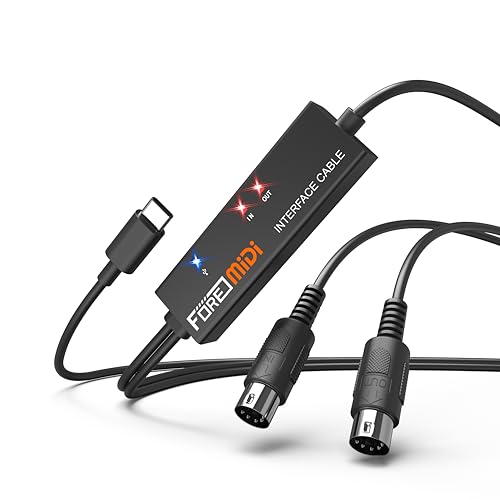
- One MIDI input and one MIDI output
- USB-C connection with plug-and-play setup
- Works with mobile and desktop platforms
Best For: Connecting five-pin MIDI hardware to modern devices
Hands-On Mixing

- Eight channel faders plus a master fader
- 24 knobs and 16 performance-control buttons
- Compact USB controller with Ableton Live mapping
Best For: Portable Ableton Live mixing and DAW control
Multitrack Expansion
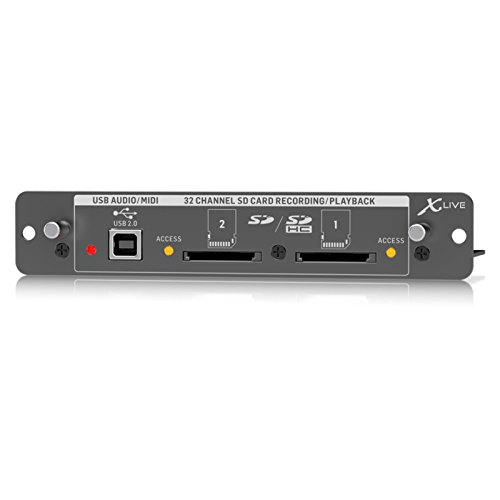
- 32-channel SD/SDHC recording and playback
- Independent SD-card and USB operation
- USB audio/MIDI with remote-control options
Best For: Compatible X32-based live recording systems
Simple MIDI Connectivity

- One MIDI input and one MIDI output
- Plug-and-play Windows and Mac connection
- LEDs monitor power and signal activity
Best For: Single-instrument USB-C MIDI setups
Best Overall – CME H4MIDI WC Advanced USB Host MIDI Interface
For performers who need flexible routing without relying on a computer, the CME H4MIDI WC is a strong choice among midi interfaces for live performances. It connects USB MIDI gear, traditional 5-pin MIDI hardware, and computers, while supporting standalone power and stored presets.
Best For: Guitarists, producers, and live rigs using multiple USB and DIN MIDI devices.
Pros:
- Standalone USB host mode supports up to eight USB MIDI device ports with a hub.
- Offers MIDI thru, split, merge, mapper, and filter functions through HxMIDI Tools.
- Compact design, dual-power options, and four onboard preset configurations suit mobile and stage setups.
Cons:
- Advanced WIDI Bluetooth MIDI requires the optional WIDI Core module.
- Its extensive routing features may require setup through the companion software.
The H4MIDI WC is the most versatile option here for complex live MIDI systems. Its standalone operation and preset management are especially useful when quick, repeatable changes matter on stage.
Best Compact Controller – Korg nanoKONTROL2 Slim-Line USB Control Surface
The Korg nanoKONTROL2 is a slim USB control surface for performers who want hands-on mixer and transport-style control in a small footprint. Among midi interfaces for live performances, it is best viewed as a practical controller for compatible software rather than a traditional MIDI connectivity hub.
Best For: Ableton Live users who need compact button-based control and eight-channel mixing functions.
Pros:
- Low-profile design is easy to fit into compact live or travel setups.
- Provides eight mixer channels and mute controls for hands-on software control.
- Supports major DAW programs and includes a USB cable.
Cons:
- USB connectivity is aimed at computer-based setups.
- It has buttons and control functions rather than a traditional keyboard layout.
- The supplied notes specifically identify Ableton Live and Mac compatibility.
The nanoKONTROL2 makes sense when your live performance workflow centers on software mixing and button control. Its slim profile is the main advantage, though users seeking DIN MIDI or standalone hardware routing should choose a different product.
Best MIDI Cable – CME U2MIDI Pro High-Speed USB MIDI Cable
The CME U2MIDI Pro is a straightforward USB-to-DIN MIDI cable for connecting a computer or mobile device to a MIDI instrument. For midi interfaces for live performances, its plug-and-play setup, long 6.5-foot cable, and built-in filtering and mapping make it a convenient choice for simple rigs.
Best For: Performers connecting one MIDI instrument to a computer, tablet, or compatible mobile device.
Pros:
- Plug-and-play operation works across macOS, iOS, Windows, Android, Linux, and ChromeOS without drivers.
- Supports all 16 MIDI channels and messages including clock, sysex, MTC, and MPE.
- Built-in processor, optocoupler, LED indicators, and 6.5-foot cable support reliable connections with less clutter.
Cons:
- It is a one-in/one-out cable, so it is less suitable for multi-device MIDI routing.
- The USB connection is USB-A, which may require an adapter with some newer devices.
The U2MIDI Pro is a focused solution rather than a full routing interface. Choose it when your performance setup needs a dependable computer-to-instrument connection and does not require multiple MIDI ports.
Best for Ableton Live – Akai APC Mini MK2 USB MIDI Pad Controller
The Akai APC Mini MK2 is designed for hands-on Ableton Live performance, combining clip launching, mixer control, and playable pad modes. It stands out among midi interfaces for live performances when visual feedback and rapid session interaction are more important than traditional DIN MIDI connections.
Best For: Ableton Live performers launching clips, controlling mixes, and triggering drums or melodic parts.
Pros:
- Its 8×8 RGB pad matrix provides 64 pads with visual clip feedback.
- Eight assignable faders plus a master fader offer direct mixer and device control.
- Drum and Note modes, USB power, and 1:1 Ableton Live mapping support stage use.
Cons:
- Its supplied software integration is centered on Ableton Live.
- USB power means it is intended for a computer-based setup rather than standalone operation.
- It does not provide traditional 5-pin DIN MIDI ports.
The APC Mini MK2 is a compelling performance controller for clip-based sets and electronic live work. Its pad grid and faders give Ableton users immediate control, while its USB-only design limits its usefulness in hardware-only MIDI rigs.
Compact Audio Hub – Focusrite Scarlett Solo 3rd Gen
The Focusrite Scarlett Solo 3rd Gen is an audio interface rather than a traditional MIDI interface, but it can complement MIDI-based live performances by providing clean vocal, guitar, or bass input alongside your performance setup. Its compact USB-C design, low-noise outputs, and high-resolution recording support make it practical for mobile rigs and small live setups.
Best For: Performers who need quality vocal or instrument audio alongside a MIDI performance system.
Pros:
- One XLR mic input and one Hi-Z instrument input for vocals, guitar, or bass.
- Air mode and 56dB of gain provide added flexibility for recording sources.
- 24-bit/192kHz converters and low-noise balanced outputs support detailed monitoring.
- Compact, lightweight design with Mac, Windows, and iPadOS compatibility.
Cons:
- It does not provide dedicated MIDI input or output ports.
- Only two audio channels are available, limiting larger live setups.
Choose the Scarlett Solo when your live performance rig needs dependable audio capture and monitoring more than direct MIDI routing. For MIDI control, pair it with a separate MIDI interface or controller.
Hands-On Stage Control – Akai Professional LPD8 USB MIDI Pad Controller
The Akai Professional LPD8 is a compact MIDI controller for live performers who want hands-on access to samples, loops, virtual instruments, or DAW parameters. Its RGB pads, assignable knobs, and preset slots make it a practical choice for portable MIDI performance setups.
Best For: DJs, beat makers, and electronic performers triggering clips, samples, and software instruments from a laptop.
Pros:
- Eight RGB-backlit MPC pads provide visual feedback for triggering sounds and loops.
- Eight assignable Q-Link knobs offer tactile control over DAW and plugin parameters.
- Four programmable presets allow quick recall of different mappings.
- USB-powered, driver-free operation works with Mac and Windows systems.
Cons:
- It has eight pads and knobs but no piano-style keys.
- USB connectivity requires a computer-based setup rather than standalone operation.
The LPD8 is a strong fit when portability and immediate control matter more than a full-size keyboard. It delivers useful performance controls in a slim format that can fit beside other live gear.
Legacy Gear Bridge – FORE T1 USB-C MIDI Interface
The FORE T1 is a straightforward MIDI interface for connecting keyboards, synthesizers, electronic drums, and other five-pin MIDI devices to a computer or mobile device. For live performances, its USB-C connection, plug-and-play setup, and status LEDs make it useful for routing MIDI data between older hardware and modern software.
Best For: Performers connecting a five-pin MIDI keyboard, synth, drum machine, or controller to USB-C devices.
Pros:
- Provides one MIDI input and one MIDI output with 16 channels each.
- Plug-and-play operation uses a built-in driver and LED status indicators.
- Supports iOS, Android, macOS, and Windows devices.
- USB bus-powered design and a 6.5-foot integrated cable simplify setup.
Cons:
- It connects five-pin DIN MIDI devices but does not offer wireless or standalone operation.
- A USB A-to-C adapter may be needed for Type-A ports and is not included.
The FORE T1 is a practical choice for live performers integrating classic MIDI hardware with a USB-C laptop, phone, or tablet. Its single in-and-out configuration suits basic controller and instrument chains, while larger systems may need more MIDI ports.
Hands-On Mixing – Akai MIDImix
The Akai Professional MIDImix is a compact choice for performers who want hands-on DAW control during live performances. It combines eight channel faders, a master fader, 24 assignable knobs, and 16 buttons in a lightweight metal enclosure, with direct Ableton Live mapping.
Best For: Performers and producers who need portable mixer-style control for Ableton Live, track levels, effects, and virtual instruments.
Pros:
- Eight individual line faders plus a master fader provide practical mix control.
- Twenty-four knobs support EQ, bus sends, instrument parameters, and effects.
- Sixteen buttons offer mute, solo, and record-arm functions.
- Compact, lightweight design and included Ableton Live integration suit portable setups.
Cons:
- Requires a USB connection to a compatible computer or laptop.
- Its functionality depends on DAW mapping and supported software.
- It is a controller rather than a standalone audio mixer.
For midi interfaces for live performances that prioritize tactile DAW mixing, the MIDImix offers a strong control layout in a small footprint. It is especially practical for Ableton-based rigs, though it does not replace a standalone audio interface or mixer.
Multitrack Expansion – Behringer X-LIVE
The Behringer XLIVE is a 32-channel expansion card designed for compatible live systems that need SD/SDHC recording and playback alongside USB audio and MIDI connectivity. It is a specialized option for performers building recording and playback capabilities into an X32-based setup.
Best For: X32 users who need 32-channel live recording and playback through SD/SDHC cards, plus USB audio/MIDI integration.
Pros:
- Supports 32 channels for larger live recording and playback workflows.
- Provides independent SD-card and USB recording/playback operation.
- Offers USB audio/MIDI connectivity and remote-control support through compatible apps or hardware.
Cons:
- This is an expansion card, not a standalone MIDI interface.
- Its usefulness depends on having compatible Behringer equipment.
- The supplied notes do not confirm current software-update support.
Among midi interfaces for live performances, the XLIVE is best viewed as an installed system expansion rather than a portable controller or cable. For compatible X32 rigs, its combination of multichannel recording, playback, and USB MIDI/audio can simplify live production workflows.
Simple MIDI Connectivity – LEKATO USB-C MIDI Cable
The LEKATO MIDI Cable is a straightforward MIDI-to-USB-C interface for connecting keyboards, synthesizers, drum pads, and other MIDI devices to a computer or iPad. Its one-in/one-out design, built-in driver, and status LEDs make it a practical cable-style option for compact live performance setups.
Best For: Musicians who need a simple USB-C connection between one MIDI instrument and a Windows computer, Mac, or compatible iPad.
Pros:
- One MIDI input and one MIDI output support standard two-way MIDI connections.
- Built-in driver and plug-and-play design simplify setup on Windows and Mac.
- LED indicators show power and MIDI signal activity.
- Soft cable construction and electromagnetic-interference resistance support portable use.
Cons:
- One input and one output limit larger multi-device MIDI rigs.
- Compatibility should be checked for older or proprietary instruments.
- It handles MIDI data rather than serving as a multichannel audio interface.
For midi interfaces for live performances, the LEKATO is a budget-conscious, low-complexity solution when the setup centers on a single MIDI instrument. Its USB-C connection and activity indicators are useful on modern computer-based rigs, but larger performances may need a multi-port interface.
How We Picked the Best Midi Interfaces for Live Performances
We focused on the features that matter most on stage: stable connectivity, low-latency response, straightforward setup, portability, useful control options, and compatibility with common keyboards, synthesizers, computers, and digital audio workstations. The selection includes both dedicated MIDI interfaces and performance controllers that add hands-on command over clips, pads, faders, or software instruments.
Because live rigs vary widely, we also considered connection type and role. A simple USB-to-MIDI cable may be ideal for one keyboard, while a host interface, pad controller, mixer controller, audio interface, or expansion card may better suit a more complex setup.
Quick Comparison
- Best for basic MIDI conversion: USB-to-MIDI cable interfaces with input and output connections.
- Best for hands-on control: Pad, knob, and fader controllers for clips, effects, and software instruments.
- Best for computer-and-hardware rigs: Interfaces designed to connect USB devices with traditional MIDI gear.
- Best for combined audio and MIDI: Audio interfaces that add instrument, microphone, and MIDI connectivity.
- Best for larger live systems: Expansion hardware intended for mixers, recording, playback, or multichannel workflows.
Key Buying Factors for Midi Interfaces for Live Performances
Connections and Compatibility
Check whether you need standard five-pin MIDI, USB-A, USB-C, or a dedicated host connection. Confirm that the interface works with your computer, tablet, keyboard, controller, and operating system before buying. If you plan to connect several devices, count MIDI inputs and outputs rather than assuming one port will be enough.
Latency and Reliability
Live playing rewards consistent timing. Look for dependable drivers, stable power, secure connectors, and a proven plug-and-play design. A shorter signal path and fewer adapters can also reduce potential failure points on stage.
Control Layout and Portability
Choose pads, knobs, faders, or transport controls based on what you need to operate without reaching for a mouse. Compact controllers are easier to carry, while larger units can provide faster access to more parameters. Consider cable management and power requirements as part of portability.
Power and Stage Practicality
USB bus-powered models simplify small setups, but verify that your computer or host can supply adequate power. For longer shows, keep spare cables and a backup connection plan. Avoid buying advanced hardware if your performance only requires a single keyboard connection.
Who Should Buy Which Midi Interfaces for Live Performances?
Keyboard and synth players should prioritize dependable MIDI input and output, simple setup, and compatibility with their host device. Electronic performers and DJs may benefit more from pad, knob, or fader controllers that provide immediate software control. Singer-instrumentalists and solo performers can favor an audio interface that combines MIDI with microphone or instrument inputs.
Small mobile rigs are best served by compact USB-to-MIDI cables or slim controllers, while band, studio, and venue operators may need more extensive routing, recording, playback, or mixer integration. Match the interface to your actual stage workflow, then leave room for the number of devices you expect to add later.