
If you’re looking to boost your home office setup, mini PCs might just be the solution you need. These compact devices pack a powerful punch, offering impressive performance without taking up much space. With options like the KAMRUI Pinova P2 and Beelink SER5 MAX, there’s a model for every type of user. But how do you determine which one fits your specific needs? Let’s explore the top contenders and what they bring to the table.
KAMRUI Pinova P2 Mini PC (16GB RAM, 512GB SSD)

If you’re looking for a powerful yet compact solution for your home office, the KAMRUI Pinova P2 Mini PC is an excellent choice. With an AMD Ryzen 4300U processor and 16GB of RAM, it handles demanding applications, HD video editing, and multitasking with ease. The 512GB SSD guarantees quick startup and fast file transfers, so you won’t waste time waiting. Plus, its support for triple 4K displays and integrated AMD Radeon graphics delivers stunning visuals. Compact and easy to mount, this mini PC offers versatile connectivity options, making it a top contender for enhancing your workspace efficiency.
Best For: The KAMRUI Pinova P2 Mini PC is best for professionals and casual users seeking a compact and powerful computing solution for multitasking, video editing, and casual gaming.
Pros:
- High Performance: Equipped with an AMD Ryzen 4300U processor and 16GB RAM, it efficiently handles demanding applications and multitasking.
- Fast Storage: The 512GB SSD ensures quick boot times and rapid file transfers, enhancing overall productivity.
- Triple 4K Display Support: Capable of connecting to three 4K displays, providing stunning visuals for media consumption and productivity tasks.
Cons:
- Limited Gaming Performance: While it supports casual gaming, it may not handle more demanding games effectively due to its integrated graphics.
- Upgradability Constraints: Although it supports up to 64GB RAM and additional storage, the initial configuration may limit performance for advanced users.
- Compact Design Limitations: The small size may lead to reduced cooling efficiency during extended high-performance tasks, potentially impacting thermal management.
GMKtec Mini PC Ryzen 5 3500U

The GMKtec Mini PC with the Ryzen 5 3500U is an ideal choice for professionals who need powerful performance without sacrificing space. With its quad-core processor running at up to 3.7 GHz, you’ll experience a significant boost in performance—35% more than Intel N-Series processors. It comes equipped with 16GB of RAM, expandable to 64GB, and a 1TB NVMe SSD, allowing for extensive storage options. Networking is seamless with 2.5GbE Ethernet and Wi-Fi 5. Plus, the integrated AMD Radeon Vega 8 graphics support triple displays, perfect for multitasking. Enjoy reliable support with a 1-year warranty and professional assistance.
Best For: Professionals and power users looking for a compact and efficient mini PC with robust performance and multitasking capabilities.
Pros:
- High performance with Ryzen 5 3500U processor, offering a 35% boost over Intel N-Series.
- Expandable memory and storage options, accommodating up to 64GB RAM and 16TB storage.
- Triple display support for enhanced productivity and multitasking with integrated AMD Radeon Vega 8 graphics.
Cons:
- Limited warranty period of only 1 year may be a concern for some users.
- Integrated graphics may not suffice for high-end gaming or intensive graphic design tasks.
- Potential heat management issues due to compact design under heavy load conditions.
Beelink SER3 Mini PC with AMD Ryzen 3200U
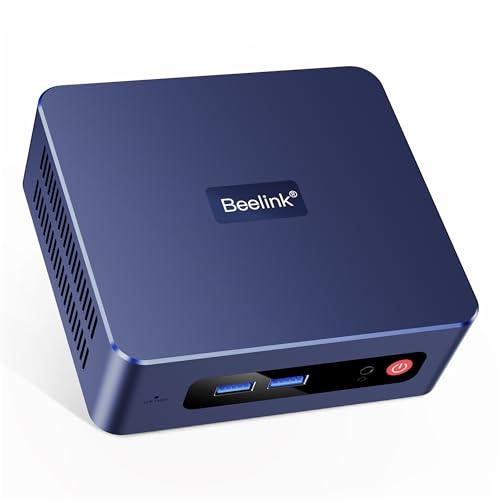
For those seeking a compact yet powerful solution for their home office, the Beelink SER3 Mini PC with AMD Ryzen 3200U stands out with its impressive performance capabilities. With a dual-core processor that can reach 3.5GHz, 16GB of RAM, and a 500GB PCIe SSD, it handles multitasking with ease. You can even upgrade the storage to 2TB for additional space. Its AMD Radeon Vega 3 graphics support 4K dual-screen displays, making your work visually stunning. Plus, with WiFi 5 and multiple ports, connectivity is a breeze. Weighing just 1.76 pounds, it’s perfect for any workspace.
Best For: Those looking for a compact and efficient mini PC suitable for home office tasks and multitasking requirements.
Pros:
- Compact design making it easy to fit in any workspace.
- Powerful AMD Ryzen 3 3200U processor and 16GB RAM for smooth multitasking.
- Supports 4K dual-screen display for enhanced visual experience.
Cons:
- Limited graphics performance for high-end gaming or intensive graphics tasks.
- Upgradeable storage may require additional investment for higher capacity.
- Potentially limited availability of technical support depending on the region.
KAMRUI P1 Mini PC with AMD Ryzen 4300U

Designed for professionals seeking efficiency, the KAMRUI P1 Mini PC with AMD Ryzen 4300U stands out with its powerful processor. With 4 cores and clock speeds up to 3.7GHz, it outperforms typical entry-level CPUs, ensuring faster responses and improved productivity. You’ll appreciate the 16GB DDR4 RAM, expandable to 64GB, combined with a 512GB M.2 SSD that can grow to 4TB. Plus, its triple 4K display support enhances your multitasking experience. Connectivity is a breeze, thanks to multiple ports, including USB-C and HDMI. Its sleek design and pre-installed OS make setup effortless, perfect for any home office.
Best For: Professionals and multitaskers seeking a powerful and efficient mini PC for office tasks, media consumption, and light creative applications.
Pros:
- Powerful AMD Ryzen 4300U processor delivers superior performance compared to typical entry-level CPUs.
- Supports triple 4K display output for enhanced multitasking and visual clarity.
- Ample connectivity options including multiple USB ports and HDMI, making it versatile for various peripherals.
Cons:
- Limited to light creative applications; may not handle intensive gaming or heavy graphic design tasks well.
- Upgrading storage and memory may require technical knowledge or effort.
- Compact design might limit upgradeability in terms of internal components.
Beelink Mini PC SER5 MAX with AMD Ryzen 7 6800U

With its powerful AMD Ryzen 7 6800U processor and robust performance capabilities, the Beelink Mini PC SER5 MAX is an excellent choice for professionals who require efficiency in their home office. You’ll appreciate its 8 cores and 16 threads, which easily handle large applications and light gaming. The AMD Radeon 680M graphics guarantee smooth 4K video playback and support for triple display setups. With 24GB of LPDDR5 RAM and a speedy 500GB SSD, multitasking becomes effortless. Plus, with WiFi 6 and multiple connectivity options, you’ll enjoy fast data transmission, making this mini PC a perfect fit for your productivity needs.
Best For: Professionals and home office users seeking a powerful and efficient mini PC for multitasking and light gaming.
Pros:
- High-performance processor with 8 cores and 16 threads, ideal for handling large applications.
- Impressive graphics capabilities with AMD Radeon 680M, supporting smooth 4K video playback and triple display setups.
- Fast connectivity options including WiFi 6 and multiple USB ports, ensuring quick data transfer and efficient multitasking.
Cons:
- Limited gaming capability for more demanding titles beyond light gaming.
- Upgrade potential for storage is capped at 8TB, which may not meet the needs of users requiring extensive storage.
- Compact design may limit upgrade options for components compared to larger PCs.
ACEMAGIC M1 Mini PC (Intel Core i9-11900H, 32GB DDR4, 1TB SSD)

The ACEMAGIC M1 Mini PC stands out as an exceptional choice for professionals who demand high performance in a compact form. With its Intel Core i9-11900H processor and 32GB DDR4 RAM, it handles demanding tasks like photo editing and 3D modeling effortlessly. The 1TB SSD guarantees quick load times, while the expandable storage option allows you to grow with your needs. Connectivity is a breeze with multiple USB ports and WiFi6 support. Plus, the upgraded cooling system keeps it running smoothly. Backed by a solid warranty, this mini PC is perfect for your home office setup.
Best For: Professionals in need of a powerful, compact PC for tasks such as photo/video editing, 3D modeling, and big data analysis.
Pros:
- High-performance Intel Core i9-11900H processor for demanding applications.
- Expandable 32GB DDR4 RAM and 1TB SSD provide ample memory and fast storage.
- Versatile connectivity options including multiple USB ports, WiFi6, and triple display support.
Cons:
- May be overkill for casual users or basic computing tasks.
- Limited integrated graphics performance compared to dedicated graphics cards for advanced gaming.
- Compact design may lead to limited upgrade options compared to larger PCs.
KAMRUI Essenx E1 Mini PC

For those seeking a powerful yet compact solution for their home office, the KAMRUI Essenx E1 Mini PC stands out with its AMD Ryzen 3250U processor. This mini PC delivers impressive performance, boasting a base frequency of 2.6GHz and a boost of up to 3.5GHz. With 8GB DDR4 RAM and a 256GB M.2 SSD, multitasking is a breeze, and you can upgrade storage up to 2TB. Its AMD Radeon Graphics handle photo editing and video playback beautifully. Plus, with various connectivity options and a compact design, it fits seamlessly into any workspace while keeping things cool and efficient.
Best For: Individuals seeking a compact and efficient mini PC for home office tasks, web browsing, and multimedia use.
Pros:
- Compact size ideal for limited workspace.
- Impressive performance with AMD Ryzen 3250U and upgradeable storage options.
- Versatile connectivity options including dual-band WiFi and multiple USB ports.
Cons:
- Limited to integrated graphics, which may not satisfy high-end gaming needs.
- Only 8GB of RAM may be insufficient for more demanding applications without upgrades.
- Requires additional setup for VESA mounting, which may not be suitable for all users.
KAMRUI Pinova P1 Mini PC with AMD Ryzen 4300U, 16GB RAM, 512GB SSD

Ideal for professionals seeking a compact yet powerful computing solution, the KAMRUI Pinova P1 Mini PC boasts an AMD Ryzen 4300U processor, ensuring impressive performance for multitasking and demanding applications. With 16GB of RAM and a 512GB SSD, it handles large software and games effortlessly. You’ll appreciate the 4K@60Hz resolution and the ability to connect multiple displays. The sleek design, measuring just 5.06 inches square, fits perfectly in any workspace. Plus, with Windows 11 Pro preloaded and lifetime technical support, you’re set for stability and efficiency. The KAMRUI Pinova P1 is your ideal work companion.
Best For: Professionals seeking a compact and powerful computing solution for multitasking and demanding applications.
Pros:
- Impressive performance: The AMD Ryzen 4300U processor and 16GB RAM ensure smooth multitasking and the ability to run large software and games.
- 4K display support: Capable of 4K@60Hz resolution, making it ideal for creative tasks and multi-display setups.
- Compact design: Its small size (5.06 inches square) allows for easy placement in any workspace, including behind monitors with the included VESA bracket.
Cons:
- Limited upgrade options: While storage is expandable up to 2TB, RAM is fixed at 16GB, which may not be sufficient for some high-end applications.
- Cooling fan noise: The cooling fan may produce noise under heavy loads, which could be distracting in a quiet environment.
- No dedicated graphics card: The integrated graphics may not provide the performance needed for intensive gaming or graphics work compared to systems with dedicated GPUs.
Beelink Mini PC with Intel 12th N95, 8GB DDR4, 256GB SSD

Looking for a compact powerhouse for your home office? The Beelink Mini PC with Intel 12th N95 processor offers impressive performance with up to 3.4GHz speed, ensuring fast app loading and seamless 4K playback. With 8GB of DDR4 memory and a 256GB SSD, multitasking becomes a breeze, and you can expand storage up to 4TB. Enjoy reliable networking with 2.5G LAN and Wi-Fi 5, while Bluetooth 5.0 keeps your workspace cable-free. Its compact design and multiple connectivity options make it perfect for any setup. Plus, you get lifetime technical support, ensuring peace of mind for your productivity needs.
Best For: Those seeking a compact and efficient mini PC for home office use, offering powerful performance and versatile connectivity options.
Pros:
- Compact design enhances portability and fits easily into various setups.
- Supports expandable storage options up to 4TB, accommodating growing data needs.
- Reliable networking capabilities with 2.5G LAN and Wi-Fi 5 for fast internet access.
Cons:
- Limited internal RAM at 8GB may not suffice for heavy multitasking needs.
- Integrated graphics may not support high-end gaming or graphic-intensive applications.
- Additional storage devices are not included, requiring separate purchases for expansion.
Ultra-Compact Mini PC for Home Office & Gaming (13th Gen N150)

The Ultra-Compact Mini PC featuring the 13th Gen Intel N150 is perfect for professionals who demand high performance in a limited workspace. With a robust 4-core processor clocking up to 3.6 GHz, it offers a 10-15% performance boost over previous models. You’ll appreciate the 16 GB DDR4 RAM, expandable to 32 GB, and a speedy 512 GB PCIe M.2 SSD, which can grow to 2 TB. This mini PC supports triple 4K displays and boasts dual LAN ports along with WiFi 6, ensuring seamless connectivity. Compact and VESA mount compatible, it’s designed for your home office and gaming needs.
Best For: Professionals and gamers seeking a high-performance, ultra-compact PC that fits seamlessly into limited workspace environments.
Pros:
- Powerful Performance: Equipped with a 13th Gen Intel N150 processor, offering significant improvements over previous models.
- Expandable Storage and Memory: Comes with 16 GB RAM and a 512 GB SSD, both of which can be upgraded for enhanced multitasking and storage needs.
- Versatile Display Options: Supports triple 4K displays, making it ideal for multitasking and immersive gaming experiences.
Cons:
- Limited Integrated Graphics: While it supports 4K displays, the integrated UHD graphics may not be sufficient for high-end gaming.
- Size Constraints: Although compact, the small size may limit upgrade options and internal cooling efficiency compared to larger systems.
- Potential Compatibility Issues: Preinstalled with Windows 11, users may face challenges when installing alternative operating systems like Linux or Ubuntu.
Factors to Consider When Choosing a Mini PC for Home Office
When choosing a mini PC for your home office, you’ll want to contemplate several key factors. Think about your performance needs, memory and storage options, and connectivity features that will keep you productive. Don’t forget to factor in size, design, and your budget to find the perfect fit for your workspace.
Performance Requirements
Choosing the right mini PC for your home office hinges on several performance requirements that directly impact your productivity. First, consider the processor; options like the AMD Ryzen 4300U, with a boost frequency of up to 3.7GHz, can handle demanding applications and multitasking seamlessly. Next, evaluate RAM capacity; 16GB DDR4 is ideal for efficient multitasking, while expandable options up to 64GB offer even more power. Look for a 512GB M.2 SSD for quick boot times and data access, with expandability for larger media libraries. Check the graphics capabilities too—integrated AMD Radeon graphics support 4K video playback, essential for content creation. Finally, verify your mini PC has connectivity options like dual LAN ports and Wi-Fi 6 for faster network speeds.
Memory and Storage
Memory and storage are critical components to evaluate for your home office mini PC. Start by considering the RAM capacity; options usually range from 8GB to 32GB. Higher RAM means better multitasking and smoother performance, especially with demanding applications. For storage, prioritize SSDs, as they offer faster boot times and data access, with capacities from 256GB to 1TB or more. If you need extra space for media libraries or backups, look for dual storage options that combine SSD and HDD installations. Confirm the mini PC supports expandable memory and storage, ideally up to 64GB of RAM or 4TB total. Finally, opt for PCIe NVMe SSDs, which deliver considerably faster read and write speeds compared to traditional SATA drives.
Connectivity Options
Connectivity options are vital for a seamless home office experience, and you should prioritize specific features when selecting a mini PC. Look for models with multiple USB ports, ideally USB 3.2 Gen2, to guarantee fast data transfer and the ability to connect various peripherals simultaneously. HDMI and DisplayPort outputs are essential for supporting multiple displays, enhancing productivity with options for triple 4K setups. Make certain the mini PC includes Gigabit Ethernet or 2.5GbE LAN ports for reliable, high-speed wired internet connections. Additionally, consider wireless capabilities like Wi-Fi 5 or Wi-Fi 6 and Bluetooth 5.0 for smooth connections to your devices. Finally, USB-C ports can add versatility with data transfer and video output options, making your setup more efficient.
Size and Design
When setting up your home office, the size and design of your mini PC can considerably influence both functionality and aesthetics. Mini PCs are compact, usually measuring around 5 to 6 inches on each side, making them perfect for small desk spaces. Many models come with VESA mounting options, allowing you to attach them to the back of your monitor, creating a cleaner workspace. Their sleek, matte exteriors not only look good but also help reduce dust accumulation. Plus, the lightweight design—typically under 2 pounds—means you can easily relocate your setup as needed. With efficient cooling systems, these devices operate quietly, ensuring your work environment remains peaceful and focused.
Budget Considerations
Budgeting for a mini PC can be a bit tricky, especially if you want to balance cost with performance. Start by considering the total cost of ownership, including RAM and storage upgrades, which can enhance performance considerably. Entry-level models typically range from $200 to $500, but for more demanding tasks, expect to spend between $500 and $1,000 or more. Evaluate the performance-to-price ratio by comparing processor capabilities, ensuring you pick one that meets your needs. Don’t forget additional costs like peripherals and software licenses, which can add up quickly. Finally, look for warranty and support options—investing in a mini PC with a solid warranty can save you money on repairs or replacements down the road.