
If you’re looking to optimize your workspace, compact mini PCs might be just what you need. These powerful machines pack a punch without taking up too much room, making them ideal for any desk setup. With options like the BOSGAME E2 and KAMRUI Pinova series, you’ll find a range of features to suit your needs. But which one truly stands out for your specific requirements? Let’s explore the top contenders.
BOSGAME E2 Mini PC with AMD Ryzen 5 3550H

The BOSGAME E2 Mini PC with AMD Ryzen 5 3550H is perfect for multitaskers who need a powerful yet compact solution for their desk setup. With its 4 cores and 8 threads, this mini PC boosts productivity, reaching speeds up to 3.7GHz. You’ll appreciate the built-in Radeon Vega 8 Graphics for smooth 4K streaming and impressive multitasking. Plus, with 16GB of expandable RAM and a 512GB SSD, storage won’t be an issue. Enjoy seamless triple-screen multitasking through multiple HDMI ports and USB-C. Its silent design and efficient cooling make it an ideal choice for clutter-free environments.
Best For: The BOSGAME E2 Mini PC is best for multitaskers, remote workers, and content creators seeking a compact and powerful desktop solution.
Pros:
- Powerful Performance: Equipped with an AMD Ryzen 5 3550H processor, providing excellent multitasking capabilities.
- Compact Design: Its small footprint makes it perfect for clutter-free desks or home theaters.
- Multi-Display Support: Supports triple-screen multitasking with 4K Ultra HD clarity via multiple connectivity options.
Cons:
- Limited Upgrade Options: While RAM is expandable, the internal components may have limited upgrade potential.
- No Included Operating System: Users must install their preferred OS, which may be inconvenient for some.
- Potential Heat Generation: Despite its cooling system, heavy usage could lead to heat buildup in compact designs.
ACEMAGIC K1 Mini PC with Windows 11 Pro

If you’re looking for a powerful yet compact solution for your desk setup, the ACEMAGIC K1 Mini PC with Windows 11 Pro stands out with its impressive Intel Core i5-12600H processor. With a base frequency of 2.7GHz and a turbo boost of 4.5GHz, it excels in multitasking. You’ll appreciate the 16GB DDR4 RAM, expandable up to 64GB, and a speedy 512GB PCIe SSD, perfect for both work and play. Plus, it supports three 4K displays, enhancing your gaming and content creation experience. With WiFi 6 and Bluetooth 5.2 for connectivity, the K1 is a superb addition to your setup.
Best For: Those seeking a powerful, compact PC for multitasking, gaming, and content creation in a home or office environment.
Pros:
- Impressive Intel Core i5-12600H processor with high turbo frequency for seamless multitasking.
- Expandable memory options and fast 512GB PCIe SSD to accommodate various storage needs.
- Supports three simultaneous 4K displays, ideal for enhanced gaming and content creation experiences.
Cons:
- Limited to a single pre-installed 512GB SSD, requiring additional purchases for expanded storage.
- May not be ideal for heavy gaming without a dedicated GPU.
- Compact design might limit upgrade options compared to larger desktop PCs.
Lenovo ThinkCentre M910q Tiny Desktop Computer (Renewed)

Looking for a space-saving solution that doesn’t compromise on performance? The Lenovo ThinkCentre M910q Tiny Desktop Computer (Renewed) is your answer. With its Intel Core i5-6500T processor, 8GB RAM, and 250GB SSD, it handles business tasks and multitasking with ease. Its ultra-compact design, measuring less than 1 liter, fits perfectly behind monitors or under desks, keeping your workspace organized. Pre-installed with Windows 11 Pro and bundled with a keyboard and mouse, it’s ready to go right out of the box. Plus, with a customer rating of 4.4 out of 5 stars, it’s a reliable choice for any setup.
Best For: The Lenovo ThinkCentre M910q Tiny Desktop Computer is best for professionals and students seeking a compact yet powerful computing solution for business tasks and multitasking.
Pros:
- Ultra-compact design fits easily in small spaces, ideal for organized work environments.
- Fast performance with an Intel Core i5 processor and 250GB SSD for quick boot times and file access.
- Comes pre-installed with Windows 11 Pro and includes a keyboard and mouse, ready for immediate use.
Cons:
- Integrated graphics may not support demanding gaming or graphic-intensive applications.
- Limited storage capacity of 250GB may require external storage solutions for larger files.
- As a renewed product, there may be varying conditions and warranty coverage compared to new models.
KAMRUI Pinova P2 Mini PC (16GB RAM, 512GB SSD)

For professionals seeking a powerful yet compact solution, the KAMRUI Pinova P2 Mini PC is an excellent choice. With an AMD Ryzen 4300U processor and 16GB DDR4 RAM, it handles demanding tasks like HD video editing and casual gaming with ease. The 512GB SSD guarantees rapid startup and file transfers. You can connect up to three 4K displays for an immersive experience, thanks to its versatile ports. Its compact design and improved cooling make it perfect for any workspace. Plus, with lifetime technical support, you’ll have peace of mind while enjoying its impressive performance.
Best For: Professionals and casual users seeking a compact yet powerful mini PC for multitasking, HD video editing, and casual gaming.
Pros:
- Powerful Performance: AMD Ryzen 4300U processor and 16GB RAM handle demanding applications effortlessly.
- Versatile Connectivity: Supports triple 4K displays and includes multiple high-speed USB ports for efficient data transfer.
- Compact Design: Small footprint and VESA mounting options make it ideal for limited workspace environments.
Cons:
- Limited Graphics Performance: Integrated graphics may not meet the needs of high-end gaming or intensive graphic design tasks.
- Storage Expansion Costs: While it supports additional storage, extra SSDs or RAM can incur additional expenses.
- Noise Levels: Although designed for quiet operation, fan noise may still be noticeable under heavy load.
KAMRUI Pinova P1 Mini PC with AMD Ryzen 4300U

The KAMRUI Pinova P1 Mini PC with AMD Ryzen 4300U stands out as an ideal choice for professionals seeking a powerful yet compact computing solution. With a 4-core processor that reaches speeds up to 3.7GHz, it handles multitasking, HD meetings, and 4K video streaming effortlessly. You’ll appreciate the 16GB DDR RAM and 1TB M.2 SSD, delivering rapid boot times and file transfers. Plus, its triple 4K display support guarantees stunning visuals. Compact at just 5.05 × 5.05 × 2.01 inches, it easily fits in tight spaces and even mounts behind monitors, maximizing your desk’s efficiency.
Best For: Professionals seeking a powerful, compact computing solution for multitasking, video streaming, and light content creation.
Pros:
- High Performance: Powered by the AMD Ryzen 4300U processor, offering significant improvements in CPU and GPU performance.
- Fast Storage and Memory: Equipped with 16GB DDR RAM and a 1TB M.2 SSD for rapid boot times and file transfers.
- Triple 4K Display Support: Supports multiple high-resolution displays, enhancing productivity and entertainment experiences.
Cons:
- Limited Upgradability: While it supports additional M.2 SSD expansion, other components may not be easily upgradeable.
- Compact Size May Limit Cooling: The small form factor might lead to thermal limitations during intensive tasks.
- No Dedicated Graphics Card: Integrated graphics may not be sufficient for more demanding gaming or graphic-intensive applications.
Lenovo ThinkCentre M910q Tiny Mini Desktop Computer (Renewed)
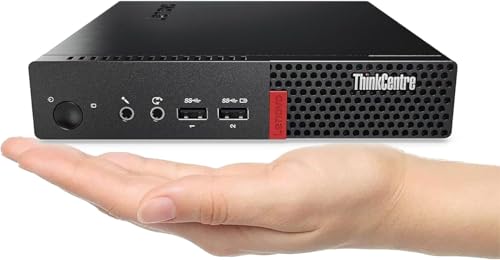
If you’re seeking a powerful yet compact solution for your workspace, the Lenovo ThinkCentre M910q Tiny Mini Desktop Computer (Renewed) stands out with its Intel Core i5-6500T processor. With 8GB of RAM and a 250GB SSD, it effortlessly manages multitasking, office applications, and web browsing. The SSD enhances responsiveness, ensuring quicker boot times and faster file access. Its ultra-compact design fits seamlessly into any environment, from home offices to classrooms. Plus, it comes pre-installed with Windows 11 Pro, so you can dive right into work. A keyboard and mouse are included, making it ready for immediate use.
Best For: Individuals or small businesses seeking a compact and efficient desktop solution for multitasking and productivity.
Pros:
- Powerful Intel Core i5-6500T processor for efficient performance.
- Ultra-compact design suitable for space-constrained environments.
- Comes pre-installed with Windows 11 Pro and includes keyboard and mouse for immediate use.
Cons:
- Limited upgrade options due to its compact design.
- 250GB SSD may not provide enough storage for users with extensive file needs.
- As a renewed product, it may not come with a full manufacturer warranty.
BOSGAME P3 Mini Gaming PC with AMD Ryzen 7 7840HS

Compact yet powerful, the BOSGAME P3 Mini Gaming PC with AMD Ryzen 7 7840HS is perfect for gamers and professionals seeking robust performance in a small footprint. With its 8-core processor running up to 5.1GHz and integrated Radeon 780M graphics, it handles AAA games and 4K video editing effortlessly. You’ll appreciate the 32GB DDR5 RAM, expandable to 64GB, ensuring smooth multitasking. Plus, it supports up to three 4K displays for immersive experiences. With dual Gigabit Ethernet and Wi-Fi 6E, connectivity is exceptional. Weighing just 2.77 pounds and measuring 6.57 x 6.46 x 4.17 inches, it’s a perfect desk companion.
Best For: Gamers and professionals looking for a compact yet powerful PC capable of handling demanding tasks like gaming and video editing.
Pros:
- High Performance: Equipped with an AMD Ryzen 7 7840HS processor and integrated Radeon 780M graphics, delivering performance comparable to GTX 1060.
- Expandable Memory and Storage: Comes with 32GB of RAM, expandable to 64GB, and a 1TB SSD with an additional slot for expansion.
- Versatile Connectivity: Features dual Gigabit Ethernet, Wi-Fi 6E, and multiple ports for seamless connectivity and remote management options.
Cons:
- Limited Graphics Upgrade: Integrated graphics may not satisfy hardcore gamers who prefer dedicated GPUs for the highest performance.
- Weight and Size: While compact, it may still be heavier and bulkier than some ultra-portable alternatives on the market.
- Warranty Term: Only a 1-year limited warranty, which may be less appealing compared to longer warranty options offered by competitors.
HP EliteDesk 705 G4 Mini Desktop Computer (Renewed)

For professionals seeking a powerful yet space-saving solution, the HP EliteDesk 705 G4 Mini Desktop Computer (Renewed) stands out with its AMD Quad-Core Ryzen 5 Pro processor, delivering speeds up to 3.8GHz. With 8GB of DDR4 RAM and a speedy 256GB SSD, multitasking becomes effortless. You can enjoy stunning visuals at a maximum resolution of 3840×2160, powered by integrated AMD Radeon Vega 11 graphics. Its compact design—measuring just 10.6 x 11.7 x 3.7 inches—makes it perfect for any desk setup. Plus, it’s certified refurbished, ensuring it looks and performs like new.
Best For: Professionals looking for a compact and efficient desktop solution without sacrificing performance.
Pros:
- Powerful Performance: Equipped with an AMD Quad-Core Ryzen 5 Pro processor and 8GB of RAM for smooth multitasking.
- Fast Storage: The 256GB SSD significantly improves loading times and overall system responsiveness.
- Compact Design: Its small footprint makes it ideal for limited desk space while still offering high-resolution graphics.
Cons:
- Limited Upgrade Options: Being a mini desktop, there may be restrictions on hardware upgrades compared to larger systems.
- Integrated Graphics: While capable, the AMD Radeon Vega 11 graphics may not meet the demands of high-end gaming or graphics-intensive applications.
- Renewed Product Concerns: As a refurbished item, there may be uncertainties regarding long-term reliability compared to brand new devices.
ACEMAGIC K1 Mini PC with AMD Ryzen 4300U

The ACEMAGIC K1 Mini PC with AMD Ryzen 4300U is an excellent choice for professionals seeking a powerful yet space-saving solution for their desk setup. With a 2.7GHz base clock and 4 cores, this mini PC offers impressive CPU performance, while the integrated Radeon Graphics guarantees smooth HD media editing and casual gaming. You’ll enjoy seamless multitasking with 16GB of RAM, expandable to 64GB, and a fast 512GB SSD for quick access to files. Plus, it supports a triple 4K display setup and comes equipped with ample USB ports, making certain you stay connected and productive in any workspace.
Best For: Professionals and creatives looking for a compact yet powerful mini PC capable of handling multitasking, HD media editing, and casual gaming.
Pros:
- High Performance: Equipped with an AMD Ryzen 4300U processor and integrated Radeon Graphics for excellent CPU and graphics performance.
- Expandable Memory: Comes with 16GB of RAM, expandable up to 64GB, allowing for smooth multitasking.
- Multiple Display Support: Supports a triple 4K display setup, enhancing productivity and visual experience.
Cons:
- Limited Gaming Capability: While suitable for casual gaming, it may not handle demanding games at high settings.
- No pre-installed OS: Users need to install their own operating system, which could be inconvenient for some.
- Cooling Noise: Although designed for quiet operation, the cooling fan may still produce noise under heavy load.
ACEMAGIC Mini PC Windows 11 Pro with AMD Ryzen 4300U Processor

If you’re seeking a powerful yet space-saving solution for your desk, the ACEMAGIC Mini PC with the AMD Ryzen 4300U Processor is an ideal choice. This compact powerhouse delivers lightning-fast multitasking, thanks to its 16GB DDR4 RAM and 256GB SSD, perfect for business applications and 4K video editing. You can connect up to three 4K monitors for an immersive workspace. With WiFi 5 and Bluetooth 4.2, you’ll enjoy stable connectivity. Plus, its VESA-mountable design saves desk space while offering versatile ports. Backed by a 1-year warranty, ACEMAGIC guarantees you have reliable support for your computing needs.
Best For: Professionals and creatives looking for a compact, high-performance PC capable of handling demanding tasks like 4K video editing and multitasking across multiple displays.
Pros:
- Powerful performance with AMD Ryzen 4300U Processor, 16GB DDR4 RAM, and 256GB SSD for fast data access.
- Supports up to three 4K monitors, enhancing productivity for multitasking and graphic-intensive work.
- VESA-mountable design saves desk space while providing versatile connectivity options.
Cons:
- Limited upgrade options due to its compact size, which may restrict future hardware enhancements.
- No dedicated graphics card, potentially limiting performance for high-end gaming or 3D rendering.
- Only a 1-year warranty, which may not be sufficient for users looking for longer-term protection.
Factors to Consider When Choosing a Compact Mini PC for Desk Setup
When you’re picking a compact mini PC for your desk setup, several key factors come into play. You’ll want to take into account performance specifications, size, and design, as well as connectivity options. Don’t forget about storage, memory capacity, and how well the PC manages cooling and noise levels.
Performance Specifications Overview
Choosing the right compact mini PC for your desk setup hinges on understanding its performance specifications. First, consider the processor type and speed; options like the AMD Ryzen 5 3550H and Intel Core i5-12600H deliver impressive multitasking capabilities. Next, look at RAM capacity, which typically ranges from 8GB to 32GB—higher amounts enhance performance, especially with demanding applications. Storage matters, too; SSDs offer faster boot times and quicker data access compared to HDDs, with sizes from 256GB to 1TB. Don’t overlook graphics capabilities, whether it’s integrated options like AMD Radeon Vega 8 or dedicated GPUs for video editing and gaming. Finally, guarantee solid connectivity options, including USB ports and WiFi 6, to support your peripherals efficiently.
Size and Design Factors
Size and design play essential roles in selecting the perfect compact mini PC for your desk setup. Look for models measuring around 4.5×4.5×2 inches or 5.05×5.05×2 inches; these dimensions make placement easy, whether on your desk or mounted behind a monitor. Weighing between 2 to 3 pounds, these PCs are lightweight and portable, allowing for flexible configurations. If you want to optimize desk space, consider VESA mount compatibility for secure attachment behind displays. Additionally, choose a design with effective cooling features to guarantee silent operation, maintaining a distraction-free environment. A compact form factor that fits snugly under desks or in tight spaces enhances organization, reducing clutter, and is perfect for home offices or shared workspaces.
Connectivity Options Available
While you might focus on size and design, connectivity options are equally important when selecting a compact mini PC for your desk setup. Look for models equipped with USB 3.0 and USB-C ports, providing fast data transfer rates of up to 10Gbps for your peripherals and external storage. Dual-band WiFi (2.4GHz and 5GHz) and Bluetooth capabilities guarantee reliable wireless performance for streaming and file transfers. If multitasking is your goal, multiple display outputs like HDMI, DisplayPort, and USB-C support triple-monitor setups. Don’t overlook Gigabit Ethernet ports for stable wired connections, essential for low-latency online activities. For enhanced performance, consider mini PCs with advanced networking options like Wi-Fi 6, which accommodates multiple devices seamlessly.
Storage and Memory Capacity
When you’re diving into the world of compact mini PCs, storage and memory capacity play a crucial role in guaranteeing your setup meets your needs. Look for memory options between 8GB and 32GB of DDR4 RAM, with some models expandable up to 64GB for enhanced multitasking. For storage, SSDs ranging from 250GB to 1TB are common, and many models support extra M.2 slots, allowing for a total of up to 4TB. Speed matters too—SSDs provide quicker boot times and file access than traditional HDDs. Opt for dual-channel memory configurations to boost performance and data transfer rates. Finally, verify your mini PC supports NVMe PCIe interfaces for faster data transfer, especially if you handle large files or high-resolution media.
Cooling and Noise Levels
After ensuring you’ve got the right storage and memory for your compact mini PC, it’s important to take into account how it manages heat and sound. Effective cooling systems, like upgraded fans and high thermal conductivity materials, are essential for stable performance during extended use. Look for mini PCs that utilize silent fan technology, which minimizes noise levels and creates a quieter work environment. This is especially beneficial for concentration-intensive tasks like video editing or programming. The size and layout of cooling components also matter; efficient airflow can help reduce distractions while prolonging your mini PC’s lifespan. Plus, energy-efficient components contribute to lower operational costs, making your setup both effective and economical.
Operating System Compatibility
Choosing a compact mini PC that fits seamlessly into your desk setup requires careful consideration of operating system compatibility. Make sure the mini PC supports your preferred operating system, whether it’s Windows 10, Windows 11, or a Linux distribution. Some models come with OS pre-installed, saving you time during setup. Also, check the system requirements for the OS you plan to use, as different versions may have varying hardware needs. It’s essential to select mini PCs that offer regular updates and support, ensuring your system remains secure and functional. Finally, verify driver support for your chosen operating system, as this can greatly impact the performance of connected hardware and peripherals.