
In today’s fast-paced world, having the right tools for video conferencing can make all the difference in your professional interactions. Whether you’re in a small huddle room or a hotel room while traveling, portable video conferencing kits offer the flexibility you need. With features like 4K video and 360° audio, these kits guarantee you stay connected and present. Let’s explore the top options available to elevate your remote meetings to the next level.
Yealink 4K USB Video Conference Camera

The Yealink 4K USB Video Conference Camera is perfect for professionals seeking high-quality video and audio in small spaces, like home offices. Its compact design makes setup a breeze—just plug in the USB-A cable and power supply. With 4K resolution at 30FPS and a 120° wide-angle view, you’ll capture every detail. The built-in 8-microphone array and 5W speakers guarantee crystal-clear audio, while AI features like auto framing and noise cancellation enhance your calls. Compatible with platforms like Microsoft Teams and Zoom, this camera simplifies your conferencing experience, making remote meetings feel more personal and engaging.
Best For: Professionals seeking high-quality video and audio solutions for small spaces, such as home offices.
Pros:
- 4K resolution at 30FPS provides stunning video quality for clear and detailed conferencing.
- Built-in 8-microphone array and 5W speakers ensure exceptional audio clarity during calls.
- AI features like auto framing and noise cancellation enhance the overall meeting experience.
Cons:
- Limited compatibility with some niche video conferencing platforms may restrict user options.
- Compact design may not suit larger conference rooms or settings requiring wider coverage.
- Weight of 3.57 pounds might be considered bulky for some users looking for ultra-portable solutions.
EMEET Conference Speakerphone M0 Plus with 4 AI Mics

For teams of up to eight people looking to enhance their video conferencing experience, the EMEET Conference Speakerphone M0 Plus with 4 AI mics stands out as an ideal solution. Its 360° voice pickup guarantees everyone’s voice is heard clearly, while advanced noise reduction filters out distractions. You’ll love the high-quality sound and natural communication, thanks to full duplex audio. Plus, it’s incredibly easy to set up with plug-and-play functionality and multiple connection options, including USB-C and Bluetooth. With over 10 hours of battery life, it’s perfect for on-the-go meetings, making collaboration seamless and efficient.
Best For: Teams of up to eight people looking for a high-quality, easy-to-use conference speakerphone for seamless video and audio communication.
Pros:
- Excellent 360° voice pickup with advanced noise reduction for clear conversations.
- Simple plug-and-play setup with multiple connectivity options (USB-C and Bluetooth).
- Long battery life of over 10 hours, suitable for extended meetings.
Cons:
- Limited to eight people without daisy chaining for larger groups.
- Requires a power source for charging, which may limit mobility.
- Some users may find the design less portable compared to other options.
Tenveo 4K PTZ Conference Room Camera System

When you need a reliable solution for large room meetings, the Tenveo 4K PTZ Conference Room Camera System stands out with its impressive 12x optical zoom and AI auto-tracking capabilities. This system delivers stunning 4K visuals through its advanced CMOS sensor, ensuring every detail is captured. With a 78° viewing angle and extensive pan and tilt options, it adapts seamlessly to your needs. The integrated DSP audio processor and omnidirectional microphones provide clear sound across 33 feet. Plus, it’s easy to set up and compatible with popular platforms like Zoom and Teams, making it perfect for any professional environment.
Best For: The Tenveo 4K PTZ Conference Room Camera System is best for businesses and organizations that conduct large meetings in spaces accommodating 10-25 participants.
Pros:
- High-quality visuals: Offers stunning 4K resolution and advanced tracking features for clear and engaging presentations.
- Easy to set up: Plug-and-play functionality allows for quick installation without the need for complex configurations.
- Versatile compatibility: Works seamlessly with major video conferencing platforms, making it adaptable for various professional settings.
Cons:
- Limited range for audio pickup: While effective, the 33ft microphone range may not suffice for larger rooms beyond the specified size.
- Potential learning curve: Users unfamiliar with PTZ cameras may require time to fully utilize the tracking and framing features.
- Higher initial investment: Compared to basic camera systems, the upfront cost may be a consideration for smaller businesses or organizations.
Logitech Rally Bar Mini and Tap IP Bundle Video Camera

Elevate your midsize video meetings with the Logitech Rally Bar Mini and Tap IP Bundle. This all-in-one video camera delivers stunning 1920 x 1080 pixel resolution in a sleek graphite finish. You’ll appreciate its easy installation, complete with an integrated table stand and patented speaker suspension system. The Rally Bar Mini features advanced technology that maintains persistent room awareness, automatically framing participants for a polished experience. Plus, it’s designed for seamless compatibility with Microsoft Teams, Zoom Rooms, and Ring Central Rooms. This complete solution guarantees your meetings are professional and engaging, no matter where you are.
Best For: The Logitech Rally Bar Mini and Tap IP Bundle is best for businesses and organizations looking for a complete solution for midsize video meeting rooms.
Pros:
- Easy installation with an all-in-one design and integrated table stand.
- High-quality video resolution at 1920 x 1080 pixels for clear visuals.
- Advanced technology for auto-framing participants enhances meeting engagement.
Cons:
- Limited to specific platforms like Microsoft Teams, Zoom Rooms, and Ring Central Rooms.
- May be considered expensive compared to basic video conferencing options.
- The graphite color may not suit all office aesthetics or preferences.
Logitech MeetUp Video Conferencing System

Designed specifically for huddle and small rooms, the Logitech MeetUp Video Conferencing System stands out with its ultra HD 4K sensor and wide 120° field of view. You’ll appreciate the 5x HD zoom, ensuring everyone remains clear and sharp. Its beamforming microphones capture voices up to 4 meters away, while an optional expansion mic extends this to 5 meters, making it ideal for collaborative discussions. The motorized pan and tilt feature expands your view up to 170°. Plus, with plug-and-play USB connectivity, it works seamlessly with various devices and platforms, making setup a breeze for any meeting environment.
Best For: Teams and organizations looking for a high-quality video conferencing solution for huddle and small rooms.
Pros:
- Ultra HD 4K video quality with a wide 120° field of view for clear visibility.
- Beamforming microphones capture audio effectively up to 4m, enhancing communication.
- Easy plug-and-play USB connectivity compatible with various devices and platforms.
Cons:
- Expansion microphone sold separately, adding to the overall cost.
- Limited to huddle and small rooms, not suitable for larger spaces.
- Requires a mini PC or Logitech RoomMate for full functionality with certain platforms.
Logitech Roommate and Tap IP Video Conferencing Kit

The Logitech Roommate and Tap IP Video Conferencing Kit is perfect for businesses looking to enhance collaboration in their meeting spaces. This bundle includes the Logitech Tap IP and RoomMate, seamlessly integrating with existing Logitech conference cameras. You can easily deploy it across various room sizes, using the MeetUp for small spaces and the Rally system for larger environments. With one-touch meeting access via Tap IP, transforming any area into a video conferencing room is a breeze. Weighing just 1 pound, it’s a lightweight option that combines functionality with ease of use—ideal for professionals on the go.
Best For: Businesses looking to enhance collaboration in meeting spaces with a flexible and easy-to-deploy video conferencing solution.
Pros:
- One-touch meeting access allows for quick and easy participation in video calls.
- Versatile deployment options make it suitable for various room sizes, from small to large.
- Lightweight design (1 pound) ensures easy installation and mobility.
Cons:
- No AV included in the bundle may require additional purchases for a complete setup.
- Best Sellers Rank indicates lower visibility compared to other office products.
- Limited USB ports (only 1) may restrict the connection of multiple devices.
Movo iVlogger-PRO Vlogging Kit for iPhone/Android

If you’re a content creator looking to enhance your vlogging setup, the Movo iVlogger-PRO Vlogging Kit for iPhone/Android offers an all-in-one solution. This kit features universal compatibility with all smartphones via USB-C, Lightning, and 3.5mm connections. The VXR10 Shotgun Microphone captures high-quality sound while minimizing background noise, ensuring your audio is crisp. Plus, the rechargeable RGB light lets you choose dynamic colors to elevate your videos. With essential accessories like a rotating phone mount, multiple tripods, a wireless remote, and a travel case, you’re ready to vlog anywhere with ease and professionalism.
Best For: Content creators seeking an all-in-one vlogging kit compatible with all smartphones.
Pros:
- High-quality audio capture with the VXR10 Shotgun Microphone, reducing background noise.
- Versatile lighting options with a rechargeable RGB light to enhance video quality.
- Includes essential accessories like tripods and a wireless remote for convenience.
Cons:
- May require additional cables for specific smartphone models if not included in the kit.
- The size of the kit may be bulky for some users when traveling.
- Limited battery life on the RGB light might require frequent recharging during extended shoots.
Video Conference Lighting Kit for Remote Working and Live Streaming

For professionals engaged in remote work or live streaming, the Video Conference Lighting Kit brings a game-changing solution to enhancing video quality. This kit features a versatile ring light that easily clips onto your monitor, providing soft, even illumination without glare. With adjustable color temperatures from warm to white light and five brightness levels, you can customize your lighting for any setting. Its lightweight design and USB power compatibility make it perfect for on-the-go use. Plus, with reliable customer support, you’ll have assistance whenever you need it, ensuring a smooth and professional video experience every time.
Best For: Remote workers, content creators, and professionals who require high-quality video lighting for video calls and live streaming.
Pros:
- Provides soft, even illumination that enhances video quality and skin appearance.
- Adjustable color temperatures and brightness levels allow for customizable lighting settings.
- Lightweight and portable design with USB power compatibility makes it easy to use anywhere.
Cons:
- Requires USB power source, limiting use in locations without easy access to power.
- Clip-on design may not fit all monitor sizes or styles securely.
- Limited to the brightness and color options provided by the built-in LED beads.
Ring Light Video Conference Lighting Kit for Content Creation
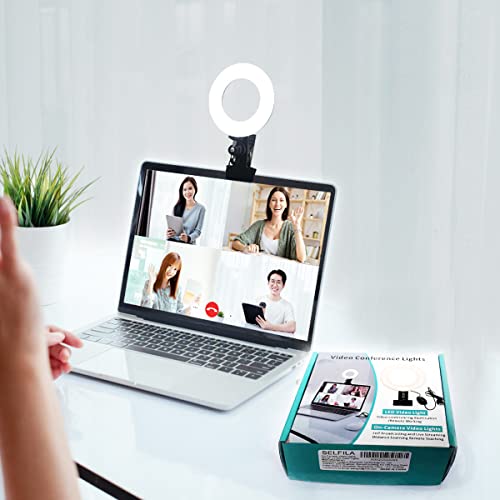
Content creators looking to elevate their video quality will find the Ring Light Video Conference Lighting Kit an essential tool. With adjustable color temperatures from 3200K to 6500K and five brightness levels, it caters to all your lighting needs. The clip-on design fits laptops and monitors, making it versatile for any setup. Featuring 48 LEDs and five lighting modes, you can simulate natural sunlight for excellent results. Its compact and lightweight design allows for easy transport, so you can enhance your video quality anywhere. Just plug it into a USB power supply, and you’re ready to shine in your content creation!
Best For: Content creators, video conferencing professionals, and remote workers seeking to improve their video quality and visual appeal.
Pros:
- Adjustable color temperature and brightness for customized lighting.
- Clip-on design makes it compatible with various devices and setups.
- Compact and lightweight for easy portability and convenience.
Cons:
- Requires a separate USB power supply, as the adapter is not included.
- Limited maximum clip width may not fit all setups.
- May not provide adequate lighting in very large spaces.
Logitech Group Video Conferencing Bundle with Expansion Mics

Designed specifically for large meeting rooms, the Logitech Group Video Conferencing Bundle with Expansion Mics is the ideal choice for teams of up to 20 participants. You’ll enjoy plug-and-play HD audio and stunning 1080p video, thanks to its autofocus and Zeiss-certified optics. The extended audio range of 28 feet guarantees everyone can be heard clearly. It’s compatible with both Mac and PC, supporting various conferencing apps like Microsoft Lync and Skype for Business. Weighing in at 8.5 pounds, this bundle combines portability with powerful performance, making it perfect for your professional meetings on the go.
Best For: Teams conducting large meetings of up to 20 participants who require high-quality audio and video conferencing solutions.
Pros:
- Plug-and-play setup with business-grade audio and stunning 1080p video quality.
- Extended audio range of 28 feet ensures clear communication across large meeting spaces.
- Compatible with various operating systems and popular conferencing applications, including Skype for Business and Microsoft Lync.
Cons:
- Weighing 8.5 pounds, it may be less portable than smaller video conferencing solutions.
- Higher price point compared to basic video conferencing systems, which may not fit all budgets.
- Some users may require additional training to utilize all features effectively.
Factors to Consider When Choosing a Portable Video Conferencing Kit
When you’re choosing a portable video conferencing kit, consider your video quality requirements and audio performance standards first. It’s also important to check compatibility with your existing software and assess portability and size for easy transport. Finally, think about how simple the setup and installation will be for your needs.
Video Quality Requirements
Since video quality plays a pivotal role in the effectiveness of portable video conferencing kits, you should prioritize key factors to guarantee a seamless experience. Aim for a resolution of 1080p or higher to secure clarity and detail during your meetings. A wide field of view, ideally 120 degrees or more, lets you capture larger groups without sacrificing image quality. Look for advanced features like AI auto-framing and low-light optimization to keep participants well-framed and visible, even in challenging lighting. Ascertain the camera maintains a high frame rate of at least 30 frames per second for smooth motion. Finally, consider kits with digital pan, tilt, and zoom capabilities for dynamic framing during discussions.
Audio Performance Standards
While video quality is crucial for effective communication, audio performance standards are equally important in portable video conferencing kits. Look for systems that offer full-duplex audio capabilities, allowing you to speak and listen simultaneously without interruptions. High-quality speakerphones should include noise reduction technology to filter out background sounds, ensuring clear communication. Consider kits with multiple microphones, such as an omnidirectional array, to effectively capture voices from various angles in the room. Pay attention to the voice pickup range; ideal systems support ranges of up to 10 meters (33 feet) for larger spaces. Enhanced audio algorithms, like echo cancellation, are also essential for a natural conversation experience, eliminating feedback and minimizing distortions, so you can focus on the discussion.
Compatibility With Software
Choosing a portable video conferencing kit that works seamlessly with your existing software is essential for a smooth communication experience. Make certain the kit explicitly lists compatibility with major platforms like Microsoft Teams, Zoom, Skype, and Webex. This guarantees effortless integration in different environments. Check for USB and Bluetooth connectivity options to enhance compatibility with various devices and operating systems. Review the specific version requirements, as some features might only be available on newer versions of the applications. Look for kits that offer plug-and-play functionality to simplify setup and minimize potential issues. Finally, consider whether the kit includes firmware updates or ongoing support, guaranteeing it remains compatible with evolving conferencing solutions for the long haul.
Portability and Size
When selecting a portable video conferencing kit, portability and size play a significant role in ensuring you can set up anywhere. Look for a compact design that makes transport effortless, especially in small offices or home environments. Kits weighing less than 4 pounds are ideal, as they allow you to quickly carry and set up for spontaneous meetings. Opt for systems with USB connectivity for easy plug-and-play use, making them user-friendly in various locations. Integrated components like built-in microphones and speakers reduce the number of items you need to transport, enhancing overall portability. Additionally, choose kits that fit easily in standard laptop bags or travel cases, ensuring convenient transport without taking up too much space.
Setup and Installation Ease
To guarantee a smooth experience, look for a portable video conferencing kit that emphasizes setup and installation ease. Opt for a plug-and-play design, ensuring you won’t need extra drivers or software. Quick setup options, like USB connections for cameras and speakerphones, can save you valuable time when you’re ready to start. Compact designs are perfect for portability, allowing you to deploy your kit effortlessly in various locations, from home offices to conference rooms. Kits with integrated mounting solutions or stands make positioning during meetings straightforward. Finally, clear instructions or user manuals can greatly enhance your setup experience, making it user-friendly even for those with limited technical skills.
Battery Life and Power
As you explore portable video conferencing kits, battery life and power options play a vital role in maintaining seamless communication. Look for devices that offer over 10 hours of talk time on a single charge, ensuring you won’t be cut off mid-meeting. USB-powered options can be convenient, making it easier to plug in while on the go. Consider the weight and dimensions of the kit; a compact design is essential for easy transport. Quick charging capabilities can greatly reduce downtime, allowing you to stay connected during important discussions. Additionally, evaluate the power efficiency of the devices, as energy-saving features can help extend battery life, making prolonged usage hassle-free. Choose wisely, and you’ll never miss a vital moment.