
As you prepare for your next presentation, you might be wondering how to make it more engaging and seamless. The right presentation clicker can greatly enhance your delivery, making it easier to connect with your audience. With many options available in 2026, each offering unique features, it can be challenging to choose the best one. Let’s explore the top ten clickers that could transform your presentation experience.
Logitech Wireless Presenter R400 PowerPoint Clicker

If you’re looking for a reliable and user-friendly presentation tool, the Logitech Wireless Presenter R400 is an excellent choice for educators and business professionals alike. This PowerPoint clicker features intuitive touch-keys for seamless slideshow control. With a red laser pointer that’s easy to see, you’ll keep your audience engaged. Enjoy the freedom of movement with a wireless range of up to 50 feet. Plus, it’s plug-and-play; just connect the receiver to a USB port, and you’re set. Its compact design and built-in docking bay enhance portability, making it perfect for presentations, meetings, and lectures.
Best For: The Logitech Wireless Presenter R400 is best for educators and business professionals who need a reliable and intuitive tool for delivering presentations.
Pros:
- Ease of Use: Plug-and-play functionality eliminates the need for software installation.
- Laser Pointer: The built-in red laser pointer enhances audience engagement and visibility.
- Portability: Compact design with a docking bay for the receiver makes it easy to transport.
Cons:
- Battery Dependency: Requires AAA batteries which need to be replaced periodically.
- Limited Compatibility: Only compatible with certain versions of Windows (XP, Vista, 10, 11).
- Range Limitations: While the wireless range is 50 feet, obstacles may affect performance in larger spaces.
Presentation Clicker Wireless Presenter Remote for PowerPoint

The Presentation Clicker Wireless Presenter Remote for PowerPoint, model E600, is ideal for anyone seeking a seamless presentation experience. With its dual-head design and plug-and-play functionality, you can easily connect it to your Mac, laptop, or PC without any software hassle. The contoured keys guarantee smooth access, even in low light, while the bright red laser pointer highlights your key points. You’ll enjoy a wireless range of up to 100 feet, allowing you to engage with your audience freely. Plus, its magnetic storage for the USB dongle keeps everything organized. It’s a must-have for effortless presentations!
Best For: The Presentation Clicker Wireless Presenter Remote for PowerPoint is best for educators, business professionals, and anyone who frequently delivers presentations and needs a reliable remote control.
Pros:
- Plug-and-play functionality allows for easy setup without the need for software installation.
- Wireless range of up to 100 feet enables presenters to move freely and engage with their audience.
- Bright red laser pointer helps highlight key points clearly against various backgrounds.
Cons:
- Requires 2 AAA batteries which are not included, potentially adding extra cost.
- Limited compatibility may not support some devices without the appropriate ports or adapters.
- Lack of rechargeable battery option means ongoing battery replacements are necessary.
Wireless Presenter Presentation Clicker (RF 2.4GHz)

For professionals seeking an efficient and reliable tool for presentations, the Wireless Presenter Presentation Clicker (RF 2.4GHz) stands out as an ideal choice. This clicker supports page forward/backward, volume control, and hyperlink functions, making it perfect for daily use. With its plug-and-play functionality, you just need to insert the USB receiver—no software required. Its compact design features a bright red pointer visible against most backgrounds and soft, easy-to-use buttons. You’ll enjoy a wireless range of up to 100 feet, allowing you to move freely. Plus, the energy-saving auto-sleep function extends battery life, ensuring you’re always prepared.
Best For: Professionals and educators looking for an efficient and user-friendly tool to enhance their presentations.
Pros:
- Plug-and-play functionality allows for quick setup without the need for software downloads.
- Wireless range of up to 100 feet provides freedom of movement during presentations.
- Compact design with a bright red pointer ensures visibility and ease of use against various backgrounds.
Cons:
- The red pointer is not recommended for use on LCD/LED/TV screens, limiting its versatility in some settings.
- Operated by a single AAA battery (not included), which may require frequent replacements.
- Some users may find the button layout challenging if they are accustomed to different presentation clickers.
Logitech Wireless Presenter R500s PowerPoint Clicker

Looking for a reliable presentation tool? The Logitech Wireless Presenter R500s PowerPoint Clicker is an excellent choice. With its built-in Class 1 red laser pointer, you can easily highlight key points during your presentation. Its intuitive touch-keys allow for seamless slideshow control, making it user-friendly. Thanks to 2.4GHz RF wireless technology, you’ll enjoy a range of up to 20 meters, giving you the freedom to move. Plus, setup is a breeze—just plug the receiver into a USB port, and you’re ready to go. Don’t forget, it uses AAA batteries and features convenient storage for the receiver after use.
Best For: Professionals, educators, and students who frequently give presentations and need a reliable tool for effective slideshow control.
Pros:
- Intuitive touch-keys make it easy to navigate through presentations smoothly.
- Bright red laser pointer enhances visibility against various backgrounds, helping to emphasize key points.
- Wireless range of up to 20 meters provides freedom of movement during presentations.
Cons:
- Requires AAA batteries, which may need to be replaced frequently.
- Limited compatibility with some presentation software could hinder functionality in certain setups.
- Laser visibility may vary in extremely bright environments, affecting usability.
Wireless Presenter Remote for PowerPoint and Keynote

Presenting with confidence is made easy with the Wireless Presenter Remote, designed specifically for PowerPoint and Keynote users. This multifunctional clicker lets you navigate slides, control hyperlinks, and adjust volume effortlessly. With a plug-and-play setup, you won’t need any software installations—though Mac users might need a quick setup. You’ll enjoy a control range of up to 100 meters, while the bright red laser guarantees visibility from 200 meters away. Compatible with various operating systems and software, it’s perfect for teaching, meetings, or gifting. A single AAA battery powers it, making it convenient and user-friendly.
Best For: Professionals and educators who frequently deliver presentations using PowerPoint or Keynote.
Pros:
- Easy plug-and-play setup with no software installation required.
- Impressive control range of 100 meters and visibility of the red light up to 200 meters.
- Compatible with multiple operating systems and software applications.
Cons:
- Mac users may require a quick setup, which could be inconvenient for some.
- Limited to a single AAA battery, which may need frequent replacement.
- May not be suitable for large venues where extreme distance control is required.
Logitech Wireless Presenter R800 PowerPoint Clicker

The Logitech Wireless Presenter R800 PowerPoint clicker stands out as a top choice for educators and business professionals who crave both functionality and ease of use. With its built-in Class 2 green laser pointer, your slides become more engaging, ensuring your audience stays focused. The 2.4GHz RF technology provides a remarkable 100-foot range, letting you move freely during presentations. Plus, there’s no need for software installation—just plug in the USB receiver. Its built-in docking bay keeps everything organized, and it operates on AAA batteries for peak performance. Choose the R800 for a seamless presentation experience every time.
Best For: The Logitech Wireless Presenter R800 is best for educators and business professionals seeking an efficient and user-friendly presentation tool.
Pros:
- Bright green laser pointer enhances visibility against various backgrounds, keeping the audience engaged.
- Impressive 100-foot wireless range allows for freedom of movement during presentations.
- No software installation needed; simply plug in the USB receiver for instant use.
Cons:
- Requires AAA batteries, which may need to be replaced frequently depending on usage.
- Limited functionality compared to some advanced presentation clickers with additional features.
- Not rechargeable, meaning ongoing battery purchases are necessary.
QUI Presentation Clicker for PowerPoint

For anyone seeking a reliable and versatile presentation tool, the QUI Presentation Clicker for PowerPoint stands out as an excellent choice. This RF 2.4GHz USB wireless presenter connects effortlessly with a plug-and-play setup, no software needed. Compatible with Mac and Windows, it covers a range of applications like PowerPoint and Google Slides. With a wireless range of up to 328 feet, you can move freely while presenting. Its intuitive buttons allow for easy navigation and volume control, and the bright red laser guarantees your audience stays focused on key points. Lightweight and portable, it’s perfect for mobile presenters.
Best For: Mobile presenters, educators, and professionals looking for a reliable wireless tool to enhance their presentations.
Pros:
- Versatile Compatibility: Works seamlessly with multiple operating systems and applications, including Mac, Windows, PowerPoint, and Google Slides.
- Impressive Range: Offers a wireless coverage of up to 328 feet, allowing presenters to engage with their audience from a distance.
- User-Friendly Design: Intuitive buttons for easy navigation and volume control, along with a bright red laser for highlighting key points.
Cons:
- Limited Software Integration: While it supports many applications, some advanced features may not be available with every software.
- Battery Dependency: Requires batteries for operation, which may need to be replaced periodically.
- Potential Interference: As with any RF device, there is a possibility of interference in crowded wireless environments.
Logitech Spotlight Presentation Remote – Universal Wireless Clicker

Elevating your presentations is effortless with the Logitech Spotlight Presentation Remote, ideal for professionals who demand precision and control. This universal wireless clicker features a laser pointer and advanced digital highlighting, allowing you to magnify on-screen content seamlessly. With Bluetooth connectivity and a 30-meter range, you can move freely while engaging your audience. The mouse-like cursor control enables you to play or pause videos and interact with content effortlessly. Plus, configure timing milestones through the Logi Options+ App, receiving vibration alerts to keep you on track. Compatible with various operating systems and software, it’s fully customizable to meet your needs.
Best For: Professionals seeking a reliable and feature-rich presentation remote for seamless control and engagement during presentations.
Pros:
- Advanced Features: Includes laser pointer and digital highlighting for enhanced audience interaction.
- Wireless Connectivity: Bluetooth and USB-A options provide versatility and a 30-meter range for freedom of movement.
- Customizable Alerts: Vibration alerts for timing milestones help maintain presentation flow and structure.
Cons:
- Charging Requirement: Requires periodic charging, which may be inconvenient during long sessions.
- Compatibility Limitations: While optimized for many systems, some niche software may not be fully supported.
- Size and Portability: The remote may be larger than basic clickers, affecting portability for some users.
Presentation Clicker for PowerPoint and Laptop Presentations

Looking to enhance your presentations? A presentation clicker for PowerPoint and laptop presentations is your perfect companion. With a wireless range of 98 feet, you can move freely while emphasizing key points. Its ergonomic design guarantees comfort, and the large buttons help prevent accidental clicks. Simply plug the USB receiver into your computer, and you’re ready to go—no complicated setup required. This clicker is compatible with various systems, including Windows and Mac, and works with major software like Google Slides and PowerPoint. Plus, it runs on two AAA batteries, making it portable and convenient for any occasion.
Best For: Professionals, educators, and students who frequently deliver presentations and need a reliable tool for seamless control.
Pros:
- Ergonomic design ensures comfortable grip during long presentations.
- Large buttons reduce the chance of accidental clicks, enhancing usability.
- Plug and play functionality makes setup quick and easy without technical hassles.
Cons:
- Limited to a range of 98 feet for PowerPoint control, which may not suit larger venues.
- Requires two AAA batteries, which need to be replaced periodically.
- Some users may prefer additional features like built-in timers or more advanced laser pointers.
Presentation Clicker with Case for PowerPoint and Google Slides
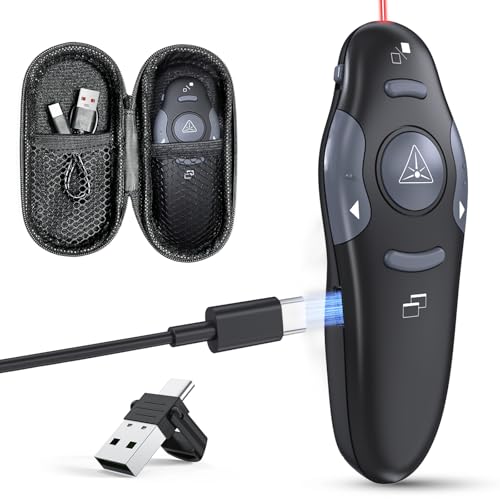
If you need a reliable presentation tool that seamlessly integrates with both PowerPoint and Google Slides, the Presentation Clicker with Case is an excellent choice. This wireless presenter features a USB Type C rechargeable red laser pointer, allowing you to control your slides from up to 98 feet away. Its plug-and-play design requires no drivers, making setup a breeze. With intuitive buttons for easy navigation, you’ll feel confident during presentations. The compact, ergonomic design guarantees a secure grip and discreet storage during Q&A sessions. Plus, the quick charge feature gives you an hour of use after just five minutes of charging.
Best For: Professionals, educators, and presenters looking for a reliable and user-friendly tool to enhance their presentations with seamless slide control.
Pros:
- Plug-and-play design: No drivers required for easy setup.
- Long wireless range: Control your slides from up to 98 feet away.
- Quick charging: Just 5 minutes of charging provides up to 1 hour of use.
Cons:
- Limited to USB Type C: May not be compatible with older USB interfaces without an adapter.
- Rechargeable only: Requires charging, which could be inconvenient during extended use.
- Red laser pointer visibility: Effectiveness may vary depending on lighting conditions.
Factors to Consider When Choosing a Presentation Clicker Remote
When you’re choosing a presentation clicker remote, several key factors can make a big difference in your experience. You’ll want to take into account the wireless range, device compatibility, and even the quality of the laser pointer. Additionally, think about battery life and the overall design to guarantee it feels comfortable in your hand during presentations.
Wireless Range Considerations
One key factor to evaluate in choosing a presentation clicker remote is its wireless range, which can dramatically enhance your presentation experience. Some devices offer ranges up to 100 feet, giving you the freedom to engage with your audience without being tethered to your computer. A longer wireless range is essential, especially in larger venues where you’ll want to move around freely. Most clickers use 2.4GHz RF technology, guaranteeing a stable connection over extended distances. Additionally, some remotes come with visibility features like effective laser pointers, helping maintain audience engagement even from afar. Always check the wireless range against the size of your presentation space to guarantee you select the right clicker for your needs.
Compatibility With Devices
Compatibility is essential in choosing a presentation clicker remote, as it guarantees smooth operation across various devices and operating systems. First, confirm the clicker works with your operating system—many support Windows, Mac OS, and Linux, but check for version limitations. Next, verify compatibility with popular software like PowerPoint, Keynote, and Google Slides for seamless presentations. Look for clickers offering multiple connectivity options, such as USB-A receivers and Bluetooth, to connect easily to laptops and desktops. Opt for models with a plug-and-play design that require no software installation for immediate use. Finally, assess the available physical connection types, like USB and Type-C ports, to confirm you won’t need extra adapters for your devices.
Laser Pointer Quality
Choosing the right presentation clicker remote involves more than just compatibility; the quality of the laser pointer is equally important. A bright, visible laser helps you highlight key points, keeping your audience engaged. Look for Class 1 or Class 2 lasers, as they’re safe for eye exposure and offer great brightness against various backgrounds. Opt for a laser pointer with a range of at least 100 feet, allowing you to move freely and interact with your audience. Consider the color, too—while red lasers are common, green lasers stand out better against bright backgrounds. Finally, make certain your laser pointer has a reliable battery life indicator to avoid any unexpected interruptions during your presentation.
Battery Life and Type
Battery life and type are essential factors when selecting a presentation clicker remote. You’ll want to evaluate the battery type, as most clickers use AAA batteries, which can affect convenience and availability during your presentations. Look for models with energy-saving modes or battery indicators, helping you avoid unexpected failures. Rechargeable options can be particularly advantageous, allowing quick charging and eliminating the hassle of frequent replacements. Some clickers are designed for extended use, ensuring they last through multiple presentations without needing a recharge. Additionally, an auto-sleep function can further extend battery life by powering down the device when not in use, making it a practical choice for anyone who presents regularly.
Design and Ergonomics
When selecting a presentation clicker remote, you’ll often find that design and ergonomics play an essential role in your overall experience. Look for a remote with a comfortable grip and strategically placed buttons to reduce hand fatigue during long presentations. A lightweight design enhances portability, making it easy to carry without adding bulk to your bag. Pay attention to the button layout; well-defined, contoured keys are crucial for usability, especially in low-light settings. A compact design allows for convenient storage and quick access when you need it. Finally, consider the tactile feedback from the buttons, as it helps you navigate slides confidently without taking your eyes off your audience. Prioritize these factors for a seamless presentation experience.
Ease of Use
After considering design and ergonomics, ease of use becomes an essential factor in selecting a presentation clicker remote. Look for clickers with plug-and-play functionality, allowing easy setup without software installation. Choose models featuring intuitive touch keys or contoured buttons, which help you navigate smoothly and reduce accidental clicks. A built-in battery indicator is vital, letting you monitor power levels to avoid surprises during your presentation. Opt for a remote that’s lightweight and offers a comfortable grip, making it easy to hold during long sessions. Additionally, guarantee the wireless range is adequate, ideally up to 100 feet, so you can engage with your audience without being tethered to your device.
Additional Functionality Features
How can you enhance your presentations with the right clicker remote? Look for a clicker that offers additional functionality like volume control, hyperlink navigation, and the ability to switch between applications. This interactivity keeps your audience engaged. A black screen option can help you focus attention when you need to emphasize a point without distractions from slides. Consider a clicker with a bright laser pointer, as it highlights content effectively against various backgrounds. A longer wireless range, up to 100 feet, lets you move freely around the room. Finally, opt for plug-and-play functionality, ensuring you can set up quickly without the hassle of installing software. These features make your presentations smoother and more impactful.