
The best powered docking stations turn a laptop into a practical desktop replacement by adding displays, charging, networking, storage-card access, and extra USB ports through one connection.
These 10 options cover compact dual-monitor hubs, high-port-count desktop docks, and multi-display models for Windows laptops, MacBooks, and business systems. Before buying, confirm your laptop’s display support, charging requirements, and operating-system compatibility.
Best 10 Powered Docking Stations Picks for 2026
Best Compact Pick
Anker 8-in-1 Dual-Monitor Dock

- Dual HDMI with up to 4K output
- Up to 85W pass-through charging
- Compact design with Ethernet and card readers
Best For: Portable USB-C laptop setups
Best Triple-Display Design

- Supports up to three Windows displays
- Four video outputs and 10Gbps USB
- Upright space-saving aluminum design
Best For: Windows multi-monitor workstations
Best Built-In Power
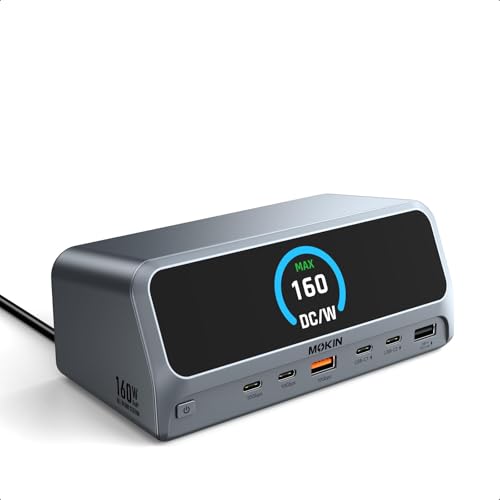
- 160W total built-in power supply
- Up to 100W laptop charging
- Dual HDMI 4K at 60Hz and LCD status display
Best For: Multi-device desktop charging
Best for Managed Workspaces

- Supports up to three HDMI displays
- 100W Power Delivery and six USB ports
- DisplayLink support for Apple Silicon Macs
Best For: Hybrid offices and IT deployments
Best High-Power Pick
Anker Prime 14-in-1 Docking Station

- 160W total output with up to 100W USB-C charging
- 14-in-1 design with dual HDMI and 10Gbps data
- Supports Windows and ChromeOS; macOS displays mirror
Best For: Power users building a dual-display Windows or ChromeOS workstation
Best Triple-Monitor Pick
TobenONE 18-in-1 Docking Station
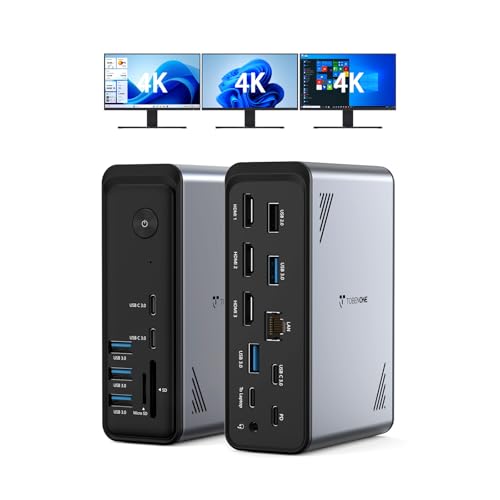
- Supports triple or dual 4K displays at 60Hz
- 18 ports include three HDMI and nine USB connections
- Provides up to 100W PD but requires a separate power supply
Best For: Windows and ChromeOS users managing three displays and many peripherals
Best Complete Bundle

- Includes a 96W power adapter with 65W laptop charging
- Dual 4K at 30Hz or single 4K at 60Hz
- Adds Ethernet, audio, SD, TF, and 18W USB-C output
Best For: Everyday office users wanting a powered dual-monitor dock with card readers
Enterprise Powerhouse
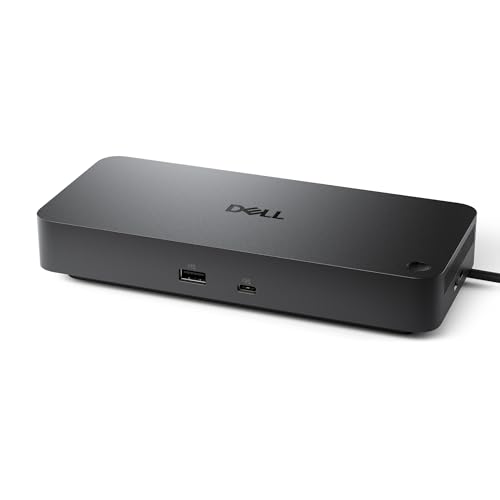
- Up to 100W laptop power delivery
- Native support for up to four displays
- 3-year warranty and IT manageability
Best For: Business offices and multi-monitor Dell deployments
Flexible 13-Port Value

- 13 ports with dual HDMI and DisplayPort
- 100W PD with up to 10Gbps data speeds
- Windows triple-display support
Best For: Windows workstations and mixed-device home offices
High-Power Triple-Display Hub

- 150W total DC power delivery
- Triple-display output with HDMI and DisplayPort
- 10Gbps USB-C plus SD and microSD readers
Best For: Windows and Linux multi-monitor workstations
Best Compact Pick – Anker 8-in-1 Dual-Monitor Dock
The Anker 8-in-1 is a compact option among powered docking stations for USB-C laptops. It combines dual HDMI, card readers, Ethernet, USB-A data ports, and up to 85W pass-through charging in a small 3.2-ounce hub. Note that the required 100W wall charger and USB-C cable are not included.
Best For: USB-C Windows or ChromeOS users who want dual-monitor connectivity and everyday expansion in a travel-friendly format.
Pros:
- Supports one 4K display at 60Hz or two displays at 4K at 30Hz.
- Includes HDMI, Ethernet, SD/microSD, and USB-A connectivity.
- Provides up to 85W USB-C Power Delivery pass-through charging.
Cons:
- Requires a separate 100W PD charger and USB-C cable.
- macOS mirrors the same image on both external monitors.
- Not compatible with Linux.
This is a sensible choice when portability and broad connectivity matter more than a built-in power supply. Verify that your laptop supports DisplayPort Alt Mode and Power Delivery before buying.
Best Triple-Display Design – Baseus Spacemate 11-in-1 Dock
The Baseus Spacemate is one of the more feature-rich powered docking stations for Windows multi-monitor workstations. Its upright 11-in-1 design provides two HDMI ports, two DisplayPort outputs, 10Gbps USB ports, Ethernet, audio, and up to 85W laptop charging from a 100W adapter.
Best For: Windows users building a three-monitor desk setup who value fast connectivity and a space-saving vertical dock.
Pros:
- Supports up to three external displays on Windows, with two monitors at 4K 60Hz or three at 4K 30Hz.
- Offers HDMI, DisplayPort, three 10Gbps USB ports, Ethernet, and a headset jack.
- Vertical aluminum body, magnetic swiveling base, built-in host cable, and status display help organize a desk.
Cons:
- Power adapter is not included.
- macOS supports only one extended external display.
- Laptops requiring more than 100W may charge slowly.
The Spacemate stands out for Windows productivity users who need several screens and peripherals through one cable. Its triple-display capability depends on a full-featured USB-C port with DisplayPort Alt Mode.
Best Built-In Power – MOKiN LumiNext 13-in-1 Dock
The MOKiN LumiNext DD01 takes a different approach to powered docking stations by building the power supply into the dock itself. It delivers 160W of total power, up to 100W to the host laptop, dual 4K HDMI output, 10Gbps data ports, Gigabit Ethernet, and an LCD status display.
Best For: Users who want a single wall-connected dock to power a laptop and multiple accessories without a separate external power brick.
Pros:
- Built-in AC power delivers 160W total output and up to 100W laptop charging.
- Can charge multiple devices simultaneously through additional USB-C and USB-A ports.
- Dual HDMI supports 4K at 60Hz, while Windows supports extended or mirrored displays.
- LCD status screen and physical privacy button provide useful control and visibility.
Cons:
- macOS supports mirrored rather than extended dual-monitor output.
- Requires a laptop with a full-function USB-C or Thunderbolt port.
- The integrated power design may be less portable than a compact hub.
Choose this dock when charging capacity and desk convenience are priorities. Its built-in power system reduces cable clutter, while the display and privacy controls add practical visibility for a busy workstation.
Best for Managed Workspaces – Plugable Triple-Display Dock
The Plugable 12-in-1 dock is designed for powered docking stations in hybrid offices and managed deployments. It supports up to three HDMI monitors, six USB 3.0 peripherals, Gigabit Ethernet, audio, and 100W USB-C Power Delivery across Windows, macOS, and ChromeOS systems.
Best For: Hybrid teams and IT-managed workspaces that need broad laptop compatibility, wired networking, and triple-display support.
Pros:
- Supports up to three extended HDMI displays, including one 4K at 30Hz and two 1080p at 60Hz.
- DisplayLink helps bypass native single-display limits on Apple Silicon MacBooks.
- Includes six USB 3.0 ports, Gigabit Ethernet, audio, and 100W Power Delivery.
- Backed by North American technical support and a compatibility guarantee.
Cons:
- macOS requires driver installation.
- Not compatible with Linux.
- HDCP is not supported.
This dock is particularly compelling for organizations standardizing mixed fleets of Windows, Mac, and ChromeOS laptops. Its triple-display setup is flexible, though the different resolution and refresh limits should be matched to the intended monitors.
Best High-Power Pick – Anker Prime 14-in-1 Docking Station
The Anker Prime is a powerful choice for users who need powered docking stations with extensive connectivity and fast charging. Its 14-in-1 design combines dual HDMI, USB ports, Ethernet, audio, and up to 160W of total output in one desk-friendly hub.
Best For: Windows and ChromeOS users who need dual-display support, high charging output, and fast peripheral connectivity.
Pros:
- Offers 14 connections, including dual HDMI, Ethernet, audio, and multiple USB ports.
- Provides up to 160W of total output, with up to 100W available through USB-C ports.
- Supports data transfer speeds up to 10Gbps and dual displays up to 2K at 60Hz with a DP 1.4 laptop.
- Includes a 24-month warranty and supports USB-C, USB4, and Thunderbolt connections.
Cons:
- It does not support Linux.
- On macOS, both connected external displays show the same image.
- It does not support a 5120×1440 monitor.
With its unusually high power capacity and broad port selection, the Anker Prime is a strong fit for a busy workstation. Check your laptop’s DP Alt Mode and Power Delivery support before buying, especially if you need extended displays on macOS.
Best Triple-Monitor Pick – TobenONE 18-in-1 Docking Station
The TobenONE is built for users who want powered docking stations that can support a highly expanded desk setup. It provides 18 ports, three HDMI outputs, nine USB ports, card readers, Ethernet, audio, and up to 100W laptop charging for compatible Windows and ChromeOS systems.
Best For: Windows and ChromeOS users who need triple-monitor support and many connections for productivity, creative work, or home-office setups.
Pros:
- Offers 18 ports, including three HDMI outputs, nine USB ports, Ethernet, SD, microSD, and audio.
- Supports triple or dual 4K displays at 60Hz on compatible systems.
- Provides up to 100W Power Delivery for continuous laptop charging.
- Works with many full-featured USB-C, USB4, and Thunderbolt 3/4 Windows and ChromeOS laptops.
Cons:
- The dock does not include a power supply; an additional supply rated above 65W is required for stable operation.
- It is designed primarily for Windows and ChromeOS systems rather than macOS.
- Display operation requires using the HDMI monitor connection as specified by the manufacturer.
The TobenONE stands out when three screens and a large number of peripherals matter more than a compact setup. Budget for a compatible power adapter, and confirm your laptop supports the required display mode before ordering.
Best Complete Bundle – NewQ 12-in-1 Docking Station
The NewQ 12-in-1 dock is a practical option among powered docking stations because it includes a 96W power adapter and dedicated charging for connected devices. It combines dual HDMI, USB, Ethernet, SD and TF card slots, audio, and an 18W USB-C output in a broadly compatible package.
Best For: Users who want a ready-to-use dock with dual-monitor support, card readers, and a bundled power adapter.
Pros:
- Includes a 96W adapter and can provide at least 65W to charge the connected laptop.
- Supports dual 4K displays at 30Hz or one 4K display at 60Hz.
- Provides 12 ports, including dual HDMI, four USB-A ports, SD and TF slots, Ethernet, and audio.
- Supports up to 5Gbps USB-A transfers and simultaneous SD and microSD access.
Cons:
- Dual 4K display output is limited to 30Hz.
- macOS does not support triple extended displays.
- The dock’s USB-C Power Delivery output is rated at 18W, so it is intended for smaller device charging rather than full laptop charging through that port.
For shoppers who prefer not to source a separate charger, the bundled adapter makes the NewQ especially convenient. Its display limits are modest, but the card readers, charging options, and wide operating-system compatibility suit everyday office and home use.
Enterprise Powerhouse – Dell Pro Dock WD25
For business users seeking powered docking stations, the Dell Pro Dock WD25 combines up to 100W laptop power delivery with broad operating-system support, modern connectivity, and native support for as many as four high-resolution displays. Its management features and durable, adjustable USB-C cable suit organized office deployments.
Best For: Office professionals and IT-managed workspaces using Dell or compatible Windows, Linux, or ChromeOS systems.
Pros:
- Delivers up to 100W of power to compatible Dell and non-Dell PCs.
- Supports up to four high-resolution displays natively.
- Includes Ethernet, HDMI, DisplayPort, USB-A, and USB-C connectivity.
- Offers a 3-year limited hardware warranty with advanced exchange.
Cons:
- Its business-focused features may be more than a basic home setup needs.
- Display and charging performance depend on the connected computer and operating system.
The WD25 is a strong choice when reliability, manageability, and multi-monitor expansion matter more than minimizing cost or desk footprint.
Flexible 13-Port Value – LIONWEI Triple 4K Dock
This LIONWEI model is one of the more versatile powered docking stations for mixed laptop setups. Its 13 ports include dual HDMI, DisplayPort, Ethernet, fast USB connections, audio, and 100W USB-C Power Delivery, making it a practical way to expand a Windows workstation or simplify a MacBook desk.
Best For: Windows users needing triple-display support or Mac users who want broad peripheral connectivity with one-monitor extension.
Pros:
- Provides dual HDMI and DisplayPort outputs for up to three displays on Windows.
- Offers two USB-C ports with 100W Power Delivery and 10Gbps data transfer.
- Includes Gigabit Ethernet, eight USB ports, and a combined audio/mic jack.
- Backed by an 18-month technical-support warranty.
Cons:
- The dock uses 13W, leaving up to 87W for laptop charging from a 100W source.
- macOS can extend only one monitor.
- Triple-display behavior depends on Windows MST/SST support and the source device.
With its extensive port selection and relatively compact 140-gram design, this dock offers strong flexibility, provided its operating-system display limits fit your setup.
High-Power Triple-Display Hub – Selore&S-Global UC2101 Dock
The Selore&S-Global UC2101 stands out among powered docking stations for its 150W DC power architecture, triple-monitor connectivity, and built-in card readers. It can supply up to 100W to a laptop while also providing 30W USB-C output, making it suited to demanding desks with several connected accessories.
Best For: Windows or Linux users building a triple-display workstation with high-speed storage, memory cards, and multiple peripherals.
Pros:
- Supports three displays through two HDMI ports and one DisplayPort.
- Provides 150W total DC power delivery, including up to 100W for a laptop and 30W through USB-C.
- Includes dual 10Gbps USB-C ports, USB-A ports, Gigabit Ethernet, SD, microSD, and audio.
- Supports Thunderbolt 3/4 and USB4 compatibility.
Cons:
- macOS supports screen mirroring rather than extended desktop across multiple displays.
- 4K at 144Hz is limited to a single monitor; multi-display use requires lower resolutions.
- Power allocation dynamically changes when laptop and accessory charging occur together.
The UC2101 is a feature-rich workstation dock for users who need displays, card readers, fast USB, and substantial power in one unit, but its display limitations should be checked before buying.
How We Picked These Powered Docking Stations
We focused on docks that combine power delivery with meaningful desktop connectivity rather than simple unpowered USB hubs. The selection represents common priorities: dual- and triple-monitor output, USB-C charging, HDMI or DisplayPort support, Ethernet, audio, SD or TF card access, and enough USB ports for everyday peripherals.
We also considered the practical differences between compact travel-friendly designs and larger desktop docks with dedicated power adapters. Compatibility matters just as much as port count, so buyers should verify display protocols, charging limits, operating-system support, and whether a dock uses DisplayLink software for additional monitors.
Quick Comparison
| Best For | Look For | Potential Trade-Off |
|---|---|---|
| Everyday office use | Dual display output, 85W–100W charging, Ethernet | Fewer specialty ports |
| Three-monitor Windows setups | Triple-display support and DisplayLink compatibility | Software or driver requirements |
| Power users | Many USB ports, high-wattage input, fast data transfer | Larger size and external power brick |
| MacBook owners | Mac-compatible display mode and clear monitor limits | Some models mirror displays instead of extending them |
| Travel | Compact body, USB-C power pass-through, essential ports | Less robust charging and cooling |
Key Buying Factors for Powered Docking Stations
Display Support
Check the maximum resolution, refresh rate, and number of independent displays. A dock listing “dual 4K” may support 4K at different refresh rates, while triple-monitor operation may depend on DisplayLink or a compatible USB-C video standard. MacBook display support can also vary by model.
Power Delivery
Match the dock’s charging capacity to your laptop. A 100W dock may deliver less to the computer after reserving power for its own operation. Gaming laptops and workstation notebooks may need a dedicated charger even when the dock supports USB-C Power Delivery.
Ports and Bandwidth
Count the connections you actually use: USB-A for older accessories, USB-C for newer drives, Ethernet for stable networking, audio for headsets, and SD or TF readers for media work. High port counts are useful only when the dock can share bandwidth without slowing essential devices.
Compatibility and Setup
Confirm support for Windows, macOS, ChromeOS, or your specific business laptop. Thunderbolt and USB4 systems may offer better bandwidth, but they do not automatically guarantee every display feature. Also check included cables, power adapters, driver requirements, and warranty coverage.
Who Should Buy Which Powered Docking Stations?
Choose a compact dual-monitor dock if you need a clean home-office setup with minimal desk space. Select a triple-display model if your workflow benefits from several independent screens and your Windows laptop supports the required technology. A high-port-count dock is better for creators, analysts, and professionals who connect storage, wired networking, memory cards, audio gear, and multiple displays at once.
Business users may prefer a Dell-branded dock for a supported Dell laptop fleet, while mixed-device households should prioritize broad operating-system compatibility. If you travel frequently, favor a smaller hub and carry your laptop’s original charger; if the dock will remain on a desk, an included high-wattage adapter and stronger port selection are usually worth the extra size.