
Powered KVM over IP switches make it possible to control computers and servers remotely while viewing the screen, sending keyboard and mouse commands, and handling tasks that ordinary remote-desktop software cannot reach.
This roundup compares 10 options ranging from compact remote KVM devices for home labs and small offices to rackmount systems designed for centralized IT management. The right choice depends on video quality, BIOS-level access, networking, power control, security, and installation requirements.
Best 10 Powered Kvm Over Ip Switches Picks for 2026
Best Overall

- BIOS-level remote control without host software
- 4K video at 30Hz with H.264 encoding
- Remote audio and file transfer included
Best For: Remote access to one PC or server
Best Open-Source Platform

- Raspberry Pi CM4-based production-grade design
- 1080p and 1200p video at 60Hz
- Ethernet, Wi-Fi, and cellular connectivity
Best For: Server management and open-source deployments
Best PoE Option

- PoE and USB Type-C dual power
- 4K streaming at 30 frames per second
- Remote BIOS reinstall and 32GB eMMC
Best For: PoE-powered PC and server installations
Best Flexible Access

- Local, cloud, and Wake-on-LAN access
- 1080p at 60fps with 30–60ms latency
- Open-source Linux platform with expansion support
Best For: Flexible remote troubleshooting and recovery
Best Wireless Flexibility
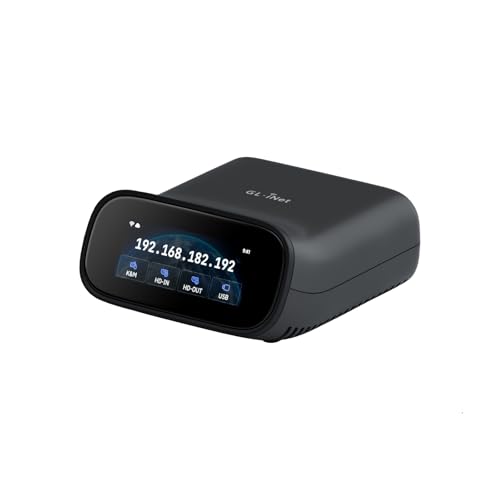
- Wi-Fi 6 and wired connectivity
- 4K@30FPS passthrough with two-way audio
- Tailscale and optional self-hosting
Best For: Wireless-friendly home labs, offices, and remote support
Best Open-Source Compact Pick

- 1080p@60FPS streaming with 30–60ms latency
- Open-source Linux and Golang firmware
- LAN, WebRTC cloud, and Wake-on-LAN access
Best For: Compact home-lab and server troubleshooting
Best 4K Power-Control Bundle
Remote KVM Over IP with 4K/60Hz
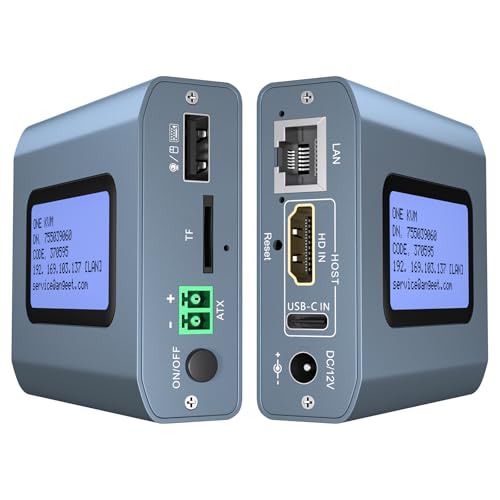
- 4K@60Hz video with under 60ms latency
- Built-in ZeroTier cross-network access
- ATX desktop power on/off control included
Best For: Remote IT management with 4K and desktop power control
Best Flexible 4K Extender
AV Access 4K HDMI USB KVM Extender

- Extends 4K HDMI, audio, and USB up to 390 feet
- Uses existing Ethernet infrastructure
- Supports up to 16 paired extender sets
Best For: Distributed workstations and AV installations
Best Rackmount Multi-Server Option

- Controls eight servers in a 1U rackmount chassis
- Supports one local and one remote user
- Can cascade to manage up to 128 servers
Best For: Server rooms and centralized IT administration
Best Secure BIOS-Level Access
Lantronix SecureLinx Spider KVM-over-IP

- Provides BIOS-level remote KVM access
- Uses hardware AES encryption
- Built for enterprise server management
Best For: Secure remote maintenance of servers and PCs
Best Overall – GL.iNet Comet GL-RM1
The GL.iNet Comet GL-RM1 is a compact powered KVM over IP switch for remote PC and server access. It supports BIOS-level control, remote reboots, operating-system installation, file transfers, and 4K video at 30Hz without requiring software on the controlled computer.
Best For: IT professionals, remote workers, and smart-home users who need reliable internet-based access to a single computer or server.
Pros:
- Provides BIOS-level access for rebooting, OS installation, and recovery.
- Supports 3840×2160 video at 30Hz with H.264 hardware encoding.
- Includes remote audio, file transfer, and one-click app setup.
- Works with laptops, desktops, servers, routers, and other compatible devices.
Cons:
- Controls one connected system rather than multiple devices.
- PD adapters cannot be used.
- Its 4K mode is limited to 30Hz.
With its small enclosure and broad compatibility, the GL-RM1 is a practical choice when BIOS access and high-resolution remote viewing matter more than multi-port switching.
Best Open-Source Platform – PiKVM V4 Plus
The PiKVM V4 Plus is a production-oriented powered KVM over IP switch built around the Raspberry Pi Compute Module 4. It offers remote server and PC management through Ethernet, Wi-Fi, or cellular connectivity, with 1080p video support at up to 60Hz.
Best For: Server administrators and technical users who want an open-source, turnkey KVM platform with several network access options.
Pros:
- Supports 1920×1080 and 1920×1200 video at 60Hz.
- Offers Ethernet, Wi-Fi, and cellular connectivity channels.
- Includes power supply, USB and Ethernet cables, and PCI brackets.
- Provides extra internal USB 3.0 storage and two additional HDMI outputs.
Cons:
- Its 1080p-class output is less suited to 4K remote viewing.
- The larger metal enclosure may be less convenient for compact installations.
- Cellular connectivity requires a suitable cellular setup.
The PiKVM V4 Plus stands out for its open-source design, included accessories, and flexible connectivity, making it a strong fit for more structured server-management deployments.
Best PoE Option – GL.iNet Comet PoE GL-RM1PE
The GL.iNet Comet PoE GL-RM1PE is a powered KVM over IP switch designed for installations where network-based power simplifies deployment. It combines PoE and USB Type-C power, 4K streaming at 30 frames per second, built-in eMMC storage, and remote BIOS reinstall capability.
Best For: Networked PC and server installations that can provide power and data through Ethernet.
Pros:
- Supports both PoE and USB Type-C power.
- Streams 4K video at 30 frames per second.
- Provides remote BIOS reinstall functionality.
- Includes 32GB built-in eMMC storage and a USB interface for ATX or Fingerbot control.
Cons:
- Requires compatible PoE networking for its most convenient installation method.
- 4K streaming is limited to 30 frames per second.
- Supplied details identify computer and server compatibility but do not indicate multi-device switching.
The RM1PE is the natural choice for a clean network cabinet or remote site installation where PoE reduces cabling and remote recovery features are important.
Best Flexible Access – JetKVM Over IP
JetKVM is a powered KVM over IP switch for controlling a computer through a browser, local network, or optional cloud dashboard. It supports 1920×1080 video at 60fps, Wake-on-LAN, adjustable stream quality, and several power options for flexible remote deployments.
Best For: Users who want browser-based remote access, optional cloud connectivity, and open-source customization.
Pros:
- Offers local browser access, optional cloud access, and Wake-on-LAN.
- Delivers 1080p at 60fps with stated latency of 30–60ms.
- Supports USB-C power, a separate 5V supply, DC extension, or ATX board extension.
- Open-source Linux software and an expansion port support customization.
Cons:
- Video output is 1080p rather than 4K.
- Cloud access is optional and depends on the JetKVM cloud setup.
- Advanced power and serial features may require additional expansion hardware.
JetKVM is a versatile pick for remote troubleshooting and recovery, particularly if you value adjustable streaming, multiple power methods, and the ability to modify the platform.
Best Wireless Flexibility – GL.iNet GL-RM10 Comet Pro
The GL.iNet GL-RM10 Comet Pro is a flexible choice among powered kvm over ip switches for users who want both wired and Wi-Fi 6 connectivity. It supports 4K video passthrough, two-way audio, browser-based access, and BIOS-level recovery tasks without interrupting the local display.
Best For: Home labs, offices, and remote support setups that benefit from wireless access, 4K passthrough, and secure networking options.
Pros:
- Dual-band Wi-Fi 6 plus wired connectivity helps reduce cabling and connectivity bottlenecks.
- 4K@30FPS passthrough, H.264 streaming, and two-way audio support clear remote interaction.
- Built-in Tailscale, optional self-hosting, and compatibility with Windows, macOS, Linux, iOS, and Android expand access options.
- Supports remote BIOS access, OS reinstallation, and optional ATX or Fingerbot power-control extensions.
Cons:
- ATX Board and Fingerbot accessories for remote power control are sold separately.
- 4K passthrough is limited to 30 frames per second.
- Its 0.6A, 5V design is intended for KVM control rather than powering the connected computer.
The Comet Pro stands out when wireless placement, audio, and broad client support matter as much as basic KVM control. Its touchscreen and self-hosted option also give advanced users more control over deployment and privacy.
Best Open-Source Compact Pick – JetKVM Over IP
The JetKVM is a compact, open-source option among powered kvm over ip switches, using HDMI for video and USB-C for keyboard, mouse, and device power. It offers browser-based LAN access, optional WebRTC cloud access, and responsive 1080p streaming for troubleshooting PCs and servers.
Best For: Home-lab users and IT teams seeking an open-source, low-latency KVM for BIOS access and remote recovery.
Pros:
- 1080p@60FPS H.264 streaming with stated latency of 30–60ms.
- Works through a local browser, optional WebRTC cloud access, and Wake-on-LAN.
- Open-source Linux and Golang firmware supports SSH customization.
- Compatible with Windows, Mac, Linux, and Raspberry Pi, with optional hardware expansion.
Cons:
- HDMI carries video only; audio transfer is not supported.
- The non-POE model is powered through host USB-C and cannot control a fully powered-off target without separately sold ATX or DC modules.
- Maximum video resolution is 1920×1080.
JetKVM is a practical choice when compact size, open-source customization, and quick browser access are priorities. Its limitations are straightforward, but users needing 4K video, audio, or built-in full power control should consider a more feature-rich model.
Best 4K Power-Control Bundle – Remote KVM Over IP with 4K/60Hz
This remote KVM over IP is a strong fit for users comparing powered kvm over ip switches with 4K support and desktop power control. It provides web and app access, ZeroTier connectivity, sub-60ms latency, and a supplied ATX connection for remotely powering compatible desktop computers on or off.
Best For: Remote IT management and desktop or server setups needing 4K viewing, cross-network access, and motherboard power control.
Pros:
- Supports 3840×2160 at 60Hz with latency below 60ms.
- ZeroTier enables peer-to-peer access across networks without port forwarding or VPN configuration.
- Web and app interfaces support Windows, macOS, Linux, and Android devices.
- Includes an ATX connection for remote power on/off on compatible desktop computers, plus useful cables and a 12V adapter.
Cons:
- Remote power control is for desktop computers and is not supported on laptops.
- ZeroTier requires an online upgrade according to the supplied product notes.
- Remote access depends on the included platform or app setup rather than a purely local connection.
With 4K/60Hz support and included desktop power-control wiring, this model offers a broad feature set for remote administration. It is especially compelling where remote reboot capability matters, provided the target system is a compatible desktop and the network setup meets your requirements.
Best Flexible 4K Extender – AV Access 4K HDMI USB KVM Extender
If you need powered kvm over ip switches for a distributed workstation, this AV Access extender uses existing Ethernet cabling to carry HDMI, audio, USB, and control signals up to 390 feet. It is a practical fit for offices, server rooms, classrooms, and AV installations that need remote access without dedicated KVM cabling.
Best For: Remote workstations, control rooms, gaming setups, and installations using Cat5e or better Ethernet cabling.
Pros:
- Supports 4K at 30Hz and 1080p at 120Hz over distances up to 120 meters.
- Provides USB keyboard, mouse, and peripheral control with three USB ports on the receiver.
- Can support up to 16 extender sets through DIP-switch pairing and works without drivers.
- Supports Windows, macOS, and Linux, with locking power connectors and ESD protection.
Cons:
- It is an extender pair rather than a multi-port server KVM switch.
- 4K operation is limited to 30Hz.
- Networked installations require suitable Gigabit switching for stable high-bandwidth transmission.
This is a strong choice when distance, flexible cabling, and high-resolution video matter more than centralized multi-server management. Its plug-and-play design also keeps deployment relatively simple.
Best Rackmount Multi-Server Option – Tripp Lite 8-Port KVM Over IP
For organizations comparing powered kvm over ip switches for server rooms, the Tripp Lite NetCommander provides access to eight systems in a compact 1U rackmount chassis. It supports one local and one remote user simultaneously and adds IPv4, IPv6, authentication, and expansion features for managed deployments.
Best For: Rack-based server management where administrators need local and secure remote access to multiple systems.
Pros:
- Controls up to eight servers and can be cascaded to manage as many as 128 servers.
- Supports simultaneous local and remote users.
- Offers browser-based remote control over a secure IP connection, with RADIUS and LDAP/S authentication support.
- Supports both IPv4 and IPv6 and can integrate compatible IP PDUs for control.
Cons:
- Its CAT5-based setup is designed for rack and server environments rather than simple desktop use.
- The supplied notes specify Java-based browser access, which may require compatibility planning.
- The listed warranty details differ between the bullets and product details, so verify coverage before purchase.
This model is the most natural fit for conventional data-center KVM duties in the group. Its 1U design, cascading capability, and enterprise authentication options make it better suited to centralized server administration than point-to-point AV extension.
Best Secure BIOS-Level Access – Lantronix SecureLinx Spider KVM-over-IP
The Lantronix SecureLinx Spider is a focused powered kvm over ip solution for secure remote server management. It provides BIOS-level keyboard, video, and mouse access, while hardware AES encryption and secure management features support business-critical deployments.
Best For: Administrators who need encrypted, remote BIOS-level access to servers or PCs.
Pros:
- Provides BIOS-level remote keyboard, video, and mouse access.
- Uses hardware AES encryption for protected communications.
- Designed as an enterprise-class device for business-critical deployments.
- Includes USB/video cabling and manufacturer warranty support.
Cons:
- The supplied details list two compatible ports, so it is not intended as a large multi-server switch.
- It is a specialized remote-management device rather than a general-purpose rack KVM with many local ports.
- The notes do not specify video resolution, remote-user capacity, or detailed network protocol support.
This is the strongest match for security-conscious remote maintenance where BIOS access is essential. Choose it for focused server control rather than environments that require extensive port density or broad switching features.
How We Picked These Powered Kvm Over Ip Switches
We focused on products that provide remote keyboard, video, and mouse control over a network, with particular attention to practical administration features. The selection includes compact devices, open-source platforms, Wi-Fi and PoE models, rackmount KVM switches, and systems with extended-distance connectivity.
We also considered support for BIOS and pre-boot access, 4K video where available, remote power or wake functions, operating-system installation, compatibility with modern IP networks, and deployment flexibility. Because these products serve different environments, the best option is not necessarily the one with the highest resolution or the most features.
Quick Comparison
| Best For | Look For | Typical Advantage |
|---|---|---|
| Home labs and individual PCs | Compact design, easy setup, secure remote access | Lower cost and simpler installation |
| Open-source customization | PiKVM or open IPKVM software | Greater control and community support |
| Remote offices | Wi-Fi, PoE, Tailscale, or ZeroTier | Flexible deployment without complex VPN setup |
| Server rooms | Rackmount chassis, multiple ports, IPv4/IPv6 | Centralized management of several systems |
| Long-distance video and USB | Cat5e or better extender support | Reliable connections across a facility |
Key Buying Factors for Powered Kvm Over Ip Switches
Video Resolution and Refresh Rate
Check the source resolution, passthrough capability, and remote viewing refresh rate separately. Some devices support 4K input or local passthrough but stream at a lower rate. For server administration, clear 1080p may be sufficient; workstation use benefits more from higher resolution and smoother motion.
True Pre-Boot and BIOS Control
Confirm that the device works before the operating system loads. BIOS access, boot-menu control, remote OS installation, and recovery support are key reasons to choose KVM over ordinary remote-desktop software.
Power Management
Some models can trigger Wake-on-LAN or connect to external remote power hardware, while others only control the computer’s display, keyboard, and mouse. If unattended recovery matters, verify the exact power-control method and whether additional equipment is required.
Network and Security Features
Ethernet is usually preferable for fixed infrastructure, while Wi-Fi, PoE, Tailscale, or ZeroTier can simplify deployment. Look for encrypted access, strong authentication, firmware updates, network segmentation, and compatibility with your IPv4 or IPv6 environment. Avoid exposing a KVM interface directly to the public internet without appropriate protection.
Port Count and Installation
A single-port device suits one workstation or server. Multi-port rackmount hardware is more efficient when administrators need access to several systems. Check connector types, USB compatibility, rack depth, cable length, and whether the installation requires a dedicated power adapter.
Who Should Buy Which Powered Kvm Over Ip Switches?
Choose a compact GL.iNet, JetKVM, or similar single-system unit for a home lab, remote workstation, or small office where simple installation and secure remote access matter most. PiKVM is a strong fit for buyers who value open-source software, customization, and hands-on control.
A Wi-Fi or PoE model makes sense when running new network cabling is inconvenient. Buyers who need remote power, webcam support, storage-based OS installation, or broader out-of-band management should prioritize those features rather than choosing solely on resolution.
For IT teams managing multiple rack servers, a Tripp Lite NetCommander or Lantronix SecureLinx-style system is generally the better match. These solutions emphasize centralized access, structured cabling, multi-user administration, and dependable server-room deployment. Finally, choose an AV Access extender when the primary challenge is transporting KVM signals over long Cat5e or better cable rather than managing many computers through a conventional rack KVM interface.