
Choosing the right screen can make presentations look sharper, easier to follow, and more professional in any meeting space. For projector screens for conference rooms, the best option depends on room size, projector throw distance, and how permanently the screen will be installed.
This roundup focuses on practical choices for boardrooms, training rooms, and hybrid workspaces, with options that balance image quality, convenience, and value.
Best 10 Projector Screens for Conference Rooms Picks for 2026
Fixed Frame Conference Pick
Silver Ticket STR Series 120" 16:9 Fixed Frame

- 120-inch fixed frame for a permanent room setup
- 1.1 gain white surface with 160-degree viewing angle
- Works with long, short, and many UST projectors
Best For: Permanent conference rooms needing a crisp wall-mounted screen
Motorized Convenience Pick

- Remote-controlled motorized screen for quick deployment
- 1.3 gain surface with 160-degree viewing angle
- Wall or ceiling mount support for office flexibility
Best For: Conference rooms that need easy remote-controlled operation
Portable Presentation Pick
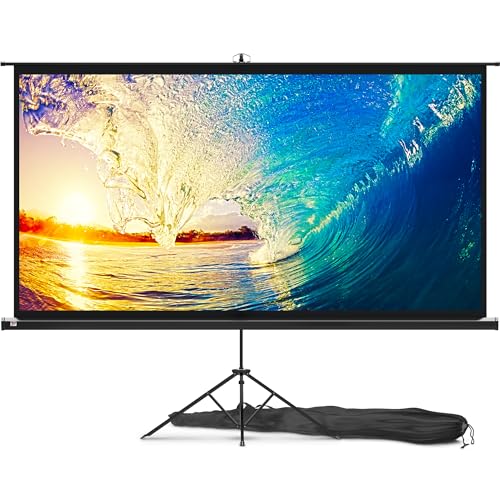
- 100-inch portable screen with carry bag
- Three-step setup and stable tripod stand
- Good for conferences, classrooms, and shared spaces
Best For: Teams that need a portable screen for multiple venues
Large Pull-Down Pick
Elite Screens 150" Manual Screen

- Large 150-inch diagonal for bigger meeting rooms
- 1.1 gain surface with 180-degree viewing angle
- Auto-lock manual design with wall or ceiling install
Best For: Large conference spaces needing a wide manual pull-down screen
Motorized Conference-Ready Pick
Aoxun 120-Inch Electric Screen
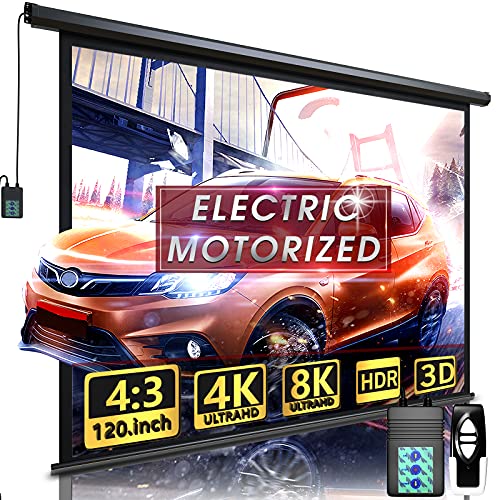
- 120-inch motorized screen with remote and wall control
- 4-layer matte PVC surface with 160° viewing angle
- Fully assembled and ready for wall or ceiling mounting
Best For: Conference rooms needing a large motorized presentation screen
Manual Office Value Pick

- Auto-lock pull-down design for simple height adjustment
- Matte white surface with black borders for sharper contrast
- Wall or ceiling mounting for indoor office use
Best For: Small rooms that need a simple, budget-friendly presentation screen
Large Motorized Presentation Pick
DINAH 120-Inch Electric Screen

- 120-inch motorized screen with remote control
- Matte finish with 160° viewing angle for presentations
- Space-saving ceiling or wall drop-down design
Best For: Professional spaces that need a large, retractable presentation screen
Wall-Mounted Utility
VIVOHOME 120-inch Manual Pull Down Screen

- 120-inch manual retractable screen
- Wall or ceiling mount installation
- Matte surface with 160° viewing angle
Best For: Conference rooms needing a mounted, retractable screen
Compact Meeting Room Pick
VIVOHOME 100-inch Manual Pull Down Screen

- 100-inch screen in 16:9 format
- Manual lock at any height
- Wall or ceiling mount design
Best For: Smaller conference rooms and widescreen presentations
Fixed Frame Conference Pick – Silver Ticket STR Series 120" 16:9 Fixed Frame
If you want projector screens for conference rooms with a clean, permanent presentation setup, this fixed-frame Silver Ticket model is built for that job. Its 120-inch 16:9 surface, 1.1 gain, and wide viewing angle make it a strong fit for meeting spaces where multiple people need a clear view from different seats.
Best For: Conference rooms that want a wall-mounted, cinema-style screen for long-throw, short-throw, or ultra short throw setups, with the note that some UST projectors may not be compatible.
Pros:
- Wall-mounted fixed frame design creates a clean, dedicated conference-room look
- 1.1 gain white surface with 160-degree viewing angle for broad visibility
- Works great with long, short, and ultra short throw projectors, with a compatibility note for some UST models
- Heavy-duty aluminum frame with black velvet trim helps create a crisp viewing image
Cons:
- No legs or stand option, so it is not portable
- Some UST projectors are not compatible with the STR frame series
- Standard white material is not acoustically transparent
For a conference room that needs a more permanent display surface, this model is focused on image quality and a polished appearance. It is especially appealing if you can mount it once and leave it in place for consistent presentations.
Motorized Convenience Pick – Kshioe 92" Motorized Screen
Among projector screens for conference rooms, a motorized option is ideal when you want a screen that disappears after meetings. This 92-inch 16:9 model offers remote-controlled operation, a 1.3 gain surface, and a design that mounts to either a wall or ceiling for flexible office use.
Best For: Offices, classrooms, and conference spaces that want easy remote-controlled screen deployment without a fixed-frame installation.
Pros:
- Wireless remote makes it easy to raise or lower the screen from anywhere in the room
- Motorized operation keeps use simple and steady with no jerking
- Dual wall and ceiling installation design adds placement flexibility
- 1.3 gain, 160-degree viewing angle, and conference-room-friendly application notes
Cons:
- Smaller 92-inch size may be limited for larger conference rooms
- Glossy finish may not suit every presentation preference
- Motorized design adds complexity compared with manual screens
This is a practical pick if your team wants a tidy presentation setup with quick screen deployment. It is more about convenience and flexibility than maximum screen size.
Portable Presentation Pick – PropVue 100" Tripod Screen
If your projector screens for conference rooms need to move between spaces, this PropVue tripod model is built around portability. The 100-inch 16:9 matte screen packs into a carry bag, sets up in three steps, and uses a stable wide-leg tripod stand for presentations on the go.
Best For: Mobile presenters, training teams, and shared spaces that need a portable screen for meetings, conferences, and occasional presentations.
Pros:
- Portable design includes a carry bag and tight straps for transport
- Three-step assembly makes setup straightforward
- Stable tripod support with wide legs improves reliability
- 160-degree viewing angle and 1.1 gain suit a range of presentation spaces
Cons:
- Tripod stand is less permanent than wall-mounted options
- Only a 100-inch screen, so it may be smaller than some fixed conference-room setups
- Manual, instruction-based operation is less convenient than motorized screens
For teams that present in different rooms or venues, this screen balances size and portability well. It is a practical choice when flexibility matters more than a fixed installation.
Large Pull-Down Pick – Elite Screens 150" Manual Screen
For bigger projector screens for conference rooms, this 150-inch manual Elite Screens model gives you a large 16:9 viewing area with a pull-down design. The 1.1 gain MaxWhite 2 surface, 180-degree viewing angle, and wall or ceiling mounting options make it a solid fit for larger meeting spaces.
Best For: Large conference rooms and training spaces that need a big manual pull-down screen with broad viewing angles.
Pros:
- Large 150-inch diagonal size works well in bigger rooms
- Manual auto-lock system allows variable height settings
- 1.1 gain, 180-degree viewing angle, and ISF-certified material support image fidelity
- Dual wall and ceiling installation design adds setup flexibility
Cons:
- Not compatible with short-throw or ultra short-throw projectors
- Manual pull-down operation is less convenient than motorized alternatives
- Larger size requires enough wall or ceiling space for installation
This is a strong option when room size calls for a larger screen and you do not need motorized operation. It is best viewed as a dedicated meeting-room display rather than a portable solution.
Motorized Conference-Ready Pick – Aoxun 120-Inch Electric Screen
For projector screens for conference rooms, this 120-inch motorized option gives you a large, clean display with the convenience of remote control and wall-mounted operation. Its 4:3 format works well for presentations, and you can stop it partway down if you need a smaller 16:9 viewing area.
Best For: Conference rooms that need a motorized screen with flexible sizing and easy remote operation.
Pros:
- Quiet <42dB motor with long-distance RF remote and wall control panel
- 4-layer PVC matte surface with 160° viewing angle and 1.2 gain
- Arrives fully assembled for plug-and-play installation
- Works for wall or ceiling mounting
Cons:
- 4:3 native format may not suit every widescreen-first setup
- Larger size and 24.3 lb weight may require more careful mounting
This is a practical pick if you want a polished, easy-to-use screen for meetings, training, or mixed-use presentation spaces. The motorized design and durable matte surface make it a strong fit where convenience matters as much as image quality.
Manual Office Value Pick – Pyle 72-Inch Pull-Down Screen
If you want projector screens for conference rooms without the cost or complexity of a motorized unit, this 72-inch manual pull-down model keeps things simple. The matte white surface and black border are aimed at clearer presentation viewing in offices, classrooms, and other indoor spaces.
Best For: Small conference rooms, offices, and classrooms that need a straightforward wall or ceiling-mounted screen.
Pros:
- Auto-lock pull-down mechanism makes height adjustment easy
- Matte white surface with black masking borders for better focus and contrast
- Flexible wall or ceiling installation
- Thick 4.0mm fabric with no odor or off-gassing on opening
Cons:
- Manual operation is less convenient than a motorized screen
- 72-inch size may be modest for larger meeting rooms
This screen makes sense when you want dependable presentation performance in a compact or budget-conscious setup. It is a solid no-frills choice for smaller rooms where easy mounting and a clean image matter more than automation.
Large Motorized Presentation Pick – DINAH 120-Inch Electric Screen
Among projector screens for conference rooms, this 120-inch electric screen stands out for its easy remote-controlled operation and space-saving drop-down design. The matte finish and 160° viewing angle make it a practical fit for presentations, training sessions, and shared viewing in professional spaces.
Best For: Professional conference rooms, classrooms, or offices that want a large motorized drop-down screen.
Pros:
- 120-inch screen size creates a large viewing area for group settings
- Remote control allows easy lower-and-retract operation
- Motorized drop-down design helps keep the room looking clean when stored
- Matte screen finish and 160° viewing angle support presentation visibility
Cons:
- Native 4:3 format may not match every modern widescreen presentation setup
- Ceiling-mount design may be less flexible than portable options
This is a good choice if you want a polished in-room solution that disappears when not in use. It balances size, convenience, and professional presentation features without adding much visual clutter.
Portable Giant Display – TOWOND 150-inch Projector Screen with Stand
If you need projector screens for conference rooms that can also double as a portable presentation setup, this TOWOND 150-inch model offers a very large image area with front and rear projection support. It is built for quick assembly, easy transport, and sharp 4K HD viewing, making it a flexible option when you need a screen that can move between rooms or events.
Best For: Teams that want a large portable screen for presentations, training sessions, and temporary conference-room setups.
Pros:
- 150-inch diagonal size gives presenters a big, easy-to-see display.
- Foldable stand assembles without tools in about 2 minutes.
- Supports both front and rear projection for flexible room layouts.
- Carry bag and 11.5 lb weight make it easier to transport.
Cons:
- Needs a room wider than 140 inches for indoor use.
- Portable design is less permanent than a wall- or ceiling-mounted screen.
For conference rooms that host occasional presentations or need a screen that can travel, this model stands out for size and portability. It is best when setup speed matters and you want a large projected image without installing hardware.
Wall-Mounted Utility – VIVOHOME 120-inch Manual Pull Down Screen
For projector screens for conference rooms that need a cleaner, more permanent installation, this VIVOHOME 120-inch pull-down screen is a practical pick. The manual retractable design locks at different heights, and the matte surface is meant to deliver bright, uniform images with reduced glare for meetings and shared viewing.
Best For: Conference rooms, classrooms, and meeting spaces that want a wall- or ceiling-mounted screen with simple operation.
Pros:
- Manual pull-down design with self-locking height control.
- 120-inch diagonal screen size is well suited to meeting-room use.
- Matte white surface and 160° viewing angle support clear visibility.
- Metal casing and 3-layer PVC fabric are built for durability.
Cons:
- Requires wall or ceiling mounting for installation.
- Screws and L-bracket are not included.
- Its 1:1 format may not suit every widescreen presentation layout.
This is a strong choice if you want a dependable conference-room screen that stays in place and rolls up when not in use. Its manual mechanism keeps the design straightforward, while the materials and finish aim for a professional presentation look.
Compact Meeting Room Pick – VIVOHOME 100-inch Manual Pull Down Screen
If your conference room is smaller or you prefer a widescreen format, this VIVOHOME 100-inch manual pull-down screen is a straightforward option. It uses a 16:9 aspect ratio and a matte white surface to support clear viewing, while the roll-up design keeps storage simple when the screen is not in use.
Best For: Smaller meeting rooms, classroom-style spaces, and presentation areas that benefit from a widescreen 16:9 layout.
Pros:
- 100-inch diagonal size with a 16:9 layout fits many presentation needs.
- Manual self-locking mechanism allows flexible height positioning.
- 160° viewing angle and matte finish help reduce glare.
- Wall or ceiling mounting makes it suitable for permanent rooms.
Cons:
- Smaller than larger conference-room screens if you need maximum visibility.
- Mounting hardware is not fully included.
- Manual operation is less convenient than motorized options.
This screen makes sense when you want a simple, space-conscious solution for presentations and shared viewing. Its widescreen format is often the easier fit for modern slides and video content, especially in rooms that do not need a very large display.
How We Picked the Best Projector Screens for Conference Rooms
We prioritized screens that suit everyday business use: consistent image brightness, clean flatness, dependable mounting, and screen sizes that work for small huddle spaces through larger conference rooms. We also considered whether each style is better for permanent installs, flexible rooms, or portable presentations.
Quick Comparison
Manual pull-down screens are usually the simplest fit for fixed conference rooms on a budget. Motorized screens add a cleaner look and easier operation in more polished spaces. Portable tripod or stand-mounted screens make sense for teams that present in different rooms or need temporary setups. Fixed-frame screens generally deliver the flattest surface and the most professional image, but they are the least flexible once installed.
Key Buying Factors for Projector Screens for Conference Rooms
Screen Size and Aspect Ratio
Match the screen to your projector and room layout. Most modern meeting content works well on a 16:9 screen, while some older business projectors or specialized rooms may still benefit from 4:3 or 1:1 formats. Choose a diagonal size that keeps text readable from the back of the room without overwhelming the wall.
Mounting Style
Fixed-frame screens are best when presentation quality matters most. Motorized screens are a strong choice for executive rooms and spaces that double as multipurpose areas. Manual retractable screens offer a lower-cost, reliable option for everyday use, and portable screens are ideal when the screen needs to move between locations.
Surface and Gain
For Projector Screens for Conference Rooms, a neutral matte white surface is often the safest choice because it provides broad viewing angles and predictable color. Slightly higher gain can help in brighter rooms, but too much can narrow viewing angles or create hotspotting.
Room Lighting and Visibility
Consider how much ambient light the room gets during meetings. If blinds are limited or overhead lights stay on, look for screens and projectors that work well in brighter conditions. The screen alone cannot fix a weak projector, but the right surface can improve perceived contrast and readability.
Who Should Buy Which Projector Screens for Conference Rooms?
If you want the cleanest, most permanent presentation setup, choose a fixed-frame screen. If convenience and a professional appearance matter most, go motorized. If budget and simplicity are top priorities, a manual pull-down screen is usually the best value. And if your team presents in multiple spaces, a portable stand-based screen will be the most flexible choice.
In short, the best screen is the one that fits your room, lighting, and meeting style. For most conference rooms, a well-sized 16:9 model with a smooth matte surface delivers the best mix of clarity, ease of use, and professional presentation quality.