
Choosing the right projector can make meetings smoother, sharper, and far less frustrating. The best wireless projectors for meeting rooms help teams share screens quickly, keep presentations readable, and reduce cable clutter.
In this roundup, we focus on models that balance brightness, image quality, wireless convenience, and business-friendly setup for real conference-room use.
Best 10 Wireless Projectors for Meeting Rooms Picks for 2026
Brightest Choice for Large Rooms
Epson Pro EX11000 Wireless Laser Projector
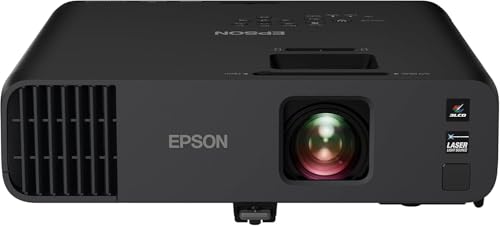
- 4,600 lumens color and white brightness
- 20,000-hour laser light source
- Miracast, 2 HDMI ports, and USB power
Best For: Large, well-lit meeting rooms and frequent presentations
All-in-One Hybrid Meeting Pick
CZUR StarryHub Conference System

- Projector, camera, mics, and speakers in one
- Short-throw 1080p display with auto framing camera
- Works with Zoom, Meet, Teams, and more
Best For: Hybrid meetings that need an all-in-one setup
Travel-Friendly Business Pick
Epson PowerLite 1781W Wireless Projector

- Weighs just 4 lb for easy transport
- 3,200 lumens color and white brightness
- High-speed LAN module for wireless connectivity
Best For: Mobile presenters and smaller meeting rooms
Short-Throw Meeting Room Pick
BenQ MW632ST 3200L WXGA Wireless

- 3,200 lumens for bright rooms
- Short-throw lens suits small spaces
- Two HDMI ports plus wireless support
Best For: Conference rooms and classrooms with limited projector distance
Portable Full HD Option
Epson PowerLite 1795F 1080p Wireless

- 1080p resolution for sharper images
- Wireless projection from mobile devices
- Weighs just 4 lb for easy transport
Best For: Mobile presenters and rooms needing Full HD portability
Bright Budget Business Choice

- 4,000 lumens for strong room brightness
- Easy setup with zoom and keystone
- Long lamp life for frequent use
Best For: Training rooms and offices needing a bright basic projector
Ultra-Bright Laser Pick
Optoma ZH551 5600-Lumen Wireless Meeting Projector
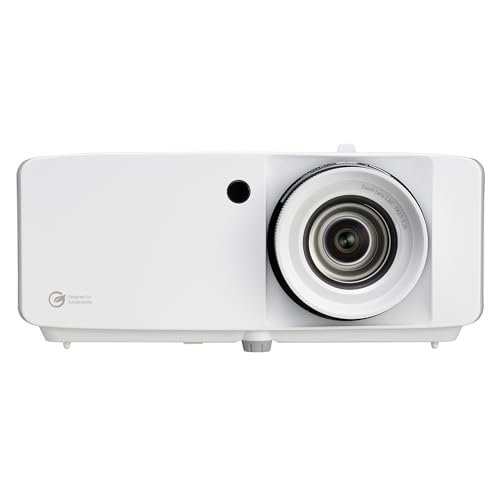
- 5,600-lumen output suits lights-on rooms.
- Miracast supports wireless screen sharing.
- 30,000-hour laser design cuts maintenance.
Best For: Bright meeting rooms that need maintenance-free wireless sharing.
Budget Brightness Pick
ViewSonic PA503HD 4000-Lumen Meeting Projector

- 4,000 ANSI lumens for business-ready brightness.
- 1080p Full HD keeps content crisp.
- Auto keystone and zoom simplify setup.
Best For: Meeting rooms that prioritize brightness and simple installation.
Wireless Presentation Pick
Epson Pro EX9270 4100-Lumen Business Projector

- Built-in Wi-Fi, AirPlay, and Miracast support.
- 4,100-lumen color and white brightness.
- 3-chip 3LCD delivers accurate color.
Best For: Teams needing wireless streaming from phones, laptops, and Macs.
Brightest Choice for Large Rooms – Epson Pro EX11000 Wireless Laser Projector
For wireless projectors for meeting rooms, the Epson Pro EX11000 is built for spaces where lights stay on and everyone needs a clear view. Its 4,600 lumens of color and white brightness, 1080p resolution, and 3-chip 3LCD engine make it a strong pick for video conferences, spreadsheets, and presentations in well-lit environments.
Best For: Larger meeting rooms, boardrooms, and teams that need a bright, dependable projector for frequent presentations and virtual meetings.
Pros:
- 4,600 lumens of color and white brightness for well-lit rooms
- Laser light source is rated for up to 20,000 hours with no bulbs to replace
- Miracast, 2 HDMI ports, USB power, and built-in Wi-Fi support flexible connectivity
- Built-in 16W speaker and support for images up to 300 inches
Cons:
- At 9.5 pounds, it is less portable than compact travel models
- Designed more for meeting-room use than quick carry-anywhere setups
This model makes the most sense when brightness and reliability matter more than ultra-compact size. If your room is large or moderately lit, it offers a practical mix of wireless sharing, strong image output, and low-maintenance laser performance.
All-in-One Hybrid Meeting Pick – CZUR StarryHub Conference System
The CZUR StarryHub stands out among wireless projectors for meeting rooms because it combines projection, video, audio, and conferencing tools in one unit. With a short-throw 1080p projector, HD camera with auto framing, six AI-driven microphones, and built-in speakers, it is designed to simplify hybrid meetings and reduce setup clutter.
Best For: Teams that want an all-in-one hybrid meeting setup with minimal cable management and built-in conferencing hardware.
Pros:
- Combines projector, 1080p camera, microphones, and speakers in one system
- Short-throw design and 30-150 inch display range suit meeting spaces
- AI sound technology helps enhance speech and reduce ambient noise
- Works with Zoom, Google Meet, Microsoft Teams, and more
Cons:
- 2200 ANSI lumens is lower than brighter business projectors
- Best fit is meetings and conferencing, not general-purpose projection needs
If your priority is fast meeting startup and fewer accessories on the table, this system is very compelling. It is especially useful when you want projection and conferencing hardware bundled together instead of piecing the setup together yourself.
Travel-Friendly Business Pick – Epson PowerLite 1781W Wireless Projector
If you need wireless projectors for meeting rooms that can also travel easily, the Epson PowerLite 1781W is a practical lightweight option. It weighs just 4 pounds, includes wireless connectivity through a high-speed LAN module, and offers WXGA resolution with 3,200 lumens of color and white brightness for business presentations.
Best For: Mobile presenters, small conference rooms, and teams that want a lightweight wireless business projector.
Pros:
- Only 4 pounds, making it easy to carry between meetings
- 3,200 lumens color and white brightness for well-lit rooms
- WXGA resolution gives more detail than SVGA for presentations
- High-speed LAN module adds wireless connectivity
Cons:
- Native resolution is WXGA rather than full 1080p
- Uses a lamp light source with a 4,000-hour life, shorter than laser models
This is a solid choice when portability matters as much as wireless sharing. It is not the brightest or most feature-packed projector here, but it delivers a sensible balance of size, business-ready resolution, and room-friendly output.
Budget Portable Option – HAPPRUN Native 1080P Smart Projector
The HAPPRUN H1 is a compact projector that can work for simple meeting-room use, especially when portability and value matter most. It offers native 1080p resolution, built-in speakers, and Bluetooth connectivity, plus support for wireless mirroring through a Chromecast when needed.
Best For: Small rooms or casual presentation setups where a portable 1080p projector is enough.
Pros:
- Native 1080p resolution for sharp basic presentations
- Bluetooth 5.1 and built-in speakers add flexible audio options
- Portable design with ceiling, desktop, and tripod installation options
- Compatible with TV sticks like Fire TV Stick and Chromecast
Cons:
- Wireless phone mirroring may require additional adapters or a Chromecast
- Better suited to casual or small-scale use than bright conference rooms
This projector makes sense if you want an affordable, flexible unit rather than a dedicated business model. It is more of a compact all-rounder than a true meeting-room specialist, but it can still handle basic presentations well in the right environment.
Short-Throw Meeting Room Pick – BenQ MW632ST 3200L WXGA Wireless
If you need wireless projectors for meeting rooms that can handle a bright office and a tight space, the BenQ MW632ST is a practical short-throw option. Its 3,200 lumens, WXGA resolution, and short-throw lens help keep presentations clear without forcing the presenter far from the screen.
Best For: Conference rooms and classrooms where short-throw placement and bright-room visibility matter.
Pros:
- 3,200 ANSI lumens help images stay visible in well-lit rooms.
- 0.9 short-throw lens design is useful when space is limited.
- WXGA 1280 x 800 resolution gives more detail than SVGA.
- Two HDMI ports and wireless support make setup more flexible.
Cons:
- WXGA is not as sharp as Full HD for text-heavy content.
- Lamp-based design means eventual lamp replacement.
Overall, this BenQ fits meeting spaces that prioritize ease of placement, solid brightness, and simple connectivity over higher-end resolution.
Portable Full HD Option – Epson PowerLite 1795F 1080p Wireless
For wireless projectors for meeting rooms where image sharpness and portability both matter, the Epson PowerLite 1795F is an easy fit. It combines 1080p resolution, 3,200 lumens, and wireless projection so presenters can move around without staying tethered to the projector.
Best For: Mobile presenters and meeting rooms that need Full HD image quality in a lightweight package.
Pros:
- 1080p resolution provides sharp widescreen presentation detail.
- 3,200 lumens of white and color brightness work well in bright rooms.
- Wireless connectivity supports projection from laptop, tablet, or smartphone.
- At 4 lb, it is easy to carry between rooms or on the road.
Cons:
- Lamp life is listed at 4,000 hours, which is shorter than some rivals.
- Portable design may be less ideal than a dedicated fixed-install unit.
In practice, this Epson is a strong choice when you want a travel-friendly projector that still delivers a sharper Full HD look for meetings.
Bright Budget Business Choice – ViewSonic PA503S 4000L SVGA
If your priority is a simple, bright model among wireless projectors for meeting rooms, the ViewSonic PA503S focuses on visibility and easy setup. Its 4,000 lumens and SVGA output are aimed at dependable business presentations, training spaces, and other shared rooms where brightness matters more than resolution.
Best For: Training rooms, offices, and event spaces that need a bright, straightforward projector.
Pros:
- 4,000 ANSI lumens help keep presentations readable in lighted rooms.
- Low 16 ms input latency and 120 Hz refresh rate support smooth motion.
- 1.1x optical zoom and vertical keystone make setup easier.
- Long lamp life and energy-efficient design are useful for frequent use.
Cons:
- SVGA 800 x 600 resolution is the least detailed of the three options here.
- Best suited to basic presentations rather than sharp text-heavy visuals.
This ViewSonic makes sense when you want a bright, easy-to-place meeting projector and can live with lower resolution.
Ultra-Bright Laser Pick – Optoma ZH551 5600-Lumen Wireless Meeting Projector
For wireless projectors for meeting rooms, the Optoma ZH551 is built for spaces where the lights stay on and presentations still need to look sharp. Its 5,600-lumen brightness, 1080p resolution, and Miracast screen sharing make it a practical fit for conference rooms, classrooms, and other shared spaces that need dependable wireless presenting.
Best For: Bright meeting rooms that need a maintenance-light laser projector with built-in wireless sharing.
Pros:
- 5,600 lumens is strong enough for lights-on meeting spaces.
- Built-in Miracast supports wireless screen sharing from Windows and Android devices.
- Laser light source is rated for up to 30,000 hours, reducing maintenance.
- IP6X dust resistance adds extra reliability in demanding environments.
Cons:
- Miracast support may require additional hardware on some devices.
- It is a room-focused projector, not a compact portable pick.
- Wireless features are centered on screen sharing rather than a broad smart platform.
The ZH551 stands out if your meeting room needs brightness first and convenience second. It combines business-friendly installation flexibility with long-life laser performance, making it a solid choice for teams that want fewer interruptions and consistent presentation quality.
Budget Brightness Pick – ViewSonic PA503HD 4000-Lumen Meeting Projector
The ViewSonic PA503HD is a straightforward option in wireless projectors for meeting rooms if you want strong image quality without extra complexity. It delivers 1080p resolution, 4,000 lumens, and easy setup features like auto keystone and optical zoom, making it a practical fit for business presentations and classroom use.
Best For: Rooms that need a bright, simple projector with easy setup for presentations.
Pros:
- 4,000 ANSI lumens provide solid brightness for business spaces.
- 1080p Full HD resolution keeps text and graphics clear.
- Auto keystone and optical zoom help speed up setup.
- Ceiling-mount support makes it suitable for permanent meeting-room installs.
Cons:
- It does not include built-in wireless screen sharing.
- Lamp life is listed at 4,000 hours, which is shorter than laser models.
- Wireless presentation features will require external devices or adapters.
If your priority is bright, clean projection and flexible installation, the PA503HD gets the basics right. It is less wireless-focused than some alternatives, but it remains a sensible choice for rooms where image clarity and setup simplicity matter most.
Wireless Presentation Pick – Epson Pro EX9270 4100-Lumen Business Projector
If you want wireless projectors for meeting rooms that can handle modern conferencing workflows, the Epson Pro EX9270 is a strong fit. It pairs 4,100 lumens of color and white brightness with built-in Wi-Fi, AirPlay, and Miracast support, so teams can stream from phones, laptops, and Mac or Windows devices with fewer cables.
Best For: Teams that want wireless streaming from multiple devices in bright meeting spaces.
Pros:
- Built-in Wi-Fi, AirPlay, and Miracast support make wireless presenting easier.
- 4,100 lumens of color and white brightness work well in lit rooms.
- 3-chip 3LCD design is built for accurate color without rainbowing issues.
- Two HDMI ports plus USB add useful wired connectivity for conferencing setups.
Cons:
- Its lamp-based design is less maintenance-light than laser models.
- Light source life is listed at 5,500 hours, which is modest versus long-life lasers.
- It is portable, but not as compact as a mini presentation projector.
The EX9270 is a well-rounded business projector for rooms that need both wireless convenience and dependable image quality. With broad device support and strong brightness, it works especially well when different presenters need to connect quickly from varied devices.
How We Picked These Wireless Projectors for Meeting Rooms
We prioritized models that make everyday meetings easier: reliable wireless screen sharing, strong enough brightness for lit rooms, and resolutions that keep text, charts, and slides legible. We also looked for practical business features such as multiple input options, keystone correction, short-throw flexibility, portability, and lower-maintenance light sources.
Quick Comparison: What Matters Most
For Wireless Projectors for Meeting Rooms, the biggest decision is usually between convenience and presentation quality. Higher brightness helps in larger or brighter rooms, while 1080p projectors are better for detail-heavy slides. Portable models are useful for shared spaces, but fixed installations often benefit from laser light sources, better lens flexibility, and more consistent performance.
Key Buying Factors for Wireless Projectors for Meeting Rooms
Brightness
Look at lumens first. Small, dim rooms can work with lower brightness, but most meeting spaces benefit from at least 3,000 lumens or more. If your room has daylight, glass walls, or overhead lighting, aim higher so content stays readable.
Resolution
WXGA can be fine for basic slides, but 1080p is the safer choice for sharper text, spreadsheets, and video. If your team shares detailed visuals often, Full HD is worth the upgrade.
Wireless Sharing
Check whether the projector supports Miracast, built-in screen casting, or app-based sharing. The best Wireless Projectors for Meeting Rooms connect quickly and support common laptops and mobile devices without a complicated setup process.
Room Fit and Placement
Short-throw designs help in smaller conference rooms and reduce shadowing. Keystone correction, zoom, and flexible mounting options also make it easier to fit the image to different room layouts.
Maintenance and Portability
Laser models often need less upkeep and can be a strong choice for frequent use. Portable projectors are better if you move between rooms, while heavier-duty units are ideal for dedicated conference spaces.
Who Should Buy Which Wireless Projectors for Meeting Rooms?
Choose a brighter 1080p projector if you present to larger teams or work in a well-lit room. Pick a portable business projector if you need flexibility between spaces or want a simple travel-ready option. If you have a small meeting room, a short-throw model can improve visibility and reduce setup hassles. For organizations that want a more integrated collaboration setup, an all-in-one conferencing system may be the best fit.
In short, the best choice depends on how often you present, how bright your room is, and how much wireless convenience you want. Prioritize the features that match your meeting environment, not just the highest spec sheet number.