
When it comes to securing your home, choosing the right smart lock can make all the difference. With access logs, you can keep track of who enters and exits your space, enhancing your peace of mind. From fingerprint recognition to mobile app controls, these innovative options offer convenience and security. Curious about which smart locks stand out in these features? Let’s explore the top choices available on the market today.
Veise VE027-K Built-in WiFi Smart Lock with Fingerprint Keyless Entry

The Veise VE027-K Built-in WiFi Smart Lock with Fingerprint Keyless Entry is perfect for tech-savvy families who value security and convenience. With its integrated Wi-Fi, you can easily open your door using various methods, from fingerprints to voice commands via Alexa or Google. You’ll love the remote management features, allowing you to monitor lock status and access logs in real-time. Plus, the 0.2s fingerprint entry guarantees quick access with 99.99% accuracy. Installation is a breeze, taking only 10-15 minutes. Built to last, this smart lock offers peace of mind with weatherproof durability and US-based support.
Best For: Tech-savvy families looking for a secure and convenient keyless entry solution.
Pros:
- Multiple access methods: Unlock using fingerprint, app, voice commands, and more for convenience.
- Real-time monitoring: Keep track of lock status and access logs remotely for enhanced security.
- Easy installation: Quick DIY setup in just 10-15 minutes without any wiring required.
Cons:
- Battery-powered: Requires 8 AA batteries, which may need frequent replacements based on usage.
- Limited compatibility: Designed specifically for standard US doors, which may not fit all door types.
- No included batteries: Additional cost for batteries, as they are not provided with the lock.
Fingerprint Smart Door Lock with Handle & Keypad
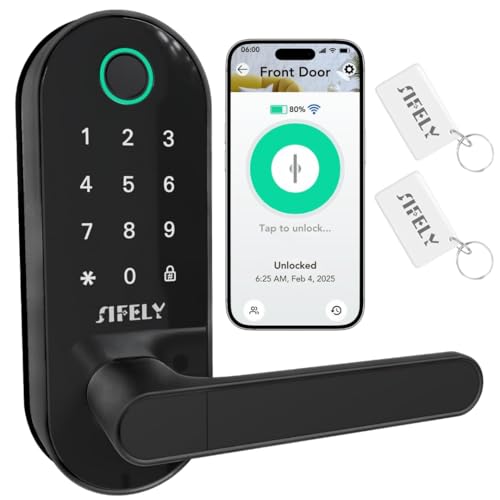
For homeowners and rental property managers seeking convenience and security, the Fingerprint Smart Door Lock with Handle & Keypad is an excellent choice. With built-in WiFi, you can access your lock remotely without needing a separate gateway. It offers multiple entry methods, including fingerprint, passcode, app, FOB, or mechanical key, ensuring quick access—just 0.3 seconds for fingerprint recognition! The heavy-duty deadbolt design provides reliable protection, while compatibility with Amazon Alexa and Google Assistant allows for hands-free control. Features like auto-lock and low-battery alerts enhance safety and ease of use, making it perfect for families, rentals, and offices.
Best For: Homeowners and rental property managers looking for a secure and convenient entry solution.
Pros:
- Quick fingerprint recognition in just 0.3 seconds for fast access.
- Built-in WiFi allows for remote access without needing a separate gateway.
- Compatible with smart home assistants like Amazon Alexa and Google Assistant for hands-free control.
Cons:
- Initial setup may be complex for some users unfamiliar with smart technology.
- Dependence on WiFi connectivity for remote features could be a drawback in power outages.
- Higher price point compared to traditional locks may not fit all budgets.
Fingerprint Smart Door Lock with Handle & Keypad

Looking for a secure and convenient locking solution for your home or rental property? The Fingerprint Smart Door Lock with Handle & Keypad is your answer. It offers keyless entry through fingerprints, a keypad, an app, a FOB, and a traditional key option. Easy to install, it fits most standard doors without extra drilling, and it works seamlessly with Alexa and Google Assistant. You’ll love its weather-resistant design, anti-peeping password, and auto-lock features. With a solid customer rating of 4.3 stars, this smart lock guarantees safety and convenience for families, kids, and Airbnb hosts alike.
Best For: Families, kids, elderly individuals, Airbnb hosts, and rental property owners seeking a secure and convenient locking solution.
Pros:
- Keyless entry options including fingerprint recognition, keypad, and app access for enhanced convenience.
- DIY installation that fits most standard doors without the need for extra drilling.
- Smart home integration with Alexa and Google Assistant for easy control and management.
Cons:
- Requires 4 AA batteries for operation, which may need to be replaced periodically.
- Limited warranty period of only one year, which may not cover long-term use.
- Weight of 3.6 pounds could be considered heavy for some users during installation.
Philips Wi-Fi Smart Lock with Handles

With its versatile unblocking methods, the Philips Wi-Fi Smart Lock with Handles is ideal for busy households that prioritize convenience and security. You can open it using fingerprints, PIN codes, keys, or the app, making access a breeze. It supports up to 50 fingerprints and offers unlimited one-time PINs for guests. With built-in Wi-Fi, you can manage your door’s status and receive notifications from anywhere. Plus, it’s voice control compatible with Alexa and Google Assistant. The auto-lock feature enhances security, ensuring your door locks when closed. Upgrade your home effortlessly with this smart, reliable lock.
Best For: Busy households looking for a convenient and secure locking solution with multiple access methods.
Pros:
- Versatile unlocking options: Offers fingerprints, PIN codes, keys, and app access for flexibility.
- Remote management: Built-in Wi-Fi allows for remote control and real-time notifications via the Philips App.
- Voice control compatibility: Works with Alexa and Google Assistant for hands-free operation.
Cons:
- Battery dependence: Requires 8 AA batteries, which need to be replaced periodically.
- Installation requirement: May need professional installation if existing door is incompatible or requires modifications.
- Wi-Fi connectivity limitations: Only supports 2.4GHz networks, potentially limiting compatibility with some home networks.
Built-in WiFi Fingerprint Smart Door Lock with Handle & Keypad

The Built-in WiFi Fingerprint Smart Door Lock with Handle & Keypad is perfect for property owners seeking seamless remote management and enhanced security. With its six access methods, including fingerprint and keypad entry, you can effortlessly control entry to your home, Airbnb, or rental property. The built-in WiFi enables real-time lock status updates and eKey sharing directly from your smartphone, eliminating the need for extra gateways. Plus, its easy DIY installation and durable design guarantee it fits standard US doors perfectly. With features like auto-lock and low-power alerts, you can enjoy peace of mind knowing your property is secure.
Best For: Property owners looking for a secure, convenient, and remote management solution for their homes, Airbnb, or rental properties.
Pros:
- Supports multiple unlocking methods, enhancing convenience and security.
- Built-in WiFi allows for remote access and real-time notifications through an app.
- Easy DIY installation with a durable design that fits standard US doors.
Cons:
- Relies on battery power, which may require periodic replacements.
- Limited warranty period of only 30 days for returns.
- Compatibility issues may arise with certain smart home systems, despite broad compatibility.
Fingerprint Door Lock Biometric Door Knob with Keyless Entry

For individuals seeking an efficient and secure way to manage access to their homes or offices, the Evanshow Fingerprint Door Lock Biometric Door Knob offers a versatile solution. This 5-in-1 smart lock supports up to 100 fingerprints and 50 passwords, allowing you to customize access for family and guests. With app control, you can easily track entry logs and even enable silent mode. Installation is a breeze—no drilling or wiring required, fitting standard wooden doors in minutes. Plus, its advanced fingerprint technology enhances security, ensuring only authorized users gain entry. Enjoy peace of mind with this sleek, matte black lock.
Best For: Individuals and businesses seeking a secure, versatile, and easy-to-install access control solution for their doors.
Pros:
- Supports multiple access methods, including fingerprints, passwords, and app control for convenience.
- Quick and simple installation without the need for professional help or drilling.
- Enhanced security features, including anti-peeping password technology and advanced fingerprint recognition.
Cons:
- Requires a USB power source for emergency power, which may not be readily available in all situations.
- Limited to standard wooden doors, which may restrict installation options for some users.
- App management may have a learning curve for users unfamiliar with smart technology.
WeHere 32-Key Smart Key Lock Box Wall Mount

Designed specifically for small businesses and property managers, the WeHere 32-Key Smart Key Lock Box Wall Mount offers a robust solution for secure key management. You can easily track access with the activity log, which shows Bluetooth and dynamic passcode access history via the app. This feature allows you to identify who generated each code, enhancing visibility. Pair it with a WiFi gateway for remote access, generating one-time codes for guests or contractors without app installation. The wall-mounted steel cabinet includes numbered hooks for organized storage, making key management efficient and secure for your office or property.
Best For: Small businesses, rental property managers, and facility management teams seeking efficient and secure key management solutions.
Pros:
- Enhanced Security: Supports multi-admin setup and permission-based access control to prevent unauthorized key handling.
- Activity Monitoring: Features an activity log that tracks Bluetooth and dynamic passcode access for improved visibility.
- Remote Access: Allows remote unlocking capabilities when paired with a WiFi gateway, enabling easy management for temporary users.
Cons:
- Requires WiFi Gateway: Remote unlocking functionality requires an additional purchase of a WiFi gateway, increasing overall costs.
- Limited Capacity for Larger Fobs: Standard model may not accommodate larger key fobs, necessitating the purchase of the Plus version.
- App Dependency: Full functionality relies on app usage, which may not be convenient for all users.
WeHere 32-Key Plus Smart Key Lock Box Wall Mount
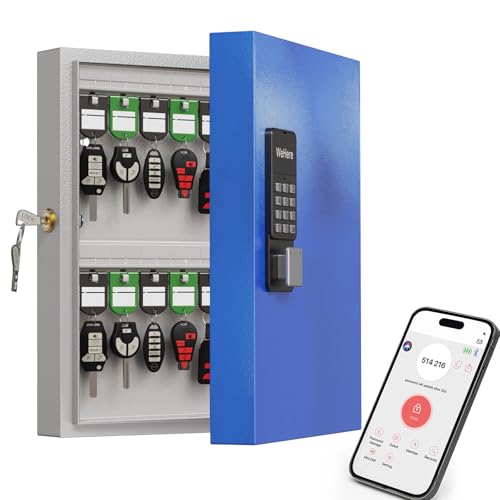
If you’re managing a rental property or overseeing office facilities, the WeHere 32-Key Plus Smart Key Lock Box Wall Mount offers an efficient solution for key management. This sturdy cabinet holds up to 32 keys and features Bluetooth and WiFi release capabilities, enhancing your control. With multi-admin setup and access log tracking, you can easily monitor who accessed which key and when. You can generate temporary codes for guests without requiring app installation, making it convenient for everyone involved. Its sleek design and secure features make it a reliable choice for your key management needs.
Best For: Rental property managers and office facility supervisors seeking a secure and efficient key management system.
Pros:
- Multi-admin setup allows for permission-based access control, minimizing unauthorized key handling.
- Remote unlock capabilities via WiFi and Bluetooth provide flexibility and convenience.
- Activity log tracking enhances accountability by monitoring who accessed which key and when.
Cons:
- WiFi gateway sold separately, which may add to initial setup costs.
- Limited capacity of 32 keys may not suffice for larger properties or facilities.
- Installation required, which may be a drawback for those seeking a plug-and-play solution.
Yamiry Keypad Smart Door Lock with Knob

The Yamiry Keypad Smart Door Lock with Knob is an ideal choice for tech-savvy homeowners seeking enhanced security and convenience. This durable lock features a solid aluminum construction that resists corrosion and external damage. Installation is a breeze, compatible with most American standard doors using just a screwdriver. You’ll appreciate the five access methods: APP, password, key fob, fingerprint, and traditional key. Plus, it offers multiple locking options like auto lock and app control. With Bluetooth connectivity, you can store up to 50 access methods. Enjoy peace of mind with a 30-day money-back guarantee and lifetime support!
Best For: Tech-savvy homeowners looking for a reliable and convenient smart locking solution.
Pros:
- Five access methods provide versatility for unlocking the door, catering to different user preferences.
- Durable aluminum construction ensures long-lasting performance and resistance to corrosion.
- Easy installation allows for quick setup on most American standard doors without professional help.
Cons:
- Wi-Fi gateway sold separately for remote control features, potentially increasing overall cost.
- Limited to 50 stored access methods, which may not be sufficient for larger households or frequent guests.
- Reliance on battery power, which requires periodic replacement to maintain functionality.
Philips WiFi Keypad Door Lock with Handle

For homeowners seeking a seamless blend of security and convenience, the Philips WiFi Keypad Door Lock with Handle stands out with its robust features. This smart lock offers built-in WiFi, allowing you to control it remotely via the Philips Home Access App. You can gain access using fast fingerprint recognition, with support for multiple users. The auto-lock function guarantees your door secures itself after a set time, while the keypad lets you create various PIN codes for different needs. Installation is easy, and with US-based customer support, you’ll have assistance whenever you need it. Enjoy peace of mind with this cutting-edge lock!
Best For: Homeowners looking for a secure, convenient, and technologically advanced door lock solution.
Pros:
- Built-in WiFi allows for easy remote control through the Philips Home Access App.
- Fast fingerprint access with support for multiple users enhances convenience and security.
- Auto-lock feature ensures the door locks automatically after a set time, providing peace of mind.
Cons:
- Requires 8 AA alkaline batteries which are not included in the package.
- Compatibility limited to doors that are 1-3/8 to 1-3/4 inches thick.
- Relies on a 2.4GHz WiFi connection, which may not be suitable for all home networks.
Factors to Consider When Choosing a Smart Lock With Access Logs
When choosing a smart lock with access logs, consider the variety of open methods available to suit your lifestyle. You’ll also want to look at features like real-time monitoring, app management, and user access control to enhance your security. Don’t forget about security alerts, which can keep you informed of any suspicious activity.
Unlock Methods Variety
Choosing a smart lock with access logs means considering the variety of opening methods it offers. You’ll want a lock that supports multiple opening options—like fingerprint recognition, passcodes, RFID cards, and smartphone app access—to suit different preferences and situations. Fast biometric fingerprint access is essential; look for models that open in under 0.3 seconds for busy households. Voice control compatibility with smart assistants like Alexa or Google Assistant can also enhance convenience. Additionally, the ability to generate one-time or time-limited PIN codes allows for secure temporary access for guests. Finally, opt for a smart lock that can store a significant number of fingerprints and passcodes, ensuring flexibility while maintaining detailed access logs for monitoring.
Real-time Monitoring Capability
While evaluating smart locks, real-time monitoring capability stands out as an essential feature. This allows you to check your lock’s status instantly and receive alerts for access attempts or unauthorized entry. With detailed access logs, you can track who accessed the lock, including timestamps and entry methods, giving you valuable oversight. This is especially useful for property managers or families, as it promotes accountability among multiple users. Additionally, some smart locks send notifications directly to your mobile device, keeping you informed of any security events as they occur. By having this real-time capability, you enhance your security and can quickly respond to any suspicious activity or potential lock malfunctions, ensuring peace of mind.
App Management Features
Real-time monitoring sets the stage for effective app management features in smart locks. These features let you control your lock remotely, allowing you to lock or open your door and view access logs from anywhere. Many smart locks enable you to create temporary or time-limited digital keys through the app, making guest access a breeze without needing physical keys. You can also manage access permissions for family members, guests, or service providers, giving you customizable control right from your smartphone. Additionally, access logs provide detailed insights into who enters or exits your home, enhancing your security oversight. Advanced app features often include low-battery alerts and notifications for unauthorized access attempts, keeping you informed about your lock’s status.
User Access Control
When selecting a smart lock with access logs, it’s essential to evaluate how well it manages user access control. Look for systems that let you create and manage different access levels for multiple users, ensuring only authorized individuals can enter your property. Many smart locks offer flexibility by allowing permanent, scheduled, one-time, and expiring digital keys, so you can tailor access as needed. Access logs that track user activity, logging every release and locking instance, enhance your security oversight. Additionally, advanced systems enable remote management, letting you add or remove users and monitor access history through an app. Some locks even store hundreds of unique passcodes and fingerprints, offering extensive customization in user access management.
Security Alerts Functionality
To enhance your security measures, consider a smart lock with robust security alerts functionality. These locks provide real-time notifications for unauthorized access attempts or unusual activities, keeping you informed. You’ll receive instant alerts via a mobile app whenever someone opens or tries to access the lock, allowing you to take immediate action if needed. Many smart locks also enable remote user management, so you can quickly revoke access or change codes when an alert is triggered. Plus, you can customize security alerts, setting specific conditions for notifications, like when a new code is created. The detailed access logs maintain a history of who accessed the lock and when, helping you identify potential security risks and usage patterns.
Installation and Compatibility
Choosing the right smart lock for your home involves careful consideration of installation and compatibility factors. First, verify the lock fits your door type, typically accommodating standard US doors between 1-3/8 to 2-1/4 inches thick. Think about the installation process; many smart locks allow for DIY setup without extra drilling or wiring. A reversible handle feature is also beneficial, as it suits both left and right-swinging doors. Don’t forget to check the dimensions and weight of the lock to confirm it aligns with your door’s design without hindering functionality. Finally, look for locks that provide clear installation instructions and necessary tools, making the setup process easier for you without needing professional help.
Battery Life Considerations
After ensuring your smart lock fits your door and is easy to install, battery life becomes a vital factor in your selection. Many smart locks operate for up to 240 days on standard alkaline batteries, so you won’t need to replace them frequently. Look for models with low-power alerts that notify you via an app when battery levels are running low, preventing unexpected lockouts. The type of batteries matters too; AA batteries may differ in longevity compared to lithium-ion options. Consider energy-efficient features like auto-locking timers to conserve battery life. Finally, regular maintenance, such as keeping battery contacts clean and free from corrosion, can help extend your smart lock’s battery performance.
Voice Control Integration
While evaluating smart locks with access logs, it’s essential to contemplate voice control integration as a significant convenience factor. Voice control lets you operate your lock hands-free, using popular platforms like Amazon Alexa and Google Assistant. You can easily lock, release, or check the lock status with simple voice commands. Many voice-controlled smart locks support multiple user profiles, allowing family members or trusted guests to manage access through their own commands. This integration not only enhances convenience but also adds a layer of security, letting you issue commands without touching the lock or app. Additionally, smart locks with voice control typically fit seamlessly into various smart home ecosystems, making them versatile options for your home automation needs.