
In today’s business world, securing access points is more critical than ever. You need reliable solutions that blend convenience with advanced security. WiFi smart locks offer a range of features like biometric access and remote management, making them ideal for modern workplaces. But with so many options available, how do you choose the right one? Let’s explore the top contenders that could transform your business’s security landscape.
Philips Wi-Fi Smart Door Lock with Keyless Entry

The Philips Wi-Fi Smart Door Lock with Keyless Entry is an ideal choice for businesses looking to enhance security and streamline access management. You’ll appreciate its flexible opening methods, including fingerprint access, custom passcodes, and voice commands via Alexa or Google Assistant. With built-in Wi-Fi, you can lock or open the door remotely and receive real-time alerts about door activity. The auto-lock feature guarantees your door secures itself automatically, while the Away Mode adds an extra layer of protection. Plus, installation is a breeze, requiring just a screwdriver for doors between 1-3/8 to 2 inches thick.
Best For: Businesses seeking enhanced security and convenient access management through a keyless entry system.
Pros:
- Flexible unlocking methods including fingerprint access, custom passcodes, and voice commands for convenience.
- Remote control capabilities allow you to lock or unlock the door from anywhere without needing a hub.
- Auto-lock feature ensures doors secure themselves automatically, enhancing safety.
Cons:
- Requires batteries (4 or 8 AA alkaline) which are not included, potentially leading to additional costs.
- No door sensor included, which may limit security monitoring capabilities.
- Installation may require DIY skills, which some users might find challenging.
Philips Wi-Fi Smart Lock with Handles

For business owners seeking a reliable and versatile security solution, the Philips Wi-Fi Smart Lock with Handles stands out as an ideal choice. This smart lock features four access methods—fingerprints, PIN codes, keys, and a mobile app—offering you keyless entry convenience. You can manage door status and receive real-time notifications through the Philips App, while voice control compatibility with Alexa and Google Assistant adds hands-free ease. Its auto-locking feature enhances security, ensuring peace of mind. Designed for standard doors, it’s a straightforward upgrade, making it a perfect fit for modern workplaces looking to boost security effortlessly.
Best For: Business owners seeking a reliable and versatile security solution for their workplaces.
Pros:
- Offers four access methods: fingerprints, PIN codes, keys, and mobile app for convenience and flexibility.
- Built-in Wi-Fi and app connectivity allow for remote management and real-time notifications.
- Auto-locking feature enhances security, ensuring the door is always locked when closed.
Cons:
- Requires 8 AA batteries, which may need regular replacement.
- Compatibility limited to standard doors (1-3/8 to 1-3/4 inches thick).
- Potential vulnerabilities in Wi-Fi connectivity could pose security risks if not properly managed.
Philips WiFi Smart Keypad Deadbolt Lock with App Remote Control

Releasing convenience and security, the Philips WiFi Smart Keypad Deadbolt Lock is an ideal choice for businesses seeking a keyless entry solution. You can access it in four ways: via voice control with Alexa or Google Assistant, physical keys, custom passcodes, or the Philips Home Access App. The lock features an auto-lock setting and alerts you if there are incorrect password attempts. With a durable, waterproof design, it withstands extreme temperatures and pressure. Powered by 8 AA batteries, it lasts up to six months with regular use. Plus, you’ll enjoy US-based customer support and a 12-month warranty.
Best For: The Philips WiFi Smart Keypad Deadbolt Lock is best for businesses and homeowners seeking a secure and convenient keyless entry solution.
Pros:
- Easy integration with Alexa and Google Assistant for voice control.
- Multiple unlocking methods, including mobile app access and custom passcodes.
- Durable, waterproof design suitable for extreme weather conditions.
Cons:
- Requires 8 AA batteries, which are not included.
- Battery life may vary depending on usage, lasting up to 6 months with regular use.
- Limited to US-based customer support hours for immediate assistance.
Yale Security Assure Lock 2 Deadbolt with Wi-Fi Keypad

Yale Security Assure Lock 2 Deadbolt with Wi-Fi Keypad stands out as an ideal choice for businesses seeking seamless security solutions. This smart lock offers key-free access through a keypad, voice assistant, and the Yale Access App on your smartphone or Apple Watch. Installing it is a breeze; you just need a screwdriver to replace the deadbolt on most standard US entry doors. With the Auto-Lock feature, you won’t have to worry about forgetting to secure the door. The app allows you to lock, grant access, and receive notifications remotely, ensuring your workplace remains safe and convenient.
Best For: Businesses seeking a seamless and secure access solution for their entry doors.
Pros:
- Key-free access options enhance convenience for users.
- Easy installation with just a screwdriver, making it accessible for non-DIYers.
- Remote management through the Yale Access App allows for flexibility in controlling access.
Cons:
- Reliance on Wi-Fi may pose security risks if the network is compromised.
- Requires batteries, which may need to be replaced periodically.
- Initial cost may be higher compared to traditional locks.
Tapo Smart Wi-Fi Deadbolt Door Lock (Tapo DL100)

The Tapo Smart Wi-Fi Deadbolt Door Lock (Tapo DL100) stands out as an ideal choice for businesses seeking enhanced security without sacrificing convenience. You’ll appreciate its keyless tactile buttons and customizable access through the Tapo App. With multiple access methods, including a backlit keypad and voice commands, you can manage up to 200 access codes easily. Its durable design features BHMA Grade 3 certification and an IP54 weatherproof rating. Plus, the auto-lock feature, real-time alerts, and smart home integration with Alexa and Google Home further elevate your security. Enjoy peace of mind knowing you’ve made a smart investment for your business.
Best For: Businesses seeking enhanced security and convenience with customizable access options.
Pros:
- Keyless unlocking options including a backlit keypad, Bluetooth, and voice commands for easy access.
- Durable design with BHMA Grade 3 certification and IP54 weatherproof rating for reliable performance.
- Smart home integration compatible with Alexa, Google Home, and Samsung SmartThings for seamless control.
Cons:
- Dependent on battery power, requiring regular battery replacements to ensure functionality.
- Limited backup access with only two physical keys, which may not suffice in all scenarios.
- Initial setup may require familiarity with the Tapo App and smart home systems for optimal use.
Schlage Encode Smart Wi-Fi Deadbolt Lock with Touchscreen Keypad

For businesses looking to enhance security without sacrificing convenience, the Schlage Encode Smart Wi-Fi Deadbolt Lock with Touchscreen Keypad is an ideal choice. This sleek, matte black lock features a fingerprint-resistant touchscreen and manages up to 100 access codes for keyless entry. With the Schlage Home app, you can control it remotely, ensuring peace of mind from anywhere. It also integrates seamlessly with Amazon Alexa and Google Assistant for voice control. Easy to install on standard doors, this lock offers an encrypted connection and customizable alerts, making it a reliable security solution for modern workplaces.
Best For: Businesses seeking a secure and convenient keyless entry solution for their premises.
Pros:
- Anywhere Access: Control the lock remotely through the Schlage Home app for added convenience.
- Voice Control Compatibility: Easily integrates with Amazon Alexa and Google Assistant for hands-free operation.
- User-Friendly Installation: Installs quickly on standard doors without the need for hardwiring.
Cons:
- Battery Dependency: Requires 4 AA batteries which may need replacement every 6 months.
- Limited Warranty on Electronics: The electronics warranty is limited to three years.
- Smart Home Compatibility May Vary: While it works with many systems, compatibility with all smart home setups is not guaranteed.
ULTRALOQ Bolt SE Smart Lock with Built-in Wi-Fi and Keyless Entry

Accessing convenience and security, the ULTRALOQ Bolt SE Smart Lock is perfect for businesses that prioritize flexibility and control. With its 7-in-1 keyless entry options, including fingerprint ID and smartphone app access, you can manage up to 50 access codes effortlessly. The remote control feature lets you lock or open your door from anywhere, while real-time notifications keep you informed. Plus, its auto-lock function adds an extra layer of security. Built to last with a weather-resistant design, the ULTRALOQ is easy to install in just 10 minutes, making it a smart choice for any modern workplace.
Best For: Businesses seeking advanced security and flexible access management for employees and guests.
Pros:
- Versatile Entry Options: Features 7-in-1 keyless entry methods including fingerprint ID and smartphone app access.
- Remote Management: Allows remote locking, unlocking, and ekey sharing, providing convenience and control from anywhere.
- Durable and Weather-Resistant: Constructed with zinc alloy materials, ensuring reliable performance in various climates.
Cons:
- Dependence on Wi-Fi: Requires stable Wi-Fi for remote access and notifications, which may not be available in all locations.
- Limited Battery Life Alerts: While it has real-time low battery alerts, users still need to monitor battery levels to avoid unexpected failures.
- Installation May Vary: Though designed for easy DIY installation, some users may encounter challenges depending on their door setup.
Philips Wi-Fi Smart Door Lock with Handle
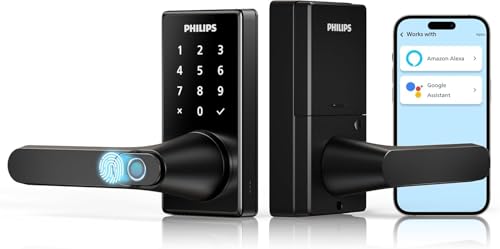
Offering a seamless blend of convenience and security, the Philips Wi-Fi Smart Door Lock with Handle is ideal for businesses seeking keyless entry solutions. You’ll appreciate the fast fingerprint access in just 0.3 seconds, allowing up to 50 fingerprints for easy entry. With integrated Wi-Fi, use the Philips HomeAccess App to manage and monitor your lock remotely. Choose from five access methods, including voice control via Alexa or Google Assistant. The adjustable auto-lock timer guarantees hands-free locking, while the anti-peeping passcode enhances security. Plus, enjoy peace of mind with a 2-year warranty and U.S.-based support for any inquiries.
Best For: Businesses looking for a secure and convenient keyless entry solution for their front doors.
Pros:
- Fast fingerprint access with unlocking in just 0.3 seconds, accommodating up to 50 fingerprints for multiple users.
- Integrated Wi-Fi functionality allows for remote management and monitoring through the Philips HomeAccess App.
- Multiple unlocking methods including voice control via Alexa/Google Assistant, enhancing convenience and accessibility.
Cons:
- Requires 8 AA LR6 alkaline batteries which are not included, leading to additional costs and maintenance.
- Limited to 2.4GHz Wi-Fi, which may not be compatible with some newer dual-band routers.
- Potential technical issues with app connectivity or fingerprint recognition, which may require troubleshooting.
Philips Built-in WiFi Smart Lock with Keyless Entry and App Compatibility

The Philips Built-in WiFi Smart Lock stands out with its keyless entry and app compatibility, making it an ideal choice for businesses that prioritize convenience and security. With five access methods, including fingerprint recognition and voice control through Alexa and Google Assistant, you can easily manage entry for employees and trusted visitors. The lock’s splash-proof design guarantees durability, while the adjustable auto-lock timer enhances security. You’ll appreciate the ability to oversee user access and receive notifications right from your smartphone. Plus, with a 24-month warranty and responsive support, you can trust Philips to keep your business secure.
Best For: Businesses looking for a convenient and secure access solution for employees and trusted visitors.
Pros:
- Versatile Access Methods: Offers five ways to unlock, including fingerprint recognition and voice control.
- Remote Management: Built-in Wi-Fi allows for easy remote control and management via smartphone.
- Durable Design: Splash-proof design ensures reliability in various environments.
Cons:
- Dependency on Power: Requires batteries, which need to be monitored for optimal functionality.
- Potential Connectivity Issues: May experience connectivity problems if Wi-Fi signal is weak.
- Setup Complexity: Initial setup might be complicated for users unfamiliar with smart technology.
Philips WiFi Keypad Door Lock with Handle

For businesses seeking a reliable security solution, the Philips WiFi Keypad Door Lock with Handle stands out with its built-in WiFi and versatile access options. You can control it remotely via the Philips Home Access App, allowing you to lock or open from anywhere. Enjoy quick entry with 0.3 seconds fingerprint access, and easily manage multiple user codes for employees or trusted visitors. The auto-lock feature gives you peace of mind, ensuring the door secures itself after a set time. Installation is straightforward, and Philips offers excellent customer support, making this lock a smart choice for your business.
Best For: Businesses looking for a secure, convenient, and remote-access door locking solution.
Pros:
- Built-in WiFi allows for direct connectivity without the need for a hub.
- Quick fingerprint access ensures fast entry, enhancing user experience.
- User-friendly installation process and robust customer support provide added convenience.
Cons:
- Requires 8 AA alkaline batteries, which are not included and need regular replacement.
- Limited to 2.4GHz WiFi, which may affect connectivity in some environments.
- May not be suitable for doors thicker than 1-3/4 inches.
Factors to Consider When Choosing a Wifi Smart Lock for Business
When choosing a WiFi smart lock for your business, it’s essential to evaluate several factors. You’ll want to assess the security features, access methods, and remote access capabilities to guarantee they meet your needs. Additionally, reflect on installation ease, compatibility with existing systems, and battery life for long-term reliability.
Security Features Importance
Choosing a WiFi smart lock for your business requires careful consideration of its security features, as they play an important role in protecting your property. Look for auto-lock capabilities and customizable locking timers that guarantee doors lock automatically, reducing the risk of unauthorized access. Biometric options like fingerprint recognition can add another layer of security, allowing only authorized personnel entry. Real-time alerts and notifications keep you informed about door activity, enabling quick responses to potential breaches. Additionally, PIN attempt limiters help thwart unauthorized access attempts by locking users out after several incorrect entries. Finally, remote management lets you lock or open doors from anywhere, offering vital security for businesses with multiple locations or employees.
Unlocking Methods Variety
A diverse range of access methods can greatly enhance your business’s security and convenience. Consider options like fingerprint recognition, PIN codes, mobile app access, and even voice commands. These methods not only provide flexibility but also allow you to store multiple fingerprints and custom access codes, making it easy to manage access for varying staff members. Keyless entry reduces the risk of lost or stolen keys, boosting overall security. Additionally, the option to integrate temporary or one-time passcodes can be invaluable for granting short-term access to guests or service personnel without compromising long-term security. By choosing a lock with versatile access methods, you guarantee a seamless and secure experience for everyone in your workplace.
Remote Access Capabilities
With various access methods in place, it’s time to contemplate how remote access capabilities can further enhance your business’s security and efficiency. Wi-Fi smart locks let you lock and release doors from anywhere using a mobile app, offering convenience in managing entry. You’ll receive real-time notifications and alerts, allowing you to monitor door activity and quickly respond to unauthorized access attempts. Managing user access remotely becomes effortless, letting you create, modify, or revoke entry codes for employees or guests without being on-site. Additionally, some locks integrate with smart home platforms, enabling voice command control for enhanced convenience. Built-in Wi-Fi simplifies setup, ensuring reliable remote control capabilities for your business needs.
Installation Ease and Compatibility
When evaluating WiFi smart locks for your business, considering installation ease and compatibility is essential to guarantee a smooth changeover. First, check if the lock fits your door’s thickness, usually between 1-3/8 inches and 2 inches. Look for models that allow for easy installation using common tools like a screwdriver, enabling a DIY setup without the need for professionals. It’s also helpful to choose locks with built-in WiFi, as these eliminate the requirement for additional hubs. Ascertain the lock can replace existing deadbolts or lever handles for a straightforward upgrade. Finally, confirm that the lock supports multiple door types and configurations, offering versatility for your unique business security needs.
Battery Life Considerations
Battery life is a crucial factor to take into account for WiFi smart locks, especially in a business setting where frequent access is common. Many models offer up to six months of usage on standard AA batteries with regular daily access. However, if you anticipate frequent remote access, this can shorten battery life. Look for locks that provide low battery alerts via a mobile app, so you’re notified before replacement is needed. The type of battery—AA alkaline or lithium—affects longevity and performance. Additionally, consider locks with built-in power-saving features or energy-efficient designs, as these can greatly extend battery life, ensuring your lock remains reliable in a busy commercial environment.
Smart Home Integration
Choosing a WiFi smart lock for your business involves more than just considering battery life; smart home integration plays an essential role in enhancing security and convenience. By connecting your smart lock to existing home automation systems, you can control and monitor access through a single platform. Many models work seamlessly with voice assistants like Alexa and Google Assistant, allowing for hands-free operation.
With smart home integration, you can manage remote access, locking or opening doors from anywhere via a mobile app. Plus, advanced locks provide real-time status updates and notifications about door activity, improving your overall security. The ability to manage user access codes and permissions further enhances flexibility, making it easier to accommodate various personnel in your business.
User Management Options
To effectively manage access within your business, it’s crucial to evaluate user management options when selecting a WiFi smart lock. Look for locks that allow you to create multiple user codes, so you can efficiently manage access for employees, guests, and service providers. Consider options with temporary or one-time access codes that automatically delete after use, enhancing security for short-term visitors. Choose locks that enable remote management via an app, allowing real-time updates and monitoring of who has access. Confirm the lock supports fingerprint recognition for quick entry, accommodating multiple fingerprints for trusted staff. Finally, evaluate the availability of audit trails or access logs to track door activity and monitor who accessed your facility at specific times.