
Choosing the right lock for a conference room is about more than convenience. You need controlled access, reliable entry methods, and a setup that fits shared office use without slowing people down.
Below, we focus on smart locks for conference rooms that balance security, simplicity, and everyday usability for modern workplaces.
Best 10 Smart Locks for Conference Rooms Picks for 2026
Best for Fingerprint Access
DESLOC D212 Fingerprint Door Knob

- Fingerprint, keypad, app, and backup key entry
- Remote access, temporary codes, and activity records
- Local biometric storage for added privacy
Best For: Small offices and conference rooms that need flexible keyless access.
Best for Quick Installation
Yamiry Keypad Smart Door Knob Lock

- Installs in about 15 minutes with a screwdriver
- Stores up to 20 codes plus one-time guest access
- Adjustable auto-lock and backlit keypad improve usability
Best For: Small conference rooms and shared offices that need simple keypad access with minimal setup.
Best for Multi-Door Rollouts

- Four-lock bundle for multiple interior doors
- Built-in Wi-Fi and app control
- Fingerprint entry with auto-lock
Best For: Offices or facilities outfitting several conference rooms or interior doors with keyless access.
Best for Easy Access Control
DESLOC B200 Fingerprint Smart Lock

- 8 unlock methods for flexible entry
- Temporary and scheduled access via app
- USB-C backup power with long battery life
Best For: Teams or offices needing simple shared access and backup entry options.
Best for Easy Retrofit
Fingerprint Smart Door Knob with App Control

- Fingerprint, app, and key access
- Multiple lock modes with auto-lock
- Rechargeable battery with app alerts
Best For: Small offices and conference rooms that need simple, keyless access control.
Best for Long Battery Life
DESLOC K120 Fingerprint WiFi Smart Lock

- Up to 16 months of battery life from a 15,000mAh rechargeable pack
- Fingerprint, keypad, app, and backup key access
- IP65 protection and BHMA Grade 3 durability
Best For: Teams or property managers who need a durable keyless lock with remote access and long battery life.
Best for Keyless Privacy
Foxgard 5-in-1 Biometric Smart Lock

- 5 unlock methods: fingerprint, code, app, IC card, and key
- Timed and one-time passcodes help manage shared access
- Auto-lock and anti-peep keypad improve privacy
Best For: Indoor conference rooms, offices, and shared spaces needing flexible keyless entry.
Best for Fast Entry
DESLOC B200L Fingerprint Smart Lock

- Grab-to-unlock handle with fingerprint sensor
- Multiple entry methods for shared access
- App-based codes, alerts, and access logs
Best For: Conference rooms and small offices needing quick, flexible keyless entry.
Best Simple Pick
DESLOC B200 Fingerprint Smart Lock
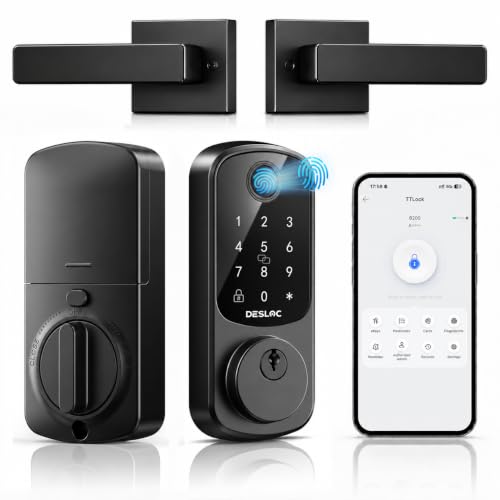
- Fast fingerprint entry for regular users
- Temporary codes for guests and visitors
- Auto-lock and long battery life for shared spaces
Best For: Shared conference rooms and offices that need quick, flexible keyless entry.
Best for Fingerprint Access – DESLOC D212 Fingerprint Door Knob
The DESLOC D212 is a practical option if you want one lock that balances app control, keypad access, and fingerprint entry. For smart locks for conference rooms, it makes the most sense in small office spaces or shared meeting rooms where you want quick access without juggling physical keys.
Best For: Small offices, private conference rooms, and shared spaces that need flexible keyless entry with remote access control.
Pros:
- Fingerprint, keypad, app, and backup key access for flexible entry options
- Remote app control with temporary passcodes and activity logs
- Local fingerprint storage adds a privacy-friendly security layer
- Easy knob-style installation suits many standard doors
Cons:
- Knob design may not fit every commercial conference room door
- Runs on AA batteries, so battery upkeep is still required
- Better suited to light-duty office use than heavy commercial traffic
Overall, the D212 is a good fit when you need simple, controlled access rather than a full enterprise lock system. For smart locks for conference rooms, it stands out more for convenience and flexibility than for high-volume commercial durability.
Best for Quick Installation – Yamiry Keypad Smart Door Knob Lock
If you need a simple keypad option for smart locks for conference rooms, this Yamiry door knob lock is a practical choice for spaces that need quick access control without a complex setup. It supports multiple user codes, temporary guest access, and an adjustable auto-lock timer, making it useful for lightly trafficked meeting rooms and shared offices.
Best For: Small conference rooms, private offices, and other spaces where you want fast keypad access with easy installation.
Pros:
- Installs in about 15 minutes with just a screwdriver
- Supports up to 20 user codes plus one-time guest codes
- Auto-lock can be set from 5 to 99 seconds or turned off
- Backlit keypad, low-battery indicator, and weather resistance add convenience
Cons:
- Knob-style design may be less secure than a full deadbolt for higher-security spaces
- Code-based access may not be ideal if you need app or audit-trail features
- Best suited to interior or light-duty access control rather than heavy commercial use
Overall, this lock stands out for teams that want a low-friction way to manage smart locks for conference rooms without spending much time on installation or maintenance. It’s not the most advanced option, but its keypad access and flexible code management make it a sensible fit for straightforward shared-room access.
Best for Multi-Door Rollouts – eufy FamiLock C32 4-Pack
If you need smart locks for conference rooms across several interior doors, the eufy Security Smart Lock FamiLock C32 4-Pack is built for consistency and convenience. It combines fingerprint entry, app control, built-in Wi-Fi, and auto-lock in one package, making it easier to manage shared spaces without handing out physical keys.
Best For: Offices or facilities that want a 4-pack of keyless interior-door locks with app-based access and fingerprint entry.
Pros:
- Four-lock bundle is useful for outfitting multiple conference rooms or interior doors at once
- Built-in Wi-Fi and app control reduce the need for extra hubs or bridge devices
- Fingerprint access adds fast, keyless entry for approved staff
- Auto-lock helps keep shared rooms secured after meetings
Cons:
- Rekeying is not supported, so it is less flexible for traditional key changes
- Designed for interior doors, not a full commercial exterior-door security setup
- Battery-powered operation means ongoing battery maintenance
For smart locks for conference rooms, this bundle makes sense when you want a simple, standardized setup across multiple doors with fewer access headaches. It is a practical fit if your priority is convenient employee access, centralized control, and quick installation on interior spaces.
Best for Fast Biometric Access – Fingerprint Door Lock with Keypad
If you want a simple keyless upgrade for shared spaces, this fingerprint door knob is a practical option to consider for smart locks for conference rooms. It combines biometric entry, keypad access, IC cards, and backup keys, making it flexible for teams, offices, and guest areas where quick entry matters.
Best For: Offices, bedrooms, apartments, and small meeting areas that need fast, flexible access control without hardwiring.
Pros:
- 4-in-1 access options: fingerprint, password, IC card, and mechanical keys
- Stores up to 100 fingerprints and 50 passwords for multiple users
- Quick fingerprint recognition helps reduce wait time at busy doors
- Easy DIY installation with no drilling or wiring required
Cons:
- Not a full smart-home lock with app or Wi-Fi control
- Requires an administrator fingerprint setup before normal use
- Best suited to wooden doors within the listed thickness range
For smart locks for conference rooms, the main appeal here is speed and simplicity: it gives you multiple access methods without adding a complex install. If you need basic shared-entry control and want a budget-friendly biometric knob, this is a solid fit.
Best for Easy Access Control – DESLOC B200 Fingerprint Smart Lock
The DESLOC B200 is a practical option for buyers comparing smart locks for conference rooms when they want quick entry methods, simple access sharing, and backup options that reduce lockouts. Its fingerprint reader, PIN codes, app control, and temporary access features make it a flexible fit for spaces that need controlled, repeatable access.
Best For: Teams or offices that want a straightforward smart deadbolt with multiple unlock methods and app-based access management.
Pros:
- 8 unlock methods, including fingerprint, PIN, app control, and physical key
- Fast fingerprint recognition with support for up to 50 fingerprints
- App-based scheduling and temporary codes are useful for shared spaces
- USB-C emergency power and up to 12-month battery life add convenience
Cons:
- Alexa and Google Assistant voice control require a separate G2 Gateway
- Designed as a deadbolt, so it may not suit every conference-room door setup
- Bluetooth app management works best within close range unless gateway accessories are added
For smart locks for conference rooms, the B200 stands out for access flexibility rather than enterprise-grade networking. It is a solid choice if you want easy credential sharing, reliable backup entry, and a low-friction setup for smaller offices or meeting rooms.
Best for Easy Retrofit – Fingerprint Smart Door Knob with App Control
If you need a simple, keyless option that can work for private offices, shared rooms, or light-use smart locks for conference rooms, this fingerprint door knob is a practical retrofit pick. It blends biometric entry, app-based access management, and backup key access without requiring a full commercial lock upgrade.
Best For: Small offices, apartments, Airbnb spaces, and conference rooms that need convenient access control with easy installation.
Pros:
- Fingerprint, app, and mechanical key entry in one lock
- Multiple modes including passage, normal auto-lock, privacy, and silent
- Easy DIY installation with a screwdriver
- Rechargeable battery with low-battery alerts in the app
Cons:
- App control works only within Bluetooth range unless you add a separate gateway
- Not suitable for doors with weather strips installed
- Door-knob form factor may be less ideal than a lever-style commercial lock
Overall, this is a flexible choice if you want smart locks for conference rooms that are affordable, easy to install, and simple to manage day to day. It is not a heavy-duty commercial solution, but it delivers the convenience most small teams need.
Best for Long Battery Life – DESLOC K120 Fingerprint WiFi Smart Lock
If you want smart locks for conference rooms that reduce maintenance and support shared access, the DESLOC K120 is a practical fit. Its WiFi app control, touchscreen keypad, and fingerprint entry make it easy to manage staff, guests, or temporary access without handing out physical keys.
Best For: Teams or property managers who need a durable keyless lock with remote access, fingerprint entry, and long battery life.
Pros:
- Long 15,000mAh battery is rated for up to 16 months between charges
- WiFi app support enables remote access, logs, and temporary codes
- Fingerprint, keypad, and backup key options add flexible entry methods
- IP65 rating and BHMA Grade 3 help it handle frequent use and harsh conditions
Cons:
- Designed for a front door deadbolt format, so fit depends on your door hardware
- Conference-room use may not need all of its outdoor durability features
- WiFi features may be more than some simple internal offices need
For smart locks for conference rooms, the K120 stands out when you want a low-maintenance option with multiple ways to unlock and simple remote control. It is especially appealing for shared spaces where access changes often and reliability matters.
Best for Keyless Privacy – Foxgard 5-in-1 Biometric Smart Lock
If you need a practical, easy-to-install option among smart locks for conference rooms, the Foxgard Fingerprint Door Lock is built around flexible access control. It supports fingerprint entry, keypad codes, app management, IC cards, and a physical key, so you can balance convenience with backup access for staff or authorized guests.
Best For: Indoor office spaces, private meeting rooms, and shared rooms that need keyless entry plus simple user management.
Pros:
- Five unlock methods make it easy to share access with different users.
- One-time and timed passcodes are useful for temporary room access.
- Auto-lock and anti-peep keypad features add extra privacy.
- Simple screwdriver installation suits quick office upgrades.
Cons:
- Remote access requires the separate Foxgard Gateway.
- Best suited to indoor doors rather than exterior entry points.
- Batteries are not included.
For teams comparing smart locks for conference rooms, this Foxgard model stands out for its mix of temporary code sharing, biometric entry, and privacy-focused locking. It’s a strong fit when you want straightforward access control without hardwiring or complex setup.
Best for Fast Entry – DESLOC B200L Fingerprint Smart Lock
The DESLOC B200L is a practical pick for smart locks for conference rooms when you want quick, keyless access without a steep learning curve. Its grab-to-unlock design, multiple entry methods, and app-based controls make it easy to manage frequent in-and-out use for shared doors.
Best For: Conference rooms, small offices, and shared spaces that need fast access plus flexible user management.
Pros:
- Fingerprint unlock built into the handle for very fast, one-motion entry
- Multiple access options: fingerprint, PIN, app, key fob, and physical key
- App control supports temporary or scheduled codes and access logs
- Long battery life and emergency power port help reduce downtime
Cons:
- Bluetooth-only remote control unless you add the separate gateway
- Designed more for homes and small offices than heavy-duty commercial use
- Conference-room features depend on app setup and user management
For teams comparing smart locks for conference rooms, the B200L stands out for speed and convenience more than enterprise-grade access control. It’s a strong fit if you want simple shared access, easy installation, and enough flexibility for everyday meeting-room use.
Best Simple Pick – DESLOC B200 Fingerprint Smart Lock
If you want smart locks for conference rooms that prioritize fast entry and easy user management, the DESLOC B200 is a practical fit. It combines fingerprint unlock, keypad access, app control, and temporary codes, which makes it useful for shared spaces where different people may need access at different times.
Best For: Small conference rooms, private offices, or shared meeting spaces that need flexible keyless entry with quick access options.
Pros:
- Fingerprint unlocking is fast and convenient for frequent users.
- Temporary access codes work well for guests, contractors, or visiting teams.
- Auto-lock and privacy features help keep a meeting space secure.
- Long battery life reduces maintenance in busy office settings.
Cons:
- Remote control requires a separate gateway purchase.
- Bluetooth app control is limited when you are away from the door.
- Installation is straightforward, but door fit and backset measurements still matter.
For teams comparing smart locks for conference rooms, the B200 stands out for its mix of quick biometric access and flexible code sharing. It is a solid choice when you want convenience for regular users without giving up basic security and control.
How We Picked the Best Smart Locks for Conference Rooms
For Smart Locks for Conference Rooms, we prioritized easy access for multiple users, dependable locking performance, straightforward installation, and features that make sense in a business setting. We also looked for options with keypad entry, app control, fingerprint access, auto-lock, and battery life that supports busy daily use.
Quick Comparison
If you want the simplest shared access, keypad and fingerprint models are usually the best fit. If your team needs remote management or frequent credential updates, app-connected locks are more practical. For rooms with higher traffic, look for models that combine multiple unlock methods and auto-lock to reduce the chance of an unsecured door.
Key Buying Factors for Smart Locks for Conference Rooms
Access Methods
A conference room lock should support at least one backup method in addition to the primary unlock option. Fingerprint, keypad, app access, and physical keys can each serve different teams and visitor scenarios.
Ease of Administration
Shared spaces need easy credential management. The best smart locks let you add or remove users quickly, set temporary codes when needed, and avoid complicated admin steps.
Installation and Door Compatibility
Check whether the lock works with your door type, thickness, and existing hardware. Some office doors benefit from deadbolts, while others are better suited to knob or lever designs depending on traffic and privacy needs.
Power and Reliability
Battery life matters in business environments because a dead lock can disrupt meetings. Auto-lock, low-battery alerts, and dependable offline access help reduce interruptions.
Security and Privacy
Look for strong credential control, encryption where available, and a design that prevents casual tampering. Conference rooms often store sensitive discussions, so security should not be an afterthought.
Who Should Buy Which Smart Locks for Conference Rooms?
Choose a keypad or fingerprint lock if you want fast entry with minimal training. Pick an app-enabled model if an office manager needs to update access from a phone or track usage more easily. Choose a deadbolt-style lock if your conference room needs a more secure, formal solution. For larger offices or shared spaces with frequent turnover, multi-pack or multi-user-friendly models can save time and simplify rollout.
In short, the best Smart Locks for Conference Rooms are the ones that match your office workflow, not just the latest feature list. Focus on access control, reliability, and ease of use, and you’ll end up with a lock that supports meetings instead of interrupting them.