
Choosing smart locks for staff entrances is about more than convenience. You need reliable access control, easy credential management, and the right mix of security features for employees, contractors, and rotating teams.
Below, we focus on practical options that balance keypad entry, fingerprint access, remote control, and simple installation so you can match the lock to your workflow and budget.
Best 10 Smart Locks for Staff Entrances Picks for 2026
Best for Apple Home Teams
ULTRALOQ Bolt Fingerprint Smart Lock
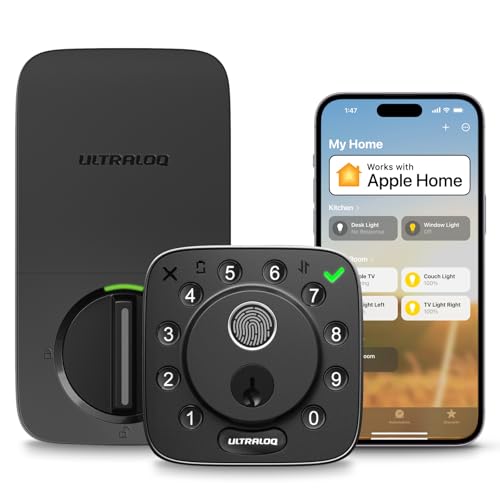
- Apple Home support with Siri, Alexa, Google, and SmartThings
- Built-in Wi‑Fi for remote access, logs, and alerts
- Fingerprint, codes, app access, auto-unlock, and keys
Best For: Small offices and shared entrances that need Apple Home support and remote access control.
Best for Easy Setup

- 20 access codes plus one-time guest PIN
- Auto-lock and one-touch locking for added security
- Simple screwdriver installation and long battery life
Best For: Small offices and staff entrances that need keypad access without app-based complexity.
Best for All-in-One Entry Control
WiFi TUYA Access Control Kit with RFID

- Complete access-control kit with lock, keypad, switch, and remote
- Supports app, PIN, RFID card, password, and remote entry
- 600-lb magnetic lock and IP68 keypad fit staff doors
Best For: Teams needing a full-featured access control kit for a staff entrance.
Best for Remote Access
ULTRALOQ U-Bolt Pro WiFi Smart Lock
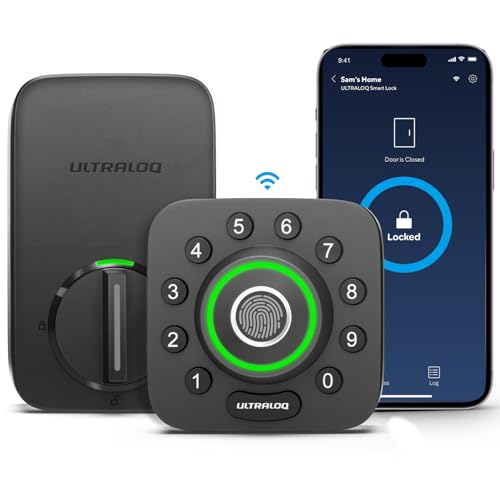
- Built-in Wi-Fi for remote control and access sharing
- Multiple unlock methods including fingerprint, passcode, app, and voice
- Door sensor, auto-lock, and alerts improve entry oversight
Best For: Offices, rentals, and small businesses that need flexible, app-managed staff entry.
Best for Keyless Staff Access
Fingerprint Smart Door Lock with Handle

- Fingerprint, keypad, app, FOB, and key entry
- Guest codes and access logs for easy oversight
- DIY install with optional remote access
Best For: Small businesses, rentals, and shared entrances that need flexible keyless access.
Best for Multi-User Control
Veise VE017 Fingerprint Smart Door Lock

- Remote app control for adding, pausing, or deleting users
- 8-in-1 access with fingerprint, code, fob card, app, and key
- Activity logs plus local encrypted storage for better oversight
Best For: Staff doors, rentals, and shared spaces that need simple permission management.
Best for Smart Access Control
ULTRALOQ Bolt Fingerprint WiFi Smart Lock

- Fingerprint, keypad, app, and web access in one lock
- Remote status checks, access logs, and door-open alerts
- Works with Apple Home, Alexa, Google Home, and SmartThings
Best For: Small businesses, offices, rentals, and staff entrances with changing access needs.
Best for Shared Access
TEEHO TE019 Keypad Lock with Handle

- App-managed passcodes with one-time and duration sharing
- Auto-lock, one-touch lock, and passage mode
- Backup keys plus break-in alerts for added security
Best For: Shared doors, rentals, and staff entrances that need flexible code-based access.
Best for Keyless Office Access
ULTRALOQ U-Bolt Pro WiFi Smart Lock
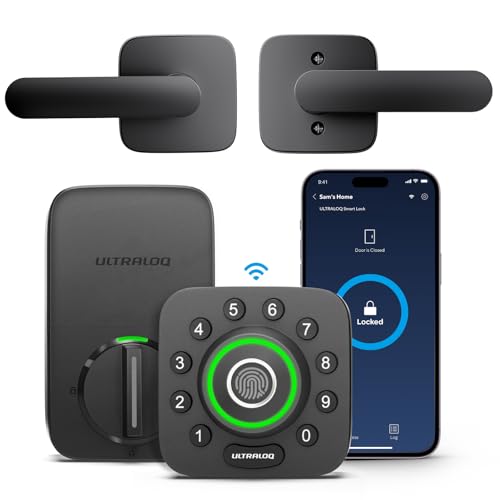
- Built-in WiFi with remote control and entry logs
- Fingerprint, keypad, app, and voice unlock options
- ANSI Grade 1 build suits busy staff doors
Best For: Small offices and staff entrances that need flexible, app-managed access.
Best for Apple Home Teams – ULTRALOQ Bolt Fingerprint Smart Lock
If you need smart locks for staff entrances that balance remote control, audit trails, and flexible entry methods, the ULTRALOQ Bolt is a strong fit. It supports fingerprint, passcode, app, voice, auto-unlock, and physical keys, while the built-in Wi‑Fi and door sensor make it easier to manage who comes and goes.
Best For: Small offices, rentals, and shared entrances that want Apple Home support plus easy remote access management.
Pros:
- Fully supports Apple Home, plus Alexa, Google, and SmartThings integration
- Built-in Wi‑Fi with remote lock/unlock, access sharing, and entry logs
- Multiple access options: fingerprint, codes, app, auto-unlock, and keys
- Door sensor and left-open alerts add helpful status monitoring
Cons:
- 2.4 GHz Wi‑Fi only, so network placement matters
- Advanced smart features may be more than a basic office door needs
For teams comparing smart locks for staff entrances, this model stands out for its mix of Apple Home compatibility, remote admin tools, and flexible entry methods. It makes the most sense when you want both convenience and visibility at a shared door.
Best for Easy Setup – TEEHO Keypad Deadbolt
For teams that need a straightforward upgrade, the TEEHO TE001 is a practical option among smart locks for staff entrances. It adds keypad access, temporary codes, and auto-locking without requiring a complex install or app-based system.
Best For: Small offices, back doors, or staff-only entrances that need simple code access and quick installation.
Pros:
- Supports up to 20 access codes plus a one-time guest PIN.
- Auto-lock and one-touch locking help keep entry points secured.
- Easy screwdriver-only installation makes setup fast.
- Long battery life with low-battery alerts reduces maintenance.
Cons:
- Not a connected smart lock, so there’s no app or remote management.
- Only fits 2-1/8" door holes, which limits compatibility.
This is a solid fit when you want a simple keypad deadbolt rather than a full access-control system. For smaller operations evaluating smart locks for staff entrances, it covers the basics well: controlled entry, temporary codes, and easy daily use.
Best for All-in-One Entry Control – WiFi TUYA Access Control Kit with RFID
This all-in-one kit is a practical choice for smart locks for staff entrances when you want keypad, card, app, and remote access in one package. It bundles the core hardware for a controlled entry point, with a simple 6-terminal wiring setup that should help reduce install complexity for small offices, back rooms, and service doors.
Best For: Teams that need a complete, budget-conscious access control setup for a staff door, especially where multiple unlock methods and basic remote management matter.
Pros:
- Complete kit includes the keypad host, magnetic lock, brackets, switch, doorbell, and remote
- Multiple entry methods: app, temporary password, RFID card, password, and remote unlock
- IP68 waterproof keypad and 1000-user capacity suit busy indoor/outdoor staff access points
- 600-lb magnetic lock adds strong holding force for controlled doors
Cons:
- Wiring and setup may still be more involved than a standalone smart lock
- Best suited to compatible door types and may need bracket planning for certain installs
- AAA batteries for the doorbell are not included
For smart locks for staff entrances, this kit stands out because it combines access control hardware and flexible entry options in one box rather than forcing you to piece together separate parts. It makes the most sense where you need dependable, shared access control more than a sleek consumer-style lock.
Best for Easy Access Control – Bluetooth Fingerprint Smart Lock with Handle
If you need smart locks for staff entrances, this Bluetooth fingerprint smart lock is a practical option for doors that need flexible, controlled entry without constant key management. It combines fingerprint, keypad, FOB, app, code, and physical key access, making it easy to assign different entry methods to employees, cleaners, or temporary staff.
Best For: Small businesses, rentals, and shared entrances that need simple keyless access with quick setup.
Pros:
- Six unlock methods make it easy to manage access for different users
- DIY install fits most standard US doors with no drilling required
- Auto-lock and app controls help reduce lockout and security issues
- Time-limited and one-time codes are useful for staff or guest access
Cons:
- Bluetooth features may require a gateway for Alexa and Google voice control
- Best suited to standard US door sizes, so compatibility should be checked first
For smart locks for staff entrances, this model stands out because it balances convenience and access control without a complex install. It’s a strong fit when you want to manage who gets in, limit access by time or code, and keep the door secure with auto-locking.
Best for Remote Access – ULTRALOQ U-Bolt Pro WiFi Smart Lock
If you need smart locks for staff entrances, the ULTRALOQ U-Bolt Pro WiFi is a strong fit thanks to built-in Wi-Fi, remote access, and multiple ways to unlock. It lets you manage entries from the app, monitor door status with the sensor, and share eKeys or passcodes without adding a separate hub.
Best For: Offices, short-term rentals, and small businesses that want app-based control and flexible entry options for staff.
Pros:
- Built-in Wi-Fi enables remote locking, unlocking, and access sharing from the app.
- 8-in-1 entry options include fingerprint ID, passcodes, app control, voice assistants, and keys.
- Door sensor, auto-lock, and open-door alerts add useful oversight for staff entrances.
- ANSI Grade 1 construction and IP65 weather resistance support heavy daily use.
Cons:
- 2.4GHz Wi-Fi only, so it won’t work on 5GHz networks.
- Not recommended for metal doors.
- Advanced features may be more than casual home users need.
For teams that need flexible access control without a full commercial system, this lock covers the essentials well. It stands out among smart locks for staff entrances because it combines remote management, biometric entry, and door-status monitoring in one unit.
Best for Keyless Staff Access – Fingerprint Smart Door Lock with Handle
This fingerprint smart lock is a practical fit for smart locks for staff entrances when you need quick, trackable entry without handing out physical keys. It supports fingerprint, keypad, app, FOB, and key access, plus remote management with the optional Wi‑Fi gateway for more flexible oversight.
Best For: Small businesses, rentals, and shared spaces that need convenient keyless access for multiple users and simple code management.
Pros:
- Multiple entry methods make it easy to assign access to staff, guests, or family members.
- Guest codes and access logs help managers monitor entry activity remotely.
- DIY-friendly installation works on most standard doors with no extra drilling.
- Alexa and Google Assistant compatibility adds hands-free convenience with the gateway.
Cons:
- Remote access and voice control require the optional Wi‑Fi gateway.
- Handle-style design may not suit every commercial door setup.
For teams that need an affordable, flexible entry upgrade, this lock covers the essentials well. It is especially useful for smart locks for staff entrances where simple setup, quick user changes, and access tracking matter more than heavy-duty commercial hardware.
Best for Multi-User Control – Veise VE017 Fingerprint Smart Door Lock
If you need smart locks for staff entrances, the Veise VE017 is built around user management, remote access control, and detailed entry logs. It combines multiple unlock methods with app-based permission changes, making it a practical fit for doors that need flexible day-to-day access without handing out physical keys to everyone.
Best For: Small businesses, shared offices, rentals, or back entrances that need easy user management and activity tracking.
Pros:
- App-based user management makes it easy to add, pause, or remove staff access remotely.
- Multiple entry options include fingerprint, code, app, fob card, voice, and mechanical key.
- Activity logs and local encryption add useful visibility and privacy for busy entrances.
- Auto-lock and emergency power support help keep access secure and reliable.
Cons:
- Alexa/Google voice access requires a separate G1 gateway.
- Heavier feature set may be more than basic single-user door setups need.
For smart locks for staff entrances, the VE017 stands out most for access control rather than just convenience. If your priority is managing multiple users, tracking door activity, and changing permissions fast, it offers a strong balance of security and flexibility.
Best for Smart Access Control – ULTRALOQ Bolt Fingerprint WiFi Smart Lock
For teams that need practical, app-based access control, this ULTRALOQ model is a strong fit among smart locks for staff entrances. It combines fingerprint entry, passcodes, app and web access, plus remote status monitoring, so managers can track who came and went without handing out physical keys.
Best For: Small businesses, offices, rentals, and staff entrances that need flexible access sharing and remote lock management.
Pros:
- Supports fingerprint, keypad, app, web, voice, and mechanical key access.
- Remote unlock, access logs, door-left-open alerts, and live door status monitoring.
- Works with Apple Home, Alexa, Google Home, SmartThings, and IFTTT.
- Auto-lock and geofence auto-unlock add convenience for busy entry points.
Cons:
- Requires 2.4GHz Wi-Fi and works best with a stable nearby router.
- Some smart home features depend on app and firmware updates.
- May be more connected than some teams need for simple key replacement.
Overall, this lock stands out when you want smart locks for staff entrances that balance convenience, remote oversight, and broad ecosystem support. It’s especially useful where access needs to change often and you want fewer keys in circulation.
Best for Shared Access – TEEHO TE019 Keypad Lock with Handle
TEEHO’s TE019 is a practical pick for smart locks for staff entrances when you need flexible sharing, quick code changes, and simple everyday access control. It combines app-managed passcodes, auto-locking, and a passage mode that can keep traffic moving during busy hours.
Best For: Shared doors, rental units, and staff-only entrances where managers need to issue one-time or recurring codes without handing out extra keys.
Pros:
- App control supports up to 100 passcodes, plus one-time and duration-based sharing
- Auto-lock, one-touch locking, and passage mode make daily access easier to manage
- Backup mechanical keys and break-in alerts add useful fallback security
- Durable, weather-resistant build with keypad backlight and low-battery alerts
Cons:
- Full remote control needs the separate TEEHO G1 Gateway
- Bluetooth-based sharing is limited by proximity unless you add the gateway
- Battery-powered design means occasional battery replacements
For teams that want straightforward code-based access rather than a complex access-control system, this lock fits the job well. It’s a strong middle-ground option for smart locks for staff entrances where shared access, temporary codes, and reliable auto-locking matter most.
Best for Keyless Office Access – ULTRALOQ U-Bolt Pro WiFi Smart Lock
If you need smart locks for staff entrances, the ULTRALOQ U-Bolt Pro WiFi is a strong fit thanks to its fingerprint access, remote eKey sharing, and built-in WiFi with no extra hub required. It’s designed for quick day-to-day access control while still giving you activity logs, auto-lock, and app-based management from anywhere.
Best For: Small offices, Airbnb-style properties, and staff doors that need flexible access control without a full access system.
Pros:
- Built-in WiFi lets managers lock, unlock, and review entry logs remotely
- Fingerprint, keypad, app, and voice control offer multiple entry options
- ANSI Grade 1 and IP65 rating add durability for busy, high-use entrances
- Auto-lock and auto-unlock help streamline routine staff entry
Cons:
- 2.4GHz WiFi only, so network compatibility may be a limitation
- Advanced smart features may be more than some simple doors need
For teams that want convenience, auditability, and stronger hardware in one package, this lock lands in a very practical middle ground. It’s especially appealing among smart locks for staff entrances where easy sharing and remote oversight matter more than elaborate enterprise features.
How We Picked These Smart Locks for Staff Entrances
We prioritized locks that are appropriate for busy entry points where multiple people may need access at different times. That means looking at authentication methods, app and remote management, auto-lock behavior, emergency access, and compatibility with common door types.
We also favored models that offer a straightforward setup, since staff entrances often need upgrades without major downtime or complicated wiring.
Quick Comparison
For simple password-based access, keypad deadbolts are the easiest fit. For faster identity verification, fingerprint models reduce credential sharing and can speed up entry. If you need to manage access remotely, choose a Wi-Fi or app-connected model. For higher-control environments, options with one-time codes, passage mode, or integrated access hardware are more suitable.
Key Buying Factors for Smart Locks for Staff Entrances
Access Method Mix
Look for a lock that supports the way your staff actually enters. Keypads are ideal for shared access, fingerprint readers are useful for frequent users, and app control helps admins update permissions without being on site.
Administration and Remote Control
If schedules change often, prioritize Smart Locks for Staff Entrances with temporary codes, remote unlock, audit-friendly app controls, and the ability to revoke access quickly. These features matter more than premium styling in a business setting.
Installation and Door Compatibility
Check door thickness, backset, handing, and whether the lock is designed for a deadbolt or a handle set. A lock that fits standard US doors will save time, but some facilities may need a more specialized access kit.
Reliability and Backup Access
Choose models with low-battery alerts, backup power options, or physical key override where appropriate. For staff entrances, dependable fallback access is essential in case of outage or sensor issues.
Security and Usage Policies
Features like auto-lock, passage mode, and door sensors can improve everyday use, but they should match your security policy. For example, a high-traffic internal staff door may benefit from passage mode, while an exterior entrance should usually auto-lock every time.
Who Should Buy Which Smart Locks for Staff Entrances?
If you want a simple, low-maintenance upgrade, a keypad deadbolt is often the best choice. If you need faster access for recurring users, go with fingerprint support. If multiple staff, vendors, or managers need changing permissions, choose a Wi-Fi or app-connected lock with code management. And if your entrance functions more like a controlled access point than a typical door, consider a more complete electronic access system instead of a consumer-style deadbolt.
In short, the best Smart Locks for Staff Entrances are the ones that fit your traffic level, admin needs, and security requirements without creating extra work for your team.