
An external GPU setup can transform a compatible laptop or handheld into a more capable gaming, creative, or workstation system—but the cable connecting it matters. Bandwidth, certification, length, and power support all affect reliability and performance.
We compared 10 Thunderbolt 4 and Thunderbolt 5 cables and eGPU-focused bundles to help you choose a dependable connection for your hardware, desk layout, and upgrade plans.
Best 10 Thunderbolt Cable for External GPU Picks for 2026
Best Value Thunderbolt Cable

- 40Gbps USB4 bandwidth
- Supports up to 8K displays
- 240W charging support
Best For: Versatile Thunderbolt 3/4 and USB4 eGPU setups
Highest Bandwidth Thunderbolt Cable

- Up to 80Gbps data transfer
- Intel Certified Thunderbolt 5
- 240W power delivery
Best For: Thunderbolt 5 eGPU and high-performance workstation setups
Best Compatibility Thunderbolt Cable

- 40Gbps Thunderbolt 4 bandwidth
- Explicit eGPU and PCIe support
- Three-year warranty
Best For: Mac and PC eGPU setups needing broad compatibility
Best Braided Thunderbolt Cable
Cable Matters Thunderbolt 5 Braided

- Braided, tangle-resistant jacket
- Up to 80Gbps data transfer
- Intel Certified with 240W support
Best For: Compact Thunderbolt 5 eGPU setups needing extra durability
Best High-Power Cable

- Up to 80Gbps data transfer
- Supports 240W Power Delivery
- Backward-compatible with Thunderbolt 4 and USB4
Best For: Modern eGPU and docking setups needing charging and bandwidth
Best Space-Saving Cable
Cable Matters Right-Angle Thunderbolt 5
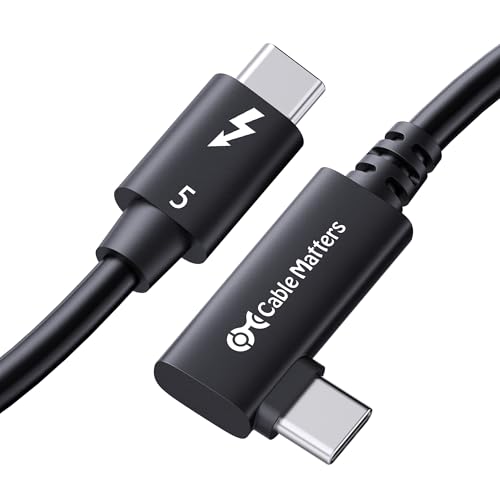
- 90-degree connector eases cable routing
- Up to 80Gbps data transfer
- Supports up to 240W Power Delivery
Best For: Compact eGPU and workstation setups with limited port space
Best Plug-and-Play eGPU Dock

- Includes a 60cm Thunderbolt cable
- Supports Thunderbolt 3/4 and USB4
- Flexible power input options
Best For: Windows users building an NVIDIA or AMD eGPU setup
Best High-Speed Cable
Silkland USB4 Thunderbolt 4 Cable

- Up to 40Gbps data transfer
- Supports up to 240W charging
- 2m length with display support
Best For: High-bandwidth eGPU, display, and storage connections
Best 40Gbps eGPU Adapter

- Includes a 12.5-inch Thunderbolt 4 cable
- Uses a PCIe 3.0 x16 interface
- Supports USB4 and Thunderbolt 3/4
Best For: Compact eGPU setups needing a short cable and high bandwidth
Best Value Thunderbolt Cable – Anker 515 USB4 Cable
If you need a dependable thunderbolt cable for external gpu use, the Anker 515 offers 40Gbps USB4 performance in a practical 3.3-foot length. It also supports high-resolution displays and up to 240W charging, provided your computer and eGPU enclosure support the required standards.
Best For: Buyers seeking a versatile 40Gbps cable for an eGPU, external displays, fast storage, and USB-C charging.
Pros:
- Supports USB4 and Thunderbolt 3/4 connections at up to 40Gbps.
- Supports displays up to 8K at 60Hz or 4K at 144Hz.
- Offers up to 240W charging and testing for up to 5,000 bends.
Cons:
- It is a Thunderbolt 4/USB4-era cable rather than a Thunderbolt 5 model.
- Actual eGPU performance depends on the host computer and enclosure.
For most Thunderbolt 3 or 4 eGPU setups, this cable combines strong bandwidth, useful length, and broad charging support without adding unnecessary complexity.
Highest Bandwidth Thunderbolt Cable – Cable Matters Thunderbolt 5
For newer systems, this Intel Certified Cable Matters model is a forward-looking thunderbolt cable for external gpu connections. Thunderbolt 5 delivers up to 80Gbps bidirectional data transfer and up to 120Gbps of video bandwidth, although your computer, enclosure, and display determine the performance you actually receive.
Best For: Thunderbolt 5 workstations, demanding creative workflows, and users who want maximum cable bandwidth for compatible hardware.
Pros:
- Supports up to 80Gbps data transfer and up to 120Gbps video bandwidth.
- Backward compatible with Thunderbolt 3, Thunderbolt 4, USB4, and USB-C equipment.
- Supports up to 240W power delivery and multiple high-resolution display configurations.
Cons:
- The short 1.6-foot length may not suit every desk or eGPU placement.
- Thunderbolt 5 benefits require compatible host and peripheral hardware.
This is the strongest fit when your eGPU enclosure and computer support Thunderbolt 5; for older systems, its extra bandwidth may not provide a practical advantage.
Best Compatibility Thunderbolt Cable – OWC Thunderbolt 4
The OWC Thunderbolt 4 cable is a practical thunderbolt cable for external gpu setups using Thunderbolt 3, Thunderbolt 4, USB4, or USB-C ports. Its 40Gbps bandwidth, 240W power support, and 28-inch length make it suitable for connecting an eGPU enclosure while also handling displays, docks, and storage.
Best For: Mac and PC users who want broad compatibility and a cable specifically described for eGPUs and PCIe expansion.
Pros:
- Works with Thunderbolt 3/4, USB4, and USB-C devices.
- Supports up to 40Gbps data, 8K video, and 240W charging.
- Explicitly supports eGPUs, PCIe expansion, external SSDs, and docks.
- Includes a three-year warranty.
Cons:
- It does not offer Thunderbolt 5’s higher bandwidth.
- The 2.36-foot length may be limiting for farther-away enclosures.
With broad device support and explicit eGPU compatibility, the OWC is a strong all-around choice for established Thunderbolt 3 and 4 systems.
Best Braided Thunderbolt Cable – Cable Matters Thunderbolt 5 Braided
This braided Cable Matters model is a durable thunderbolt cable for external gpu users who want Thunderbolt 5 capability in a compact 1.6-foot design. It combines up to 80Gbps data transfer with 240W power delivery, while the braided jacket and aluminum connectors are intended to withstand frequent handling.
Best For: Compact Thunderbolt 5 workstations where cable durability, high bandwidth, and a tidy connection matter.
Pros:
- Provides up to 80Gbps data transfer and up to 120Gbps video bandwidth.
- Braided construction helps resist tangling and everyday wear.
- Aluminum connectors support heat dissipation and a secure connection.
- Supports up to 240W power delivery and Intel certification.
Cons:
- The 1.6-foot length may be too short for some eGPU arrangements.
- Thunderbolt 5 performance depends on compatible computer and enclosure hardware.
If your setup supports Thunderbolt 5 and you prefer a more rugged cable jacket, this version offers high bandwidth and a durable design in a space-saving length.
Best Complete eGPU Dock – PCIe 3.0 x16 eGPU Dock
If you need a thunderbolt cable for external gpu setups and do not already have the enclosure hardware, this OwlTree dock combines a PCIe 3.0 x16 slot with a supplied Thunderbolt 4 cable. It supports Thunderbolt 3, Thunderbolt 4, and USB4 systems running Windows 10/11 or Linux, though compatibility depends on the host device and graphics-card drivers.
Best For: Windows laptops, desktops, and compatible consoles that need a flexible external NVIDIA or AMD graphics-card dock.
Pros:
- Supports NVIDIA and AMD graphics cards with available official drivers.
- Includes a 23.6-inch Thunderbolt 4 cable and 24-pin power jumper.
- Offers CPU, Molex, PD 3.0, or DC5521 power-input options.
- Designed for gaming, video editing, graphics work, and AI art.
Cons:
- Requires a separate compatible NVIDIA or AMD graphics card.
- Some USB4 consoles may need a BIOS update.
- Its approximately 22Gbps transfer speed is below newer Thunderbolt 5 cable specifications.
This is the most complete choice when you need both the eGPU connection hardware and a cable in one package. Check your computer’s port, processor, BIOS, and graphics-card driver support before buying.
Best High-Power Cable – Plugable Thunderbolt 5 Cable
For a high-performance thunderbolt cable for external gpu use, the Plugable TBT5-240W1M offers Thunderbolt 5 connectivity, up to 80Gbps data transfer, and 240W Power Delivery. Its one-meter length suits laptops, eGPUs, docks, displays, and fast storage without adding much cable slack.
Best For: Thunderbolt 5 users who want one cable for an external GPU, high-speed data, displays, and high-wattage charging.
Pros:
- Supports up to 80Gbps data transfer and Thunderbolt 5 Bandwidth Boost up to 120Gbps.
- Compatible with Thunderbolt 5, Thunderbolt 4, USB4, and USB-C devices.
- Supports up to 240W Power Delivery for high-performance laptops and other devices.
- Rated for 8K video and multiple high-resolution display configurations.
Cons:
- Its benefits depend on compatible Thunderbolt 5 or USB4 hardware.
- At one meter, it may be short for some desk layouts.
- The product notes do not specify a right-angle connector.
This is a versatile premium cable for modern eGPU and docking setups, especially where charging and display bandwidth matter alongside data speed. Older Thunderbolt systems can use it, but the highest performance requires matching host and peripheral support.
Best Space-Saving Cable – Cable Matters Right-Angle Thunderbolt 5
The Cable Matters right-angle model is a practical thunderbolt cable for external gpu installations where port clearance is limited. Its 90-degree connector helps route the cable neatly while supporting Thunderbolt 5 speeds, 240W charging, and backward compatibility with Thunderbolt 3, Thunderbolt 4, USB4, and USB-C.
Best For: Compact desktop, docking-station, and workstation setups that benefit from an angled connector and high display bandwidth.
Pros:
- Delivers up to 80Gbps bidirectional data transfer and up to 120Gbps video bandwidth.
- Supports dual 6K or 8K displays and triple 4K at 144Hz configurations.
- Provides up to 240W Power Delivery with PD 3.1 support.
- Intel-certified and compatible with Thunderbolt 3, Thunderbolt 4, USB4, and USB-C.
Cons:
- The 2.6-foot length may not suit setups requiring a longer cable run.
- Maximum performance requires compatible Thunderbolt 5 hardware.
- The angled connector may not fit every port orientation or enclosure layout.
Choose this cable when physical routing is as important as speed. Its right-angle design can reduce strain and clutter near a port, while the Thunderbolt 5 specification leaves room for demanding eGPU, display, and storage workflows.
Best Plug-and-Play eGPU Dock – OwlTree Thunderbolt eGPU Dock
The OwlTree dock is a practical starting point if you need a thunderbolt cable for external gpu use and want the cable and eGPU enclosure hardware together. It supports Thunderbolt 3, Thunderbolt 4, and USB4 connections, includes a 60cm cable, and is designed for Windows 10/11 systems with compatible NVIDIA or AMD graphics cards.
Best For: Windows laptop or desktop users assembling an external GPU setup with a supported NVIDIA or AMD card.
Pros:
- Includes a 60cm Thunderbolt cable and pre-installed dock board.
- Supports Thunderbolt 3, Thunderbolt 4, and USB4 devices.
- Offers flexible power input options, including ATX-style CPU 8-pin, Molex, PD 3.0, and DC5521.
- Works with many NVIDIA and AMD cards using official drivers.
Cons:
- Intel graphics cards are not supported.
- Its stated transfer speed is up to 22Gbps.
- Some USB4 consoles may require a BIOS update.
Choose this model when you want a bundled dock with straightforward installation and multiple power-input choices. Verify your laptop port, operating system, graphics card, and power setup before buying.
Best High-Speed Cable – Silkland USB4 Thunderbolt 4 Cable
The Silkland cable is a strong choice when you specifically need a thunderbolt cable for external gpu connections and also want broad USB-C functionality. Its 2-meter length supports up to 40Gbps, Thunderbolt 3/4 compatibility, and USB4 connectivity, though the manufacturer recommends shorter cables for stable docking performance.
Best For: Users who need a longer, high-bandwidth USB4/Thunderbolt cable for compatible docks, laptops, displays, and storage devices.
Pros:
- Supports data rates up to 40Gbps.
- Compatible with Thunderbolt 4, Thunderbolt 3, USB4, and USB-C devices.
- Supports up to 240W charging with compatible equipment.
- Can handle one 8K display or dual 4K displays at 60Hz when supported by the connected hardware.
Cons:
- The 2-meter length may be less suitable for docking stability than cables under 5 feet.
- Actual transfer speed depends on host and device support.
- It is a cable only, not an eGPU dock or graphics enclosure.
This is the most versatile cable option of the three, especially for setups that also connect displays, SSDs, or chargers. For an eGPU dock, confirm that both the computer and dock support the advertised bandwidth.
Best 40Gbps eGPU Adapter – YiBaoTong PCIe 3.0 eGPU Dock
The YiBaoTong dock combines a PCIe 3.0 x16 interface with a supplied 12.5-inch Thunderbolt 4 cable, making it a compact option for a thunderbolt cable for external gpu setups. It supports USB4 and Thunderbolt 3/4 systems, uses the 7440 chip, and is positioned for graphics work, video editing, AI art, and gaming.
Best For: Users who want a compact eGPU adapter with a short included Thunderbolt 4 cable and stated speeds around 40Gbps.
Pros:
- Includes a standard Thunderbolt 4 cable.
- Supports USB4, Thunderbolt 3, and Thunderbolt 4.
- Uses a PCIe 3.0 x16 interface and 7440 chip.
- Provides several power options, including CPU 8-pin, Molex, PD 3.0, and DC5521.
Cons:
- The included cable is relatively short at 12.5 inches.
- Requires a compatible graphics card and separate power arrangement.
- Listed warranty coverage is one year.
Consider this dock if your setup benefits from a short cable run and you want the dock’s stated 40Gbps-class performance. Check laptop or desktop port compatibility and make sure your selected NVIDIA or AMD card has an available official driver.
How We Picked the Best Thunderbolt Cable for External GPU Setups
We focused on cables and eGPU bundles that clearly identify their Thunderbolt generation, bandwidth, length, and compatibility. Intel certification is a useful signal for Thunderbolt reliability, while USB4 compatibility can add flexibility for devices that support the standard. We also considered practical details such as 240W charging support, braided construction, right-angle connectors, included cables, and the short lengths often preferred for eGPU enclosures.
Not every cable marketed for USB-C delivers Thunderbolt performance. The host computer, eGPU enclosure, graphics card, and operating system must also support the required connection standard.
Quick Comparison
- Best for current Thunderbolt 4 systems: Choose a certified 40Gbps cable with the correct length and connector style.
- Best for future-ready systems: Thunderbolt 5 cables offer up to 80Gbps where both connected devices support it.
- Best for longer desk layouts: A 2m cable provides more flexibility, but verify that its rated bandwidth meets your needs.
- Best for a complete setup: An eGPU dock bundle may include the cable and PCIe interface, simplifying installation.
Key Buying Factors for a Thunderbolt Cable for External GPU
Bandwidth and Generation
Thunderbolt 4 commonly provides up to 40Gbps, while Thunderbolt 5 can reach up to 80Gbps with compatible hardware. A Thunderbolt 5 cable can work with some older equipment, but it will not make a Thunderbolt 4 port operate at Thunderbolt 5 speeds.
Length and Signal Reliability
Short cables are often the safest choice for eGPU connections because they reduce clutter and make high-speed signal integrity easier to maintain. Longer cables are convenient, but check the advertised speed at the exact length you need.
Power and Construction
High-wattage charging ratings are valuable for compatible laptops and docks, although they do not increase the graphics bandwidth by themselves. Braided jackets, reinforced connectors, and a right-angle plug can improve durability and cable management.
Compatibility
Check whether your computer has a genuine Thunderbolt 3, Thunderbolt 4, or Thunderbolt 5 port rather than a USB-C port with fewer capabilities. Confirm enclosure requirements, graphics-card support, Windows or macOS compatibility, and any driver or firmware requirements before buying.
Who Should Buy Which Thunderbolt Cable for External GPU?
For most Thunderbolt 4 eGPU users, a certified 40Gbps cable from a reputable manufacturer is the sensible choice. Users building a new workstation or planning to upgrade to Thunderbolt 5 should consider an 80Gbps cable, provided their laptop and enclosure can use the newer standard. Choose a braided or right-angle model when durability and cable routing matter, and select a longer USB4-compatible option only when your layout genuinely requires it.
If you do not already own an eGPU enclosure, an eGPU dock bundle can be more convenient than buying a cable alone. However, compare its PCIe implementation, power supply requirements, graphics-card clearance, and cooling before prioritizing the included cable.