
If you need a dock that can keep a business laptop charged, connected, and ready for meetings, a good Thunderbolt dock makes a big difference. The best options simplify cable management while supporting multiple displays, fast networking, and reliable data transfer.
Below, we’ve focused on practical picks for office and hybrid workflows, with attention to compatibility, power delivery, and the ports that matter most.
Best 10 Thunderbolt Docks for Business Laptops Picks for 2026
Best for Surface Workstations
Microsoft Surface Thunderbolt 4 Dock

- Thunderbolt 4 speeds with fast laptop charging
- Dual 4K monitor support for productive setups
- Includes USB-C, USB-A, Ethernet, and audio ports
Best For: Surface users and business laptops that need reliable high-speed docking and dual monitors.
Best for Dual 4K Mac Setups
Plugable 16-in-1 Thunderbolt 4 Dock

- Dual 4K 60Hz outputs with HDMI or DisplayPort
- 100W charging plus 2.5Gb Ethernet
- Seven USB ports and SD/microSD card readers
Best For: MacBook Air/Pro and Windows users who want a straightforward dual-monitor business dock.
Best for Legacy Port & Thunderbolt Flexibility
HP Thunderbolt Dock G2 with Combo Cable

- Combo cable for broader business laptop compatibility
- Works well with mixed modern and legacy peripherals
- Good fit for shared desks and office hot-swap setups
Best For: Office users who need a flexible dock for business laptops and mixed peripherals.
Best for Secure IT Management

- Universal USB-C and Thunderbolt laptop compatibility
- Single-cable charging, networking, and peripherals
- Compact design with remote manageability features
Best For: IT-managed offices and hybrid workers who need a compact, reliable dock.
Best for Multi-Display Workstations
Dell Pro Thunderbolt 4 Smart Dock SD25TB4

- Up to four 4K displays for heavy multitasking
- 130W USB-C charging plus dual Thunderbolt 4
- 2.5GbE, Wi‑Fi, DP 1.4, and HDMI 2.1 connectivity
Best For: Power users and office teams needing a high-capacity dock for multi-monitor business setups.
Best for High-Speed TB5 Workstations

- Thunderbolt 5 with up to 120Gbps transfer
- 140W charging for demanding business laptops
- Up to 8K dual-display support
Best For: Power users with Thunderbolt 5 or Thunderbolt 4 business laptops who need maximum speed and charging.
Best for Dual-Display Workstations
Lenovo Thunderbolt 4 Dock 135W

- Thunderbolt 4 dock with HDMI, DisplayPort, and USB-C
- 135W power delivery helps keep a business laptop charged
- Dual-monitor support boosts productivity at the desk
Best For: Office users who need a reliable Thunderbolt 4 dock for dual-monitor setups and simple peripheral expansion.
Best for Dell-First Workspaces
Dell SD25TB4 Pro Thunderbolt 4 Smart Dock
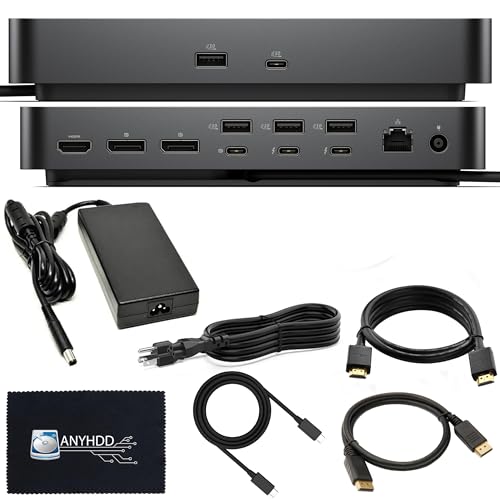
- 40 Gb/s Thunderbolt 4 performance
- Rich port selection for multi-display desks
- 3-year warranty with 180W adapter
Best For: Dell laptop users and business teams building a reliable multi-monitor workstation.
Best for Dual 4K Legacy Workstations
Lenovo 40AN0135US Thunderbolt 3 Dock Gen 2

- Dual 4K output with HDMI and DisplayPort support
- Broad business-class I/O, including Ethernet and USB 3.1 Gen 2
- Compatible with Windows 7 and Windows 10 setups
Best For: Business users who need a reliable dual-monitor dock for older or mixed workstation environments.
Best for Surface Workstations – Microsoft Surface Thunderbolt 4 Dock
If you want one dock that feels made for Microsoft hardware, this Surface Thunderbolt 4 Docking Station is an easy fit. It’s a strong option for thunderbolt docks for business laptops thanks to fast Thunderbolt 4 performance, dual 4K display support, and enough legacy ports to keep a full desk setup connected.
Best For: Surface users and business laptops that need reliable high-speed docking, charging, and dual-monitor support.
Pros:
- Thunderbolt 4 connectivity with quick laptop charging
- Plenty of ports, including USB-C, USB-A, audio, and 2.5G Ethernet
- Supports up to two 4K monitors for productive multi-display work
- Tactile port markers make it easier to plug in at a desk
Cons:
- Pricier than basic USB-C docks
- Best suited to Thunderbolt-compatible laptops
- Black, business-first design may feel utilitarian
This is a practical pick for workplaces that want dependable performance and a tidy desk setup. For buyers comparing thunderbolt docks for business laptops, it stands out for Surface-friendly design, strong display support, and the mix of modern and older ports professionals still need.
Best for Dual 4K Mac Setups – Plugable 16-in-1 Thunderbolt 4 Dock
For teams and solo professionals who need reliable monitor expansion, this Plugable dock is a strong pick among thunderbolt docks for business laptops. It combines dual 4K output, 100W charging, and a broad mix of ports, making it easier to run a clean desk without giving up wired networking or legacy peripherals.
Best For: MacBook Air/Pro users, Windows Thunderbolt 4 laptops, and anyone who wants a simple dual-monitor workstation dock.
Pros:
- Drives two 4K 60Hz displays through HDMI or DisplayPort with plug-and-play setup on compatible systems.
- Delivers 100W charging, 2.5Gb Ethernet, seven USB ports, and SD/microSD readers in one dock.
- Works with Thunderbolt 5, Thunderbolt 4, USB4, and USB-C laptops for broad office compatibility.
Cons:
- Dual-display support is strongest on supported Mac and Windows Thunderbolt/USB4 laptops.
- It’s a full-size dock, so it takes up more desk space than compact travel options.
This is a practical choice if your priority is a dependable, all-in-one docking station rather than the smallest footprint. For thunderbolt docks for business laptops, it stands out for easy dual-monitor expansion, strong charging, and enough ports to replace a hub-filled workspace.
Best for Legacy Port & Thunderbolt Flexibility – HP Thunderbolt Dock G2 with Combo Cable
If you need one of the more flexible thunderbolt docks for business laptops, the HP Thunderbolt Dock G2 is built around broad office compatibility and a practical mix of modern and legacy connections. It’s a solid fit for workstations that need a single-cable desk setup without giving up common peripherals.
Best For: Office users who want a dependable docking solution for mixed business peripherals, older accessories, and daily desk use.
Pros:
- Combo cable design helps support a wider range of business laptop setups.
- Useful for desks that still rely on both newer and legacy office accessories.
- Good choice for simplifying hot-desk and shared-workspace workflows.
Cons:
- Not the smallest or cleanest-looking dock for minimalist setups.
- May be more than some users need if they only want a basic charging dock.
Overall, this HP dock makes the most sense when compatibility matters more than flashy extras. For teams shopping thunderbolt docks for business laptops, it stands out as a practical bridge between newer USB-C/TB systems and everyday office gear.
Best for Power Users – Dell WD22TB4 Thunderbolt 4 Dock 180W
If you want one of the most capable thunderbolt docks for business laptops, the Dell WD22TB4 is built for dense desk setups, multi-monitor workflows, and mixed Windows or USB-C fleets. It brings a strong port spread, Thunderbolt 4 throughput, and enough power delivery to simplify a single-cable workstation.
Best For: Professionals who need a high-port-count dock for dual or triple displays, Ethernet, and reliable laptop charging.
Pros:
- 13 total ports, including Thunderbolt 4, HDMI, DisplayPort, USB-C, USB-A, and Gigabit Ethernet
- Up to 130W power delivery for supported laptops, helping reduce charger clutter
- Supports dual/triple monitor setups and 4K displays for productivity-heavy desks
- Broad compatibility across Windows, Ubuntu, Chrome OS, and Thunderbolt-enabled Macs
Cons:
- Best display flexibility is on Windows; macOS monitor support can be more limited
- Large feature set makes it overkill for simple single-monitor setups
- Premium pricing is likely compared with basic USB-C docks
Overall, the WD22TB4 is a strong choice if you need a serious desk dock rather than a bare-bones adapter. For teams and power users comparing thunderbolt docks for business laptops, it stands out for connectivity, charging headroom, and practical workstation flexibility.
Best for Secure IT Management – HP USB-C Dock G5 11-in-1 Dock
If you want a practical dock for thunderbolt docks for business laptops, the HP USB-C Dock G5 is a straightforward single-cable hub that handles charging, networking, peripherals, and up to three displays. It is designed to work with both HP and non-HP USB-C- and Thunderbolt-enabled laptops, making it a flexible choice for mixed-office environments.
Best For: IT-managed offices, hybrid workers, and teams that need a compact dock with remote management features.
Pros:
- Universal support for USB-C and Thunderbolt-enabled laptops
- Single-cable setup for charging, data, networking, and accessories
- Supports up to three displays for a more productive desk setup
- Compact 5 x 5 inch footprint helps reduce clutter
Cons:
- USB-C docking may not match the highest performance of full Thunderbolt-only docks
- Display and feature support can vary by laptop model
For buyers comparing thunderbolt docks for business laptops, this HP model stands out less for raw speed and more for manageability, compatibility, and clean desk integration. It is a sensible pick when reliability and IT control matter more than premium dock features.
Best for Multi-Display Workstations – Dell Pro Thunderbolt 4 Smart Dock SD25TB4
If you need one of the most capable thunderbolt docks for business laptops, the Dell Pro Thunderbolt 4 Smart Dock SD25TB4 is built for busy desk setups with multiple monitors, fast wired networking, and plenty of USB-C expansion. It’s a strong fit for hybrid offices where one cable should handle charging, displays, and peripherals without fuss.
Best For: Power users who want a high-end dock for dual- or quad-display workstations, secure office setups, and modern business laptops.
Pros:
- Supports up to four 4K displays for demanding multi-monitor workflows
- Includes 2.5GbE, Wi‑Fi, and dual Thunderbolt 4 ports for flexible connectivity
- 130W USB-C power delivery suits many business laptop charging needs
- Broad video output mix with 2x DP 1.4 and HDMI 2.1
Cons:
- Likely overkill if you only need a simple single-monitor dock
- Feature-rich design can push it into a higher price tier
For teams that want a future-ready desk hub, this Dell dock checks a lot of boxes for thunderbolt docks for business laptops. Its blend of power, display support, and wired networking makes it especially appealing for professionals who work across multiple apps and screens every day.
Best for High-Speed TB5 Workstations – Anker Prime TB5 14-in-1 Dock
If you need one of the most capable thunderbolt docks for business laptops, the Anker Prime TB5 Docking Station is built for high-bandwidth workflows, multi-display setups, and fast laptop charging. It pairs Thunderbolt 5 support with a 14-in-1 layout, making it a strong fit for desk-based professionals who move large files, run external displays, and want fewer dongles.
Best For: Power users with Thunderbolt 5 or Thunderbolt 4 business laptops who want top-end speed, charging, and display expansion in one dock.
Pros:
- Thunderbolt 5 with up to 120Gbps max transfer for demanding peripherals and storage
- 140W max charging helps power many business-class laptops through a single cable
- Supports up to 8K and dual-display setups for productive workstation use
- Cooling system is designed to help maintain performance under heavier loads
Cons:
- May be more dock than casual users need for basic office setups
- Best value depends on having a TB5 or compatible high-end Thunderbolt laptop
For buyers comparing thunderbolt docks for business laptops, this Anker model stands out when speed, charging headroom, and display flexibility matter more than price. It is a strong workstation-style dock for modern professionals who want a future-facing connection hub.
Best for Dual-Display Workstations – Lenovo Thunderbolt 4 Dock 135W
If you want a practical add-on for thunderbolt docks for business laptops, this Lenovo Thunderbolt 4 dock is built around everyday office connectivity. It adds HDMI, DisplayPort, and USB-C options, while the 135W power delivery helps keep a compatible laptop charged through a full workday.
Best For: Office users who need a reliable Thunderbolt 4 dock for dual-monitor setups and simple peripheral expansion.
Pros:
- Thunderbolt 4 docking with flexible USB-C, HDMI, and DisplayPort connectivity
- 135W power delivery supports busy desk setups and helps reduce charger clutter
- Dual-display support is useful for multitasking and productivity-focused work
- Renewed pricing can make it a stronger value for business deployments
Cons:
- Renewed condition may not suit buyers who want brand-new hardware
- Compatibility can vary depending on the laptop model and Thunderbolt support
For teams and professionals comparing thunderbolt docks for business laptops, this is a solid middle-ground option: strong on ports, capable of dual monitors, and straightforward to use at a shared or personal desk. It’s especially appealing if you want Lenovo-style dock compatibility without paying top-tier new-unit pricing.
Best for Dell-First Workspaces – Dell SD25TB4 Pro Thunderbolt 4 Smart Dock
If you want one dock to anchor a busy desk, the Dell SD25TB4 Pro is a strong fit for thunderbolt docks for business laptops. It combines Thunderbolt 4 connectivity, plenty of display outputs, and a 180W power adapter so you can run a monitor-heavy setup with fewer compromises.
Best For: Dell laptop users and business teams that want a flexible dock with strong display support and easy cable management.
Pros:
- Thunderbolt 4 with up to 40 Gb/s transfer for fast, reliable expansion
- Wide port mix includes dual DisplayPort, HDMI, USB-A, USB-C, and Ethernet
- Supports up to 8K display setups for high-end productivity workflows
- Includes a 3-year warranty and accessories for a more complete package
Cons:
- May be more dock than needed for simple, single-monitor setups
- Best value is strongest in Dell-centric environments
This is a practical choice if you need a dock that can scale with a demanding office setup. For buyers comparing thunderbolt docks for business laptops, the SD25TB4 stands out for its display flexibility, strong port selection, and enterprise-friendly design.
Best for Dual 4K Legacy Workstations – Lenovo 40AN0135US Thunderbolt 3 Dock Gen 2
If you need one of the more capable thunderbolt docks for business laptops, this Lenovo Thunderbolt 3 Dock Gen 2 is built for multi-monitor desks, wired networking, and plenty of peripheral connections. It’s a practical fit for ThinkPad users and other Windows business machines that still rely on Thunderbolt 3 or USB-C docking.
Best For: Office setups that need dual 4K displays, Ethernet, and a broad mix of legacy and modern ports.
Pros:
- Supports dual 4K displays with HDMI and DisplayPort outputs
- Strong port selection includes USB 3.1 Gen 2, USB-C, audio, and RJ-45 Ethernet
- Designed for Windows 7 and Windows 10 business environments
- Includes 135W Slim Tip adapter plus USB-C and Thunderbolt cabling
Cons:
- Thunderbolt 3-era design may be more than some users need today
- Renewed listing means condition can vary versus brand-new units
Overall, this dock makes sense if your priority is stable desk connectivity rather than the newest hardware features. For buyers comparing thunderbolt docks for business laptops, it stands out as a solid workstation-style option with strong display support and the kind of wired connectivity many office setups still depend on.
How We Picked These Thunderbolt Docks for Business Laptops
We prioritized docking stations that fit real-world business use: stable charging, dependable monitor output, strong port selection, and broad laptop compatibility. We also looked for docks that support common office needs such as Ethernet, USB-A for legacy accessories, and enough video outputs for dual- or multi-monitor setups.
For Thunderbolt Docks for Business Laptops, reliability matters as much as raw speed. That means favoring models with solid power delivery, clear display support, and warranty coverage that makes sense for long-term office deployment.
Quick Comparison: What Matters Most
Some docks are best for simple desk setups, while others are built for power users running multiple external displays and high-performance peripherals. If you only need one monitor and basic peripherals, a more affordable USB-C or Thunderbolt 3 dock may be enough. If you manage a modern workstation or a mobile office, Thunderbolt 4 or Thunderbolt 5 docks offer more headroom for displays, bandwidth, and charging.
Key Buying Factors for Thunderbolt Docks for Business Laptops
Power Delivery
Check the dock’s wattage against your laptop’s charging needs. Many business notebooks are fine with 60W to 100W, but larger systems may benefit from 130W or more.
Display Support
Review how many monitors the dock can handle and at what resolutions and refresh rates. Dual 4K is a common target for office productivity, but some users may need support for 4K at higher refresh or even 8K output.
Ports and Expansion
Look for the mix you actually use: USB-A, USB-C, HDMI, DisplayPort, SD card slots, audio, and Ethernet. For business environments, 2.5GbE can be a nice upgrade over standard gigabit networking.
Compatibility and Fleet Fit
Not every dock behaves the same across Windows, macOS, and Thunderbolt versions. If you’re standardizing across a team, confirm laptop compatibility before buying in volume.
Who Should Buy Which Thunderbolt Docks for Business Laptops?
If you want the simplest setup for a standard office laptop, a USB-C or Thunderbolt 3 dock can still be a smart value choice. If you need newer monitor support, better charging, and stronger long-term flexibility, Thunderbolt 4 is the safest all-around pick. Power users, creators, and IT-managed workstations may prefer Thunderbolt 5 for maximum bandwidth and future-proofing.
In short, choose the dock that matches your display load, charging needs, and device mix. The best Thunderbolt Docks for Business Laptops are the ones that remove friction from your day without adding compatibility headaches.