
If you want a cleaner, faster workstation, the right hub can turn a single laptop connection into a full desktop command center.
This roundup of thunderbolt hubs for desk setups focuses on the features that matter most: charging power, display support, port variety, and real-world expandability.
Best 10 Thunderbolt Hubs for Desk Setups Picks for 2026
Best for Thunderbolt 5 Power Users

- 14-in-1 port selection for workstations and creators
- 120Gbps max transfer with active cooling
- 140W charging and up to 8K display support
Best For: Thunderbolt 5 and Thunderbolt 4 laptop owners who need a fast, high-power dock.
Best for Power Users
CalDigit TS4 18-Port Thunderbolt 4 Dock

- 18-port dock with Thunderbolt 4, USB, audio, cards, and DisplayPort
- 98W charging for single-cable laptop power and desk cleanup
- 2.5GbE plus high-res display support for demanding setups
Best For: Power users who want maximum ports, strong charging, and fast networking in one dock.
Best for Multi-Monitor Desks
Anker Nano 13-in-1 Docking Station

- Detachable dock + portable hub in one
- Triple-display output with 2 HDMI + 1 DP
- Up to 100W charging and 10Gbps USB-C
Best For: Professionals who need a flexible multi-monitor dock for a home office or hybrid workspace.
Best for High-End Mac/PC Setups

- 80Gb/s Thunderbolt 5 bandwidth
- 140W charging for capable laptops
- Triple 8K display support
Best For: Mac or PC users building a high-performance desk setup with advanced display and charging needs.
Best for Dual Monitors

- Triple-4K or single-5K display support
- Includes HDMI and DisplayPort cables
- 180W adapter and broad USB/Ethernet port mix
Best For: Users who need a reliable Thunderbolt dock for dual monitors and a clean desk setup.
Best for Multi-Display Mac Docks
UGREEN Revodok Max 208 TB4 Dock

- 3x Thunderbolt 4 ports with 40Gbps speeds
- Dual 4K or single 8K display support
- 85W charging with Ethernet and USB-A expansion
Best For: MacBook Pro/Max and Windows users building a multi-monitor desk dock.
Best for Dual-Monitor Desk Stations
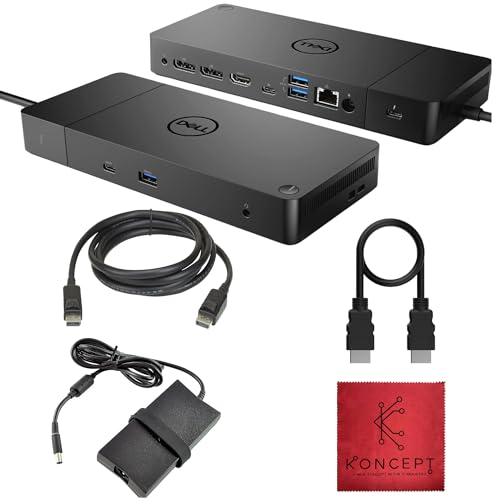
- Dual-monitor support for a cleaner workstation
- HDMI and DisplayPort keep monitor setup flexible
- 180W power delivery helps simplify desk cables
Best For: People building a stable dual-monitor desk setup with a Thunderbolt dock.
Best for Triple-Display Workstations

- 13-in-1 port selection with HDMI, DisplayPort, Ethernet, and audio
- Triple-display support on Windows for multi-monitor productivity
- Two USB-C ports add 100W PD charging and 10Gbps data
Best For: Windows users building a multi-monitor desk setup with lots of wired peripherals.
Best for Multi-Monitor Workstations
Dell WD22TB4 Thunderbolt 4 Dock

- 13 ports for monitors, peripherals, and Ethernet
- Up to four 4K displays on Windows setups
- 130W power delivery for single-cable docking
Best For: Windows or USB-C laptop users who want a powerful dock for dual or triple monitors and a cleaner desk.
Best for Triple-Display Value
USB C Docking Station 8-in-1 for 3 Monitors

- Dual HDMI, DisplayPort, and VGA for flexible monitor setups
- 100W USB-C power pass-through for compatible laptops
- Good for basic desk peripherals with 3 USB 2.0 ports
Best For: People building a flexible multi-monitor desk setup on a budget.
Best for Thunderbolt 5 Power Users – Anker Prime TB5 14-in-1 Dock
If you want one of the fastest thunderbolt hubs for desk setups, the Anker Prime TB5 Docking Station is built for heavy file transfers, dual-display work, and serious laptop charging. Its Thunderbolt 5 bandwidth, 140W power delivery, and active cooling make it a strong fit for demanding creators and power users.
Best For: Thunderbolt 5 and Thunderbolt 4 laptop owners who want a fast, high-power dock with plenty of ports.
Pros:
- 14-in-1 layout covers Thunderbolt, USB-C, USB-A, Ethernet, SD/TF, audio, and display connections
- Up to 120Gbps transfer speeds and 140W max charging for fast, efficient workflows
- Supports up to 8K output and dual-display setups on compatible Thunderbolt 5 Windows laptops
- Active cooling helps maintain performance under sustained load
Cons:
- Overkill for basic office setups or users with just a few peripherals
- Display support is more limited on non-Thunderbolt laptops and standard Mac chips
- Does not support external USB-A hubs
For buyers comparing thunderbolt hubs for desk setups, this Anker dock stands out more for speed, power, and connectivity than for simplicity. It’s a strong pick if you regularly move large files, run multiple displays, and want a single hub that can anchor a high-performance workstation.
Best for Power Users – CalDigit TS4 18-Port Thunderbolt 4 Dock
If you want one of the most capable thunderbolt hubs for desk setups, the CalDigit TS4 is built for heavy multitasking. It combines 18 ports, strong laptop charging, and fast display/network support in a single dock, making it a solid centerpiece for a clean workstation.
Best For: Power users who need a one-cable dock with lots of USB, external display support, and faster wired networking.
Pros:
- 18 total ports with Thunderbolt 4, USB-A, USB-C, card readers, audio, and DisplayPort
- 98W charging handles demanding laptops while keeping the desk to one cable
- 2.5GbE and 40Gb/s Thunderbolt ports suit fast networking and data-heavy workflows
- Strong monitor support for single 8K or dual high-resolution displays, depending on host
Cons:
- More expensive than basic hubs and docks
- Maximum display support varies by Mac, Windows, and USB4/Thunderbolt host hardware
- Full performance depends on using the included certified cable or an approved replacement
The TS4 stands out if you want a dock that can anchor a serious workstation without running short on ports. Among thunderbolt hubs for desk setups, it’s a top choice for users who value speed, charging, and expandability over a minimal footprint.
Best for Multi-Monitor Desks – Anker Nano 13-in-1 Docking Station
If you want one of the more flexible thunderbolt hubs for desk setups, this Anker dock is built around monitor-heavy workstations. It combines a detachable portable hub with a full desktop docking station, so you can leave it at your desk during the week and snap off the smaller section when you need to travel.
Best For: Professionals who run multiple displays and want a single-cable dock with strong port variety for a home office or hybrid setup.
Pros:
- Detachable 2-in-1 design gives you both a desk dock and a portable hub in one package.
- Triple-display support with 2 HDMI ports and 1 DisplayPort makes complex monitor layouts easier.
- Plenty of connectivity for USB accessories, wired internet, audio, and SD/TF cards.
- Up to 100W laptop charging helps keep your workstation clean and cable-light.
Cons:
- MacOS multi-display support is limited to mirrored mode on external monitors.
- Best suited to USB-C laptops; it is not a universal fit for every device.
- The full dock needs external power, so it is less minimal than a travel-only hub.
For buyers comparing thunderbolt hubs for desk setups, this model stands out for its monitor flexibility and detachable design rather than sheer compactness. It is a smart pick if you want a dock that can anchor a workstation but still go mobile when needed.
Best for High-End Mac/PC Setups – OWC Thunderbolt 5 Hub
If you want one of the most capable thunderbolt hubs for desk setups, the OWC Thunderbolt 5 Hub is built for serious bandwidth, modern multi-display workflows, and clean single-cable docking. It pairs 80Gb/s throughput with strong charging and broad compatibility, making it a smart pick for demanding creative or productivity stations.
Best For: Mac or PC users who need high-speed expansion, heavy peripheral support, and a future-ready hub for a more advanced desk setup.
Pros:
- Thunderbolt 5 performance with up to 80Gb/s bandwidth
- 140W charging helps power capable laptops from one hub
- Supports up to triple 8K displays for demanding workflows
- Fanless design keeps the desk quiet and uncluttered
Cons:
- Likely overkill for basic accessory expansion
- Best features depend on a Thunderbolt 5-capable device
- Premium capabilities usually come with a higher price
For buyers comparing thunderbolt hubs for desk setups, this model stands out when performance, display support, and charging matter more than keeping costs low. It is a strong fit for users who want a high-end hub that can grow with a more demanding workstation.
Best for Dual Monitors – Dell WD19TBS Thunderbolt Dock
If you want a dependable dock from the world of thunderbolt hubs for desk setups, the Dell WD19TBS is a practical choice thanks to its mix of dual-display support, fast 40Gbps connectivity, and included cables for a simpler one-cable workstation.
Best For: Office and home users who need a stable Thunderbolt dock for dual monitors, charging, and wired peripherals.
Pros:
- Supports up to triple 4K at 60Hz or a single 5K display over Thunderbolt 3
- Includes HDMI and DisplayPort cables, plus an 180W adapter for faster setup
- Offers a strong port mix with USB-C, multiple USB-A ports, Ethernet, and video outputs
- Built for daily workstation use with thermal control and a 1-year warranty
Cons:
- Renewed condition may not appeal to buyers wanting brand-new hardware
- Best features are aimed at USB-C/Thunderbolt-compatible laptops
This dock makes the most sense for users who want reliable monitor expansion and cable cleanup more than compact size. For thunderbolt hubs for desk setups, it stands out as a ready-to-use option with strong display support and the essentials already in the box.
Best for Multi-Display Mac Docks – UGREEN Revodok Max 208 TB4 Dock
If you want one of the most capable thunderbolt hubs for desk setups, this UGREEN dock stands out with three Thunderbolt 4 ports, fast USB-A expansion, Ethernet, and enough video output bandwidth for a serious multi-monitor workstation. It’s a strong fit if you need a clean one-cable desk solution with room for high-speed peripherals and laptop charging.
Best For: MacBook Pro/Max users and Windows laptops that need dual displays, fast data ports, and reliable docked power in one unit.
Pros:
- 3x Thunderbolt 4 ports with up to 40Gbps transfer speeds
- Supports dual 4K@60Hz or single 8K display setups on compatible systems
- Includes 3x USB-A 3.2 ports plus Gigabit Ethernet for full desk expansion
- 85W laptop charging helps keep your workspace to one cable
Cons:
- Full display support depends on your laptop’s chip and OS
- MacBooks with base M-series chips are limited to one external display
- Requires the included charger to operate properly
For buyers comparing thunderbolt hubs for desk setups, this is a high-end option that prioritizes display flexibility, port count, and clean charging over portability. It’s especially compelling if your desk needs to support multiple monitors and several wired accessories at once.
Best for Dual-Monitor Desk Stations – Dell WD19TB Thunderbolt Dock
If you want a practical way to expand a laptop into a cleaner workstation, this Dell WD19TB is a solid fit for thunderbolt hubs for desk setups. It adds a wired display and accessory hub in one dock, making it easier to keep your desk organized while supporting dual monitors and everyday peripherals.
Best For: Users who need a dependable Thunderbolt dock for a dual-monitor desk setup with simple cable management.
Pros:
- Supports dual displays for a more productive desk layout
- Includes HDMI and DisplayPort connectivity for flexible monitor matching
- 180W power delivery helps reduce charger clutter
- Renewed option can be a value-friendly way to buy into Dell docking
Cons:
- Renewed condition may not appeal to buyers wanting new-in-box gear
- Best suited to Dell and Thunderbolt-compatible laptops
- Heavier desk-focused dock, so it is not ideal for frequent travel
For buyers comparing thunderbolt hubs for desk setups, this dock stands out as a straightforward workstation upgrade rather than a compact travel accessory. It is a good pick if your priority is stable multi-monitor support and fewer cables on the desk.
Best for Triple-Display Workstations – LIONWEI 13-in-1 USB-C Dock
If you want one dock that can anchor a more complex monitor and peripheral layout, this LIONWEI hub is a practical option to compare against other thunderbolt hubs for desk setups. It combines dual HDMI, DisplayPort, Ethernet, audio, and plenty of USB-A/USB-C ports, making it easier to run a tidy home office without juggling multiple adapters.
Best For: Windows laptop users who need triple-display support, wired networking, and a lot of USB ports in one compact dock.
Pros:
- 13-in-1 layout with dual HDMI, DisplayPort, Ethernet, audio, and multiple USB ports
- Supports triple-display setups on Windows for more flexible multitasking
- Two USB-C ports offer 100W PD charging plus 10Gbps data
- Useful for reducing cable clutter on busy desks
Cons:
- Mac users are limited to extending only one monitor
- Not a true Thunderbolt dock, so performance depends on USB-C host support
- Uses about 13W of its own power, slightly reducing passthrough charging
For buyers comparing thunderbolt hubs for desk setups, this model stands out more for sheer port variety and Windows multi-monitor support than for premium Thunderbolt speed. It makes the most sense if your priority is turning a laptop into a full workstation with minimal cable swapping.
Best for Multi-Monitor Workstations – Dell WD22TB4 Thunderbolt 4 Dock
Dell WD22TB4 Thunderbolt 4 Docking Station, 40Gbps, USB-C and USB-A, Dual 4K Display, Black
Check Price On AmazonIf you want one of the most capable thunderbolt hubs for desk setups, the Dell WD22TB4 is built for people who rely on multiple displays, wired networking, and single-cable laptop docking. With Thunderbolt 4 support, up to 130W power delivery, and plenty of USB-A, USB-C, HDMI, and DisplayPort options, it’s a strong fit for demanding home offices and workstation-style desks.
Best For: Windows or USB-C laptop users who want a powerful dock for dual or triple monitors, fast charging, and a cleaner desk.
Pros:
- 13 ports give you broad connectivity for monitors, peripherals, and Ethernet.
- Supports up to four 4K displays on Windows setups for serious multitasking.
- 130W power delivery helps reduce charger clutter on the desk.
- Works with Thunderbolt 4, Thunderbolt 3, USB4, and USB-C systems.
Cons:
- Mac display support is more limited than Windows, especially on base M1/M2 systems.
- Overkill if you only need a simple charging hub with a few ports.
This is a strong pick if your setup needs dock-level expandability rather than a basic adapter. For buyers comparing thunderbolt hubs for desk setups, the WD22TB4 stands out for monitor support, power delivery, and overall desktop flexibility.
Best for Triple-Display Value – USB C Docking Station 8-in-1 for 3 Monitors
If you want one affordable dock to turn a laptop into a multi-monitor workstation, this option stands out in the world of thunderbolt hubs for desk setups. It combines HDMI, DisplayPort, VGA, 3 USB 2.0 ports, and up to 100W USB-C power pass-through, making it a practical pick for office layouts that need broad display and peripheral support.
Best For: Users who need a simple, budget-friendly dock for dual or triple monitors, basic USB peripherals, and laptop charging on a productivity desk.
Pros:
- Multiple display outputs for dual, triple, or quad-monitor configurations
- Includes 100W PD passthrough for keeping compatible laptops charged
- Three USB 2.0 ports are enough for keyboard, mouse, and low-speed accessories
- Works with many Dell, HP, Lenovo, and Surface USB-C laptops
Cons:
- USB 2.0 ports are slower than newer USB-A or USB 3.x options
- Using VGA can reduce overall display resolution
- Mac users get mirrored rather than extended external displays
For shoppers comparing thunderbolt hubs for desk setups, this dock is strongest when display flexibility matters more than premium port speed. It is a solid fit for mixed-monitor offices, but buyers should double-check USB-C video support and monitor limitations before committing.
How We Picked the Best Thunderbolt Hubs for Desk Setups
We prioritized Thunderbolt Hubs for Desk Setups that offer a practical mix of speed, charging, and connectivity. The best options in this category support modern Thunderbolt bandwidth, reliable multi-display output, and enough USB, Ethernet, and audio ports to reduce cable clutter.
We also favored models with higher-wattage laptop charging, broad Mac and Windows compatibility where applicable, and desk-friendly designs that fit a permanent workstation rather than a travel-only setup.
Quick Comparison
For most users, Thunderbolt 4 docks are the best balance of value and compatibility, while Thunderbolt 5 options are the strongest pick if you want more bandwidth, future-proofing, or advanced display support. USB-C docks can still make sense for lighter workloads, but they usually trade away speed and display flexibility.
If you need a simple dual-monitor office setup, midrange docks are usually enough. If your desk includes external SSDs, multiple peripherals, high-resolution monitors, and charging from one cable, step up to a premium dock or hub.
Key Buying Factors for Thunderbolt Hubs for Desk Setups
Charging Power
Check laptop power delivery first. Many users need 85W to 100W, while larger workstations may benefit from 140W support. If the dock cannot supply enough power, your laptop may charge slowly or lose battery under load.
Display Support
Match the dock to your monitor setup. Some hubs handle a single 4K or 8K display well, while others can run dual 4K screens or more. Keep in mind that macOS and Windows may differ in how they handle multiple external displays.
Port Mix
A strong desk dock should include a useful mix of Thunderbolt or USB-C ports, standard USB-A for legacy accessories, Ethernet for stable networking, and audio for headsets or speakers. The right mix depends on whether you prioritize storage, peripherals, or display expansion.
Bandwidth and Peripheral Load
Thunderbolt Hubs for Desk Setups are best when you connect several demanding devices at once. If you plan to use fast external drives, capture gear, or multiple high-resolution monitors, bandwidth matters more than raw port count.
Who Should Buy Which Thunderbolt Hubs for Desk Setups?
Choose a Thunderbolt 5 dock if you want the most headroom for future displays and high-speed accessories. Pick a Thunderbolt 4 dock if you want broad compatibility and dependable performance for everyday office or creator use.
If your setup is mostly monitors, keyboard, mouse, and Ethernet, a midrange dock may be all you need. If you want a single-cable setup with heavy charging and lots of peripherals, look for a premium model with strong cooling, higher wattage, and a port layout that fits your desk habits.