
The best universal remote controls for home use make it easier to manage TVs, streaming devices, soundbars, and other entertainment gear without juggling several remotes.
This roundup includes straightforward replacements, senior-friendly big-button models, backlit options, two-packs, and a premium hub-based system for more complex setups.
Best 10 Universal Remote Controls for Home Use Picks for 2026
Versatile Four-Device Control

- Controls up to four compatible devices
- Preprogrammed for Samsung TVs
- Automatic code search and master volume control
Best For: Typical living-room setups needing broad compatibility
Easy-Read Design
GE BigEZ OneTouch Remote for Seniors
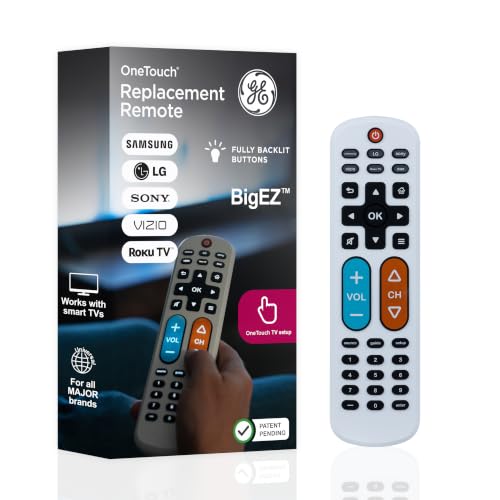
- Large backlit buttons improve visibility
- Preset for five major TV brands
- Controls a TV plus one additional device
Best For: Seniors and users wanting simple, visible controls
Dim-Room Visibility

- Backlit buttons improve nighttime visibility
- Controls up to four devices
- Preprogrammed for Samsung and Roku media boxes
Best For: Multi-device setups used in dimly lit rooms
Smart Home Theater Hub
SofaBaton X1S Universal Remote

- Supports IR, Bluetooth, and Wi-Fi devices
- Controls up to 50 devices
- Creates one-touch Activities and macros
Best For: Complex home theaters and activity-based control
Best Multi-Device Value

- Controls up to four devices
- Preprogrammed for Samsung TVs
- Backlit buttons aid nighttime use
Best For: Multi-device infrared home entertainment systems
Best Multi-Device Coverage

- Supports many TV brands and entertainment devices
- 26-foot range with stated fast response
- Includes code list and user manual
Best For: Mixed home entertainment setups
Best Samsung Replacement Value

- Pack includes two Samsung TV remotes
- No pairing or programming required
- Works within a stated 32-foot range
Best For: Samsung TV owners needing a spare
Best for Easy Reading
GE Big Button Universal Remote

- Large buttons are easy to read and navigate
- Controls up to two compatible devices
- Supports automatic and direct-code setup
Best For: Simple setups and users who prefer larger controls
Versatile Four-Device Control – GE 4-Device Universal Remote
For shoppers comparing universal remote controls for home use, this GE model offers straightforward control of up to four compatible audio and video devices. It supports major brands, includes automatic code search and direct code entry, and is preprogrammed for Samsung TVs.
Best For: Households that want one affordable remote for a TV, player, receiver, soundbar, or streaming device.
Pros:
- Controls up to four compatible devices.
- Supports thousands of devices from major brands.
- Offers master volume control across devices.
- Silver finish and ergonomic shape provide a comfortable, tidy design.
Cons:
- Two AAA batteries are required and not included.
- Uses infrared and is not compatible with RF devices such as Roku Streaming Sticks or Amazon Fire TV Sticks.
This is a practical choice when broad brand compatibility and simple programming matter more than advanced smart-home features. Its four-device limit works well for typical living-room setups.
Easy-Read Design – GE BigEZ OneTouch Remote for Seniors
The GE BigEZ is designed for shoppers seeking simple universal remote controls for home use, especially when visibility and uncomplicated operation are priorities. Its large backlit buttons and preset TV controls reduce setup and make everyday navigation easier.
Best For: Seniors, visually impaired users, or anyone who prefers a large, highly visible remote.
Pros:
- Extra-large, fully backlit buttons are easy to see.
- Color-coded volume and channel buttons support easier identification.
- Preset controls work with Samsung, LG, Vizio, Sony, and Roku TVs.
- Can operate a TV plus one additional device.
Cons:
- Supports only two devices.
- Two AA batteries are required and not included.
- Its preset compatibility is focused on the listed TV brands and one auxiliary device.
With no programming required for the supported TV brands and access to U.S.-based technical support, this remote emphasizes ease of use over extensive system control. It is a strong fit for a simple television setup.
Dim-Room Visibility – GE Backlit Four-Device Remote
This GE backlit model is a useful option among universal remote controls for home use when you need to manage several components and still see the buttons in low light. It supports up to four devices and is preprogrammed for Samsung TVs and compatible Roku streaming media boxes.
Best For: Living rooms with multiple devices where backlit controls are useful at night.
Pros:
- Controls up to four compatible audio and video devices.
- Blue LED backlighting helps illuminate the buttons in dark rooms.
- Preprogrammed for Samsung TVs and Roku streaming media boxes.
- Includes automatic code search, direct code entry, and master volume control.
Cons:
- Two AAA batteries are required and not included.
- Not compatible with RF devices such as Roku Streaming Sticks or Amazon Fire TV Sticks.
- Has a 90-day limited warranty.
The combination of four-device control and backlighting makes this a practical replacement remote for a conventional entertainment center. Check your streaming device type carefully, since the listed Roku compatibility does not extend to Roku Streaming Sticks.
Smart Home Theater Hub – SofaBaton X1S Universal Remote
For shoppers seeking advanced universal remote controls for home use, the SofaBaton X1S combines a remote, hub, app customization, and activity-based control. It supports IR, Bluetooth, and Wi-Fi devices, allowing one-touch routines for setups with TVs, soundbars, receivers, projectors, and players.
Best For: Larger home theaters and users who want activities, macros, app setup, and voice-assisted control.
Pros:
- Supports more than 500,000 entertainment devices across IR, Bluetooth, and Wi-Fi.
- Controls up to 50 devices.
- One-touch Activities can power devices on and select the correct input.
- Hub provides up to 40 feet of coverage and supports cabinet control with wired IR transmitters.
Cons:
- Setup and customization rely on the SofaBaton app.
- Alexa and Google Assistant voice control works with Activities, not individual devices.
- Its broader feature set may be more than needed for a basic TV setup.
The X1S is the most capable option in this group for consolidating a complex entertainment system. Its app, macros, tracker, and hub-based operation are especially useful when devices are inside cabinets or when you want to automate common viewing routines.
Senior-Friendly Pick – Big Button TV Remote
For shoppers seeking universal remote controls for home use, this Gvirtue model prioritizes simple TV operation and accessibility. Its large buttons, tactile feedback, and extra-large Enter button are designed for easier handling, while no programming is required for Samsung TVs.
Best For: Seniors, users with limited dexterity or vision, and households needing a straightforward TV-only replacement remote.
Pros:
- Large, tactile buttons support easier navigation.
- Works with many major TV brands, including Samsung, LG, VIZIO, Sony, and Hisense.
- No programming is required when used with a Samsung TV.
- Includes a stated 90-day free-replacement warranty.
Cons:
- Controls one device only.
- Not compatible with streaming devices, cable boxes, or unrelated TV platforms.
- Two AAA batteries are required.
This is a practical choice when accessibility matters more than multi-device control. Confirm that your TV is supported before buying, especially if you also need to operate a soundbar, cable box, or streaming player.
Best Multi-Device Value – GE Backlit Universal Remote
This GE remote is a versatile option among universal remote controls for home use, handling up to four compatible devices. It is preprogrammed for Samsung TVs and adds backlit buttons, automatic code search, direct code entry, and master volume control.
Best For: Home entertainment setups that include a TV plus devices such as a Blu-ray player, cable receiver, soundbar, or compatible streaming player.
Pros:
- Controls up to four compatible devices.
- Preprogrammed for Samsung TVs.
- Blue backlighting improves button visibility in dim rooms.
- Supports automatic code search, direct code entry, and master volume control.
Cons:
- Two AA batteries are required and not included.
- Does not work with radio-frequency devices such as Roku Streaming Sticks and Amazon Fire TV Sticks.
- Programming may still be needed for non-Samsung devices.
Choose this model if you want to consolidate several infrared-compatible remotes without giving up illuminated controls. Check device compatibility carefully if your setup relies on RF streaming sticks.
Simple Setup Choice – 4-in-1 Universal Remote
This PLBEREMC model is aimed at shoppers who want universal remote controls for home use across common audio and video equipment. It supports TVs, Blu-ray/DVD players, streaming media players, soundbars, and cable receivers, with direct code entry and auto code search for setup.
Best For: Users replacing a lost or damaged remote and seeking broad compatibility with home theater devices and a simple programming process.
Pros:
- Designed for TVs, disc players, streaming media players, soundbars, and cable receivers.
- Supports direct code entry and automatic code search.
- Lightweight design with a stated 12-meter maximum range.
- Includes a one-year warranty.
Cons:
- Two AAA batteries are required and not included.
- Setup is required; it is not ready to use with every device immediately.
- Supplied specifications list a maximum of one supported device, despite the 4-in-1 positioning.
This remote offers useful device coverage and two setup methods, but the conflicting device-capacity specification warrants checking the manual and compatibility details before purchase. It is best suited to buyers comfortable with basic programming.
Best Multi-Device Coverage – LOUTOC Universal Remote
For shoppers comparing universal remote controls for home use, this LOUTOC model is a flexible option for mixed entertainment setups. It supports many TV brands plus devices such as DVD and Blu-ray players, soundbars, streaming players, set-top boxes, DVRs, VCRs, and audio equipment. Setup uses brand codes or an automatic pairing method.
Best For: Homes that want one infrared remote for several types of entertainment devices.
Pros:
- Broad compatibility across major TV brands and other home entertainment devices.
- 26-foot operating range and stated 0.2-second response time.
- Code list and multiple setup options support easier programming.
- Durability is rated for up to 50,000 presses.
Cons:
- Requires two AAA batteries, which are not included.
- Programming may require trying multiple codes for some devices.
This is a practical pick when device variety matters more than a highly specialized control layout. Its wide brand coverage and included documentation make it useful for consolidating several remotes, though setup can take some trial and error.
Best Samsung Replacement Value – LOUTOC Two-Pack Remote
This two-pack is a straightforward choice for Samsung owners seeking universal remote controls for home use without programming. The infrared remotes are designed for Samsung Smart TVs, LED, LCD, HDTV, 3D, and series televisions; insert two AAA batteries and use them directly.
Best For: Samsung TV owners who want a backup remote or a replacement pair.
Pros:
- Pack of two provides a convenient spare for another room or backup use.
- Designed to work with Samsung Smart TV and multiple Samsung TV types.
- No pairing or programming is required according to the product notes.
- Rated for quick response within a 32-foot range.
Cons:
- AAA batteries are required but not included.
- Its compatibility is focused on Samsung televisions rather than mixed-brand devices.
- No manual is included.
If you already use Samsung TVs, this pack emphasizes simplicity and redundancy. It is less suitable for controlling soundbars, streaming players, or non-Samsung equipment, but it can be a convenient low-effort replacement solution.
Best for Easy Reading – GE Big Button Universal Remote
The GE Big Button remote is designed for shoppers who prioritize simple controls when choosing universal remote controls for home use. Its large, simplified buttons are easy to read, while automatic code search and direct code entry support setup for up to two compatible devices.
Best For: Basic TV and entertainment setups, including homes, assisted-living spaces, nursing homes, and hotels.
Pros:
- Large, readable buttons and an ergonomic design support straightforward operation.
- Controls up to two compatible devices, such as a TV, soundbar, or cable box.
- Offers automatic code search, direct code entry, and master volume control.
- Preprogrammed for Samsung TVs and backed by U.S.-based technical support.
Cons:
- Limited to two devices.
- Requires two AA batteries, which are not included.
- Infrared control requires line of sight to compatible devices.
This GE model is a strong fit when accessibility and uncomplicated operation are more important than extensive device coverage. Its two-device limit keeps the layout manageable, while the setup assistance is helpful for less technical users.
How We Picked the Best Universal Remote Controls for Home Use
We focused on compatibility, setup simplicity, button visibility, device support, and the type of household each remote is designed to serve. The selection covers basic TV replacements as well as models intended to control streaming players, Blu-ray/DVD players, cable receivers, soundbars, and broader audio/video systems.
We also considered practical details such as backlit or oversized buttons, learning curves, replacement value, and whether a remote is sold individually or as a multipack. Before buying, confirm that your exact TV or device model is supported, especially if you use a less common brand or an external streaming box.
Quick Comparison
| Best For | Look For | Ideal Choice Type |
|---|---|---|
| Simple TV replacement | Basic setup and essential controls | Standard GE or compatible TV remote |
| Seniors or users with limited vision | Large buttons and uncluttered layouts | Big-button remote |
| Late-night viewing | Illuminated keys | Backlit universal remote |
| Multiple entertainment devices | Broad device compatibility | Multi-device universal remote |
| Complex home theater systems | Hub control and activity-based commands | SofaBaton X1S-style system |
| Spare or replacement coverage | Two remotes in one package | Multipack option |
Key Buying Factors for Universal Remote Controls for Home Use
Device Compatibility
Check support for your TV brand and every device you want to control. A remote may work with a television but have limited functions for a Roku player, Apple TV, soundbar, cable box, or disc player. Confirm whether streaming shortcuts, voice functions, and smart-TV menus are supported.
Layout and Accessibility
Choose a conventional layout if you want familiar controls, or a big-button design when visibility and simplicity matter most. Backlighting is useful in dark rooms, but it may increase battery use. Look for clearly labeled power, volume, channel, input, home, and navigation buttons.
Setup and Everyday Control
Basic remotes typically use brand codes or an automatic scan. More advanced models may require an app, hub, Wi-Fi connection, or additional configuration. Consider who will set it up and whether everyone in the household can use it comfortably afterward.
One Remote or Several
A standard universal remote is often enough for one TV and a few basic devices. If you want to combine many components into one system, prioritize device capacity and activity controls rather than simply choosing the remote with the most buttons.
Who Should Buy Which Universal Remote Controls for Home Use?
- Choose a standard GE universal remote for a straightforward replacement covering common TV brands and everyday functions.
- Choose a big-button model for seniors, children, guest rooms, or anyone who prefers a simpler, easier-to-read layout.
- Choose a backlit remote if you frequently watch TV in dim lighting or need to identify buttons without turning on a lamp.
- Choose a multipack for multiple rooms, a backup remote, or households that want an inexpensive spare.
- Choose a broad multi-device remote when you need control over a TV, streaming player, audio equipment, and other components.
- Choose a hub-based system if your home theater has several devices and you want centralized, activity-style control rather than a basic replacement.
For the best result, match the remote’s feature set to your actual setup. A simple model is usually easier and more reliable for one television, while advanced controls make more sense when they replace several remotes at once.