
The right USB-C cable can simplify a desktop setup by connecting monitors, docks, laptops, storage drives, and chargers with fewer compromises. However, USB-C cables vary widely in speed, display support, charging capacity, length, and build quality.
We compared 10 options for different workstation needs, from USB4 and Thunderbolt-compatible connections to affordable monitor cables and short cords for cleaner cable management. Use the guide below to match specifications with your equipment before buying.
Best 10 USB C Cables for Desktop Setups Picks for 2026
Best Overall Performance

- 40Gbps data and 8K@60Hz video
- Up to 240W PD 3.1 charging
- Braided, USB-IF certified design
Best For: High-performance USB4 and Thunderbolt desktop stations
Best Long Cable
DteeDck USB-C 20Gbps Monitor Cable

- Six-foot reach for flexible routing
- 4K@144Hz display support
- 20Gbps data and 100W charging
Best For: Extended desks with USB-C monitors and docks
Best Established Brand

- 40Gbps data and up to 8K@60Hz
- Up to 240W charging support
- Tested for up to 5,000 bends
Best For: Compact premium USB4 desktop connections
Best for Tight Spaces
Silkland Right-Angle USB-C Cable

- Right-angle connector for cleaner routing
- 20Gbps data and high-resolution video
- Up to 240W charging support
Best For: Crowded desks and USB-C monitor connections
Reliable Charging Pair
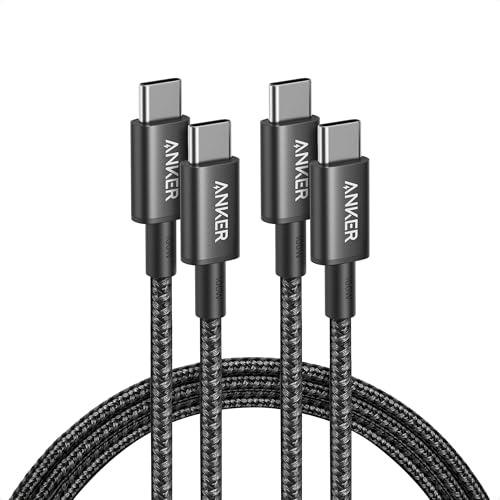
- 100W charging support
- Two 6-foot nylon cables
- Does not support video output
Best For: Everyday charging across a desktop setup
All-in-One Desk Cable

- 240W power delivery
- 10Gbps data transfer
- 4K 60Hz video support
Best For: Charging, storage, and monitor connections
High-Speed Monitor Pair
Cable Matters 20Gbps USB-C Cables

- 20Gbps data transfer
- Up to 8K30 or 4K120 video
- Two 6-foot cables with 240W PD
Best For: USB-C monitors, docks, and fast external drives
Tidy Power Pick
Short 240W Desktop Charging Cable

- Up to 240W PD 3.1 charging
- Compact 2-foot length reduces desk clutter
- USB 2.0; no video or high-speed SSD support
Best For: Minimalist charging stations and power-heavy devices
Dual-Monitor Workhorse

- 4K at 60Hz video support
- Up to 20Gbps data transfer
- 100W charging with a 6-foot reach
Best For: Workstations using monitors, external SSDs, and USB-C laptops
Compact High-Speed Link

- 20Gbps data and 4K 60Hz video support
- Up to 100W charging with E-Marker chip
- Short 3-foot length suits compact desks
Best For: USB-C monitors, external SSDs, and space-conscious workstations
Best Overall Performance – Acer USB4 40Gbps Cable
For demanding usb c cables for desktop setups, the Acer USB4 cable combines high-speed data, high-resolution display support, and substantial charging capacity in one 3.3-foot cord. It is a strong fit for workstations using USB4 or Thunderbolt 4/3 devices, provided the connected hardware supports the advertised standards.
Best For: High-bandwidth desktop setups with USB4 or Thunderbolt peripherals, external displays, docks, or SSDs.
Pros:
- Supports up to 40Gbps data transfer and 8K at 60Hz video output.
- Offers up to 240W PD 3.1 charging with compatible equipment.
- Braided construction and aluminum-alloy casing are designed for durability.
- USB-IF certified and compatible with Thunderbolt 4/3 devices.
Cons:
- The 3.3-foot length may be limiting for larger desks.
- Maximum performance depends on compatible USB4, display, and charger ports.
This is the most versatile option here for a compact, high-performance desktop station. Its combination of 40Gbps connectivity, 8K output, and 240W charging makes it especially useful when one cable must handle several demanding tasks.
Best Long Cable – DteeDck USB-C 20Gbps Monitor Cable
The DteeDck USB-C cable is a practical choice for usb c cables for desktop setups when six feet of reach matters. It supports monitor connectivity, fast data transfer, and up to 100W charging, making it useful for desks where the computer and display or dock are not positioned close together.
Best For: Extended desktop layouts, USB-C monitors, docking stations, gaming displays, and external SSDs.
Pros:
- Six-foot length offers more routing flexibility than shorter cables.
- Supports up to 20Gbps data transfer and 4K at 144Hz video.
- Provides up to 100W USB Power Delivery charging.
- Includes 24 months of coverage care from the brand.
Cons:
- Its 20Gbps data rate is below USB4 40Gbps alternatives.
- Display output requires DP Alt Mode support on both connected devices.
- It does not offer the 240W charging capacity of some competing cables.
Choose this cable when desk layout and monitor reach are more important than maximum USB4 bandwidth. It balances useful display support, solid data speeds, and 100W charging in a longer format.
Best Established Brand – Anker 515 USB4 Cable
The Anker 515 is a compact premium option for usb c cables for desktop setups, offering USB4-class speed in a 3.3-foot cable. It is suited to nearby laptop-to-monitor, dock, or storage connections where 40Gbps transfers and high-power charging are priorities.
Best For: Compact workstations that need fast file transfers, high-resolution displays, and broad USB-C charging support.
Pros:
- Supports 40Gbps data transfer and displays up to 8K at 60Hz.
- Handles up to 240W charging with a compatible charger and device.
- Tested to withstand up to 5,000 bends.
- USB-IF and IEC specification compliance is listed.
Cons:
- The 3.3-foot length is best for close-together components.
- Maximum 240W charging requires compatible equipment.
- Specific smartphone compatibility is not listed in the supplied details.
The Anker 515 is a straightforward choice for a tidy, high-speed desktop connection. Its short length keeps nearby components manageable, while USB4 bandwidth and 240W support leave room for demanding peripherals.
Best for Tight Spaces – Silkland Right-Angle USB-C Cable
The Silkland right-angle cable is designed for organized usb c cables for desktop setups, especially where a straight connector would strain a port or create clutter. Its five-foot length, elbow connector, high-speed data support, and monitor capabilities make it useful around displays, docks, and constrained desk edges.
Best For: Tight desktop spaces, USB-C monitors, portable displays, and setups needing reduced cable bend and port stress.
Pros:
- Right-angle design helps manage routing and reduce port strain.
- Supports up to 20Gbps data transfer and 8K at 30Hz video.
- Offers 5K at 60Hz and 4K at up to 144Hz display support.
- Supports up to 240W charging with compatible PD 3.1 equipment.
Cons:
- Video output requires DP Alt Mode support on the connected devices.
- Right-angle plugs may not fit every port orientation or thick case.
- The supplied notes caution against excessive swaying during data transmission.
This is the most layout-focused pick in the group. Select it when connector orientation and cable organization matter as much as display and charging performance, while checking clearance around your devices first.
Reliable Charging Pair – Anker 100W USB-C Cable 2-Pack
For desktop setups that mainly need dependable charging and everyday data connections, the Anker USB C to USB C Cable 2-Pack offers two 6-foot cables with support for up to 100W charging. Its nylon exterior and long length make it a practical choice for keeping devices connected around a desk.
Best For: Charging USB-C laptops, tablets, smartphones, and other compatible devices at a desktop workstation.
Pros:
- Supports charging up to 100W with a compatible charger.
- Includes two 6-foot cables for convenient desk or multi-device use.
- Nylon construction is rated for a 5,000-bend lifespan.
- Includes hook-and-loop cable ties and an everlasting warranty.
Cons:
- Does not support video output.
- Data transfer is listed at up to 0.48Gbps, so it is not intended for the fastest file transfers.
This is a straightforward option when your desktop setup prioritizes charging over monitor connectivity or high-speed storage transfers. Choose another cable if you need USB-C video output.
All-in-One Desk Cable – UGREEN 240W USB 3.2 Cable
The UGREEN 240W PD3.1 cable is a versatile pick for desktop setups that combine charging, file transfers, and monitor connections. At 6.6 feet, it provides useful reach while supporting up to 240W power delivery, 10Gbps data transfer, and 4K 60Hz video on compatible USB-C ports.
Best For: USB-C desktop setups that need one cable for laptop charging, external storage, and 4K monitor connectivity.
Pros:
- Supports up to 240W charging with compatible equipment.
- Transfers data at up to 10Gbps.
- Supports 4K 60Hz video output on devices with DP Alt Mode.
- Nylon braiding, aluminum shells, and reinforced joints improve durability.
Cons:
- Video output requires a USB-C port that supports DP Alt Mode.
- Only one 6.6-foot cable is included.
With charging, data, and display support in one cable, this UGREEN model is a strong fit for a flexible desk setup. Confirm that your computer and monitor support the required USB-C video mode before buying.
High-Speed Monitor Pair – Cable Matters 20Gbps USB-C Cables
For desktop setups built around USB-C monitors, docks, or fast external drives, this Cable Matters 2-pack combines 20Gbps data transfer with high-resolution video support. Each 6-foot cable can also deliver up to 240W power when paired with compatible chargers and devices.
Best For: Multi-device desktop workstations using USB-C monitors, docks, external storage, or high-speed file transfers.
Pros:
- Supports up to 20Gbps data transfer for compatible storage devices.
- Supports 8K at 30Hz or 4K at 120Hz video output.
- Provides up to 240W Power Delivery with compatible equipment.
- Two 6-foot cables offer flexibility for monitor and dock connections.
Cons:
- Actual video resolution and refresh rate depend on the connected devices.
- The PVC outer material may be less flexible than a braided cable design.
- Compatibility depends on the USB-C, monitor, dock, and charger specifications.
This pair is the most feature-focused choice here for a desktop setup that needs fast storage access and USB-C display connectivity. It is especially useful when having a spare cable available matters as much as peak performance.
Tidy Power Pick – Short 240W Desktop Charging Cable
For usb c cables for desktop setups where clutter control and charging power matter most, this 2-foot cable keeps the connection close and tidy. It supports up to 240W charging, but its USB 2.0 data speed makes it primarily a charging and basic-sync cable rather than a display or high-speed storage solution.
Best For: Minimalist desktop charging stations, power banks, and users who want a short cable for laptops, phones, and tablets.
Pros:
- Supports up to 240W PD 3.1 charging and is backward compatible with lower-power USB-C charging.
- Compact 2-foot length helps reduce cable clutter on a desk.
- E-Marker chip, braided construction, and reinforced connectors are designed for reliable everyday use.
Cons:
- USB 2.0 performance is limited to 480Mbps.
- Does not support video output or high-speed SSD data transfer.
This is a focused charging cable, not an all-purpose desktop connectivity cable. Choose it when a short reach and high charging capacity are more important than monitor support or fast file transfers.
Dual-Monitor Workhorse – 6ft 20Gbps USB-C Video Cable
For usb c cables for desktop setups that need monitor connectivity, fast storage access, and charging in one lead, this 6-foot cable offers broad workstation utility. It supports 4K at 60Hz, up to 20Gbps data transfer, and up to 100W Power Delivery when paired with compatible equipment.
Best For: Desktop workstations, home offices, extended displays, portable monitors, and users moving large files to external SSDs.
Pros:
- Supports 4K 60Hz video through DisplayPort Alternate Mode on compatible devices.
- 20Gbps USB 3.2 Gen 2×2 transfer rate helps with large files and external SSDs.
- 6-foot length, 100W charging, braided construction, and a 36-month warranty suit regular workstation use.
Cons:
- Video, charging, and maximum data performance depend on compatible devices and ports.
- Its 6-foot length may be more cable than needed for compact desks.
This is the most versatile option of the three for a full desktop workflow. It is a strong fit when one cable needs to handle a monitor, data transfers, and laptop charging without giving up reach.
Compact High-Speed Link – 3ft 20Gbps USB-C Cable
For usb c cables for desktop setups that need high-speed file transfers without a long lead, this 3-foot ZeroneTeck cable combines 20Gbps data, 4K 60Hz video, and up to 100W charging. It is suited to monitor and SSD connections when both connected devices support the required standards.
Best For: Compact desks, USB-C monitors, external SSDs, laptops, and users who want one shorter cable for data, display, and charging.
Pros:
- Supports up to 20Gbps data transfer and 4K 60Hz video with compatible hardware.
- Provides up to 100W charging through an E-Marker-equipped design.
- 3-foot length, braided construction, and stated 3-year warranty fit everyday desktop use.
Cons:
- 4K video requires DP Alt Mode support on the source and display.
- Maximum speeds require compatible upstream and downstream devices.
- A suitable USB-C power adapter is required for maximum charging output.
This cable balances reach and capability well for smaller work areas. It offers the same core desktop functions as a longer video cable while keeping excess slack under control, provided your devices support USB-C video and 20Gbps operation.
How We Picked the Best USB C Cables for Desktop Setups
We focused on cables suited to everyday workstation connections, including monitors, docks, laptops, external storage, chargers, and desktop peripherals. The selection covers several performance tiers: USB4 and Thunderbolt-compatible cables for demanding setups, USB 3.2 options for fast data and 4K video, and practical charging cables for simpler connections.
We also considered stated bandwidth, display resolution and refresh-rate support, Power Delivery ratings, cable length, connector design, pack size, and desktop practicality. USB-IF certification and established-brand specifications received additional consideration where available. Because compatibility depends on both connected devices, the cable’s rating should be treated as one part of the complete setup.
Quick Comparison
| Best For | Recommended Specification | What to Check |
|---|---|---|
| Thunderbolt docks and high-speed storage | USB4 40Gbps or Thunderbolt 4 | Device and dock compatibility, length, and display support |
| 4K monitors and everyday video | USB 3.2 Gen 2 or higher | Resolution, refresh rate, and alternate-mode support |
| Fast laptop charging | 100W or 240W USB Power Delivery | Charger, laptop, and e-marker requirements |
| Neat desktop cable management | Short, angled, or right-angle design | Reach, connector clearance, and bend direction |
Key Buying Factors for USB-C Cables for Desktop Setups
Bandwidth and Data Speed
USB-C describes the connector, not the performance level. USB 2.0 cables may charge devices but can be unsuitable for monitors or fast storage. For desktop use, 10Gbps is a useful baseline, while 20Gbps and 40Gbps cables are better suited to high-speed SSDs, docks, and demanding file transfers.
Video Capability
Confirm that the cable supports video through USB-C DisplayPort Alt Mode. Check the advertised resolution and refresh rate against your monitor, laptop, dock, and graphics hardware. A cable marketed for 4K at 60Hz may not support 4K at 144Hz or 8K output.
Charging Power
100W cables cover many laptops and accessories, while 240W models support newer USB PD 3.1 charging equipment. The cable cannot increase the capability of a lower-rated charger or device. For higher wattage, look for an appropriately rated cable with the necessary e-marker support.
Length and Construction
Choose the shortest length that reaches comfortably without tension. Short cables reduce desktop clutter, while 6-foot models work better for monitors, docks, and towers placed farther apart. Braided jackets, reinforced connectors, and right-angle plugs can improve durability and routing, but make sure an angled connector fits your ports.
Who Should Buy Which USB C Cables for Desktop Setups?
Choose a USB4 or Thunderbolt-compatible cable if you use a high-performance dock, fast external SSD, or multi-display workstation. Select a 20Gbps or 10Gbps monitor cable for typical 4K displays and everyday data connections. A 100W cable is generally sufficient for standard laptop charging, while a 240W option offers more headroom for compatible high-power systems.
For a tidy fixed workstation, a 2-foot cable or right-angle model can reduce visible slack. If you are equipping several devices, a two-pack may offer better value. Before ordering, verify every required specification—data rate, video support, charging wattage, connector orientation, and length—rather than relying on the USB-C label alone.