
If you need trusted media copies with verification, the right duplicator saves time and reduces costly errors. From small office jobs to high-volume production, today’s USB cloners vary widely in speed, target count, and workflow features.
This roundup of the best USB duplicators for data verification in 2026 focuses on practical buying factors like standalone operation, throughput, erase options, and compatibility so you can choose with confidence.
Best 10 USB Duplicators for Data Verification Picks for 2026
Standalone Clone-and-Test Duplicator
BestDuplicator UB300 1:2 USB duplicator and tester

- Copies one drive to two targets at once
- Includes capacity, speed, and device tests
- Standalone LCD operation with port status LEDs
Best For: Portable USB cloning and basic media verification
Touchscreen Multi-Target Copier
EZ Dupe SOHO Touch 1:10 USB duplicator

- Copies one source to up to ten drives
- Touchscreen menu with Copy and Compare
- Also supports Format and One-Touch Erase
Best For: High-volume flash duplication with simple touchscreen control
High-Capacity Standalone Duplicator
Nexcopy USB115SA 1:15 standalone USB duplicator

- Copies one master to 15 targets
- Runs without a PC or software
- LCD shows real-time status and feedback
Best For: Bulk USB duplication with standalone operation
High-Speed Standalone Choice
Systor 1:7 USB 3.0/3.1 Duplicator & Sanitizer

- Standalone operation with no computer needed
- Bit-by-bit copying from USB 3.0/3.1 source drives
- Up to 6GB per minute with 7-target duplication
Best For: Businesses needing fast, standalone USB duplication and sanitizing
Verification-Friendly Standalone Pick
Vinpower Digital USBShark 7 Targets

- Smart copy for accessible content duplication
- USB prescan scans source media for reading errors
- Standalone unit supports USB 3.0, 2.0, and 1.0
Best For: Teams needing prescan and secure erase in a standalone duplicator
PC-Based Multi-Target Option

- PC-based duplicator with Nexcopy Drive Manager
- 16-target capacity for larger batch jobs
- Uses USB 3.0 and copies at maximum drive speed
Best For: PC-driven batch duplication with 16 targets
Best with Extra Features
USB131SA 1 to 31 Standalone USB Duplicator
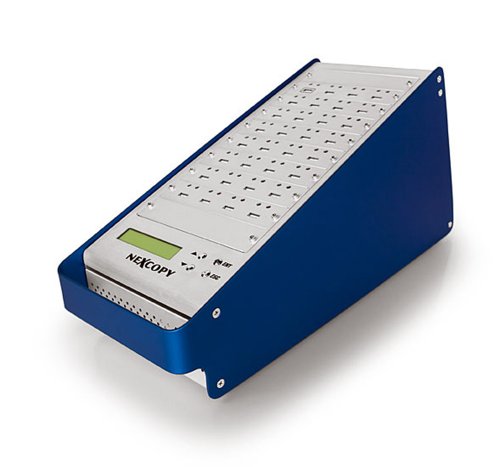
- Standalone operation, no PC or software needed
- Copies 1 master to 31 targets
- LCD shows real-time performance and status
Best For: High-volume standalone USB duplication with live status feedback
Compact Computer-Connected Copier
DupliM Mini USB Flash Media Duplicator

- Duplicates up to 10 USB drives at once
- Supports image files, drives, folders, and files
- Works with Windows and Mac via included software
Best For: Compact multi-drive duplication on a PC or Mac
Secure Standalone Eraser-Cloner
Vinpower Flash Memory USB Duplicator

- Standalone 1-to-3 duplicator with no PC required
- Smart Copy, Raw Copy, and DoD wipe support
- Read Error Skip helps with damaged media
Best For: Secure USB duplication and wiping in a compact standalone unit
Standalone Clone-and-Test Duplicator – BestDuplicator UB300 1:2 USB duplicator and tester
If you need usb duplicators for data verification in a compact, standalone setup, the BestDuplicator UB300 is built for quick one-to-two flash drive cloning with built-in checks and erase tools. It supports Quick Copy for data-only jobs and Whole Media Copy for bit-for-bit duplication, while the LCD and port LEDs help you monitor the process without software.
Best For: IT teams, schools, and field techs that need portable USB cloning plus basic media testing and erase functions.
Pros:
- Duplicates one USB flash drive to two targets at once without a computer.
- Offers Quick Copy and Whole Media Copy for different verification needs.
- Includes Capacity Check, Device Information, Read/Write Speed Test, and erase functions.
- Standalone LCD operation with individual red/green LED indicators for each port.
Cons:
- Designed for USB 1.1 and USB 2.0 media, so it is not aimed at newer high-speed flash standards.
- Best performance depends on source and target media of similar capacity.
This is a practical choice when you want a simple copier that also helps verify and sanitize flash drives before deployment. Its small footprint and offline operation make it especially useful for mobile or shared work environments.
Offline Windows File Transfer Cable – Plugable USB Transfer Cable for Windows file moves
For usb duplicators for data verification in a transfer-focused workflow, this Plugable USB Transfer Cable is aimed at moving files between two Windows PCs without a network connection. It includes Bravura Easy Computer Sync software and is designed for straightforward file-and-folder transfers when upgrading or migrating data.
Best For: Windows users who need a simple offline cable for moving personal files between two PCs.
Pros:
- Works with Windows 11, 10, 8.1, 8, 7, Vista, and XP.
- Includes downloadable transfer software and a license key.
- No network connection required, which can be useful for sensitive data.
- Backed by a 2-year warranty and lifetime North American support.
Cons:
- macOS, Windows Server, and Windows S Mode are not compatible.
- Programs and installed applications cannot be transferred.
This is not a drive duplicator, but it can be a useful offline transfer tool when your priority is controlled file movement between two Windows systems. If you need simple migration rather than media cloning, it offers a clean and practical approach.
Touchscreen Multi-Target Copier – EZ Dupe SOHO Touch 1:10 USB duplicator
If you want usb duplicators for data verification with a modern interface, the EZ Dupe SOHO Touch is built for one-to-ten flash drive duplication plus compare, format, and erase functions. Its touchscreen menu simplifies operation, and the unit is described as supporting all file formats, file sizes, and drive capacities on USB flash media.
Best For: Users who want a touchscreen USB duplicator for routine high-volume flash drive copying and verification tasks.
Pros:
- Duplicates one source to up to ten USB drives.
- Touchscreen interface supports Copy, Compare, Format, and Erase.
- Rated for high-speed duplication at 35 MB per second.
- Compatible with USB flash media across Windows, Linux, or macOS workflows.
Cons:
- The notes do not specify built-in capacity checks or detailed media diagnostics.
- It is a larger, heavier-duty unit than compact single- or two-target duplicators.
This model stands out for its user-friendly touchscreen and compare feature, making it a strong fit for repetitive duplication jobs. It’s a good option when you want speed and a simpler workflow for multi-drive production.
High-Capacity Standalone Duplicator – Nexcopy USB115SA 1:15 standalone USB duplicator
When you need usb duplicators for data verification at scale, the Nexcopy USB115SA is a standalone 1-master-to-15-target duplicator that works without a PC or extra software. It also provides asynchronous duplication, real-time LCD status feedback, and immediate enumeration so the USB sticks are ready right away.
Best For: High-volume production environments that need a standalone USB duplicator with status feedback and fast turnaround.
Pros:
- Supports a 1 master to 15 target configuration.
- Standalone operation requires no PC or software.
- Asynchronous duplication helps with masters up to 256MBs.
- LCD provides real-time performance feedback and status.
Cons:
- The supplied notes do not list advanced compare, erase, or media test functions.
- Technical details are limited in the notes beyond the port and duplication setup.
This unit is geared toward bulk copying rather than feature-rich diagnostics, so it makes the most sense in production settings where throughput matters. If your priority is scaling USB duplication with clear status reporting, it fits that role well.
High-Speed Standalone Choice – Systor 1:7 USB 3.0/3.1 Duplicator & Sanitizer
If you need usb duplicators for data verification in a self-contained workflow, this Systor unit is built around bit-by-bit copying with no computer or software required. It supports synchronous and asynchronous copy modes and keeps transfer speed up to 6GB per minute even as the load increases, which makes it practical for repeatable production runs.
Best For: Businesses that want a standalone 7-target USB duplicator with fast, consistent copying and sanitizing features.
Pros:
- Standalone operation with no PC or software required
- Bit-by-bit copy mode from a source USB 3.0/3.1 flash drive
- Copy speed up to 6GB per minute / 100MB per second
- Supports synchronous and asynchronous copy modes
Cons:
- Limited to USB 3.0/3.1 source drive copying as described
- Designed for business use, so it may be more than casual users need
This is a solid pick when your priority is fast, standalone duplication with a verification-friendly bit-level copy process. The included sanitizer function also adds value if your workflow needs both copying and drive cleaning.
Verification-Friendly Standalone Pick – Vinpower Digital USBShark 7 Targets
Vinpower Digital USBShark Standalone USB Flash Drive Duplicator - 7 Targets (High Speed)
Check Price On AmazonFor usb duplicators for data verification, the Vinpower Digital USBShark focuses on standalone copying plus tools that help you inspect the source before duplication. Its smart copy feature copies accessible content quickly, while USB prescan can scan the source device for physical reading errors and secure erase is available when you need to wipe media after use.
Best For: Teams that want a standalone 7-target duplicator with prescan, secure erase, and broad USB compatibility.
Pros:
- Smart copy feature copies accessible content on the USB device
- USB prescan checks the source for physical reading errors
- Secure erase helps fully erase USB devices
- Standalone operation with support for USB 3.0, 2.0, and 1.0 devices
Cons:
- Write speed is listed in the notes, but no detailed throughput workflow is provided
- Best suited to dedicated duplication setups rather than general home use
This model stands out when verification matters as much as copying, since prescan and bit-by-bit duplication are built into the workflow. It is a practical choice if you need a self-contained system that also handles secure erase tasks.
PC-Based Multi-Target Option – Nexcopy SSUSB160PC 16 Target
If your usb duplicators for data verification workflow is tied to a computer-based process, this Nexcopy model is built as a PC-based 16-target duplicator that takes advantage of USB 3.0. It is described as capable of copying flash drives at their maximum transfer speeds and includes Nexcopy Drive Manager software for the job.
Best For: PC-driven teams that need a 16-target USB duplicator with software support and USB 3.0 speed.
Pros:
- PC-based design with included Nexcopy Drive Manager software
- 16-target duplication for larger batches
- Supports USB 3.0 hardware interface
- Designed to copy at flash drives’ maximum transfer speeds
Cons:
- Requires a PC-based workflow instead of standalone operation
- Specific verification tools are not detailed in the supplied notes
This is the strongest fit for high-volume duplication when you want software-driven control rather than a standalone box. The 16-target design makes it especially appealing for batch production environments.
Best with Extra Features – USB131SA 1 to 31 Standalone USB Duplicator
If you need usb duplicators for data verification at scale, this standalone 1-to-31 unit is built for fast batch copying without relying on a PC or software. It’s aimed at straightforward high-volume workflows where you want quick status checks, repeatable duplication, and simple operation from the front panel.
Best For: Teams that need a standalone duplicator for large USB runs with real-time LCD feedback.
Pros:
- Standalone operation means no computer or software is required.
- 1 master to 31 target layout supports high-volume duplication.
- Real-time performance feedback and status display on the LCD.
- Asynchronous duplication supports masters up to 256MBs.
Cons:
- Heavy at 18 pounds, so it is less portable than compact units.
- Designed for flash duplication rather than computer-connected workflows.
For large-scale USB duplication jobs, this model’s main appeal is its standalone workflow and broad target count. If your priority is efficient batch production with visible status updates, it fits that use case well.
Compact Computer-Connected Copier – DupliM Mini USB Flash Media Duplicator
For buyers comparing usb duplicators for data verification in a smaller, software-driven setup, this DupliM unit offers a computer-connected approach with support for up to 10 drives at once. It can duplicate from image files, flash drives, or selected files and folders on your hard drive, which makes it flexible for everyday office or lab tasks.
Best For: Users who want a compact USB duplicator that works with Windows or Mac and supports multiple source options.
Pros:
- Duplicates up to 10 USB 3.0 or 2.0 drives simultaneously.
- Works with image files, flash drives, or selected files and folders.
- Includes DupliM software suite for Windows and Mac OS.
- Compact, portable design with USB 3.0 cable and power adapter included.
Cons:
- Requires a connected computer, so it is not a standalone unit.
- Minimum system requirements may limit very old systems.
This is a practical choice if you want a compact duplicator that integrates into a PC or Mac workflow. Its flexibility and included software make it well suited to controlled duplication jobs where convenience matters.
Secure Standalone Eraser-Cloner – Vinpower Flash Memory USB Duplicator
This standalone option is a strong fit if you want usb duplicators for data verification plus secure cleanup in one device. It supports smart copy and raw copy modes, can erase drives using DoD 5220.22-M standards, and includes read error skip technology to help recover readable data from troublesome media.
Best For: Businesses and IT teams that need a compact standalone duplicator with secure erase and recovery-focused features.
Pros:
- Standalone design works without a PC and helps avoid computer-based exposure.
- Smart Copy and Raw Copy modes support different duplication needs.
- DoD 5220.22-M erase feature adds secure drive wiping.
- Read Error Skip helps recover data from damaged sectors.
Cons:
- Only 3 ports, so it is smaller scale than larger duplicators.
- Focused on flash drives and thumb drives rather than broader media types.
For organizations that care about secure handling as much as duplication speed, this model stands out. The combination of cloning, wiping, and error-skipping makes it a versatile tool for managed USB workflows.
How We Picked the Best USB Duplicators for Data Verification
For USB Duplicators for Data Verification, we prioritized models that support dependable copy-and-check workflows, straightforward operation, and the right balance of target count and speed. We also looked for options that fit different environments, from portable standalone units to PC-based systems built for larger jobs.
We favored devices with clear status feedback, reasonable media compatibility, and useful management features such as sanitizing or erasing when needed. Since verification matters most when you’re making many identical copies, we gave extra attention to consistency under repeated use.
Quick Comparison
Broadly, the 10 products fall into three groups: compact standalone duplicators for small teams, higher-capacity standalone units for office or production use, and PC-connected duplicators for users who want tighter software control. Lower-target models are usually simpler and more portable, while 7-, 10-, or 31-target systems are better suited to batch work.
USB 2.0-only tools are fine for older media and lighter workloads, but USB 3.0/3.1-capable duplicators are a better fit when throughput and verification time matter. If your process includes drive sanitization, make sure the duplicator explicitly supports erase or sanitize functions rather than assuming it does.
Key Buying Factors for USB Duplicators for Data Verification
Verification Method
Look for true post-copy verification rather than a simple copy confirmation. The best units compare source and target data to help catch corruption, bad sectors, or incomplete transfers.
Target Count and Workflow
Choose the number of targets based on daily volume. A 1-to-2 or 1-to-3 unit suits small runs, while 1-to-7, 1-to-10, or 1-to-31 models are better when speed and batching matter more than portability.
Standalone Vs. PC-Based
Standalone units are easier to deploy, faster to set up, and less dependent on software. PC-based duplicators can be more flexible for advanced control, but they add a computer to the workflow.
Speed and USB Version
USB 3.0 and 3.1 support can significantly shorten copy and verification cycles, especially with larger flash media. If you regularly duplicate modern drives, avoid bottlenecks from older interfaces.
Media Compatibility and Erase Features
Make sure the system supports the flash media types you actually use. If you handle reused drives, an integrated erase or sanitizer function is a major advantage.
Who Should Buy Which USB Duplicators for Data Verification?
Buy a compact standalone model if you need occasional verified copies for small teams, events, or field deployment. Choose a high-target standalone unit if you run recurring batches and want a simple, self-contained setup. Pick a PC-based duplicator if you prefer software-driven control and don’t mind adding a host computer.
If your main goal is reliable, repeatable copying with minimal rework, prioritize verification, speed, and a target count that matches your workload. That combination will matter more than extra features you may never use.