
When you’re in the architecture field, the right workstation PC can make all the difference in your design workflow. You need a system that combines raw power with reliable performance. This is essential for handling complex projects efficiently. In this guide, we’ll explore the 10 best workstation PCs tailored specifically for architects like you. Each option balances speed, graphical capabilities, and storage solutions to support your creative process. Curious about which models stand out?
Dell Tower Plus EBT2250 Desktop Computer
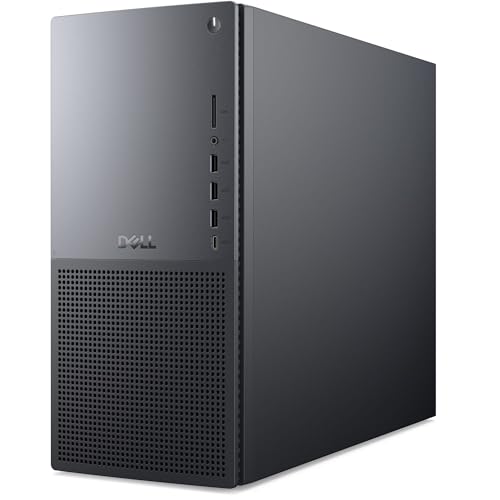
The Dell Tower Plus EBT2250 Desktop Computer is an ideal choice for architects and creative professionals who demand robust performance and speed. With a powerful Series 2 Intel Core Ultra 9 285K CPU and 64GB of DDR5 RAM, it handles complex tasks with ease. The 4TB NVMe SSD guarantees you’ve got ample storage for your projects, while the NVIDIA GeForce RTX 5070 GPU provides stunning graphics and advanced ray tracing capabilities. Its sleek, modern design fits any workspace, and you’ll appreciate the optimized productivity it offers. Plus, with a solid warranty and customer support, you’re covered for any issues.
Best For: Architects and creative professionals who require high-performance computing for complex tasks and stunning graphics.
Pros:
- Powerful performance with a Series 2 Intel Core Ultra 9 285K CPU and 64GB DDR5 RAM for efficient multitasking.
- Ample storage provided by a 4TB NVMe SSD, ensuring plenty of space for large projects and files.
- Advanced graphics capabilities with the NVIDIA GeForce RTX 5070, featuring ray tracing and AI frame generation for exceptional visual quality.
Cons:
- Heavier design at 35 pounds, making it less portable compared to smaller desktop options.
- High price point may not be suitable for budget-conscious consumers.
- Limited upgrade options due to the specific design and components, which may restrict future enhancements.
Corsair AI Workstation 300 Desktop PC

If you’re an AI developer or a professional in creative fields, the Corsair AI Workstation 300 Desktop PC is designed just for you. Its compact 4.4L form factor houses powerful specs, including an AMD Ryzen AI Max 385 CPU and up to 64GB LPDDR5X memory. With the AMD Radeon 8050S iGPU, you can handle demanding graphics tasks effortlessly. This workstation is AI-optimized, supporting local LLMs and creative workloads. Plus, the advanced dual-fan cooling system guarantees efficient performance. Backed by a 2-year warranty and lifetime tech support, it’s a reliable choice for professionals seeking power and performance.
Best For: AI developers and professionals in creative fields seeking a compact yet powerful workstation for demanding tasks.
Pros:
- AI-optimized performance tailored for local LLMs and creative workloads.
- Compact 4.4L form factor, making it suitable for limited workspace environments.
- Backed by a 2-year warranty and lifetime tech support for peace of mind.
Cons:
- Limited upgrade options due to its compact design.
- High price point compared to standard desktop PCs without AI specialization.
- May require additional peripherals for optimal use in creative applications.
CPU Solutions Express 4K Video Editing PC (Ryzen 9 9950X, 64GB DDR5 RAM, 2TB NVMe SSD)

Designed for professionals who demand exceptional performance, the CPU Solutions Express 4K Video Editing PC stands out with its powerful AMD Ryzen 9 9950X processor, boasting 16 cores and a max boost of 5.7 GHz. With 64GB of fast DDR5 RAM, you’ll enjoy rapid multitasking and smooth video editing. The ultra-fast 2TB NVMe SSD guarantees quick access to large video files, enhancing your workflow. Coupled with an NVIDIA Quadro RTX 2000 ADA graphics card, you can seamlessly support up to four monitors. This workstation, running on Windows 11 Pro, is a solid choice for your architectural design needs.
Best For: Professionals seeking a high-performance video editing workstation capable of handling 4K content with ease.
Pros:
- Powerful Performance: Equipped with a 16-core AMD Ryzen 9 9950X processor, ensuring smooth multitasking and efficient video editing.
- High-Speed Storage: The 2TB NVMe SSD provides rapid access to large video files, significantly enhancing workflow efficiency.
- Advanced Graphics Support: Features an NVIDIA Quadro RTX 2000 ADA graphics card, allowing for seamless multi-monitor setups and exceptional rendering capabilities.
Cons:
- Weight: At 45 pounds, it may be cumbersome for those needing a portable editing solution.
- Price Point: High-performance components may come at a premium cost, making it less accessible for budget-conscious buyers.
- Limited Warranty: The 1-year warranty may not provide sufficient coverage for long-term use or potential hardware issues.
MINISFORUM MS-S1 MAX Mini AI Workstation PC

For architects and designers seeking powerful performance in a compact form, the MINISFORUM MS-S1 MAX Mini AI Workstation PC stands out with its AMD Ryzen AI Max+ 395 processor, delivering up to 5.1GHz across 16 cores. With 128GB of ultra-fast LPDDR5x RAM and dual M.2 PCIe 4.0 slots supporting up to 16TB of storage, it’s built for demanding tasks like 3D modeling and video editing. The advanced cooling system guarantees peak performance, while Wi-Fi 7 and multiple connectivity options enhance your workflow. Weighing only 8.29 pounds, this mini workstation is ideal for design professionals on the go.
Best For: Architects and designers seeking a compact yet powerful workstation for demanding tasks such as 3D modeling and video editing.
Pros:
- High-performance AMD Ryzen AI Max+ 395 processor with 16 cores and up to 5.1GHz.
- Extensive connectivity options, including USB4, dual 10GbE LAN, and HDMI 2.1 for high-resolution displays.
- Advanced cooling system ensures optimal performance even under heavy workloads.
Cons:
- Relatively high price point compared to traditional desktop workstations.
- Limited upgrade options due to compact design.
- Weight and dimensions may not appeal to users seeking ultra-portable solutions.
HP OmniDesk Desktop PC (M02-0110)

The HP OmniDesk Desktop PC (M02-0110) stands out as an excellent choice for architects seeking powerful performance and efficiency in their design work. Featuring an Intel Core i7-14700 processor and 16 GB DDR5 RAM, it delivers impressive speed and multitasking capabilities. The 1 TB PCIe Gen4 NVMe SSD guarantees quick access to your projects, while dual display support enhances your workflow. With Wi-Fi 6 and Bluetooth 5.4, connectivity is seamless. Plus, its environmentally friendly design and included MyHP software make it a smart choice. You’ll also enjoy a 1-year warranty and three months of PC Game Pass for added value.
Best For: Architects and design professionals seeking a powerful and efficient desktop PC for their design work.
Pros:
- Powerful Performance: Equipped with an Intel Core i7-14700 processor and 16 GB DDR5 RAM for impressive speed and multitasking.
- Fast Storage: The 1 TB PCIe Gen4 NVMe SSD ensures quick access to projects and files.
- Environmental Responsibility: Made with post-consumer recycled materials and certified with EPEAT Gold and ENERGY STAR.
Cons:
- Limited Graphics Capability: Intel UHD Graphics 770 may not support high-end gaming or intensive graphic design tasks.
- Single Year Warranty: The 1-year limited hardware warranty may not provide long-term assurance for durability.
- No Dedicated Graphics Card: Lacks a dedicated GPU for users needing advanced graphics performance.
AI Workstation Gaming PC with Ryzen 5 9600X

Architects and designers seeking a powerful solution for demanding AI workloads will find the AI Workstation Gaming PC with Ryzen 5 9600X to be an exceptional choice. With its 6 cores and turbo speeds up to 5.4 GHz, it excels in parallel processing for tasks like engineering, gaming, and content creation. The AMD Radeon Pro R9700 enhances AI performance, providing up to 2x improvements over previous generations. Coupled with 32GB DDR5 RAM and a 1TB Gen4 SSD, multitasking becomes seamless. Plus, its advanced cooling system guarantees stability during intense workloads, making it a reliable partner for any design professional.
Best For: Architects and designers seeking a high-performance solution for demanding AI workloads and multitasking.
Pros:
- Exceptional AI Performance: Equipped with AMD Radeon Pro R9700, offering up to 2x better AI performance than previous generations.
- High-Speed Specifications: Features a Ryzen 5 9600X with turbo speeds up to 5.4 GHz and 32GB DDR5 RAM for seamless multitasking and program loading.
- Reliable Cooling System: Advanced cooling technology ensures optimal thermal stability, preventing performance throttling during intense workloads.
Cons:
- Limited Upgrade Options: The proprietary design may limit future upgrades or customization.
- Price Point: Higher cost compared to standard gaming PCs, which may not be justifiable for casual users.
- Weight and Size: The workstation may be bulkier and less portable than other gaming PCs, making it less suitable for on-the-go use.
GMKtec EVO-X2 AI Mini PC Ryzen Al Max+ 395

Designed with power and efficiency in mind, the GMKtec EVO-X2 AI Mini PC Ryzen AI Max+ 395 is an excellent choice for professionals in architecture who demand high-performance computing. With a Ryzen AI Max+ 395 processor that boosts up to 5.1 GHz and 16 cores, you’ll handle complex design tasks effortlessly. Its 128GB LPDDR5X RAM and 2TB PCIe 4.0 SSD guarantee rapid data access and multitasking capabilities. Plus, the AMD Radeon RX 8060S graphics card delivers stunning visuals. Enjoy seamless connectivity with Wi-Fi 7 and 4K/8K display support, making it a powerhouse for your architectural projects.
Best For: Professionals in architecture and design who require high-performance computing for complex tasks.
Pros:
- Exceptional processing power with a Ryzen AI Max+ 395 processor and 16 cores for efficient multitasking.
- Impressive graphics performance with the AMD Radeon RX 8060S, ideal for rendering and visualization.
- Advanced connectivity options including Wi-Fi 7 and support for 4K/8K displays for enhanced productivity.
Cons:
- Higher price point compared to entry-level PCs, which may not be suitable for budget-conscious users.
- The compact design may limit upgrade options for some users in the future.
- Cooling system may generate noise in higher performance modes, which could be distracting in quiet environments.
Dell Workstation Desktop Computer (Renewed)

For creative professionals seeking a reliable workstation, the Dell Workstation Desktop Computer (Renewed) stands out with its powerful Intel Octa-Core i7 processor and NVIDIA Quadro P620 graphics card. With 32GB DDR4 RAM and a combination of 1TB SSD and 4TB HDD, you’ll experience fast performance and ample storage for your projects. It’s certified for popular software like Adobe Premiere and AutoCAD, ensuring seamless compatibility. Plus, with five USB 3.0 ports and Wi-Fi 5G, connectivity is a breeze. This renewed model, backed by a Microsoft certification, offers great value for architects and designers alike.
Best For: Creative professionals such as photographers, videographers, and designers who require a high-performance workstation for content creation.
Pros:
- Powerful Performance: Equipped with an Intel Octa-Core i7 processor and NVIDIA Quadro P620 graphics for demanding applications.
- Ample Storage: Features a fast 1TB SSD for quick access and a 4TB HDD for extensive file storage.
- Software Compatibility: Certified for major creative software like Adobe Premiere, Photoshop, and AutoCAD, ensuring reliable performance.
Cons:
- Average Customer Rating: The product has a modest average rating of 2.6 out of 5 stars.
- Weight and Size: Weighing 11.57 pounds and with dimensions that may not be suitable for compact spaces.
- Renewed Model Concerns: As a renewed product, potential buyers may have concerns about long-term reliability and previous usage.
Dell Tower Plus EBT2250 Desktop Computer
The Dell Tower Plus EBT2250 Desktop Computer stands out with its powerful Series 2 Intel Core Ultra 9 285 Processor, making it an excellent choice for professionals in architecture who demand high-performance computing. With 24 cores and a frequency range up to 5.6 GHz, it handles distributed workloads effortlessly. You’ll appreciate the 64GB DDR5 RAM and 2TB PCIe NVMe SSD, which provide ample storage and speed. The NVIDIA GeForce RTX 4060 GPU guarantees stunning graphics with ray tracing capabilities. Plus, its sleek design and Windows 11 Pro make it a stylish and efficient addition to your workspace.
Best For: Professionals in architecture and design who require high-performance computing for demanding workloads.
Pros:
- Powerful Performance: Equipped with a Series 2 Intel Core Ultra 9 285 Processor, featuring 24 cores and a high frequency up to 5.6 GHz for optimal performance.
- Ample Storage and Memory: Comes with 64GB DDR5 RAM and a 2TB PCIe NVMe SSD, ensuring fast data access and plenty of space for large projects.
- Advanced Graphics: The NVIDIA GeForce RTX 4060 GPU offers stunning graphics capabilities with ray tracing and AI-powered performance boosts.
Cons:
- Price: High-performance specifications can lead to a higher cost compared to standard desktops.
- Power Consumption: While efficient, the powerful components may still consume more power than less demanding systems.
- Weight and Size: The desktop may be bulkier and heavier than compact alternatives, requiring more desk space.
Sentinel Threadripper PRO 9955WX Workstation PC

Architects and content creators seeking powerful performance will find the Sentinel Threadripper PRO 9955WX Workstation PC an excellent choice. With its AMD Ryzen Threadripper PRO 9955WX CPU featuring 16 cores and 32 threads, you’ll experience unmatched speed, reaching up to 5.4 GHz. The 2TB PCIe NVMe SSD guarantees rapid bootup and data transfer, while the NVIDIA GeForce RTX 5060 Ti graphics card delivers smooth performance for demanding tasks. Plus, with 32GB of DDR5 RAM, multitasking becomes effortless. Assembled in the USA, it also includes lifetime technical support, making this workstation a reliable investment for your architectural needs.
Best For: Architects and content creators seeking high-performance computing capabilities for demanding tasks such as 4K video editing and complex 3D rendering.
Pros:
- Exceptional Performance: Equipped with a powerful AMD Ryzen Threadripper PRO 9955WX CPU and NVIDIA GeForce RTX 5060 Ti graphics for high-speed processing and rendering.
- Fast Storage Solutions: Features a 2TB PCIe NVMe SSD for rapid bootup and data transfer, complemented by a 3TB HDD for additional storage.
- Reliable Support: Comes with lifetime technical support and a 3-year limited hardware warranty, ensuring peace of mind for users.
Cons:
- Price Point: High-performance workstations like this can be expensive, making them less accessible for casual users or those on a tight budget.
- Size and Weight: The workstation may be larger and heavier than typical desktops, requiring adequate space for setup.
- Power Consumption: Such powerful components can lead to higher electricity usage, which may be a consideration for energy-conscious users.
Factors to Consider When Choosing a Workstation PC for Architecture
When choosing a workstation PC for architecture, you’ll want to focus on several key factors that can impact your workflow. Performance specifications, graphics capabilities, and storage options are essential for handling complex designs efficiently. Additionally, consider the cooling system and overall build quality to guarantee your PC runs smoothly and lasts long.
Performance Specifications Importance
Choosing the right workstation PC for architecture hinges on understanding performance specifications, as they directly affect your ability to manage complex software and multitasking demands. Look for a CPU with multiple cores and a high frequency, which will help you run demanding applications smoothly. Aim for a processor with a cache size of 36MB or more to guarantee faster data access. For RAM, 64GB is the minimum you should consider to handle large files and multiple applications. Additionally, opt for NVMe SSDs for quicker read/write speeds, enhancing system responsiveness. While we’ll discuss graphics capabilities later, remember that a dedicated GPU is vital for rendering high-quality visualizations in architectural projects.
Graphics Capabilities Considerations
Graphics capabilities play an essential role in selecting a workstation PC for architecture, especially when it comes to handling intricate 3D modeling and rendering tasks. You’ll want a high-performance GPU equipped with features like ray tracing and AI acceleration for enhanced visual fidelity. Aim for a GPU with at least 8GB of dedicated video memory (VRAM) to manage large architectural models and high-resolution textures smoothly. Support for multiple monitors is also vital, allowing you to view detailed plans and 3D models simultaneously, boosting your productivity. Make certain the GPU is optimized for industry-standard software to guarantee compatibility and maximize performance. Finally, consider enhanced cooling solutions in graphics cards to maintain performance during demanding workloads.
Storage Options Evaluation
For architects, storage is just as important as graphics capabilities when selecting a workstation PC. You should prioritize PCIe NVMe SSDs, as they provide considerably faster read/write speeds compared to traditional HDDs, enhancing your workflow during complex architectural tasks. Aim for at least 2TB of SSD storage to accommodate large design files and software. Consider workstations that allow for expandable storage options, enabling additional drives or RAID configurations for improved data redundancy and performance. High-speed RAM, like DDR5, paired with fast SSD storage, will boost multitasking and responsiveness when working on extensive models. Finally, verify your workstation supports multiple storage drives, allowing a mix of speedy SSDs for active projects and larger HDDs for archiving completed work.
Cooling System Efficiency
While selecting a workstation PC for architecture, an efficient cooling system plays a pivotal role in sustaining peak performance during demanding tasks. It prevents thermal throttling, which can slow down your productivity. Look for workstations equipped with advanced cooling technologies like multiple fans, heat pipes, or liquid cooling solutions; these can greatly enhance heat dissipation under heavy workloads. Verify the thermal management design keeps critical components, like the CPU and GPU, operating below 85°C to prolong their lifespan. Additionally, consider noise levels; quieter cooling solutions create a more conducive work environment, especially in open offices. Proper airflow design within the chassis is also essential for efficient circulation, keeping your system cool during intense architectural rendering tasks.
Design and Build Quality
A workstation PC’s design and build quality greatly impact its performance and usability in architecture. Prioritizing airflow and effective cooling solutions is essential, especially during demanding tasks like 3D rendering. You’ll want a robust build that can endure heavy usage and physical stress without sacrificing performance. A minimalistic and ergonomic design enhances your workspace, promoting productivity by keeping it clutter-free and ensuring easy access to ports and components. Aesthetics shouldn’t be overlooked either; modern, sleek finishes can complement your architectural environment beautifully. Finally, consider the dimensions and weight of the workstation, as it needs to fit comfortably within your office or studio without hindering mobility. Choose wisely to create a seamless working experience.
Warranty and Support Services
When selecting a workstation PC for architecture, warranty and support services play a critical role in ensuring your investment remains protected and functional. A longer warranty period usually signals the manufacturer’s confidence in the product’s durability, which is essential for demanding architectural workloads. Look for warranties covering both parts and labor to avoid unexpected repair costs. Extensive support services, like lifetime technical support and easy return policies, can greatly reduce downtime and help you resolve issues quickly. On-site support can be particularly advantageous, minimizing disruption by providing assistance right at your location. Finally, understanding the renewal process and certification for refurbished products can impact the overall quality and support experience, ensuring your workstation meets necessary performance standards.