
Choosing the right conference camera can make hybrid meetings feel far more natural, especially when everyone needs to be seen and heard clearly. The best all-in-one conference cameras for offices combine video, audio, and smart framing in one simple setup.
Below, we focus on options that help teams reduce clutter, improve meeting quality, and support everything from small huddle rooms to larger conference spaces.
Best 10 All in One Conference Cameras for Offices Picks for 2026
Best for Easy Hybrid Meetings
Meeting Owl 3 360° Conference Camera

- 360° 1080p video with 18-foot audio pickup
- AI speaker tracking keeps meetings focused
- Plug-and-play setup for quick office deployment
Best For: Office teams that want a simple all-in-one camera for hybrid meeting rooms.
Best for Audio-First Meeting Rooms
Bose Professional VB-S Conference Camera

- 4K camera with 5x digital zoom
- Beamforming mics reduce unwanted noise
- Built-in Bluetooth speaker for calls and music
Best For: Small to medium office meeting rooms that need strong sound and an easy all-in-one setup.
Best for Hybrid Teams
Meeting Owl 4+ 4K 360° Conference Camera

- 360° 4K video and audio for full-room coverage
- Auto-focuses on active speakers in real time
- Easy plug-and-play setup with admin controls
Best For: Hybrid offices that want a smart, room-covering conference camera for regular team meetings.
Best for Auto-Tracking Presentations
TONGVEO 1080p Conference System

- AI auto-tracking keeps the speaker centered.
- 1080p 60fps video with 3x optical zoom.
- Wireless speakerphone helps cover small meeting rooms.
Best For: Small to medium office meetings and presentations that benefit from automatic camera tracking.
Best for Easy Setup
NUROUM C10 1080P Conference Webcam

- All-in-one camera, mic array, and speaker
- 1080p video with 90° wide-angle lens
- Plug-and-play USB setup for major meeting apps
Best For: Small offices and hybrid teams that want a portable, low-fuss conference camera.
Best for Comfort
NexiGo Meeting 360 Ultra (Gen 3)

- Up to four cameras for broader room coverage
- Built-in OS with Zoom, Teams, Google Meet, and more
- Eight mics plus Hi-Fi speakers for clearer room audio
Best For: Medium to large meeting rooms that need flexible, all-in-one conferencing without a dedicated PC.
Best for AI Framing and Room Coverage
Yealink UVC40 E2 4K Conference Camera

- 4K video with 120° wide-angle coverage
- Auto framing and speaker tracking keep meetings centered
- 8-mic array improves voice pickup and reduces echo
Best For: Offices needing a single conference camera system with smart framing and strong room coverage.
Best for Hybrid Rooms
PANOCORE360 360° Meeting Camera

- 360° capture with auto speaker focus
- Built-in speaker plus 3-mic array
- Works with Zoom, Teams, Webex, and Meet
Best For: Small to medium conference rooms that need a simple, all-in-one setup for hybrid meetings.
Best for Auto-Tracking
TONGVEO AI Auto-Tracking PTZ Conference Camera
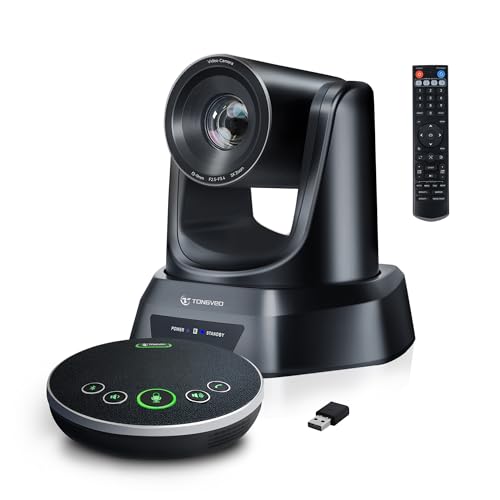
- AI tracking follows the active speaker automatically.
- Includes a Bluetooth speakerphone for integrated audio.
- USB3.0/HDMI plug-and-play setup is easy to deploy.
Best For: Small to medium offices, churches, and meeting rooms that want automatic speaker tracking with built-in conferencing audio.
Best for Easy Hybrid Meetings – Meeting Owl 3 360° Conference Camera
If you want one of the most practical all in one conference cameras for offices, the Meeting Owl 3 is built for hybrid meetings where people sit around a table and remote attendees need a clear view of the room. It combines 360° 1080p video, speaker tracking, and full-room audio pickup into a single USB device that’s simple to deploy.
Best For: Office teams that want an easy-to-use, plug-and-play conference camera for small to medium meeting rooms and hybrid collaboration.
Pros:
- 360° video and audio help remote participants see and hear everyone in the room
- AI-driven speaker tracking automatically focuses on the active speaker
- Plug-and-play setup makes it fast to get meetings running
- Certified for Microsoft Teams and works with Zoom, Google Meet, and more
Cons:
- May be more camera than needed for very small huddle spaces
- Expanded room coverage can require extra Owl Labs accessories
For offices that value simplicity and better hybrid engagement, this is a strong pick among all in one conference cameras for offices. It’s especially appealing if you want automatic framing without juggling multiple peripherals.
Best for Audio-First Meeting Rooms – Bose Professional VB-S Conference Camera
If you want one of the more polished all in one conference cameras for offices, the Bose Professional VB-S stands out for its strong audio performance and clean, low-profile design. It combines a 4K camera, beamforming microphones, and a built-in Bluetooth speaker, making it a practical fit for teams that want fewer separate devices on the table or wall.
Best For: Small to medium office meeting rooms that need better-than-average sound, simple mounting, and reliable video conferencing compatibility.
Pros:
- 4K Ultra HD camera with 5x digital zoom and wide field of view
- Four beamforming microphones help focus on voices and cut background noise
- Built-in Bluetooth speaker is useful for calls and music between meetings
- Works with Google Meet, Microsoft Teams, Zoom, and more
Cons:
- Premium pricing may be high for smaller teams
- Display mounting kit is sold separately
- Best suited to rooms that can benefit from a more advanced all-in-one setup
Overall, the VB-S is a strong fit if audio clarity and a tidy install matter as much as video quality. Among all in one conference cameras for offices, it leans more toward a refined meeting-room experience than a bare-bones budget pick.
Best for Large Rooms – TONGVEO 4K AI PTZ Conference Camera
If you need all in one conference cameras for offices that can cover a bigger meeting area without constant manual adjustment, this TONGVEO system is built for that job. The 4K PTZ camera adds 20X optical zoom, AI auto tracking, and flexible USB3.0, HDMI, LAN, and PoE connectivity, so it can fit into a more serious conference setup.
Best For: Medium to large conference rooms, hybrid meetings, and teams that want camera tracking plus built-in speakerphone and microphone support in one package.
Pros:
- 4K PTZ camera with 20X optical zoom for tighter framing and clearer detail
- AI auto tracking helps keep presenters centered during meetings or worship services
- Multiple connection options, including USB3.0, HDMI, LAN, and PoE
- Includes Bluetooth speakerphone and microphone for an all-in-one setup
Cons:
- More advanced than a simple plug-and-play webcam
- May be more camera than small huddle rooms need
For offices that want all in one conference cameras for offices with stronger zoom, better room coverage, and built-in audio support, this TONGVEO package is a practical fit. It makes the most sense when you need professional features without piecing together separate camera and audio gear.
Best for Hybrid Teams – Meeting Owl 4+ 4K 360° Conference Camera
If you want one of the most capable all in one conference cameras for offices, the Meeting Owl 4+ is built for hybrid meetings that need room coverage, clear speaker tracking, and simple setup. Its 360° 4K video and 360° audio help remote attendees see and hear the full room, while the automatic focus keeps attention on whoever is speaking.
Best For: Offices that run frequent hybrid meetings and want an intelligent, easy-to-deploy camera for medium to larger conference spaces.
Pros:
- 360° 4K video with 360° audio for full-room visibility and coverage
- Automatic speaker focus helps remote participants follow in-room discussion
- Plug-and-play USB setup with admin management via The Nest
- Works with Zoom, Google Meet, Webex, Microsoft Teams, and more
Cons:
- Premium price compared with basic conference webcams
- Best suited to collaborative rooms rather than solo desk use
For offices comparing all in one conference cameras for offices, the Meeting Owl 4+ stands out for its smart framing and room-wide audio rather than just sharp video. It is a strong fit when you need a single device that makes hybrid meetings feel more natural without a complicated AV install.
Best for Auto-Tracking Presentations – TONGVEO 1080p Conference System
If you want one of the more capable all in one conference cameras for offices, this TONGVEO bundle combines an AI auto-tracking PTZ camera with a wireless Bluetooth speakerphone. It is built for small to medium meeting rooms where you need clear video, room-filling audio, and simple plug-and-play setup without piecing together separate gear.
Best For: Small to medium office meeting rooms that need automatic speaker tracking and a separate wireless speakerphone for better audio pickup.
Pros:
- AI auto-tracking PTZ camera keeps presenters framed during meetings and trainings.
- 1080p at 60fps with 3x optical zoom delivers sharp, smooth video output.
- Bluetooth speakerphone with mic array improves voice pickup for groups of 8-12 people.
- USB 3.0, HDMI, and broad app compatibility make it easy to integrate.
Cons:
- The camera is wired, so it is not a fully wireless conference kit.
- Best suited to smaller rooms; larger spaces may need additional audio coverage.
- Feature set is strong, but the system is more complex than a simple webcam.
For offices that want an all-in-one conference cameras for offices setup with smarter framing and better audio than a basic webcam, this TONGVEO package is a practical mid-range choice. It is especially appealing when you want one system for meetings, training sessions, and live presentations.
Best for Easy Setup – NUROUM C10 1080P Conference Webcam
If you want one of the most straightforward all in one conference cameras for offices, the NUROUM C10(2nd Gen) is built for quick deployment in huddle rooms, focus rooms, and hybrid workspaces. It combines a 1080p camera, microphone array, and speaker in a single portable unit, so teams can start meetings without piecing together separate gear.
Best For: Small offices and hybrid teams that need a compact plug-and-play conference camera with integrated audio.
Pros:
- All-in-one design combines camera, microphones, and speaker in one portable device
- 1080p video with a 90° wide-angle lens suits small meeting rooms
- USB plug-and-play setup works with Zoom, Teams, and other major platforms
- Noise cancellation, AGC, and full-duplex audio help keep conversations clear
Cons:
- 90° field of view is better for small groups than larger conference rooms
- Requires nearSync software for firmware updates or advanced parameter changes
As a practical pick for all in one conference cameras for offices, the C10 stands out more for simplicity and portability than for advanced room-scale features. It’s a strong fit if you want a tidy, low-maintenance conference device that just works.
Best for Comfort – NexiGo Meeting 360 Ultra (Gen 3)
If you need all in one conference cameras for offices that can handle bigger spaces, the NexiGo Meeting 360 Ultra (Gen 3) stands out with multi-camera support, AI framing, and built-in conferencing tools. It’s designed to cover long tables, U-shaped rooms, and lecture-style setups without relying on a separate PC for every meeting.
Best For: Medium to large offices that want a room-ready conferencing system with flexible camera coverage and onboard apps.
Pros:
- Supports up to four cameras for wider room coverage and multiple viewpoints
- Built-in OS lets you start calls directly from the camera with major meeting apps
- Eight mics and Hi-Fi speakers help keep voice pickup clear in larger rooms
- AI framing and auto-tracking keep active speakers centered and visible
Cons:
- More camera system than smaller teams likely need
- Best suited to rooms with enough space to justify the setup
For offices that want all in one conference cameras for offices with real coverage flexibility, this model is a strong fit because it combines panoramic video, room audio, and app-based control in one system. It makes the most sense when you’re outfitting a main conference room rather than a small huddle space.
Best for AI Framing and Room Coverage – Yealink UVC40 E2 4K Conference Camera
If you want one of the more capable all in one conference cameras for offices, the Yealink UVC40 E2 is built around a 4K ultra-wide camera, AI auto framing, and speaker tracking to keep meetings focused and professional. Its 120° field of view makes it a strong fit for medium meeting rooms where you need everyone visible without constant camera adjustments.
Best For: Offices that want a single, easy-to-deploy conference camera system with strong video coverage, clear audio pickup, and smart framing features.
Pros:
- 4K camera with a 120° wide-angle lens captures larger rooms well
- Auto framing and speaker tracking help keep presentations and discussions centered
- 8 microphone arrays with echo reduction improve voice clarity for calls
- Built-in privacy lens cover and included wall/TV mounts support practical office use
Cons:
- Better suited to meeting rooms than very small huddle spaces
- Advanced features may be more than casual users need
- Wired network management may add setup complexity in some offices
For teams comparing all in one conference cameras for offices, this model stands out for combining smart AI tracking with strong audio and wide room coverage in a single device. It is a solid choice when you want fewer peripherals and a more polished meeting-room setup.
Best for Hybrid Rooms – PANOCORE360 360° Meeting Camera
If you want one of the more integrated all in one conference cameras for offices, the PANOCORE360 is built for small to medium meeting rooms that need video, audio, and speaker tracking in a single device. Its 360° capture, auto speaker focus, and 1080p output make it a practical fit for hybrid meetings where visibility and clarity matter more than fancy extras.
Best For: Small to medium conference rooms that need a simple, all-in-one setup for mixed in-person and remote meetings.
Pros:
- 360° camera with dual 180° viewing modes for full-room coverage
- Built-in speaker, 3-mic array, and AI voice isolation improve conversation clarity
- Driver-free setup works with Zoom, Teams, Webex, and Google Meet
- Local MicroSD recording adds flexibility for meetings and training sessions
Cons:
- 1080p output may not satisfy buyers who want true 4K meeting playback
- Best suited to small and medium rooms rather than larger boardrooms
- Older laptops may need the included splitter and power adapter for full performance
Overall, the PANOCORE360 is a strong fit if you need all in one conference cameras for offices that simplify setup while still giving remote participants a clear view of the room and the active speaker. It’s especially appealing for teams that want unified audio and video without adding separate peripherals.
Best for Auto-Tracking – TONGVEO AI Auto-Tracking PTZ Conference Camera
If you want one of the more hands-off all in one conference cameras for offices, this TONGVEO system stands out for its AI speaker tracking, built-in audio, and simple USB/HDMI setup. It’s a practical fit for teams that need a camera and mic solution that can follow presenters without constant manual adjustment.
Best For: Small to medium offices, churches, and meeting rooms that want automatic speaker tracking plus a combined camera and speakerphone setup.
Pros:
- AI auto-tracking keeps the active speaker centered without manual PTZ control.
- Includes a Bluetooth speakerphone with omnidirectional pickup and full-duplex audio.
- Plug-and-play USB3.0 or HDMI connectivity keeps setup straightforward.
- 3X optical zoom and 93° wide angle give it flexibility for different room sizes.
Cons:
- Best suited to smaller rooms rather than large conference spaces.
- 1080p is solid, but not ideal if you want 4K video.
- Tracking features may be more than some basic meeting setups need.
Overall, this is a strong choice if you want all in one conference cameras for offices that reduce setup friction and keep presenters in frame. It’s especially appealing for teams that value simple operation, clear audio, and a more professional meeting-room experience.
How We Picked the Best All in One Conference Cameras for Offices
For All in One Conference Cameras for Offices, we prioritized video quality, microphone pickup, speaker clarity, framing intelligence, room coverage, and ease of setup. We also looked for practical office-friendly features like USB connectivity, Bluetooth support, certified platform compatibility, and flexible mounting or placement options.
Quick Comparison
Think in terms of room size and meeting style. 360-degree cameras are often best for small to medium rooms where people sit around a table, while PTZ models with optical zoom work better in longer rooms, presentation spaces, or setups that need more control over the frame. Units with built-in speakers and mic arrays can reduce cable clutter and simplify deployment.
Key Buying Factors for All in One Conference Cameras for Offices
Room Size and Layout
Match the camera to the space. A wide-angle or 360-degree model is usually enough for compact meeting rooms, while larger conference rooms may benefit from zoom, auto-tracking, or multi-camera capability.
Audio Pickup and Speaker Output
Clear audio matters as much as video. Look for strong microphone arrays, noise reduction, and a speaker that can fill the room without distortion.
Framing and Tracking
AI framing and speaker tracking can make meetings feel more polished, especially when multiple people speak from different positions. These features are useful for boardrooms, training sessions, and collaborative team meetings.
Connectivity and Compatibility
USB is the simplest path for most offices, while HDMI, LAN, and PoE can be helpful in more permanent installations. Make sure the camera works smoothly with your preferred platform and room system.
Resolution and Zoom
1080p is often sufficient for everyday video calls, but 4K can improve clarity in larger rooms or when zooming is needed. Optical zoom is more reliable than digital zoom when you need to preserve image quality.
Who Should Buy Which All in One Conference Cameras for Offices?
Smaller teams and huddle rooms should lean toward compact, all-in-one designs with simple setup and strong speakerphone performance. Medium and larger offices may want PTZ cameras or higher-end 360-degree systems with better tracking and room coverage. If you want the easiest path to fewer devices and faster deployment, a true all-in-one model is usually the best fit.