
When you’re looking to enhance productivity in your office, choosing the right all-in-one printer is essential. These devices combine printing, scanning, and copying, streamlining your workflow. With options like the HP Color LaserJet Pro and the Epson EcoTank, you can find a model that fits your specific needs. But what features should you prioritize? Let’s explore the top contenders and what they can offer your workspace.
HP Color LaserJet Pro MFP 3301sdw Wireless All-in-One Printer

If you’re part of a small team that needs to produce professional-quality color documents, the HP Color LaserJet Pro MFP 3301sdw Wireless All-in-One Printer is an excellent choice. This versatile machine functions as a printer, scanner, and copier, with duplex printing and an automatic document feeder for added efficiency. You’ll appreciate its print speeds of up to 26 pages per minute. Plus, with built-in Wi-Fi and Ethernet connectivity, you can easily print from anywhere using the HP app. Weighing 37.7 pounds and boasting a 250-sheet capacity, it’s designed to meet your office’s demands seamlessly.
Best For: Small teams seeking to produce high-quality color documents efficiently and conveniently.
Pros:
- High print speeds of up to 26 pages per minute for both black and color documents.
- Versatile functionality, including printing, scanning, copying, and duplex printing with an automatic document feeder.
- Built-in Wi-Fi and Ethernet connectivity, allowing for remote printing through the HP app.
Cons:
- Requires specific HP toner cartridges for proper functioning, limiting third-party options.
- Weighs 37.7 pounds, which may make it less portable.
- Firmware updates are necessary to maintain cartridge effectiveness, which may be inconvenient for some users.
HP OfficeJet Pro 8125e Wireless All-in-One Color Inkjet Printer

The HP OfficeJet Pro 8125e Wireless All-in-One Color Inkjet Printer is perfect for busy home office professionals who need versatility and efficiency in their printing tasks. With print, scan, copy, and duplex capabilities, it streamlines your workflow. You’ll appreciate the fast print speeds of up to 12 pages per minute and vibrant resolutions up to 4800 x 1200 dpi. The 225-sheet capacity and automatic document feeder make handling large jobs effortless. Plus, the AI-enabled features adapt to your needs, ensuring peak performance. Enjoy a 3-month Instant Ink trial, and rest easy with the one-year limited warranty for added peace of mind.
Best For: Busy home office professionals seeking a versatile and efficient all-in-one printer for their printing tasks.
Pros:
- Fast print speeds of up to 12 pages per minute enhance productivity.
- High print resolution of up to 4800 x 1200 dpi ensures vibrant and quality output.
- Automatic document feeder and 225-sheet capacity simplify handling of larger print jobs.
Cons:
- Limited warranty of one year may not provide enough coverage for some users.
- Single tray design could be restrictive for users needing to switch between multiple paper types frequently.
- Ink cartridges may require frequent replacement, especially for high-volume users.
HP OfficeJet Pro 9135e Wireless All-in-One Color Inkjet Printer

For busy professionals needing a reliable and versatile printing solution, the HP OfficeJet Pro 9135e Wireless All-in-One Color Inkjet Printer stands out with its impressive print speeds of 20 pages per minute in color and 25 in black. This printer excels in producing professional-quality color documents, such as presentations and brochures. With automatic two-sided printing, scanning, copying, and faxing capabilities, it enhances your productivity. Plus, its dual-band Wi-Fi guarantees seamless wireless printing, while the HP App lets you manage tasks straight from your smartphone. Trust in HP’s quality assures you’re getting a dependable office companion for all your printing needs.
Best For: Busy professionals needing a reliable and versatile printing solution for high-quality documents.
Pros:
- Fast print speeds of 20 ppm in color and 25 ppm in black enhance productivity.
- Multifunction capabilities including printing, scanning, copying, and faxing streamline office tasks.
- Dual-band Wi-Fi ensures stable wireless connectivity for mobile printing.
Cons:
- Initial setup may require some technical knowledge for optimal performance.
- Ongoing ink costs can accumulate, particularly if not using the Instant Ink trial.
- Size may be a consideration for smaller office spaces or home offices.
HP LaserJet Pro MFP 3101sdw Wireless All-in-One Laser Printer

Designed specifically for small teams, the HP LaserJet Pro MFP 3101sdw Wireless All-in-One Laser Printer combines speed and efficiency to meet your office’s demands. With print speeds up to 35 pages per minute and a sharp resolution of 1200 x 1200 dpi, it produces professional-quality documents quickly. Its multifunctionality includes scanning, copying, and auto duplex printing, while the 250-sheet input tray and 50-sheet automatic document feeder enhance productivity. You’ll appreciate the reliable Wi-Fi connectivity for easy printing from your devices. Plus, with a compact design and award-winning reliability, this printer is an excellent choice for your busy workspace.
Best For: Small teams looking for a reliable, multifunctional laser printer that delivers professional-quality black-and-white documents quickly.
Pros:
- High-speed printing of up to 35 pages per minute, enhancing productivity.
- Versatile functionality with scanning, copying, and auto duplex printing capabilities.
- Reliable Wi-Fi connectivity allows for seamless printing from various devices.
Cons:
- Limited media size support, with a maximum size of 8.5 x 14 inches.
- Only compatible with HP cartridges, which can limit options for users seeking third-party alternatives.
- Heavier than some competitors, weighing 23.1 pounds, which may affect portability.
Brother DCP-L2640DW Wireless Compact Monochrome Multi-Function Laser Printer

Looking for an efficient solution for your small office? The Brother DCP-L2640DW is a compact monochrome multi-function laser printer that covers all your printing, scanning, and copying needs. With a speedy print rate of up to 36 pages per minute, you’ll breeze through tasks. Its 50-page automatic document feeder simplifies multi-page jobs, while dual-band wireless connectivity guarantees seamless integration into your network. Plus, you can manage it remotely using the Brother Mobile Connect App. Don’t forget the Refresh EZ Print Subscription Service to save on toner costs and avoid shortages. This printer truly combines efficiency and functionality!
Best For: Small businesses and home offices looking for a compact, multifunctional printer that delivers high-speed, monochrome printing.
Pros:
- High-speed printing of up to 36 pages per minute, enhancing productivity.
- Dual-band wireless connectivity allows for flexible network integration and easy remote management.
- 50-page automatic document feeder simplifies the process of scanning and copying multi-page documents.
Cons:
- Monochrome printing only limits options for color document needs.
- No advanced features like duplex scanning, which may be a drawback for some users.
- Requires specific Brother toner, which might limit third-party options and increase costs.
HP Laserjet Pro MFP 3101fdw Wireless All-in-One Laser Printer

The HP Laserjet Pro MFP 3101fdw Wireless All-in-One Laser Printer stands out as an ideal choice for small teams of up to seven users, providing efficient printing, scanning, copying, and faxing capabilities in one compact device. With a print speed of up to 35 pages per minute and a maximum print resolution of 1200 dpi, it delivers high-quality results quickly. You can easily connect via Ethernet, Bluetooth, or USB, and manage your print tasks with HP Web JetAdmin. Plus, HP Wolf Pro Security guarantees your data stays protected, making it a reliable option for your office needs.
Best For: Small teams of up to seven users seeking an efficient all-in-one printing solution.
Pros:
- High-speed printing of up to 35 pages per minute, enhancing productivity.
- Versatile connectivity options including wireless, Ethernet, Bluetooth, and USB for easy integration.
- Robust security features such as HP Wolf Pro Security to protect sensitive data.
Cons:
- Limited color printing capabilities, as it is a black & white laser printer.
- Weight of 23.1 pounds may make it less portable compared to lighter alternatives.
- Maximum input capacity of 250 sheets, which may require frequent refilling in high-volume environments.
HP OfficeJet Pro 9125e Wireless All-in-One Color Inkjet Printer

For professionals seeking a reliable and efficient printing solution, the HP OfficeJet Pro 9125e Wireless All-in-One Color Inkjet Printer stands out with its impressive capabilities. It prints, scans, copies, and faxes, making it an all-in-one powerhouse for your office. With print speeds of up to 18 ppm in color and 22 ppm in black, your workflow remains uninterrupted. The 250-sheet input tray and automatic duplex printing enhance productivity. Plus, its dual-band Wi-Fi guarantees seamless connectivity. You can easily manage tasks through the HP App, making printing from your smartphone a breeze. Enjoy a 3-month Instant Ink trial with your purchase!
Best For: Professionals and businesses looking for a reliable all-in-one printing solution that delivers high-quality color documents and efficient performance.
Pros:
- Versatile functionality: Combines printing, scanning, copying, and faxing in one device, catering to various office needs.
- Fast print speeds: Offers quick printing at up to 18 ppm in color and 22 ppm in black, enhancing productivity.
- User-friendly technology: Features a mobile app for easy management and dual-band Wi-Fi for reliable connectivity.
Cons:
- Initial ink costs: The printer may require purchasing additional ink after the 3-month Instant Ink trial ends.
- Size: The all-in-one design may take up more space compared to single-function printers.
- Limited paper capacity: The 250-sheet input tray may not be sufficient for high-volume printing tasks without frequent refills.
Epson EcoTank ET-2800 Wireless Color All-in-One Printer

Epson EcoTank ET-2800 Wireless Color All-in-One Printer stands out as the perfect choice for families and small home offices needing a reliable, cost-effective printing solution. With cartridge-free printing and refillable ink tanks, you can save up to 90% on ink costs, producing up to 7,500 color pages. The Micro Piezo Heat-Free Technology guarantees vivid prints at a maximum resolution of 5760 x 1440 dpi, with speeds reaching 10 pages per minute. Plus, you’ll enjoy features like a high-resolution flatbed scanner, easy connectivity options, and an eco-friendly design that reduces waste. It’s a smart investment for your printing needs!
Best For: Families and small home offices looking for a reliable and cost-effective printing solution.
Pros:
- Cartridge-free printing: Reduces waste and saves up to 90% on ink costs.
- High-quality output: Produces vivid prints with a maximum resolution of 5760 x 1440 dpi.
- Convenient features: Includes a flatbed scanner, easy connectivity options, and supports various paper types.
Cons:
- Initial cost: Higher upfront investment compared to traditional cartridge printers.
- Print speed: While decent, it may not meet the needs of users requiring extremely fast printing.
- Limited warranty: Manufacturer warranty may not cover all potential issues, leading to extra costs for repairs.
HP OfficeJet Pro 8135e Wireless All-in-One Inkjet Printer
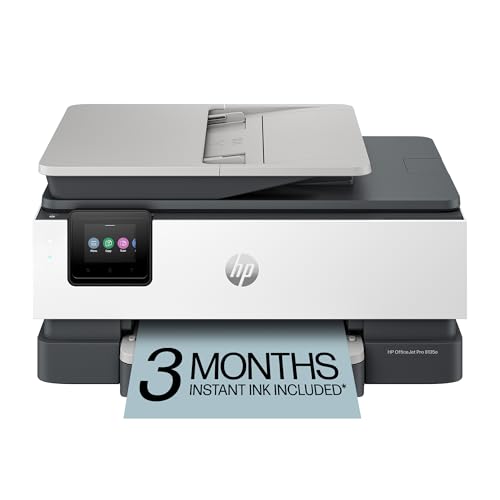
Designed for busy professionals, the HP OfficeJet Pro 8135e Wireless All-in-One Inkjet Printer streamlines your office tasks with its multifunction capabilities. You can print, scan, copy, and fax effortlessly, and the auto 2-sided printing saves paper. With print speeds up to 20 ppm in black and 10 ppm in color, you won’t be waiting long for documents. The 2.7-inch touchscreen makes navigation a breeze, and dual-band Wi-Fi guarantees reliable connectivity. Plus, the 3-month Instant Ink trial means you won’t run out of ink unexpectedly. With HP Wolf Essential Security, your data stays protected while you focus on your work.
Best For: Busy professionals who need a reliable all-in-one printer that can handle printing, scanning, copying, and faxing efficiently.
Pros:
- Multifunction capabilities allow for printing, scanning, copying, and faxing all in one device.
- Fast print speeds of up to 20 ppm in black and 10 ppm in color help save time on document production.
- User-friendly 2.7-inch touchscreen and dual-band Wi-Fi provide easy navigation and reliable connectivity.
Cons:
- Requires HP cartridges only, limiting options for third-party ink.
- Subscription service for Instant Ink may incur additional costs after the trial period.
- Limited input tray capacity of 225 sheets might require more frequent refilling for high-volume printing.
HP OfficeJet Pro 8139e Wireless All-in-One Color Inkjet Printer

The HP OfficeJet Pro 8139e Wireless All-in-One Color Inkjet Printer is an excellent choice for small to medium-sized businesses that demand high-quality printing and versatile functionality. With capabilities to print, scan, copy, and fax, it streamlines your workflow. Enjoy fast print speeds of up to 20 pages per minute for black and 10 for color, plus a 225-sheet input tray. The 2.7-inch touchscreen makes navigation simple. Benefit from wireless printing through your devices using the HP app, while the sustainable design guarantees eco-friendliness. Plus, HP’s security features protect your data, keeping your business safe.
Best For: Small to medium-sized businesses that require high-quality printing and multifunctional capabilities.
Pros:
- Versatile all-in-one functionality: print, scan, copy, and fax all in one device.
- Fast print speeds of up to 20 ppm for black and 10 ppm for color, enhancing productivity.
- Eco-friendly design made from over 45% recycled plastic, contributing to sustainability efforts.
Cons:
- Monthly fee required post-trial for the Instant Ink subscription service.
- Compatibility issues with non-HP cartridges, which may limit options for ink replacement.
- Limited print speed for color documents compared to black printing speeds, which may affect workflow for color-heavy tasks.
Factors to Consider When Choosing an All in One Printer for Office
When you’re choosing an all-in-one printer for your office, several key factors come into play. You’ll want to think about print technology, features, and connectivity options. Plus, consider print speed, quality, and the ongoing costs of supplies to guarantee you make the right choice for your needs.
Print Technology Options
Choosing the right print technology for your all-in-one printer can greatly impact your office’s efficiency and costs. You’ll typically choose between inkjet and laser printers. Inkjet models excel in producing high-quality color images, while laser printers shine in speed and text quality for black-and-white documents. Although inkjet printers often have a lower upfront cost, they can lead to higher ink replacement expenses over time. In contrast, laser printers might cost more initially but are more economical for high-volume printing due to their toner longevity. Laser printers also offer faster print speeds, with some reaching up to 35 pages per minute. For high-volume black-and-white tasks, monochrome laser printers are usually your best bet.
Functionality and Features
To enhance your office’s productivity, consider the multifunction capabilities of an all-in-one printer, which can streamline various tasks like printing, scanning, copying, and faxing. Evaluate print speed; many models range from 10 to 35 pages per minute, ensuring you handle high-volume jobs efficiently. Automatic document feeders (ADF) and duplex printing features can boost productivity by allowing quick handling of multi-page documents and two-sided printing. Check the maximum print resolution—higher resolutions, up to 4800 x 1200 dpi for inkjet and 1200 x 1200 dpi for laser, enhance document quality. Finally, assess input and output sheet capacities; options from 60 to 250 sheets can determine how often you need to refill paper in busy office environments.
Connectivity and Compatibility
Selecting the right all-in-one printer hinges on understanding its connectivity options and compatibility with your office’s devices. Look for built-in Wi-Fi, Ethernet, and USB ports to guarantee seamless integration with various setups. Dual-band Wi-Fi support is a plus, as it allows your printer to operate on both 2.4GHz and 5GHz bands, enhancing performance and reducing interference.
Check for compatibility with mobile printing solutions, enabling easy printing from smartphones or tablets through specific apps. Some printers even offer advanced features like automatic issue detection to minimize downtime. Finally, confirm compatibility with operating systems like Windows, Mac, and mobile platforms to avoid any restrictions that could hinder your printing capabilities across different devices.
Print Speed and Quality
After ensuring your all-in-one printer connects seamlessly with your office devices, it’s time to contemplate print speed and quality. Look for printers that deliver speeds between 10 to 35 pages per minute for black-and-white and varying speeds for color prints. The maximum print resolution matters too; some models offer up to 4800 x 1200 optimized dpi for vibrant colors and 1200 x 1200 dpi for sharp black-and-white documents. Consider automatic duplex printing for efficient double-sided outputs, especially in high-volume environments. Features like automatic document feeders (ADF) can streamline your workflow by handling multi-page tasks without manual loading. Finally, check the initial page print time—some printers can produce the first page in as little as 7 seconds, minimizing wait times.
Cost of Supplies
When you’re choosing an all-in-one printer for your office, the cost of supplies is an essential factor that can greatly impact your budget. Inkjet printers usually have higher ongoing ink costs compared to laser printers, which often feature lower per-page printing expenses thanks to high-yield toner cartridges. While inkjet subscriptions like Instant Ink can help manage costs, be sure to take into account the monthly fee after any trial period ends. Laser printers can print thousands of pages per toner cartridge, making them more economical for high-volume tasks. Don’t forget to evaluate the total cost of ownership, including purchase price, maintenance, and ongoing supply costs, to make an informed decision that suits your office’s needs.
Size and Design
Finding the right all-in-one printer for your office involves careful consideration of size and design. The dimensions can vary considerably; some models measure 16.46 x 13.44 x 16.5 inches, while others are more compact at 13.29 x 18.11 x 9.17 inches. If your office has limited space, opt for a smaller model. Weight also matters—printers can weigh between 23.1 and over 37 pounds, affecting portability. Make sure the design accommodates the maximum media size you need, typically 8.5 x 11 inches for inkjet and 8.5 x 14 inches for laser printers. Additionally, consider input and output sheet capacities, as well as the user interface features like touchscreen displays, which enhance usability and efficiency.