
When it comes to outfitting your office with the right printer, efficiency and reliability should top your list. You need a model that not only meets your printing demands but also fits seamlessly into your workflow. From all-in-one solutions to specialized color printers, the options can be overwhelming. However, understanding the key features can make all the difference. Let’s explore some of the best printers that could transform your workspace.
Epson EcoTank ET-2800 Wireless All-in-One Printer

If you’re looking for a reliable and cost-effective printer for your office, the Epson EcoTank ET-2800 Wireless All-in-One Printer stands out with its innovative cartridge-free design. This printer uses refillable ink tanks, saving you up to 90% on replacement ink costs. With a print speed of up to 10 pages per minute and a maximum resolution of 5760 x 1440 dpi, your documents will look sharp. Plus, you’ll receive up to two years of ink, minimizing interruptions. Its eco-friendly design reduces waste, making it a smart choice for both your budget and the environment.
Best For: Families and home offices looking for a cost-effective, eco-friendly printer with high-capacity ink tanks.
Pros:
- Cartridge-free design reduces waste and saves up to 90% on ink costs.
- High print resolution of 5760 x 1440 dpi ensures sharp and vivid prints.
- Includes up to two years of ink, minimizing the hassle of frequent replacements.
Cons:
- Print speed of up to 10 pages per minute may be slower for high-volume printing needs.
- Limited media size support (maximum 8.5 x 14 inches) may not accommodate larger print jobs.
- Customer service response times can vary, as indicated by some user feedback.
HP Color LaserJet Pro MFP 3301sdw Wireless All-in-One Printer

The HP Color LaserJet Pro MFP 3301sdw Wireless All-in-One Printer is the perfect choice for small teams that demand professional-quality color documents without sacrificing speed. It prints, scans, and copies efficiently, reaching up to 26 pages per minute. With a maximum print resolution of 600×600 DPI, your documents will look sharp. This printer features a 250-sheet input capacity and two trays for versatile media handling. Plus, built-in Wi-Fi and Ethernet make connectivity a breeze. With HP Wolf Pro security, you can trust that your data’s safe. Customers rate it 4.1 out of 5, making it a reliable office companion.
Best For: Small teams looking for a reliable all-in-one printer that delivers professional-quality color documents quickly.
Pros:
- High print speeds of up to 26 pages per minute for both black and color documents.
- Versatile media handling with a 250-sheet input capacity and dual trays.
- Built-in Wi-Fi and Ethernet connectivity for easy printing from various devices.
Cons:
- Requires original HP toner cartridges for optimal performance, which may increase costs.
- Maximum print resolution of 600×600 DPI may not satisfy those needing higher-quality graphics.
- Weighs 37.7 pounds, making it less portable than smaller printers.
HP LaserJet Pro MFP 3101sdw Wireless All-in-One Laser Printer

Designed for small teams needing efficiency and reliability, the HP LaserJet Pro MFP 3101sdw Wireless All-in-One Laser Printer stands out with its impressive print speed of up to 35 pages per minute. It delivers professional-quality black-and-white documents with a resolution of up to 1200 x 1200 dpi. Enjoy multifunctionality with fast printing, scanning, copying, and auto duplex printing. Its 250-sheet input tray and 50-sheet automatic document feeder enhance productivity. Plus, reliable Wi-Fi connectivity allows seamless printing from any device. With a robust design and a one-year warranty, this printer is a dependable choice for your office needs.
Best For: Small teams needing a reliable and efficient all-in-one laser printer for high-quality black-and-white document printing.
Pros:
- Fast printing speed of up to 35 pages per minute, enhancing productivity.
- Multifunctional capabilities including printing, scanning, copying, and auto duplex printing.
- Seamless Wi-Fi connectivity allows printing from various devices including laptops, PCs, and smartphones.
Cons:
- Limited to black-and-white printing, which may not suit users needing color outputs.
- Compatibility restricted to HP cartridges only, potentially increasing operating costs.
- Weight of 23.1 pounds may make it less portable compared to lighter models.
Brother DCP-L2640DW Wireless Monochrome Multi-Function Laser Printer

For small businesses seeking efficiency, the Brother DCP-L2640DW Wireless Monochrome Multi-Function Laser Printer stands out as an ideal choice. This compact printer effortlessly handles printing, scanning, and copying tasks, making it perfect for your workspace. With impressive print speeds of up to 36 pages per minute and a 50-page automatic document feeder, you’ll breeze through multi-page jobs. Plus, its dual-band wireless connectivity guarantees seamless access from any device. You can even manage the printer remotely using the Brother Mobile Connect App. For reliable toner supply, consider the Refresh EZ Print Subscription for significant savings.
Best For: Small businesses looking for an efficient and compact solution for printing, scanning, and copying tasks.
Pros:
- Fast Print Speed: Capable of printing up to 36 pages per minute, enhancing productivity.
- Versatile Functionality: Combines printing, scanning, and copying in one compact device.
- Remote Management: Allows for easy control and monitoring via the Brother Mobile Connect App.
Cons:
- Monochrome Only: Limited to black and white printing, which may not meet all users’ needs.
- No Color Scanning: While it can scan documents, color scanning speeds are slower and may not be ideal for color documents.
- Compact Size: May not be suitable for larger printing tasks or high-volume workloads in larger businesses.
Canon PIXMA TS4320 Wireless Color Inkjet Printer

Compact and versatile, the Canon PIXMA TS4320 Wireless Color Inkjet Printer is perfect for home users and hybrid workers seeking a budget-friendly all-in-one solution. With its impressive print quality from a 2-cartridge hybrid ink system, you’ll enjoy vibrant color documents. The automatic 2-sided printing feature helps you save on paper, while its diverse media support lets you print up to 8.5” x 11”. Setup is easy, and you can connect through dual-band Wi-Fi or print directly from your smartphone using the Canon PRINT app. Plus, it’s ENERGY STAR certified, making it an eco-friendly choice for your workspace.
Best For: Home users and hybrid workers looking for a compact, budget-friendly all-in-one printer.
Pros:
- Impressive print quality with a 2-cartridge hybrid ink system for vibrant color documents.
- Automatic 2-sided printing feature reduces paper consumption and saves costs.
- Easy connectivity options with dual-band Wi-Fi and mobile printing capabilities via Canon PRINT App.
Cons:
- Limited paper size support, only printing up to 8.5” x 11”.
- Single-function cartridges may require more frequent replacements, increasing long-term costs.
- Compact design may lead to a smaller input tray, requiring more frequent refills.
HP DeskJet 2855e Wireless All-in-One Printer

The HP DeskJet 2855e Wireless All-in-One Printer is an excellent choice for small offices or home setups that require a multifunctional device without breaking the bank. With color printing speeds of 5.5 ppm and black at 7.5 ppm, it efficiently handles your printing tasks. The printer’s 60-sheet input tray supports your everyday needs, while HP AI guarantees your prints are perfectly formatted. Enjoy seamless wireless connectivity, automatically resolving issues, and use the HP app to print, scan, or copy directly from your smartphone or tablet. Plus, it comes with three months of Instant Ink to keep you running smoothly.
Best For: Those seeking an affordable, multifunctional printer for home or small office use.
Pros:
- Multifunctional capabilities: Combines printing, scanning, and copying in one device.
- Wireless connectivity: Provides reliable single-band Wi-Fi connections with automatic issue resolution.
- Mobile app integration: Easily print, scan, or copy directly from smartphones and tablets using the HP app.
Cons:
- Limited paper capacity: The 60-sheet input tray may require frequent refills for larger print jobs.
- Moderate print speeds: Color printing at 5.5 ppm and black at 7.5 ppm may be slower compared to other models.
- Basic features: Lacks advanced functionalities that may be present in higher-end printers.
HP Envy 6155e Wireless All-in-One Color Inkjet Printer

If you need a reliable all-in-one printer that effortlessly handles various tasks, the HP Envy 6155e Wireless All-in-One Color Inkjet Printer is a standout choice. With printing, scanning, and copying capabilities, it’s designed for efficiency. You’ll appreciate its print speeds of up to 10 pages per minute in black and 7 in color. The 2.4-inch color touchscreen makes navigation easy, while its AI-enabled printing optimizes content for precise results. Plus, with dual-band Wi-Fi, you’ll enjoy seamless connectivity. Eco-conscious users will love its sustainable materials and HP’s commitment to forest conservation. Don’t forget the convenient Instant Ink trial for hassle-free ink delivery!
Best For: Those seeking a versatile and eco-friendly all-in-one printer suitable for home or small office use.
Pros:
- User-friendly 2.4-inch color touchscreen simplifies navigation and operation.
- AI-enabled printing technology optimizes print quality for better results.
- Sustainable design made from 60% recycled plastic and supports forest conservation efforts.
Cons:
- Limited input tray capacity of 100 sheets may require frequent refills for high-volume printing.
- Non-HP cartridges are blocked, limiting options for ink replacement.
- Monthly fee applies after the Instant Ink trial, which may not suit all users.
Canon PIXMA TS6520 Wireless Color Inkjet Printer

Designed with families and students in mind, the Canon PIXMA TS6520 Wireless Color Inkjet Printer stands out for its all-in-one functionality, allowing you to print, copy, and scan with ease. You’ll appreciate the sharp text and vibrant colors thanks to its hybrid ink system, delivering a maximum print resolution of 1200 x 1200 dpi. With automatic duplex printing, you’ll save paper effortlessly. The printer’s dual-band Wi-Fi guarantees stable connections for mobile printing through various apps. At just 15.65 pounds and measuring 14.8D x 14W x 6.7H inches, it’s compact for any workspace, making it an excellent choice for your needs.
Best For: Families and students seeking a reliable, easy-to-use printer for occasional tasks without advanced features.
Pros:
- Compact design makes it suitable for small workspaces.
- High-quality printing with vibrant colors and sharp text.
- Wireless connectivity options allow for convenient mobile printing.
Cons:
- Limited to basic features, which may not satisfy advanced users.
- Print speed may be slower compared to higher-end models.
- Only supports up to letter size media, restricting larger projects.
HP Smart Tank 5000 Wireless All-in-One Ink Tank Printer

For busy offices that demand reliability and efficiency, the HP Smart Tank 5000 Wireless All-in-One Ink Tank Printer stands out with its impressive capacity to print thousands of pages without needing frequent ink replacements. With up to 2 years of ink included, you can enjoy cartridge-free printing with minimal interruptions. The mess-free refill system makes it easy to replenish ink, while HP AI technology guarantees accurate formatting, reducing waste. Designed for long-lasting performance, this printer maintains high-quality output, delivering sharp text and vibrant colors. Plus, HP’s premium support means you’ll get help whenever you need it.
Best For: Busy offices and home users looking for a reliable and high-capacity printing solution that minimizes the need for frequent ink replacements.
Pros:
- Cartridge-free printing: Comes with up to 2 years of ink, allowing for thousands of pages without the hassle of replacing cartridges.
- User-friendly features: The mess-free refill system and HP AI technology ensure easy ink replenishment and accurate formatting, respectively.
- Long-lasting performance: Maintains high-quality prints with sharp text and vibrant colors, even after extensive use.
Cons:
- Initial cost: The upfront investment may be higher compared to traditional cartridge printers.
- Limited advanced features: May lack some advanced functionalities found in more expensive models.
- Dependence on HP ink: Requires specific HP ink for refills, which could limit options for users looking for cheaper alternatives.
HP OfficeJet Pro 8135e Wireless All-in-One Color Inkjet Printer
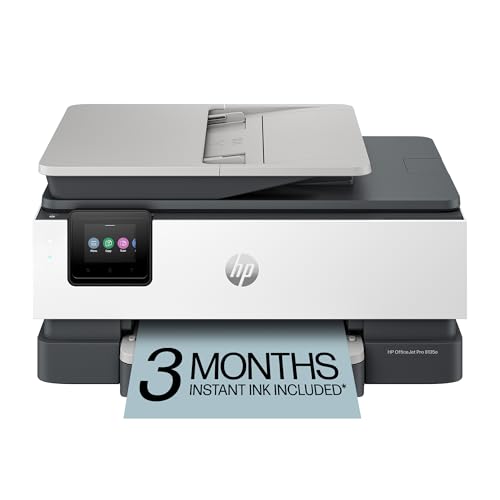
The HP OfficeJet Pro 8135e Wireless All-in-One Color Inkjet Printer stands out as an ideal choice for small to medium-sized businesses seeking efficiency and versatility. With its ability to print, scan, copy, and fax, along with auto 2-sided printing and an auto document feeder, it streamlines your workflow. Print speeds reach up to 20 ppm in black and 10 ppm in color, ensuring you won’t waste time. The dual-band Wi-Fi and HP app make connectivity a breeze, while the 2.7-inch touchscreen simplifies navigation. Plus, with HP Wolf Essential Security, your data remains protected, making this printer a smart investment for your office.
Best For: Small to medium-sized businesses looking for an efficient and versatile all-in-one printer solution.
Pros:
- High print speeds of up to 20 ppm in black and 10 ppm in color enhance productivity.
- User-friendly touchscreen interface and reliable dual-band Wi-Fi simplify navigation and connectivity.
- HP Wolf Essential Security protects sensitive data and networks from cyber threats.
Cons:
- Ink subscription may incur additional costs after the 3-month trial period.
- Limited input tray capacity of 225 sheets may require frequent refills for high-volume printing.
- Compatibility with HP cartridges only may limit options for ink replacement.
Factors to Consider When Choosing a Printer for Office Use
When choosing a printer for your office, it’s important to take into account several key factors. Think about your print speed needs, the cost of ink or toner, and the connectivity options that will best suit your setup. You’ll also want to evaluate the printer’s functionality beyond just printing and its size to make certain it fits your workspace.
Print Speed Requirements
Choosing a printer that meets your office’s print speed requirements is essential, especially if you need to maintain a smooth workflow. Many printers offer speeds from 5.5 pages per minute (ppm) for color to as high as 35 ppm for black-and-white documents. If your office has heavy printing demands, consider high-speed options like laser printers, which can achieve up to 26 ppm for color and 36 ppm for monochrome. A printer’s initial page print time also matters; some models can produce the first page in as little as 7 seconds. Additionally, opting for a printer with duplex printing capability can enhance speed and efficiency by automatically printing on both sides, reducing manual work and wait times.
Ink or Toner Cost
How much are you willing to spend on ink or toner for your office printer? This question is essential when choosing a printer. Inkjet printers may have a lower upfront cost, but they can lead to higher ongoing expenses due to frequent ink replacements. On the other hand, laser printers might cost more initially but offer a lower cost per page thanks to longer-lasting toner cartridges, which can print between 1,500 to 10,000 pages. If you want to save considerably, consider ink tank models with refillable tanks—they can reduce ink costs by up to 90%. Also, subscription services for ink delivery can help you manage expenses and avoid running out unexpectedly, ensuring predictable monthly costs based on your printing habits.
Connectivity Options Available
Connectivity options play an essential role in selecting the right printer for your office. Look for models with built-in Wi-Fi, allowing multiple users to print wirelessly from various devices. Dual-band Wi-Fi support, operating on both 2.4GHz and 5GHz, guarantees stable connections and minimizes interference, which is critical in busy environments. Additionally, consider printers with Ethernet ports for reliable wired connections, enhancing speed and security. USB ports are also important, enabling direct connections to computers for easy printing without needing network access. Don’t overlook mobile printing compatibility; features that support specific apps let you print conveniently from smartphones and tablets, boosting productivity in today’s modern workspace. Make certain your printer meets these connectivity needs for ideal office functionality.
Functionality Beyond Printing
When selecting a printer for your office, it’s important to contemplate functionality beyond just printing. Multifunction printers that include scanning and copying can greatly boost productivity by allowing you to handle multiple tasks with one device, eliminating the need for extra equipment. Look for Automatic Document Feeders (ADF) to streamline your scanning and copying processes, letting you load multiple pages at once and saving you valuable time. Duplex printing features enable automatic double-sided printing, which reduces paper usage and costs, making it a greener choice. Advanced mobile printing options let you print directly from smartphones or tablets, enhancing convenience. Finally, prioritize security features to protect sensitive information, ensuring your professional documents remain safe.
Space and Size Considerations
Selecting the right printer for your office involves more than just features; you also need to take into account its size and space requirements. Consider the printer’s dimensions, as compact models fit better in limited spaces, while larger ones may enhance functionality but demand more desk area. Don’t forget to evaluate input and output tray capacities; larger trays reduce the need for frequent paper refills, boosting efficiency during busy hours. The printer’s weight matters too, especially if you plan to relocate it often—heavier models might need sturdier furniture. Finally, verify the printer’s design aligns with your office decor while allowing proper ventilation and access to connectivity options. This thoughtful approach will enhance your workspace’s functionality.