
In today’s fast-paced business environment, choosing the right color printer can greatly impact your office productivity. You need a model that balances speed, quality, and cost efficiency. From advanced security features to eco-friendly options, the choices are diverse. As you explore the top contenders for 2026, you’ll discover essential factors that can help streamline your workflow and support your unique business needs. What features will matter most to you?
HP Color LaserJet Pro MFP 3301sdw Wireless All-in-One Printer

If you’re part of a small team looking for a reliable, high-quality printing solution, the HP Color LaserJet Pro MFP 3301sdw Wireless All-in-One Printer is a standout choice. It combines printing, scanning, and copying functions into one efficient device. With print speeds of up to 26 pages per minute and a maximum print resolution of 600×600 DPI, you’ll get professional-quality color documents quickly. Its built-in Wi-Fi and Ethernet guarantee easy connectivity, while the HP app lets you manage tasks remotely. Weighing 37.7 pounds and measuring 16.5 inches high, it fits perfectly in any office space.
Best For: Small teams seeking a reliable all-in-one printer that delivers professional-quality color documents efficiently.
Pros:
- Fast print speeds of up to 26 pages per minute for both black and color documents.
- Versatile functionality, combining printing, scanning, and copying in one device.
- Easy connectivity options with built-in Wi-Fi and Ethernet, plus compatibility with the HP app for remote management.
Cons:
- Maximum print resolution is limited to 600×600 DPI, which may not meet high-end graphic needs.
- Requires original HP toner cartridges with chips, which can limit cost-effective options.
- Weighs 37.7 pounds, making it less portable for users needing to move it frequently.
Brother MFC-L3720CDW Wireless Color Laser Printer

The Brother MFC-L3720CDW Wireless Color Laser Printer is an ideal choice for small to medium-sized businesses that require versatile printing solutions without sacrificing speed or quality. With print speeds up to 19 pages per minute and scanning capabilities of 29 images per minute, it efficiently handles your workload. The 50-sheet auto document feeder and 250-sheet adjustable paper tray streamline your tasks. Plus, dual-band wireless connectivity and a 3.5-inch touchscreen enhance usability. You’ll appreciate the eco-friendly features like automatic duplex printing. Brother also offers great support and a 1-year warranty, ensuring you stay productive with minimal downtime.
Best For: Small to medium-sized businesses that need a reliable and efficient wireless color laser printer for various printing tasks.
Pros:
- Fast printing and scanning speeds, with up to 19 ppm for printing and 29 ipm for scanning, enhancing productivity.
- User-friendly features, including a 3.5-inch touchscreen and dual-band wireless connectivity for easy access and control.
- Eco-friendly options like automatic duplex printing and ENERGY STAR® compliance help reduce environmental impact.
Cons:
- Limited print speed compared to some higher-end models, which may be a consideration for larger businesses with higher volume needs.
- Initial cost may be higher than some inkjet alternatives, which could be a barrier for budget-conscious buyers.
- Toner cartridges can be expensive to replace, potentially increasing long-term operating costs.
Epson EcoTank ET-2800 Wireless All-in-One Printer

Looking for a reliable printing solution for your home office? The Epson EcoTank ET-2800 Wireless All-in-One Printer could be your answer. With its cartridge-free design, you’ll save up to 90% on ink costs and enjoy up to 4,500 black and 7,500 color pages from just one set of ink bottles. Its Micro Piezo Heat-Free Technology guarantees vivid prints at a maximum resolution of 5760 x 1440 dpi, while the flatbed scanner offers high-quality copies. Plus, with wireless connectivity and a 100-sheet capacity, it’s perfect for busy families seeking efficiency and sustainability. Upgrade your printing experience today!
Best For: Families and home offices looking for an affordable, efficient, and eco-friendly printing solution.
Pros:
- Cartridge-free design significantly reduces ink costs, saving up to 90%.
- High print quality with a maximum resolution of 5760 x 1440 dpi for vibrant and detailed prints.
- Wireless connectivity allows for convenient printing from various devices, enhancing usability.
Cons:
- Initial setup may be complex for some users unfamiliar with wireless printers.
- Limited paper size support with a maximum media size of 8.5 x 14 inches.
- Customer service response times may vary, leading to potential delays in support.
Brother HL-L8430CDW Business Color Laser Printer

For busy offices and work teams that demand high-performance printing, the Brother HL-L8430CDW Business Color Laser Printer stands out as a reliable choice. With print speeds up to 33ppm, it delivers professional results efficiently. You’ll appreciate the cost efficiency, thanks to included 3,000-page black and 1,800-page color toner cartridges. The 250-sheet capacity paper tray, expandable to 1,340 sheets, provides flexibility for various media. Plus, its 2.7” color touchscreen simplifies navigation. Enjoy secure and eco-friendly printing with advanced features, including ENERGY STAR certification and two-sided printing that reduces paper use. This printer truly enhances your office productivity.
Best For: Busy offices and work teams that require high-performance and cost-effective printing solutions.
Pros:
- High print speeds of up to 33 pages per minute, ensuring efficient workflow.
- Cost-efficient with included high-yield toner cartridges and low printing costs.
- Expandable paper capacity of up to 1,340 sheets, accommodating various media needs.
Cons:
- Initial cost may be higher compared to entry-level printers.
- Larger footprint may require more space in smaller office environments.
- Potential complexity in setup and connectivity for users unfamiliar with advanced features.
Brother MFC-L8930CDW Business Color Laser All-in-One Printer

Businesses seeking a reliable all-in-one solution will find the Brother MFC-L8930CDW an exceptional choice. This compact color laser printer delivers sharp prints at speeds up to 33ppm, perfect for busy environments. With high-speed two-sided scanning capabilities and an 80-page auto document feeder, you can streamline your workflow effortlessly. The printer features flexible connectivity options, including dual-band wireless and Gigabit Ethernet, along with a user-friendly 7” color touchscreen. Designed for cost efficiency, it supports high-yield toner cartridges, helping you maximize your printing budget while ensuring advanced security and sustainability standards are met. Upgrade your office productivity today!
Best For: Businesses looking for a reliable, high-performance all-in-one printer that enhances productivity with its fast printing and scanning capabilities.
Pros:
- High-speed printing and copying at up to 33 pages per minute, ideal for busy office environments.
- Cost-efficient with support for high-yield toner cartridges, reducing overall printing expenses.
- User-friendly interface featuring a 7” color touchscreen and flexible connectivity options, including dual-band wireless.
Cons:
- Initial investment cost may be higher compared to basic printers, which could be a consideration for small startups.
- Size may still be larger than some compact printers, potentially affecting workspace in limited office environments.
- Limited paper handling for very large print jobs, as it may require manual intervention for certain tasks.
HP Color Laserjet Pro 3201dw Wireless Color Laser Printer

Designed specifically for small teams, the HP Color Laserjet Pro 3201dw Wireless Color Laser Printer stands out as an ideal choice for those who require professional-quality color documents and reports. With print speeds of up to 26 pages per minute, you’ll enjoy efficient performance for both black and color prints. Its next-generation TerraJet toner guarantees vivid colors that impress. Plus, the auto 2-sided printing and a 250-sheet input tray enhance productivity. Wireless printing capabilities with dual-band Wi-Fi mean you can connect easily, while award-winning reliability keeps your business running smoothly. Just remember to use original HP cartridges for peak performance.
Best For: Small teams needing professional-quality color documents and reports.
Pros:
- Fast print speeds of up to 26 pages per minute for both black and color.
- Next-generation TerraJet toner ensures vivid colors for high-quality prints.
- Wireless printing with dual-band Wi-Fi for easy connectivity and automatic issue resolution.
Cons:
- Requires original HP cartridges, limiting compatibility with third-party options.
- 250-sheet input tray may not be sufficient for larger print jobs.
- May not support very high-volume printing, as it’s designed for small teams.
HP Color LaserJet Pro MFP 3301fdw Wireless All-in-One Printer

The HP Color LaserJet Pro MFP 3301fdw Wireless All-in-One Printer is an excellent choice for small teams seeking a reliable, high-performance solution for their printing needs. With print speeds of up to 26 pages per minute for both black and color documents, you’ll boost productivity effortlessly. Its auto 2-sided printing and single-pass scanning streamline your workflow. You’ll appreciate the vivid colors produced by the next-generation TerraJet toner and the convenience of a 250-sheet input tray. Plus, dual-band Wi-Fi with self-reset capabilities guarantees smooth connectivity, making this printer a dependable asset for your office environment.
Best For: Small teams looking for a reliable and high-performance all-in-one printer to handle their printing, scanning, copying, and faxing needs.
Pros:
- Fast print speeds of up to 26 pages per minute for both black and color documents.
- Equipped with next-generation TerraJet toner for vibrant color output and quality.
- Dual-band Wi-Fi with self-reset capabilities ensures stable and reliable connectivity.
Cons:
- Compatible only with HP cartridges, which may limit options for replacement.
- May be overkill for individuals or very small teams with minimal printing needs.
- Initial setup and configuration could be complex for less tech-savvy users.
Canon imageCLASS MF465dw II Wireless Duplex Laser Printer

For companies seeking efficiency and versatility, the Canon imageCLASS MF465dw II Wireless Duplex Laser Printer stands out with its impressive print speed of up to 42 pages per minute. Its 5-inch color touchscreen simplifies navigation, while the automatic document feeder allows for seamless duplex printing. You can easily print from mobile devices using the Canon PRINT app, Apple AirPrint, or Mopria. With a standard capacity of 250 sheets and optional expansion, it meets various needs. Plus, its ENERGY STAR certification guarantees eco-friendly operation. Enjoy a 3-year limited warranty for peace of mind as you enhance your office productivity.
Best For: Businesses and offices that require high-speed, efficient printing, scanning, copying, and faxing capabilities in a compact, multifunctional device.
Pros:
- Fast print speed of up to 42 pages per minute, enhancing office productivity.
- User-friendly 5-inch color touchscreen for easy navigation and access to features.
- Mobile printing compatibility with Canon PRINT app, Apple AirPrint, and Mopria for convenience.
Cons:
- Limited to monochrome printing, which may not suit all printing needs.
- The standard paper capacity may require frequent refilling for high-volume tasks without optional expansion.
- Some users may find the initial setup process challenging despite the easy wireless setup feature.
Brother Color Laser Printer (HL-L3220CDW)

If you’re seeking a reliable color laser printer that enhances productivity in a professional home office, the Brother HL-L3220CDW stands out with its impressive 19 pages per minute printing speed. This printer delivers stunning business documents with crisp text and vibrant graphics, ensuring professional quality every time. Its automatic duplex printing saves both time and paper, allowing you to create double-sided documents effortlessly. With advanced wireless connectivity, you can print seamlessly from your laptop, smartphone, or tablet. Plus, the 250-sheet paper tray minimizes refills, making it perfect for high-volume tasks. This printer truly enhances your office efficiency.
Best For: Professionals seeking a reliable color laser printer that enhances productivity in a home office environment.
Pros:
- Prints at impressive speeds of 19 pages per minute, ensuring quick document production.
- Automatic duplex printing saves time and reduces paper usage, promoting efficiency.
- Advanced wireless connectivity allows seamless printing from a variety of devices, enhancing convenience.
Cons:
- May be more expensive upfront compared to inkjet printers.
- Larger footprint may require more desk space in a home office setup.
- Limited to color printing; not ideal for high-quality photo printing compared to dedicated photo printers.
HP Color LaserJet Pro MFP 4301fdw Wireless All-in-One Printer
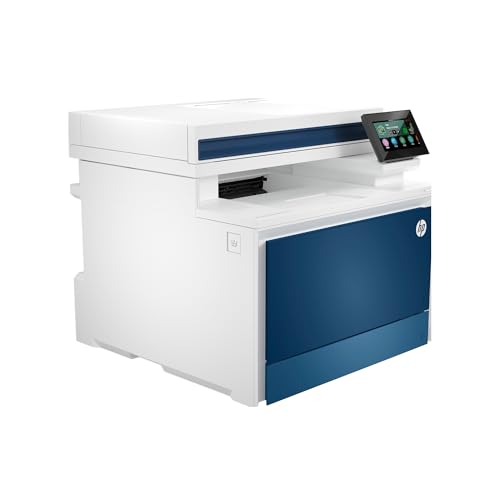
Designed specifically for small teams of up to 10 users, the HP Color LaserJet Pro MFP 4301fdw Wireless All-in-One Printer delivers impressive performance with print speeds of up to 35 color pages per minute. Its maximum print resolution of 607 x 600 DPI guarantees sharp, vibrant images. You’ll appreciate the intelligent Wi-Fi connectivity, allowing wireless printing from various devices, including PCs and tablets. Plus, HP Wolf Pro Security safeguards your data from unauthorized access. With a 300-sheet input capacity and all-in-one functionality—printing, scanning, copying, and faxing—this printer enhances your office productivity while maintaining a compact design.
Best For: Small teams of up to 10 users seeking a reliable and efficient all-in-one printing solution.
Pros:
- Fast print speeds of up to 35 color pages per minute enhance productivity.
- Versatile connectivity options including Wi-Fi, Ethernet, and Bluetooth for easy printing from various devices.
- Comprehensive security features with HP Wolf Pro Security to protect sensitive data.
Cons:
- Limited input capacity of 300 sheets may require frequent paper refills for larger jobs.
- Weight of 45 pounds makes it less portable and may require dedicated space.
- Cost of toner cartridges can be high, potentially increasing overall printing expenses.
Factors to Consider When Choosing a Color Printer for Business
When you’re choosing a color printer for your business, you need to take into account several key factors. Think about print speed efficiency, cost of operation, and the available connectivity options. Also, don’t overlook paper handling capacity and security features, as these can greatly impact your workflow.
Print Speed Efficiency
As you evaluate color printers for your business, print speed efficiency becomes a key factor that can directly impact your operations. Look for printers that offer speeds between 19 to 35 pages per minute (ppm) for both black and color prints. Opting for models with speeds of 33 ppm or more can greatly boost productivity, especially in busy environments where quick turnaround is essential. Consider printers with automatic duplex printing capabilities to save time and reduce paper waste. Additionally, check the first print time—some printers deliver the first page in as little as 5 seconds, minimizing wait times. Selecting a printer with reliable high-speed performance can help you avoid bottlenecks and keep your workflow smooth during peak hours.
Cost of Operation
Understanding the cost of operation is essential for making an informed decision about a color printer for your business. Start by evaluating the expenses for toner or ink cartridges, as these can vary widely. Opting for high-capacity toner cartridges can greatly lower your cost per page, with some yielding up to 7,500 pages for black and 6,500 for color. Don’t forget to factor in maintenance costs, including drum and waste toner replacements. Energy efficiency ratings, like ENERGY STAR, can also help reduce operational costs. Finally, look for printers that offer automatic duplex printing; this feature can minimize paper usage, further cutting down your overall expenses. By considering these factors, you’ll enhance your business’s productivity and save money.
Connectivity Options Available
Choosing the right connectivity options for your color printer can greatly streamline your business operations. Many modern printers come with built-in Wi-Fi, allowing you to print wirelessly from multiple devices, which eliminates the clutter of cables. Look for dual-band wireless networking (2.4GHz and 5GHz) to enhance connectivity and minimize interference for more reliable printing. If your business prioritizes security, consider models with Ethernet ports for a stable, wired connection. Additionally, support for mobile printing technologies like Apple AirPrint and Google Cloud Print lets you print directly from smartphones and tablets, adding convenience. Finally, USB ports offer a direct connection option if you prefer wired setups or need to print without network access.
Paper Handling Capacity
When selecting a color printer for your business, paper handling capacity is a key factor that can greatly impact your workflow. Look for printers with a high maximum input capacity; options can range from 100 sheets on lower-end models to over 1,300 sheets for high-capacity units. A printer with an automatic document feeder (ADF) can save you time by allowing you to process multiple pages without manual intervention, which is essential for scanning and copying. Additionally, ascertain the printer can handle various media sizes, like legal and letter formats, to meet diverse printing needs. Finally, consider output sheet capacity and expandable paper trays to minimize interruptions and customize your setup for maximum productivity.
Security Features Included
As you evaluate color printers for your business, don’t overlook the importance of robust security features. Advanced options, like customizable settings, can protect against unauthorized access, keeping your sensitive documents secure. Look for printers that offer firmware updates; these are vital for maintaining security effectiveness and addressing vulnerabilities. Some models come equipped with HP Wolf Pro Security, adding extra layers of protection for both the printer and your data. Integrated NFC card readers enable easy badge authentication, ensuring that only authorized personnel can access the printer. Also, check for compliance with industry standards like ENERGY STAR and EPEAT ratings, as these can indicate a printer’s commitment to security and environmental sustainability, which is essential for today’s business landscape.
Warranty and Support Options
Robust security features are just one aspect to contemplate in your search for the right color printer for your business. Warranty periods can vary widely, with some models offering up to three years of coverage against defects and malfunctions. You should check if the warranty includes parts, labor, and on-site service, as these factors can greatly influence your maintenance costs. Customer support options like online resources, phone support, and live chat are vital for resolving issues quickly, ensuring minimal downtime. Some manufacturers even offer next-business-day service or replacements, boosting your productivity. Finally, reviewing customer feedback on warranty claims and support responsiveness can give you valuable insights into the reliability and service quality of the printer brand you’re considering.