
Choosing among audio equalizers for podcasting can be confusing because podcast setups range from a single USB microphone to a full multi-person production studio. The right option should improve vocal clarity without adding unnecessary complexity.
This roundup compares compact podcast consoles, creator-focused interfaces, and traditional graphic equalizers so you can match tone-shaping control to your microphones, recording workflow, and available desk or rack space.
Best 10 Audio Equalizers for Podcasting Picks for 2026
Best All-in-One Mixer
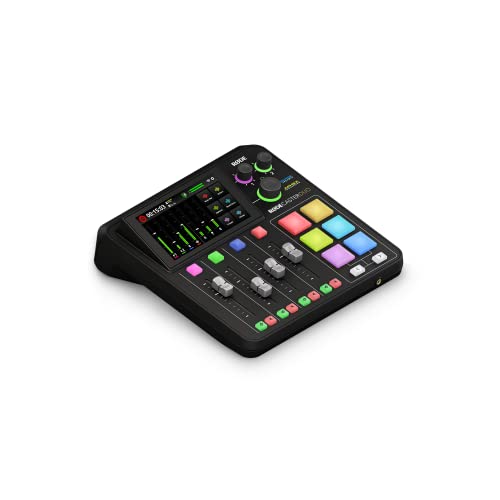
- Two combo inputs with up to 76dB gain
- APHEX processing and hands-on controls
- Supports podcasting, streaming, and music production
Best For: Creators wanting a compact, feature-rich production studio
Best Simple Two-Person Interface

- Two mic inputs and two headphone outputs
- Auto Gain simplifies level setup
- Includes Enhance presets and phone connectivity
Best For: Host-and-guest podcasts with a quick setup
Best for Larger Podcast Productions

- Four XLR inputs for multi-mic shows
- APHEX processing and eight SMART pads
- Records standalone or to computer, microSD, or USB
Best For: Teams and live productions needing expanded control
Best Dedicated 7-Band Equalizer

- Seven frequency bands from 60Hz to 15kHz
- Provides ±12dB adjustment per band
- Compact two-channel 3.5mm design
Best For: Manual tone shaping in compatible 3.5mm audio setups
Solo Podcasting Interface

- Auto Gain and four Enhance presets simplify vocal setup
- Over 70dB of microphone gain
- Phone, camera, and stereo loopback connectivity
Best For: Solo podcasters seeking fast, streamlined recording
Rackmount Graphic EQ
EQ-215 15-Band Stereo Equalizer
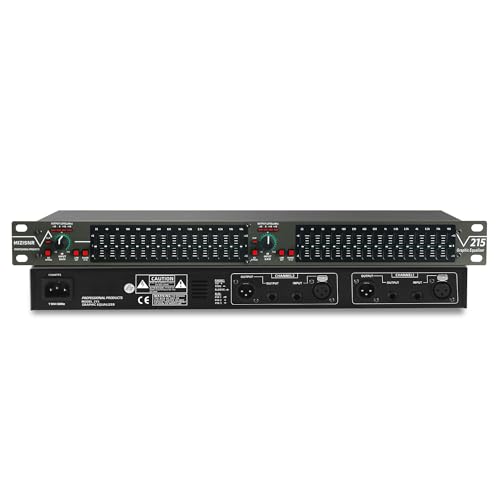
- 15 adjustable bands per stereo channel
- Low-cut switch reduces rumble, wind noise, and hum
- XLR and 1/4-inch TRS input/output options
Best For: Rack-based podcast studios needing hands-on EQ control
Compact Balanced Preamp EQ
Douk Audio T7 7-Band Equalizer

- Seven bands with ±6 dB adjustment
- XLR and RCA inputs and outputs
- Compact aluminum housing with plug-and-play operation
Best For: Desktop and home audio chains needing simple EQ control
Versatile 31-Band Choice

- 31-band control with real-time spectrum monitoring
- Noise and echo reduction for clearer sound
- USB, optical, coaxial, and Bluetooth connectivity
Best For: Podcasters building a flexible home or studio audio setup
Rack-Ready Precision
15-Band Dual-Channel Equalizer

- 15 bands per channel with ±12 dB adjustment
- Low-cut control targets unwanted low-end noise
- XLR and 1/4-inch TRS connectivity
Best For: Rack-mounted podcast studios and professional audio chains
Visual Monitoring Pick

- 31-segment LED spectrum display
- 10 presets with independent high, mid, and bass control
- Bluetooth 5.2, USB, XLR, and 1/4-inch TRS support
Best For: Creators who want visual EQ feedback and flexible studio connectivity
Best All-in-One Mixer – RØDECaster Duo
The RØDECaster Duo is a versatile choice for creators seeking audio equalizers for podcasting alongside recording, streaming, and music-production tools. Its two combo inputs, high-gain preamps, touchscreen, faders, SMART pads, and APHEX processing provide hands-on control in one compact unit.
Best For: Podcasters and content creators who want an all-in-one production studio with built-in voice processing and flexible monitoring.
Pros:
- Two Neutrik combo inputs with up to 76dB of gain
- Includes APHEX effects such as Aural Exciter and Big Bottom
- Provides four faders, six SMART pads, and a high-resolution touchscreen
- Supports headphone and headset monitoring through its 3.5mm TRRS input
Cons:
- Only two microphone or instrument combo inputs are listed
- Requires corded power
- More equipment than needed for a simple two-mic setup
Choose the RØDECaster Duo when you value integrated controls and production features more than a minimal interface. It is particularly practical for shows that mix spoken audio, effects, music, and live content creation.
Best Simple Two-Person Interface – Focusrite Vocaster Two
The Focusrite Vocaster Two is a straightforward option for comparing audio equalizers for podcasting with easy recording workflows. It is built around two microphone inputs, two headphone outputs, Auto Gain, voice Enhance presets, and convenient phone and camera connectivity.
Best For: Two-person podcasts that need quick level setup, separate headphone monitoring, and simple host-and-guest controls.
Pros:
- Two microphone inputs and two dedicated headphone outputs
- Auto Gain sets recording levels with a button press
- Four voice Enhance presets are designed for podcasting
- Bluetooth and TRRS phone connections support call recording or audio playback
Cons:
- Offers two channels, limiting larger productions
- Its feature set is more focused on recording than extensive live production
- Bluetooth and camera connectivity may be unnecessary for basic setups
The Vocaster Two makes sense for beginners and co-hosts who prioritize speed over deep routing or extensive effects. Auto Gain and separate headphone outputs reduce setup friction for conversational shows.
Best for Larger Podcast Productions – RØDECaster Pro II
The RØDECaster Pro II is a strong candidate for audio equalizers for podcasting when you also need multiple inputs, live controls, and standalone recording. Four XLR inputs, APHEX processing, SMART pads, multitrack recording, and computer-free operation give it a broad production role.
Best For: Multi-microphone podcasts, livestreams, and creators who want effects, sound triggers, and recording without a separate mixer or computer.
Pros:
- Four XLR microphone inputs and headphone outputs
- APHEX presets help make voices broadcast-ready
- Eight customizable SMART pads can trigger music and sound effects
- Records multitrack to a computer, microSD card, or USB drive
Cons:
- Larger and more feature-heavy than a basic podcast interface
- Includes no microphones
- Its extensive controls may require more setup time
For teams, live shows, and complex productions, the Pro II offers more room to grow than a two-input interface. Its standalone recording and show-control features are especially useful when dependable on-air operation matters.
Best Dedicated 7-Band Equalizer – 7 Band Sound Equalizer
This compact two-channel unit is the most direct fit for shoppers seeking audio equalizers for podcasting rather than a complete recording interface. It provides seven adjustable frequency bands, 3.5mm input and output connections, preamp gain, and headphone support for shaping audio in a small setup.
Best For: Users who want manual seven-band tone adjustment for a 3.5mm recording, streaming, or podcasting chain.
Pros:
- Seven bands cover frequencies from 60Hz to 15kHz
- Provides ±12dB equalization control per band
- Two-channel design includes 3.5mm connectivity
- Supports headphone use and microphone-headset connections
Cons:
- Does not replace a full podcast production studio or microphone interface
- Requires a 5V to 12V DC power supply
- Its compact 3.5mm connections may not suit XLR-based setups
This equalizer is best viewed as a hands-on tone-shaping component. It can be useful in a compatible analog-style chain, but buyers should confirm their connectors, power arrangement, and overall routing before choosing it.
Solo Podcasting Interface – Focusrite Vocaster One
For creators comparing audio equalizers for podcasting, the Focusrite Vocaster One takes a streamlined approach: its Auto Gain and Enhance controls help shape a clear vocal signal without requiring a separate hardware equalizer. It also adds practical podcast features such as Mute, phone connectivity, camera connectivity, and stereo loopback.
Best For: Solo podcasters who want quick vocal setup and integrated recording connections.
Pros:
- Auto Gain sets microphone levels quickly.
- Enhance offers four voice-focused presets.
- Supports phone, camera, and stereo loopback connections.
- Provides over 70dB of microphone gain.
Cons:
- It is a one-channel interface rather than a multi-channel mixer.
- Its voice shaping uses presets instead of adjustable EQ bands.
The Vocaster One is a strong choice when ease of use matters more than detailed manual equalization. Its 48 kHz operation, USB connectivity, and dedicated podcast controls make it a practical starting point for solo production.
Rackmount Graphic EQ – EQ-215 15-Band Stereo Equalizer
For buyers seeking audio equalizers for podcasting with hands-on frequency control, the EQ-215 provides 15 adjustable bands on each stereo channel. Its low-cut switch can help reduce wind noise, floor rumble, and electrical hum, while balanced XLR and 1/4-inch TRS connections suit studio, live, and installed systems.
Best For: Podcasters with a rack-based audio setup who need detailed, physical EQ adjustments.
Pros:
- Dual-channel, 15-band stereo design enables detailed shaping.
- Adjustable range reaches up to ±12 dB per band.
- Low-cut switch targets unwanted low-frequency noise.
- Includes bypass control and XLR/TRS connectivity.
Cons:
- Its 1U rack-mount format is less convenient for compact desktop setups.
- It is a hardware equalizer and does not include the microphone-focused automation of a podcast interface.
The EQ-215 is best suited to users who already have compatible preamps, interfaces, or mixers and want granular control over a stereo signal path. The bypass switch also makes comparisons and troubleshooting straightforward.
Compact Balanced Preamp EQ – Douk Audio T7 7-Band Equalizer
Among audio equalizers for podcasting, the Douk Audio T7 is a compact preamp-style option for users who want straightforward tonal adjustment between source equipment and an amplifier or speaker system. Its seven fixed frequency bands provide ±6 dB of control, with both XLR and RCA inputs and outputs for flexible integration.
Best For: Compact home or desktop audio systems that need basic balanced or RCA EQ control.
Pros:
- Seven bands cover low, mid, and high frequency adjustments.
- Provides simultaneous XLR and RCA output connectivity.
- Offers a stated signal-to-noise ratio above 104 dB and 0.003% distortion.
- Compact aluminum housing helps suit space-conscious setups.
Cons:
- Its ±6 dB adjustment range is narrower than the EQ-215’s range.
- There is no volume control knob.
- It is designed around rated-level output rather than podcast-specific controls.
The T7 makes sense when you need a small, plug-and-play EQ with both balanced and unbalanced connections. It is less specialized for microphone recording, but its compact design and simple operation can fit a broader home audio chain.
Versatile 31-Band Choice – Bluetooth Graphic Equalizer
For shoppers comparing audio equalizers for podcasting, this model offers detailed control across 31 bands, along with real-time frequency monitoring and noise and echo reduction. Its multiple inputs, USB playback, and customizable presets make it adaptable to vocal-focused recording and broader home audio setups.
Best For: Podcasters and home users who want extensive EQ control, visual frequency monitoring, and flexible device connectivity.
Pros:
- 31 adjustable bands cover bass, midrange, and treble tuning.
- Real-time spectrum analysis helps visualize frequency changes.
- Supports optical, coaxial, USB, and Bluetooth connectivity.
- Auto-save presets simplify switching between customized EQ curves.
Cons:
- The wide feature set may be more than a simple podcasting setup requires.
- The notes do not specify dedicated microphone inputs or a built-in preamp.
This is a flexible choice when podcasting is part of a larger audio system. Its 31-band layout and noise-reduction features provide room for careful voice refinement, while the connectivity options support varied equipment configurations.
Rack-Ready Precision – 15-Band Dual-Channel Equalizer
This rack-mount model is a practical option among audio equalizers for podcasting when your setup uses balanced connections and separate stereo channels. Its 15-band-per-channel design, low-cut control, bypass switch, and dedicated bass output support precise signal shaping and low-end cleanup.
Best For: Advanced podcast studios, live audio rigs, and users integrating a rack-mounted equalizer with XLR or 1/4-inch equipment.
Pros:
- Provides 15 adjustable bands on each stereo channel.
- Low-cut control helps remove unwanted low-frequency noise.
- Offers XLR balanced and 1/4-inch TRS unbalanced connections.
- 1U rack-mount design includes bypass operation for easier testing.
Cons:
- It has fewer bands than the 31-band alternatives in this roundup.
- Its rack-oriented design may be less convenient for compact desktop setups.
- The supplied notes do not mention Bluetooth, USB playback, or spectrum display.
Choose this equalizer when connection flexibility and hands-on control matter more than wireless features. The dedicated low-cut adjustment is particularly useful for managing rumble and other low-end distractions in a podcast signal chain.
Visual Monitoring Pick – Digital 31-Band Equalizer
For podcast creators who prefer visual feedback, this digital unit combines 31-band adjustment with an LED spectrum display. It also includes intelligent noise reduction, preset modes, bypass operation, Bluetooth 5.2, and USB playback, making it one of the more feature-rich audio equalizers for podcasting and studio use.
Best For: Home studios and creators who want visual frequency tracking, preset recall, and multiple playback or connection options.
Pros:
- 31-segment LED spectrum indication shows frequency activity in real time.
- Offers 10 saved preset modes plus independent high, mid, and bass adjustment.
- Includes intelligent noise reduction and an EQ bypass switch.
- Supports Bluetooth 5.2, USB playback, XLR, and 1/4-inch TRS connections.
Cons:
- The rack-mount format may require dedicated installation space.
- The notes do not identify a dedicated microphone input or recording interface.
- Its many controls may require more setup than a basic voice-EQ solution.
This model suits users who want to see how their adjustments affect the signal while recording or monitoring. Its presets and bypass switch support repeatable workflows, while the connection options help it fit into varied home, studio, and live configurations.
How We Picked the Best Audio Equalizers for Podcasting
We focused on practical control, connection options, workflow fit, and flexibility for spoken-word recording. The selection includes all-in-one podcast production studios, USB-friendly interfaces, compact analog units, and multi-band rack equalizers. We also considered whether each type suits solo recording, interviews, live streaming, post-production, or a more traditional home-studio setup.
Because an equalizer cannot compensate for poor microphone placement or a noisy room, we prioritized products that can fit into a sensible signal chain. Built-in routing, headphone monitoring, microphone compatibility, balanced outputs, and straightforward frequency adjustment all matter when you need reliable speech reproduction.
Quick Comparison
| Type | Best For | Main Advantage | Potential Limitation |
|---|---|---|---|
| All-in-one podcast console | Multi-mic shows and live production | Mixing, routing, monitoring, and processing in one device | Higher cost and learning curve |
| USB podcast interface | Solo creators and simple interviews | Easy computer integration | Less detailed EQ control |
| Compact analog equalizer | Basic tone shaping | Simple, immediate adjustments | May require additional hardware |
| 15- or 31-band graphic EQ | Detailed studio or rack setups | Precise frequency control | More complex signal routing |
Key Buying Factors for Audio Equalizers for Podcasting
Match the Unit to Your Microphone Setup
Count the microphones you use now and expect to add later. A solo USB interface may be enough for one host, while interviews and roundtable shows benefit from multiple microphone inputs, separate headphone feeds, and independent channel processing.
Choose the Right EQ Control
Broad bass and treble adjustments are useful for quick vocal cleanup. A 7-band unit offers more shaping, while 15- and 31-band graphic equalizers provide finer control over rumble, boxiness, harshness, and room-related resonances. More bands are not automatically better if you are unfamiliar with frequency management.
Check Connections and Signal Flow
Verify whether your microphones and other equipment use USB, XLR, RCA, or 3.5mm connections. Balanced XLR inputs and outputs are generally preferable for longer cable runs and more demanding studio setups. Also confirm that the equalizer can be placed at the correct point between the microphone preamp, interface, mixer, and recorder.
Consider Monitoring and Production Features
For live podcasts, built-in headphone outputs, mix-minus support, routing, sound pads, recording controls, and onboard processing can be more valuable than highly detailed EQ sliders. For editing recorded audio, a traditional graphic EQ may be sufficient when paired with a capable interface or digital audio workstation.
Who Should Buy Which Audio Equalizers for Podcasting?
- Solo podcasters: Choose a compact USB-oriented interface with simple vocal controls and direct monitoring.
- Interview and co-host shows: Look for multiple microphone inputs, independent headphone monitoring, and flexible routing.
- Live streamers: An all-in-one production console can reduce the need for several separate devices.
- Audio hobbyists and DJs: A 15- or 31-band rack EQ offers detailed hands-on shaping for a broader home-audio system.
- Budget-conscious users: A compact analog equalizer can provide basic tone adjustment, but confirm that your existing equipment supplies the required preamp and connections.
For most podcast beginners, prioritize clean inputs, easy monitoring, and dependable computer connectivity before buying the most complex equalizer available. Experienced users can gain more from expanded routing or multiband control when their recording chain and room acoustics are already under control.