
Choosing the right scanner matters when you’re preserving books, manuals, or bound records for long-term access. The best options balance image quality, page flattening, OCR accuracy, and gentle handling.
Below, we focus on book scanners for archival projects that help you digitize efficiently without sacrificing legibility or damaging materials.
Best 10 Book Scanners for Archival Projects Picks for 2026
High-Resolution Overhead Pick
CZUR ET24 Pro Professional Book Scanner
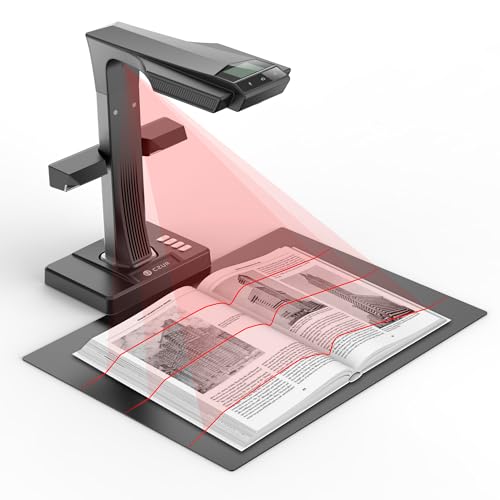
- 24MP overhead camera with 320 DPI output
- A3 scanning with page-flattening technology
- ABBYY OCR supports editable PDF, Word, and Excel
Best For: Archival digitization of books and documents up to A3 size
Organized Flatbed Choice
Plustek OpticBook 4900 with BookMaker

- BookMaker software organizes books, PDFs, and notes
- AI text recognition enables editable, searchable files
- 1200 dpi flatbed scanning for books and reference documents
Best For: Archiving books and reference documents with structured file management
Flexible Overhead Scanner

- Overhead scanning for non-destructive book digitization
- Auto Book Correction reduces curve distortion
- Multi Document Detection handles mixed items in one scan
Best For: Non-destructive scanning of books, newspapers, and other delicate archival items
Fast Smart-Lamp Scanner
CZUR Aura Pro Book & Document Scanner

- About 2 seconds per page for quick capture
- Flattening technology improves curved book pages
- Outputs searchable PDF plus Word and JPG
Best For: Fast archival scanning of books and documents with built-in lighting control
Professional Overhead Pick

- 38MP sensor with A3 capture support
- Auto curve-flattening for bound books
- OCR creates searchable and editable files
Best For: High-volume archival scanning of books and documents
Portable Handheld Option
IRIScan Book 7 White Portable Scanner

- Battery-powered handheld scanner with SD card support
- Up to 1050 DPI with JPEG and PDF output
- Includes Readiris OCR and PDF editing tools
Best For: Portable archival scanning away from a desk
Large-Format Archival Pick
VIISAN S21 Pro A2/A3 Book Scanner

- Switches between A2 and A3 scanning
- 26MP capture with 600 DPI enhancement
- Auto-flatten and OCR for archival cleanup
Best For: Oversized newspapers, maps, and mixed-format archives
Portable Curved-Page Scanner
CZUR Shine Ultra Thin Book Scanner

- About 1 second per page for fast scanning
- Patented page-flattening tech for thin books
- 13MP camera with OCR and auto-cropping
Best For: Thin books, flat documents, and quick desktop digitizing
A3 Archive Capture Scanner

- A3 overhead scanning for books and large pages
- 16MP camera with up to 300 DPI capture
- Anti-glare LED lighting for cleaner pages
Best For: Libraries, offices, and home archivists scanning A3 books and large documents
Large-Format Manuscript Scanner

- A2 size for oversized archival originals
- 26MP capture with software-enhanced 600 DPI
- Auto-flattening and OCR export tools
Best For: Oversized archival materials like manuscripts, newspapers, maps, and large journals
High-Resolution Overhead Pick – CZUR ET24 Pro Professional Book Scanner
If you need book scanners for archival projects that can handle oversized materials and produce clean digital copies, the CZUR ET24 Pro is built around fast overhead capture with page-flattening tools. Its 24MP camera, A3 support, and OCR make it a practical choice for preserving books, magazines, receipts, and other mixed materials without cutting pages apart.
Best For: Archival digitization of books and documents up to A3 size with strong OCR support.
Pros:
- 24MP camera with 5696 x 4272 resolution and 320 DPI output.
- Upgraded flattening technology helps correct curved book pages.
- Supports A3-size scanning for larger books and documents.
- ABBYY OCR can convert JPG files into editable PDF, Word, and Excel formats.
Cons:
- Very glare-prone papers are not recommended.
- Arabic OCR support is limited to ET Series scanners on Windows systems.
- Thai and Hebrew are not supported.
For archival workflows that prioritize speed, large-format coverage, and searchable output, the ET24 Pro is a strong overhead scanner option. It also includes HDMI support, multiple lighting angles, and broad OS compatibility, which can simplify setup in mixed computer environments.
Organized Flatbed Choice – Plustek OpticBook 4900 with BookMaker
For book scanners for archival projects where organization matters as much as image capture, the Plustek OpticBook 4900 combines a flatbed design with file-sorting software. It is aimed at users who want to classify books, magazines, handwritten notes, and reference documents into searchable, editable collections.
Best For: Archiving books and reference documents with structured file management and OCR search.
Pros:
- BookMaker software helps organize scanned books, magazines, PDFs, and notes.
- AI text recognition supports editable formats and full-text search.
- Simple three-step workflow makes scanning and exporting straightforward.
- Includes one year of free cloud storage service for collaboration and syncing.
Cons:
- Flatbed design has a standard sheet capacity of 1.
- Best suited to single-page scanning rather than fast batch capture.
- Requires driver download from Plustek for setup.
The OpticBook 4900 makes sense when your archive needs clear file organization and searchable records more than high-speed overhead capture. Its 1200 dpi resolution and document management tools are useful for building a neatly indexed digital library.
Flexible Overhead Scanner – ScanSnap SV600
If your archival work involves bound books, newspapers, and fragile materials, the ScanSnap SV600 offers overhead scanning that avoids cutting or damaging pages. Its auto-correction tools and multi-document detection make it a practical option for digitizing mixed materials in a single workflow.
Best For: Non-destructive scanning of books, newspapers, and other delicate archival items.
Pros:
- Overhead design scans books and newspapers without damage.
- Auto Book Correction helps flatten curve distortion.
- Multi Document Detection can crop and rotate multiple items in one scan.
- Page Turning Detection and Time Mode support hands-free scanning workflows.
Cons:
- Standard sheet capacity is 1, so it is not a batch scanner.
- Resolution is listed at 1200 rather than a higher megapixel camera spec.
- Requires compatible Windows 10/11 or macOS Monterey 12+ systems.
The SV600 is a solid choice when preserving the original material is the top priority. It is especially appealing for archives with varied formats, since its software features help streamline capture and cleanup without physical contact.
Fast Smart-Lamp Scanner – CZUR Aura Pro Book & Document Scanner
For book scanners for archival projects that need speed and clean output in a compact setup, the CZUR Aura Pro combines overhead capture with smart lighting and flattening tools. It is designed to scan books, documents, and A3/A4 materials quickly while producing JPG, Word, PDF, and searchable PDF files.
Best For: Fast archival scanning of books and documents with built-in lighting control.
Pros:
- Scans in about 2 seconds per page.
- Flattening curved book page technology helps replicate flat pages.
- Outputs JPG, Word, PDF, and searchable PDF files.
- Includes 32 LED lights plus 2 supplemental side lights for better illumination.
Cons:
- Standard sheet capacity is 3, so it is not ideal for large batch runs.
- Thai, Hebrew, and Arabic OCR are not supported.
- Windows and Mac compatibility is listed, but Linux support is not included in the notes.
The Aura Pro is a strong fit if you want quick page capture with less setup complexity than a larger archival workstation. Its lighting controls and software features make it especially useful for scanned books that need both readability and searchable text.
Professional Overhead Pick – CZUR ET MAX 38MP Book Scanner
If you’re comparing book scanners for archival projects, the CZUR ET MAX stands out for high-detail overhead capture and automatic curve-flattening. Its 38MP sensor, A3 support, and fast 1.5-second page workflow make it a strong fit for preserving bound books and bulk document sets without unbinding.
Best For: Libraries, offices, and serious digitization projects that need fast, high-resolution scans of books and documents.
Pros:
- 38MP CMOS sensor with 7168 × 5376 resolution for detailed captures
- Patented curve-flattening technology helps correct curved book pages automatically
- OCR support converts scans into searchable PDFs and editable Word/Excel files
- Scans up to A3 size and can work with Windows, macOS, and Linux (Ubuntu 20.04 to 24.04)
Cons:
- Not recommended for glossy or highly reflective materials
- Arabic OCR support is limited by operating system and model series notes
- Linux support is restricted to Ubuntu versions listed in the specs
For archival work where speed and image quality matter, this is a capable overhead scanner with the software tools needed to organize and search large collections.
Portable Handheld Option – IRIScan Book 7 White Portable Scanner
For book scanners for archival projects where portability matters more than a fixed overhead setup, the IRIScan Book 7 is built to travel. It scans directly to microSD or over USB, offers up to 1050 DPI, and includes OCR software for turning captures into usable files.
Best For: Mobile scanning, quick reference archives, and users who need a lightweight scanner for books and documents on the go.
Pros:
- Handheld, battery-powered design is easy to carry between locations
- Up to 1050 DPI scanning with JPEG and PDF output options
- Includes Readiris OCR and PDF software for Word, PDF, and Excel conversion
- Can scan to SD card or connect by USB with Windows and Mac compatibility
Cons:
- Handheld scanning is less ideal for large-volume fixed workflows than overhead scanners
- AC adapter is not provided
- Does not support Wi-Fi connectivity
This is a practical choice if you need a compact archival scanner that can work in the field, though it trades speed and convenience for maximum portability.
Large-Format Archival Pick – VIISAN S21 Pro A2/A3 Book Scanner
If your book scanners for archival projects need to handle oversized materials, the VIISAN S21 Pro brings A2 and A3 interchangeability in one foldable overhead unit. It combines 26MP capture, auto-flattening, fingerprint removal, and OCR so you can digitize books, newspapers, maps, and documents with minimal cleanup.
Best For: Archives, classrooms, and research spaces that need one scanner for both standard books and large-format materials.
Pros:
- Supports both A2 and A3 formats with telescopic height adjustment
- 26MP sensor plus software-enhanced 600 DPI output for detailed preservation
- Auto-flatten, fingerprint removal, and page repair reduce manual editing
- OCR supports 180+ languages and exports to PDF, Word, Excel, ePub, and TXT
Cons:
- Not recommended for highly glossy or glare-prone papers
- Not compatible with ARM-based devices such as Surface Pro X
- Some AI features depend on external Gemini/Web UI setup
As a large-format scanner, it is especially appealing when archival work includes oversized pages alongside standard bound volumes.
Portable Curved-Page Scanner – CZUR Shine Ultra Thin Book Scanner
If you’re comparing book scanners for archival projects, the CZUR Shine Ultra is a strong pick for thin volumes, loose papers, and other flat materials that benefit from fast overhead capture. Its patented page-flattening tech is designed to reduce curvature on book pages, while the 13MP camera and auto-cropping tools help streamline digitizing and OCR workflows.
Best For: Thin books, flat documents, and quick desktop digitizing on Windows or Mac.
Pros:
- About 1 second per page scanning speed for fast batch work
- Patented flattening technology helps with curved book pages
- 13MP CMOS camera with smart paging and auto cropping
- Works as both a book scanner and USB document camera
Cons:
- Only suitable for thinner books; thicker volumes are better served by CZUR ET series
- Not compatible with Android or iOS
- OCR does not support Thai, Hebrew, or Arabic
For archival projects centered on thinner books and mixed paper documents, this model emphasizes speed and convenience more than heavy-duty volume handling. It fits best when you want a portable overhead scanner that can move quickly through pages without a lot of manual cleanup.
A3 Archive Capture Scanner – VIISAN DL16 A3 Book Scanner
The VIISAN DL16 is aimed at archival projects that need an A3 overhead scanner for books, oversized pages, artwork, and other large-format originals. With a 16MP camera, 300 DPI capture, and anti-glare LED lighting, it focuses on making bound materials and glossy pages easier to digitize cleanly.
Best For: Libraries, offices, and home archivists scanning A3 books and large documents.
Pros:
- A3 overhead scanning suits books, artwork, and large documents
- 16MP camera with up to 300 DPI for clear capture
- Anti-glare LED lighting helps reduce shadows and glare
- Compatible with both Windows and Mac
Cons:
- Not as resolution-rich as higher-end large-format models
- Designed for desktop use rather than portability
- Overhead scanning still requires careful page positioning
For people building a practical scanning station around book scanners for archival projects, the DL16 makes sense when A3 reach matters more than extra advanced features. It balances size coverage, clear capture, and simple compatibility for organized digitization work.
Large-Format Manuscript Scanner – VIISAN S21 A2 Book Scanner
For book scanners for archival projects that involve oversized originals, the VIISAN S21 stands out with A2 coverage, 26MP capture, and software tools built for books and documents. It is designed for large journals, manuscripts, newspapers, and maps, while the bundled software can flatten pages, remove fingers, and split two-page spreads automatically.
Best For: Oversized archival materials like manuscripts, newspapers, maps, and large journals.
Pros:
- A2 overhead format handles very large archival originals
- Up to 26MP resolution with software-enhanced up to 600 DPI
- Auto-flatten, finger removal, and double-page splitting features
- Supports OCR export to PDF, Word, Excel, EPUB, and text formats
Cons:
- Bundled OfficeCam software is not compatible with ARM-based devices
- Very glossy papers are not recommended
- Best results depend on using the bundled software
If your archive includes materials beyond standard book sizes, this model offers the broadest capture range in the group. Its software-assisted workflow is especially useful when you need cleaner files from large, fragile, or spread-out originals.
How We Picked the Best Book Scanners for Archival Projects
For Book Scanners for Archival Projects, we prioritized scan quality, consistent edge-to-edge capture, OCR performance, useful flattening or dewarping tools, and workflow speed. We also considered whether a scanner is better suited to delicate bound volumes, oversized pages, or everyday office digitizing.
Quick Comparison
Overhead scanners and document cameras are usually the fastest choice for bound books and fragile materials, while flatbed models can deliver cleaner page-by-page results for smaller books and tighter archival needs. Portable wand-style scanners are convenient, but they are typically less ideal for high-volume preservation work.
Key Buying Factors for Book Scanners for Archival Projects
Image Resolution and Detail
Higher megapixel counts can help preserve fine text, marginalia, diagrams, and older typefaces. For archival work, prioritize clarity and dependable focus over marketing claims alone.
Auto-Flattening and De-Skew Tools
Books rarely lie perfectly flat. Good software can correct curvature, reduce shadowing near the spine, and improve readability without excessive editing.
OCR and File Workflow
If you need searchable PDFs or editable text, OCR quality is critical. Look for software that exports consistently and supports batch processing, naming, and file organization.
Book Safety and Ease of Use
Fragile spines, aged paper, and sewn bindings call for non-contact capture methods. Overhead scanners are often the safest option because they avoid pressing the book against glass.
Format Support
Think about the largest pages you need to digitize. A3 and A2 support is valuable for newspapers, ledgers, art books, and archival records that exceed standard letter or A4 sizes.
Who Should Buy Which Book Scanners for Archival Projects?
If you want the safest and fastest setup for bound volumes, choose an overhead scanner with flattening and OCR features. If your priority is maximum page cleanliness for smaller books, a flatbed scanner can still be the better archival choice. For large-format materials, select a model that explicitly supports A3 or A2 capture. Portable scanners make sense for occasional use, travel, or quick capture, but they are usually not the first pick for serious preservation workflows.
In short, the best choice depends on your materials, volume, and how much post-scan cleanup you’re willing to do. Match the scanner to the collection, and you’ll get better preservation results with less frustration.