
Choosing the right scanner can make digitizing books, receipts, and household paperwork far easier. The best options balance image quality, speed, and simple workflows without taking over your desk.
In this roundup, we focus on practical picks for different home setups, from compact portable scanners to larger-format models for books and archives.
Best 10 Book Scanners for Home Use Picks for 2026
Desktop Book Scanner

- Scans A3 and A4 pages in about 2 seconds
- Outputs JPG, Word, PDF, and searchable PDF
- Uses laser lines to flatten curved book pages
Best For: Home users who want a fast desktop scanner for books and documents
Ultra-Compact Travel Scanner
Brother DS-640 Compact Mobile Scanner

- Scans up to 16 ppm with color and B&W
- Powered by micro USB 3.0 for outlet-free use
- Fits easily in a bag thanks to its small size
Best For: People who need a tiny scanner for loose pages, receipts, and travel
Book Camera Scanner

- 13MP CMOS sensor with A3/A4 capture
- One-key automatic correction for skewed pages
- OCR claims 98%+ accuracy with Word/TXT export
Best For: Home users who want a foldable camera scanner for books and documents
Portable Wand Scanner
MUNBYN 900 DPI Handheld Scanner

- Handheld design weighs about 0.66 lb
- Scans up to 900 dpi and A4 size
- Includes a 16GB SD card for storage
Best For: Home users who want a lightweight handheld scanner for occasional pages
A2 Overhead Scanning
VIISAN Large Format Book & Document Scanner

- A2 overhead design for large books and journals
- Auto-flatten, finger removal, and split-page tools
- 26MP capture with OCR and multiple output formats
Best For: Home users scanning oversized books, journals, or maps
Media Cataloging

- Barcode-based item identification with AutoFill
- Built for books, movies, and media organization
- Simple USB handheld design
Best For: Home library owners who want fast media cataloging
Portable Wand Scanning
ANNCARY 900DPI Handheld Document Scanner

- Plug-and-play on Windows and Mac OS
- 300/600/900 DPI settings for flexible capture
- Saves JPG or PDF to Micro SD card
Best For: Home users who want a portable scanner for occasional pages and receipts
Portable QR Library Scanner
Book Scanner for Personal Library, Bluetooth QR Code, w/o Stand
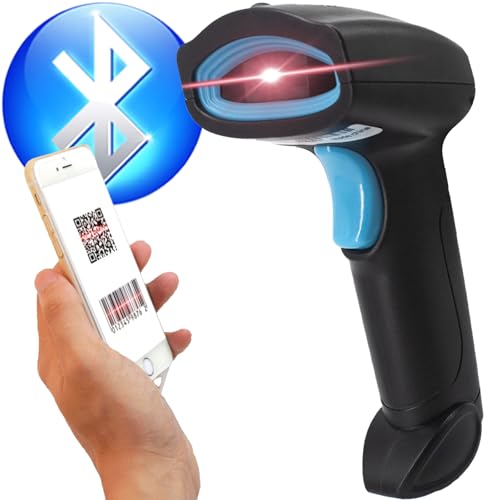
- Bluetooth, USB, and corded use
- Reads 30+ 1D/2D code types
- Works with Libib and mobile devices
Best For: Home library cataloging and mixed barcode scanning
Fast Overhead Book Scanner
CZUR Aura Pro Portable Book Scanner, A3 Document Scanner

- Flattening tech helps curved pages
- About 2 seconds per page
- OCR supports 180+ languages
Best For: Fast home digitizing of books and large documents
Lightweight Thin-Book Scanner
CZUR Shine Ultra Smart Portable Document Scanner, Thin Book Scanner

- About 1 second per page
- Works as scanner and document camera
- Lightweight foldable 4 lb design
Best For: Thin books, flat documents, and home teaching setups
Desktop Book Scanner – CZUR Aura Pro for A3/A4
If you want book scanners for home use that can handle curved pages with minimal fuss, the CZUR Aura Pro is built for fast desk-based digitizing. It scans A3 and A4 originals in about 2 seconds per page, outputs JPG, Word, PDF, and searchable PDF files, and uses flattening technology plus three laser lines to improve page accuracy.
Best For: Home users who want a fast desktop scanner for books, documents, and searchable PDFs.
Pros:
- Fast scanning speed of about 2 seconds per page
- Supports JPG, Word, PDF, and searchable PDF output
- OCR supports 180+ languages
- Flattening curved book page technology with three laser lines
Cons:
- Thai, Hebrew, and Arabic are not currently supported in OCR
- Needs compatible Mac or Windows system requirements
- Designed as a desktop scanner, not a handheld portable option
Overall, the Aura Pro is a strong pick if speed and page correction matter most at home. Its glare-free lighting and OCR features make it especially useful for turning books into cleaner digital files without a complicated workflow.
Ultra-Compact Travel Scanner – Brother DS-640 Compact Mobile Scanner
For book scanners for home use that also need to travel easily, the Brother DS-640 is a compact sheet-fed option that fits into small spaces and scans quickly. It reaches up to 16 ppm, runs over micro USB 3.0 without needing a wall outlet, and works with the Brother iPrint&Scan app for scan-to-PC, cloud, email, and OCR workflows.
Best For: Users who want a lightweight scanner for occasional home scanning and on-the-go use.
Pros:
- Very compact and lightweight at about 1.5 lb
- Fast scanning up to 16 ppm
- Powered by micro USB 3.0, so no outlet is required
- Supports Windows, Mac, and Linux with OCR software included
Cons:
- Single-sheet feed, so it is not ideal for books that need flat-page capture
- Best suited to documents and cards rather than bound volumes
- Requires a computer connection to scan
This model makes sense if portability is the priority and you mainly scan loose pages, receipts, or cards at home. It is not the best choice for bound books, but its small size and easy setup are major advantages for light everyday use.
Book Camera Scanner – NetumScan 13MP for A3/A4
If you are comparing book scanners for home use and want a camera-style setup, the NetumScan 13MP is designed for quick page capture with minimal manual work. It supports A3/A4 sizes, one-key automatic correction, OCR with 98% or better accuracy, and export to Word or TXT, making it a practical choice for digitizing books and papers.
Best For: Home users who want a foldable book camera scanner for documents, books, and live projection.
Pros:
- One-key automatic correction helps fix skewed images quickly
- Captures A3/A4 content with a 13MP CMOS sensor
- OCR claims 98%+ accuracy and supports Word/TXT export
- Foldable aluminum body with USB connection and adjustable bracket
Cons:
- Requires software installation to get started
- Best on a Windows 7 system or compatible Mac/Linux setup
- More of a camera scanner than a traditional sheet-fed scanner
For a home office or study area, this model offers a flexible balance of scanning and live projection features. It is especially appealing if you want a foldable, desk-friendly device that can handle books without the constraints of a feeder.
Portable Wand Scanner – MUNBYN 900 DPI Handheld Scanner
Among book scanners for home use, the MUNBYN portable wand scanner is a simple choice when you need to digitize pages without a desk machine. It scans up to A4 pages in 3 to 5 seconds at up to 900 dpi, stores files on its included 16GB SD card, and transfers them to a computer over USB.
Best For: Home users who want a handheld scanner for books, photos, and documents in a compact format.
Pros:
- Portable handheld design at just 0.66 lb
- Up to 900 dpi resolution for clear digital files
- Includes a 16GB SD card for storing many scans
- No driver required for basic USB transfer to a computer
Cons:
- Requires AA batteries, which are not included
- Handheld scanning takes practice to get consistent results
- Less convenient than a desktop book scanner for repeated volume scanning
This scanner is a practical pick when portability matters more than automation. It is best for occasional home scanning of book pages and documents, especially if you want something lightweight that can be stored easily.
A2 Overhead Scanning – VIISAN Large Format Book & Document Scanner
If you’re comparing book scanners for home use and need room for oversized pages, the VIISAN S21 is built for books, journals, manuscripts, and even maps. Its overhead design and adjustable height make it easier to capture bound pages and large-format material without a flatbed workflow.
Best For: Home users who need an overhead scanner for large books, magazines, journals, or other oversized originals.
Pros:
- Captures large A2-sized originals up to 594 x 420 mm.
- Auto-flatten, finger removal, and double-page splitting help with book scanning.
- 26MP capture and software-enhanced up to 600 DPI for detailed results.
- Built-in LED lighting and OCR support for PDF and editable file formats.
Cons:
- Bundled software supports only x64 and x86 systems, not ARM-based devices.
- Built-in LEDs are not recommended in bright light conditions.
- Glary paper is specifically noted as not recommended.
For home scanning projects that go beyond standard letter-size pages, this model offers a flexible overhead setup with helpful book-cleanup features. It is more specialized than a basic scanner, but that also makes it a strong fit for large, awkward, or bound materials.
Media Cataloging – IntelliScanner Classic
For book scanners for home use that focus on organization rather than page capture, the IntelliScanner Classic is a simple handheld option. It scans barcodes and uses included media software with AutoFill technology to identify items, which makes it useful for building a home library or media catalog quickly.
Best For: Home users who want to catalog books, movies, and media collections with barcode scanning.
Pros:
- Barcode scanning with AutoFill technology helps identify items automatically.
- Designed for organizing books, movies, and other media.
- USB connection keeps the setup straightforward.
- Compact handheld format for quick scans.
Cons:
- Minimum system requirement is Windows 7.
- It is aimed at cataloging, not scanning full pages or book text.
- Resolution is listed at 600, but page imaging details are not the focus.
If your main goal is to track and organize a home collection, this scanner fits that job well. It is less about digitizing pages and more about making a personal library easier to manage.
Portable Wand Scanning – ANNCARY 900DPI Handheld Document Scanner
If you want a flexible option among book scanners for home use, this handheld wand scanner is designed for quick page capture without a full desktop setup. It supports documents, receipts, photos, and books, with plug-and-play operation that keeps the workflow simple for Windows and Mac users.
Best For: Home users who want a portable, no-software-required scanner for occasional books and document digitizing.
Pros:
- Works with Windows and Mac OS with no driver or software required.
- Offers 300, 600, and 900 DPI settings for different scan needs.
- Supports JPG and PDF file formats with Micro SD card storage.
- One-button operation makes it easy to use at home or on the go.
Cons:
- Minimum system requirements list Windows 7.
- Handheld wand scanning is less automated than an overhead book scanner.
- Best suited to quick capture rather than high-volume book workflows.
This is a practical choice if portability matters more than advanced page correction tools. It can handle home scanning tasks well, but it is most attractive when you want a simple, lightweight scanner you can use anywhere.
Portable QR Library Scanner – Book Scanner for Personal Library, Bluetooth QR Code, w/o Stand
If you want book scanners for home use that can also handle general organizing tasks, this handheld model is built around flexibility. It works with Libib and connects to PC, Mac, laptops, iPhone, iPad, and Android devices, while its 2D engine reads 30+ code types for books, labels, and QR-based workflows.
Best For: Home library owners who want a portable scanner for book catalogs and mixed barcode tasks.
Pros:
- Supports Bluetooth, 2.4G USB, and corded connections for flexible setup.
- Reads 1D and 2D QR codes, including 30+ supported code types.
- Works with common devices and library apps like Libib.
- Long battery life is rated for about 72 hours of use and 30 days standby.
Cons:
- It is a barcode scanner, not a dedicated overhead book scanner.
- No stand is included, so scanning setup is fully manual.
- Best suited to cataloging rather than page capture or OCR.
This is a practical choice if your priority is quick barcode and QR scanning for a home collection. It is less specialized for full-page book digitizing, but it adds broad connectivity and portability that can be useful around the house.
Fast Overhead Book Scanner – CZUR Aura Pro Portable Book Scanner, A3 Document Scanner
Among book scanners for home use, the Aura Pro is aimed at people who want fast page capture with help for curved books. Its three laser lines, AI-assisted software, and auto-detect page turn features are designed to make scanning smoother, while the included lamp and side lights help reduce glare during everyday use.
Best For: Home users digitizing books, documents, and large pages with a fast overhead scanner.
Pros:
- Flattening technology is designed to replicate curved book pages more accurately.
- Fast scanning speed is rated at about 2 seconds per page.
- Scans up to A3 size materials and includes supplemental side lights.
- OCR supports 180+ languages for text recognition.
Cons:
- Requires USB connection and a compatible Windows or Mac system.
- Thai, Hebrew, and Arabic are not currently supported in OCR.
- Less ideal if you only need a simple barcode-style catalog scanner.
The Aura Pro stands out when accuracy and speed matter more than simplicity. For home archives, study materials, and larger books, it offers a strong balance of scanning quality and automation.
Lightweight Thin-Book Scanner – CZUR Shine Ultra Smart Portable Document Scanner, Thin Book Scanner
If you need book scanners for home use but mostly handle thinner books and flat papers, the Shine Ultra is built for speed and portability. It combines a 13MP CMOS camera, auto-cropping, and curved-page flattening technology with a foldable body that makes it easy to store between scanning sessions.
Best For: Home users who want a lightweight scanner for thin books, papers, and remote-teaching use.
Pros:
- Ultra-fast scanning at about 1 second per page.
- Patented flattening technology works on thinner books.
- Functions as both a document camera and scanner for Zoom or Google Meet.
- Portable, foldable design weighs about 4 lbs and includes a foot pedal.
Cons:
- Not compatible with Android or iOS.
- Only suitable for thinner books; thicker books are better served by the ET series.
- Requires a compatible Windows or macOS computer.
The Shine Ultra is a strong pick if you want a compact overhead scanner that can do double duty for home and teaching tasks. It is not the best fit for thick, heavy books, but it is efficient for quick, everyday scanning.
How We Picked the Best Book Scanners for Home Use
For Book Scanners for Home Use, the most important factors are legibility, page-capture convenience, and how much setup each model requires. We favored scanners that handle mixed content well, including bound books, documents, and photos, while also considering portability, software features, and value for typical home projects.
We also looked for useful automation such as auto-flattening, finger removal, OCR support, and file-format flexibility. Since many home buyers scan only occasionally, ease of use mattered just as much as raw speed.
Quick Comparison
Think in terms of workflow first. Overhead book scanners are usually the best fit for bound volumes and larger pages because they reduce page damage and make alignment easier. Portable wand and sheet-fed scanners tend to be better for receipts, loose papers, and travel-friendly use. If you need one device for a mix of books and everyday paperwork, a versatile overhead model is often the safest choice.
Key Buying Factors for Book Scanners for Home Use
Capture Size and Page Type
Check whether the scanner can handle your largest pages. A4 is fine for most documents, but larger books, magazines, and art books may benefit from A3 or bigger support. If you scan thick or fragile books, an overhead design is usually more practical than a flatbed or feed-only scanner.
Image Quality and Text Clarity
Higher resolution helps preserve fine text, illustrations, and small annotations, but software processing matters too. Look for strong contrast handling, de-skewing, and OCR if you want searchable PDFs or editable text.
Flattening and Cleanup Tools
Automatic page flattening, curve correction, and finger removal can save a lot of time on bound books. These features are especially helpful when scanning at home without a dedicated scanning station.
Portability and Storage
If space is limited, compact scanners or handheld models can be a smart choice. Home users who only scan occasionally may prefer something easy to store and quick to set up.
Who Should Buy Which Book Scanners for Home Use?
If you want the easiest setup for personal archives, family recipes, or hardcover books, choose an overhead book scanner with correction software. If your main job is receipts, forms, and loose sheets, a compact mobile scanner may be enough. If you need to scan larger formats or plan to digitize a mixed library, prioritize size, automation, and OCR over the smallest possible footprint.
For most Book Scanners for Home Use, the best purchase is the one that fits your biggest page size and your real workflow, not just the highest specs on paper.