
The right external recorder can give directors more than a larger preview. It can improve monitoring, preserve higher-quality footage, simplify camera control, and keep picture and sound organized on demanding sets.
These 10 options cover compact HDMI monitor-recorders, studio decks, camera-to-cloud tools, and dedicated field audio hardware, so you can match the recorder to your cameras, crew, and post-production workflow.
Best 10 Camera External Recorders for Directors Picks for 2026
Premium RAW Control

- 1500-nit HDR touchscreen
- ProRes and ProRes RAW recording
- Camera control and professional scopes
Best For: Directors needing RAW workflows and detailed on-set monitoring
Studio Deck Choice
Blackmagic HyperDeck Studio HD Mini

- HDMI, SDI, USB, and RCA connectivity
- Records digital video to SD cards
- Designed for studio-oriented setups
Best For: Directors working with studio and broadcast connections
Versatile 4K Monitor
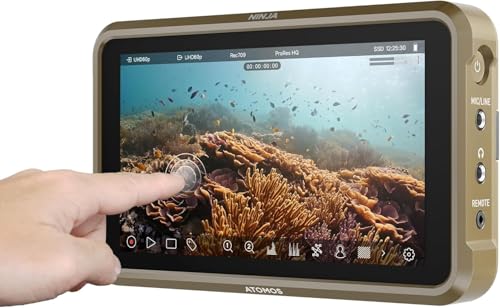
- Records up to 4Kp60
- Supports ProRes, DNxHD, and H.265
- Lightweight 210 g monitor-recorder
Best For: Directors seeking flexible HDMI recording in a compact package
Bright Scope Monitor
Blackmagic Video Assist 5-inch 3G

- 2500-nit LCD display
- Scopes, 3D LUTs, and focus assist
- Portable monitor, recorder, and viewfinder
Best For: Directors needing bright, detailed on-set monitoring
Best Compact Audio Companion

- 32-bit float recording for no-clip audio capture
- Dual XLR/TRS inputs and 3.5 mm input
- Built-in timecode generation and sync
Best For: Videographers needing portable audio and timecode support
Best Connected Monitoring Recorder
Atomos Ninja TX Camera to Cloud

- 5.2-inch 1500-nit touchscreen
- Records to CFexpress Type B media
- Wi-Fi 6, timecode sync, and cloud uploading
Best For: Connected shoots needing monitoring and recording flexibility
Best HDMI Recorder Bundle

- 4Kp60 recording and up to 6Kp30 ProRes RAW
- Includes a 240GB SE4 SSD
- Compatible with DSLR, cinema, and mirrorless cameras
Best For: HDMI-camera users wanting monitoring and included storage
Director's Choice
Ninja TX GO 5-inch Monitor-Recorder

- 1500-nit touchscreen with camera control
- Records up to 6K RAW to CFexpress or USB-C
- Supports ProRes RAW, DNx, H.265, and H.264
Best For: Directors needing compact monitoring and flexible RAW recording
Production Bundle Pick
Ninja TX 5.2-inch Camera-Cloud Recorder

- Adds HDMI 2.0 and 12G-SDI inputs
- Records 8K30 RAW to CFexpress or USB-C
- Includes battery, charger, mount, hood, and cables
Best For: Crews wanting SDI connectivity and a ready-to-use accessory kit
Accessory Bundle Pick
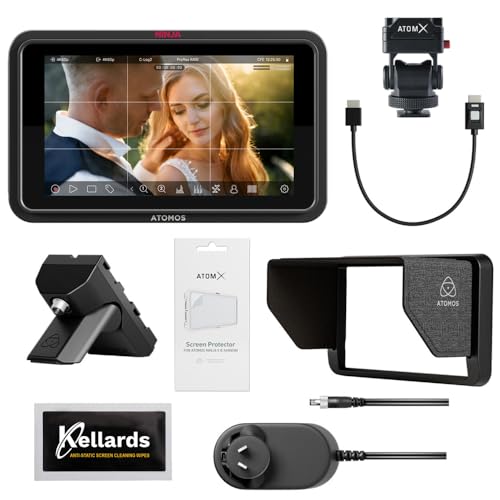
- Includes the 1500-nit Ninja TX GO recorder
- Captures up to 6K RAW with multiple codecs
- Adds Creator Kit and five cleaning wipes
Best For: Directors wanting a compact recorder with useful monitor-care accessories
Premium RAW Control – Atomos Ninja RAW
For directors choosing camera external recorders for directors, the Atomos Ninja RAW combines a bright HDR monitor, camera controls, and professional recording formats in a compact on-camera unit. It records ProRes and ProRes RAW from compatible HDMI or USB-C cameras to CFexpress Type B media or external USB-C storage.
Best For: Directors who need RAW recording, precise monitoring, and hands-on camera control in mobile productions.
Pros:
- 1500-nit 5.2-inch HDR touchscreen is suited to bright shooting environments.
- Records ProRes, ProRes RAW, ProRes RAW HQ, ProRes LT, 422, and 422 HQ.
- Includes camera control and tools such as waveform, focus peaking, EL Zone false color, and Onion Skin.
- Runs from NP-F batteries, USB-C power banks, or a DC adapter.
Cons:
- Its advanced RAW and monitoring features may be more than a simple recording setup requires.
- Network adapters and some external-storage accessories are sold separately.
The Ninja RAW is a strong choice when image evaluation and recording flexibility matter as much as portability. Its 5-inch 1080p display and professional tools make it particularly useful for director-led camera operation.
Studio Deck Choice – Blackmagic HyperDeck Studio HD Mini
The Blackmagic Design HyperDeck Studio HD Mini is a studio-oriented option among camera external recorders for directors. It supports HDMI, SDI, USB, and RCA connectivity, records digital video to SD cards, and offers 3G-SDI video input for compatible production setups.
Best For: Studio and broadcast-style environments using compatible HDMI, SDI, or RCA equipment.
Pros:
- Flexible connectivity includes HDMI, SDI, USB, and RCA.
- Supports SD-card digital video recording.
- Compatible-device notes include cameras such as the Canon EOS R5, Sony A7S III, and Nikon Z6 II.
- Includes a stated two-year warranty.
Cons:
- The supplied specifications do not identify recording resolutions or codecs.
- At 953 g, it is less suited to lightweight handheld or on-camera use.
This HyperDeck is best considered a fixed or semi-fixed studio recorder rather than a compact field monitor. Its broad connection selection can simplify integration with mixed production hardware, but directors should confirm codec and workflow requirements before buying.
Versatile 4K Monitor – Atomos Ninja 5.2-inch 4K
The Atomos Ninja is a lightweight 5.2-inch recording monitor for directors comparing camera external recorders for directors across a wide range of HDMI-output cameras. It records up to 4Kp60 in ProRes, Avid DNxHD, and H.265, while compatible cameras can provide up to 6Kp30 in ProRes RAW.
Best For: Directors who want a compact HDMI monitor-recorder with multiple codec options and modern production-assist features.
Pros:
- Records up to 4Kp60 in ProRes, Avid DNxHD, and H.265.
- Supports up to 6Kp30 ProRes RAW with compatible cameras.
- Lightweight 210 g body with a 1000-nit 5.2-inch display.
- AtomOS 11 adds improved memory management plus RecordAssist and PlayBackAssist.
Cons:
- The native display resolution is 1920×1080 even though it accepts higher-resolution recording formats.
- RemoteView features require compatible Atomos devices and network conditions.
For directors who need a flexible recorder without a heavy field setup, the Ninja offers a practical balance of size, recording support, and monitoring. Its usefulness depends on the camera’s HDMI output and compatibility with the desired format.
Bright Scope Monitor – Blackmagic Video Assist 5-inch 3G
Blackmagic Design Video Assist 5'' 3G Portable Monitor, Recorder, Scope, and Viewfinder
Check Price On AmazonThe Blackmagic Design Video Assist 5” 3G combines a portable monitor, recorder, scopes, and viewfinder for directors evaluating camera external recorders for directors. Its 5-inch 1080p LCD offers a listed 2500-nit brightness, HDR support, 3D LUTs, and focus-assist features for production monitoring.
Best For: Directors who prioritize a very bright monitoring screen, exposure scopes, and focus assistance with compatible camera equipment.
Pros:
- Very bright 2500-nit 5-inch LCD for demanding viewing conditions.
- Includes professional scopes, 3D LUT support, HDR, and focus assist.
- Provides HDMI connectivity and two HDMI ports according to the supplied specifications.
- Includes a stated two-year warranty.
Cons:
- At 771 g, it is considerably heavier than compact monitor-recorders in this group.
- The supplied notes do not specify recording codecs or supported recording resolutions.
The Video Assist is a monitoring-focused choice for directors who need strong visibility and evaluation tools on set. Its high brightness and scopes are compelling, but its weight and unspecified codec details warrant checking against the intended camera workflow.
Best Compact Audio Companion – TASCAM FR-AV2 Field Recorder
For directors comparing camera external recorders for directors, the TASCAM FR-AV2 is an audio-focused option built for compact production setups. It combines 32-bit float recording, dual XLR/TRS inputs, and internal timecode generation to simplify location audio and synchronization.
Best For: Videographers who need portable, no-clip audio capture and timecode support.
Pros:
- 32-bit float recording with dual ADCs helps provide no-clip capture.
- Dual XLR/TRS combo inputs use Ultra HDDA preamps.
- Built-in timecode IN/OUT and generation reduce the need for a separate timecode device.
- Compact 9.5-ounce design supports mobile production kits.
Cons:
- It is an audio recorder rather than a video monitor/recorder.
- Bluetooth monitoring requires the optional AK-BT2 adapter, which is the only compatible adapter.
- It requires three AA batteries.
The FR-AV2 is a practical choice when clean, flexible location audio and reliable synchronization matter more than on-camera video recording. Its small footprint and 32-bit float workflow make it especially useful for fast-moving shoots.
Best Connected Monitoring Recorder – Atomos Ninja TX Camera to Cloud
For directors seeking camera external recorders for directors with monitoring and production connectivity in one unit, the Atomos Ninja TX pairs a bright touchscreen with broad recording and camera-to-cloud features. It supports HDMI 2.0 and 12G-SDI workflows, CFexpress Type B recording, Wi-Fi 6, and timecode synchronization.
Best For: Productions that need a bright on-camera monitor, flexible recording codecs, and wireless uploading features.
Pros:
- 5.2-inch, 1500-nit touchscreen is designed for bright shooting conditions.
- Records Apple ProRes, Avid DNx, and H.265/H.264 formats.
- Supports 4K60 I/O, 8K30 ProRes RAW recording, and cross conversion.
- Includes Wi-Fi 6, timecode sync, and Camera to Cloud uploading capabilities.
Cons:
- Recording media is a CFexpress Type B card rather than built-in storage.
- Its 0.67 kg weight is greater than a basic monitor-only accessory.
- The L-series battery slot does not indicate that a battery is included.
The Ninja TX is suited to directors who want an integrated monitoring, recording, and connectivity tool. Its codec range and network-oriented features make it a stronger fit for connected production workflows than a simple HDMI recorder.
Best HDMI Recorder Bundle – Atomos Ninja with 240GB SSD
For directors evaluating camera external recorders for directors using HDMI-output cameras, this Atomos Ninja bundle combines a 5.2-inch recording monitor with a 240GB SE4 SSD. It supports recording up to 4Kp60 in several codecs, plus up to 6Kp30 in Apple ProRes RAW, making it a flexible option for DSLR, cinema, and mirrorless setups.
Best For: HDMI-camera users who want an on-camera monitor and included recording storage.
Pros:
- Records up to 4Kp60 in Apple ProRes, Avid DNxHD, and H.265/HEVC.
- Supports up to 6Kp30 in Apple ProRes RAW.
- Includes a 240GB SE4 2.5-inch SSD.
- RecordAssist and PlayBackAssist add planning tools for recording and playback.
Cons:
- Connectivity is HDMI, so it is not presented as a 12G-SDI recorder.
- The included 240GB storage may be limiting for extended high-resolution recording.
- The listed bundle includes a battery eliminator and power cable rather than a camera battery.
This Ninja bundle offers a straightforward way to add professional recording formats and monitoring to an HDMI camera. The included SSD improves out-of-box readiness, while the compact design suits DSLR, mirrorless, and cinema-camera rigs.
Director's Choice – Ninja TX GO 5-inch Monitor-Recorder
Atomos Ninja TX GO 5-inch Camera Monitor-Recorder, HDMI CFexpress Wi-Fi HDR Touchscreen ProRes RAW
Check Price On AmazonFor directors seeking camera external recorders for directors, the Atomos Ninja TX GO combines a bright 5-inch touchscreen with professional monitoring, camera control, and flexible recording. It captures up to 6K RAW to CFexpress Type B or compatible USB-C storage and supports HDMI and Wi-Fi 6E workflows.
Best For: Directors who want a compact HDMI monitor-recorder with RAW capture and broad post-production codec support.
Pros:
- 1500-nit touchscreen with touch-to-focus and professional monitoring tools
- Records ProRes, ProRes RAW, Avid DNx, H.265, and H.264
- Supports up to 6K RAW recording and NDI streaming
- Works with DaVinci Resolve, Premiere Pro, Final Cut Pro, and Avid Media Composer
Cons:
- CFexpress media and compatible USB-C drives are not included
- Network adapter and calibration probe are sold separately
The Ninja TX GO is a strong all-purpose choice when on-camera visibility, director-friendly control, and flexible editing formats matter more than built-in media.
Production Bundle Pick – Ninja TX 5.2-inch Camera-Cloud Recorder
Among camera external recorders for directors, this Ninja TX bundle stands out for its dual HDMI 2.0 and 12G-SDI connectivity, 1500 cd/m² HDR display, and included field accessories. It records up to 8K30 RAW to CFexpress Type B or USB-C media and includes a battery, charger, mount, sun hood, and cables.
Best For: Directors and crews who want a more complete on-set package with SDI connectivity and extended shooting accessories.
Pros:
- Dual HDMI 2.0 and 12G-SDI inputs support varied camera setups
- Captures 8K30 RAW with ProRes RAW, DNx, and H.265 codecs
- Includes sun hood, adjustable monitor mount, screen protector, and locking cable
- Includes a Sony NP-F750 battery and single charger
Cons:
- Recording media is not listed as included
- Bundle size may be more than needed for minimal handheld setups
Choose this package when connectivity and included production accessories are priorities. Its 12G-SDI support and 8K30 RAW capability make it the most production-oriented option in this group.
Accessory Bundle Pick – Ninja TX GO with Creator Kit
This Ninja TX GO bundle gives directors a compact option among camera external recorders for directors, pairing the 5-inch, 1500-nit touchscreen recorder with an Atomos Creator Accessory Kit and anti-static cleaning wipes. Its core recording features include up to 6K RAW capture, Wi-Fi 6E, NDI support, and multiple professional codecs.
Best For: Directors who want the Ninja TX GO workflow with a practical accessory addition for maintaining the monitor on set.
Pros:
- Bright 1500-nit touchscreen with touch-to-focus and camera control
- Records ProRes RAW, ProRes, Avid DNx, H.265, and H.264
- Captures up to 6K RAW to CFexpress Type B or USB-C storage
- Includes Creator Accessory Kit and five anti-static cleaning wipes
Cons:
- Storage media is not included
- Several workflow accessories, including network and calibration options, are sold separately
This is a sensible pick for directors who prefer the Ninja TX GO’s compact feature set but value an added accessory kit. It offers the same capable monitoring and recording foundation without moving to the larger SDI-focused bundle.
How We Picked the Best Camera External Recorders for Directors
We evaluated these recorders by looking at the production problems they solve: recording format support, camera compatibility, monitoring tools, connectivity, storage, audio and timecode options, and how easily each device fits into a director-led workflow. We also considered portability, power requirements, durability, and whether a product is better suited to a compact camera package, studio environment, or multi-person production.
Because cameras differ widely, compatibility should take priority over brand familiarity. Verify your camera’s HDMI or SDI output, supported resolutions and frame rates, trigger behavior, and whether the recorder can capture the codec you plan to use.
Quick Comparison
| Priority | Best fit | What to look for |
|---|---|---|
| RAW or high-quality capture | Atomos Ninja models | ProRes RAW support, compatible camera output, fast media |
| Studio playback and recording | Blackmagic HyperDeck Studio HD Mini | Rack-friendly design, I/O, reliable fixed-location operation |
| Portable monitoring and scopes | Blackmagic Video Assist | Bright display, waveform tools, recording formats, SDI/HDMI needs |
| Camera-to-cloud workflows | Atomos Ninja TX models | Network access, cloud services, upload management, subscriptions |
| Production sound | TASCAM FR-AV2 | Dual XLR/TRS inputs, timecode, 32-bit float recording |
Key Buying Factors for Camera External Recorders for Directors
Camera and Signal Compatibility
Start with the camera’s output type. HDMI is common on mirrorless and compact cinema cameras, while SDI is more prevalent on professional bodies and studio systems. Check connector size, signal standards, resolution, frame-rate limits, and whether the camera can send a clean feed.
Recording Format and Media
ProRes is widely supported in post-production, while ProRes RAW can preserve additional flexibility when the camera and recorder support the combination. Confirm media requirements, sustained write speeds, recording times, and the cost of SSDs, CFexpress cards, or other approved media.
Monitoring and Director-Focused Tools
Look for a display that is large and bright enough for the set, plus tools such as waveform, vectorscope, false color, focus peaking, LUT preview, frame guides, and anamorphic de-squeeze. Touchscreen camera control can reduce the need for an assistant to make basic adjustments.
Audio and Synchronization
If the recorder handles sound, inspect input types, preamp quality, phantom power, channel count, headphone monitoring, and timecode support. A dedicated field recorder may be a better choice than a video monitor when reliable production audio is the main requirement.
Workflow, Power, and Durability
Camera-to-cloud features can speed review and editorial handoffs, but they may require reliable internet access, compatible services, and ongoing fees. Also budget for batteries, cables, mounting hardware, media, and backup power.
Who Should Buy Which Camera External Recorders for Directors?
- Choose an Atomos Ninja if you shoot with HDMI cameras and want portable monitoring, ProRes recording, or compatible RAW capture.
- Choose a Ninja TX model if rapid proxy delivery, cloud collaboration, or remote production review is central to your workflow.
- Choose Blackmagic Video Assist if you want a versatile on-camera monitor with scopes and broad production monitoring capabilities.
- Choose the HyperDeck Studio HD Mini for a fixed studio, edit suite, playback station, or rack-oriented setup rather than handheld camera work.
- Choose the TASCAM FR-AV2 when synchronized, flexible production audio matters more than video monitoring.
For most directors, the best choice is the recorder that removes a specific bottleneck without complicating the set. Match the device to your camera’s output, the final delivery format, and whether your priority is capture quality, monitoring, synchronization, or faster collaboration.