
When it comes to managing your workforce, choosing the right cloud-based employee time clock can make a significant difference. These systems offer a range of features that can enhance accuracy and simplify payroll processes. With options like biometric clock-ins and real-time data access, you’ll find solutions tailored to your business needs. But which ones stand out as the best? Let’s explore the top contenders that can transform how you manage employee time.
NGTeco Cloud-Based Time Clock for Employees

If you’re a small business owner looking for an efficient way to manage employee time tracking, the NGTeco Cloud-Based Time Clock is an excellent choice. This 4-in-1 device offers face recognition, fingerprint scanning, RFID, and PIN access, ensuring secure and accurate clock-ins. With the NGTeco Office app, you can access real-time data and automated reports from any device. It supports various shift types, making it perfect for diverse teams. Plus, you’ll benefit from end-to-end encryption and offline functionality. With multilingual support and a one-year warranty, it’s a reliable solution for managing time tracking effortlessly.
Best For: Small business owners seeking a secure and efficient time tracking solution for diverse teams.
Pros:
- Supports multiple clock-in methods: face recognition, fingerprint, RFID, and PIN access for enhanced security.
- Real-time tracking and automated reporting through the NGTeco Office app, accessible from any device.
- Customizable shift options suitable for various business types and schedules.
Cons:
- Requires a stable internet connection for optimal functionality, though it has offline capabilities.
- Premium features like GPS geofencing and advanced analytics come at an additional one-time cost.
- May require initial setup time to integrate with existing payroll systems or processes.
NGTeco Cloud-Based Fingerprint+RFID Time Clock for Employees
The NGTeco Cloud-Based Fingerprint+RFID Time Clock is an ideal solution for small businesses seeking an efficient way to manage employee attendance. Combining fingerprint and RFID technology, it guarantees accurate clock-ins while operating on dual-band WiFi for reliable connectivity. You can easily access attendance data through a mobile app or web portal, allowing you to track employee logs and generate reports remotely. Its customizable shift management adapts to your specific needs, whether you have fixed schedules or flexible hours. Plus, with secure AWS cloud storage and lifetime technical support, you can confidently streamline your workforce management.
Best For: Small businesses looking for an efficient and secure way to manage employee attendance with advanced technology.
Pros:
- Combines fingerprint and RFID technology for accurate clock-ins.
- Offers remote access to attendance data via mobile app or web portal.
- Provides customizable shift management suitable for various scheduling needs.
Cons:
- Premium upgrade required for additional features like GPS punch-in and unlimited employees.
- Limited technical support hours (Mon–Fri, 6AM–6PM EST).
- Initial investment may be higher for small businesses with tight budgets.
NGTeco Cloud-Based Time Clock with Touch Screen
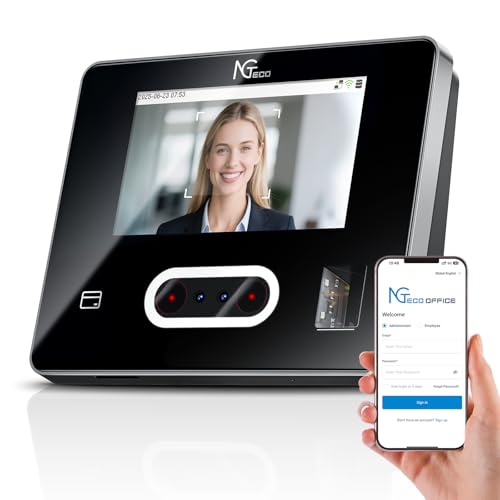
For small businesses seeking an efficient and versatile time management solution, the NGTeco Cloud-Based Time Clock with Touch Screen stands out as an ideal choice. This 4-in-1 device supports face recognition, fingerprint, RFID cards, and PIN methods, guaranteeing flexibility for your employees. With a 4.3-inch high-definition touchscreen, managing attendance becomes effortless. You can access your attendance system anytime through the NGTeco Office web software or mobile app. Customizable shifts and attendance rules let you tailor the system to your needs, while dual-band WiFi ensures stable connectivity. Plus, with secure data storage and U.S.-based support, you’re always covered.
Best For: Small businesses looking for a flexible and efficient time management solution for employee attendance.
Pros:
- Supports multiple clock-in methods: face recognition, fingerprint, RFID cards, and PIN.
- Remote access via web software or mobile app for convenient management.
- Customizable attendance rules and shifts to fit various business needs.
Cons:
- Premium features require a paid upgrade of $9.90.
- Potential learning curve for users new to cloud-based systems.
- Limited customer support hours may not accommodate all time zones.
NGTeco Cloud Employee Time Clock with Fingerprint & Card Punch
Looking for an efficient way to manage employee attendance? The NGTeco Cloud Employee Time Clock with Fingerprint & Card Punch is your solution. This compact device, measuring just 5 inches, features advanced fingerprint recognition for quick, accurate clock-ins. With dual-band WiFi, you can manage attendance remotely via a mobile app or web portal, ensuring real-time tracking. Enjoy the peace of mind that comes with AWS cloud storage and end-to-end encryption. Plus, there’s no monthly fee, and you’ll receive free lifetime technical support. Boost your workplace productivity effortlessly with this reliable time clock!
Best For: Small to medium-sized businesses looking for an efficient and reliable solution to manage employee attendance seamlessly.
Pros:
- Advanced Fingerprint Recognition: Ensures quick and accurate clock-ins, reducing waiting time for employees.
- Remote Management: Dual-band WiFi connectivity allows for real-time monitoring and attendance management via mobile app or web portal.
- No Monthly Fees: Enjoy the benefits of the device without incurring ongoing costs, along with free lifetime technical support.
Cons:
- Limited Display Size: The compact 5-inch display may not be ideal for larger workplaces where visibility from a distance is needed.
- Dependence on WiFi: Requires a stable internet connection for remote management features, which may be a limitation in areas with poor connectivity.
- Corded Electric Power Source: The reliance on a corded power source could limit placement options compared to fully wireless alternatives.
NGTeco Cloud-Based Time Clock for Employees

Small businesses seeking an efficient time-tracking solution should consider the NGTeco Cloud-Based Time Clock, which combines remote clock in/out capabilities with user-friendly software. This 4-in-1 time clock operates on 2.4GHz Wi-Fi, allowing real-time punch data management from anywhere. You can generate precise hour tracking reports accessible via any web browser. With flexible scheduling options, it supports various shift types, making it perfect for different business needs. Plus, your attendance data is secured on AWS with end-to-end encryption. Supporting up to 200 users, it also includes lifetime technical support and a 1-year warranty, ensuring you’re covered.
Best For: Small to medium-sized businesses looking for a flexible and secure time-tracking solution.
Pros:
- Supports remote clock in/out capabilities, enhancing flexibility for employees.
- Offers flexible scheduling options suitable for various shift types and business models.
- Data is secured with end-to-end encryption on AWS, ensuring compliance with data protection regulations.
Cons:
- Limited to 200 users, which may not be sufficient for larger organizations.
- Premium features come at an additional cost of $9.90.
- Requires a stable Wi-Fi or LAN connection for optimal performance.
NGTeco Cloud Time Clock for Employees
The NGTeco Cloud Time Clock is perfect for businesses that need precise time tracking and customization. You can eliminate inaccurate work hours with smart clock-in/out windows, and configure breaks, meal periods, and overtime rules tailored to your unique shifts. With cloud-based access, you’ll track attendance anytime, anywhere, ensuring real-time sync across devices. The tool allows department-specific management, letting you create custom attendance rules and monitor employee transfers effortlessly. Plus, your data’s secure with AWS servers and end-to-end encryption. Enjoy core features for free or upgrade to Premium for advanced functionalities—all at an attractive price for your business needs.
Best For: Small and medium businesses seeking precise time tracking and customizable attendance management solutions.
Pros:
- Core features available for free, making it budget-friendly for startups and small businesses.
- Cloud-based access allows for real-time attendance tracking from any device, enhancing flexibility.
- Customizable attendance rules enable tailored management for different departments and shifts.
Cons:
- Upgrading to Premium for advanced features requires a monthly fee, which may be a consideration for cost-sensitive businesses.
- The reliance on internet connectivity could pose challenges in areas with poor service.
- Some users may find the initial setup and configuration of customized rules to be time-consuming.
uAttend JR2000 Biometric Time Clock for Small Business

For businesses seeking an efficient way to track employee hours, the uAttend JR2000 Biometric Time Clock stands out with its advanced fingerprint and RFID capabilities. This cloud-based system simplifies attendance tracking and automates payroll processes, ensuring accuracy and saving you time. You can manage employee attendance in real-time from any device, with in-depth reporting to help you analyze productivity and labor costs. Its user-friendly interface makes setup a breeze for everyone on your team. Plus, with automatic cloud backups, your data remains secure, while the low-cost subscription offers premium features tailored for your growing business needs.
Best For: Small businesses looking for an efficient and accurate way to track employee hours and automate payroll processes.
Pros:
- Advanced fingerprint and RFID capabilities provide secure and accurate time tracking.
- Real-time attendance management and in-depth reporting help analyze productivity and labor costs.
- User-friendly interface and easy setup make it accessible for all team members.
Cons:
- Requires a subscription for premium features, which may add to overall costs.
- Cloud-based system relies on internet connectivity, which could be a limitation in areas with poor service.
- Initial setup may require some time for configuration and employee enrollment.
ANVIZ FacePass 7 Pro Biometric Time Clock
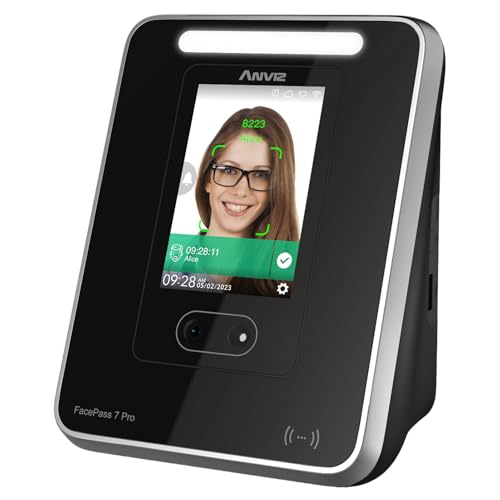
When you’re looking for a reliable time clock solution that fits a small business environment, the ANVIZ FacePass 7 Pro Biometric Time Clock stands out with its cloud-based technology and advanced facial recognition capabilities. It supports up to 1,500 users, storing 100,000 logs, ensuring effective time management. You can track employee punches in real-time via a web browser, and its intuitive interface simplifies user management. With multi-language support, flexible scheduling options, and multiple punching methods, it adapts to your needs. Plus, the 3-year hardware warranty and strong customer support make it a smart investment for your business.
Best For: Small businesses looking for an efficient and reliable time tracking solution with advanced biometric features.
Pros:
- Supports up to 1,500 users and stores 100,000 logs for extensive tracking and management.
- Offers multiple punching methods, including facial recognition, RFID, and PIN, preventing buddy punching.
- Provides a 3-year hardware warranty and access to cloud-based software for real-time tracking and management.
Cons:
- The free cloud software is limited to 1 admin and 1 device, which may not be sufficient for larger businesses.
- Requires internet connectivity for full functionality; offline mode is limited to capturing punches only.
- Additional RFID cards need to be purchased separately, which may incur extra costs.
ANVIZ W1 Pro Fingerprint Biometric Time Clock for Employees

Designed specifically for small businesses, the ANVIZ W1 Pro Fingerprint Biometric Time Clock streamlines employee attendance tracking with its versatile capabilities. You’ll appreciate its CrossChex Cloud software, which automates attendance data synchronization—no more manual record-keeping needed! It supports fingerprint scanning, RFID cards, and PINs, handling up to 500 users and 50,000 logs. Even in offline mode, it captures punches securely. With multilingual support and a 3-year warranty, you’re covered. The device accommodates various scheduling options, making it perfect for your unique business needs. Plus, it connects easily via LAN or 2.4GHz Wi-Fi for seamless operation.
Best For: Small businesses looking for an efficient and versatile solution for employee attendance tracking.
Pros:
- Automated Attendance Management: CrossChex Cloud software simplifies attendance data synchronization, reducing manual record-keeping.
- Multiple Tracking Options: Supports fingerprint scanning, RFID cards, fobs, and PINs for varied employee preferences.
- Offline Functionality: Captures attendance securely even when internet connectivity is lost, ensuring no data is missed.
Cons:
- User Limitations: Supports only up to 500 users, which may not suffice for larger organizations.
- Basic Connectivity Options: Limited to LAN and 2.4GHz Wi-Fi, potentially restricting network compatibility for some users.
- Circular Log Overwriting: Older logs are overwritten after reaching 50,000 entries, which may lead to data loss over time.
NGTeco APP Time Clock, Biometric Clock for Small Business
Small businesses seeking an efficient way to manage employee time and attendance will find the NGTeco APP Time Clock exceptionally beneficial. This biometric clock uses advanced fingerprint recognition, authenticating prints in just 0.5 seconds. With streamlined scheduling and automated time tracking, it simplifies managing shifts and guarantees accurate attendance records. You can easily sync payroll with various cycles and export timesheets for quick processing. Plus, built-in data protection safeguards records during power loss. With a dedicated support team and a 1-year warranty, you’ll have peace of mind knowing help is just a call away.
Best For: Small businesses looking for an efficient and reliable time and attendance management solution.
Pros:
- Streamlined scheduling and automated time tracking simplify shift management.
- Advanced fingerprint recognition technology ensures quick and secure clock-ins.
- Built-in data protection and backup system safeguard attendance records during power outages.
Cons:
- Initial setup may require time and effort for integration into existing systems.
- The device may not work optimally with very dry or dirty fingerprints.
- Limited customer support hours may be inconvenient for some users.
Factors to Consider When Choosing a Cloud Based Employee Time Clock
When choosing a cloud-based employee time clock, you’ll want to contemplate several key factors. Features and functionality, security, and user experience all play vital roles in ensuring the system meets your needs. Don’t forget to check how well it integrates with your payroll system and whether it can scale as your business grows.
Features and Functionality
Choosing the right cloud-based employee time clock involves considering several key features and functionalities that can considerably impact your business’s efficiency. Look for systems offering multiple clock-in methods like fingerprint and face recognition, RFID, and PIN access to meet employee preferences and secure attendance tracking. Real-time access through mobile apps or web portals is essential for remote management and easy reporting. Customizability in shift management is vital, so make sure the system supports various shift types to fit your needs. Additionally, consider solutions with lifetime access to core features without monthly fees, along with premium options for enhanced functionality, including GPS geofencing and advanced reporting capabilities. These elements will help streamline your workforce management effectively.
Security and Data Protection
While selecting a cloud-based employee time clock, prioritizing security and data protection is essential to safeguarding your business and employees’ sensitive information. Make certain the system uses end-to-end encryption to protect attendance data during transmission and storage. Look for solutions that store data on compliant cloud servers, like AWS, to meet strict data protection regulations. Verify if the time clock offers automatic backups to prevent data loss during outages, guaranteeing business continuity. Also, consider offline functionality, allowing punches to be captured without an internet connection, syncing later. Finally, assess security measures against unauthorized access, such as multi-factor authentication or biometric verification methods, to enhance your overall data protection strategy.
User Interface and Experience
A user-friendly interface can greatly impact how quickly employees adapt to a cloud-based time clock system. An intuitive design simplifies onboarding, allowing your team to get started without extensive training. With clear navigation and displays, clocking in and out becomes a breeze, reducing frustration and increasing satisfaction. Mobile app accessibility means your employees can manage attendance and schedules from anywhere, adding flexibility in today’s remote work environment. Customizable dashboards let you tailor the interface to meet your specific needs, ensuring easy access to crucial data and reports. Plus, multilingual support helps all team members interact effectively, making it easier for everyone to engage with the time clock system in their preferred language.
Integration With Payroll Systems
An intuitive user interface is just the beginning of what you should consider when adopting a cloud-based employee time clock system. Integration with payroll systems is essential for seamless operations. Look for a solution that automatically syncs tracked hours, minimizing manual entry and reducing payroll errors. Many systems allow you to export timesheets directly to payroll software, which streamlines the process and saves you time. Make sure the clock adapts to your payroll schedule—whether weekly, bi-weekly, or semi-monthly—so you can accurately account for employee hours. Real-time data synchronization enhances accountability, helping you resolve discrepancies quickly. Finally, consider systems with APIs or compatibility with popular payroll services to customize your payroll workflows easily.
Scalability for Business Growth
As your business grows, choosing a cloud-based employee time clock system that scales with you becomes essential. You’ll want a system that allows you to easily add users and manage increased attendance data. Look for platforms that can accommodate up to 200 users and 30,000 logs, guaranteeing they can handle your future expansion. Flexible scheduling options, like customizable shifts and break management, will help you adapt to your changing workforce needs. Additionally, consider systems that let you upgrade to premium features or services, providing tools like GPS tracking and advanced analytics without hefty initial costs. Finally, ensure seamless integration with your existing payroll system to facilitate smooth scalability without disrupting your financial processes.
Remote Access Capabilities
Choosing a cloud-based employee time clock system that meets your growing business needs naturally leads to evaluating remote access capabilities. With remote access, you can monitor employee clock-ins and attendance in real-time from any device with an internet connection, enhancing your oversight and efficiency. Many systems offer mobile apps for iOS and Android, allowing employees to clock in and out from their smartphones, no matter where they are. Web portals provide administrators with the tools to manage schedules, correct time entries, and generate reports, streamlining your processes. This flexibility is essential for businesses with multiple locations or remote teams, ensuring consistent time tracking. Plus, seamless synchronization of attendance records maintains data accuracy, even in areas with intermittent connectivity.
Technical Support and Warranty
When evaluating a cloud-based employee time clock, understanding the technical support and warranty options can considerably influence your decision. Check if the system includes a warranty period, usually between 1 to 3 years, to safeguard against hardware failures. Opt for solutions that offer free lifetime technical support; this guarantees you get help for troubleshooting and operational questions during business hours. If your workforce is diverse, consider whether support is available in multiple languages. Also, review customer service hours—many systems provide assistance Monday through Friday, typically from 6 AM to 6 PM EST. Finally, confirm if updates or upgrades are included in the warranty, keeping your system compliant and technologically up-to-date.