
Building a gaming or productivity PC does not require spending heavily on the chassis. The best computer cases under $100 can deliver strong airflow, useful front-panel connectivity, tempered-glass styling, and enough room for mainstream components.
This roundup compares 10 affordable ATX and Micro-ATX cases, with attention to included fans, cooling potential, layout, construction, and upgrade flexibility.
Best 10 Computer Cases Under 100 Picks for 2026
Best Panoramic Cooling Value

- Seven pre-installed PWM ARGB fans
- 400 mm GPU and 360 mm radiator support
- 270-degree dual-glass panoramic view
Best For: RGB gaming showcase builds
Best Compact MATX Pick
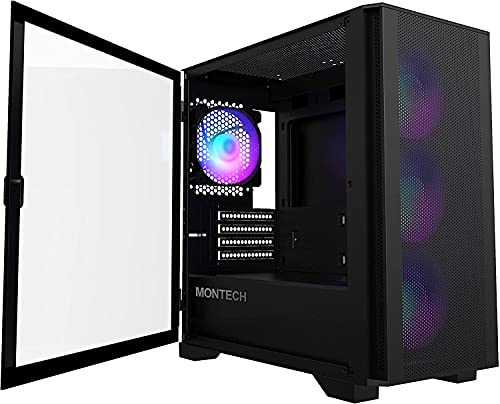
- Compact Micro-ATX and Mini-ITX design
- Four included 120 mm ARGB fans
- 330 mm GPU and 280 mm front radiator support
Best For: Space-conscious MATX gaming builds
Best Expandable Airflow Option

- Mesh front with magnetic dust filters
- Supports up to eight 120 mm fans
- 340 mm GPU and 360 mm radiator support
Best For: Upgradeable ATX cooling setups
Best Hardware Showcase Design

- Tiered platform for display pieces
- 430 mm GPU and 180 mm cooler clearance
- Supports back-connect motherboards
Best For: Large, presentation-focused ATX builds
Best Budget Workhorse
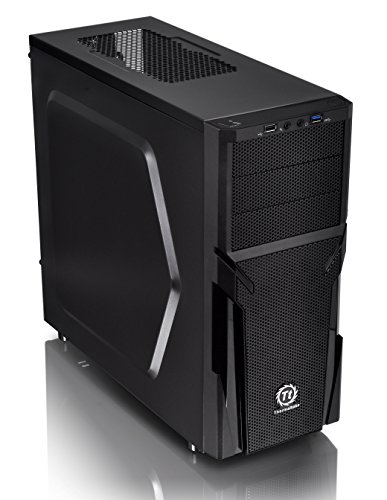
- ATX mid-tower with broad component support
- Perforated panels and raised feet aid airflow
- Tool-free installation with cable-management support
Best For: Budget-conscious ATX builders wanting a straightforward case
Best ARGB Starter Build

- Four pre-installed 120mm ARGB fans
- Mesh front panel supports airflow
- Tempered-glass side panel and broad motherboard support
Best For: Entry-level gaming builds with included cooling and lighting
Best High-Clearance Option

- Fits GPUs up to 420mm and 360mm radiators
- Four PWM-controlled 120mm ARGB fans included
- Tool-less panels and back-connect motherboard support
Best For: Performance builds using large GPUs or advanced cooling
Best RGB Airflow Value
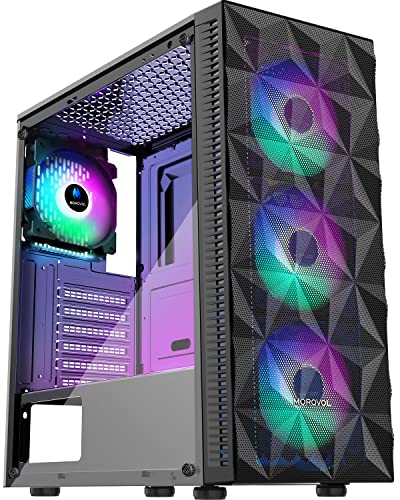
- Four pre-installed RGB fans
- Mesh front panel for airflow
- Supports ATX, Micro-ATX, and Mini-ITX
Best For: Budget builders wanting included RGB cooling
Best Quiet ATX Design
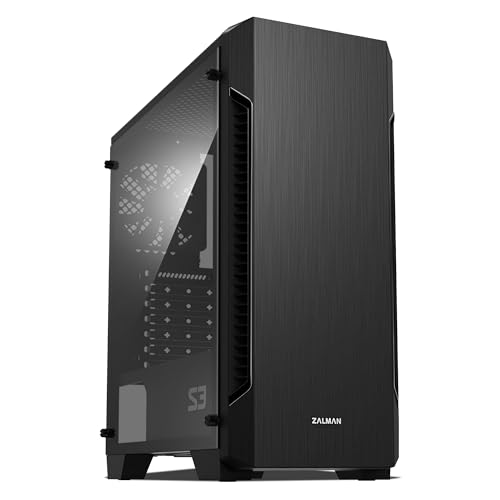
- Three pre-installed 120mm fans
- Supports up to eight fans
- 330mm maximum GPU length
Best For: ATX builders planning future cooling upgrades
Best Addressable RGB Features

- Six PWM ARGB fans included
- Opening tempered-glass side door
- Dual USB 3.0 ports
Best For: RGB-focused builders wanting flexible cooling and access
Best Panoramic Cooling Value – MUSETEX K2 ATX Gaming Case
For shoppers comparing computer cases under 100, the MUSETEX K2 stands out with seven pre-installed PWM ARGB fans, broad component clearance, and a dual-tempered-glass panoramic design. It supports ATX, Micro-ATX, and Mini-ITX motherboards while adding front-panel USB-C connectivity.
Best For: Gaming builds that prioritize included cooling, RGB lighting, and a wide hardware showcase.
Pros:
- Seven pre-installed adjustable-speed PWM ARGB fans, expandable to 10.
- Supports graphics cards up to 400 mm and top-mounted radiators up to 360 mm.
- 270-degree dual tempered-glass view highlights internal components.
- Includes a USB-C port plus two USB 3.0 ports.
Cons:
- The tempered-glass panoramic design may be less practical for users who do not want a display-focused case.
- Power-supply clearance depends on whether the hard-drive cage is installed.
The K2 offers an unusually complete starting configuration for its category. Verify your power-supply length and component dimensions, then it can be a strong choice for a cooling-focused showcase PC.
Best Compact MATX Pick – MONTECH AIR 100 ARGB Case
Among computer cases under 100, the MONTECH AIR 100 ARGB is a practical compact option for builders who want Micro-ATX compatibility without giving up included lighting. Its mesh front, four 120 mm ARGB fans, and removable filters support a tidy, serviceable build.
Best For: Space-conscious Micro-ATX or Mini-ITX gaming PCs with included airflow and lighting.
Pros:
- Compact 405 x 210 x 425 mm chassis supports Micro-ATX and Mini-ITX boards.
- Four pre-installed 120 mm ARGB fans and a lighting controller are included.
- Supports graphics cards up to 330 mm and CPU coolers up to 161 mm.
- Tool-free mesh-front access, swivel glass, and top and bottom dust filters simplify maintenance.
Cons:
- It does not support full-size ATX motherboards.
- Internal storage capacity is limited to two bays.
The AIR 100 ARGB balances a smaller footprint with useful hardware clearance and straightforward cable routing. Check radiator and graphics-card dimensions before building, particularly if using a front-mounted radiator.
Best Expandable Airflow Option – DARKROCK EC2 ATX Case
For buyers seeking computer cases under 100 with room to expand, the DARKROCK EC2 combines a mesh front panel, tempered-glass side panel, and support for up to eight 120 mm fans. It accepts ATX, Micro-ATX, and Mini-ITX motherboards and is Type-C ready.
Best For: Flexible ATX builds that may receive additional fans, a large graphics card, or front-mounted liquid cooling.
Pros:
- Mesh front panel promotes airflow for internal components.
- Supports up to eight 120 mm fans and one 360 mm front radiator.
- Provides clearance for graphics cards up to 340 mm and power supplies up to 200 mm.
- Separate magnetic top and bottom dust filters help limit dust entry.
Cons:
- Only one fan is pre-installed, so additional cooling may be needed.
- The supplied notes do not specify included RGB lighting.
The EC2 is a straightforward foundation rather than a fully equipped showcase case. Its value is in the airflow-focused layout and generous expansion potential, but budget for extra fans if your components run warm.
Best Hardware Showcase Design – MONTECH TG3 Panoramic Case
The MONTECH TG3 is a compelling choice among computer cases under 100 for builders who want a display-oriented ATX system. Its tiered interior platform, panoramic layout, four ARGB fans, and support for up to nine fan positions give both components and cooling hardware room to stand out.
Best For: Showcase ATX builds using large graphics cards, back-connect motherboards, and customizable lighting.
Pros:
- Tiered interior platform creates dedicated space for figures and custom accents.
- Includes a side-intake unibody fan and rear exhaust fan setup totaling four ARGB fans.
- Supports graphics cards up to 430 mm, CPU coolers up to 180 mm, and ATX PSUs up to 250 mm.
- Compatible with standard and supported back-connect motherboard designs.
Cons:
- Its showcase-oriented layout may be more case than needed for a simple build.
- Back-connect features require a compatible motherboard.
The TG3 is best suited to builders who care about presentation as much as component capacity. Its extensive clearances and nine cooling positions make it adaptable, while the back-connect support can help keep wiring out of view when paired with compatible hardware.
Best Budget Workhorse – Thermaltake Versa H21
Thermaltake Versa H21 SPCC ATX Mid Tower Computer Chassis CA-1B2-00M1NN-00,Black
Check Price On AmazonThe Thermaltake Versa H21 is a practical option for shoppers comparing computer cases under 100. Its ATX mid-tower layout supports standard components, while the perforated front and top panels are designed to encourage airflow. Tool-free installation and cable-management support make it suitable for straightforward gaming or general-purpose builds.
Best For: Budget-conscious ATX builders who want broad component compatibility and simple ventilation.
Pros:
- Supports ATX motherboards, long graphics cards, and CPU cooler installation.
- Perforated front and top panels plus raised feet support airflow.
- Includes one USB 3.0 port, one USB 2.0 port, and headset and microphone jacks.
- Offers tool-free installation, cable-management support, and liquid-cooling compatibility.
Cons:
- Only one fan is included.
- Front connectivity is limited to two USB ports.
- It lacks tempered-glass or built-in RGB features listed for the other cases.
The Versa H21 emphasizes function over visual extras. It is a sensible pick when component compatibility, ventilation, and a familiar mid-tower layout matter more than pre-installed lighting or a glass side panel.
Best ARGB Starter Build – GAMDIAS AURA GC1 ELITE
For shoppers seeking computer cases under 100 with cooling and lighting included, the GAMDIAS AURA GC1 ELITE is a compelling mid-tower choice. It combines a mesh front panel with four pre-installed 120mm ARGB fans, while the tempered-glass side panel displays the build. Its ATX, Micro-ATX, and Mini-ITX support also allows flexible system planning.
Best For: Entry-level gaming builds that prioritize included fans, airflow, and visible ARGB lighting.
Pros:
- Includes four 120mm ARGB fans for airflow and lighting.
- Mesh front panel is designed for direct air intake.
- Tempered-glass side panel provides a clear view of internal components.
- Supports ATX, Micro-ATX, and Mini-ITX motherboards, with seven PCIe slots.
Cons:
- Storage support is more limited than the Versa H21, with five listed internal bays.
- The manufacturer warranty is one year.
- It does not list USB-C connectivity.
With four included fans and a mesh front, this case reduces the need for immediate cooling upgrades. It is especially attractive for builders who want a finished gaming look without separately purchasing case fans.
Best High-Clearance Option – Lian Li V100-ATX
The Lian Li V100-ATX is worth considering among computer cases under 100 when high-end component clearance is a priority. This black mid-tower includes four PWM-controlled 120mm ARGB fans and supports graphics cards up to 420mm, CPU coolers up to 178mm, and top-mounted radiators up to 360mm. Tool-less side panels and back-connect motherboard support add build flexibility.
Best For: Performance-focused builders fitting large graphics cards, tall CPU coolers, or a 360mm radiator.
Pros:
- Supports GPUs up to 420mm, CPU coolers up to 178mm, and 360mm top radiators.
- Includes four PWM-controlled 120mm ARGB fans with daisy-chain connectivity.
- Supports ATX, Micro-ATX, Mini-ITX, and compatible back-connect motherboards.
- Features tool-less side panels, dust filtering, and a USB-C side I/O highlight.
Cons:
- Its listed 8.2 kg weight may make transport less convenient.
- The manufacturer warranty is one year.
- It lists four internal bays, which may not suit storage-heavy builds.
The V100-ATX stands out for expansion room rather than compact simplicity. Its combination of generous clearance, included PWM fans, and radiator support makes it a strong fit for ambitious builds, provided the available storage bays meet your needs.
Best RGB Airflow Value – Morovol 621
If you are comparing computer cases under 100, the Morovol 621 stands out for combining four pre-installed RGB fans with a mesh front panel. It supports ATX, Micro-ATX, and Mini-ITX motherboards and includes a tempered-glass side panel for displaying your build.
Best For: Budget-conscious builders who want strong out-of-the-box airflow and fixed RGB lighting.
Pros:
- Includes four pre-installed 120mm RGB fans.
- Diamond-shaped mesh front panel promotes airflow.
- Supports GPUs up to 300mm and CPU coolers up to 155mm.
- Removable tempered-glass side panel simplifies installation and showcases components.
Cons:
- RGB lighting is fixed rather than addressable.
- GPU clearance is more limited than some larger mid-tower cases.
- Only one USB 3.0 port is provided on the I/O panel.
The 621 is a practical choice when included fans and visible lighting matter more than premium expansion or advanced RGB control. Check your graphics-card and CPU-cooler dimensions before buying.
Best Quiet ATX Design – Zalman S3
Among computer cases under 100, the Zalman S3 offers a straightforward ATX mid-tower layout with three pre-installed 120mm fans and room for additional cooling. Its brushed-style front design, acrylic side panel, and dust filters give it a clean, practical presentation.
Best For: ATX builders who want a conventional case with included fans, dust filtering, and upgradeable cooling.
Pros:
- Comes with three pre-installed 120mm fans.
- Supports up to eight fans for expanded cooling.
- Accommodates graphics cards up to 330mm.
- Includes top and bottom dust filters and a USB 3.0 port.
Cons:
- The side window is acrylic rather than tempered glass.
- Front radiator support is limited to 120mm.
- The listing presents the case as an ATX mid-tower, so it may be less compact than smaller formats.
The Zalman S3 is a balanced option for a conventional gaming or productivity build. Its larger GPU allowance and generous fan capacity make it easier to expand later, while the dust filters help simplify maintenance.
Best Addressable RGB Features – MUSETEX NN8
For shoppers seeking computer cases under 100 with extensive included cooling, the MUSETEX NN8 packs six PWM ARGB fans into an ATX mid-tower design. It also features a hinged tempered-glass side door, dual USB 3.0 ports, and storage capacity suited to larger builds.
Best For: RGB-focused builders who want adjustable fan speeds, addressable lighting, and easy component access.
Pros:
- Includes six PWM ARGB fans with adjustable speed control.
- Addressable lighting can be controlled through compatible motherboard software.
- Opening tempered-glass side door makes cleaning and installation easier.
- Offers multiple storage configurations and room for a top 280mm radiator.
Cons:
- ARGB control requires a compatible 3-pin RGB motherboard connection.
- The large feature set may be more than a basic office build needs.
- Motherboard, graphics card, power supply, and radiator are not included.
The NN8 is the most feature-rich pick here for builders prioritizing customizable lighting and airflow. Confirm motherboard connectivity and component clearances before installation, especially if you plan to use a large radiator or vertical GPU configuration.
How We Picked the Best Computer Cases Under 100
We focused on practical features that matter during a real PC build: motherboard compatibility, ventilation, included fans, radiator and graphics-card clearance, cable-management space, front-panel ports, and ease of assembly. Cases with pre-installed fans can offer better value, while mesh-front designs generally provide a stronger starting point for airflow.
We also considered form factor. Most selections support ATX boards, while the compact Micro-ATX option may suit smaller desks or more space-conscious builds. Tempered-glass panels, RGB lighting, and back-connect support were treated as convenience or style features rather than substitutes for cooling performance.
Quick Comparison
| Priority | Look for | Best fit |
|---|---|---|
| Airflow | Mesh front panel and multiple fan mounts | Gaming PCs with hot components |
| Value | Several included fans and USB Type-C | First-time builders |
| Compact size | Micro-ATX support and shorter depth | Small desks and modest builds |
| Appearance | Tempered glass and ARGB lighting | Showcase systems |
| Future upgrades | ATX support, generous clearance, and cable space | Long-term builds |
Key Buying Factors for Computer Cases Under $100
Compatibility and Clearance
Confirm the case supports your motherboard size, power-supply format, graphics-card length, CPU-cooler height, and planned radiator. A case can be inexpensive yet unsuitable if your GPU or air cooler exceeds its limits.
Airflow and Cooling
Prioritize a ventilated front panel over a fully closed design when using a gaming CPU or graphics card. Check whether the included fans are PWM models, how many are supplied, and whether the layout supports balanced intake and exhaust. More fans are not automatically better if the front panel restricts air.
Build Convenience
Useful features include a removable side panel, accessible dust filters, a PSU shroud, routing cutouts, and adequate space behind the motherboard tray. Front USB Type-C is increasingly worthwhile, especially for newer peripherals and external storage.
Noise, Materials, and Extras
Thin steel is common at this price, so inspect reviews for panel rigidity and vibration control. RGB fans and glass add visual appeal but may require an included hub, motherboard lighting header, or separate controller. Check those connection requirements before buying.
Who Should Buy Which Computer Cases Under 100?
Choose an airflow-oriented mesh case if your priority is lower temperatures or a powerful gaming build. A compact Micro-ATX model is better for a smaller system and limited desk space, provided your component list fits. Buyers who want a ready-to-use showcase should consider a case with several pre-installed ARGB fans and tempered glass.
For a straightforward office, school, or general-purpose build, a simpler ATX chassis may be the better value: it can provide adequate room without charging extra for lighting. If you expect frequent upgrades, favor ATX compatibility, strong cable-management space, front USB Type-C, and generous GPU and cooling clearances over appearance alone.